Leaderboard




Popular Content
Showing content with the highest reputation on 09/24/20 in Posts
-
I understand it is too late BUT it should be the other way around. That is single space for regular [enter] and double space for [shift+enter] However it seems to me that you could run a script of some kind against the existing database to change earlier posts and then implement what I believe is the correct [enter] behavior. Just because something is wrong behavior does not mean it should be kept that way for the future. But I "can" live with it this way I just think it would be better the other way. Particularly since every other forum I deal with does it what I believe is the correct way. That is [enter] = single space.2 points
-
Alright, we'll leave it in yours and the teams capable hands! On a positive note, its only my second day of using emby and I'm very pleased with it otherwise!2 points
-
Downloading subtitles during video playback is coming to the next version of many of our apps - android, iOS, etc. iOS will actually be two updates from now as we've already submitted one to apple. Enjoy.2 points
-
Hi, Would be nice if HDR content can be filtered out.1 point
-
You've grown up with watching live tv but on television only runs garbage? You have a big library but don't know what to watch next? Then this for you: "VirtualTV" - my new live tv plugin that allows you to create custom channels based on conditions of your Emby library content. What's missing: Maybe codec conditions Known problems: Needs Emby Premier to work (Playback) Emby's live tv and playback api is very limited, so i've had to make some detours to get things working. The plugin has two general playback modes: "continous" and "playlist" playback. With "continous" mode you can also choose between "live", which bahaves like real live tv or "archive", which plays the videos from the start. In "Continuous" mode multiple videos are queued and concatenated to one big file with the help of ffmpeg. To make this happen every video in the queue has to have some common features (video and audio codec). That's why it often happens that the video also has to be transcoded by ffmpeg. For transcoding the plugin relies on Emby's internal transcoding engine. If there's a problem, not uncommon with hardware acceleration enabled, the plugin also has a problem. Nothing i can do about it. The availability of subtitle tracks is mostly dependant of the Emby user playback settings. In continous playback mode only one (the default) subtitle track can be used and this one has to be burnded into the video (transcoding takes place). In "Playlist" playback mode the videos are pushed as a playlist to the Emby clients. It's like you would play your videos directly from your libraries. This way you get all the features you are used to. Audio and subtitle selection, pause, skipping around and similar things. "Native" playback method was created by the Emby Devs. Similar to Playlist playback it will play the real library videos, but with the big difference that playback is purely initiated by the client app, without any remote command execution. This is why it also works for Roku devices on a WAN network. And although the real videos are played, the whole thing is treated like live TV. This means that channel zapping is possible and no dialogs for playing the next episode are displayed. Unfortunately, the new playback method does not yet support all features. As the name "Archive" suggests, it will currently always start all videos from the beginning. In addition, only very few Emby apps automatically advance to the next video. If you want it to be improved even further, each of you should raise your voice in this thread. To get things started install the plugin via Emby's plugin catalog and restart Emby. Setup your channels with a name and number and choose your playback mode. In the channel conditions you'll have to select an Emby account. This account is used to get library access, respect parental rating, reading watched states and selecting the stream language. At least one textual input field of the conditions has to be filled to get some program data. Fields with an asterisk are either evaluated with an "AND" or "OR" condition among each other. Finally, if you've chosen "Continous Playback" for one of you channels, take a look at the transcoding settings. Save your channel line up and manually trigger a "Guide Refresh". Now have fun! Version History: After a plugin update, always clear your browser cache. If your settings still don't load in the config screen, you have to move the "VirtualTV.xml" out of ...\plugins\configurations and restart Emby. Start from scratch. 2.0.0.0 Unlimited number of channels; New playback method "Native (Archive)"; New security concept for the Export API 2.0.2.0 Performance improvements to Guide Refresh; Preview for Add/Edit Channels; Option to disable Program indicators 2.0.3.0 Fixed missing Playlist sort order for some Content Types; Added support for Seasons with Content Source Collections 2.1.0.0 Selectively enable channels for specific users; Create copies of existing channels; Ordered unwatched episode playback 2.1.5.0 Added option to (auto)enable channels on a specific date range; Bug fixing1 point
-
Guys, The ebook side of Emby/MediaBrowser has been long stalled or rather stagnated. I would like to offer up a couple of suggestions. Many people use calibre as an ebook/comic book tool for scraping data and general management of their collection already. This program is absolutely astonishing in its ability to pull metadata from post calibre scans, as well as draw in metadata from the file source and/or directory structure. http://vaemendis.net/ubooquity/ Its a self contained .jar server/reader combination. And honestly I am very impressed by it's small footprint and wide range of abilities. The other option is COPS , which was written specifically with calibre in mind. It is open source, so making it work with emby I would think would be fairly easy. https://blog.slucas.fr/projects/calibre-opds-php-server/ Ever since the original release of MediaBrowser's bookshelf I have always wanted something that would allow me to 'read' my collection, rather than being basically nothing more than a place-set for images of books I own. I am sure that those who mainly have audiobooks are thrilled with bookshelf , but it's nothing more than an extension of the music library IMHO, not new features. We can have both right? Here I give you two suggestions free of charge.. Just because I love you, and Emby Personally I plan on running the Ubooquity Server along side of Emby from now on, just because of it's massive functionality and tiny footprint. But I sure hope that someone decides -- "yeah, ebook support should be in here too" and do something about it - rather than allow this now very very ancient issue to continue to remain an issue. And so I don't have to have 20 different ports open, some with SSL support - some not, because Emby isn't delivering the 'complete package'. (Please take some of this with humor, I know you have your hands full with improvements/bugs/suggestions/requests)1 point
-
Hi, I would like to have an option to choose H265 instead of H264 in the Transcode option. It will be smaller for all bad bandwidth (2~5Mbit ADSL), but will have a great quality. Mobile phone can benefit of it greatly too with the 4G and the limitation of download.1 point
-
I am switching over from a Win7 box running MBC to Chromecast dongles. With the Win7 box I had a HDMI to Cat6 setup that allowed me to stream to up to 4 displays/TVs simultaneously. It was great while it lasted, but involved stapling cables to the ceiling to run it from room to room - plus it has borked Can there be an option to multi-cast to several receivers at once? i.e. simultaneously play to Chromecast dongles in my office and living room and kitchen simultaneously so i can walk from room to room without stopping and restarting the movie or show all the time? I realize that bandwidth could POTENTIALLY be an issue, but i have a fill gigabit network and a multi-port NAS so that really is the least of my worries... Thank you!1 point
-
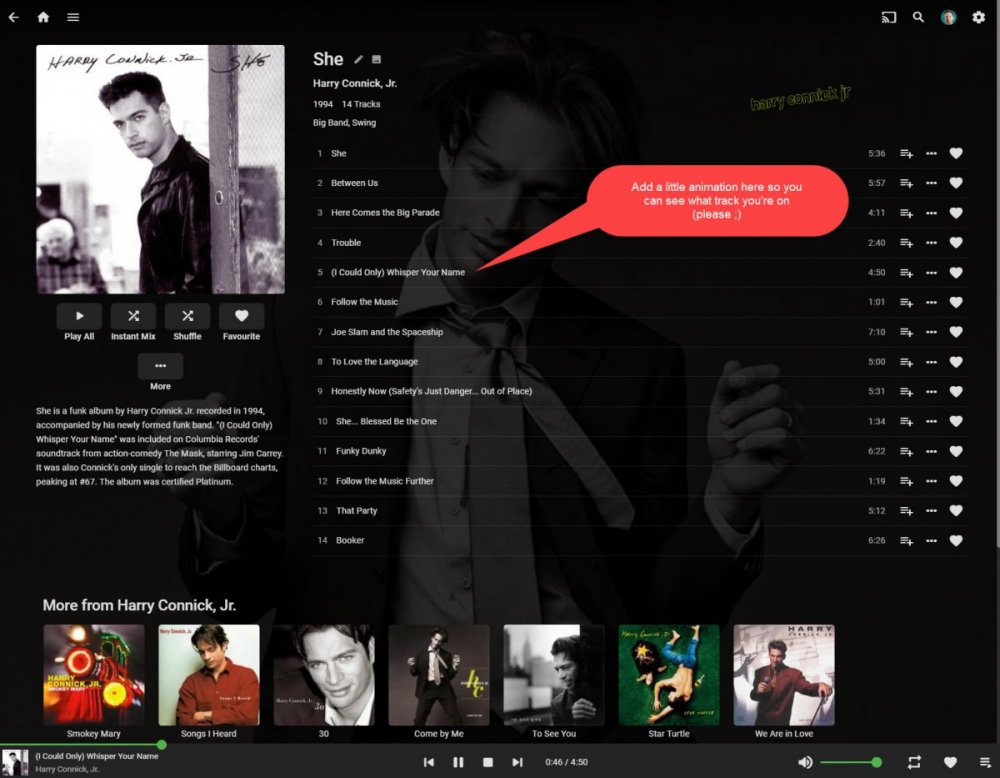
Hi there! It would be great if you could indicate the currently playing on the album track list (like it does on the play queue with the animated equaliser bars) This seems to be pretty common functionality and is means you don't have to scan through track names to work out how far through and album you are.
 1 point
 -
So I have a couple of playlist downloaded but if I do disconnect and go to downloads the playlist doesn’t show up. It just downloads the songs, but it would be nice if we could just have the playlist ready to be played and not have to go through all the albums to the songs just to add them up next1 point
-
Can you add playlist support to the sync and download option? The feature is awesome for movies, but for music it needs to have a way to play a playlist. I wanted to use the sync and download for music to not use my phone data, I normally use all in 2 weeks. I use Emby on my phone and then I connect it to the car to listen to music.1 point
-
Feature Request. A present I have several user accounts setup for family members. When we sit down together to watch a movie we currently log into one account (Mostly mine), so obviously only this account gets the watched status. What happens then is everyone uses my account because there's isn't up-to date and it's "just easier". This results in my account telling me I've watched something when I haven't... I would like the ability to log into my account and select/deselect which other users are present so that when a movie/TV episode is watched together, their watched statuses are updated accordingly? The next time you log in again all other users would have been deselected. It could be implemented so each user account can do this, or only select user accounts can. Even a special "Family" user account, or multiple viewers button as long as everyone's watched status is correct. Even just ticking the users present on the login screen before login into an account.1 point
-
I have noticed there is no way to configure the path used by Auto-boxset pliuging to create folders to hold created collections. Given this is, by default, under the Data folder within the install folder of Media Browser server, and the fact this is on my SDD drive, it would be great if this folder may be overriden to a custom path (the way other folders may be configured via the Control Panel).1 point
-
I would love the ability to increase the size of subtitles on the different platforms, specially android, chrome and roku... One additional thing that would be great would be the ability to change font color, outline, drop shadow, font background... Thank you1 point
-
hey what I'm really missing is support for audiobooks. Simply saving the resume point for those mp3s would be absolutely enough, no need to fetch metadata etc.1 point
-
I hope one day Emby can play music from downloads if a download exists for that song (especially when I only downloaded the songs from within the playlist and don't have all the songs from that album downloaded). So if i am in the playlist view and the download button is ticked (highlighted blue) because i have downloaded that playlist, I would like it to play from the downloaded file. That way when I drive through a dead-zone my music is not interrupted.1 point
-
Well the id in your metadata is wrong for the show and return a error as that id does not exist. Have you compared the id on TMDB to the external id that is in your metatadata? Is it not suppose to be 7905? if not can you provide a like to the show.1 point
-
No I think you have an Id saved in your metadata that over time has become invalid (e.g. was removed from MovieDb).1 point
-
That is the correct destination.1 point
-
Great, I deleted the "anime" addon and everything is back to normal. Thank you very much Luke ;) Thank you all ^^1 point
-
update through Emby server to 4.5.0.50 would not work. changed emby setting to NOT run on startup. then Stopped emby server. restarted machine. manually installed 4.5.0.50 from website. all is good now, thanks for help above.1 point
-
My publishers and others that I send manuscripts to never complain. So whatever is actually happening is OK with those folks. BTW: I never use [shift+enter] for anything. If I need a double space i hit [enter] twice.1 point
-
@fr0z3n This is not a easy fix due to code design. I keep in on my todo list but please don't expect to be fixed soon. The problem is, the random plugin does not create a randomized playlist. It dynamically adds items more of less on the fly.1 point
-
Just for others reading this topic, this user's issue is related to their media storage being unreachable, not due to the server update.1 point
-
I apologize for your issue. We'll try to chase down what happened.1 point
-
That's odd, it's internal and external IP has not changed in years, but the clear cached did help.1 point
-
I disagree. I use LibreOffice and it does not work that way although I believe the user can override the defaults to make it work that way. In fact the default is that you need to hit [enter] twice to get double space. I seems to me that the extra work/keystroke should be for what happens least and a double space for a paragraph seems to be needed less often than a simple single line break. Also for those of us that learned to type on a "real" typewriter we were taught and learned that a paragraph meant hitting "return" twice. Of course "wordwrap" kind of means that single space is less utilized than it used to be but I still think it is used/needed more than the double space. I think this is particularly true for technical forums like this one.1 point
-
It only worked in native mode, but after 4.0 around 2 years ago, @Angelblue05 added support for addon mode to download and save the subtitles, I been using it since but it stopped working few weeks ago, I will look for the post he made about it.1 point
-
What has worked successfully is: 1. Shutdown the server using the Dashboard within Emby (not Package Center) 2. Go to Package Center and check the Emby is now stopped. If not try from there. You can always also check in the Resource Monitor Synology app. 3. Install .50 from Package Center. Emby should start automatically. If not start it. 4. Wait 5 to 10 minutes, at least. It can take time the first time with the new version.1 point
-
Finished translation into Russian for Android TV and other tasks.1 point
-
On PC you can use shift + enter to avoid that. On mobile I couldn't find a way around it yet.1 point
-
@Abobader unless i am missing it - how do we turn off or control the double spacing in posts? this is silly1 point
-
I am an avid user of Emby. In fact, I run Plex, Jellyfin and Emby on my setup and I have premium version of both Plex and Emby. I do not consider myself a fan of either services. I use Plex for online viewing, Emby for offline viewing (on LAN), and Jellyfin to test out various things like jellyfin-mpv-shim, syncplay and gelli. I installed the latest stable version today and I discovered a plethora of changes and fixes, among them the fix about seeing server key as an user fix is my favorite. But that got me thinking, after about 5 months, we get a new version which when it comes down to it, contains only 2 new features , subtitle offset and playback speed control. It really made me sad. I like Emby for the way the devs communicate with us, for the quick fix that ensue on reporting major problems. But where is the big feature? I may be wrong, but did we get a single big feature on 2020? Jellyfin has syncplay (I use it extensively to study lectures with friends), plex has skip intro and skip commercial on livetv. What is Emby's big feature for 2020? Subtitle offset? The aforementioned products have them too. Where is the feature roadmap? Where is the voting option on requested features? I know it's a small team but Luke has repeatedly said that they have more members that do not interact here. So we don't know for sure that Emby team is smaller than Jellyfin team. Jellyfin team is consistently pumping out new feature (their next big feature is HDR > SDR tonemapping while transcoding), whereas Emby is just lagging behind. I would have loved to see the following features on Emby : Skip Intro Skip Commercial on livetv recording Lyrics in music Movie extra like Behind the scene the way Plex does it A proper official app to monitor and interact with server for the admins like Plex Dash. Failing that , something like Tautulli. Embystat does not work as well as Tautulli and the functionality is really limited IMO. Audiobook scrapping Granular control over camera upload (what to upload, which resolution to upload, which location to upload etc) Maybe a location where people can share custom CSS and vote on it. I am willing to accept the hate that might follow for me being a karen or whatever. But I do want this project to thrive, and I was as respectful as I possibly could have been. If that's still harsh, I don't know what else to say except I did not intend to be so. But anyway, I want Emby to thrive, I want to recommend Emby to my friends just like I now recommend them jellyfin if they dont use Tizen, WebOS or Roku (Roku app is improving on Jellyfin though). Let's hear the other user's opinion on what I wrote. Have a nice day.1 point
-
We can certainly start doing that. Thanks for the feedback.1 point
-
Hi, did you use the download feature to download the song to the device, by any chance?1 point
-
Yes you can be selective. this is the snippet code taken from the navdrawercontent.js in it's default mode menuHtml+='<div is="emby-collapse" title="'+item.name+'" data-expanded="true" class="navDrawerCollapseSection" If we look at the navbar we can see each section has a title: Which is the: title="'+item.name+'" The nav sections are being created in a loop, which is grabbing the "item.name" (the "Title" for each section) Since we know it gets created there, we can create a conditional which will target the "item.name" in the loop and set the "data-expanded" as needed. The new code would look like this: menuHtml+='<div is="emby-collapse" title="'+item.name+'" data-expanded=' + (item.name == "Server" ? "true" : "false") +' class="navDrawerCollapseSection" We can do it for each section, by lengthening the conditional statement menuHtml+='<div is="emby-collapse" title="'+item.name+'" data-expanded=' + (item.name == "Server" || item.name == "Admin" ? "true" : "false") +' class="navDrawerCollapseSection" which would keep only Server, and Admin open with the rest closed. Let me know if I've made sense Or we could be like Luke and start using "!0" or "!1" as boolean values all over, LOL! !0 = "not false" = "true" !1 = "not true" = "false" We almost have DeMorgans law there... LOL!1 point
-
Copying a show from recorded to test library, works correctly. I'm recording a show right now, but later when it's finished, I'll nuke the recording library, and remake it. Then I'll see if that corrects this.1 point
-
Hey @Happy2Play check this out. this is how my dashboard loads now. But the best part, I switched material icons to material SVG icons, and now it scales really nicely. It was little tricky to find everything, but I found most of it. I put most of the code in js file that can be thrown into the root after an update to remake the changes. Cool eh1 point
-
I didn't wait for a new episode to come out to test, I ended up simulating a new file in the folder and everything worked as expected. Despite showing a flaw in the conversion dashboard, as soon as the new file was added, Emby did the conversion according to my choice.1 point
-
I would say two different issues here as one would appear to image processing and the other a cache issue.1 point
-
Frostbyte thanks for that information. clip posted and ebr PM’ed with link to file.1 point
-
Correct, I guess it says Mobile app in the settings -- it just looks like ET on Samsung1 point
-
Personal opinion here. I see things far differently and see a lot of progress and new things that are focused on better playback of local media in general. Before even mentioning the backend, what about client app releases in the last couple of months? There has been what seems like a lot more app releases lately with lots of new features and fixes and even new app releases for Android (can be ran on mobile, auto and TV) which bring a LOT of new advancement to the party. A lot of dev time has been going into trying to simplify audio playback and being able to direct stream transport files (as used with Live TV). Sure some pain in beta but that's what beta is designed to do and test. There has been a lot involved in the last release of the server, just look at the list. Ask NAS users what they think! There is actually a lot of low hanging fruit in these fixes and sometimes it's good to go for lots of "small" things vs adding new functionality to clean up or fix things before building on them more from a core perspective. Also what comes into play is part of the team is working on Next Gen Live TV which will be a HUGE release not just for TV but with some other changes that come along with it. You would/should assume this isn't just core backend but also some front end work as well. Next Gen has a new pipeline that's used for TV/DVR and not just a rework of existing code. So while there may not be something you consider a stand out feature in this release it's by no means small or devs being lax. Sometimes it's wise to cleanup the yard before you do new landscaping.1 point
-
You can now report these values to the server as part of your playback start/progress check-ins: https://github.com/MediaBrowser/Emby/wiki/Playback-Check-ins Additionally, when the user changes these values during playback, you can now trigger a progress report immediately, and specify either SubtitleOffsetChange or PlaybackRateChange as the EventName: https://github.com/MediaBrowser/Emby/wiki/Playback-Check-ins#playback-progress Apps that receive remote control commands can now support receiving the following commands: SetPlaybackRate, SetSubtitleOffset and IncrementSubtitleOffset, discussed here: https://github.com/MediaBrowser/Emby/wiki/Web-Socket Additionally, for mobile apps that do remote control, you can now control these values over the api, using the SetPlaybackRate, SetSubtitleOffset and IncrementSubtitleOffset commands discussed here: https://github.com/MediaBrowser/Emby/wiki/Remote-control1 point
-
So one of the reasons I don't use Emby for music is I can sync a playlist to my phone, but I can't just click on that playlist in downloads and hit shuffle to quickly play my music. The only other way is to just shuffle all downloaded music but that button doesn't really shuffle the music as it kinda always plays it in the same order if you click the shuffle button. Sorry if this has been posted already.1 point
-
I'm hoping to get to it soon. Thanks.1 point
-
Just doing my rounds, 'liking' all the "download playlist" feature requests... no point in creating another I suppose.1 point
-
So currently when downloading a playlist for offline mode, you get the songs individually instead in a playlist. So I was wondering if it was possible to fix that and download a playlist for offline in the order that it is in. So that it’s just as when online, just press and play the songs in order.1 point
-
The skill is only available in English at this time. If you'd like to help translate, pm me.1 point








.thumb.jpeg.1f6f89ab6ab9e63551e513f3762b58cf.jpeg)