Leaderboard




Popular Content
Showing content with the highest reputation on 09/17/20 in Posts
-
I havent found a Feature Requests for this, correct me if im wrong. It will be nice to have something in the guide that show you that you already have a movie in your library. That can be in detail screen before you click record or on the main guide page.3 points
-
Hello, Perhaps I am not the first one to ask this question but it will be very cool if this feature could be implemented. I have 2 servers one at home and the other at work. ( and soon a third one...) So I have a movies library called movies on each server. I would like to see all the movies from a single 'virtual server location' when I use the app (ios or android ) where I will see only one movies library containing movies informations from the movie library at work and the movie library at home. It's an aggregation of movies informations from the movie library at work and the movie library at home. In fact when a user have multiple servers it will be perfect if another choice in the server list called "all servers" for example appears automatically with a merge of media informations from librairies with the same name on different servers.2 points
-
I'm running Emby on a Synology DS416play, which can transcode H.264 4K, but not HEVC 4K. I believe many systems are similar in these capabilities. Currently, if a user tries to transcode a 4K HEVC video, my entire system will hang. It would be brilliant if it was possible to disable 4K HEVC transcoding, and only allow direct streams for this format.1 point
-
I'd really like to have 2 Factor Authentication added to the login screen. It's just this (optional) extra layer of security to help secure the server (which, especially if people use camera uploads) contains pretty private data. There are for every type of programming language quite a few libraries available, so implementation on a server shouldn't be too hard to realise1 point
-
I would like to have the ability to check if a movie is already in my library before scheduling a recording in the DVR. The only way to do it now is to make a search. This mean going from on screen to another. It is already possible to not record an episode of a serie that already exist in the library. A similar option should be available for movie, One suggestion is to have a seach display on screen when scheduling the recording of a movie, in order to inform if the movie is already in the library or not. Hope this help!1 point
-
Be able to create playlist based on a certain criteria, like genre and or year, in order to create a dynamic playlist that it refreshes automatically when new content is added. This way you can for example, create a tv comedy playlist from the 90's, or a new sci-fi Movies playlist. Some other criteria for rules could be the rating, watched/unwantched, score, tags, language, audio codec, etc The possibilities could be endless1 point
-
Hi, I would like to have an option to choose H265 instead of H264 in the Transcode option. It will be smaller for all bad bandwidth (2~5Mbit ADSL), but will have a great quality. Mobile phone can benefit of it greatly too with the 4G and the limitation of download.1 point
-
I would like to see a plug-in developed which allows for transcoding to be offset. My thoughts are for a transcoding server (high powered pc), running cut-down/transcoding only version of Emby. Then on my main Emby server a plug-in which offsets transcoding to the high powered pc (if available) Originally I had thought of this as being a high availability server https://emby.media/community/index.php?/topic/41443-emby-server-high-availability But thinking about this more, my requirement isn't for high availability but simply to offset the transcoding elsewhere.1 point
-
Feature Request. A present I have several user accounts setup for family members. When we sit down together to watch a movie we currently log into one account (Mostly mine), so obviously only this account gets the watched status. What happens then is everyone uses my account because there's isn't up-to date and it's "just easier". This results in my account telling me I've watched something when I haven't... I would like the ability to log into my account and select/deselect which other users are present so that when a movie/TV episode is watched together, their watched statuses are updated accordingly? The next time you log in again all other users would have been deselected. It could be implemented so each user account can do this, or only select user accounts can. Even a special "Family" user account, or multiple viewers button as long as everyone's watched status is correct. Even just ticking the users present on the login screen before login into an account.1 point
-
Is it possible to add a bitrate for users that are direct(whatever) something? It's good info, and readily available. Thanks1 point
-
Personally my only reason to still use Kodi with the Emby plugin and not the Emby App is the lack of the ability to select "download subtitle" during playback. This is a killer feature in Kodi, and I hope you guys can consider bringing it to Emby, I do have my Admin area set to automatically download subtitles, but many times (even so I have the option to only download exact matches) the subtitle is not the right one to the video file version, and the ability to just download a new subtitle on the fly is very welcome. Hope you guys can consider this Null1 point
-
The EPG is likely behind on channels numbers so you would match it by name or call sign vs channel number. That's often the quick fix until the EPG provider squares things away.1 point
-
Perfect! That seems to have done it. Thanks!1 point
-
I switched allready to tmdb and use tvdb only as a backup. No Regrets for now. I just miss one feature -> DVD Ordering, but I can live with it for now.1 point
-
Wow, glad that this really old problem is finally being addressed thanks!1 point
-
Sounds you were right. Only emby was down. I've used a ram drive and possibly emby was not happy with this, odd but a fact . Thank you!1 point
-
4.1.20 Stable Changelog: https://github.com/MediaBrowser/plugin.video.emby/releases/tag/4.1.201 point
-
I will narrow my circle of friends Thanks1 point
-
I cannot reproduce this. Can you cause the problem and then send a log from the app? Thanks.1 point
-
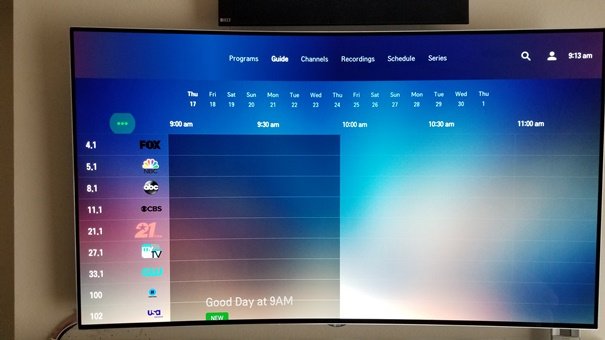
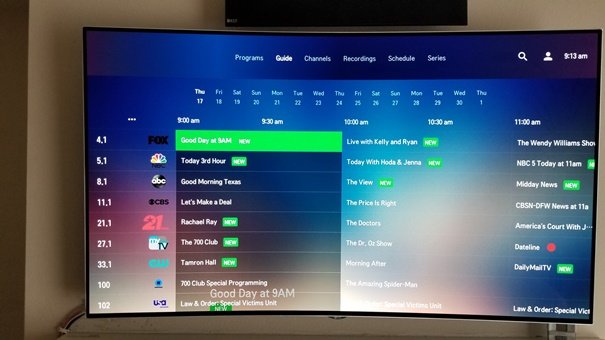
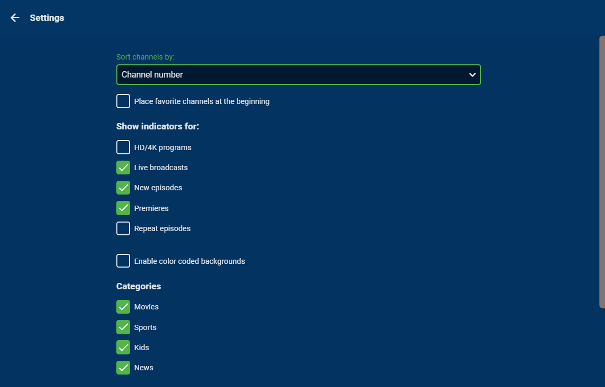
On the Guide screen, click on the 3 dots above the channels to open the Settings page, go the Categories section and make sure all 4 boxes are checked. That should fix it for you. You will need to do the same in the Web App.
 1 point
 -
@TroyKing -- Just to circle back on this that I was finally able to troubleshoot and identify the issue on tvOS 14. Apple behavior changed at the player level between tvOS 13 -> 14. We'll be getting a new beta release out shortly with the fix.1 point
-
Thanks mate that sorted that problem1 point
-
Hi devs, The web emby has bug that will expose ther server details to the public even the server has used Cloudflare to protect the IP address. Input: http://domain/emby/system/info/public, ex: http://demo.emby.tv/emby/system/info/public in the browser, it will show the server details with public IP address. Please fix this bug ASAP for the security reason. KIND REGARDS1 point
-
This is a known issue that is being worked on and why the beta does not return those details anymore.1 point
-
Funnier still, if you choose the client and then just click on a single title it will play it and then play the next one on the list, exactly as it should do with play-all. Whatever is done, just don't break this, lol.1 point
-
Only thing I see is: - Server name - Version - ID Which version are you on? I am on the latest beta.1 point
-
Merci. Most civilised of you.1 point
-
@arrbee99 /* --- Hide Beta Message in Dashboard --- */ .betaInfoBanner {display: none}1 point
-
If your not in a hurry to find out I'll let you know as soon as they're available I'm picking one up.1 point
-
We're also about to release a new version of Emby Server so you could re-evaluate with that once available. Thanks.1 point
-
@Luke You're right! Energy saving mode was enable. Thank you!1 point
-
@judgey you will need to re-add all users Connect username per user or remove and re-add if they are still present.1 point
-
Roku has hinted that firmware updates are quarterly. We are due another update on the Roku TV. Only Roku controls when they push their firmware updates to Roku devices. They do not inform developers until two weeks prior and I have heard nothing about new firmware yet. Yes. The only way to eliminate the issue with HLS is to get them to direct play. The only way for XVID to direct play is inside MKV. I apologize. This is a fault in the Roku firmware. We can only wait until they fix this problem.1 point
-
The Roku does this same thing. Pressing back on the grid from anywhere but the first position returns you to the first position. After you wind up at the first position another back press takes you out from the grid and back to where you were before you got there. The first place you wind up on the grid is first position. Pressing back when anywhere but first position on the grid should take you to first position, not exit the grid. Otherwise how do you quickly access those top view tabs? You press up repeatedly? Instead press back once and up once then BAM you are at the view tabs. This is to minimize button presses. The goal is keep users from having to repeatedly press buttons. This is the intended design.1 point
-
I still don't get why you do this: [Phone --> Direct Link --> BubbleUpnP] --> [Xiaomi Box S / Kodi (DLNA Renderer)] Why BubbleUpnP ? Why Kodi on the MiBox-S? This just seems overly complicated since you can do Phone>>MiBox-S1 point
-
The HDHR basically just send to Emby exactly what they receive with the exception of devices that can TRANSCODE. In the USA OTA is almost always using the MPEG video codec and on cable typically local channels are MPEG and then HD channels are in h.264 but it all depends on your provider. If you type http://my.hdhomerun.com/ into your browser bar you'll get a list of tuners. Click on your tuner then Channel Lineup. You can scroll down and look at your channels. Anything encoded in h.264 will say AVC and anything without AVC is going to be MPEG encoded video. Doesn't show it but does say "etc" so it could be. I'd check in the HDHomeRUN forums for compatibility. It seems people have trouble using HDHomeRun streams with this device. https://forum.silicondust.com/forum/viewtopic.php?t=73986 Personally for about $20 more you can get a MiBox-S which should give you a really nice Emby experience and outside of Emby there is Live Channels which can access your HDHomeRuns directly and plays well. Of all my devices this is my favorite after the Shield TV Pro.1 point
-
I'm not sure, sorry. I don't see the mpegts container there, but that doesn't mean it won't.1 point
-
This feature is in the next release of the LG App - the issue with with all the TV Apps is the manufacturers take FOREVER to validate and approve EACH update. LG appear to actually be one of the quicker ones .. so just a waiting game I'm afraid ..1 point
-
I suspect the beginning of the end for TVDB as the go to db for TV - especially if v4 is a mees like v3,v2 ....etc1 point
-
Now all there issues are behind closed doors. https://thetvdb.com/blog/saying-goodbye-to-thetvdb-forums Now we wait for v4 api and how every media manager ever made using TVDB will break.1 point
-
Why? Why don't you do this Phone > Mibox I do this all the time to cast to my Shield or Mibox from web or phone. It looks like you're trying to make this overly complex.1 point
-
the entire server was unresponsive or just emby? the former is generally caused by lack of free memory, and if you're using your RAM as a disk it's entirely possible for memory starvation (unless of course you've capped the size of your RAM disk)1 point
-
This isssue has long been solved, so whatever your problem was it is different from that of the OP.1 point
-
If you're expecting factual accuracy from a Brad Pitt movie, then you should stop watching them. That's like watching sport and looking for signs of intelligence. His stuff is all about the drama. I get tunnel vision with his movies. I mean, a giant space antenna.... ignore, ignore, ignore.0 points
-
Hi. Why do you require this integration?0 points