Leaderboard




Popular Content
Showing content with the highest reputation on 09/16/20 in Posts
-
Yes it's planned for a future update to the app. Thanks.2 points
-
Yes we'll be supporting DSM 7.0.2 points
-
I'm running Emby on a Synology DS416play, which can transcode H.264 4K, but not HEVC 4K. I believe many systems are similar in these capabilities. Currently, if a user tries to transcode a 4K HEVC video, my entire system will hang. It would be brilliant if it was possible to disable 4K HEVC transcoding, and only allow direct streams for this format.1 point
-
Don't know how many of you know what PseudoTV is on Kodi but basically it is a plugin that allows you to create an EPG full of your own custom TV channels using your entire media library into one big channel surfing experience on your library. Emby, I believe, would be amazing for this and really make it stand out if something like this was official supported as the only support for something like this is a little plugin on Kodi. Features: Create custom TV channels using smart filters (e.g. 500 random movies that are from 2010 and newer and genre is Horror, 25 random tv episodes that are from Fox network). Allow creation of an unlimited number of channels using these filters and assign them channel numbers Automatically generate an EPG/TV Guide using all of these custom channels and randomly assign the scheduled program at a specific time Allow sorting of the channel shows (random, in order, asc, desc) Allow channels like FX to play both TV shows from FX but also incorporate movies at specific time periods like primetime movies Allow trailers to play in between shows as well as Channel Bumpers/intro videos Allow integration with Live TV using PVR Allow YouTube channels, USTVNOW, Playon perhaps? Ability to add a logo to your custom channels Background updating that would auto generate / update all the channels and shows after a specific period of time And so on1 point
-
(15/09/2020) If like me you liked the Extrafanart sub directory to store all the downloaded fanartX.jpg files to keep the main item folder clear of clutter then you are in luck. Context In a recent beta / nfo plugin update the creation of extrafanart directories was remove (as Kodi does not support them anymore) and now fanartX files are saved to the main folder of an item. So this script allows you to clean up this situation. The script is setup to work with Movies and Series (TV Shows) only at present and not Mixed content folders either - maybe a future update might cover this but for now only run it against supported structures. User Notes - (version 1.2) - thanks to @CBers and @FrostByte for proofreading. AddEFA - script to add extrafanart directory and move the fanartX files to it from the main directory of a newly added item - Movie or Series 1.0 Basic Function 1.1 This script is to add the extrafanart directory back since in the last few beta server versions the support for it was removed when a new Series or Movie is added to Emby. 1.2 It also moves fanartX.jpg files to the extrfanart directory if they exist. 1.3 The extrafanart directory is not created if no fanartx files exist in the main directory for the item. 1.4 It leaves the fanart.jpg in the main directory of the item. 2.0 Script Requirements 2.1 The script is written in Powershell for version 7.0.3 2.2 The script requires at least Powershell 7.0 - Powershell can be downloaded from https://github.com/PowerShell/PowerShell/releases/tag/v7.0.3 - the latest Release version is 7.0.3 as of 15/09/2020. Remember to set the execution policy you require - Google it if you are not sure. 2.3 If you try and run it in Powershell 5.1/6/0 etc it will abort and not run as some of the code is PS 7 specific. 2.4 Powershell 7 and 5.1 etc can coexist on the same machine with no issues (Windows) 3.0 Setup Requirements 3.1 I have attached to the first post a zip file (AddEFA.zip) containing 3 files 3.2 AddEFA.ps1 - the main script file, AddEFA_config.ps1 - config file for the main script file (more on this below) and these user notes. 3.3 Also in the zip file is a logs folder which the script will look for to write its log file too. The location of the logs folder can be changed in the _config file. 3.4 Unzip the file to your location of choice - the main folder for the script (AddEFA) can be changed to anything you like. BUT the ps1 files should not have their names modified. 3.5 Open the _config file in any text editor and amend the setting you want and don't forget to save it after you change things! 3.5.1 Log_Path - where you want the logs saved 3.5.2 MovieBaseDir - full paths to one or multiple movie root folders - unc paths are supported - Enclose BaseDir folders in single quotes(') and separate by commas. 3.5.3 SeriesBaseDir - as above - Enclose BaseDir folders in single quotes(') and separate by commas. 3.5.4 Log_Retention - how many days you want to keep the logs for. 3.6 Why a config file - for convenience - you can replace the main ps1 file and not have to keep updating your paths etc if I need to release a new version. 3.6.1 I anticipate that the config file format will not change - with current plans - but if I add some other functionality that requires it you will get a new version etc - and only at that time would you need to edit the config again - other than your own changes. 4.0 Running the script 4.1 First you need to open a PS7 console window - there are various ways to do it - I will just do the one that most will be able to follow. 4.1.1 Start>Powershell>Powershell 7 (x64) will open the console window. 4.1.2 Navigate to the folder where the AddEFA.ps1 and config files exist 4.1.3 To run the script you need to type the following 4.1.4 .\AddEFA -DoMovies -DoSeries and then hit return - if you have things configured correctly the script will be off to the races. 4.1.5 Notice the full stop before the \ above? It's needed don't forget to type it - otherwise PS will complain! 4.1.6 The -Doxxxx are called parameters and at least one needs to be supplied - i.e. without them the script will do nothing much. You can supply both or singly - up to you. 4.1.7 If you get errors see below. 4.2 The script will write to the console window at the same time as the log - they are essentially the same - so if things fly by and you can't read what's happening - go see the log file. 4.3 When running the script it creates an AddEFA.lock file to the script directory. This is to prevent the script from being run twice or more concurrently - i.e. stopping multiple scripts fighting over files! 4.4 Once the script completes - the lock file is removed. 4.5 Once complete then your Movies/Series should have been updated where necessary - see log file for details of which was amended or not and why. 4.6 Beyond the scope of these notes but it's easy to schedule this script to run via task scheduler or the Emby ScripterX Plugin for say every couple of days - depending how much on average you add to your server. 5.0 Limitations / Restrictions 5.1 The BaseDir's you give the script, in the config file, need to have a structure which needs to be followed - see below. 5.2 MovieBaseDir\<movie individual main directory> - for me that would be M:\Movies\22 Bullets (2010) or M:\Movies\300 (2007) etc where M:\movies is the BaseDir 5.3 SeriesBaseDir\<Show individual main directory> - for me that would be M:\TV\Babylon 5 or M:\Movies\Catch-22 etc where M:\TV is the BaseDir 5.4 If you have any movies which are not in their own directories within the MovieBaseDir - put them in separate folders - or don't run the script if this is an issue 5.5 Equally the same basic structure is expected for Series - i.e. nothing not in a folder within the baseDir for Series - i.e. no loose episodes etc 5.6 If you say have your movies in Alphabetical groups say \movies\A-H, \movies\I-R etc then add those as the baseDir in the config as you can have more than one. Each of these directories will be processed one after the other. 5.6 Any other eclectic folder structure and you are on your own! Results might be weird! 5.7 The config file must be in same folder as the main script. 6.0 Errors you might see 6.1 These are common errors due to incorrect config/ finger trouble 6.2 You forget the full stop before the \ 6.3 You spell the parameters wrong 6.4 A lock file exists in the script folder - either another instance of the script is running or shock horror the script crashed last time - this never happens ... 6.5 The baseDir paths you have given are invalid/not accessible 6.6 The log_path is invalid/not accessible etc - not going to try and cover everything under the sun! 6.7 Either PS or the script will indicate what is wrong for most of the common errors - read what they say and you should be able to figure it out. 7.0 Summary 7.1 The script has been tested by myself and @cbers/@frostbyte and if they can get it to work so should you 7.2 If PS is new to you then you have a smallish learning curve to climb but its not huge - Google can help here. Example Screenshots Fig1 - about to run script - note PS has its current directory - pointing at the script directory Point 4.1.2 above Fig 2 - Script Running against my TV library Fig 3 - Script has finished in just over 3 seconds. Its not amended anything as no new TV shows added recently. Files - AddEFA.zip - as decribed in 3.1 above. AddEFA.zip I will try and respond to queries/issue with the script when i can - i here most days so should respond quickly. What i'm not going to do in this thread is answer PS issues other than directly related to this script. But i will if they are posted elsewhere if i can answer them. I want to keep this thread on track and not wander off on some winding road to nowhere Think That's It Have Fun PenkethBoy
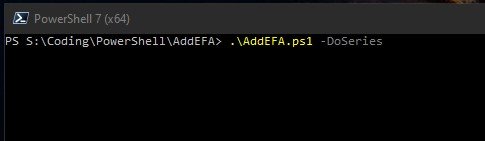
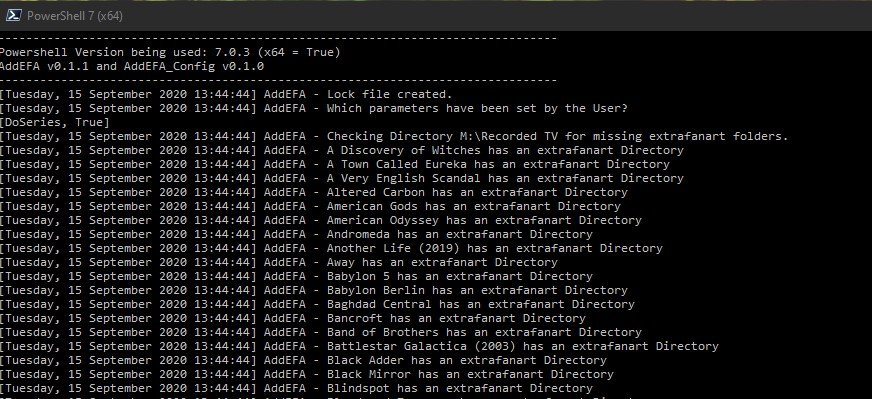
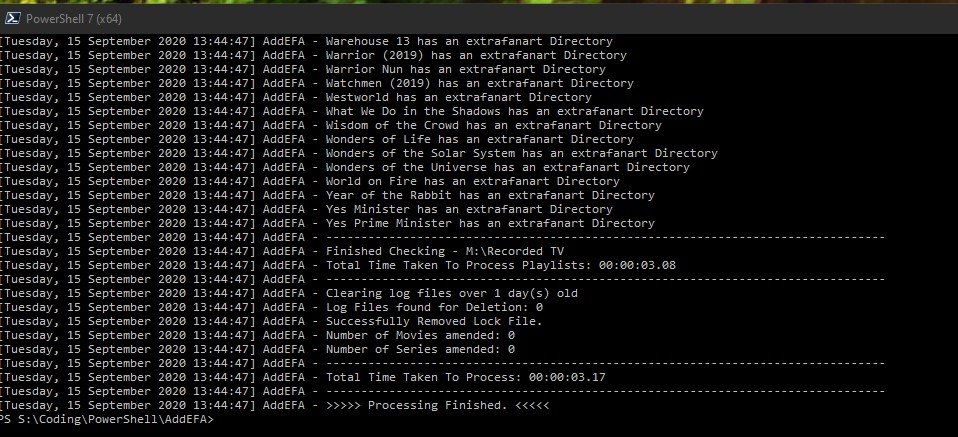 1 point
 -
Hello. Would be great to be able to adjust subitiles delay in Emby Theatre or Web client like we can in VLC with "H" and "J" shortcuts (up and down). Thanks !1 point
-
Test TVE channels using TS streams - Direct play using Nvidia Shield 2019, FFMPEG not invoked. Fast tuning 1ish seconds direct play.Trans/Remux tuning 7ish seconds. Still playing...I mean testing.1 point
-
Ok perfect, I only have the one local user account and it has administrator privileges. Setting the recording didn’t throw the error with it running not as a service. I’ve tried it again with it logged into the account as a service and the log still doesn’t have an error. I will brave skipping running it out of a service and see if it works. If not I’ll go back to it not as a service. Thanks very much for the help so far, I’m hopeful :). Will report back1 point
-
A malta que pede isto e porque querem vender contas de acesso ao Emby, o Emby nao e para isso isto e um gestor de multimedia pessoal seus chulos...1 point
-
You can force a guide refresh on "Scheduled Tasks"1 point
-
Ok we're getting close to having a new Emby Server 4.5 release. Can you please try that once available? Thanks.1 point
-
ok - where in the release notes would i find that?1 point
-
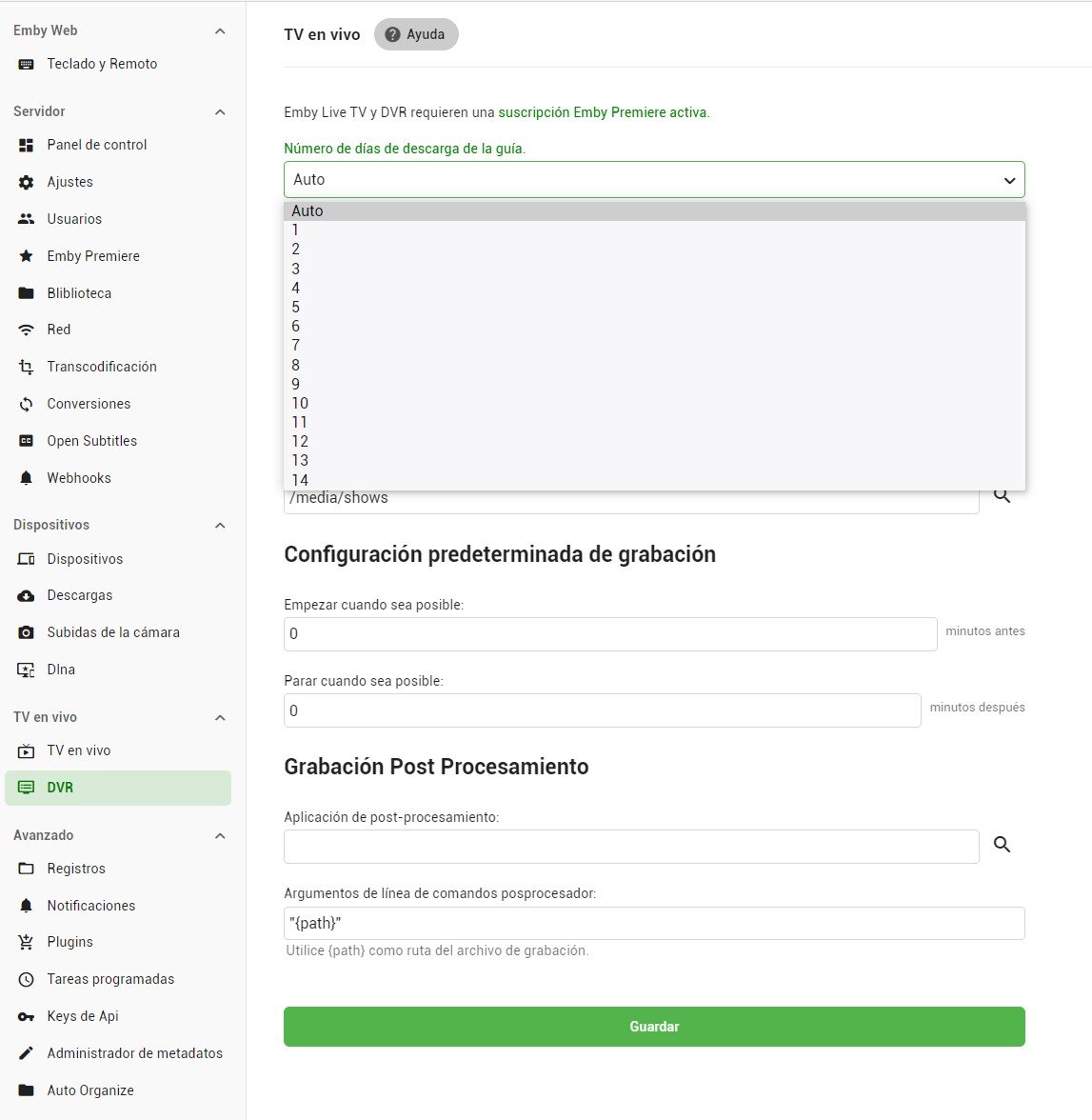
In DVR setup, you can set the days:
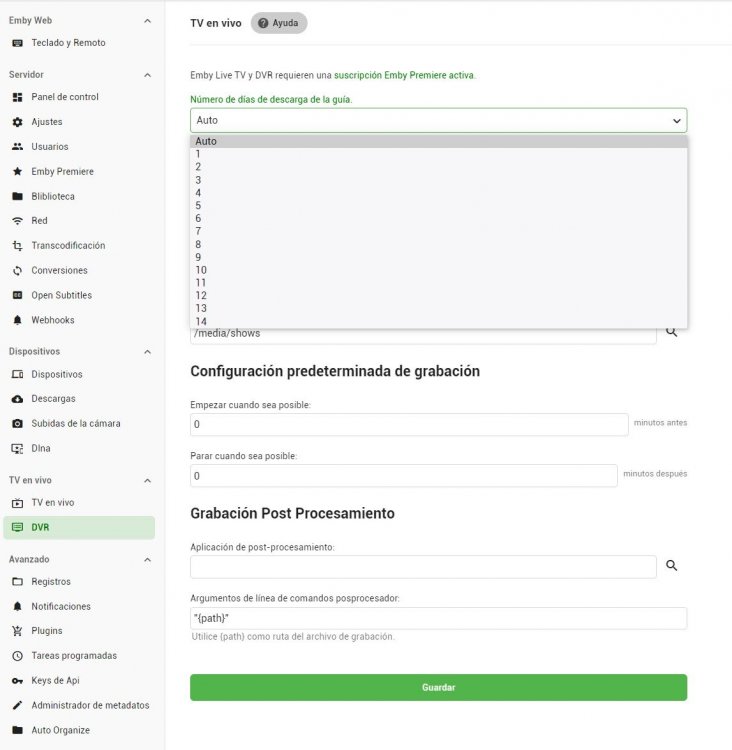 1 point
 -
Right click on the "Posted <date/time>..." at the top of the post concerned and copy the link address to put in the post you're writing. Paul1 point
-
Hmm. You're outside my areas of familiarity then! I guess Cayars will be along fairly soon... Paul1 point
-
I suspect the beginning of the end for TVDB as the go to db for TV - especially if v4 is a mees like v3,v2 ....etc1 point
-
I will uninstall and keep you updated.1 point
-
We plan to support this in an upcoming update. thanks for the feedback.1 point
-
Yea this is just a tricky example. Thanks for the feedback.1 point
-
Hi there, you simply stop playing and then choose another channel to play. We plan to add in-video changing options in an upcoming update. Thanks.1 point
-
@Happy2Play It is a fault in the Roku video player position reporting (Roku firmware 9.2.x and higher) when using HLS. I have fully debugged this. We should have a fix for this very soon. Netflix or Amazon do not use HLS thereby do not have the issue.1 point
-
Now all there issues are behind closed doors. https://thetvdb.com/blog/saying-goodbye-to-thetvdb-forums Now we wait for v4 api and how every media manager ever made using TVDB will break.1 point
-
A lot of auto's these days come with video systems in the cars. Back in the early 2000s when my kids were small I had video DVD systems strapped to the back of the driver and passenger seats for the kids to watch and it made a huge difference on long trips we used to take. No more "Are we there yet", "How much longer" starting a mile from the driveway. LOL Of course a whole vehicle audio/video system is likely more than this is going for which is driver operated and get that. What I do think would fit in with the current offerings would be audio podcasts which are good to listen to while driving. A little podcast love on the backend wouldn't hurt either.1 point
-
Now you are making things up to suit your view i asked a reasonable question Made a statement on the responses i had at the time - which was factual and not inflammatory You then jumped in with an attitude which you still have - taking offense at a statement of fact - at no point did i imply others were stupid etc. You infered that somehow from my 2 posts Although i am beginning to wonder about yourself but will give you the benefit of the doubt for now. if you want to call me names go ahead if it lowers your blood pressure - not going to make any difference to me. Oh and anybody can post in these forums their opinion at anytime as long as its kept clean and resonible - something you have failed at in your last couple of posts - "shouting and stamping your feet" does not give you the right to try and shut somebody else up because you dont like what they have posted - this is not twitter or its ilk. Happy Posting and Subtitle adjustment - automated is the only way to go apparently.1 point
-
Well I like having video in the car myself.1 point
-
I don't think True-HD is as good as DTS-X for things like this. Now combine your sound with 3D and you might have crapped a raptor egg yourself. LOL1 point
-
This will be in Emby Server 4.5. You'll be able to use the controls in the video player to adjust the subtitle offset.1 point
-
Again thanks for the great work it's truly appreciated. And i was wondering if you would consider adding the following to the steel New Releases, 3D Movies, Comic Book Movies, Disney + Pixar Movies, Trailers, Photos and Adult1 point
-
And I get fed up with people thinking the Emby UI is perfect. There are plenty of posts describing what can be improved in the UI. The UI is really good, but there are some improvements that can be made. Better consistency, option for left nav to get to libraries, more granular flexibility with what is shown on the home page, and cleaner themes/colors. We're not going to agree on this point, but IMHO the Plex UI is slightly better than Emby's. The reason I prefer Emby though is because the functionality is much, MUCH better. And, the Emby devs actually talk to us. Emby stomps Plex on those 2 points. And no, I am NOT asking for Emby to change to an identical UI as Plex. Plex got it right for their app, but Emby is it's own brand and should definitely stay that way. Some minor UI improvements however would make it much better.1 point
-
Competitive [dis]advantage.1 point
-
@EZEdI whole heartedly agree. I REALLY wish they would at least tell us what's planned for the next 6 months. I too am pulling for Emby, but there are some big gaps that I have to use Plex for. Wish I didn't have to but I have no choice. Now that we have an improved forum, maybe at a bare minimum we could get real voting added. Liking the first post doesn't work very well and isn't well known as a voting method. Make it obvious and allow us to sort by most votes so we have an idea (and devs have a better idea) of what users really want. Overall, it's getting there. Just wish I knew what was around the corner.1 point
-
This thread is the very reason why I previously advocated that the Feature Requests needed to be tracked and prioritized into a true feature list. It's just good engineering practice. (1) Make a total list of requests; (2) prioritize based on immediate need vs nice to haves; (3) keep the list running based on what is currently being worked vs what is still in the upcoming stage; (4) make the list visible to all on where each request item is in the development cycle so that all can see and then they don't have to keep asking these questions (they can readily see what has already been requested) and you might cut down on some duplicate requests; (5) check off accomplishments as you go so that all can compare what has been requested vs what has been implemented. (6) major fixes and problems with current capabilities get priority interrupt over current development and future nice to haves. In my world its called the IMS & IMP (integrated master schedule, integrated master plan) but at its heart is just a simple prioritized "to do" list that can be checked off when things are "done". Otherwise you're just running an ad-hoc railroad and no one knows what time the trains get to any of the stations. It probably cuts down on having to give a lot of canned responses to "yes it's planned for the future". They can be directed to the list and see where it is in the future and probably stop bugging you about when. Just a suggestion. I myself have resigned to not worrying any more about when things are coming since the things I'm more concerned about seem to be a good distance into the future. But to give yourselves some well deserved peace at night (meaning sleep) as developers it might help to give folks a notional plan just to let them know where they stand in the pecking order. For me personally, the things that Emby can't currently deliver, I am having to use other platforms to augment. When and until Emby get's them I'll continue that way. I'll certainly be glad when Emby gets them but I can't deny myself using them knowing that they exist waiting on Emby to implement. Again I'm certainly pulling for you guys because I like the direction that you're going but for my personal use full functionality is not quite there yet. All of your efforts are greatly appreciated. Keep up the good work. We're all pulling for you. Thank you1 point
-
Has this become more reliable yet? I hate to have my server remux DVR recordings unnecessarily.1 point
-
Hi, I tried several times to update to latest update (WINDOWS), is successfully download the update, then it tells me to restart EMBY, I restart is shows me a message that sucessfully installed latest update, but in the corner of the APP still see the old version 4.0.3.0. I restart again EMBY and again it tells me there is a new version to update. Is like a loop with no ending Can you check out this please. Regards, spiritwarrior1 point
-
Hi .. Got it working... Somthing went wrong with my VPN but know it works again0 points