
Leaderboard




Popular Content
Showing content with the highest reputation on 09/13/20 in Posts
-
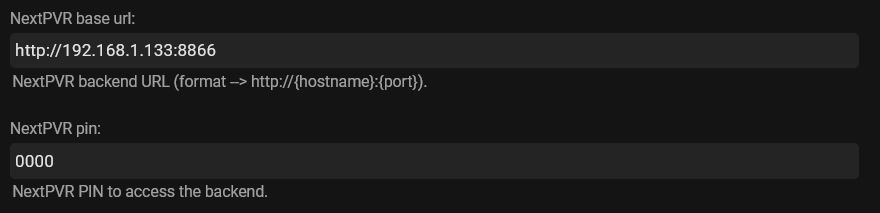
Some general suggestions. You need to match NextPVR versions with its Emby plugin, so NPVR v4 goes with the Emby NPVR v4 plugin, which is the one in the plugins catalog. V5 NPVR goes with the other plugin, which is numbered v3.6.0.0, hopefully found here - You need the base url here - to match the one on your dasboard home page, apart from the 8866 / 8096 bit.
 2 points
 -
The issue here is there is no 1 size fits all solution in linux land. There are so many variables that are user and system specific, it's not really possible to make it precedural and guarantee it will work for every system out there. The file permission guide is about as close as we can get for something like this. Which is why these forums exist, and why the community is here. I've fielded a lot of file permissioning questions on here the past few years and I don't mind, nor doe anyone else. If we did, we just wouldn't frequent these boards.2 points
-
Is there a way to have the option for larger artwork on the Apple TV? For example, when you're not using the CoverArt plugin, it shows 7 movies across the screen. When using the CoverArt plugin in goes to 6, but the images don't change in size so it's leaving a lot of dead space. I know this is just a visual thing, but it'd be nice to have consistency or have the control to make "small, medium, large" movie/tv show posters and then we can control how it looks. I love Emby and how it works (I'm coming from being a heavy Plex user) but these little things make a difference from a visual perspective and user experience.1 point
-
I would be nice to have them both in the catalog with a description of what version of Next PVR they work with! @Luke Can we get the V5 plugin in the catalog?1 point
-
Good suggestion, but we tried similar things in the past and did not work out here.1 point
-
The question is how to get an m3u outside paying for ChannelsDVR; from somewhere else that authorizes your legit login from your Provider but generates the m3u.1 point
-
Hi, yes try refreshing the metadata on the affected video.1 point
-
Still no progress - another useful feature drifts off into the sunset to die a cruel needless death on the altar of dev apathy!1 point
-
http://10.0.0.85:8096/web/ that is the I.P. address of your local server within the LAN and would not be reachable from outside of your local network, which is why downforeveryoneorjustme.com couldn't access it. After starting and enabling Emby are you able to access it now?1 point
-
Google crash report, as the app doesn't open at all.1 point
-
I made changes to the file as per your other thread. I haven't attempted native mode I will test here in a few hours and post a log file.1 point
-
The card has worked in the past. But it gets really hot inside the case. I was going to use four ports between my development machine and the server. It originally did have only the one card in it, when it work before, but it just stopped. I think that the NIC is probably a low priority card after all. So I might just do a clean install of win 10, leave the NIC out. Hack the Nvidea drivers again for my gpu, install emby, Sophos, and the reverse proxy application.1 point
-
Hey @quickmic This is great work thanks. I have some interesting findings that might help. 1. With your workaround + the "automatically playback next episode / show" setting disabled, playback from both aeon nox home screen widgets + normal list views seems 100% ok. 2. With your work around + the "automatically playback next episode / show" setting enabled, playback from aeon nox home widgets is fine but normal list view playback never opens the stream. Interesting - but expected based on your advice to turn this off? I need to some more testing with the config file back to the default value of False and verify the issue once again starts happening. Since its sort of random I'll need to use the box normally over a week or 2 with both False and True values and see if the error pops up and when. This will sort of prove changing the value from False to True has had an impact. I'll be watching the thread closely and see what other users report with your workaround as well. I'm not sure if Angel is still around but she'd be curious to know these findings too as she's been helping troubleshoot this issue on and off over the past 12 months. Thanks!1 point
-
I think i have some clarity. I think i was misinformed and thought i could just network a hard drive to the oppo while have the gui on the ipad so i get the best of both worlds, gui and direct play. Looks like i need to replan a few options. Thank you for the clarity!1 point
-
And the images, I delete them all. Why emby has extracted a preview image when it scanned the video?1 point
-
@chef - as you are having problems - i would go the clean install route and as you only have limited apps installed should not be too much of an issue this may help if you still get issues in win 10 https://recoverit.wondershare.com/computer-problems/this-device-cannot-start-code-10-error.html Question - has this card ever worked? or is it new? Also why do you need two 4 port cards in one machine? Did you try without the second working card installed - to see if the card actually works when on its own?1 point
-
Now that you mention it, the type is showing as mixed content. When I originally built the library, it was built as Movies. I'll remove and re-build, and update once complete. Thanks!1 point
-
Hey hey that's working really well so far! I tested about 10 playback attempts and didn't experience the issue once. Later tonight I'll do more in depth testing by changing it back to False, stop/restart kodi, verifying the issue happens and then change to True and verify issue stops happening, and do this a couple of times to verify it isn't placebo. But initial signs are really positive. Just for my curiosity how did you arrive at this one config file and what's the true / false thing we're actually changing; what does it actually do. Thanks so much champion!1 point
-
We could have also used De Morgan's Law, of Inversion ("!") to inverse the && (and) truth table to get the exact same outcome. De Morgan's Law in Computer science says that by inverting an inverse && we get an || and vice versa, using the "bang" ("!"). "!(!bollean.value && ! boolean.value) == boolean.value || boolean.value" Which is just Crazy right!1 point
-
I agree, the Apple TV overall is nice, but I don't like the movies and tv libraries as lots of wasted space. The menu section to the left when viewing by genres looks like it allows too much length for titles of genres when they would usually be shorter. The artwork size need to be bigger so you can see the detail on the covers (view on 55" screen 10 feet away) and reduce spacing and I'm sure another column of covers could be fitted in. It seems endless scrolling for users with large libraries at the moment.1 point
-
For everyone still interested in this. I am as well & would love to see it. I don't see Emby spending time to get this done anytime soon. I have 2 suggestions for you as a work around to have everything in one source. First if you have the beta version of Channels DVR they have a feature to include you locally stored movies & tv shows, so you can have all your antenna, TVE channels & movies all in Channels. 2nd option is to just take the m3u playlist from Channels DVR & add into Emby as a TV source & you can have it all together in Emby. Personally I've got my system setup both ways. All my recordings & new movies go to specific locations on my server & both Channels & Emby pull from it.1 point
-
Yes this is true, that is the best way, but we also support Dlna for those that want to use that.1 point
-
@Abobader A suggestion - if its possible When a user creates a new thread could a template of text/links be added - how to report a problem, questions that must be answered - server and client version numbers etc etc Reason is that a lot of users post they have an issue and provide a nice story but usually very light on facts/details - so whoever responds has to ask all the basic questions The sonarr forums as an example do this and generally people follow the request to provide basic info - and save a lot of time in most cases Maybe @cayars could craft something. Also as an extra if the message could be tailored by forum then it could be varied - but depends on forum options etc1 point
-
@Luke and rbjtech. I know that there is a good explanation of the Emby client/server architecture on the website knowledge base but is there a corresponding explanation of how DLNA works and how Emby works as a DLNA host? I think that is where Jman5150 is confused above. In short Jman, Emby is set up to function best as an IP client/server architecture where there is an Emby server somewhere on a local area network and it distributes audio/visual file data to connected clients. Those clients perform best when using the designed clients that rbjtech identified from the Apps (Clients) list above. Take note that your Oppo 203 is not one of the approved clients that Emby developers have written an application for. Your Oppo can and will connect to an Emby server however because Emby Server is also a DLNA host. You would be able to view the files and play the files from the server to the Oppo DLNA client it's just that you won't get a nice pretty interface like you would from one of the application based clients on the supported list. If you just want to play some files the Oppo is fine. If you really want to dazzle your eyes and be the envy of all of your friends use one of the app clients connected to your TV to get a truly good visual appeal to your AV consumption. You mentioned and iPad, which iPad is a good client but the experience is confined to the screen of the iPad. The experience is better if you can get it projected to a TV or larger scale viewing device. Either connect the iPad to the TV (via HDMI if that's all that you have) or better yet, get an Apple TV device, Roku or Android TV device and connect to the TV. Some smart TVs these days have Emby clients available directly on the TV (most notably, Samsung, LG, Sony and TCL/Roku enabled). I hope that helps.1 point
-
Hi, Emby is a client/server setup unlike kodi which is just a client. Any of the client apps gets the information from the server and it's streamed through the network (hard wired or WIFI).1 point
-
If you want the iOS App to act as a 'remote control' to the client connected to your TV, then what you actually want is for the client to be able to receive a 'cast' feature. I'm not sure if the Oppo has this built in - but devices like the Chromecast, Android Tablets etc have this ability. The Oppo may have some iOS Apps allowing you to view the content via DLNA (that Emby is providing). Alternatively, a dedicated client may suit you better - depending on what you want a FireTV stick, Android TV, Shield, Roku etc - there are plenty to choose from. This will give you the best experience - as they are dedicated Emby Apps. Have a look here for all the Apps (Clients) that are available to you (scroll down for the Apps)1 point
-
I think it’s a great idea and another area where the web app exposes similar options that the tvOS app doesn’t have yet. We’ll get it on our backlog for consideration in a future release.1 point
-
Yes it does, enjoy1 point
-
Hi, currently the only way is if you have a Windows PC with Windows Media Center, then you can setup the xbox 360 as an extender and use our WMC app: https://emby.media/emby-for-windows-media-center.html Please let us know if this helps. Thanks.1 point
-
That's probably not going to happen for safety reasons. Understandable though.0 points
















