Leaderboard




Popular Content
Showing content with the highest reputation on 07/27/20 in Posts
-
cant you just add S00Exx - where xx is beyond the number of extras on tvdb i do this for extras which are not specials - usually i start xx at 100 and place them in season 03 points
-
As I'm transitioning from Volumio and Plex to Emby to centralize my usage to one app, the one thing I'm missing the most is gapless playback. This is particulary annoying when listening to albums like "Dark Side of the Moon" by Pink Floyd. I'm experiencing a buffer of about 1 second in between songs, which really ruins the immersion. Would be awesome if this would be implemented in both the Chromecast, and web player.2 points
-
Yes it can.2 points
-
Could we get the option to (or the system automatically detect and set) the number of thumbnail extraction processes that can be run? Rebuilding my library is taking a long long time due to the fact that the thumbnail extract only runs on one media item at a time - server is currently sat with ~30% cpu usage.1 point
-
Now that I've got Open Subtitles working, my server is filled with subtitles downloaded for my stubs. It's a stub, so of course it doesn't have subtitles, but the file that replaces it may or may not. It's pointless to download subs that might just end up getting deleted when a real video file replaces the .disc file.1 point
-
Hello. Would be great to be able to adjust subitiles delay in Emby Theatre or Web client like we can in VLC with "H" and "J" shortcuts (up and down). Thanks !1 point
-
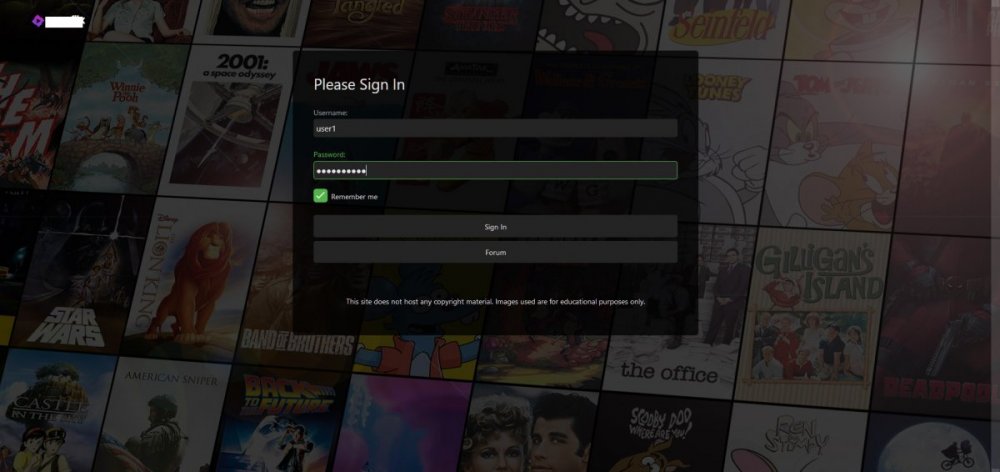
Edit (12/19/2020 - Cleaned up code, Re-wrote guide for step-by-step method) Hi everyone, I recently decided to ditch my server's landing page and just use emby itself. I've been making changes to the login page to give it a "Netflix" style and have come up with this: Now, if anyone is interested in accomplishing this, you should know it isn't just CSS. Steps First, there are some edits in manuallogin.html: 1. Find the line <div is="emby-scroller" class="view flex flex-direction-column scrollFrameY flex-grow" data-mousewheel="true" data-horizontal="false" data-centerfocus="card"> and add "custombg" as a class, like so <div is="emby-scroller" class="view flex flex-direction-column scrollFrameY flex-grow custombg" data-mousewheel="true" data-horizontal="false" data-centerfocus="card"> 2. Find the line <div class="scrollSlider flex-grow flex-direction-column padded-left padded-right padded-top-page padded-bottom-page"> and add "custombody" as a class, like so <div class="scrollSlider flex-grow flex-direction-column padded-left padded-right padded-top-page padded-bottom-page custombody"> 3. Find the line with the <form> tag and replace it with <form class="customoverlay"> Optional: If you'd like to add custom buttons, simply place and alter the following code after a </button> tag <a is="emby-button" class="raised block emby-button" href="https://myforum.com">Forum</a> Then, in your Emby settings, add this Custom CSS: .customoverlay { background-color:rgba(0,0,0,.75); -webkit-border-radius:6px; -moz-border-radius:6px; border-radius:6px; -webkit-box-sizing:border-box; -moz-box-sizing:border-box; box-sizing:border-box; display:-webkit-box; display:-webkit-flex; display:-moz-box; display:-ms-flexbox; display:flex; -webkit-box-orient:vertical; -webkit-box-direction:normal; -webkit-flex-direction:column; -moz-box-orient:vertical; -moz-box-direction:normal; -ms-flex-direction:column; flex-direction:column; margin:0 auto; min-height:515px; padding:40px 40px 40px; width:100% } .custombg { background:url('https://i.imgur.com/ynv9BKl.jpg'); background-size:cover; -webkit-background-size:cover; -moz-background-size:cover; -o-background-size:cover; height:100vh; position:fixed; background-position:center center; background-repeat:no-repeat } .custombody { height:100vh; overflow-y:auto; overflow-x:hidden; -webkit-overflow-scrolling:touch } Optional: Add the following css as well in order to hide the "Forgot Password" and "Cancel" buttons. .btnForgotPassword { display:none!important } .buttonCancel { display:none!important } You can now replace the background url with any image you want to use. I've kept in a temporary one. Note: In order to see the changes to manuallogin.html, you likely have to clear your browser cache. Hopefully someone might find this post useful. Special thanks to @Happy2Play for always answering my CSS questions.
 1 point
 -
At present you can only set it on or off for "movies" and "episodes". It'd be good to be able to set it on a per-library basis, so I could have trailers before my actual movies, but not before, say, wrestling events.1 point
-
Hi, Maybe I'm blind but I did not found anywhere (ios app, web app and theather pc) a button which allows to skip playing chapter to next one, if they are defined. I see chapters all listed before I start the movie, but there is no way to choose or skip them while playing.1 point
-
Hi as i can see the exoplayer is nearly to get a major update like allowing Dolby Vision from .mkv containers and looks like MKV standard it's nearly to support it and as soon the MKV get support for DV (Dolby Vision) exoplayer will be upgraded as soon. Mastroka Standard https://github.com/cellar-wg/matroska-specification/pull/390 ExoPlayer https://github.com/google/ExoPlayer/issues/7267 BTW, as I read I found than ts(Containers) and others already support (Dolby Vision). But I also would like than Emby add some transparent icon or something that display than the content is well in Dolby Vision and Atmos an Transparent icon/tag/logo for exemple at the beginning at the movie during 10 Seconds (Usually the time of the intro scene) and at the movie UI Wil be nice. FYI. MKVToolNix implement it in the next version https://gitlab.com/mbunkus/mkvtoolnix/-/issues/2784#note_335568674785a60fd09cfbbf3b873780a63a1513 So conclusion. Support Dolby Atmos + Vision with and logo/icon/tag whatever you want(I prefer a tag and a icon) on the movie, music UI to see than that movie have that support i also know than other concurrents are working on this implementation. So hope than emby is the first one. Nvidia Shield already support Dolby Vision and Atmos and many tv and sound bars support Atmos unfortunately there is no info on the movie,music UI to show us properly than the movie,music have Atmos and/or have Dolby Vision. And also create a filter to add this as a tag to select directly the movie have Atmos and/or Dolby or each one (Dolby Vision or Dolby Atmos) Like this. VOTE UP for this enhancement Kind regards1 point
-
Personally my only reason to still use Kodi with the Emby plugin and not the Emby App is the lack of the ability to select "download subtitle" during playback. This is a killer feature in Kodi, and I hope you guys can consider bringing it to Emby, I do have my Admin area set to automatically download subtitles, but many times (even so I have the option to only download exact matches) the subtitle is not the right one to the video file version, and the ability to just download a new subtitle on the fly is very welcome. Hope you guys can consider this Null1 point
-
Background When storing tv series content i find there are two types of files Files indexed on tvdb Files not indexed on tvdb I put unindexed content in "Season 00" [typically bluray extras), in the hope that it shows up unindexed in "season 00" ie. just a filename and an image extracted from the file. [if theres a better way to store unindexed files please say] This generally works but files are sometimes detected incorrectly "H:\TV04\The Brittas Empire\Season 00\The.Brittas.Empire.Christmas.Special.1994.mp4" is detected as Season 19 Episode 94, then shows on next up as such. Extra content seems to often have four digit years in the filename which fall foul of Emby trying to be helpful. (but 4 digit years may not be the only issue) I guess there are competing interests here, with folks who would like Emby to understand the season structure from the filename itself and not 'have to' have "season XX" sub folders. But is there a design that would allow unindexed content to be stored in the tv series folder (and be viewable in emby by filename) without fear that it will be misidentified as belonging to another season. maybe Emby could support a folder name "Extras", whos contents are never attempted to be matched, but just show show as original filenames. Sometimes these extras run into 100s of files and there is limited value in trying to add them all to the tvdb index. The specific example i used was a bad one as this file probably should be indexed as a special and is actually indexed in a season, but the request to safely / predictably store unindexed content still stands. thanks for considering.1 point
-
Buenas noches...Sería interesante, que una vez tenemos configurado un plugin para la descarga de subtitulos, tuviera la opcion de que solo descargara subtitulos forzados, ya que al fin y al cabo, solemos utilizar los subtitulos cuando en algunos tramos de las peliculas o series, se habla en un idioma que no es el nuestro...Muchas gracias...1 point
-
Since @Luke offered to help figure out the problem you should take him up on that. If you still want to change the defaults and I'm guessing you want Restart=on-failure then use a systemd unit file override (drop-in) for the emby-server. The overrides don't change the installed unit files and are persistent across updates. systemctl edit emby-server Add the settings you want to change and save.1 point
-
Yup, posted it above already in my first post I did post the logs in my top post with times when I tried it if you need details. Strange that it does work for you. I've tried different settings and such but nothing helps.1 point
-
OH! So organizing the media store into folders fixes my problem.

 1 point
 -
Happy to report it appears everything is functioning as intended with thesubdb.com reinstalled. Thanks again for the help!1 point
-
Ah, I see. Thank you!1 point
-
iso files? There's the reason, it' ancient and far out dated technology. ISO disc images really don't belong in the streaming world. Emby can do certain things with them but you should be converting these files on your own to streaming formats such as mp4 files. We don't live in the 1980s any more. Not that you don't already know how I personally feel about them, LOL, but I'd be tickled Emby Green if support for them was dropped as they are always a source of issue for people.1 point
-
Ok, lo haré cayars..Gracias por todo...Saludos...1 point
-
We shouldn't be downloading them for stubs so we'll resolve this. Thanks.1 point
-
What I did was create an Excel spreadsheet with the channels. I used the HDHomeRun app in web view to copy paste the channel info into excel. Then I could sort easily by name to find the SD dupes of HD channels and track them. When cable providers move mass channels around it's a pain in the butt as you have to rescan channels. HDHomeRun kept my SD channels hidden when the name matched but they added some additional channels and removed others so still had some manual work today. Kind of goes with the territory. Only 1 big change for me in the last 5 years so keeping fingers crossed. I've run both Verizon Fios and Comcast Xfinity both through two different HDHomeRun Primes and that made things interesting. Surprisingly Xfinity has much better picture quality than Fios even though "cable" is more limited on bandwidth than Fiber. Fios internet on the other hand is much better than xfinity especially the upstream!1 point
-
Hi there, can we please look at an example? Regarding Synology, it should be resolved with this:1 point
-
than you should try this buttons... and have fun
 1 point
 -
Correct. There isn't any sort of quick "fix" for these issues.1 point
-
I'm glad you got this resolved but hate the reason! Any backups?1 point
-
Oh... Has it been reported upstreams? Is this Microsoft libraries we are talking about? That was fast! I waited for three weeks before I gave up and I only have around 2TB of content1 point
-
Looking at your ffmpeg logs there are a lot of errors. Can you play back the media in VLC outside of Emby? How about in a couple of other players?1 point
-
How is it going to remember the history if we cannot properly identify the episode? I think everything you've mentioned is already on our wish list. Thanks.1 point
-
Yes, but then it will just be a crap shoot as to which one you get - the SD or HD channel. The DVR will be smarter about this in the future.1 point
-
Thanks. Or I'll just shut off all my SD channels.1 point
-
It is already a planned enhancement. For now, if the channel is an important factor, use the channel to do your scheduling. Either from the full guide or the individual channel detail screen.1 point
-
Hi. This is because the search is returning individual programs on individual channels and you chose the one on that channel. In the future, search will hopefully be able to group these but, for now, you need to pay particular attention to the channel if that is important for you.1 point
-
I actually believe the behavior of folder view in the Android TV app is correct based on what we are intending. Folder view is supposed to respect your file system organization and our collections are not a part of that.1 point
-
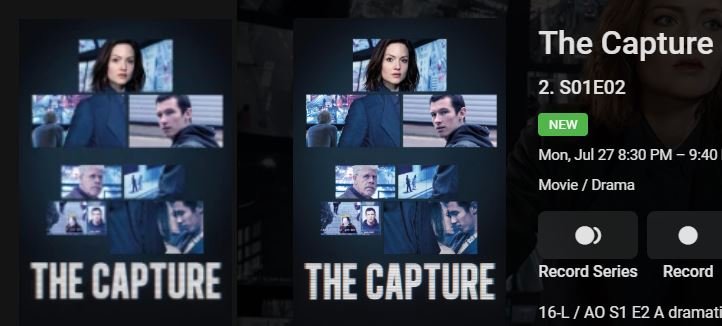
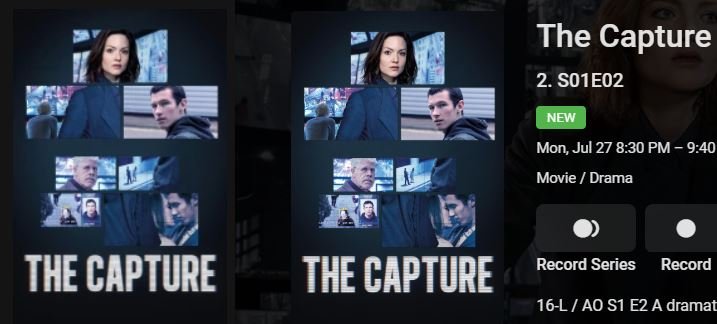
See what you think (images in same order as names) - Firefox vs Theater (as before) - Edge vs Theater - Edge vs Firefox - To me Theater is best, then Edge, then Firefox. Both browsers are set to 110% and I adjusted Theaters size to try to give roughly the same size image (not sure if that counts as artificial).
 1 point
 -
Absolutely Most likely anyone with their shared server to friends and family won't have to worry, and if they are running a larger server... Well... Emby is about friend and family.1 point
-
I'm not making light of this. It's a security problem that needs fixing. I tried to throw out a couple of idea to help reduce exposure but also to point out the reality of what can be done. It's more annoyance then destructive. This isn't an exploit that can be ran from anyone on the Internet as it takes a person with an account on your system already. If you only share with friends and family the chance of them trying to hack you is what? I'm not saying anything about external or for ports 8096 & 8920. I was just saying that I had not been able to reproduce this going through my SSL domain and Cloudflare. I was able to do it locally which is all I needed to reproduce, so not saying anything more than I too can reproduce it but had to do it inside my LAN. Others can likely do it remotely as well. I have some rewriting taking place so that likely blocked it for me.1 point
-
Go back and read the ops expanded setup. He is using the Intros and this is what he's reporting as a problem and what others have concurred don't work. If you turn that off OR rename the trailer to the same name as the movie it does work but shouldn't have to do either. The op is trying to display 2 trailers plus the cinema intro. That configuration doesn't work for me either.1 point
-
@cayars thank you, i'll wait for next update as suggested in that post and see how it goes1 point
-
I've seen this consistently as well. It looks like it didn't save but it did. If you hit submit again, it will duplicate your post. I'm almost always quoting so it may be related to that. Or, it could be when you go "back" a page and then use the box from there (because that's how I would have done this as well).1 point
-
I'm blocking Not "/emby" which seems to block "/web" My goal is block all my users from the web interface, because they don't need it. I thought I had effectively done that, but then I read this thread, and so now I need to block emby.media. I've already got my VPN set up if I need to log in to the web interface. Edit: Sorry, before when I said "At this point I don't know how I would log in to the web interface remotely", I meant I don't know how I would do it as a regular user. I see now the way I said it could be interpreted as a request for help. No need for help in that regard - I would just like to know if my current method should be effective in blocking my users (and the world) from the web interface.1 point
-
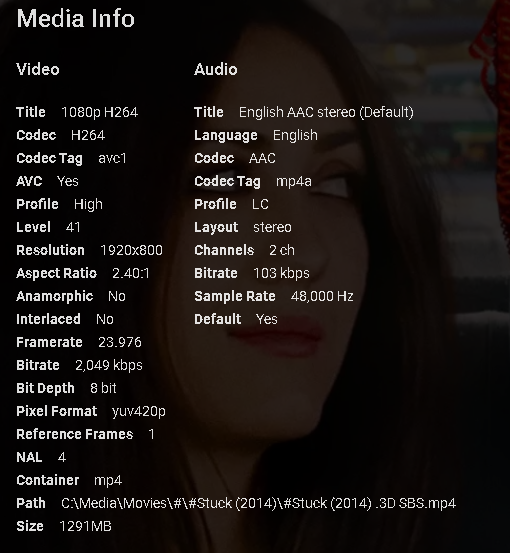
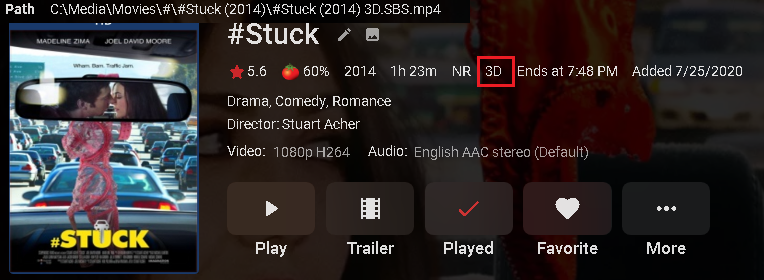
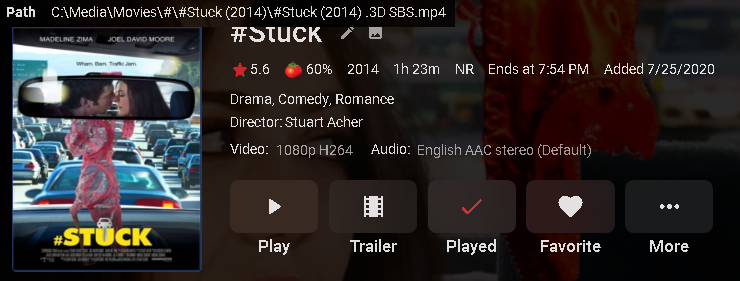
@Luke test on 4.5.0.15. Bottom line same result. I removed all files from the movie folder with only the mp4 in the folder. A full library scan was done after changing each file. Below is a screen capture from the top with the filename overlayed onto it taken from the bottom of the detail screen. #Stuck (2014) .3D SBS.mp4 does NOT work #Stuck (2014) 3D.SBS.mp4 does work #Stuck (2014) -3D SBS.mp4 does NOT work #Stuck (2014) -3D.SBS.mp4 does work #Stuck (2014) 3D-SBS.mp4 does work
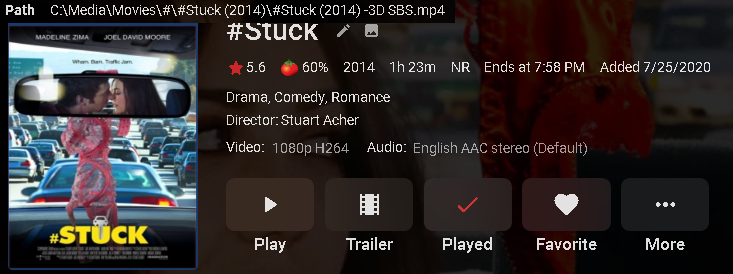
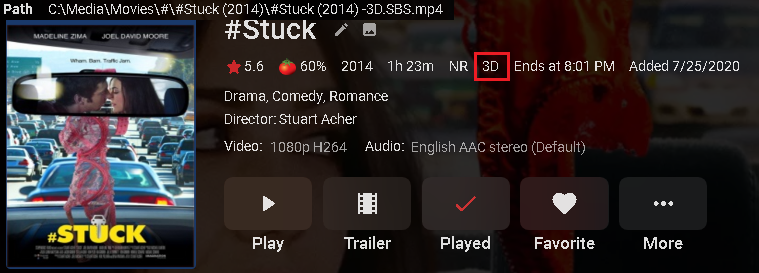
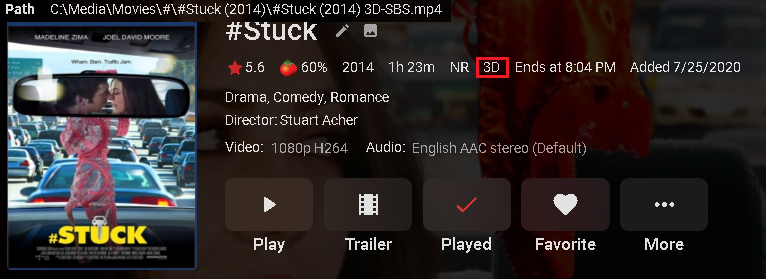 1 point
 -
Hi. I made the changes, but I was unsuccessful. The right path would be "\ system \ dashboard-ui \ startup \ manuallogin.html" ??1 point
-
Well you can get premier and it will go away. or you can hide it using css. But that will work only for the web app. css is this I believe. .btnHeaderPremiere { display: none !important; }1 point
-
OK, thanks. One thing I forgot to mention earlier, was that when I opened Emby in AA, it kept asking me to choose a server. Can this not be a remembered option?1 point
-
We just haven't gotten that far yet, but we'll get there.1 point
-
The problem unfortunately is in the .net core runtime.0 points