Leaderboard




Popular Content
Showing content with the highest reputation on 07/26/20 in Posts
-
Hello. Would be great to be able to adjust subitiles delay in Emby Theatre or Web client like we can in VLC with "H" and "J" shortcuts (up and down). Thanks !2 points
-
Or one could login to TVDB and supply the air dates as it looks like 4 episodes per air date. https://en.wikipedia.org/wiki/The_Abbott_and_Costello_Cartoon_Show https://www.imdb.com/title/tt0059962/episodes?season=12 points
-
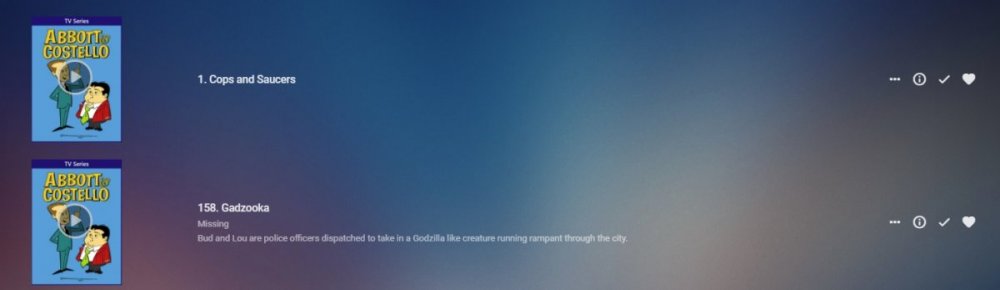
By default it will be by episode number, unless changed via edit metadata on the series Display Order is set to Aired. But I am guessing the issues may have to do with only the last episode (158) having a air date on TVDB. @Luke I just confirmed if no Air date exists they will not display as Missing. I added S01E01 for Series above and S01E158 appeared as Missing.
 2 points
 -
They also need to lose that very visible "PLAY" button over the image when missing. This is why pictures convey more information than you can in text. It helps see more and that more may help discover more issues. Thanks for showing the entire image and not cropping. ^_~ @Luke2 points
-
As Luke has already mentioned a few times there is active development and testing on a new Live TV project/subsystem for Emby Server so stay tuned.2 points
-
As I'm transitioning from Volumio and Plex to Emby to centralize my usage to one app, the one thing I'm missing the most is gapless playback. This is particulary annoying when listening to albums like "Dark Side of the Moon" by Pink Floyd. I'm experiencing a buffer of about 1 second in between songs, which really ruins the immersion. Would be awesome if this would be implemented in both the Chromecast, and web player.1 point
-
I would like the ability to adjust the playback speed of my videos and recordings. YouTube.com does this and i think it is a very convenient feature to have.1 point
-
One thing that I would like to see implemented is the abilty to display lyrics in all of the apps. For those of us who have libraries with lyrics embedded in the actual files, it would be trivial. Simply scrape the lyrics from the lyrics tag and display them. As far as scraping from online lyrics databases, I don't see that working very well as just about every app that I have seen use it either doesn't get the correct lyrics or they are truncated with an add for the website.1 point
-
The Mult-Select in the Server web app is super-useful (I'm so grateful to those that introduced me to it!). But given that the Server web app has some excellent filtering functions (eg, in my case I make use of filtering by Tags) it would be very handy to have a "Select All" functionality, so that I can filter down to the results I'm looking for and then easily add them to a Collection (or, when eventually we have Bulk Editing abilities, open a Bulk Edit view on all the Selected items). Thanks! PS - If this is something you might like to see implemented, be sure to "Like" this top/first post (as well as any subsequent posts in this thread that highlight particular aspects of what you are interested in) -- "Liking" the top/first post helps the Devs to know how much interest there is in a given Feature Request.1 point
-
Hello, is there a chance to get a Carplay Support for Emby? It would be wonderful if i can listen and switch between my Music and Audiobooks from the Car-Entertainment System. best regards maci21001 point
-
Right now there are two ways collections are displayed: 1. they are not displayed and the contents are displayed just as if the collection did not exist. 2. the collections are displayed and the contents are hidden unless you enter the collection. I suggest there should be two other display options. 1. The collection is displayed inline with the movies and the contents are also displayed in line. 2. both the collection and its contents are hidden unless it is navigated to in the collection menu. Also these options should be selectable by collection and there should be a library default. The default for the library default should be exactly as it currently is. This would give greater flexibility and it would be possible to have some large collections that are displayed inline without the hassle of having to use search. As an example we could have a "John Wayne" collection that would display inline with movies and it would contain all John Wayne movies. When you are browsing for a movie to watch it would show up just like collections do now but it would not hide the contents from regular browsing. This would give greater flexibility to how libraries get displayed and make browsing more fun and easier for those of us that often enter a library with no idea of what we really want to watch.1 point
-
I like listening to my music through my roku/emby setup. However, I don't need to know how the artist is while listening. I was wondering if there is some way to set up a virtualization like on windows media player? I can wait and my roku will go to it's screen saver, but I would like to make a choice. Or even display the lyrics on screen, all of my music files have the lyrics embedded.1 point
-
I would love to be able to jump to a year when I have my movie titles sorted by release date. When the movies are sorted by title I can click on a letter or type in the first three letters to jump down the list, however when I sort by release date and I'm in the mood for an 80s movie I have to scroll through 30+ years of movies to get to those releases. If the years (or even decades) were down the right hand side of the screen like the letters are when you sort by title that would be huge. I apologize in advance if there is a way to do this or if its already been requested I've been trying to find a quick way to do this and I can't seem to find one.1 point
-
I done some menu icon based on these icon. https://remixicon.com/ Zip file attached. To do your own, import icon at 500px in Original.xcf. Menu : Genre icon (they are 1x1 in real): edit : added genre icon + some menu icon edit 2: added XCF Icon.zip FichierXCF.zip1 point
-
Lots of content has audio levels designed for theatre sound systems. When played through lots of home systems, by the time you turn up the level to the point where you can hear the conversations (especially the conspiratorial whispers), the M&E tracks reach window rattling levels. There is a loudnorm parameter in ffmpeg that may help, and there is a python program ffmpeg-normalize that may perhaps be better. I've not yet experimented with either, but I will report back when I know more. Adding the ability to normalize audio in conversions, preferably by adding the normalized audio as a SAP would seem like a worthwhile feature. Please consider it future revisions of Emby Server.1 point
-
Hi After updating the server to version 4.3.0.30, subtitle not synced in most of videos with Google Chrome Browser. it works perfectly with iOS/Apple TV I have upload video and subtitle if you would like to test it. here is the link And another issue ... All movies are transcoded when I play them, before it's Direct play (Google Chrome Browser), of course I select max quality/bitrate but still transcoded. All these issues weren't there with old version of the emby server 4.2.1.0 emby server ver 4.3.0.30 Lunix Ubuntu server 16.04.5 Client: Chrome Version 78.0.3904.108 (Official Build) (64-bit) - macOS 10.15.1 The log and transcoding file are attached. The video (8 bit and H264) is played at 1080p - 60 Mbps but still transcoded Thanks embyserver.txt ffmpeg-remux-64ddcae5-fb17-4391-97be-60eeef2404fc_1.txt1 point
-
Personally my only reason to still use Kodi with the Emby plugin and not the Emby App is the lack of the ability to select "download subtitle" during playback. This is a killer feature in Kodi, and I hope you guys can consider bringing it to Emby, I do have my Admin area set to automatically download subtitles, but many times (even so I have the option to only download exact matches) the subtitle is not the right one to the video file version, and the ability to just download a new subtitle on the fly is very welcome. Hope you guys can consider this Null1 point
-
Being able to stop watching an active recording and resume where I left off, either later or on another device, is a key feature. The resume function on previously recorded files works great. Providing this same capability for active recordings would be great. Sports provide an easy scenario. I usually start watching 30 to 60 minutes after the start of the game so that I can skip over a lot of the dead time (commercials, time outs, etc.) and focus on the game. Over the course of a 3+ hour game, I inevitably have interruptions and often move my watching from one device to another. Today, the only way to support this is to stop/re-start recording, effectively creating a "resume" point. While effective, it's an annoying process. Enabling "resume" on playback of active recordings would make this seamless.1 point
-
Yes, you need to adjust the client. On the shield from inside the movie library on the far right are a few icons with the bottom one being 3 dots. Click that 3 dot icon and the top option will be "Group Items into collections". PS I've got about 3 times more collections than you have movies. Just wait, your libraries will keep filling over time. And no matter how many videos you have, at times you'll have option anxiety and not be able to figure out which of the hundred thousand videos you have to watch. LOL1 point
-
No, it's part of the android app, although we should update the page to mention it.1 point
-
Just remember it takes at least 24 hours for anything that is updated on TVDB to propagate as all users will still be getting cached information.1 point
-
It's a trade off. The "argument" I'd make is that if the metadata has the air date there won't be a problem. If there isn't an air date the user can request the provider to fill in said date or could do this on their own system if it really bothered them. Of course if they are future episode they actually are missing technically. On the other hand the person trying to find missing episodes has no choice in the matter and can't easily find missing episodes so will never "trust" Emby to have the correct information concerning this. I'd rather have it consistent in that files missing are always shown.1 point
-
Luke, would it be possible to use the air date if populated and treat it like 1/1/90 if not populated? This way missing files are always shown but for shows without an airdate you would have all future episodes shown as missing (they are). That might not be too bad. Carlo1 point
-
It not part of ffmpeg yet. It's an untested patch so far and not part of the main build yet.1 point
-
That is a GitHub "pull request". That means it is an enhancement contributed by someone other than the Google developers. In order for it to actually end up in the product (Exoplayer) the Google devs need to "merge" it into the code base and then release a new version with that in it. It looks like they will do that, but they haven't yet.1 point
-
It will be available in all list screens that display videos.1 point
-
I understand. Thank you for all your time and help. I will read a bit about TVH and search for assist in the subforum when I do need it. Thank you!1 point
-
Yeah, I managed to get all the episodes recognised.1 point
-
I was actually unaware of this, although I haven't been active in the forums for the last few COVID-19 months to keep an eye. Thank you for the update.1 point
-
Thanks, seems I've missed that statement.1 point
-
My son had a similar problem, fixed it by uninstalling the app and re-installing. I think that the settings were being corrupted somehow.1 point
-
@Luke This isn't implemented yet right? I see in January I commented that this was in the Android TV app, but confirmed with @ebr during beta testing that it needs to be added to the server. I assume it's not in the server yet right?1 point
-
I just posted this in another thread: Running as a service on Windows using nssm, Emby cannot update itself. I have a routine for updating manually which takes me only a couple of minutes via remote desktop, and of course I control when it happens that way; I do not consider this a significant disadvantage, even when following all the beta releases. The installation is no different from normal - I merely choose to run it as a service. Since I choose what account to run the service under, there's no need for any changes in access rights for the media folders either. In terms of actual operation, I can see no disadvantage; since the service starts automatically, Emby is always available if the machine is running (which it is, being part of my little server farm). Paul1 point
-
In my opinion the transcoding temp files should no be anything the user needs to deal with by setting up cron jobs etc. Emby creates these temp files, so Emby needs to ensure that it does not leave abandoned files on the disk array. Even in case a user closes his app or crashes his app while watching live TV! If a temp transcoding file is not in active use anymore, Emby must wipe it from the disk. That can be a scheduled task inside Emby, but nobody else than Emby knows if the file is still being used or not. Second, why does Emby create these ultra huge transcoding files? A much better strategy would be to create i.e. a temp file for max 15 mins of content and kind of "rotating" through their use. So the TV backend writes a temp file, once 15 mins are over it starts writing into temp file 2 (while the playback might still be from file 1). Once file 1 was watched on the client side and the client changed to file 2 for playback, Emby should erase file 1 and so on. @Luke What do you think? There seems to be many users with that issue.1 point
-
Hey, thank's for the tip! Yes, that was the problem. I did setup TV Sources, I used m3u8-links though, which didn't work (I didn't get an error either though). After learning about the m3u-format I created an m3u-file which includes the links to the m3u8-streams. Then it worked. Thank you for pushing me into the right direction!1 point
-
correct1 point
-
exoplayer now has the DV support with this PR https://github.com/google/ExoPlayer/pull/76671 point
-
I can confirm that this vulnerability is present both in the latest stable and the latest beta version of Emby. The worst part about it is that there are no effective mitigations that server administrators can put in place until an official patch is released to fix it. I spent a few hours today trying my best to find a good stopgap solution, but in the end, there were still trivial ways to circumvent any countermeasures I put in place. The trouble starts with the fact that browsers do not send URL fragments like "#!/dashboard" to the server, so trying to use a reverse proxy to block requests to the URLs of administrative tabs, as they're presented in the browser, is a fruitless endeavor. One has to visit the different administrative tabs one by one and check the reverse proxy's logs to see which resources are actually requested by the browser and then block access to those in the config. Now, while this approach does work, the big problem is that it only works for requests that actually come in on your own Emby domain. Why is this a problem? Because one of the benefits of Emby is Emby Connect which allows users to seamlessly sign into their accounts without having to know your Emby domain name. At this point, you may be thinking to yourself "Well, that's an easy fix, I'll just disable Emby Connect for my users until a patch is released then." Not so fast! While the vulnerability is particularly serious because it can be exploited both on the domain https://emby.media/ and your own Emby domain, what's particularly worriesome is that disabling Emby Connect won't actually prevent people from signing into your Emby server on https://emby.media/ and exploiting the vulnerability there, it will only require them to manually enter your Emby domain when signing in. The Emby website does not request access to the administrative tabs in a way that is identifiable in the reverse proxy logs, so even selectively blocking requests coming from that origin is not a realistic possibility. There seems to be no built-in way to straight-up prevent people from accessing one's server from a different domain like https://emby.media/ either. After performing extensive tests on multiple Emby servers earlier today, I can now confidently state that this exploit allows any registered user on an Emby server running the latest stable version to perform the following actions: • Viewing, pausing and terminating the streams of other users • Sending arbitrary notifications to other users • Viewing a list of all Emby users, their permissions and their email addresses • Viewing and copying (i.e. stealing) the server's Emby Premiere key • Gaining view-only access to all administrative tabs It would be an understatement to say that this is a devastating vulnerability and I for one am appalled that there has been no acknowledgement from any Emby developer almost three weeks after it was first reported by OP.1 point
-
the de.xml file is the GUIDE data only but not the actual channels. Did you setup an M3U file in TV Sources? Here are a couple of good knowledge base articles that may be of help: https://support.emby.media/support/solutions/articles/44001848795 https://support.emby.media/support/solutions/articles/44001160415-live-tv-setup1 point
-
I followed up on this, we're seeing this happen almost daily -- usually with OTA channels and it's still a lot with cablecard channels...1 point
-
You can manually set the subtitles position by editing the mpv.conf file (in %AppData%/mpv) - add these lines (these are from my mpv.conf) : sub-font="Arial Bold" sub-font-size=42 sub-color="#FFFFFFB3" sub-border-color="#FF262626" sub-border-size=1 sub-shadow-offset=2 sub-shadow-color="#A0000000" sub-spacing=0.5 sub-margin-x=10 sub-margin-y=8 You could probably just get away with adding the sub-margin-y=8 line. Adjust the value of 8 to something higher to move the subs up.1 point
-
I really would like skip to next chapter on Android Mobile. Most of my TV shows have a Chapter mark that I can utilize to skip to right after intro. For instance, Big Bang Theory I WANT to skip that annoying intro every time, but it's hard to deal with. I have my skip ahead\back buttons to 20 seconds, purely for Big Bang Theory, but when using my Android tablet half the time, or more, I try to get it to skip at the correct time and it won't respond so I have to play with the timeline to get the right spot to play, which is LESS annoying than the actual Intro but if you all only knew how much I despise that intro, you'd know how much I hate having to fiddle with my tablet while watching a stupid 20 min. +/- show, one after the other ... while on ET on my PC I have to pull out my keyboard to hit Ctrl+F, annoying but do-able, and always skips right to where I want no matter when I press those keys in the chapter that includes the Intro. I wouldn't mind a swipe to next chapter on Android Mobile. I'd prefer buttons next to the skip time buttons.1 point
-
Point you to what please? Here is the source: https://github.com/MarkCiliaVincenti/MediaBrowser.Channels.BlurN Some things changed and I can't find the problem because I'm unable to debug properly. Can you please make a pull request? I will remain actively working on this project if we can get it working again.1 point
-
Thanks for the feedback.1 point
-
played as a local trailer cant get anything to play with Cinema Intro enabled - just goes straight to movie1 point
-
Related feature request - I added to it to link to this thread, basically as another vote in favor of supporting the year: in square brackets or round parentheses at the beginning or end1 point
-
We try to support as many conventions as we can.1 point
-
Hi. As soon as Exoplayer supports it, we will too. Thanks!1 point
-
Yes we can add an option for this in a future update. Thanks.1 point
-
Just in case anyone else is wondering if you can have more than one codec video for the plug in to choose from, yes you can. The wiki seems to read as you can only have one for each codec container (ac3.mkv, DTS.mkv etc.). All you need to have is a folder that has the name of the codec then you can put what ever files you want within that folder and it doesn’t matter what they are named. For example my setup looks like this and it works fine: Codec Intros/ /AC3 - ac3 file 1.mkv - ac3 file 2.mkv /DTS - waffle 1.mkv - waffle 2.mkv Etc. It’s important to do a FULL library scan after adding new files to these folders. I was just scanning my movie libraries after making additions and it wasn’t working.1 point