Leaderboard




Popular Content
Showing content with the highest reputation on 07/24/20 in Posts
-
Right now there are two ways collections are displayed: 1. they are not displayed and the contents are displayed just as if the collection did not exist. 2. the collections are displayed and the contents are hidden unless you enter the collection. I suggest there should be two other display options. 1. The collection is displayed inline with the movies and the contents are also displayed in line. 2. both the collection and its contents are hidden unless it is navigated to in the collection menu. Also these options should be selectable by collection and there should be a library default. The default for the library default should be exactly as it currently is. This would give greater flexibility and it would be possible to have some large collections that are displayed inline without the hassle of having to use search. As an example we could have a "John Wayne" collection that would display inline with movies and it would contain all John Wayne movies. When you are browsing for a movie to watch it would show up just like collections do now but it would not hide the contents from regular browsing. This would give greater flexibility to how libraries get displayed and make browsing more fun and easier for those of us that often enter a library with no idea of what we really want to watch.2 points
-
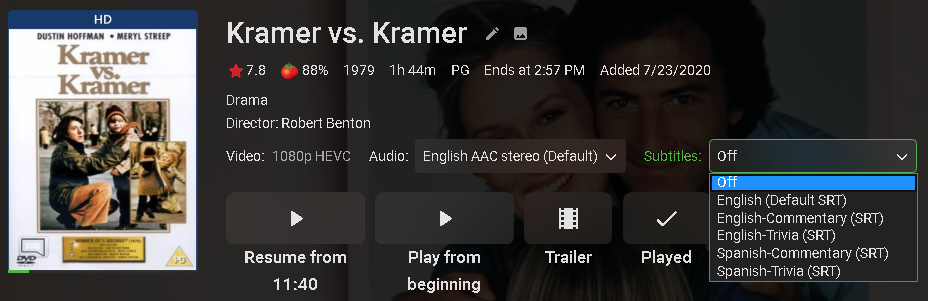
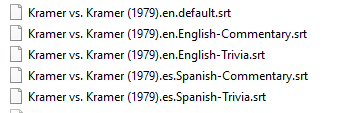
@Daniele can you post the information for the file, and 1) check if the audio is being transcoded (direct stream vs direct play), 2) check if seeking forwards/backwards also causes the subs to go out of sync? We have another thread where the subs go out of sync when audio is being transcoded and either you seek forwards/backwards or stop the video and then resume from where you left of.2 points
-
I am offended! I am offended that you came up with a more ambiguous and less precise definition than I did. Also I am offended that your example was funnier than mine. So you have doubly offended me. I doubt you can ever live down such offensive behavior.2 points
-
Be able to create playlist based on a certain criteria, like genre and or year, in order to create a dynamic playlist that it refreshes automatically when new content is added. This way you can for example, create a tv comedy playlist from the 90's, or a new sci-fi Movies playlist. Some other criteria for rules could be the rating, watched/unwantched, score, tags, language, audio codec, etc The possibilities could be endless1 point
-
I have a pretty big (2000+ items) movie library and i moved from a 2015 LG TV to a 2019 Model (65C97LA). With the old one the app was more or less unuseable - but the overall performance was bad so i did not really care. But with the new TV everything (including emby) is smooth but my movie library with over 2000 items is _very_ slow. It seems that you do lazy load the pictures but that the html items are already in place (just gussing) which seems to slow down the TV a lot. Would it be possible to improve the performance ? Splitting the libraries does not make much sense for me but propably you could insert pagination for 400 items or so like you do on the web "app" ? Or "just" enhance the performance with some coding magic? Thank you1 point
-
Hello. Would be great to be able to adjust subitiles delay in Emby Theatre or Web client like we can in VLC with "H" and "J" shortcuts (up and down). Thanks !1 point
-
Premise Emby is a media server which manages a media collection so the user does not have to do so. Basis for Feature Request Part of managing that collection is conversion to modern, appropriate media types that utilise better codecs, better encoding techniques. Presently people do most of this outside of Emby. Discussion The underlying tool being used for conversion is ffpmeg, see attached log. What I would like to see is an Advanced Conversion page which exposes some of these options to allow people to better manage their media conversion requirements. Then save these settings into a user-created named profile which can be exported or imported. This profile is then be applied it to a folder or file in the metadata of their collection. Doing so would initiate a conversion process with the settings of that profile. Benefits Current conversion options are limited. The Original Quality setting gives you files with 3MB/s bitrate from any source. Exposing more advanced options would allow the user to define specific conversion requirements and save them for use in their collection. The ability to export/import settings opens up a whole new class of community support. Conversion profiles can be shared between members and it is quite likely you will end up with a subculture of conversion expertise. As one person rightly said "giving advice on encoding is a lifetimes work" so its the community themselves who can do it best. Given the development of profiles and settings in a community of like minded people these can filter up to the Devs on which advanced features can be included in future releases. Reputation Given the right interest and gradual development Emby could easily become known for the best media management of all its competitors, something to distinguish itself in a competitive market. Devs Encoding and developing of such really is a work of passion. So its could easily become a pet project of some Dev to put together an advanced conversion page internally and slowly test out the options. Support Advanced encoding options are really out of scope when it comes to support. The core product does what it needs so if a forum is created for Advanced Conversion then right up front can be disclaimer that use of non standard profiles is at a users own risk. On the other hand, Emby devs working with the community are likely to develop some included advanced profiles that are supported when used for conversion. Thanks for listening. ffmpeg-transcode-a0dd4aa0-cce4-4e99-9e36-76d7599cc2e1_1 (4).txt1 point
-
Are you going to keep the latest beta on there too, or just stable? I assume that's stable at least1 point
-
Thanks for doing that. If that's what they say, then we'll submit the request again right now. Let's see what happens.1 point
-
https://play.google.com/store/apps/details?id=tv.emby.embyatv1 point
-
Yeah.. those "force transcoding" options are knives with blades at both ends. No matter how you try to use it you wind up cutting yourself. There is no other way to allow forced transcoding without allowing some of that dark side in. Where people don't understand why transcoding is happening. It is possible to show a different icon for subtitles when they are forced to burn in. We can keep debate ideas. I am just wanting the simplest, best, and most easiest to understand for everyone. I want the cow to jump over the moon. Hey diddle diddle. Someone get that cat a fiddle.1 point
-
We can probably do something quite similar using the same terms. The existing SSA/ASS burn option can be modified to do more. Let us see what we can do here to accomodate this. Thanks for bringing it up.1 point
-
They are aware of it but not too keen on fixing it since no streaming content has these. We are working on our own solution.1 point
-
Ah! So I accidentally figured this out. It's not a bug, more a usability thing. I'll give a description in case someone else gets this problem. So normally I use a physical media remote for the XBox; the volume control for that doesn't change the volume of the XBox output but of my surround sound speakers. Secondly, there's also the XBox app volume setting which is normally at 100%. (This is accessible by hitting the Guide button on your controller or remote, selecting the Emby app and pressing A - all it does is let you setting a comparable volume between the app and the XBox system sounds). Thirdly, I sometimes use the Emby app on Android to act as a remote control for XBox. That _also_ has a volume control setting. That volume control changes the level of the volume of the actual Emby XBox app. Raising or lowering the volume with that doesn't show up onscreen. As far as I know, there is no other way to the change the volume of the actual Emby app on XBox apart from this way. Anyway, what happened was at sometime in the past I was using the Emby Android app as a remote and lowered the volume to very low. So that was the default volume setting for Emby with no visibilty. So the "fix" was just to use the Android app to raise the volume again. A "fix" here would be to show that volume control in the Emby XBox app itself. (Unless of course it's there already and I just haven't seen it, in which case make it more prominent?) P.1 point
-
1 point
-
There are many professional (but free) tools out there that do a much better job than emby of converting media to whatever format you like and whatever settings you wish to set. Emby is a media player - it is not a full bells and whistles media convertor nor does it make claims to be one. If the format is incompatible for emby playback, then it's internal real time transcoding function will allow the file to be played. The Emby team (imo) should invest time in getting it's core playback functionality working perfectly - not side tracking into functionality, which given it's complexity, they will never match with other free tools out there. An option which I have floated before is ask Emby to produce the 'input' files for these other tools - thus automating the process, but at the same time, handing the responsibility of the conversion over to the more specialist tools.1 point
-
Wow, nice post Carlo! Talk about a precise, perfect answer! Thanks!1 point
-
You can do this but it's a bit of work. In a nutshell you edit each channel that you don't want to show and add a tag such as HideChannel or similar name. Then you edit the users who don't want all those "extra" channels and set a filter to not show anything with the tag HideChannel. So now your parents will get the whole lineup but you can only see the channels without the tag. Check out this knowledge base article which explains the tag part for the channels. https://support.emby.media/support/solutions/articles/44001921236-how-to-hide-specific-tv-channels-edit-parental-rating-or-set-tags There is a link in that article to the parental section as well which will show how to apply the tag. Let me know if anything is unclear and I'll add to the knowledge base article. Try it with a couple of channel to see if this works the way you want it to. Carlo1 point
-
Resolvido1 point
-
@MagnusDaMan Your issue is nothing to do with Music and the way metadata is used/loaded from them correct? Your issue is about using Collections for Movies and how changing folders names that contain movies affects your metadata correct? Collections names matter just like movie names matter as far as metadata goes. BOTH get information fetched from online medtadata providers. For example if you created a "Airport Collection" name and then put Snake on a Plane in that collection you would get weirdness because "Airport Collection" means this: https://www.themoviedb.org/collection/33938-airport-collection?language=en-US This is why "Western" needed to be changed to "Wild West Movies" so that there wasn't a collection by the same name in existence already with it's own metadata and meaning. You may want to install and try the Auto Box Plugin which will take the chore out making base collections for you complete with proper naming and all metadata. You can then add your own collections for directors or actors etc on top of them. Not understanding how the collections worked caused you to try and "fix" this by renaming folders on your system and moving movies around. This is NOT a good idea generally speaking as the parent folder name matters and is used to help determine the name of the movie. This knowledge base article goes over the basics of movie naming and folder use: https://support.emby.media/support/solutions/articles/44001159102-movie-naming So likely you haven't found any bugs, but discovered that Emby is trying to match things as it should based on your names (files, collections & folders) and replacing data and graphics based on your changing the names of things. Let's step back and get some information from you not on settings or configuration YET, but on what you are trying to achieve. Can you explain what you want to do or how you want your information presented? Carlo PS maybe a moderator can split this to it's own thread?1 point
-
merci, j'ai trouvé en regardant dans les logs! j'avvais un titre de film en français et un caractère spécial empechait le début du scan: massacre à la tronçonneuse, il ne voulait pas de la lettre "ç". j'ai renommé le film en anglais et le scan a démarré, merci --------- Thank you, I found it by looking in the logs! I had a film title in French and a special character prevented the start of the scan: "massacre à la tronçonneuse", he didn't want the letter "ç". I renamed the film in English, Texas Chainsaw Massacre, and the scan started, thank you.1 point
-
Try this. Create a new library say TV Shows2 with a brand new location. Move Simpsons season 1 only to that new location and scan. If it works do season 2, then 3, etc If this works it's a naming issue not just from Simpsons but in the library itself. 95%+ of time when I'm helping people it's naming , folders, files or permissions (things covered in the knowledge base) that are the issue, REGARDLESS of metadata. If you want help tomorrow the offer stands to PM. I can normally hunt down these issues pretty quickly.1 point
-
Working within the timeframe of a scheduled recording (picking say a one time sport event) and a personal desire (actually my spouse's desire) to see only one recording for that event, is it possible to on the fly "splice in" an 'Emby Stream Trouble' slide stream after the first second of stream failure. Let the recording continue with that slide up, while the server retries the stream on a sliding scale in the background. I don't think that the top end of the retry scale, say once every 2 minutes would be "hammering the provider". Then Emby would have a "complete" recording with no issues and the "user" would have one complete recording to search through and maybe find useable content. Showing my age here in picturing a typical user experience. A VHS recorder would record ABC Monday Night Football for the scheduled time in the VCR, no matter how many times the local ABC affiliate went off the air in a thunderstorm and/or how many times ABC network or the local affiliate put up a "Please Stand By... Network Trouble" slide. One just hit the FF button many times and hoped the "signal;" was there as the 4th quarter clock was running out. Oh, dang it... A tie score and overtime. Never saw the final score. Never blamed the VCR. One of the live local affiliate series streams I record is a network show at 6:30. Generally, but not always a complete 31 minutes. Always assumed a stream glitch, because when I check the stream about 8PM or so it is always there. I never blame Emby and never check the logs.1 point
-
Actually all I need is a reliable ff/rw/resume and the ability to browse by files and/or folders. I know Emby want to present this with all the bells and whistles and full metadata but while that might be nice it is important to me. I just want the ability to find and correctly play my audio books. Or they could just develop a MediaMonkey plugin that plays files from a MediaMonkey library. For me what they have now is perfectly acceptable if resume/ff/rw worked correctly.1 point
-
It's resolved for the next app update, which we're working on releasing. Thanks for the feedback.1 point
-
Added a warning about using menu steps to create sequences for Harmony, or other programmable remotes. The probability is hard to estimate, but since the sequence steps will execute from wherever focus is when executed, care and testing should be performed not only in the desired part of Emby, but throughout the app.1 point
-
The beta is usually always newer than the release.1 point
-
I like to think I do my bit to annoy people with daft suggestions to fix problems that don't exist while breaking stuff that works just fine...1 point
-
But you survived, still around to give history and change the shape of the future based on your accounts!1 point
-
Nah, I think you got it all wrong, let me see if I can help, Soon is like tomorrow, but in 24 hours, it's still not tomorrow as it will then be today. But since you know it'll be done tomorrow you can rest assured, since told yesterday that tomorrow it will be released. Of course that might give you a headache today thinking about it, but at least tomorrow it's yesterday's problem. LOL I know nothing about the release time frame but typically when you get a "soon" from Luke it's in the pipeline in some measurable way and not and idea or something planned for the future. Don't know how much help this was but you could check back soon for an update. Hope my sense of humor doesn't offend anyone!1 point
-
So things I found with meta data that may help you?: I have embedded meta data and cover art for music files and music video files put there by a tagging app I use (Tag & Rename/MP3Tag for example). I do NOT have enabled the option for getting metadata from an online provider for each of the libraries and only have thumb, logo, art enabled for the 'image fetchers' (and not tick the 'Primary' as this can overwrite cover art). This options are when you look at advanced setup under your music and/or music video library setup in Emby. You have to have 'SCREEN GRABBER' ticked under image fetchers in library setup options so embedded cover art can be retrieved else it won't be and you may have blank cover art or an incorrect image from what was there historically. To get the correct folder artwork to show up and re-read meta data from the information embedded in the file, I find I have to use REFRESH META DATA and tick the REFRSH IMAGES, and then do a REFRESH ALL METADATA again on the same item. If I then navigate back out and into the music album or music video again, the artwork is corrected to what was embedded in the file and display of the embedded ID3v2 tags is also shown.1 point
-
Apparently, with Emby Server v3.6, the software is moving forward with various aspects of the core server software becoming closed-source. The Emby devs say the reasoning for this is at least in part because they are implementing aspects of the software that are costing them money to develop or maintain. In response, there are people asking for refunds, and other people starting a project to create another open-source fork... And I'm sitting here thinking... why? Why does it matter? Open-source is not automatically better. And the fork not having features that facilitate the need for the devs to implement a pricing model like Premiere or some such just means those features won't exist. It doesn't make the forked software better for not having them. I don't see why, for a company who is developing a software package, to maintain some level of control over their codebase is worthy of demanding a refund. If you like the software, use it; if you don't, then don't.1 point
-
I am having this same issue. I have gone through the connection guide. Nothing seems to work. i have done the port forwarding. I am at a total loss of what to do. I have tried to access from inside and outside the network with the same results.1 point
-
Hi Luke, thanks for the response! I have gone through all of the trouble shooting steps. In network connections only work for my Macbook that is running the server. On other computers or through the Android app the server is detected but fails to connect. I have tried to manually enter the server and that fails as well. All are on the same wifi and I have the firewall turned off on my Macbook that is running the server. I opened the local port on my router and that does not make a difference as well. Any thoughts? Thanks!1 point