Leaderboard




Popular Content
Showing content with the highest reputation on 07/18/20 in Posts
-
This is one of those situations that proves one of the reasons we hate options :). The fact you don't see any options surrounding any other pass thru is because it is automatic. If your system supports it, it will "just work". The DTS options only exist due to some edge cases where we must either force or disable the passing of DTS. Ideally, those options will go away one day when all the hardware reports capabilities properly.3 points
-
I was extremely surprised to find that there is a statically coded limit set on search results in the web client especially when I found it's set so low as 30. For anyone with large libraries this makes the search almost useless. I have over 100 albums with the phrase "Now that's what I call music" in them. Trying to search those to give a limited subset of my music collection in order to check through them returned 30 of them and an apparently random 30 at that. I've manually upped the limit on my server to 130 in the javascript for now, but that's not exactly an ideal scenario and will get reset every time I upgrade. Please guys, let's have full paginated search results for any search term entered as with just about any other search system in the world. Please Pretty please with bells on?2 points
-
Sideloaded, problem fixed! Thank you all.2 points
-
Sounds like you are a slightly (only couple of versions) older beta?2 points
-
The GPU Hardware Encoding make things much nicer beside I can do 4+ transcode steam and doesn't take in count for all direct play. You could always up to i5 94002 points
-
X-plore2 points
-
I'd really like to have 2 Factor Authentication added to the login screen. It's just this (optional) extra layer of security to help secure the server (which, especially if people use camera uploads) contains pretty private data. There are for every type of programming language quite a few libraries available, so implementation on a server shouldn't be too hard to realise1 point
-
Feature Request: Have User Groups and all settings applied at the Group Level That way you can just assign users to the appropriate Group and all settings will be inheritated.1 point
-
Now for the embarrassing part - I'm always falling asleep watching something - then have a complete mind blank what i was watching the next day until the next episode is out and i realise im missing something. Would it be possible to add a 'recently watched' section where you can see all items you've recently viewed in order? Probably more applicable to TV I guess,1 point
-
I am switching over from a Win7 box running MBC to Chromecast dongles. With the Win7 box I had a HDMI to Cat6 setup that allowed me to stream to up to 4 displays/TVs simultaneously. It was great while it lasted, but involved stapling cables to the ceiling to run it from room to room - plus it has borked Can there be an option to multi-cast to several receivers at once? i.e. simultaneously play to Chromecast dongles in my office and living room and kitchen simultaneously so i can walk from room to room without stopping and restarting the movie or show all the time? I realize that bandwidth could POTENTIALLY be an issue, but i have a fill gigabit network and a multi-port NAS so that really is the least of my worries... Thank you!1 point
-
It would be great if i could set the server to delete certain shows after a user has watched it. I happen to watch "The Daily Show with Jon Stewart" and "The Colbert Report", everyday, and with "News"ish type shows, there is no need to keep the episodes around. So i would like to set MB to auto delete those 2 shows, 3 days after one user has watched it.1 point
-
The Mult-Select in the Server web app is super-useful (I'm so grateful to those that introduced me to it!). But given that the Server web app has some excellent filtering functions (eg, in my case I make use of filtering by Tags) it would be very handy to have a "Select All" functionality, so that I can filter down to the results I'm looking for and then easily add them to a Collection (or, when eventually we have Bulk Editing abilities, open a Bulk Edit view on all the Selected items). Thanks! PS - If this is something you might like to see implemented, be sure to "Like" this top/first post (as well as any subsequent posts in this thread that highlight particular aspects of what you are interested in) -- "Liking" the top/first post helps the Devs to know how much interest there is in a given Feature Request.1 point
-
A checkbox in the server settings somewhere to hide the domain and IP address in log files so they can be uploaded for troubleshooting without needing to be edited.1 point
-
One of the nice things about MBC is that empty TV folders (after the latest show is deleted) are hidden. This makes Emby look very smart. I know @@ebr wants to get rid of this feature from MBC as he sees that this is better as a server feature that can be applied to all clients. I agree. So what does it take to get this useful feature into the Emby server? I'm hoping that asking nicely is enough, I'm also hoping that enough other users consider this feature useful enough ot include in the server. How about it, @@Luke?1 point
-
I have noticed there is no way to configure the path used by Auto-boxset pliuging to create folders to hold created collections. Given this is, by default, under the Data folder within the install folder of Media Browser server, and the fact this is on my SDD drive, it would be great if this folder may be overriden to a custom path (the way other folders may be configured via the Control Panel).1 point
-
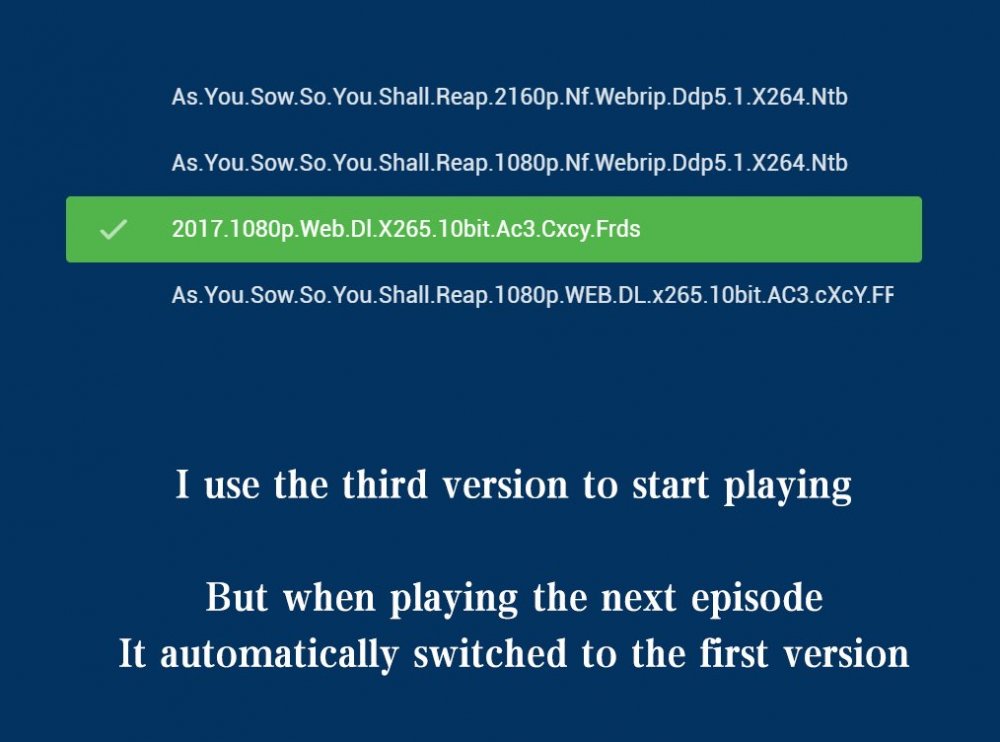
Please click "Like this" and share it if you want to support this feature. Thank you ! There are multiple versions of each tvshow in my library Some are 4K, some are 1080P, some are HDR, and some have subtitles every time when I paly a next episode, the first version of the default sort will be played automatically For this reason I was forced to quit playing, Then manually select the last version, Resume playing This is not what I want. I hope that when I play 2160P, the next episode will still be the 2160P version, not automatically switch to another(1080P) version,I need to exit playback, So I hope to switch the version during playback.
 1 point
 -
It would be nice if MBS could incorporate a Commercials.XML file generated from Comskip or ShowAnalyzer and use this to automatically skip over commercials in the web client. Ideally, I'd like to see this work like DVRMSToolbox's DTBAddin. You would have a setting in LiveTV for commercials location. During a media scan, it would match the .XML file name to a recorded TV file and generate the appropriate commercial markers based in the commercials files. When streaming from the web client, it would use this data to automatically bypass the commercials, but allow the user to go back if section was marked incorrectly. Option 1: Translate the commercials file into the chapter/scene markers. Users could manually skip to the next scene. Option 2: Make special commercial markers and automatically skip like DTBAddin Maybe this could expand later where you could have MBS scan files as well.1 point
-
Please read this post first. I was wondering if it would be possible to add something that would allow you to skip the intro to shows automatically while binge watching. When watching Netflix it does this for some shows, and im not sure if thats a feature of Netflix itself or a Chrome extension i use called "Flix Assist" but it would be a nice feature to have within Emby as well. and possibly even create a custom timed skip for specific shows1 point
-
hey what I'm really missing is support for audiobooks. Simply saving the resume point for those mp3s would be absolutely enough, no need to fetch metadata etc.1 point
-
To gauge interest... What if you had the ability to "Forget" a series for the purposes of Next Up display. That is, it would no longer show in Next Up - unless you watched another episode. Sometimes you maybe watch a series for a while and, even though there is more of it or more is made later, maybe it isn't as good as the earlier seasons or maybe you just don't have time for it anymore. So you'd like it to quit showing up in your Next Up list so it is less cluttered and you can focus on the series you are actually watching now. If you start watching it again, the "forget" would be forgotten and it would start to show up in Next Up again.1 point
-
Apologies if this feature is already there (or requested) somewhere. I'd like to know when emby is recording (or just using) a tuner. Perhaps at the top of the TV guide there could be small icons representing my tuners that change color when they're in use. I like the way nPVR's tray icon turns red when recording. I think it would be useful to know at a glance my available tuners are when I'm going through the TV guide via the Roku (or whatever device). That would also let me know how busy the system already is before I might start another stream/recording. It would also be sweet if each icon displayed exactly which tuner it represents, maybe having the last two digits of the tuners mac address displayed in the icon. Not sure if any of this would be possible. Hope this makes sense. Thanks, Bobby1 point
-
Being able to stop watching an active recording and resume where I left off, either later or on another device, is a key feature. The resume function on previously recorded files works great. Providing this same capability for active recordings would be great. Sports provide an easy scenario. I usually start watching 30 to 60 minutes after the start of the game so that I can skip over a lot of the dead time (commercials, time outs, etc.) and focus on the game. Over the course of a 3+ hour game, I inevitably have interruptions and often move my watching from one device to another. Today, the only way to support this is to stop/re-start recording, effectively creating a "resume" point. While effective, it's an annoying process. Enabling "resume" on playback of active recordings would make this seamless.1 point
-
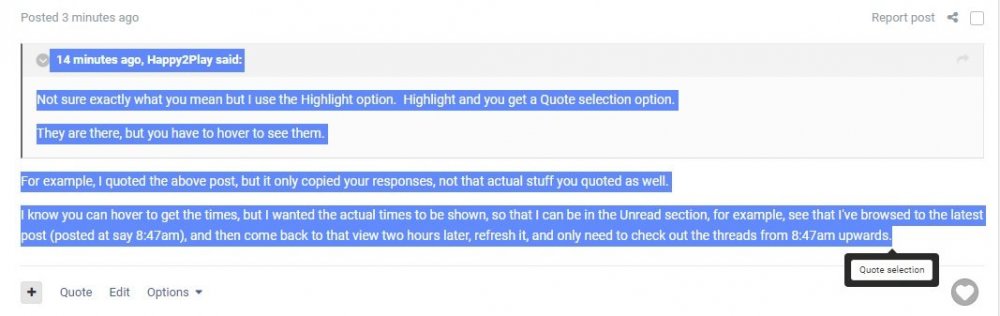
For example, I quoted the above post, but it only copied your responses, not that actual stuff you quoted as well. I know you can hover to get the times, but I wanted the actual times to be shown, so that I can be in the Unread section, for example, see that I've browsed to the latest post (posted at say 8:47am), and then come back to that view two hours later, refresh it, and only need to check out the threads from 8:47am upwards. I just highlighted everything and quoted selection
 1 point
 -
Can we have posts in threads numbered like they used to please.1 point
-
You don't have to sideload for this fix. Just join the Google beta and you will get the version that fixes this.1 point
-
Pressing back should be all you need to do. Perhaps @Spaceboy has experienced this.1 point
-
1) Using native player: Direct play of MKV files is not supported so direct streaming is used, but if MKV file is HEVC then transcoding is required because Emby uses HLS MPEGTS streaming. Apple requires HLS fMP4 for HEVC streaming and Emby does not support that That's the biggest difference with Plex. Plex supports HLS fMP4 and you can direct stream HEVC MKVs. 2) Using MPV player: You can direct play HEVC MKVs, but if item is HDR it looks ugly: Look at the post date, this problem is still present. I am a former Plex user and that is only what I miss. Developers: We need MKVs HDR HEVC support for Apple TV, please1 point
-
Did we rule that out already. LOL1 point
-
What you have to remember is that the hardware and the licensing the hardware manufacturer uses plays a big part of this. So the same software like Emby running on an Android TV, vs a MiBox S vs a Shield TV are going to get back different configurations of what is available to use. Then just because it COULD be supported doesn't mean it currently is depending on connection type. It can get a little confusing. I just happened to trip across and since had just posted here thought it might shed a bit of light on things even though it's not directly answering any questions. It's from https://www.nvidia.com/en-us/geforce/forums/discover/297989/-guide-audio-pass-through-hdmi-arc-physical-setup-settings/ Theory crash course Optical cables (also known as S/PDIF or TOSLINK) carries a digital audio stream to an AV receiver that can decode two channels of uncompressed lossless PCM audio or compressed 5.1/7.1 surround sound. Unlike HDMI, TOSLINK is limited to “vanilla” Dolby Digital and DTS, as it does not have the bandwidth to carry lossless audio codecs such as Dolby TrueHD, DTS-HD Master Audio, compressed codecs like Dolby Digital Plus/EAC3, or more than two channels of PCM audio. HDMI ARC (Audio Return Channel) allows for "upstream" and "downstream" signals over a single HDMI connection between two ARC-capable A/V devices. Compared to legacy optical cables, the flexibility of the HDMI standard allows additional audio formats to be transmitted over ARC but bandwidth is still very limited. At base level, its bandwidth of 1Mb/s allows HDMI ARC to deliver stereo audio and compressed 5.1 surround. It can be pushed to transmit Dolby Digital Plus and Atmos streams but that requires an extension introduced in 2016 called Common Mode that is not part of the base specification and must be actively supported by both the TV and AV receiver. However, bandwidth of standard HDMI ARC is still too limited for compressed 7.1 surround and even more so for lossless audio codecs such as Dolby TrueHD or DTS-HD MA. Additionally, ARC has a few more features that are only optional such lip sync correction, which has led to no small amount of confusion about its actual capabilities. For example, ARC implementations on some TVs can be limited to stereo sound, while others that do support surround can be highly inconsistent. You totally can see TVs that will pass 5.1 audio from the internal apps or TV tuner via ARC but will refuse to handle anything but stereo from the HDMI inputs. Codec stands for COder-DECoder. It's basically a bit of program used to reduce file sizes then play them back on the fly. Some of the most common audio codecs used in movies files these days are: DTS, Dolby Digital (AC3): heavily compressed and ancient Dolby Digital Plus (eAC3): compressed, much more recent revision. Very common on streaming platforms. Can carry Atmos metadata. DTS-HD MA: Lossless, very high quality codec. Dolby TrueHD: Lossless, very high quality. Can carry Atmos metadata as well. Shield can pass-through of all the mainstream codecs, but is not licensed to locally decode nor transcode of them. If the Shield detects that the device it is plugged into has the ability to handle the codec being used, the unaltered audio feed will be passed forward to be decoded out there. If it does not, Shield will simply fall back to basic decoding, and output a PCM 16bit stereo signal. In order to check the decoding formats ready to be passed forward by the Shield, go to Settings/About/Status/HDMI/Audio mode. Note that Netflix and Amazon Video exclusively output Dolby Digital Plus / EAC3. If you find out that your TV cannot pass-through this format via ARC, you might want to favor those services 5.1 audio over top of the line video and connect the Shield directly to the receiver instead of plugging it to the TV. If your AVR cannot decode DD+/eAC3 at all and is limited to vanilla Dolby Digital, there is a workaround available, but be aware that it requires root, which in turn will require you to unlock the bootloader, wipe everything on your Shield in the process. The exact same thing goes for 4K and HDR video. If the Shield detects whatever it is plugged into cannot handle HDR and/or 4K (AVRs and soundbars can have the ability to pass 4K but not HDR), it will automatically fall back to the next best thing supported by every element of the HDMI chain. In practice Let's take a look at the different possible setups. As you can see; Optical is completely outdated at this point and should be avoided at all costs Using ARC, you might have to choose between 4K HDR video or 5.1 audio from streaming services depending on the pass-through capabilities of your TV and AVR AVR with full 4K HDR pass-through capabilities is required to get the best (excellent) results eARC will improve on that by eliminating the need to have separate cables in both ways.1 point
-
Yes https://www.nvidia.com/en-gb/shield/shield-tv-pro/1 point
-
You better watch out!! The rest of the world must be wrong because all the important nations like The US, Myanmar and Liberia are clearly in the right and even use the imperial system instead of the confusing metric system. We must be right because we are. It is the divine right of pigheadedness. But even the rest of the world gets it wrong because of stupid things like leap years and the fact that in most calendars there was no year zero. We should just pick an event whose location in time can be exactly determined, something like an astronomical alignment or event that has a reasonable mathematical certainty, and count the days since then or, even better, the number of microseconds since then. Our methods of time and date calculations are so inaccurate as to be nearly meaningless for anything but the crudest applications. The people of the world need to awaken and free themselves from the claws of inaccurate time. You have nothing to lose but the chains of the past. But on a seriou note I wish we could all use the reverse of the European time: That is instead of "dd.mm.yyyy we should use yyyy.mm.dd That way dates would sort correctly without any modification and for older people like me we would not have to read more than four characters to find the important thing, what year it is. And don't even get me started on the stupidity of 12 hour clocks and time zones and daylight saving time. (If you want an extra hour of daylight then start tings one hour earlier.) Oh: "And don't call me Shirley."1 point
-
Yup, that is where I saw it and decided to give it a try. (page3 of the below thread) That leaves another 11 F keys that could be mapped to dedicated buttons/features.1 point
-
Infuse and Emby for Apple TV (mpv player) are similar, both use an MPV implementation for Apple TV, but Infuse implementation is far away from Emby implementation. The worst part is that the Emby mpv player has practically not evolved in the last year and there are no prospects for improvements in the short or medium term.1 point
-
Appreciate the work that has gone into the migration (being a moderator of a popular forum that migrated from vb to xenforo), but don't understand why Tapatalk - much better to just have a responsive theme that works on Mobile.1 point
-
Ok thanks for the feedback. Stay tuned for our upcoming revamped Hauppauge support which won't depend on WinTV anymore.1 point