Leaderboard




Popular Content
Showing content with the highest reputation on 07/16/20 in Posts
-
Yes works fine for me now thanks2 points
-
Hi. I'm not sure how "cheap" this box was but, yes, you are seeing some of the shortcomings of those types of devices. A $60 Mi box from Walmart is well worth it...2 points
-
I've just bought Shield Pro 2019 and I've got to say - it does not have the problems of ChromeCast Ultra I had (and returned) Thank you for the help, I hope you new guys will use this article as guidance as well. Ta-ta2 points
-
Would some kind of music service integration be on the cards, like plex has tidal (I like music videos, but plex handling is piss poor and very restrictive) on an official basis as opposed to people creating work arounds, I ask because I think the majority now use streaming services as opposed to keeping a music library locally (the opposite of habits with films and tv show stuff) and to access everything in 1 program would be quite simply awesome, I know this wouldn't be as simple as coding because there would I assume be a need for some kind d of commercial arrangement? Cheers1 point
-
Try it now.1 point
-
Got the updated version about an hour ago from app store. All java errors have now vanished from the event log. Good Work! Rew1 point
-
I have no idea why or how, but it is working now. I am only running the native file server that Beelink just added in it's recent update. I uninstalled the server app that I had downloaded. Now I can add any media files that are stored on the internal HDD from Emby...................1 point
-
That said, it effects two LiveTV Channels that I've found.. Another issue is I have to limit playback to 50Mbps which covers just about everything but HEVC which needs to be transcoded on the server. None of the TV's I have do HDR 4k anyhow so not a big deal but you'll need a decent server to transcode the streams if need be. Otherwise, I'm quite pleased with the MiBox s as it is much cheaper to run 6 of these in my house than ShieldTV's. I still use ShieldTV at my Family Room with my Panasonic VT60 Plasma and Denon 2312ci 7.1 AVR which works great. The SheildTV handles everything I throw at it without issue but it costs 4 times as much. I sold 6 ShieldTV's in the $200 range each and replaced them with MiBox s' about three months ago and am quite pleased. I know these issues have work arounds right now but for LiveTV you lose Closed Captions when transcoding the stream on the server. I expect some sort of fix may be forthcoming. I'm working with both Emby and Xiaomi on the issue but Xiaomi is giving me a bit of press back as you'll see in my linked Emby Forum thread above.1 point
-
Not a Trakt user, but I believe once the Trakt plugin is configured for each user the sync will just happen for each user per scheduled task.1 point
-
https://forum.silicondust.com/forum/viewtopic.php?f=119&t=730581 point
-
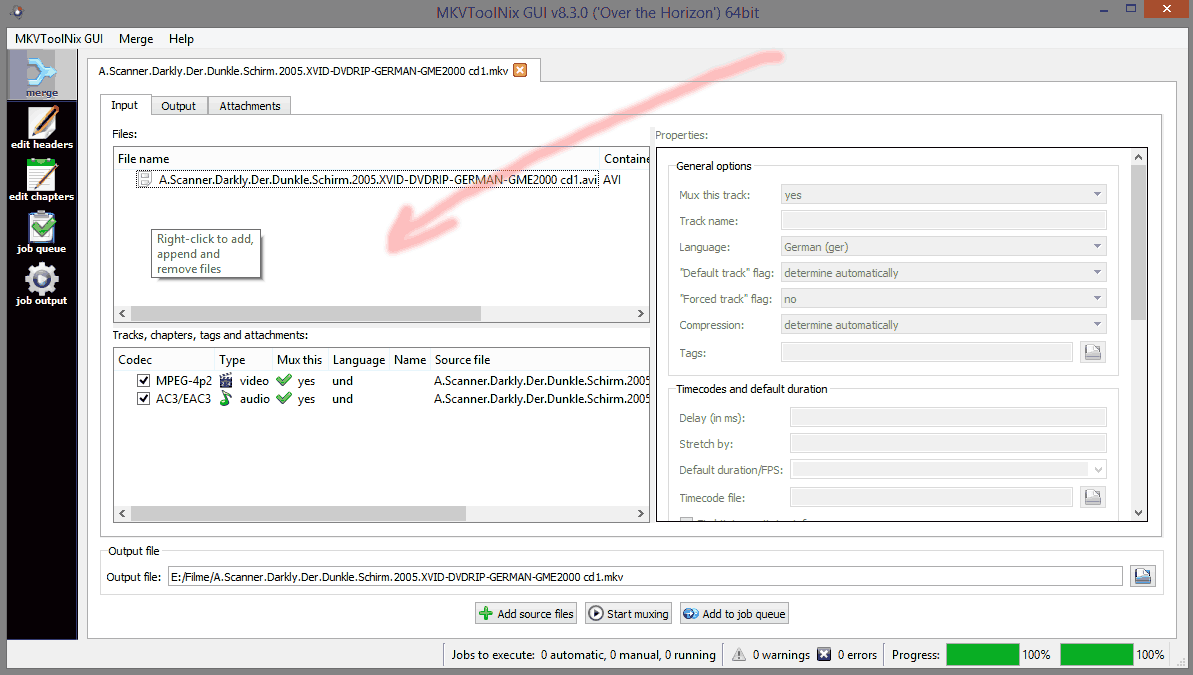
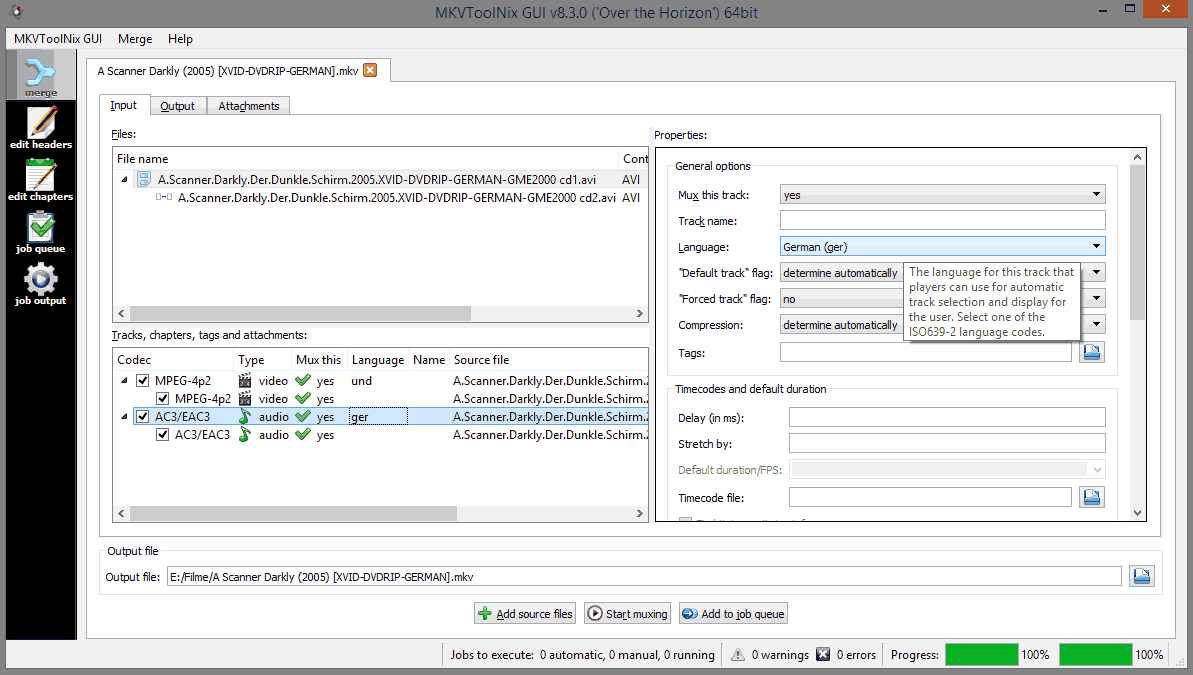
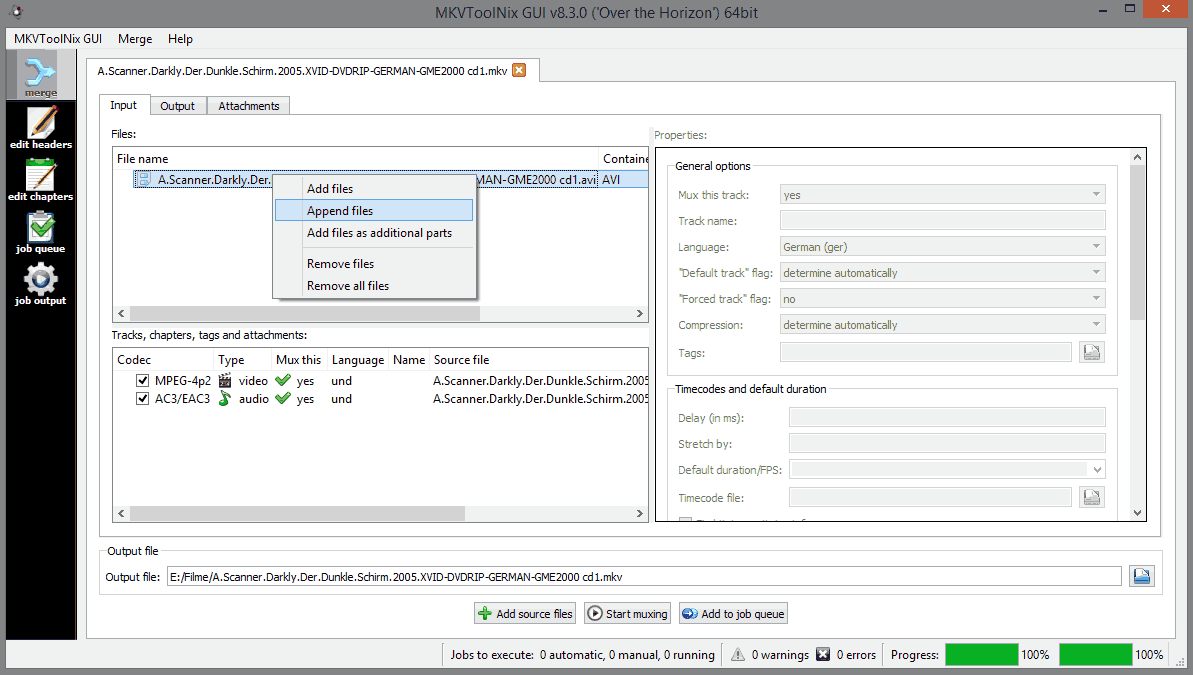
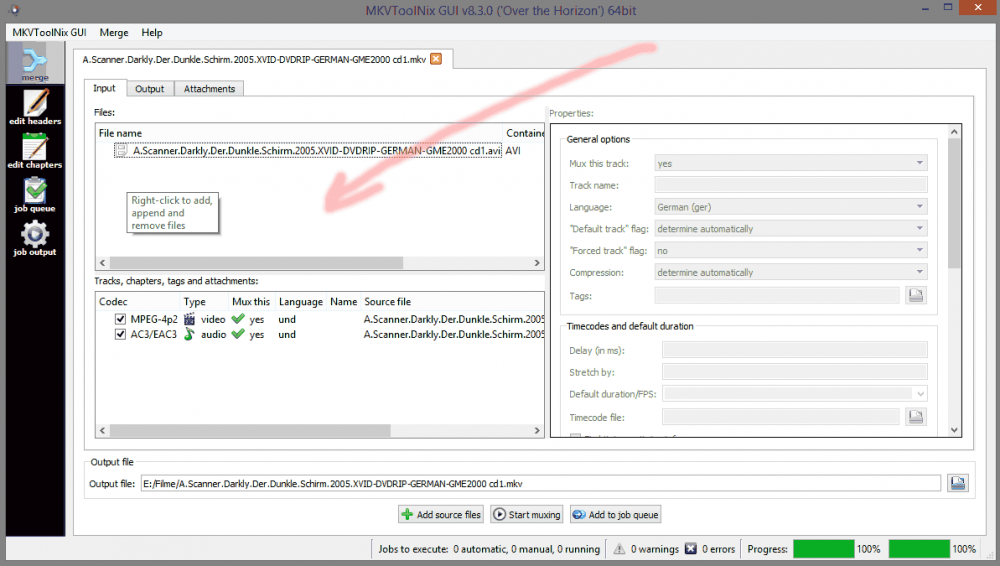
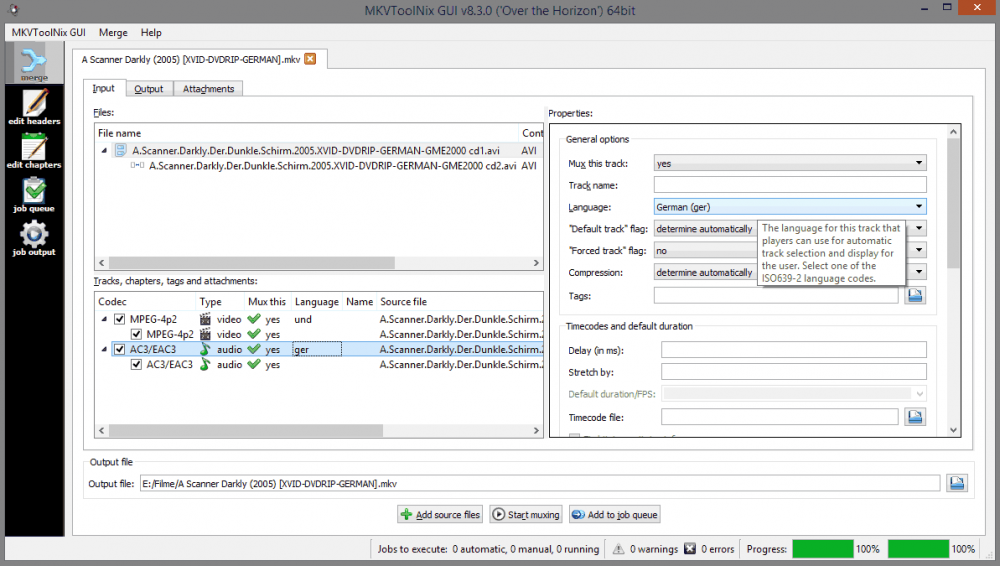
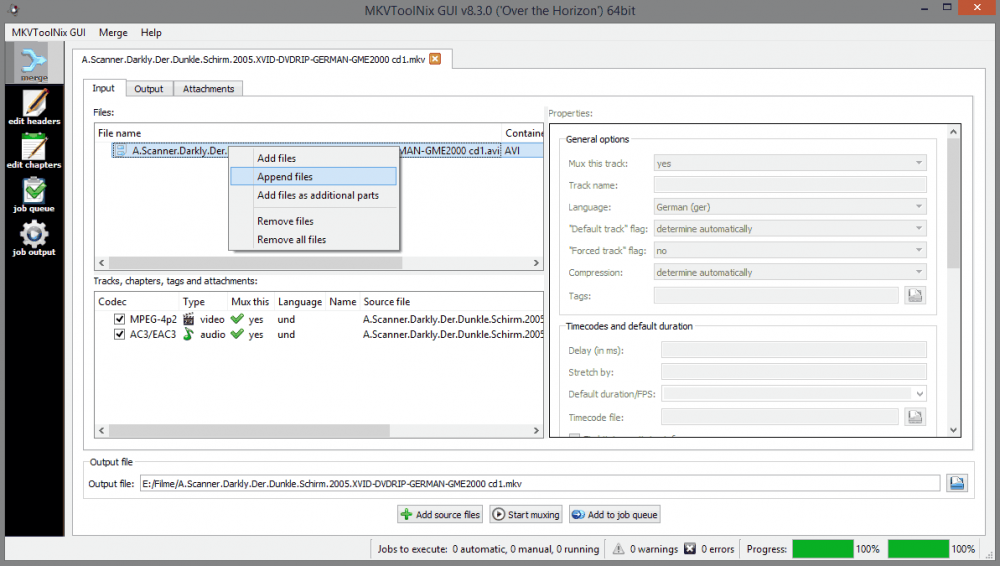
Here are some simple append instructions using mkvtoolnix start up MKVtoolnixGUI drag the first part file into the window marked by the arrow the video, audio and subtitle tracks it contains will appear in the window underneath it Right-click on the File name of the first part and choose ‘Append files’. Navigate to the file for the second part and select it. Your screen should now look like the screenshot below. Note, how the filename for the second part is ‘indented’. Correct anything you need to like defaults, languages, etc ‘Start Muxing’
 1 point
 -
@cayars / @serpi Thanks for the helpful responses. I will rename the superfluous folders with a leading dot instead of adding a .ignore file. Thanks for the tip. Last I checked, the debug logs had nothing related to trailer detection in them. For this movie, the Trailer button was always there; it previously loaded a YouTube video. In my testing over the past week, that's all I could ever get to happen, for some reason. But you're right, I tried it just now, and it plays all of the detected trailers in sequence. That's great; thanks. Moving the files over to the extras folder does not result in them showing up as Extras, with one exception: the one file with no "trailer" in its name does show up. So there are some notable differences between what the movie naming guide says and what Emby actually does. I did some more experimenting and figured out what is going on. Assuming this is all the intended behavior, it would be ideal if the Knowledge Base sections on trailers and movie/extras naming could include the following: Files are considered to be trailers if they are in a trailers folder, or the file name is the movie file name followed by -trailer, or the file name includes the word trailer preceded by a dash or space. Trailers will not show as Extras or Features in the Emby player; they are only playable via the Trailer button, where they will play in sequence and cannot be individually selected. If there are no trailers detected, the Trailer button may still appear, due to trailers designated in the movie metadata. Such trailers will not appear in Emby's metadata editor, but can be designated in NFO files. In the movie folder, the presence of subfolders with unrecognized names may interfere with the detection of extras and trailers. Move or rename such folders to begin with a leading dot, or add a .ignore file to them. I prefer the Trailer button only show me trailers for the movie itself. But I also want to see those trailers and any other trailers under Extras so I can individually play them. I think the simplest solution is to rename all of the trailers to begin with "trailer - " so they don't get detected as trailers. Just the movie trailers go in a trailers folder so they will be played with the Trailer button. The others go in the extras folder. I can then symlink or hardlink from the extras folder to the movie trailer files that I additionally want to show up under Extras: /trailers: trailer - West Side Story [1].mkv trailer - West Side Story [2].mkv trailer - West Side Story [3].mkv trailer - West Side Story [4].mkv /extras: trailer - Fiddler on the Roof DVD.mkv trailer - MGM Means Great Movies.mkv trailer - Some Like It Hot DVD.mkv trailer - The Last Waltz DVD.mkv trailer - West Side Story [1].mkv -> ../trailers/trailer - West Side Story [1].mkv trailer - West Side Story [2].mkv -> ../trailers/trailer - West Side Story [2].mkv trailer - West Side Story [3].mkv -> ../trailers/trailer - West Side Story [3].mkv trailer - West Side Story [4].mkv -> ../trailers/trailer - West Side Story [4].mkv /interviews: West Side Memories.mkv1 point
-
Ok, problem solved.....The crappy file server that Beelink was very, very basic..... I installed a samba app (SMB Lan drive), disabled the file server, now, everything fell into place............ This is the device that Beelink sent me to test...... I supports two 16 TB drives, internally....... The firmware is still in progress.1 point
-
In Windows explorer browse inside of the URL that you want to use and the copy the path (which should include the folder name) then add this to emby. Also check that the account that is running emby server has access to the folder share read/write.1 point
-
Support for this is planned for the future. Thanks.1 point
-
i use tital, play music and spotify either of them would be nice!1 point
-
After recently re-installing emby onto newly built servers i was horrified by the new dynamic collage genres and also discovered they had been re-sized (shows how often i use genres lol) This new abomination could not be allowed to exist (sorry @@Luke but they really are horrible) so i made same new 1:1 images using the old emby .psd from github, resized the layers etc.. and got the ones below. They may not be to everyone's taste but i like the clean look and they looked good on all the themes i checked them with, thought others might too, so have dropped them in a box for anyone who wants them... Grab them here. The .psd is there for anyone wanting to play and make their own, although i didn't use a background pic i did resize the activer layer and blacked it out so you can use a background colour or pic if you choose. If anyone wants transparent labels done to suit their libraries and has no access to photoshop then i am happy to do some up for you, just let me know what genres you need.1 point
-
agreed, I would say try once a minute for the remainder of the schedule1 point
-
Sorry for the late reply, but yes, you can fork it and publish it in the catalog, as long as I still have credits . And I'll try to do your suggestion as soon as I have some more time.1 point
-
So I was able to fix the issue by changing the default user from emby to my username in /etc/emby-server.conf I'm not sure why I've been able to use the server fine up to this point with the default user but now it's working fine.1 point
-
My concern would be movies with parenthetical titles. Not sure how many of those there are but I bet there are some. The standard for such things is pretty much square brackets. That's what we've been using for years and haven't had very many people with this paren problem. And, you'll need to find one of my rants on "just add it as an option" before you go there..1 point
-
If you see a blue border on your XBOX extender, the following may help (thanks to @@buddyweiser) . Open regedit on the PC extending to the 360's Navigate to the HKEY_USERS and take note of all of the users. Then, go to one of your xbox 360's and open windows media center. Leave it open, and return to your PC. At the top menu, click on View, and Refresh. Note if any new HKEY_USERS appear. If you have a new one, that is the registry for the xbox in question (NOTE: You might have to do this for each of your extenders). Once you have the registry for the xbox 360, you can then navigate to Software\Microsoft\Windows\CurrentVersion\Media Center\Settings\MCE.PerUserSettings.1 point