Leaderboard




Popular Content
Showing content with the highest reputation on 07/12/20 in Posts
-
Just tested and it's exactly how you said of course, but that a bit strange not applying meta-edit changes to all linked files or allowing edit of the individual files. I think I need to add this info as a note to the knowledge base on multi-version files.2 points
-
Not that I am aware of.2 points
-
Hi, I would like to have an option to choose H265 instead of H264 in the Transcode option. It will be smaller for all bad bandwidth (2~5Mbit ADSL), but will have a great quality. Mobile phone can benefit of it greatly too with the 4G and the limitation of download.1 point
-
Please read this post first. I was wondering if it would be possible to add something that would allow you to skip the intro to shows automatically while binge watching. When watching Netflix it does this for some shows, and im not sure if thats a feature of Netflix itself or a Chrome extension i use called "Flix Assist" but it would be a nice feature to have within Emby as well. and possibly even create a custom timed skip for specific shows1 point
-
Voici mes images pour la médiathèque.1 point
-
Permission issues are one of the biggest issues we troubleshoot in this section. Thankfully, with the release of FreeNAS 11.3 they've implemented a new featured called the ACL Manager. With this new feature, configuring permissions for your jails has never been easier! I've done up a quick how-to guide and attached. This is only for new jails created in 11.3. Anybody upgrading from an older version of FreeNAS that already has Emby installed will not need to follow this guide as they'd have already configured permissions under the old system. Emby File Permission Setup FreeNAS 11.3.pdf NOTE: To access the ACL in TrueNAS 12.0+ the location has changed slightly. You must go to Storage -> Pools, click the 3 dots beside your pool, select Edit Permissions. This will put you into the ACL Manager. All other steps are the same. I no longer use TrueNAS so I don't have screenshots, but anybody is free to update this document and provide screen shots if needed.1 point
-
Often times when I see "Reason for transcodng: Media bitrate exceeds limit." in the info I wonder, what kind of internet connection do they have? I know this can cover multiple scenarios like bandwidth limit set for user, server, client side quality setting, as well as AUTO bandwidth detection... Can you PLEASE add to the dashboard the returned client bandwidth capabilities? The value you are getting from the client that tells emby its bandwidth abilities. While you are at it tighten up the spaces between lines on the transcode items, and align the results to the right instead of center.. MAYBE SOMETHING LIKE THIS :1 point
-
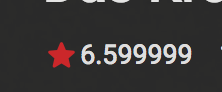
Some movies have an automatic rating like 6.599999 from the Internet but emby always highlight it as a wrong value if you ever edit the metadata. So maybe add a simple function to trim it to 6.5 or round up to 6.6 etc.
 1 point
 -
I have a consistent issue where the stream seems to start playing on web ui, roku, ios apps and jitters a little as if it's not buffering enough. Can we change the number of seconds to buffer for all devices? That would be key to getting good performance for playing live tv.1 point
-
Now that Google and Amazon are playing nice again and they've added the YouTube app back to Fire devices, can we get the trailer option added back to the FireTV emby app? Would make my life so much better as my wife constantly nags me that she can't watch a trailer to see what the movie is about lol.1 point
-
embyserver.txt Hey Guys, Sorry for the delay, I enabled debug mode, and clicked some stuff, then plugged the wheel and once I started clicking anything with the mouse in Emby the erratic behavior started, once I removed it, things went back to normal and I was able to go to settings to download the log. I was never able to reproduce the issue in Firefox 65.0.2, I tried multiple times, it works stable perfectly with and without the wheel connected. I will be using firefox for now. Thanks Guys, and I will still check the thread to assist if you need me to test anything.1 point
-
This thread have given me some ideas how to do this on my own using offline processing and leveraging the custom rating feature but it will be a kludge. I would be keen to discuss realistic options if anyone thinks this topic has enough merit but it seems so far at least everything on the table is non trivial and would need serious dev buy in which is never an easy thing to inspire. Thanks everyone for the feedback1 point
-
I found my problem. When I first set up my library, I didn't realize that I was supposed to to add the "root" directory that contained all of my shows and I was adding each show individually. I really appreciate you guys trying to help me out, Thank you!1 point
-
We need to revamp permissions related to collections and playlists. We will get there.1 point
-
It looks like either a mount issue or a permissions issue. What you're seeing when you type could be populated from your browser cache. If you visually scroll through the folder and you can't see anything they are either a) not mounted in the right spot or b) you don't have permission to read the files. Mounting has always been the easy part, permissions have always been more complicated. Fortunately, permissions in 11.3 are now incredibly easy. Check this post out:1 point
-
I'm continuing my request here because my thread was marked dup (I don't think it's exactly the same as this thread) I don't want to do a bunch of h.265 transcodes, I want to store h.265 chunks on disk during initial recording so all clients automatically get the h.265 stream and I've only spent the CPU once. post-process encoding means people watching live tv will still stream either the mpeg2 stream or have to use my hdhomerun's pretty crappy h.264 encoder (it's really aweful). post-processing is great for watching recordings but doesn't do anything for the live tv watchers. h.265 transcoding is a great feature, but I also really don't want multiple live tv viewers to completely crush the system doing these transcodes. If an h.265 transcoder is put in place please make sure the HLS chunks are available to all users for a single transcode and multi-playback.1 point
-
Or go back to the way it was before the update that changes Metadata manager. You pick the version that you want to change and change it directly. Personally, I do like Axeman's suggestion to have a drop down with an optional to "Apply to All"1 point
-
Buen día, Muchas gracias por las respuestas, si, ya tomé medidas de notificación y penalización los clientes que lo hagan1 point
-
Now that we're seeing hardware fast enough to encode H.265 reasonably, can we can H.265 support for recording in the DVR and transcoding for live TV?1 point
-
@xnappo would you mind to share your work/your scripts? I thought about something similar awhile ago but didn’t find the time to start yet. How did you accomplish to create all files without getting an API ban? How do you keep the files up to date (content is being removed regularly)?1 point
-
What about when you edit metadata, where it shows the file name, you have drop down to select which version to apply to, with an option to "apply to all". ?1 point
-
So the question here should be, should Emby write updates to all grouped media, or should the rule be split apart edit, then manually re-group? I can sort of see the conflict when you have grouped Cuts vs Versions as shown in the link in post 2. Unrated and Rated versions of media.1 point
-
I don't think it is currently possible as the UI only provides metadata for one version. Similar topic https://emby.media/community/index.php?/topic/80575-group-versions-and-parental-control/ Convoluted work around setting custom Rating via a Admin account Set custom rating for first item Set parental rating on Admin user Navigate to item again it should only show next multi-version item and set custom rating Now both items have a custom rating and should be filtered upon page refresh Depending on how many versions you have will determine how many times needed to be do. Or Split multi-version items apart and set each version custom rating, then use Multi-Select and regroup items.1 point
-
Have you checked out our convert media feature? You can convert to hevc after the recording has completed.1 point
-
It's tricky because it's the same url the video is playing from.1 point
-
It's still an issue. Like Frostbyte said, when skipping the subtitles still get desynced. embyserver.txt ffmpeg-remux-3dc55071-6165-4b9a-9ca3-ffc2a1bc3479_1.txt hardware_detection-63730111921.txt1 point
-
BTW, no need to delete bif files if the movie file hasn't changed. That will just cause Emby to regenerate it again when it didn't need to.1 point
-
In the end the solution was to create libraries named docu1 and docu2 docu 1 -movies (baraka recognized only like a movie ) docu 2 -series (planet earth\blue planet recognized only if is a tv series ) Thanks for your help @Riggs1 point
-
Hi there, this should be improved in the next update to the app. We'll add this for the next app update. Thanks.1 point
-
.avi files tend to be more problematic than other types. We are looking into improving it.1 point
-
Not yet, sorry. We have to build a special hack for this and we haven't completed it yet. Hopefully soon. Thanks for the feedback.1 point
-
Apparently a plugin needs to do the work you guys are not willing to do or to fix. It's really a shame there still is no solution from the Emby Devs for this issue - after months!1 point
-
OK good to know. Thanks for the update.1 point
-
Can I sponsor this feature, or co-sponsor it? I've just d/led my music from google play and am not going to organize it into folders (The d/l is just 1 massive folder). What can I do to help with this?1 point
-
Understand that, but I think there is still problem (don't know is it emby, docker or unraid related) If browser is kept open and in same size/position, there should not be need to resize poster image, right? But even in that case, image will be loaded from drive and encoded if drive is spin down when going back and forth emby libraries. If drive is not stopped, there is no image encoding in log file. Anyways, storing original size images in cache should solve all these problems. Big thumb up for that feature!1 point
-
0 points