Leaderboard




Popular Content
Showing content with the highest reputation on 07/09/20 in Posts
-
Can you add favorite channels to the favorite tab on ALL platforms? Right now I see favorite channels on Android TV, but not on any other platforms. I mainly use Android Mobile, so that would personally be my highest priority platform to add them to.2 points
-
My guess would be something about the connection is fooling the server into thinking it is local. That will cause it to not apply the internet limit. Luke is going to take a look at what may be going on here.2 points
-
Hey Luke Had pretty much walked away from this given the time frame. Settled for 3.0.06 as a workaround. However just tried the Test (3.0.12). Has Fixed my overlay issue and all else seems to be working just fine. Many thanks! Machine that had the issue has a i7-3610QM with Nvidia Optimus running Win10 64bit. No problem when using either: Nvidia GT 630M or Intel HD Graphics 4000. Hope this finds you and your family in good health.2 points
-
Not sure if this has been requested before, but i could not find anything in the forum. I think it would be nice to have a scrubbing (fast forward multiplier) feature in emby. Specifically in the Apps where all we have is a remote control. Or at least have the >| buttons on screen work. only the >> works and at a max of 30 seconds per skip. takes forever to get to say the middle of a movie. Background: We were watching a movie last night, toddler threw a tantrum so we stopped his movie. when he was calm he went to resume it, but, instead of hitting "OK" to resume he hit the "Play/Pause" button on the remote. It restarted the movie. the only way for us to get back to the 60% complete mark is hit the >> button over and over and over only going in 30 second increments. We use our MU8000 Samsung TV app 99% of the time.1 point
-
Hi as i can see the exoplayer is nearly to get a major update like allowing Dolby Vision from .mkv containers and looks like MKV standard it's nearly to support it and as soon the MKV get support for DV (Dolby Vision) exoplayer will be upgraded as soon. Mastroka Standard https://github.com/cellar-wg/matroska-specification/pull/390 ExoPlayer https://github.com/google/ExoPlayer/issues/7267 BTW, as I read I found than ts(Containers) and others already support (Dolby Vision). But I also would like than Emby add some transparent icon or something that display than the content is well in Dolby Vision and Atmos an Transparent icon/tag/logo for exemple at the beginning at the movie during 10 Seconds (Usually the time of the intro scene) and at the movie UI Wil be nice. FYI. MKVToolNix implement it in the next version https://gitlab.com/mbunkus/mkvtoolnix/-/issues/2784#note_335568674785a60fd09cfbbf3b873780a63a1513 So conclusion. Support Dolby Atmos + Vision with and logo/icon/tag whatever you want(I prefer a tag and a icon) on the movie, music UI to see than that movie have that support i also know than other concurrents are working on this implementation. So hope than emby is the first one. Nvidia Shield already support Dolby Vision and Atmos and many tv and sound bars support Atmos unfortunately there is no info on the movie,music UI to show us properly than the movie,music have Atmos and/or have Dolby Vision. And also create a filter to add this as a tag to select directly the movie have Atmos and/or Dolby or each one (Dolby Vision or Dolby Atmos) Like this. VOTE UP for this enhancement Kind regards1 point
-
The "Ends at" time on the item pages currently assumes you'll be starting from the beginning. If I'm partway through something I'd rather see the time it'll end if I resume, or possibly both times. The time it'll end if I start over doesn't help much if I don't intend on doing that.1 point
-
You need to login to your router, go to the port forwarding and setup one port forwarding rule. https://support.emby.media/support/solutions/articles/44001849007-connectivity If you're having trouble figuring this out install TeamViewer on your computer. Make sure you can login to your firewall in a browser. Start TeamViewer and PM me your Teamviewer account number and one time use password. I can help you set this up in 2 to 3 minutes especially if you are already logged into your router.1 point
-
Since you are logged in here you know your password, so you can change your password directly here on the forum. But as @cayars mentions the link you are showing is for a Local user to attempt to reset their local password. You need to select "Change Server", then "Sign in with Emby Connect", then "Forgot Password". http://app.emby.media/#!/startup/connectlogin.html What is the end goal? Changing your password or is there a issue connecting with your Connect account?1 point
-
That's a link for manual login. If you are using Emby Connect you want to login in using connect. If you're setup for Emby Connect click the change server link at the bottom then the Emby Connect button. But that will only work if you are setup on that server with Emby Connect. To change the password of the local server you will need to have the admin of that server change it for you. BTW, you may want to edit the message above and remove that link.1 point
-
Testing the beta version for the Fire TV, trailers working fine so far, thank you EBR1 point
-
XTeve has a few cool features that compliment Emby when using M3U files. Some of the notable things is that it can pull the M3U file, present it to you and allow you to mark channels as active or not. So it makes it easy to hide channels you don't want. You can "filter" and treat the filter as a group so anything in Spanish can be eliminated or channels from certain countries. You can assign or renumber the entries in the M3U files as well. That's just a few things but then you can have it sit in the middle between Emby and the service provider. So it can pull the M3U and make all your changes on the fly and then be able to hand off a new M3U file with your customization in it for ingesting into Emby Server. It also has an optional buffer that can help in certain situations but generally should be turned off. Features: https://xteve.de/ Limited Documentation https://github.com/xteve-project/xTeVe-Documentation/blob/master/en/configuration.md1 point
-
I downloaded drivepool with the freetrial and its exactly what i want, thanks for the advice will definitely buy the software.1 point
-
Is this happening inside your lan or from the Internet? Have you tried without the VPNBox or NGINX inline?1 point
-
I removed the bif file and did a new scan. everything is perfect now. thank you sir1 point
-
Make the request for all apps to handle this the same as Android TV by showing Live TV Favorites.1 point
-
Ok. Yea, I see that I can put the favorites at the top of the list in the guide, but they don't show up in the Favorites tab. On Android TV they do show up in the Favorites tab. I'll add it as a feature request.1 point
-
use the normal version not the cypher version1 point
-
According to the nVidia Shield page it supports WMA, WMA Lossless and WMA Pro, but Exoplayer does not. There is a ticket open on Exoplayer dev page to add WMA support, but it's at low priority I believe https://www.nvidia.com/en-us/shield/shield-tv/ Dolby Audio (Dolby Digital, Dolby Digital Plus, Dolby Atmos) DTS-X surround sound (pass-through) over HDMI High-resolution audio playback up to 24-bit/192 kHz over HDMI Audio support: AAC, AAC+, eAAC+, MP3, WAVE, AMR, OGG Vorbis, FLAC, PCM, WMA, WMA-Pro, WMA-Lossless, Digital Plus, Dolby Atmos, Dolby TrueHD (pass-through), DTS-X (pass-through), and DTS-HD (pass-through)1 point
-
not sure why you couldn't have posted your messages in the forum, there wasn't any personal info. I've just replied to you.1 point
-
Possibly, although it may have to be a much more limited buffer and some devices may not be able to support much.1 point
-
Hat sich erledigt. app nochmal de- und neuinstalliert. Jetzt geht es.1 point
-
1 point
-
I would suggest lowering the in-app quality setting so that the server will convert it to a lower bitrate. Please let us know if this helps. Thanks.1 point
-
Hey cayars, yeah, it gets used regularly by the kiddos to what shows. In that incident, we had a power outage that took the server and theater offline alone with the internet. Power came back, but internet was still out.1 point
-
I've made my own program to get the Pluto.tv streams and the guide information to create the m3u and xmltv files. Everything looks good, but the major hurdle is they are HLS streams and emby can't handle that. As soon as the program cuts to commercial, or renegotiates the bitrate or video size, then viewing stops. If I am missing something to address that issue, I am all ears. As far as alternate guide listings for the pluto channels, I haven't found much so right now I am left with 12 hours of guide on each "update".1 point
-
Thanks for the update!1 point
-
Yes I think @ebr needs to take a look at this.1 point
-
The returned protocol information is returning a really low bitrate for said connection. &VideoBitrate=9280001 point
-
luke obrigado por ajudar, depois de muito insistir consegui aqui era o navegador mesmo, aquele poup-up do navegador estava bloqueando a assinatura1 point
-
Thats out of date as MV do not show up on artist or album pages anymore not worked for months1 point
-
Hallo daar, nee, waarom denk je dit? Het moet dezelfde inhoud tonen die beschikbaar is in uw Emby-webapp.1 point
-
@gilbertovrb has this helped?1 point
-
Please try again with the next update to the app. Thanks.1 point
-
Hello, Cam Does your dad have Fire TV Stick 4K or non 4K version? I've noticed a lot of improvements to Emby App this past year and have no problem playing 4K content with Fire TV 2, Fire TV 3 and Stick 4K. There should not be any transcoding happening for those devices. Check, if there a bandwidth limit for emby account. If there is none, internet connection could be an issue. You can also disable transcoding on per user basis. If video refuses to play at all this might be client device, if video plays and keeps buffering all the time - this is bandwidth problem.1 point
-
I brought up this issue about a year ago, and its due to Emby using the LG player for playing video. Luke mentioned that they could possibly look into forced transcoding, but as of yet it hasn't been done. You can get around this and make the skip functionality work by lowering the video quality to something lower than the actual bitrate of the stream in Emby playback settings. Its definitely not an optimal solution, but unless and until the issue is addressed it is kind of a bandaid.1 point
-
@Luke @solabc16 has the package been updated for the new Geminilake processors?1 point
-
HI, yes it could be useful for collection management.1 point
-
Since when did it become "on trend" to have 15k of movies and their metadata in one folder?! Just change your downloader to put files in folders FFS. You sound like you're coming from 1980 when folders didn't exist?! I see fa benefit to having all of your media in one folder like you do?!1 point
-
Better question: should the Emby devs care if torrents die? Buy. Your. Movies. It all works just fine then.1 point
-
How does playing the same video in the web app compare?1 point
-
Yes, this is a good idea. The Android TV/Fire TV app has this now.1 point
-
Your NAS cpu is quite capable - but not that powerful - especially compared to the 9900k which is approx 6 times more powerful when comparing passmark values - so is not a valid comparison If you are getting buffering issues - very likely what you are transcoding is transcoding slower than realtime The container is not the issue has no effect on transcoding The codec does affect transcoding speed among other things like bitrate of the original file and if you are selecting subtitles etc etc You need to go over an example - with all details - more the better Also you need to provide an emby log and ffmpeg log for the example - as you have described only briefly what is happening but without any details1 point
-
Hi. There are a few topics on this. The issue is that, previously, it was impossible to sort the guide on channel name - due to tricks like what you had done with the sort title. Now we can sort on channel number AND name properly. The Roku app hasn't updated yet to allow you to sort by Name but we will get that in there in the next beta round. Thanks.1 point
-
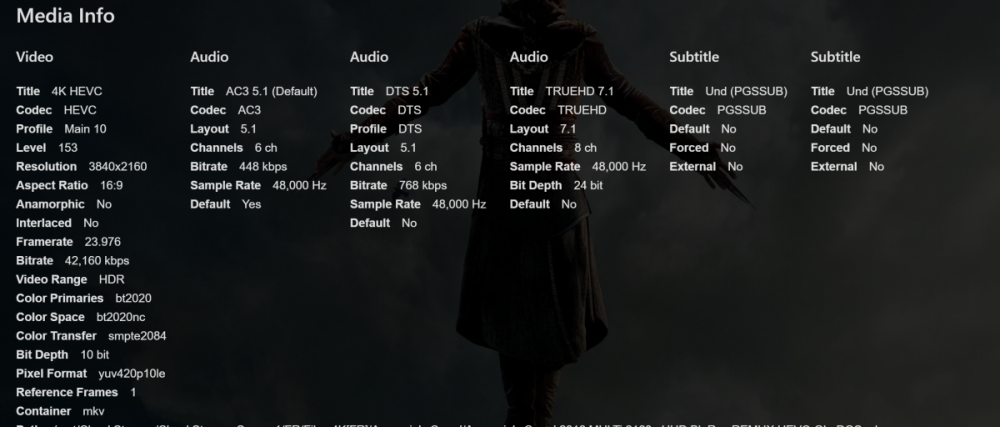
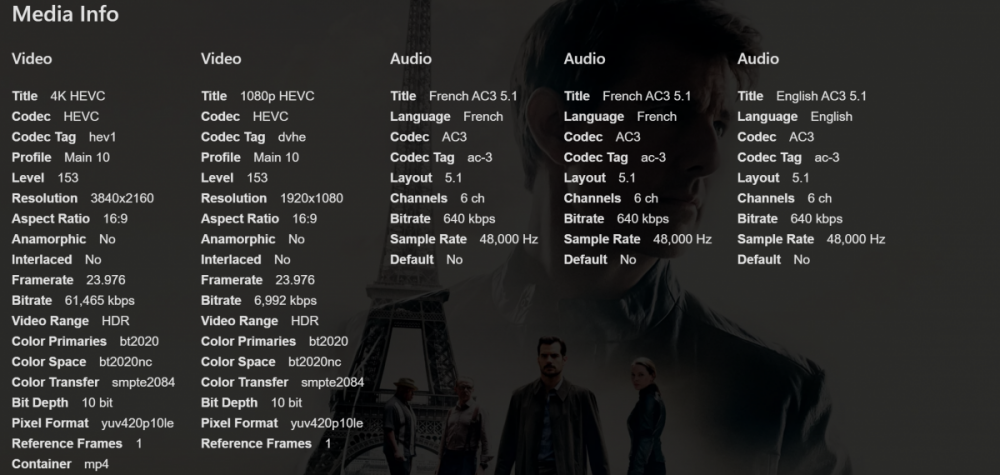
Hi everyone i have a issue with my Emby App well I tested 3 (Movies) two with Dolby Vision and 1 without Dolby Vision but with HDR10 So I tested the movies but the image are not good (Brightness/Darks colors) in HDR10 or Dolby Vision (Dolby Vision doesn't works) I tested without DV but with HDR10 and the result in bad quality of the movie is running, so the quality is very bad (Bright/dark) it's only shows me than the HDR10 is not working. Or at least compared with plex (ExoPlayer) the quality is less better in (Brightness/Dark) on Emby (LibMpv) So LibMpv < exoplayer in terms of brightness and darks color but when I open the stream with a VLC all colors as ok so it only proof than the LibMpv is not able to reproduce well the HDR10 because of their issues on the colors [Dolby Vision With LibMpv] i tried Dolby Vision but the screen still black and with plex works well, so i belive than the issue is from the (LibMpv) I really suggest to upgrade to Exoplayer. if possible. I guess than LibMpv Doesn't support MP4 Dolby Vision content so this is why i suggest moving to Exoplayer (Natively) cuz the Exoplayer run MP4 Dolby Vision withtout any issue in the quality. so i also noticed than the issue is really from the LibMpv cuz when i used "an external player" like VLC it worked well (Nice Brightness/Dark collors and etc...) [HDR10 2160p] the image still to be desirable because brightness and darks collor doesn't look at a real HDR10. i belive than it was a issue also with LibMpv. Tested With the follow movies HDR10 Dolby Vision (MP4) So Conclusion. I guess than LibMpv is not doing HDR10 / Dolby Vision as well on the plaformes where it was implemented. causing HDR10 dimming is bad on emby app My Suggestion. Emby Switch from LibMpv or talk with the LibMpv about this issue because mp4 already support Dolby Vision (Avalaible Only on MP4 and TS at this moment) and HDR10 is avalaible in all container (I guess) Issue: Bland colors instead of good colors as HDR10 Give us at normally Bad Dimming (Birghtness/Dark) colors. It just tell me than it not allow me to reproduce HDR10 but with exoplayer and vlc everything is ok on my Android and iOS. ScreenShot Plus many people enjoy more Exoplayer than others. @Luke Dolby Vision Demo files (MP4 Format) Glass Blowing @59.94fps: Dolby Vision Profile 5 UHD for iOS – Dolby Atmos Glass Blowing @59.94fps: Dolby Vision Profile 8.1 UHD – Dolby Atmos
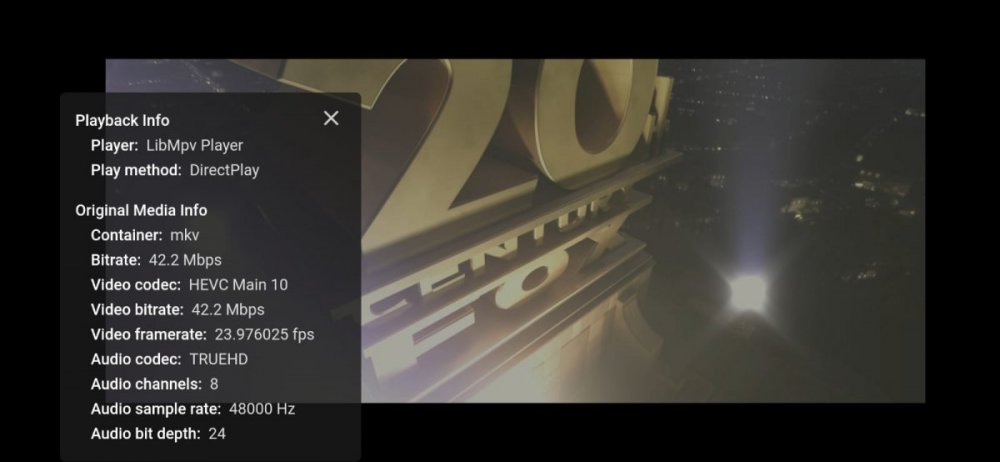 1 point
 -
Yes we are looking into improving it. Thanks for the feedback.1 point
-
More of a FYI about the metadata path error reported earlier. I got this on a test machine adding the plugin today. All I had to do is go to Library-Advanced and hit Save without changing anything and it resolved the issue. 2020-06-08 17:00:20.092 Info HttpServer: HTTP POST http://localhost:8096/emby/CustomFix/FixTMDBPeople. UserAgent: Mozilla/5.0 (Windows NT 10.0; Win64; x64) AppleWebKit/537.36 (KHTML, like Gecko) Chrome/83.0.4103.97 Safari/537.36 Edg/83.0.478.45 2020-06-08 17:00:20.104 Error HttpServer: Error processing request *** Error Report *** Version: 4.4.3.0 Command line: C:\Users\Media\Desktop\Stable\system\EmbyServer.dll -noautorunwebapp Operating system: Microsoft Windows NT 6.2.9200.0 64-Bit OS: True 64-Bit Process: True User Interactive: True Runtime: file:///C:/Users/Media/Desktop/Stable/system/System.Private.CoreLib.dll System.Environment.Version: 3.1.4 Processor count: 4 Program data path: C:\Users\Media\Desktop\Stable\programdata Application directory: C:\Users\Media\Desktop\Stable\system System.NullReferenceException: System.NullReferenceException: Object reference not set to an instance of an object. at TMDBPeopleFix.FixerService.Post(FixTMDBPeopleX result) at Emby.Server.Implementations.Services.ServiceController.<>c__DisplayClass6_0.<VoidActionDelegate>b__0(Object service, Object request) at Emby.Server.Implementations.Services.ServiceController.Execute(HttpListenerHost appHost, Object requestDto, IRequest req) at Emby.Server.Implementations.Services.ServiceHandler.ProcessRequestAsync(HttpListenerHost appHost, IRequest httpReq, IResponse httpRes, RestPath restPath, String responseContentType, CancellationToken cancellationToken) at Emby.Server.Implementations.HttpServer.HttpListenerHost.RequestHandler(IRequest httpReq, ReadOnlyMemory`1 urlString, ReadOnlyMemory`1 localPath, CancellationToken cancellationToken) Source: TMDBPeopleFix TargetSite: Void Post(FixTMDBPeopleX) 2020-06-08 17:00:20.104 Info HttpServer: HTTP Response 500 to ::1. Time: 12ms. http://localhost:8096/emby/CustomFix/FixTMDBPeople 4.4.3.0 1.0.0.1361 point
-
@@Luke This is the info i get when demuxed an remux to mkv Source: Oceans.Eight.2018.MULTI.COMPLETE.UHD.BLURAY-EXTREME eac3to v3.34 command line: eac3to.exe D:\Oceans.Eight.2018.MULTI.COMPLETE.UHD.BLURAY-EXTREME\BDMV -demux ------------------------------------------------------------------------------ M2TS, 2 video tracks, 4 audio tracks, 13 subtitle tracks, 1:50:10, 11.990p 1: Chapters, 12 chapters 2: h265/HEVC, 2160p24 /1.001 (16:9), 10 bits 3: h265/HEVC, 1080p24 /1.001 (16:9), 10 bits - Dolby Vision Enhancement Layer 4: TrueHD/AC3 (Atmos), English, 7.1 channels, 48kHz (embedded: AC3 EX, 5.1 channels, 640kbps, 48kHz, dialnorm: -27dB) 5: AC3, Japanese, 5.1 channels, 640kbps, 48kHz, dialnorm: -27dB 6: TrueHD/AC3 (Atmos), French, 7.1 channels, 48kHz (embedded: AC3 EX, 5.1 channels, 640kbps, 48kHz, dialnorm: -27dB) 7: AC3, Hungarian, 5.1 channels, 640kbps, 48kHz, dialnorm: -27dB 8: Subtitle (PGS), Japanese 9: Subtitle (PGS), English 10: Subtitle (PGS), Japanese 11: Subtitle (PGS), French 12: Subtitle (PGS), Dutch 13: Subtitle (PGS), Croatian 14: Subtitle (PGS), Modern Greek 15: Subtitle (PGS), Hungarian 16: Subtitle (PGS), Portuguese 17: Subtitle (PGS), Romanian 18: Subtitle (PGS), Turkish 19: Subtitle (PGS), French 20: Subtitle (PGS), Hungarian Creating file "00014 - Chapters.txt"... [v02] Extracting video track number 2... [s13] Extracting subtitle track number 13... [s10] Extracting subtitle track number 10... [a04] Extracting audio track number 4... [a04] Removing AC3 dialog normalization... [s15] Extracting subtitle track number 15... [s14] Extracting subtitle track number 14... [s09] Extracting subtitle track number 9... [s20] Extracting subtitle track number 20... [s11] Extracting subtitle track number 11... [s17] Extracting subtitle track number 17... [s12] Extracting subtitle track number 12... [a05] Extracting audio track number 5... [a05] Removing AC3 dialog normalization... [s19] Extracting subtitle track number 19... [s16] Extracting subtitle track number 16... [s08] Extracting subtitle track number 8... [a07] Extracting audio track number 7... [a07] Removing AC3 dialog normalization... [a06] Extracting audio track number 6... [a06] Removing AC3 dialog normalization... [s18] Extracting subtitle track number 18... [v02] Creating file "00014 - 2 - h265, 2160p24.h265"... [a06] Creating file "00014 - 6 - TrueHD+AC3 (Atmos), French, 7.1 channels, 48kHz.thd+ac3"... [a04] Creating file "00014 - 4 - TrueHD+AC3 (Atmos), English, 7.1 channels, 48kHz.thd+ac3"... [a07] Creating file "00014 - 7 - AC3, Hungarian, 5.1 channels, 640kbps, 48kHz.ac3"... [a05] Creating file "00014 - 5 - AC3, Japanese, 5.1 channels, 640kbps, 48kHz.ac3"... [s09] Creating file "00014 - 9 - Subtitle (PGS), English.sup"... [s14] Creating file "00014 - 14 - Subtitle (PGS), Modern Greek.sup"... [s15] Creating file "00014 - 15 - Subtitle (PGS), Hungarian.sup"... [s13] Creating file "00014 - 13 - Subtitle (PGS), Croatian.sup"... [s16] Creating file "00014 - 16 - Subtitle (PGS), Portuguese.sup"... [s17] Creating file "00014 - 17 - Subtitle (PGS), Romanian.sup"... [s18] Creating file "00014 - 18 - Subtitle (PGS), Turkish.sup"... [s11] Creating file "00014 - 11 - Subtitle (PGS), French.sup"... [s12] Creating file "00014 - 12 - Subtitle (PGS), Dutch.sup"... [s08] Creating file "00014 - 8 - Subtitle (PGS), Japanese.sup"... [s20] Creating file "00014 - 20 - Subtitle (PGS), Hungarian.sup"... [s10] Creating file "00014 - 10 - Subtitle (PGS), Japanese.sup"... [s19] Creating file "00014 - 19 - Subtitle (PGS), French.sup"... Video track 2 contains 158450 frames. Video track 3 contains 158450 frames. Subtitle track 8 contains 1464 captions. Subtitle track 9 contains 1763 captions. Subtitle track 10 contains 86 captions. Subtitle track 11 contains 1476 captions. Subtitle track 12 contains 1099 captions. Subtitle track 13 contains 1620 captions. Subtitle track 14 contains 1651 captions. Subtitle track 15 contains 1658 captions. Subtitle track 16 contains 1634 captions. Subtitle track 17 contains 1486 captions. Subtitle track 18 contains 1644 captions. Subtitle track 19 contains 40 captions. Subtitle track 20 contains 67 captions. eac3to processing took 27 minutes, 24 seconds. Done. ------------------------------------------------------------------------------ Format : Matroska Format version : Version 4 File size : 50.4 GiB Duration : 1 h 50 min Overall bit rate mode : Variable Overall bit rate : 65.5 Mb/s Movie name : Oceans.8.2018.Multi.Truefrench.2160p.Bluray.Remux.HEVC-ONLY Encoded date : UTC 2020-06-02 08:59:53 Writing application : mkvmerge v47.0.0 ('Black Flag') 64-bit Writing library : libebml v1.3.10 + libmatroska v1.5.2 Video ID : 1 Format : HEVC Format/Info : High Efficiency Video Coding Format profile : Main 10@L5.1@High HDR format : SMPTE ST 2086, HDR10 compatible Codec ID : V_MPEGH/ISO/HEVC Duration : 1 h 50 min Bit rate : 58.3 Mb/s Width : 3 840 pixels Height : 2 160 pixels Display aspect ratio : 16:9 Frame rate mode : Constant Frame rate : 23.976 (24000/1001) FPS Color space : YUV Chroma subsampling : 4:2:0 (Type 2) Bit depth : 10 bits Bits/(Pixel*Frame) : 0.293 Stream size : 44.9 GiB (89%) Title : MPEG-H HEVC Video @58345 kbps / 2160p / 23.976 fps / 16:9 / Main 10 @ Level 5.1 @ High / 4:2:0 / 10 bits / HDR10 / BT.2020 Language : French Default : Yes Forced : No Color range : Limited Color primaries : BT.2020 Transfer characteristics : PQ Matrix coefficients : BT.2020 non-constant Mastering display color primaries : Display P3 Mastering display luminance : min: 0.0050 cd/m2, max: 4000 cd/m2 Maximum Content Light Level : 1360 cd/m2 Maximum Frame-Average Light Level : 92 cd/m2 Audio #1 ID : 2 Format : MLP FBA 16-ch Format/Info : Meridian Lossless Packing FBA with 16-channel presentation Commercial name : Dolby TrueHD with Dolby Atmos Codec ID : A_TRUEHD Duration : 1 h 50 min Bit rate mode : Variable Bit rate : 2 893 kb/s Maximum bit rate : 4 125 kb/s Channel(s) : 8 channels Channel layout : L R C LFE Ls Rs Lb Rb Sampling rate : 48.0 kHz Frame rate : 1 200.000 FPS (40 SPF) Compression mode : Lossless Stream size : 2.23 GiB (4%) Title : VFF TrueHD 7.1 @2893 kbps Language : French Default : Yes Forced : No Number of dynamic objects : 11 Bed channel count : 1 channel Bed channel configuration : LFE So as you can see on Nº3 you are not able to put Dolby Vision Single Layer on Mastroka format with my build (But some users have done it already with the codec MpegH HEVC Main10@L5.1 (dvhe.07.06 BL+EL+RPU FEL). For now, but still to be implemented on exoplayer and it will be in mkv standard nearly. on the other hand with mp4 you are allready able to read Dolby Vision (NOTE: Looks like there are 2 Videos Ouput one 1080p and other 2160p) General Complete name : Days of Thunder 1990 UHD BluRay DolbyVisionMP4-HDR 2160p EAC3 H265-d3g.mp4 Format : MPEG-4 Format profile : Base Media / Version 2 Codec ID : mp42 (mp42/isom/hev1/dby1) File size : 47.5 GiB Duration : 1 h 47 min Overall bit rate : 63.3 Mb/s Movie name : Days of Thunder Performer : Tony Scott Performer/Sorted by : Tony Scott Genre : Adventure & Action & Romance & Drama Description : Talented but unproven stock car driver Cole Trickle gets a break and with the guidance of veteran Harry Hogge turns heads on the track. The young hotshot develops a rivalry with a fellow racer that threatens his career when the two smash their cars. But with the help of his doctor, Cole just might overcome his injuries-- and his fear. Recorded date : 1990 Encoded date : UTC 2020-05-22 03:43:19 Tagged date : UTC 2020-05-22 03:48:49 Writing application : DVDFab 11.0.8.8 Video #1 ID : 1 Format : HEVC Format/Info : High Efficiency Video Coding Format profile : Main 10@L5.1@High HDR format : SMPTE ST 2086, HDR10 compatible Codec ID : hev1 Codec ID/Info : High Efficiency Video Coding Duration : 1 h 47 min Bit rate : 56.5 Mb/s Width : 3 840 pixels Height : 2 160 pixels Display aspect ratio : 16:9 Frame rate mode : Constant Frame rate : 23.976 (24000/1001) FPS Color space : YUV Chroma subsampling : 4:2:0 (Type 2) Bit depth : 10 bits Bits/(Pixel*Frame) : 0.284 Stream size : 42.4 GiB (89%) Encoded date : UTC 2020-05-22 03:43:19 Tagged date : UTC 2020-05-22 03:48:42 Color range : Limited Color primaries : BT.2020 Transfer characteristics : PQ Matrix coefficients : BT.2020 non-constant Mastering display color primaries : Display P3 Mastering display luminance : min: 0.0001 cd/m2, max: 1000 cd/m2 Codec configuration box : hvcC Video #2 ID : 2 Format : HEVC Format/Info : High Efficiency Video Coding Format profile : Main 10@L5.1@High HDR format : Dolby Vision, Version 1.0, dvhe.07.06, EL+RPU, Blu-ray compatible / SMPTE ST 2086, HDR10 compatible Codec ID : dvhe Codec ID/Info : High Efficiency Video Coding with Dolby Vision Duration : 1 h 47 min Bit rate : 6 361 kb/s Width : 1 920 pixels Height : 1 080 pixels Display aspect ratio : 16:9 Frame rate mode : Constant Frame rate : 23.976 (24000/1001) FPS Color space : YUV Chroma subsampling : 4:2:0 (Type 2) Bit depth : 10 bits Bits/(Pixel*Frame) : 0.128 Stream size : 4.77 GiB (10%) Encoded date : UTC 2020-05-22 03:43:19 Tagged date : UTC 2020-05-22 03:48:42 Color range : Limited Color primaries : BT.2020 Transfer characteristics : PQ Matrix coefficients : BT.2020 non-constant Mastering display color primaries : Display P3 Mastering display luminance : min: 0.0001 cd/m2, max: 1000 cd/m2 Codec configuration box : hvcC+dvcC So on mp4 you are allready able to see mp4 dolby vision video formats not sure than emby support it allready But when exoplayer get merged the MKV DV Support, don't forget to put some tags/logo on Movie UI and add the Media Info like i describe bellow on Movies Info,Filters.There are tag missing in filters such as HDR,HDR10,HDR10+,Dolby Vision,Dolby Atmos and just to remember if you can (But i thought you/or the developers, can do it) add some tags to be sure than the movie is running on the Playback is in 4K,HDR,HDR10,DV(Dolby Vision),Dolby Atmos put it above the progress bar on the playback menu but somewhere more explicit instead of using the stats for nerds, just use something like(E.g Bellow) this but green like the emby theme, and something in the info to know than the movie is HDR, HDR10, Dolby Vision,Dolby Atmos, I guess (Not sure at 100%) than it only show 4K not HDR/HDR10/HDR10+ or even Dolby Vision, Dolby Atmos. Conclusion: Add a tag/logo 4K,HDR,HDR10,DV(Dolby Vision),Atmos on the Movie UI (On the Playback menu "where you have that progress bar,parameters etc. *image bellow ") Grab the Info on the Media Info like HDR,HDR10,HDR10+,DV(Dolby Vision),Dolby Atmos (No logo needed at this part) Add Filter for HDR,HDR10,HDR10+,DV(Dolby Vision),Dolby Atmos. This is an e.g about that tag/logo for i request also for 4K,HDR,HDR10,DV(Dolby Vision),Atmos Regards i will try to keep and try to update this post when the exoplayer get merged something regarding the Dolby Vision1 point
-
Hi, yes we will support this everywhere we can. Thanks for the info on exoplayer.1 point
-
I have an HDHomeRun at I am trying to get guide data using the new emby guide data source. I chose my country and select "Emby Guide Data". Next I get asked for a postcode, I have tried entering this in a number of formats but always get the error "There was an error downloading TV lineups. Please ensure your information is correct and try again." Where am I going wrong with this?1 point
-
As you mentioned POSTCODE, I assume you're in the UK ? If so, just enter the first part of the POSTCODE, so XX01, rather than XX01 9ZZ.1 point