Leaderboard



Popular Content
Showing content with the highest reputation on 07/04/20 in Posts
-
I know the answer to this is probably going to be no..... ...but.... A standalone music player for iOS would be very useful. Trying to get the wife to use the full client for music is just not happening. Something that was simple and intuative and quick and easy to use would be killer, something like spotify. The simpler the app is to use, the better. If all else fails, I have a project that's on the back burner that was an iOS music player for subsonic, but I could always target emby as well. It had an spotify a-like interface. Screenshot from as far as I got with the UI, it was playing back music from the server.1 point
-
Hi, It would be helpful if you add collections to search results. If you have a few hundred collections, it become a chore to find what you are looking for by sorting through them manually. The same argument could be made for Genres, specially with genre cleaner plugin and Emby's ability to handle custom genres. Optional: If polluting the results is an issue then perhaps a search syntax could be added that you can type in the search box to make the results more specific. example; collections: search-query (only returns the results from collection) genres: search-query (only returns the results from genres) custom-media-library: search-query (only return the results from that specific library) Thanks,1 point
-
We can look into a border option. Thanks for the feedback.1 point
-
Correct yes.1 point
-
Parece que ese es justo el problema, el plugin "Limpiador de géneros", en el tenía metico "Ciencia Ficción" y hacía que no me saliese, al parecer tiene que ser exactamente "Ciencia ficción" con la F en minúscula. Ahora con actualizar los metadatos faltantes, se me están añadiendo en todas las películas. Gracias a todos por las respuestas. _______________________________________________________________________________________________________________ It seems that this is just the problem, the "Genre Cleaner" plugin had "Ciencia Ficción" in it and made it not come out, apparently it has to be exactly "Ciencia ficción" with the F in lowercase. Now with updating the missing metadata, they are being added to me in all the movies. Thank you all for the answers.1 point
-
See the second to last post on page 3 https://emby.media/community/index.php?/topic/85196-library-main-dynamic-image-never-updates/ basically a bug introduced recently which can be fixed with a db edit - although not something everybody is comfortable with doing1 point
-
Simply drag and drop image, that all.1 point
-
Hi. Okay, this is fixed in the current beta of the app and a new release is currently in review. Thanks.1 point
-
It isn't his server so he needs to get the server owner to do that.1 point
-
Yes, they changed the original name of this collection and renamed it with that new name. I WAS THE ONE WHO MADE THESE ARTS !! I think they were erased by the collections "dollars" they erased it too, (unless they changed their minds) Here I leave the logo and all the arts that I had made for that collection Download the zip file!!! Enjoy! dollars.zip1 point
-
ok, ce n'est pas tout à fait reglé... sudo chown -R emby /mnt/mydisk fonctionne bien, par contre je suis obligé de taper la commande à chaque fois que je veux actualiser ma mediatheque. Emby ne detecte pas les nouveaux dossiers que je rajoute en cliquant sur actualisation de la mediatheque. ubuntu@ubuntu:~$ ls -l /mnt/maxtor total 112 drwxrwxr-x 2 emby ubuntu 36864 Jun 30 16:56 'Dessins animes' drwxrwxr-x 2 emby ubuntu 36864 Jul 1 06:55 Films drwxrwxr-x 8 emby ubuntu 4096 Jul 2 17:59 'Series TV' drwxrwxr-x 10 emby ubuntu 4096 Jul 2 18:42 'Series animation' drwxrwxr-x 2 emby ubuntu 16384 Jun 28 18:26 lost+found drwxrwxr-x 172 emby ubuntu 16384 Jul 4 07:35 musique1 point
-
Knock, knock, knock Penny Knock, knock, knock Penny Knock, knock, knock Penny1 point
-
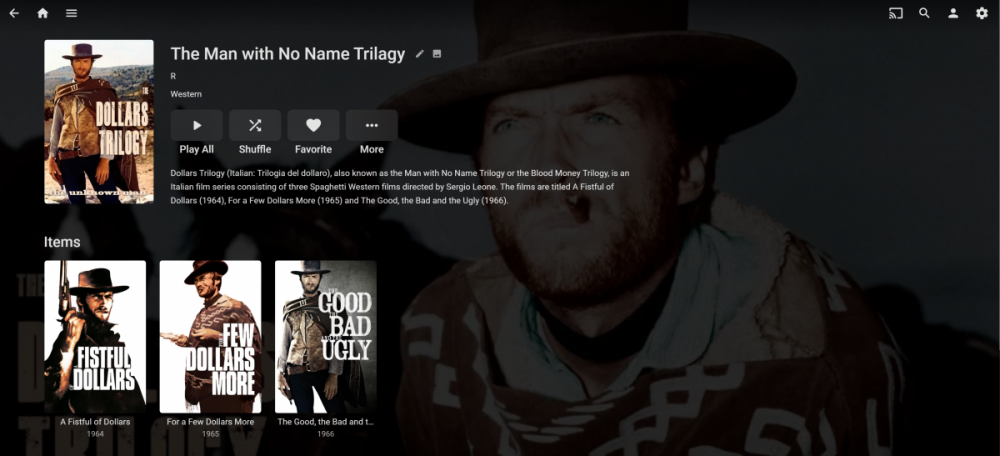
Done! Thanks! I only needed the synapsis and the images as Emby already took care of the rest.
 1 point
 -
Or, just use Emby instead :).1 point
-
You can use a STRM file for this. It's a file with type .strm (!) which you put where you might put a video file, and which contains the URL of your stream in plain text. I don't know what other possibilities there might be, as it's not much documented - but you can look in this thread or others which a forum search might throw up. I have a couple of IP cameras (with completely different URL structures), and doing exactly what I wrote, no more no less, has worked for both of them. But (for my streams at any rate) they don't play through the Android mobile client... OK in web browser on same device, and in the iOS client. As an example, these are the URLs in my two STRM files: rtsp://192.168.1.9:554/user=admin&password=xxxxxxxx&channel=1&stream=0.sdp?real_stream--rtp-caching=100 rtsp://admin:xxxxxxxx@192.168.1.81:8554 Paul1 point
-
There are a lot more variables involved that will determine exactly what will do it but the Shield is pretty much the top of the pack - meaning it will play the most.1 point
-
Agreed - and it would be nice for these to be consistent with Emby Theater.. There are a few others that should be included as well, like Recorded TV/Recordings. See https://github.com/MediaBrowser/Wiki/wiki/Keyboard%20and%20Remote%20Support If keyboard shortcuts are implemented, then everyone using FLIRC's (myself and it sounds like many others) can just use the FLIRC software to program any arbitrary IR command on their harmony remotes (or any other remote) to send any of the keyboard shortcuts. Adding keyboard shortcuts like these would make the Android client much more usable with a remote and generally make it more friendly for new users and users transitioning from Windows Media Center.1 point
-
I think beside the native Android keycodes @@ebr you really should implement some simple pc keyboard keycodes. And with simple i don't mean something like F3 that only one user requested! Something like this: H -> Homescreen G -> Guide I -> Info C -> Contextmenu P -> Play/Pause R -> Record S -> Subtitle Track selection A -> Audio Track selection L -> Last Channel Page Up -> TV Channel up Page Down -> TV Channel down Left -> Skip Back Right -> Skip Forward Ctrl+Left -> Previous Chapter Ctrl+Right -> Next Chapter Alt+Left -> Previous Track Alt+Right -> Next Track This could also be used then in Emby Theater.1 point
-
No eta but hopefully soon.0 points