Leaderboard




Popular Content
Showing content with the highest reputation on 07/01/20 in Posts
-
I like listening to my music through my roku/emby setup. However, I don't need to know how the artist is while listening. I was wondering if there is some way to set up a virtualization like on windows media player? I can wait and my roku will go to it's screen saver, but I would like to make a choice. Or even display the lyrics on screen, all of my music files have the lyrics embedded.2 points
-
I would love to be able to jump to a year when I have my movie titles sorted by release date. When the movies are sorted by title I can click on a letter or type in the first three letters to jump down the list, however when I sort by release date and I'm in the mood for an 80s movie I have to scroll through 30+ years of movies to get to those releases. If the years (or even decades) were down the right hand side of the screen like the letters are when you sort by title that would be huge. I apologize in advance if there is a way to do this or if its already been requested I've been trying to find a quick way to do this and I can't seem to find one.2 points
-
As I mention in a related post, I love the additional subfolders for Movie Extras (eg, Shorts, Scenes, Interviews, etc.)! It would be awesome to extend this functionality to TV Series as well. Specifically to add support for many/all of the same folders supported for Movie Extras, eg, extras specials shorts scenes featurettes behind the scenes deleted scenes interviews trailers As well as any additional folders that get added in the future (eg, hopefully Galleries). Support Placement of "Extras" Folders Within Each Season Folder, Plus A Naming Scheme to Link A Particular Extras Folder with a Specific Episode (eg, "\Season 1\E1 - Deleted Scenes\" for episode 1 deleted scenes): I want to clarify that it would be great if these various "extras" folder types could reside within each Season folder. So for example, within a Season 1 folder we could then have an "Extras" folder, a "Deleted Scenes" folder, a "Featurettes" folder, etc. And furthermore, that we could designate a particular folder to refer to a specific episode (eg, "\Season 1\E1 - Deleted Scenes\" for episode 1 deleted scenes). See more below, particularly why I think this would be so useful: https://emby.media/community/index.php?/topic/55915-emby-server-theater-additional-extrasspecial-folder-types-for-tv-series-similar-to-movies/&do=findComment&comment=587195 Thanks for your consideration! PS - If this is something you might like to see implemented, be sure to "Like" this top/first post (as well as any subsequent posts in this thread that highlight particular aspects of what you are interested in) -- "Liking" the top/first post helps the Devs to know how much interest there is in a given Feature Request.1 point
-
Hi I would really like to be able to send some custom notifications to my users For example, i would like to be able to send a notification like : -"What content would you like to see added on Emby this week ? https://www.strawpoll.me/#####" -"Blabla Season3 is coming next week !" -"Server will be down for maintenance tonight" A little notification icon on the top right corner would be awesome. I looked in the Feature Requests list but i did'nt find anything like that. Thanks for reading, and for this amazing software.1 point
-
Hi, I created emby plugin that gives ability to create smart playlists. It works just like iTunes smart playlists -> based on specified rules, playlists will be automatically updated during library changes. to set rules user must have rights to manage the server rules are specified inside plugin configuration section(in current logged user context): "Manage Emby Server" -> "Advanced" -> "SmartPlaylist". name of smart playlist determines which playlist will be updated playlist will be created automatically if did not exist before playlist will always be updated after saving rules user can set 3 types of update:Live -> update playlist if library changes with conditions -> update after 1000 changed items or update after 2 minutes of inactivity or update after 5 minutes Manual -> update playlist only after saving rules ShuffleDaily/ShuffleWeekly/ShuffleMonthly -> update playlist daily/weekly/monthly rules can be grouped groups can be nested strings are compared in case insensitive manner tested on Windows/Linux with Emby 4.4.0.16 beta Feel free to test. v1.3.0.0(v0.9.1.0 - for emby 4.3.1.0): filter by: Actor\GuestStar, Director, Path, Tags, ReleaseDate, ParentalRating, CommunityRating, Runtime sort by: SortName, ReleaseDate, ParentalRating, CommunityRating, Runtime, Episode(combination of SeriesName and SortName) fix setting proper MediaType for new playlists fix Random sort removed Series MediaType -> use Series criteria instead v1.2.0.0: filter by series -> add "MediaType: Series" and criteria: "Episode Name", "Series" filter by movie name Source code: https://github.com/ppankiewicz/Emby.SmartPlaylist.Plugin SmartPlaylist v0.9.0.0 - for emby 4.3.1.0.zip SmartPlaylistv1.2.0.0.zip SmartPlaylist v1.3.0.0.zip SmartPlaylist v0.9.1.0-foremby4.3.1.0.zip1 point
-
I would like to be able to mark individual media items or even perhaps entire libraries to be excluded from media scans. If I have retrieved all the metadata and images I want for a particular TV series or Music collection and I know that the files will never change and the metadata should never change, I would like to be able to exclude it from scans to a ) reduce scan time b ) decrease the likelihood of unwanted changes being made c ) reduce network utilization I've noticed that even with series that have not had any new episodes in years (and no changes have been made in my filesystem) there is still information being downloaded from metadata providers. I suppose that is to check to make sure it is current/complete, but it is a waste of my network resources which are not plentiful. Perhaps this could be implemented by adding the option to not rescan media that has been marked as locked.1 point
-
As simple as that1 point
-
With the appearance of version 4, some problems began to appear in the behavior of the application that I installed on my Samsung TV of the UH6900 series (of a somewhat special type, halfway between Orsay and Tizen) While the movie library was navigating properly, the series began to give problems. The first thing we noticed was that the announcement of new episodes of the series that we followed stopped appearing on the main screen. Then we realized that if we tried to go to TV -> Latest and navigate the series from there, the system responded with an error message 500 (server error) The solution seemed to be to start playback from the web application on the computer, leave it halfway and then play it from the TV. Then we also saw with astonishment that for any series, new or old, when selected from the catalog, the system responded with a funny message: And it brought you back to the home screen. At this point, I started to investigate online to see if anyone had the same problems, and so I reached the thread that opened @@Leyst last March. There I left a workaround that served to at least watch some episodes. But, of course, that is not enough. As an old developer, I would have liked to find the source code of the server. Surely I would have advanced faster and solved the problems better. I took advantage of that just @@SamES announced a last revised release of the client application for Samsung to install and configure the Samsung TV SDK (V 5.1), with the Oracle emulator and the appropriate extensions, and thus test that promising version 2.2.6a To my discontent, none of the problems I experienced were solved, at least with the current version of the server, 4.3.1.0 Willing to keep it that way, I started to get my hands on the code, struggling my old brain, trying to fix them. There is a problem with the way the server responds to the GETs that the application launches. The API now behaves in a different way. For example, in previous versions the list of episodes of a series did not depend on the season, and the client could skip the query and later regroup the episodes. Now it is obligatory to indicate in the query the season to which the requested episodes belong. If you don't, the result is not an error, but an unexpected empty list. Hence one of the mistakes. The other comes from the query that should return the new episodes of a series. Instead, it gives an error 500 (server error) Well, if there is someone who has the same problem and wants to save a couple of weeks of research, here I leave version 2.2.7 that I think solves at least those two problems (I have noticed that there are more, among others the screen resolution, which is not published correctly) To install it, if the television does not have Tizen (USB installer), it is best to follow the guidelines in this link (it is a mess for the neophytes) https://developer.samsung.com/tv/develop/legacy-platform-library/art00121/index Finally, I can try to do some other corrective maintenance operation on the Samsung client code, but I can only be there until the end of February of this year. I will respond in this thread and to the private ones. Emby_2.2.7_Europe_20200123.zip1 point
-
Happy2Play, you're right, that's probably what I was thinking of. Which makes me wonder even more why the arguably more important search function is crippled. No further discussion required I guess.1 point
-
Oh yes you're right, why didn't I think of that. So please remove the ServerWMC plugin and then restart Emby Server.1 point
-
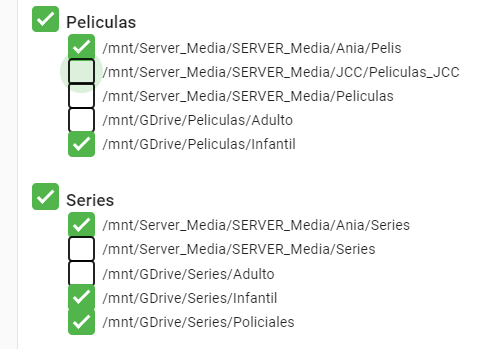
ALELUYA in the end it was a bit what you were saying, but I had forgotten a function in user control: I have created a single library with ALL the series, but the user has limited what ESA library folders can access. I didn't even remember this Thanks to all for the help
 1 point
 -
Update pure css1 point
-
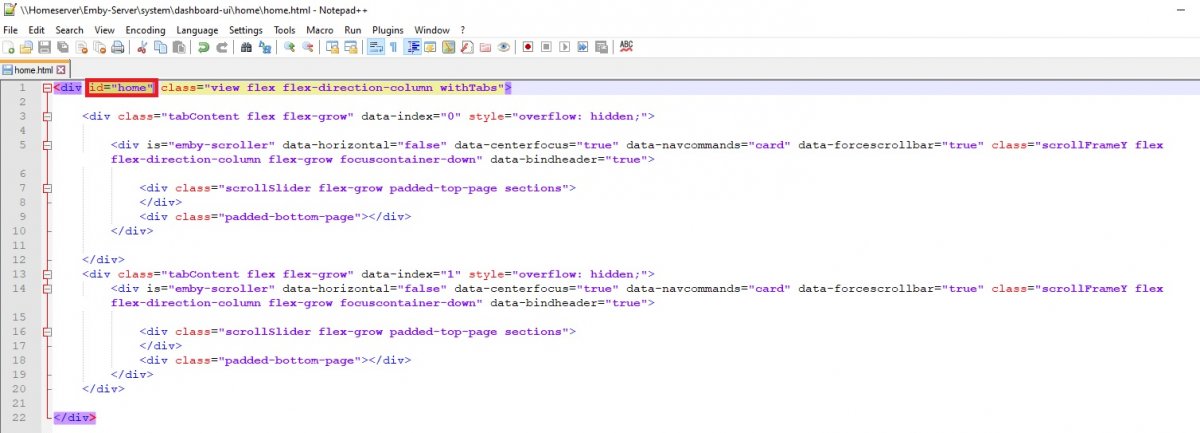
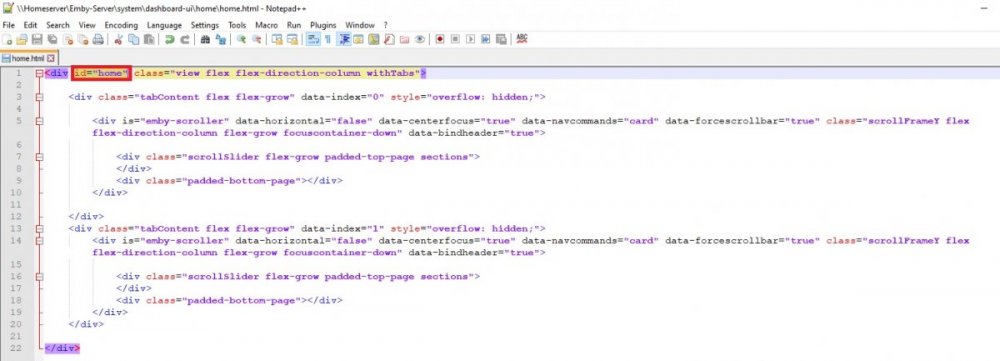
The issue is there are currently no longer page ids so the CSS somewhat becomes universal unless you can find a way to specifically target that area. So you would have to add a page id to home.html and reapply it with every update. #home div.cardText.cardTextCentered.cardText-first, #home div.cardText.cardTextCentered.cardText-secondary {display: none;}
 1 point
 -
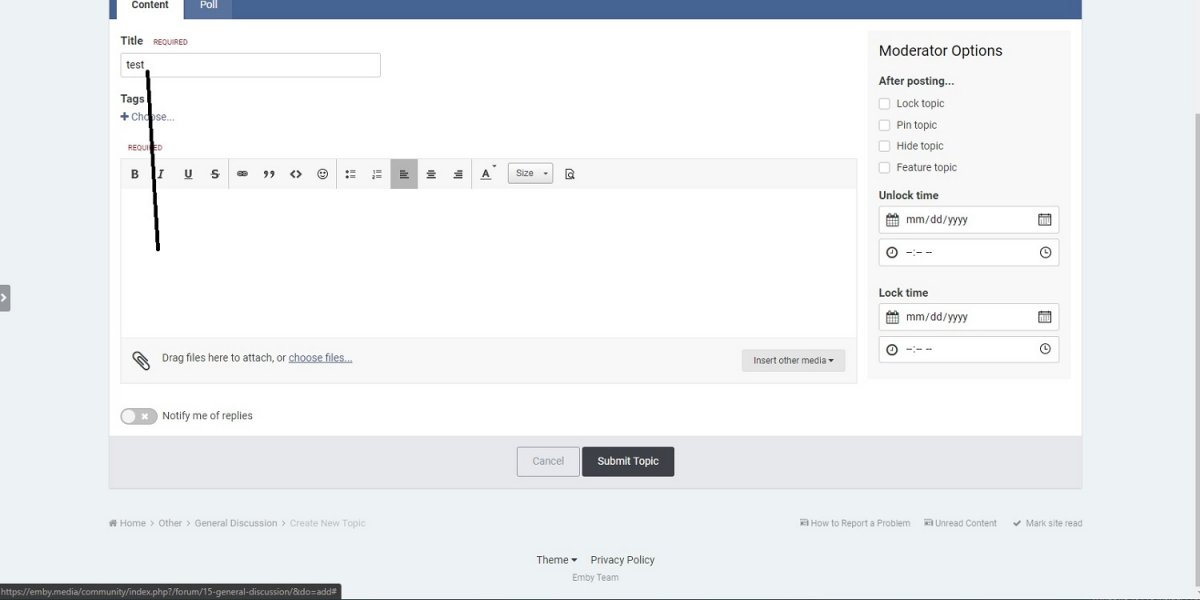
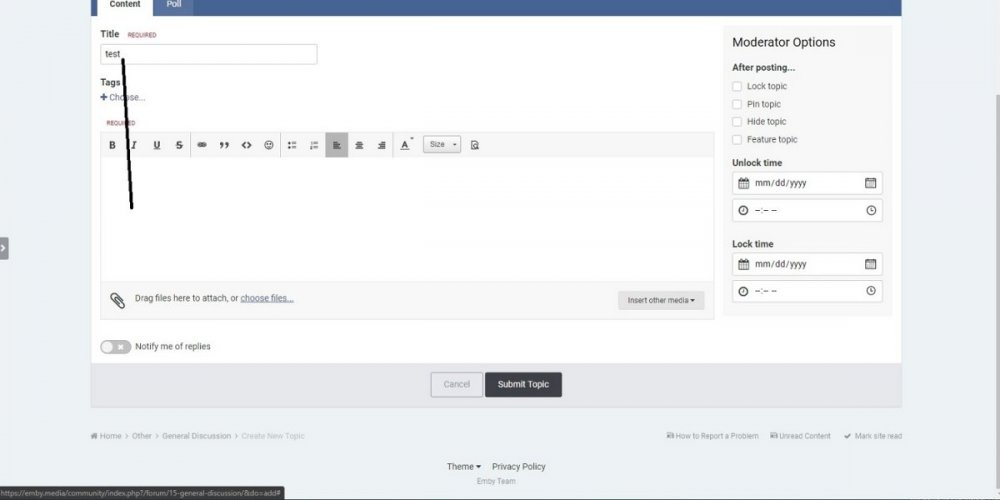
There does not appear to be a way to tab from Title to text area. Only tested in Edge Version 83.0.478.56
 1 point
 -
Video and audio support changes from year to year and can also differ between premium and standard sets. The lists can be found on the Samsung developers website, but you should be able to find the same chart near the back of your users manual. https://developer.samsung.com/smarttv/develop/specifications/media-specifications/2018-tv-video-specifications.html1 point
-
The Server Configuration Backup plugin has the ability to restore previous backed up users and userdata. That is the preferred method of restoring users and user data. Otherwise you have to have a copy of previous library.db and attempt to import the userdatas table into the new library.db.1 point
-
One thing that bothers me with the new design is I can't tab to the post area from the thread title when starting a thread. I type in the title, hit 'tab', and it skips to the 'choose files...' link for selecting attachments instead of to the area to type my post.1 point
-
If you're bent on a budget smart TV, get a Hisense with AndroidTV built in.1 point
-
You did very well, I just took the opportunity to leave a little more info with the commands for init-based systems - systemd Librelec may not be able to use sudo (I don't know either), although I do know that you will be able to use root, which is the super user after all. For general culture and community support Librelec uses the systemd for the init Have a great time1 point
-
yeah but i don't know libreelec well, i just know libreelec doesn't know sudo, so maybe coreelec also don't know sudo per default. so it could also be sudo update-rc.d depending on his system.1 point
-
ah ok this menu point is missing on linux. you can try this: systemctl enable emby-server not sure if coreelec is based on debian, but this works for me on the linux server (debian)1 point
-
Nothing obvious, but just two observations: You appear to have a bitrate limit of 80000000 (80Mbit/sec) set. This shouldn't be a problem, but just raising it in case you weren't aware that it is set The playback of Knives Out in the debug log appears to be requesting the TrueHD track. This should be causing the audio to be converted as TrueHD is not supported, but it looks like it's trying to DirectPlay without conversion, which is incorrect. We need to work out why this is happening. Can you try playing Knives Out and selecting the AC3 track from the details screen before playback? I can't see any reason why Early Man doesn't play Can you check that the playback quality is set to Auto in the client. You might have to start playback of something else that does work so that you can check that it is set to auto, then try one of these titles again.1 point
-
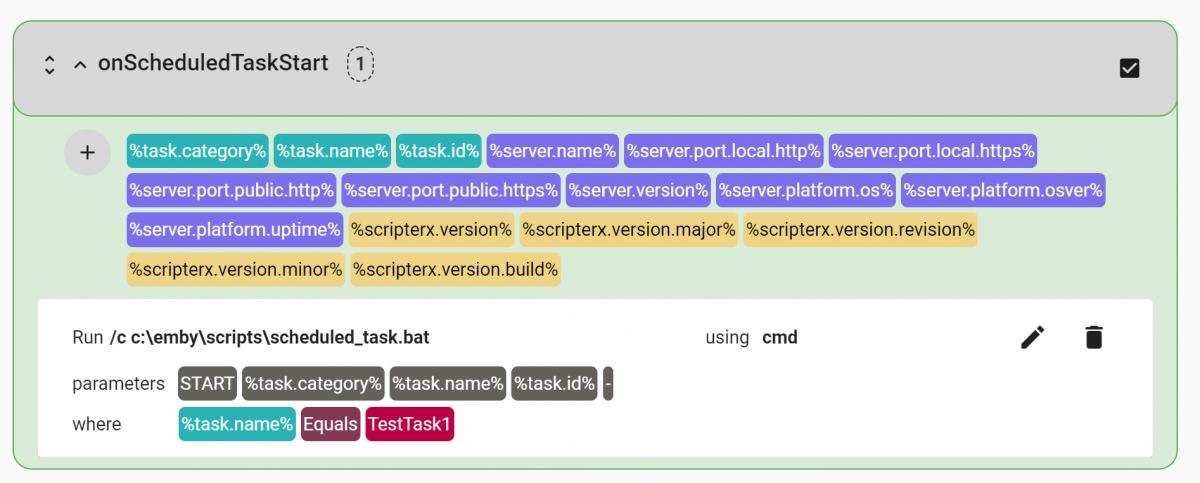
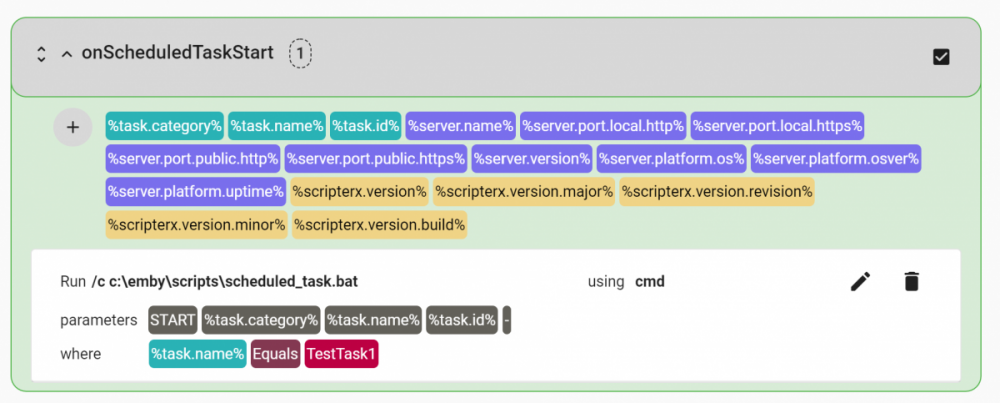
Or would you prefer it with parameters and where labels, so you can see what they mean while you're not editing them? like this:-
 1 point
 -
IMVDB is still useful - but yes gets incorrect matches for a high proportion of lookups Part of the issue is not enough people submit info to update missing data and another part of the issue is that IMVDB always returns a result Emby cant know whats correct vs incorrect If its an issue - just uninstall the plugin1 point
-
Interestingly your NAS model also runs on MARVELL Kirkwood 88F6282 CPU. Like multiple users experiencing this issue.1 point
-
A big thanks to @ogry - I was having the very same error message with some TV series ("Huh .. Looks like I have no content to show you in this view I'm afraid") and I can confirm it is working for me, applying the 2.2.7 patch they proposed. For @Carlosmp22 and others who may have the issue, I simply followed as suggested by @SamES the step by step tutorial from @FrostByte 's post on that page to install the 2.2.7 patch.1 point
-
Certbot also has a Windows Version. I had tried that earlier and it did a nice job generating the cert files. However, the PFX I created crashed EMBY so I id not go that route, but maybe it wasn't certbot but MS Edge.1 point
-
Saving them elsewhere is not going to give you the benefit of always having them properly connected even if you build a new server or move the media items. Personally, I do not consider metadata directly related to the media "junk". It is very valuable to save that information there so that we don't have to hammer the free metadata providers for it again unnecessarily.1 point
-
I think we’ve covered this topic before. I don’t agree with dumping imvdb, I still think it’s better than nothing. What I do think should be done (and I’ve said this before too) is an option added to clear all metadata assigned to a media item, rather than now the only option is to assign more incorrect metadata or manually delete each field. Clearly filling in imvdb is not an option either given how incomplete it is.1 point
-
I don't run a VPN From what I have figure out today is that namecheap's DDNS is garbadge. It was originally working correctly with www.<mydomain>.com however I wasn't smart enough to realize the 'parking page' namecheap gives you by default was making it not work. Thats what that weird IP was that I was getting from nslookup was to that parking page. I have since removed the parking page record and created 3 profiles in the DDNS client, @, www, and emby none of which have updated successfully on the domain side even though I had www updating previously. I went back to duckdns.org because I love them. I put their little client on the emby server then created a CNAME record on the domain that is like this type: CNAME Record Host: test Value: <chosen name>.duckdns.org TTL:Automatic when i nslookup <chosen name>.duckdns.org it gave me my external IP so I knew that part was working. I then gave the record a bit of time and now when I nslookup test.<mydomain>.com it also shows my external IP. The key with everything for me has been nslookup. It has been very tricky getting namecheap to play nice with a dynamic IP. I will let everything run for a couple of days to see if their client will start behaving. If it doesn't I will probably just use duckdns because I already have that working. I think there is less steps if I get namecheap's method going though. I believe the difference is, namecheap DDNS creates A record on domain, user goes to domain and domain gives my IP with duckdns method its, user goes to domain, domain points to duckdns domain, duck dns domain give my IP I believe there is an extra step in there and that I am dependent on both my domain and duckdns being up and working.1 point
-
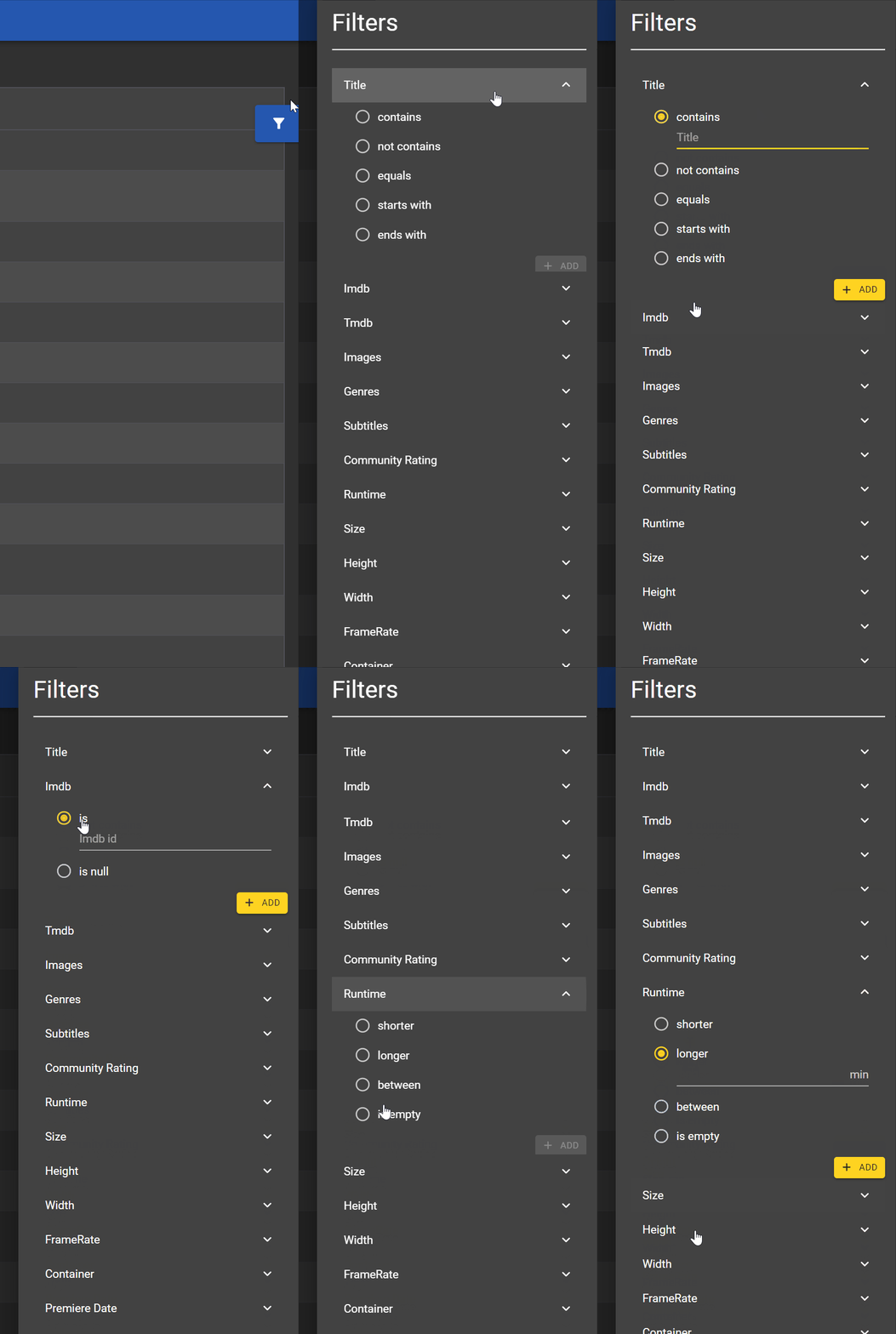
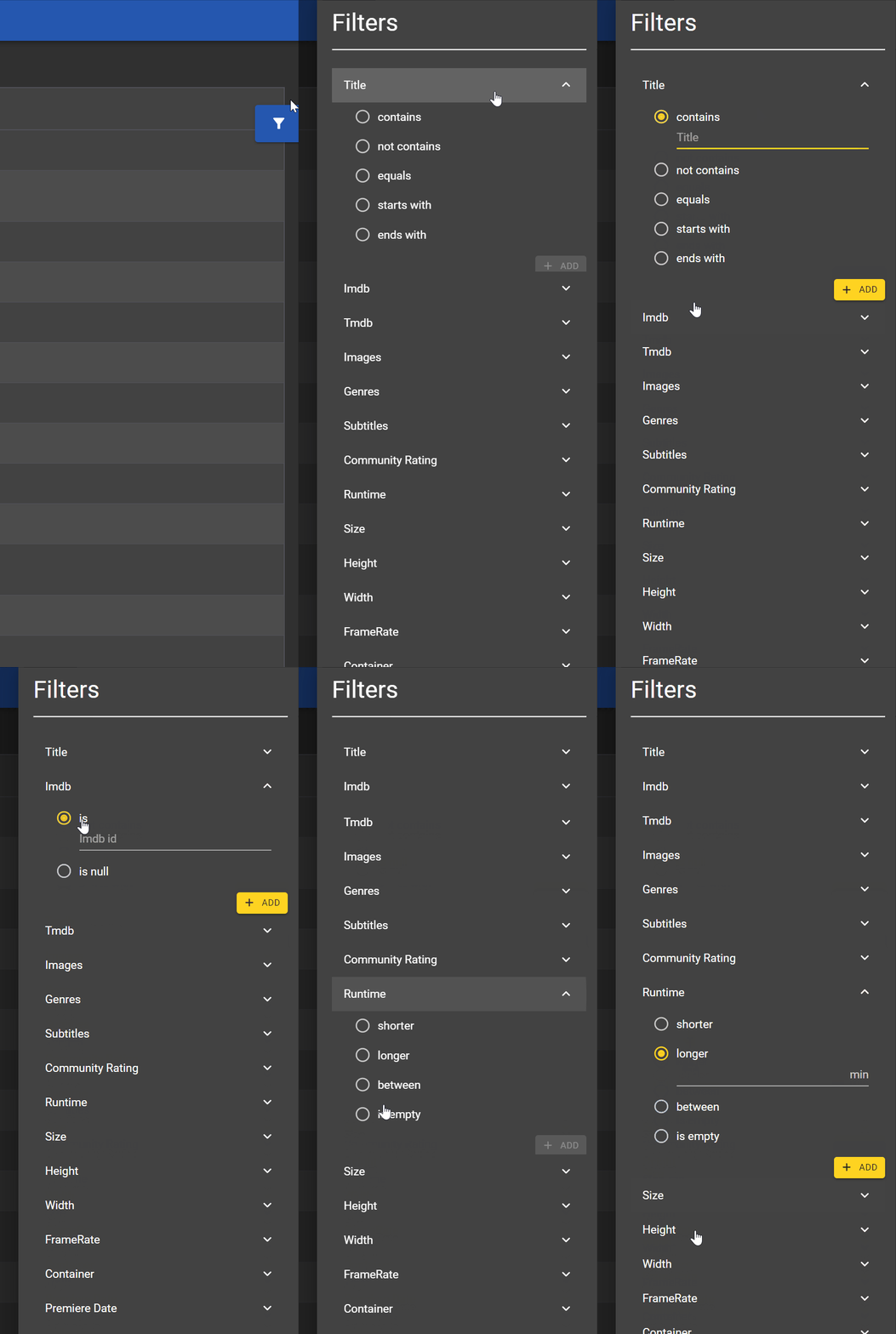
Hey guys, I was working on the filter system and wanted to check what you think about it. Not all filter types are implemented at the moment but just to have an idea. I'm not sure with the between filters. I can just place 2 input fields or I can use some kind of slider @Painkiller8818, streaming information is indeed on the roadmap. But I first want to have the static stuff ready before starting to work on the dynamic stuff because it needs the static data anyway. But some detailed transcoding view will be included as well in the end.
 1 point
 -
We'll be hiring someone to help ensure Kodi 19 compatibility when it releases, so nothing to worry about there.1 point
-
+1 A way to send notifications via Emby apps would be great1 point
-
Hi, yes it's a great idea, thanks.1 point