Leaderboard




Popular Content
Showing content with the highest reputation on 06/30/20 in Posts
-
The solution was very interesting. cayars and I searched through firefox and chrome trying to find the issue being caused in the settings. i went through and checked on 3 bare metal computers and 2 Virtual computers where none of them presented the same issue. I reinstalled windows about 3 times. Believing it was the new windows release 2004 i reinstalled 1909 and the same issue occurred. i thought about it and reverted firefox to a previous version of itself 76.0.1(current 77.0.1) and the same issue presented. i was pretty much out of options the last thing to try was removing hardware. Since cayars and i had ruled out any issues in the software. i removed everything from my computer. Monitors, network jacks, hard drives, and USB plugs. i slowly put everything back into the computer starting with the USB ports and kept testing the issue. Once i had gotten to my USB hub where the issue was coming from i narrowed down on the USB hub, unplugging everything and re-plugging those in. finding out that the issue was caused by a joy con typically used in games like ATS where there are more than 7 gears apparently some point during the shuffle of using my computer i flipped the switch which was acting like a remote in Emby. Definitely don't allow @cayars to fool you. he helped tremendously with coming to the conclusion of this being something physically on the computer instead of something in the software. Video to Issue and Solution3 points
-
Hi. You can also do what you want with physical locations, you just need to put them on a peer level instead of sub-level.2 points
-
The Emby interface(s) should support subtitle shifting by now. It is such an important feature for a video player. It was requested over 4 years ago and its absence makes the viewing experience so much worse for a lot of people. I've had so many occasions where I've tried all the available subs from multiple sources and none of them quite match up. Being able to just pick one and quickly shift it by quarter or half-second increments while the video is playing would be so useful.2 points
-
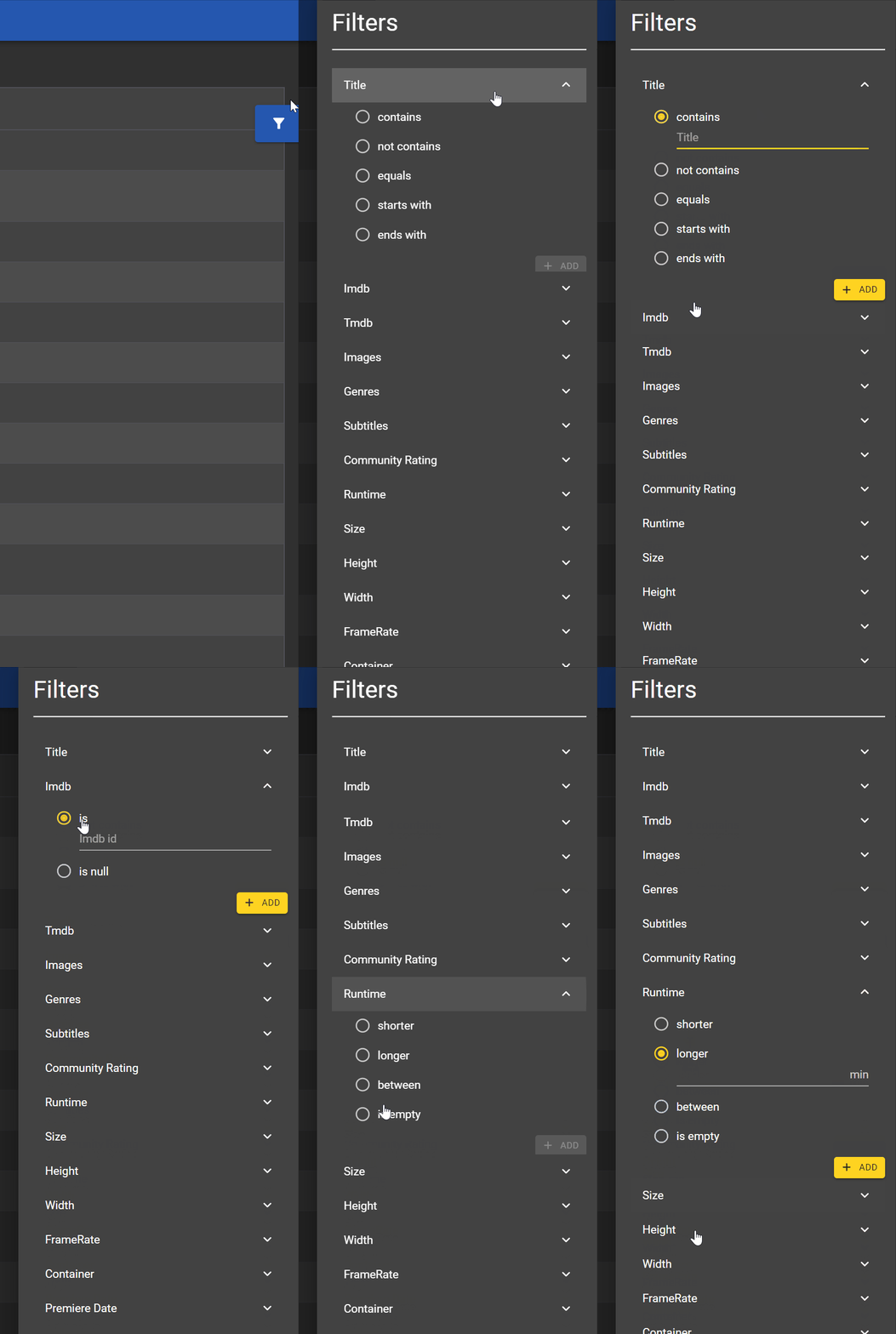
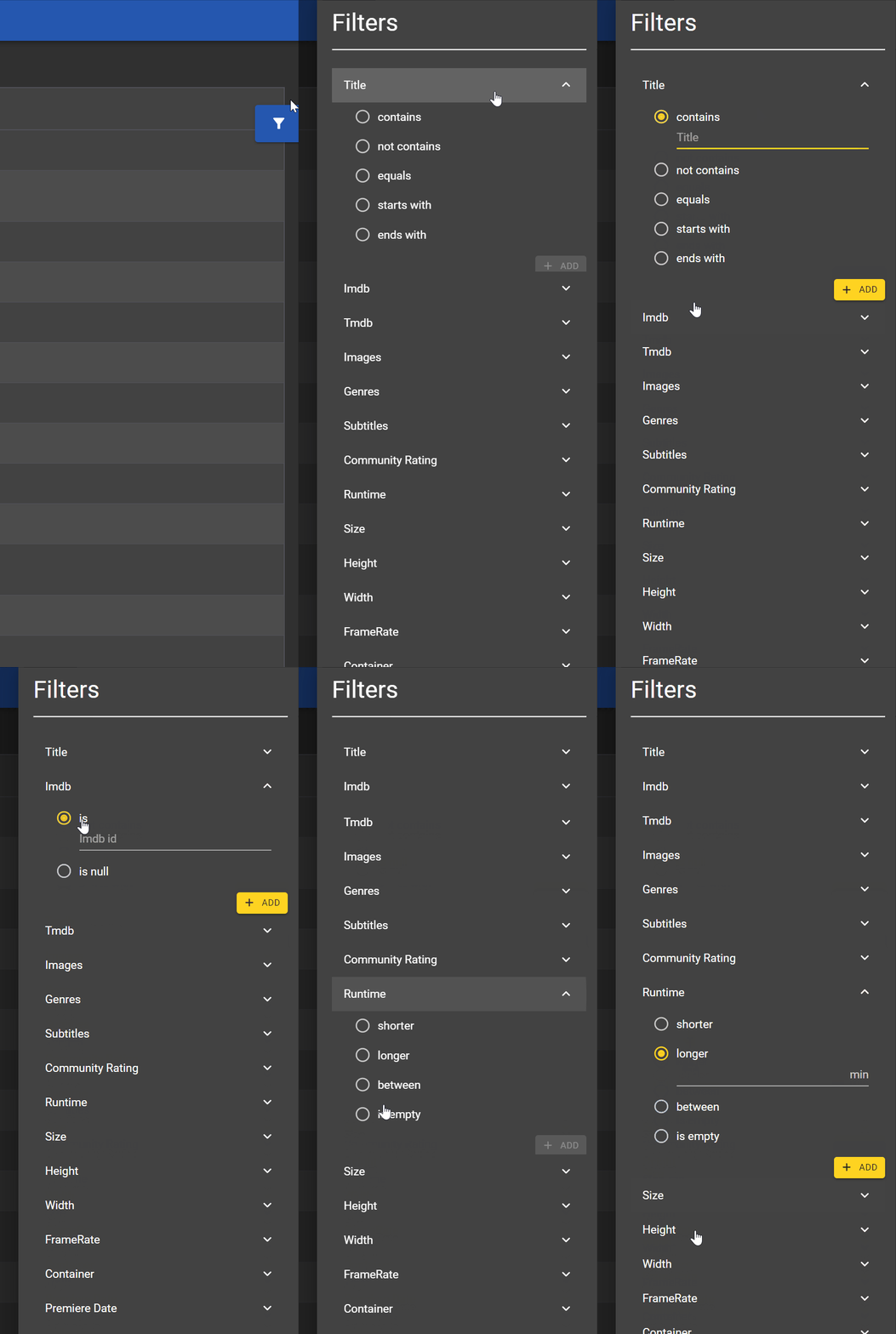
Hey guys, I was working on the filter system and wanted to check what you think about it. Not all filter types are implemented at the moment but just to have an idea. I'm not sure with the between filters. I can just place 2 input fields or I can use some kind of slider @Painkiller8818, streaming information is indeed on the roadmap. But I first want to have the static stuff ready before starting to work on the dynamic stuff because it needs the static data anyway. But some detailed transcoding view will be included as well in the end.
 2 points
 -
Hey Everyone, My journey from Plex to Emby has been pretty smooth with the exception of setting up SSL encryption. There are lots of great posts on this forum and elsewhere on how to do this, and I consider myself pretty computer literate. But I'll be honest, this was a bit overwhelming for me as I have no experience at all in hosting web servers, DNS, or encryption certificates. After many hours, I've got it all working, so I thought I'd share what I've learned. I'm going to try to write this for the newbie, so don't be offended if it seems like I'm explaining lots of simple stuff. That's really what I needed a week ago, so maybe it'll help someone else in my shoes. Also, this is for Windows, although most of it applies to any OS. There's lots of text, but it's really very easy. Let me also say, I understand that a reverse proxy gives you lots of benefits and flexibility for securing your server. But that was a step too far for me. If you want a reverse proxy this post is not for you, but there are many posts in this forum to help you. If you want to access your Emby server from outside your home network you will want to require secure connection mode for all remote connections (see "Network" tab in Emby server configuration). To do this you need an SSL certificate. To get an SSL certificate you must have your own registered domain name. Here's a step-by-step. Domain Name Registration A domain name is the readable text part of a web address. So emby.media, or google.com, or media.yourdomain.net. Most home users don't have one, but you need one to get an encryption certificate. While (Edit:)There are many options for purchasing a domain (godaddy.com being very popular), I chose to buy my domain from domains.google. It cost me $12/year, and this is the only cost to getting your Emby server working with encryption. Go to https://domains.google, pick a domain, pay your money, and you're ready to go. For the rest of this discussion let's say you registered the domain name yourdomain.net. Now you need to associate your new domain with your home IP address. Most home users get their IP address assigned to them by their internet provider and it is "dynamic," meaning it can change. So you need to be able to tell your domain provider what your address is and update it when it changes. This can be done automatically, and is called dynamic DNS (DDNS). (Edit:) Before obtaining a domain, ensure the provider supports Dynamic DNS. Google domains supports this easily, here is the help page explaining how to set it up. Fortunately, my ASUS router has this capability built in so it was easy, but it's easy even if your router doesn't (follow google's directions). (Edit:) In case you have a static IP (obtained from your ISP), DDNS support is not mandatory. That's it for domain name registration. Now yourdomain.net points to your home network IP address. SSL Certificate Now you need to get an SSL certificate. This has the encryption keys you need, and must be issued by a recognized certificate authority or it gets blocked by your browser. Lets Encrypt will give you a free SSL certificate but it has to be renewed every 90 days. This was the part I was most confused by, but it's actually really easy. The part to understand is that Lets Encrypt must have some way of proving you own your domain name before they can issue you a certificate. There are two options, 1) they give you a little text file to place on your web server in a certain location. I don't have a web server so this is a no-go. 2) They give you a text string to add to your DNS registration in what is called a "TXT Record." You do this with google domains, it's very easy. To get a certificate you need an ACME client program that knows how to talk to the lets encrypt server. They recommend certbot, but it doesn't work in windows. Dig enough and you'll find ZeroSSL, they have a nice downloadable program that does it all and is really easy. Download here. Make a directory on your computer (I used c:\ZeroSSL). Put the le64 (or 32) exe in this directory. A single command will create your certificate. I think the easiest way to do this is create a text file in the same folder as the program, call it "get_cert.bat" and put the following three lines of text in the file. Edit the second line to have your actual domain name (instead of "yourdomain.net"), and to have your actual password for your PFX file (whatever you want it to be, just replace "yourpasswordhere" in the code below. @[member="Echo"] off le64 --key account.key --csr domain.csr --csr-key domain.key --crt certificate.csr --domains "yourdomain.net" --generate-missing --handle-as dns --export-pfx “yourpasswordhere” --live pause Save the text file as get_cert.BAT and then double click it to run. This runs the le64 program, creates the public/private key pair, asks lets encrypt to generate a certificate, saves that certificate, and converts it to a PFX file format that Emby requires. All in one command! When you run this, a command window will appear and you can see what it's doing. After a few seconds it'll pause and ask you to place the TXT record in your domain. It gives you a name and value, the name will be something like _acme-challenge.yourdomain.net, and the value will be a bunch of random letters and numbers. The program pauses here for you to put this into your domain. So now you just log in to your google domain again, go to "DNS" on the left menu, scroll all the way down and enter a "Custom Resource Record." The type is TXT, the name and value are what le64 gave you. Put them in, wait a few minutes for the change to take effect (took just a couple of minutes for me). Then go back to the command window where le64 is running and press enter to continue. It'll then verify your TXT record is there and issue your certificate. You'll find a file certificate.pfx in the le64 directory, that's it! Emby Setup Now log in to your Emby server setup. Go to "Network," in the field "External Domain" you put your domain name, so yourdomain.net or whatever you chose. For "Custom SSL certificate path," browse to the .pfx file that was created by the le64 program. In the "Certificate Password" field put whatever password you used in the .BAT file above when you created your certificate. Then for "Secure Connection Mode" I recommend you choose "Required for all remote connections." You also have to log in to your home router and forward port 8920 to the computer running your Emby server. I'm not going to give directions on how to do this, it depends on your router, but it's super easy. That's it. You need to restart your Emby Server, and then you're done! You can now access your server remotely and securely at https://yourdomain.net:8920. Certificate Renewal Now, I mentioned before that the Lets Encrypt certificates are only good for 90 days. So every 90 days you have to renew the certificate. Take that "get_cert.bat" file you made earlier and make a copy of it called renew_cert.bat. At the end of the second line, just add the text "--renew 20" (without the double quotes). When you are within 20 days of your expiration date run this file, it'll renew your certificate. I believe it'll ask you to place a new TXT record in your domain, so certificate renewal cannot be made fully automatic. You'll have to run it manually and add this TXT record into your google domain just like when you created the certificate in the first place. But it takes just a few minutes and then your certificate is renewed. You'll have to restart your Emby server for it to take. The file locations all stay the same, so you don't have to update anything in the Emby setup, just restart Emby. That's it! Well, I hope this helps someone. Sorry for the long post. I would have benefited from this level of detail a week ago, so maybe it'll be good for someone. If anyone sees something wrong here, feel free to correct me.1 point
-
One thing that I would like to see implemented is the abilty to display lyrics in all of the apps. For those of us who have libraries with lyrics embedded in the actual files, it would be trivial. Simply scrape the lyrics from the lyrics tag and display them. As far as scraping from online lyrics databases, I don't see that working very well as just about every app that I have seen use it either doesn't get the correct lyrics or they are truncated with an add for the website.1 point
-
I didn't think the Fire Cube supported DTS... Can you try unchecking that option in the app?1 point
-
Ey, THE TAG.... I think this is the solution!!!!! Thanks1 point
-
Overload the subtitle method with an offset millisecond-integer parameter sounds like a quick addition to the core. After that, the client code could simply call the overloaded method by adding the offset from a slider in the GUI. You'll be done by lunch.1 point
-
Emby can do a lot of things for you as it will load ratings for tv shows and movies. For each user you can user you can set a parental ratings. So young children will only see G, an older child PG-13, etc You can also manually apply TAGs as well and use them for filtering purposes. Here's a great knowledge base article on these types of things: https://support.emby.media/support/solutions/articles/44001160251-parental-controls1 point
-
You should spend a few minutes and read the knowledge base articles on naming: https://support.emby.media/support/solutions/articles/44001159110-tv-naming TV https://support.emby.media/support/solutions/articles/44001159102-movie-naming Movies https://support.emby.media/support/solutions/articles/44001159113-music-naming Music https://support.emby.media/support/solutions/articles/44001159114-audio-book-naming Audio books https://support.emby.media/support/solutions/articles/44001159115-book-naming Books Having a folder in multiple libraries can seem to work but I almost guarantee that it's causing you problems that you just haven't figured out yet. Switching to folder view for example will often show weird results. Sometimes the last library to get scanned is the only one that will show the files as it updates the system. No telling how this will turn out as Emby REQUIRES each folder/files to be part of only one library. That's not a recommendation but a requirement for proper library management.1 point
-
The problem you likely have is the gdrives trying to imitate real drives. grives mounted don't act the same as local drives. When emby tries to get information about the files like creation date it will often times get back garbage from rclone so it errors out and goes to the next file. Not saying that's what's happening here but is very likely the cause. Emby doesn't officially support gdrive usage except for when it itself puts the files there using it's built in sync/download method. Take a look at your log file after doing a scan and see if it's full or errors.1 point
-
The problem is you're not doing what's recommended so Emby is sort of stuck. Split part files need to be the ONLY media files in the directory to work. Multi-version files can be stacked but doesn't work with split files. So either manually add the part2 and treat it like a version, or manually combine the two part files (easy) into one assuming they have the same codecs.1 point
-
It worked. Thanks a lot.1 point
-
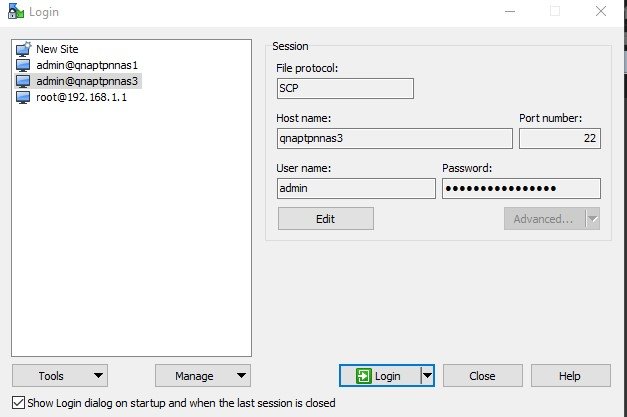
connect via "scp" and use the admin user and password
 1 point
 -
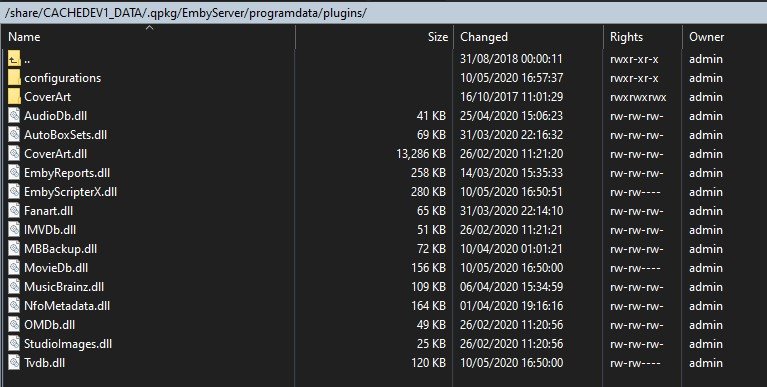
this is where the plugins are stored on a QNAP - although these directories are not accessible from the web GUI of the NAS you can however access the above with WINSCP and/or putty The xml file will be in the configurations subdirectory that you want to delete Note: - Your path may be slightly diff for "cachedev1_data" depending on the type of raid your are using
 1 point
 -
No need for the IPTV plugin. You can create an M3U file with the stream from that device. You can then add it as a "tuner" directly into Emby TV and assign it a guide source for the channel. If on the other hand you were feeding it a security camera or similar and it's not a TV broadcast then maybe the iptv plugin would work. If you don't want to speak "coded" about what you want to do, just send me a PM. I'm sure I can help specifically what you want to do. Carlo1 point
-
YAY progress!!!!! what I learned is my www.<mydomain>.com NEVER points to my IP correctly. I made 3 A names, www, @ and emby These were my results, C:\Users\<myuser>>nslookup www.<mydomain>.com Server: modem.Home Address: 192.168.0.1 Non-authoritative answer: Name: www.lachdanan.com.Home Addresses: 198.105.244.23 198.105.254.23 C:\Users\<myuser>>nslookup <mydomain>.com Server: modem.Home Address: 192.168.0.1 Non-authoritative answer: Name: <mydomain>.com Address: <my external IP> C:\Users\<myuser>>nslookup emby.<mydomain>.com Server: modem.Home Address: 192.168.0.1 Non-authoritative answer: Name: emby.<mydomain>.com Address: <my external IP> Since they displayed my external IP I put emby back to the way it's supposed to be for remote proxy. I changed my caddy file to emby.<mydomain>.com and when I ran it I got this, C:\Caddy>caddy run 2020/06/30 03:16:55.948 [34mINFO[0m using adjacent Caddyfile 2020/06/30 03:16:55.957 [34mINFO[0m admin admin endpoint started {"address": "localhost:2019", "enforce_origin": false, "origins": ["localhost:2019"]} 2020/06/29 21:16:55 [INFO][cache:0xc000609720] Started certificate maintenance routine 2020/06/30 03:16:55.960 [34mINFO[0m http server is listening only on the HTTPS port but has no TLS connection policies; adding one to enable TLS {"server_name": "srv0", "https_port": 443} 2020/06/30 03:16:55.960 [34mINFO[0m http enabling automatic HTTP->HTTPS redirects {"server_name": "srv0"} 2020/06/30 03:16:55.962 [34mINFO[0m tls cleaned up storage units 2020/06/30 03:16:55.963 [34mINFO[0m http enabling automatic TLS certificate management {"domains": ["emby.<mydomain>.com"]} 2020/06/30 03:16:55.969 [34mINFO[0m autosaved config {"file": "C:\\Users\\<myuser>\\AppData\\Roaming\\Caddy\\autosave.json"} 2020/06/30 03:16:55.970 [34mINFO[0m serving initial configuration 2020/06/29 21:16:55 [INFO][emby.<mydomain>.com] Obtain certificate; acquiring lock... 2020/06/29 21:16:55 [INFO][emby.<mydomain>.com] Obtain: Lock acquired; proceeding... 2020/06/29 21:16:56 [INFO][emby.<mydomain>.com] Waiting on rate limiter... 2020/06/29 21:16:56 [INFO][emby.<mydomain>.com] Done waiting 2020/06/29 21:16:56 [INFO] [emby.<mydomain>.com] acme: Obtaining bundled SAN certificate given a CSR 2020/06/29 21:16:56 [INFO] [emby.<mydomain>.com] AuthURL: https://acme-v02.api.letsencrypt.org/acme/authz-v3/5564930094 2020/06/29 21:16:56 [INFO] [emby.<mydomain>.com] acme: use tls-alpn-01 solver 2020/06/29 21:16:56 [INFO] [emby.<mydomain>.com] acme: Trying to solve TLS-ALPN-01 2020/06/29 21:16:56 http: TLS handshake error from 127.0.0.1:54360: EOF 2020/06/29 21:16:57 [INFO][emby.<mydomain>.com] Served key authentication certificate (TLS-ALPN challenge) 2020/06/29 21:16:57 [INFO][emby.<mydomain>.com] Served key authentication certificate (TLS-ALPN challenge) 2020/06/29 21:16:57 [INFO][emby.<mydomain>.com] Served key authentication certificate (TLS-ALPN challenge) 2020/06/29 21:16:57 [INFO][emby.<mydomain>.com] Served key authentication certificate (TLS-ALPN challenge) 2020/06/29 21:17:00 [INFO] [emby.<mydomain>.com] The server validated our request 2020/06/29 21:17:00 [INFO] [emby.<mydomain>.com] acme: Validations succeeded; requesting certificates 2020/06/29 21:17:01 [INFO] [emby.<mydomain>.com] Server responded with a certificate. 2020/06/29 21:17:01 [INFO][emby.<mydomain>.com] Certificate obtained successfully 2020/06/29 21:17:01 [INFO][emby.<mydomain>.com] Obtain: Releasing lock I then used my phone to connect to the server over LTE using emby.<mydomain>.com and my external port (set in emby program) I think I am good now. My next steps will be to figure out how to get the DDNS to work with something besides the www host as it apparently refuses to actually point to my IP1 point
-
Hey @softworkz So updated Antivirus components, which updated the night before these problems happened was the cause of it all. They've had a behaving monitoring tweak that must be causing the file writing process you described. I've been using the Trend Worry-Free Business Security for 15+ years and haven't seen it interfere like this before. I had to resort to uninstalling it. Now everything is transcoding at normal speed. I can't thank you and @cayars enough for all your help! Greatly appreciate it.1 point
-
As is it won't work with Emby per say. What you can do with this device is create IPTV streams (1 to 4 depending on resolution). So for example if you had a cable/sat box with HDMI output and input that to this box you could digitize the SINGLE channel coming from the cable/sat box and make an iptv stream from it. So you could have one single channel stream. These are the type of boxes a lot of low end systems use to put together streams for illegal IPTV services. So they are good for a single channel type thing. It will not work in Emby Live TV where you want to change channels unless you only wanted one channel or had the ability to change the cable/sat box TV via IR (old school). I tried to give a rough overview in the hopes I might have answered your question. If you can be specific about why you need HDMI I can answer you a lot better or maybe make other suggestions. When you get into HDMI you also have to take into consider the source and if it's encrypted and what type of encryption chain it uses. But basically this is an Dedicated Encoder that does WIFI and the antenna you see is for WIFI and not an OTA tuner if that is what you thought. It has no ability to pick up OTA broadcast or to tune channels on a device. It's mission is to take an input stream and ENCODE it to a streaming format and that's it.1 point
-
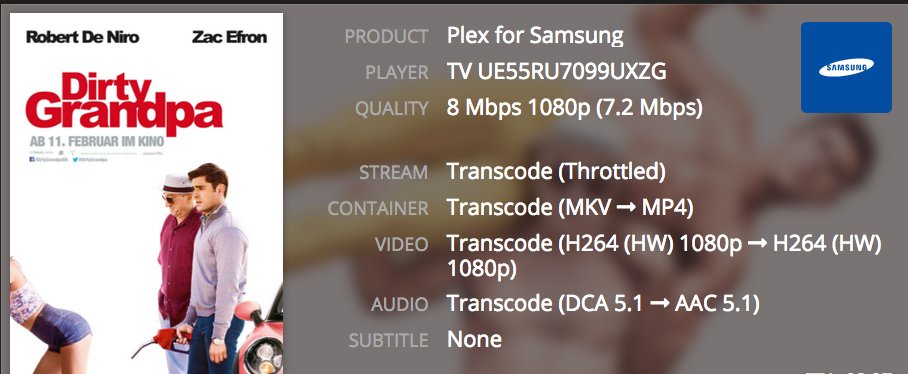
You can see the transcode info in the Emby admin dashboard Yeah i know, but i used plex for a long time and it is absolutely not the same like with tautulli. it is not clearly arranged and way less detailed than with tautulli on plex, so i hope this will be implemented in some similar kind.
 1 point
 -
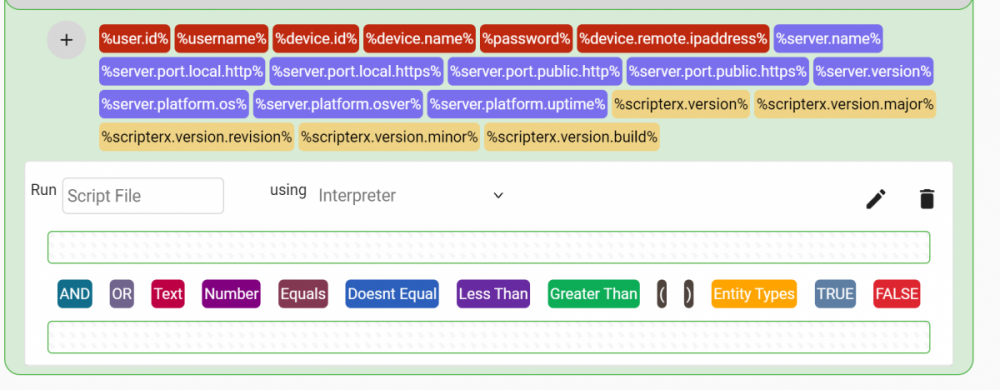
Slowly picking away at this interface rewrite. It's coming along very robustly. It's going to be awesome. This isn't indicative of the code behind it, the code is going to be MUCH smarter after this rewrite. It will be much more customisable. :) :) Can't wait to get this finished so you guys can make it do stuff :))))
 1 point
 -
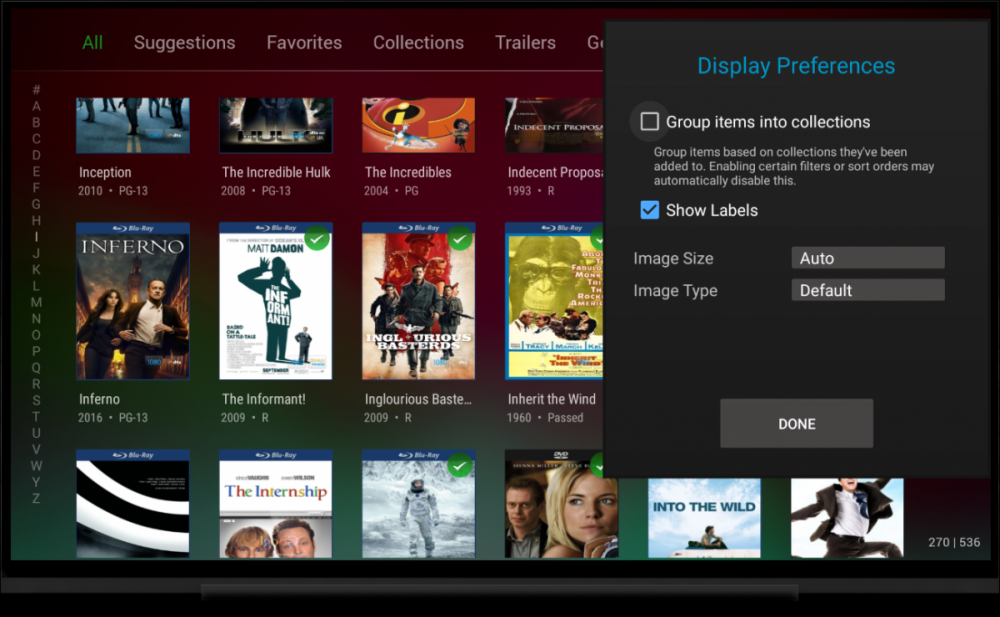
Hi. Did you open the "..." menu on that view?
 1 point
 -
Currently we have the feature of showing which episodes are missing in a season/show. My current problem is that generally I start an episode of a show and I just use continue watching or next-up and I have the setting of automatically playing the next episode turned on. Unfortunately with this way of watching the show I hardly notice missing episodes which brings me to my request. Can there be some kind of signal during playback about missing episodes? Right now I often notice later when during the "previously on ......" scene at the start of the movie, they show something from the missing episode. At that point I notice I haven't seen it before, and then when going in to the show/season I notice there was an episode missing a few episodes back. Some shows this is easily noticeable of course (missing an episode in the show 24 is hard to do generally), others though I notice it like 2 or 3 episodes later. Anything would be fine, I would even be fine with it, if it stopped going to the next available episode at that point. That way I am sure not to miss anything. Something like a pop-up or message would be fine to though. Or perhaps a short video playing with "missing episode: skipping to next episode"? Hope something like this might be possible.1 point
-
This is one of the reasons that I chose Unraid over FreeNAS. Nothing against FreeNAS, but there are a lot more "easy" options available to a standard Linux/Docker config like Unraid or OMV/Docker. I did a quick search, and couldn't find any GUI option for Nginx reverse proxy on FreeNAS. It can still be done, it will just involve the command line and manual configuration. I'm quite proud of the fact that I can create/manage my entire system without ever touching the command line.1 point
-
The best option for doing this is to use the secure standard port 443 for everything, but then use a reverse proxy on your server to direct traffic as needed. I do this using a docker container that makes things pretty easy. It has a web GUI that I configure everything in. I have about 4 applications on different domains pointing to my server. The proxy then directs the traffic to the correct instance on my home network.1 point
-
Fantastic! Can confirm that LDAP authentication is now working correctly. Thanks!1 point
-
I've built the latest ApiClient version from source and released E2PL v1.1.2.0-beta which is now using this client instead of the NuGet package. https://github.com/red217/EmbyExternalPlayerLauncher/releases/tag/v1.1.2.0-beta I haven't made any other changes and haven't had time to set up a VM with the latest version of the server, so I'm not sure if this actually fixes anything or not. It does seem to work with the old server version that I'm using for my own media. Anyone having the authentication issues could give this a try and with a bit of luck it'll work, assuming the new library uses the new authentication method in the background when talking to the server. If not, I'll get an install of the latest server going and look into it in more depth when I've next got a bit of time.1 point
-
Yes I agree that subtitle delay is a setting that we should have in our apps.1 point
-
Yes good idea.1 point