Leaderboard




Popular Content
Showing content with the highest reputation on 06/25/20 in Posts
-
@ebr @softworkz @Luke Might come in handy? https://sites.google.com/view/droid-tv/home?authuser=0 https://docs.google.com/spreadsheets/d/1kdnHLt673EjoAJisOal2uIpcmVS2Defbgk1ntWRLY3E/edit#gid=5605739312 points
-
No worries, I’m in the category of want to use it but don’t want to deal with manual install/update so it was a good opportunity to raise it again2 points
-
In light of the above I’m again going to ask if please can this be put in the catalogue. Not just so new users can find it but so people can use it without having to upgrade manually2 points
-
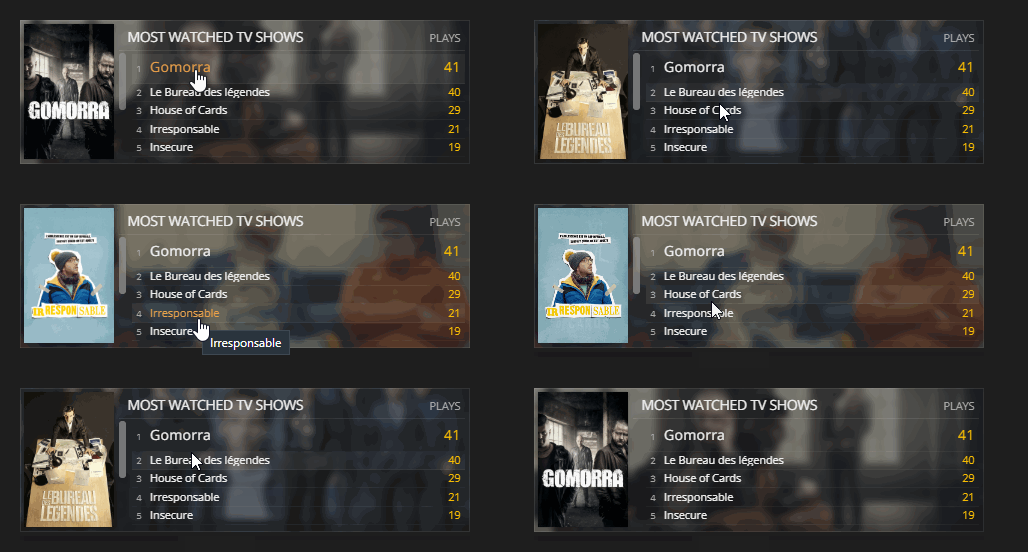
Nice can't wait to test it, I also think it could be better to have matching colors with emby/jellyfin, yellow is more or less affiliate to plex. Did the poster change when mouse is over another movie? Here is a small video on how tautulli displays it
 2 points
 -
I am switching over from a Win7 box running MBC to Chromecast dongles. With the Win7 box I had a HDMI to Cat6 setup that allowed me to stream to up to 4 displays/TVs simultaneously. It was great while it lasted, but involved stapling cables to the ceiling to run it from room to room - plus it has borked Can there be an option to multi-cast to several receivers at once? i.e. simultaneously play to Chromecast dongles in my office and living room and kitchen simultaneously so i can walk from room to room without stopping and restarting the movie or show all the time? I realize that bandwidth could POTENTIALLY be an issue, but i have a fill gigabit network and a multi-port NAS so that really is the least of my worries... Thank you!1 point
-
We actually did upgrade the hardware. However, there is a lot more involved than just the back end server. I think probably the additional delay you are perceiving now is due to the fact that the forum now refreshes as you go back. The old one did not - you got stale data from the cache. But, just like people work - software tends to consume the resources available to it.1 point
-
Hi. Please see below and let us know if you still have questions. Is there a limit to Emby Premiere1 point
-
+1 @Luke, this is a great notification plugin. Unless you guys come up with something native I would appreciate to have it in the catalogue.1 point
-
If you display device is capable of refreshing the screen at the same rate as the source video (ie 23.976/23.98 for most film) - then you will see a much smoother experience on screen - especially when the video is 'panning' - or going from left <> right. Usually, a process called 'pulldown' automatically inserts/holds frames when it does not match to make it as smooth as it can - but if your TV can refresh at that rate anyway - it is much better to have them match. Thus the option to do it in emby. They are off by default as some devices do not like to switch refresh rates on the fly, and you end up with a blank screen. Turn it on and see if you TV is ok - you can easily see what is happening if you enable the 'Stats for Nerds' in the emby options (press and hold the centre button for the Shield) - this should then show the display rate is the same as the video. You may notice a brief 'blank' of the screen when you drop back to the menu - this is normal as the screen will go back to 60Hz - or whatever your default TV setting is. Video resolution is a similar concept, when the 'input' of the TV will try and match the video - this in turn forces the internal scaler of the TV to do the upscaling work. ie you send a 720p video to your TV with this turned on, your 1080p TV (for example) accepts this and sets it's upscaler for 720p with all the appropriate optimised settings. If it wasn't turned on, the TV would still upscale, but it may not be optimised.1 point
-
Know restore defect, there are actually several topics. Here is the workaround required before restoring, place contenttype.collection file in each library in your backup. https://emby.media/community/index.php?/topic/87204-server-backup-restore-wrong-media-type/&do=findComment&comment=892781 https://emby.media/community/index.php?/topic/80502-backup-plugin-not-restoring-library-properly/&do=findComment&comment=8844341 point
-
First post, you need to put the dll in your plugins folder1 point
-
Mine is in /var/lib/emby/plugins/configurations1 point
-
owww, that's a nice feature. Currently it just shows the top poster. I'll see what I can do1 point
-
Based on a comment in the live TV forum, it struck me as a way to greatly speed up common live TV channel tuning. The idea is to allow the server admin to set a number of tuners, be they IPTV or HDHR, that can be used to tune to to channels that are not actively being watched. The channels would be selected based on their 'favorite' score. When no one is watching, the stream goes to the NULL device, or equivalent. Once a user selects it, there is an active stream already remuxed or transcoded, greatly reducing the time to get the channel loaded. For recordings or a user wanting to watch a channel not pre-tuned, the system should check to see if anyone is watching an tuner and hijack the least favorite, or any tuner not in the pretune pool. Instead of automatically using all tuners, I'd suggest a configurable number. Especially to keep an IPTV newbie from setting up hundreds of pretune streams and then wondering why they blow through their ISPs data limits, with obvious warnings about cummelative bandwidth usage. I think a lot of the elements already exist in Emby, favorite (score based?) and tuner sharing. I won't claim the rest should be easy, but would be a big user experience win. Double bonus points if this also includes a limited buffer on each pretune stream so it would be possible to rewind to the start if you tune to a channel a little bit late(which would likely break tuner sharing, but might allow getting a full recording).1 point
-
Hi, yes it's not a bad idea for the future. Thanks for the feedback.1 point
-
@Gilgamesh Come to think of it, do you only watch black & white movies/shows from 75+ years ago? I mean, if "flashy graphics" aren't important in games, media server frontends, or in forum software, then It obviously shouldn't be important in movies and shows. So why is color television necessary to watch anything? After all, using color doesn't improve the runtime in any way. I suppose you think movies peaked with The Great Train Robbery. Maybe Emby should optimize their UI for small black & white CRT TVs...1 point
-
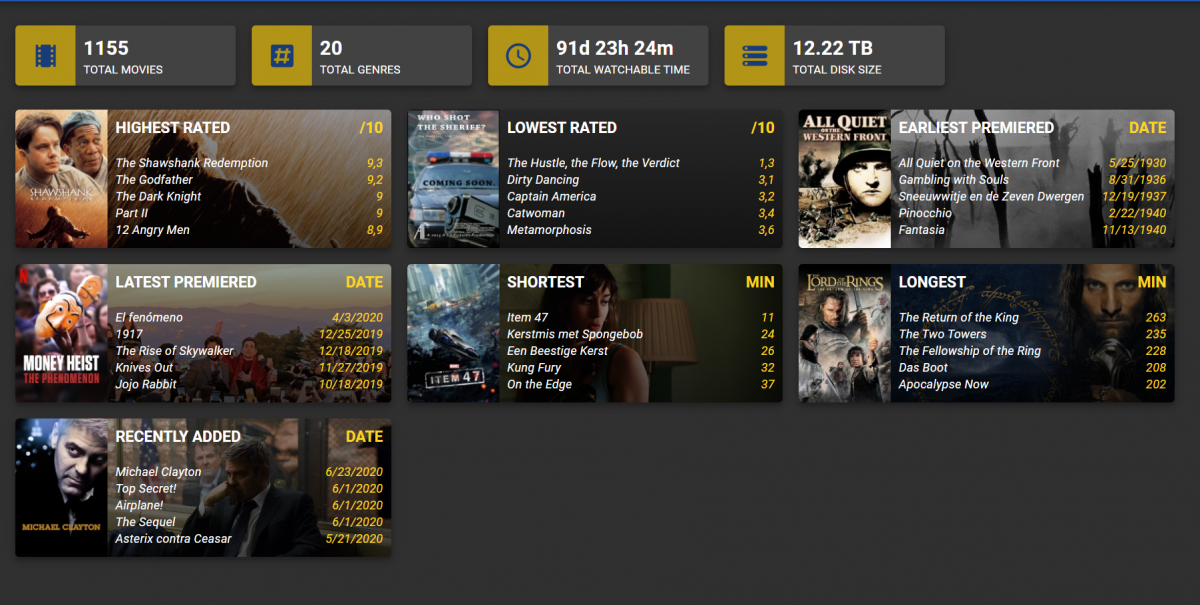
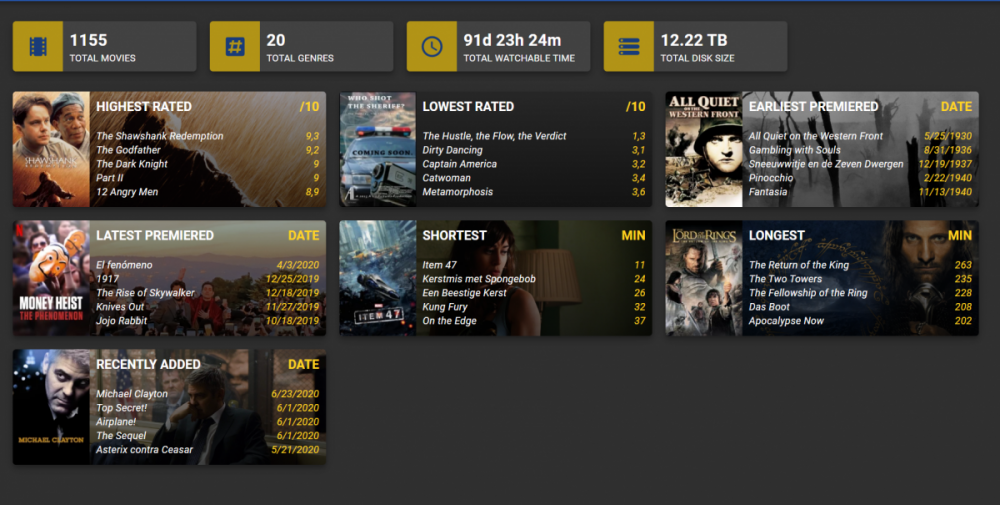
So I did some refactoring after the idea from @kesm. The titles are clickable and on hover they become yellow like the other text. I was just thinking that the yellow looks a lot like tautulli so maybe I need to find some other color scheme then blue-yellow as default theme colors. Maybe going back to the Emby green would be better.
 1 point
 -
Deleting makes no difference. You have to wait for them to drop off. I think the last time it was discussed it was said to be about a week after it was last used1 point
-
Hi. Do the ones that aren't showing up follow the proper structure and naming for TV series? Did you define the library as TV Series? TV Naming1 point
-
Still a issue but my work around works in my tests. Make a .collection file per library that reflects the contentype listed in the xml. boxsets.collection playlists.collection movies.collection tvshows.collection music.collection Without these files everything is restored Mixed Content.1 point
-
If you're using multiple devices like Roku's, phones and now a Shield TV, you should just get a lifetime premiere key and then all the apps will be free. Plus you'll get a few extra features on the server side. Sure it's more than the $5 you'll pay just for the app, but I'm happy to support these guys simply for the hours they spend here troubleshooting with everybody.1 point
-
I don't recall ever paying for the app on AndroidTV or any iPhone or Galaxy. I do recall paying for Lifetime Premier at a very low introductory price several years back and then feeling so guilty about getting it so cheaply that I pay for it again and again because I appreciate the hard work that @@ebr , @@Luke and many others put in on this project. Sent from my SM-G960U1 using Tapatalk1 point
-
Hi there, we work very hard on Emby and we thank you for your support.1 point