Leaderboard




Popular Content
Showing content with the highest reputation on 06/18/20 in Posts
-
It would be cool to allow Emby server users to comment what they think about a media piece. This could be shown on the top portion of a media info's page. Perhaps right under description, to encourage more user engagement.4 points
-
This is a deal breaker for me because I want to buy the life time membership I know it has been asked multiple time but I really need to know what developers plans for this feature3 points
-
I think the Emby logo is fine. As it's been pointed out, a company doesn't simply change its logo. I don't see anything about it's design that makes it look like it's from the 90s. I mean... what are those design cues? It certainly doesn't have a drop shadow, and it isn't embossed. THAT would make it look like it was from the 90s. I guess I just don't see that argument. It's a simple, flat, 2 color logo. That's a fairly modern design cue. With that said, I actually like the look of the green mobius play button that @dannymichel mocked up, but that doesn't mean I would change the Emby logo. One could easily argue that design is "tired" as well. It's been done and is readily available in multiple forms in standard stock art. Just do a google image search for "play button logo" and you'll find multiple instances. So even if Emby did change it, someone would just say it's derivative and un-creative.2 points
-
As I mention in a related post, I love the additional subfolders for Movie Extras (eg, Shorts, Scenes, Interviews, etc.)! It would be awesome to extend this functionality to TV Series as well. Specifically to add support for many/all of the same folders supported for Movie Extras, eg, extras specials shorts scenes featurettes behind the scenes deleted scenes interviews trailers As well as any additional folders that get added in the future (eg, hopefully Galleries). Support Placement of "Extras" Folders Within Each Season Folder, Plus A Naming Scheme to Link A Particular Extras Folder with a Specific Episode (eg, "\Season 1\E1 - Deleted Scenes\" for episode 1 deleted scenes): I want to clarify that it would be great if these various "extras" folder types could reside within each Season folder. So for example, within a Season 1 folder we could then have an "Extras" folder, a "Deleted Scenes" folder, a "Featurettes" folder, etc. And furthermore, that we could designate a particular folder to refer to a specific episode (eg, "\Season 1\E1 - Deleted Scenes\" for episode 1 deleted scenes). See more below, particularly why I think this would be so useful: https://emby.media/community/index.php?/topic/55915-emby-server-theater-additional-extrasspecial-folder-types-for-tv-series-similar-to-movies/&do=findComment&comment=587195 Thanks for your consideration! PS - If this is something you might like to see implemented, be sure to "Like" this top/first post (as well as any subsequent posts in this thread that highlight particular aspects of what you are interested in) -- "Liking" the top/first post helps the Devs to know how much interest there is in a given Feature Request.1 point
-
Channels DVR has this in beta right now. Is it something that Emby can do? https://community.getchannels.com/t/new-tv-everywhere-support-beta/17405?fbclid=IwAR0fv2XN-Xrssi5mkLLsye_fwYbX8oT5P7E8pv-fwpsBOIr1W3sXj7iecXQ1 point
-
I would love to be able to do the following. For example, say you have a TV Show episode called "The Robbery" from Seinfeld. Any extras for that episode like Commentary, Deleted Scenes, etc.. could be listed with that episode or tied to that episode on a screen for access. Would any of that be possible?1 point
-
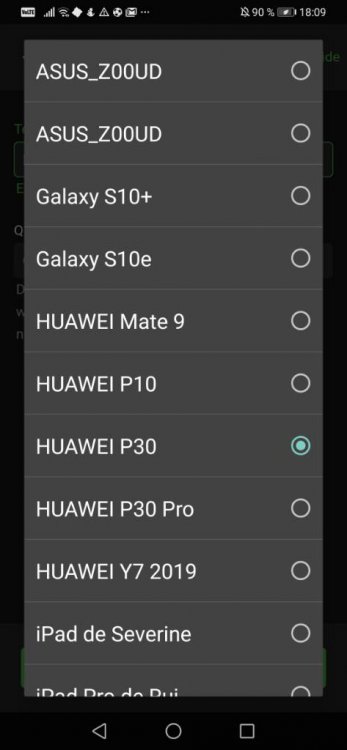
Hi everyone. I have found a (Issue and this needs enhanced) because i have a friend who have downloaded a whole TV show to my mobile because both of us have the same Phone name and looks like than emby allow to see everyone devices as connected to emby through the list of downloads to device option let me explain in other words How I supposed to know wish iPhone is mine and the other 2 is my friend, as you can see there are 3 iPhone in the list because the devs don't have isolated it. I'm my moms tv with her accounts same thing (all device is listed) As you can see in above picture, I can allow to download my movies to any device from other users, it should have a isolated device list per users Like my computer and my smartphone and etc (My own devices only) .. But not showing me the device from others like my mom devices, it should be isolated between accounts (My user can download to my own device) (My moms can download to her device) I really don't understand why the devs don't have isolated the list by user. Like I have described above. Hopefully this will be fixed soon because is a security issue user may not be able to view devices from other users. Resume to do. Isolation between device account to don't allow users to download by mistake to a device from other users, so by this way the device is isolated by accounts and the retrieved(return or resulted) list was only the device from that user and not from the other. Kind Regards Enjoy? VOTE WITH LIKE NOT WITH +1 COMMENT Sent from my VOG-L29 using Tapatalk
 1 point
 -
To gauge interest... What if you had the ability to "Forget" a series for the purposes of Next Up display. That is, it would no longer show in Next Up - unless you watched another episode. Sometimes you maybe watch a series for a while and, even though there is more of it or more is made later, maybe it isn't as good as the earlier seasons or maybe you just don't have time for it anymore. So you'd like it to quit showing up in your Next Up list so it is less cluttered and you can focus on the series you are actually watching now. If you start watching it again, the "forget" would be forgotten and it would start to show up in Next Up again.1 point
-
I feel Emby is improving when it comes to performance. However it lacks compared to its competition on new features (skipping intro), or the UI of it's clients. So what would be the next "'BIG'' thing for emby?1 point
-
I have set up Emby to record a series of shows which are repeated across a number of different channels. Some channels have both HD and SD versions but emby recorded the SD version rather than the HD version of the programme. Is there any way for Emby to prioritise HD recordings over SD while setting up the recordings?1 point
-
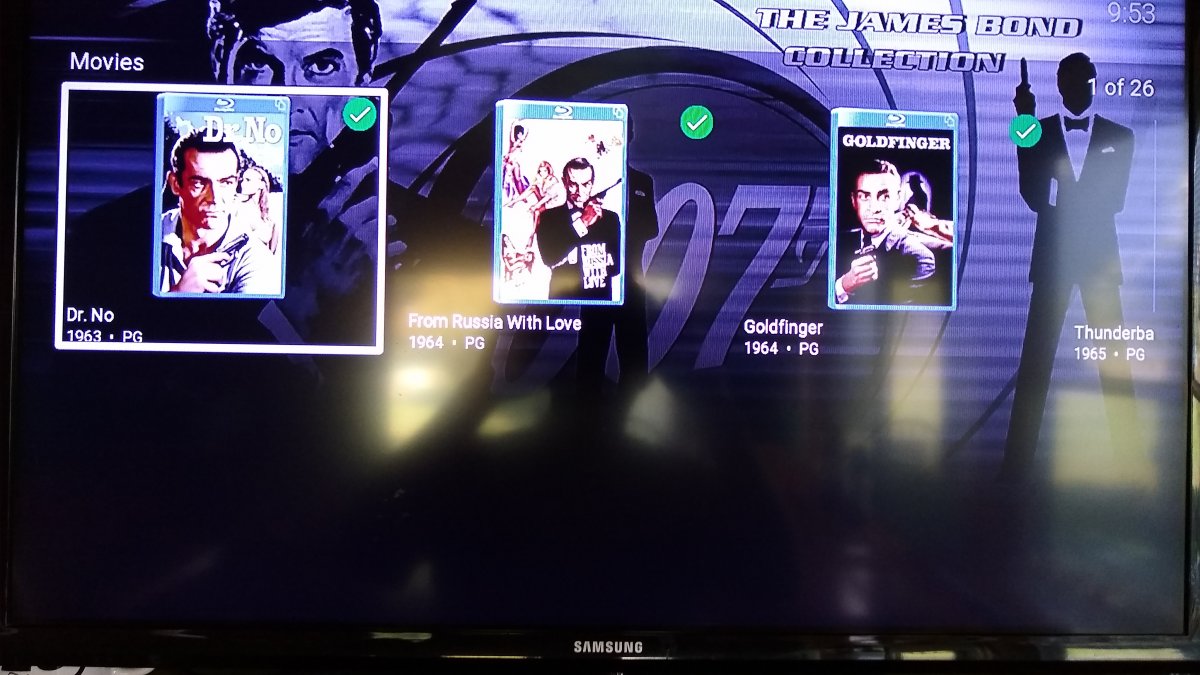
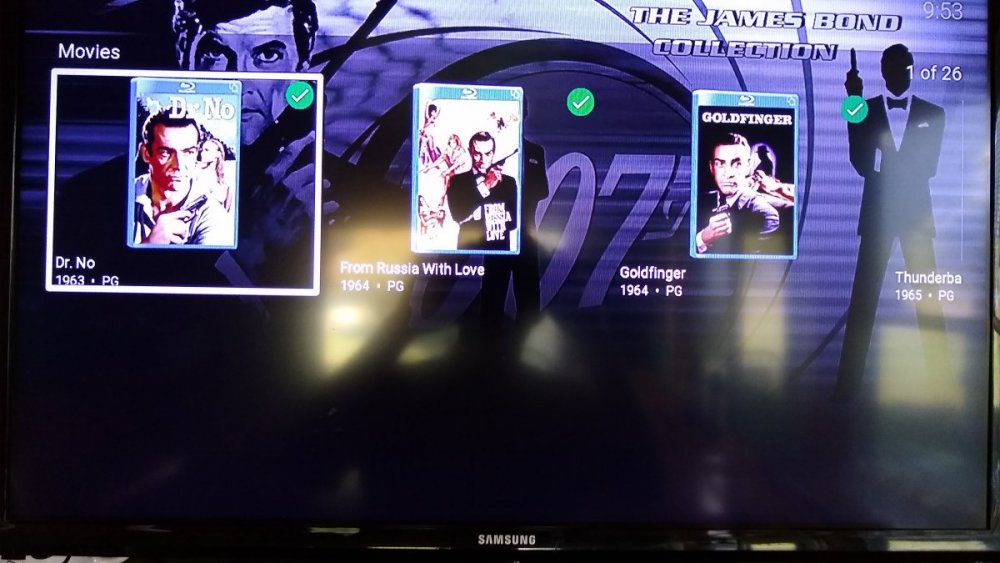
This afternoon I was watching a movie when the movie frozen, then Roku rebooted. When it came back to life the Emby Roku app had updated. I picked up where it left off and played the rest of the movie perfectly. The problem is the display of movies in a collection. Since the update now displays the movies horizontally with only 3 movies on showing without scrolling. The box surrounding the movie poster is laid out is landscape with the poster a portrait inside. What a waste of space. Can't this layout issue be fixed1 point
-
Hi I would like to know if there was planned to add "Download to" function on the other platform such as android TV? Kind regards Sent from my VOG-L29 using Tapatalk1 point
-
A download to option on the Xbox would be nice too, to prepare for times when my server is offline for an upgrade.1 point
-
Hi there, let's look at an example. Please attach the information requested in how to report a media playback issue: Thanks.1 point
-
I too was surprised by the update... my collections used to be a nice, navigable grid, and are now a single horizontal line showing three items at once. This is virtually unusable! My collections are all of the same type of media, and I desperately want my grid view back. We always open a collection (for example, current TV shows), and browse the grid to see what we want to watch next. This was a beautiful, intuitive, and functional interface that has now become unusable. One more thing that changed for the worse (dropped back, actually): the number of episodes shown on the folder in the collection view used to diminish by one each time you watched an episode. Now you need to exit the collection and re-enter to update this number (this is how it used to be a long time ago – we've regressed!). Please fix these issues! Thank you.1 point
-
Yes i've got everything up and running now, many thanks again! I'll get an emby subscription now.1 point
-
We got it figured out. There was one movie causing trouble. Through process of elimination we tried cut/paste a few movies from one directory to another and they did scan in on the "problem drive". So now things are scanning in and he's setting up his library again. Carlo1 point
-
If I understand you correctly, I will get the display I want if no single collection contains more than 30 items. I have 2 collections that have more than 30 items so I deleted them and rescanned the database thinking that the display will change. The results are the same, can only see three items before I have to scroll right.
 1 point
 -
good to hear you got it sorted, in the mean time i was doing a bit of checking and it seems that something has changed in scripterx which has indeed broken the script as you suspected, namely when removing parent objects (series,season), child objects (season,episode) are not firing an onmediaitemremoved event and hence child object removals are not being logged, which in turn is breaking the suppression. I will publish a fix shortly and include a wait state for 'integromat queue full/status code 400" so that the script pauses for 5 seconds before trying again upto 2 more times to post. (time will tell what the appropriate delay and qty is). I havent been able to replicate queue full so havent been able to test so this may introduce a bug.1 point
-
Dlna is not a second class feature. Thanks for reporting these issues.1 point
-
1 point
-
Lol well emby works and I think it looks good. It will morph over time. I like that emby follows other web and media site trends. My users can easily use my emby server, like they nan Netflix, Hulu, and do on. It sounds like we all agree on the excellent support at least.1 point
-
A logo is not something a company just changes on a whim. Ours is trademarked. It isn't changing any time soon . The rest of the UI we are open to suggestions. That doesn't necessarily mean we'll change to exactly what one person wants but we'll definitely listen to ideas.1 point
-
That "Emby" is simply UGLY. I see no reason to change anything about the appearance of Emby. It is good enough so it can be used and easily recognized and there is no reason for anyone to waste time making better that which is already good. Emby's developer's time should be spent on functionality not aesthetics once it is pretty enough for comfortable usability. But if it changes I will not complain much unless the changes get in the way of usability.1 point
-
You may need to DISABLE Hardware Throttling. Do not disable hardware acceleration entirely. Just disable throttling for the time being until we investigate more. This is on our plate to complete. This is related to the new Roku firmware 9.3.x that has just pushed to "The Wild". Now that normal users are getting it rather than just Beta Testers the issues and bugs start to get reported. I doubt Roku has very many reliable/consistent Beta testers because of their stringent NDA requirements. But I digress. We can only work around the issue presently and that might mean extending the buffer for the throttle. See this thread and this post: Note: Your TCL Roku TV is still on 9.2 and still functions normally. Your Roku Premiere Plus on the other hand has updated to 9.3 and has inherited the new bug/issue. We apologize and will try to pin down the culprit and get a work-around/solution out as quickly as we can. Thanks for reporting. Please report any and all issues. We love people like you.1 point
-
What is bad about the logo? It is minimal and purposely roundish. Do you mean the font and the text "emby" that appears after the logo looks funky? The logo should be animated IMO as it is round after all. When you press play on something and the loading spinner appears. That logo could be the spinner. The green Emby logo could spin. But the play symbol inside would not. The green Emby backdrop to the logo spins behind the play symbol. That could be the spinner. In fact... it should be. Man that would make a kick ass loading spinner. Maybe that idea should be toyed with.. lol.1 point
-
Something is more broken than usual, I did some more testing and both FLAC 2.0 and 1.0 don't work either, both are considered "unsupported audio" by Emby and are transcoded to AAC. So basically no FLAC works at all, not sure if it's Emby or ExoPlayer. There's no major FLAC issues like this reported in ExoPlayer's github issue page, so I'm guessing it's Emby.1 point
-
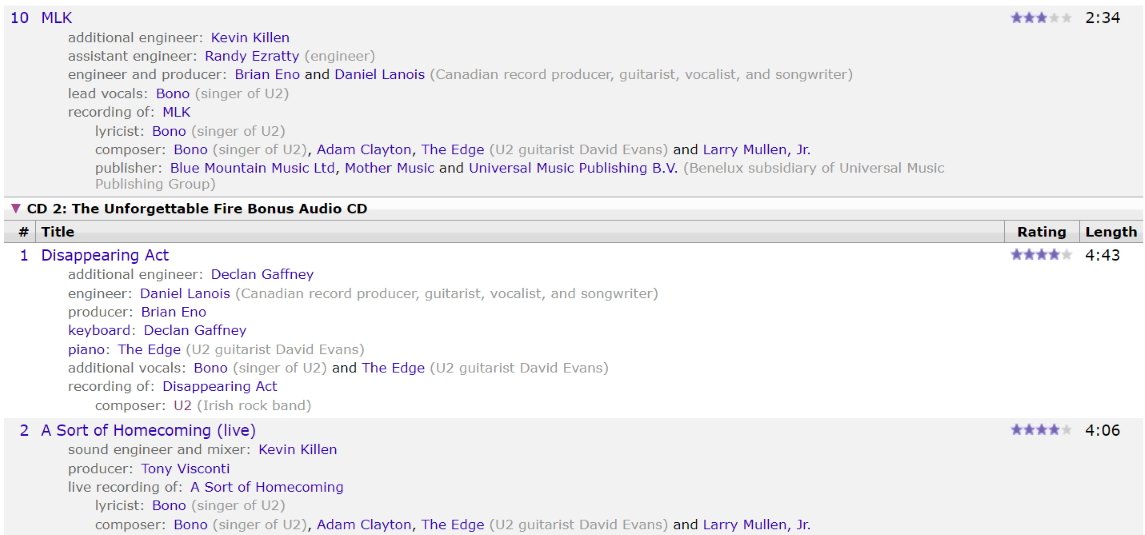
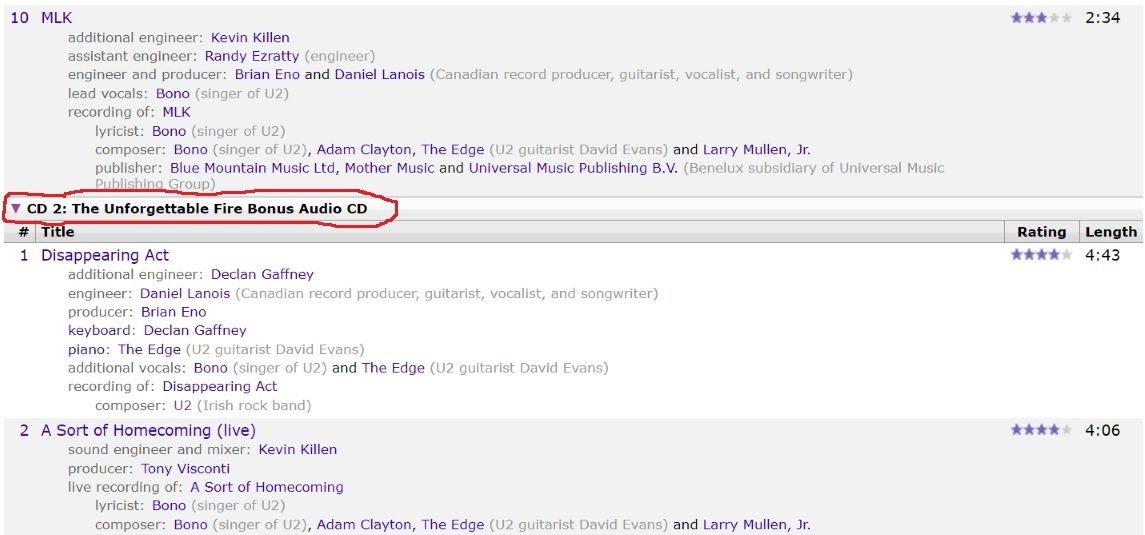
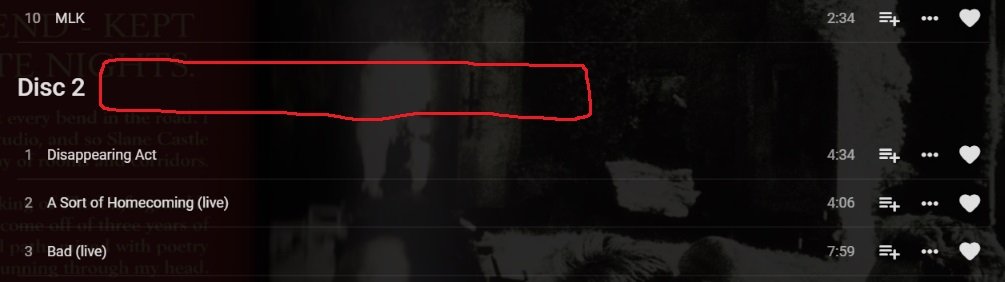
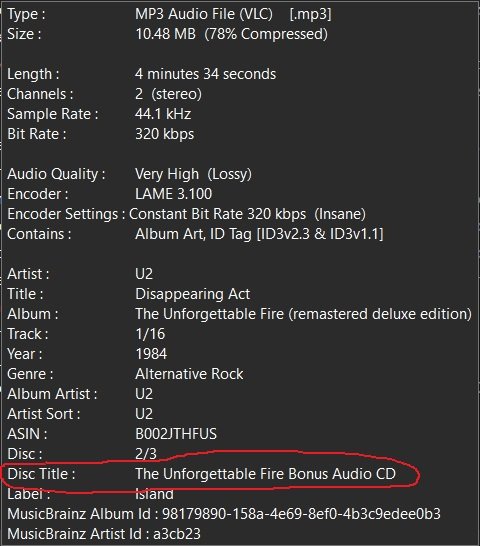
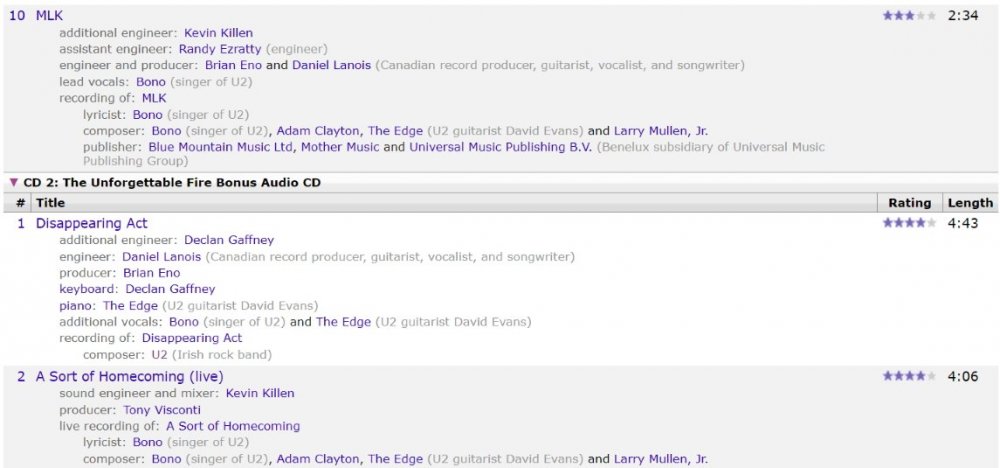
Conjuring this one back up because for multi disc music albums I'm having a tough time sometimes figuring out what is what. I have multi-disc albums anywhere from 2 to 100 discs big and just the label Disc # isn't always meaningful unless I pull out the physical disc and read what the covers say. The bigger the boxset the more important the disc title information becomes. For my 100 disc boxset of Beethoven music I can't make out what is what without the physical cover telling me as I'm not an expert in classical music. If you could pull the "Disc Title" id tag and append it to the Disc # label then I wouldn't have to pull out the physical cover for the CD to know what I'm playing. Single discs don't have this information in musicbrainz so it wouldn't affect them at all. This isn't the same thing as the Album Title. This is the label used to name individual discs within a multi-disc boxset This information is pulled from musicbrainz using mp3tag/picard As seen on musicbrainz https://musicbrainz.org/release/98179890-158a-4e69-8ef0-4b3c9edee0b3 As mentioned above this is where it probably would be a good place to put it
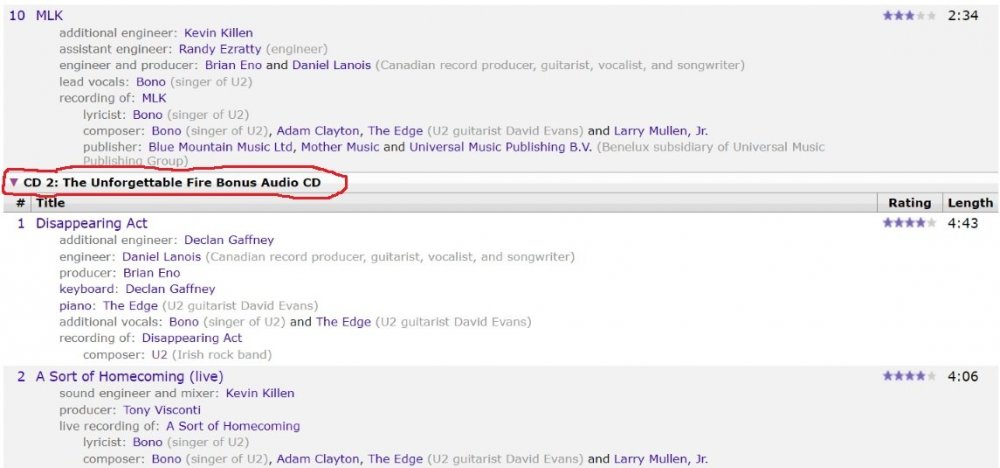
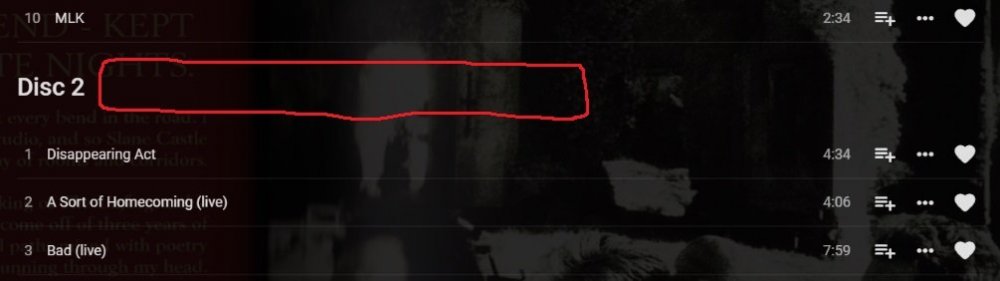 1 point
 -
As far as I am aware, there is no option to change the Emby theme on Roku, and the default is dark. The issue with this is that many of the images provided with Emby's Live TV channel guides are dark logos. This means that it is extremely difficult to see the channel logos provided by Emby programming. If the Roku App had a way to change the theme to Light or really any other colour would be a huge improvement. If this is so too much work, I'm wondering if at least the guide background could be changed in the default "dark" theme so that the images could be seen on Roku devices?1 point
-
I guess you are on latest Emby server beta, right ? if yes, you will have to wait until next MrMC TestFlight/release is out, because from Emby Server beta 4.5.0.13+, there are some Emby server API changes that impact MRMC compatibility regarding manual sign-in with MrMC Emby Client Service. This is a known MrMC issue with Emby Server beta 4.5.0.13+ and already discussed during an internal compatibility test regarding those API changes, done here with some users and devs, where Amet from MrMC, was also involved.1 point
-
This is because I have explicitly disabled certificate verification until I found the time to properly handle HTTPS. Otherwise it would only work for HTTP.1 point
-
Similar to films, whereas the extras are shown below the listing. Could be on episode info page. This could be handy for shows like The Flash, who's DVD releases have episode specific extras, such as deleted scenes or interviews, while there are season-based special features as well. How likely is this to be added to Emby? Opinions?1 point
-
Hi. The instructions included some more information to provide...0 points