All Activity
- Past hour
-
@Lukechecking where we are fixing the search TY
-
 Nini.20 joined the community
 -

version 4.9.1.80 - Add option to group notifications???
Teredactle replied to Teredactle's topic in General/Windows
Hi, checking in on this option if it's being implemented any time soon? TY -
I use Telegram and Whatsapp Bots.
-
 axelsolar joined the community
 -
 Casarara joined the community
 -
 Yuleysy joined the community
 -
 Ax02 joined the community
 -
 Jazlynriana joined the community
 -
 Conane joined the community
 -
 UJSiHOVFxtpgsaeWvPQG joined the community
 -
 Bootlace joined the community
 -
OK the 3.8.4 plugin update has added support for their new paging requirements. Thanks.
-
 a7.045 joined the community
 -

Pausing/stopping movie using android media control not working
DrNoD replied to DrNoD's topic in Android
Still not working. (all updated) For me it looks now like this: When opening emby on dex in minimized mode and i hit play on a video, the video starts in full screen. But there are no controls (play / pause) when moving mouse. The black borders on top and bootom are visible now. But the task bar of dex is still visible. So not real full screen. When hitting the "back" on the keyboard (WIN + arrow left) emby returns into window mode and the screen is just black. But i can hear the sound of the video still playing. And when moving mouse on the now minimized window, controls appear (and controls work). Hitting the "back" on the keyboard (WIN + arrow left) then, i can return to the movie overview and start/continue the movie again. then all the same behavior like described before. Tried starting emby on my phone (when connected to the dex screen) then, the movie starts in full screen on dex screen (taskbar visible, black border on top/bottom visible, but no controls) and on the phone there is black screen with the controls that are working. When hitting the "back" on the keyboard (WIN + arrow left) on the phone, the fullscreen on dex still displays the last shown stopped video. When moving the move to the dex and hitting the "back" on the keyboard (WIN + arrow left) the image disappears. Note. dex is starting all apps again, and closing on the other screen. for example starting a browser on mobile and then on dex it closes the window on dex and vice versa. Same with emby. But somehow the fullscreen when starting a video always start on the dex screen. Tried in chrome for example to open emby. there the fullscreen is not switching to the dex screen. - Today
-
It's a Galaxy S21 Ultra with Android 15 and a Marantz SR7015.
-
Hi, what device is this on? What version of android?
-

Emby doesn't exit video when Android box screensaver is on
Luke replied to Nabukodonosor's topic in Android
Hi, the idea is you should be able to come back and resume any time, similar to apps like netflix and disney. When the screensaver comes on that doesn't need to exit the video. We'll take a look at it. Thanks. -
Hi, what do you mean by "good for remote" ?
-
Backed up emby and re-installed. Trying to recover users and settings on new install
Luke replied to Astrocat's topic in Synology
Hi, you cannot really pick and choose specific parts of the data folder. What you could try is to delete the contents of /Emby and copy /OldEmby into there. -
I cannot imagine this causing burn-in, but yes we can add options to control it.
-
And also, this is a problem: TV library: /shares/Public Movie library: /shares/Public/Films You cannot use the same folder in two libraries with different content types. What you should do instead is something like: /shares/Public/TV And put your TV shows in there, and then update the TV library to use that.
-
What metadata fetchers are enabled on the tv library?
-
I saw 3 files inside the logs so here they are. Thanks embyserver.txt ffmpeg-directstream-f4c04428-fb5a-4e0e-a317-0051348b72ea_1.txt ffmpeg-transcode-2e4413ef-535e-412c-aa4b-9aab80a0ba0b_1.txt
-

Backed up emby and re-installed. Trying to recover users and settings on new install
Astrocat posted a topic in Synology
hi, My synology NAS dsm 6.0 satrted to misbehave and emby only displayed "NoItems found'" These are the steps I followed in this synology section. SSH to the Nas as Admin user. Sudo -I cd /volume1/ mv ./Emby OldEmby Then used the package manager in the DMS to install emby. I have tried to copy the users from the old Emby install into the Config folder but it does not work. Is it possible to copy the users and settings ino the fresh Emby install ?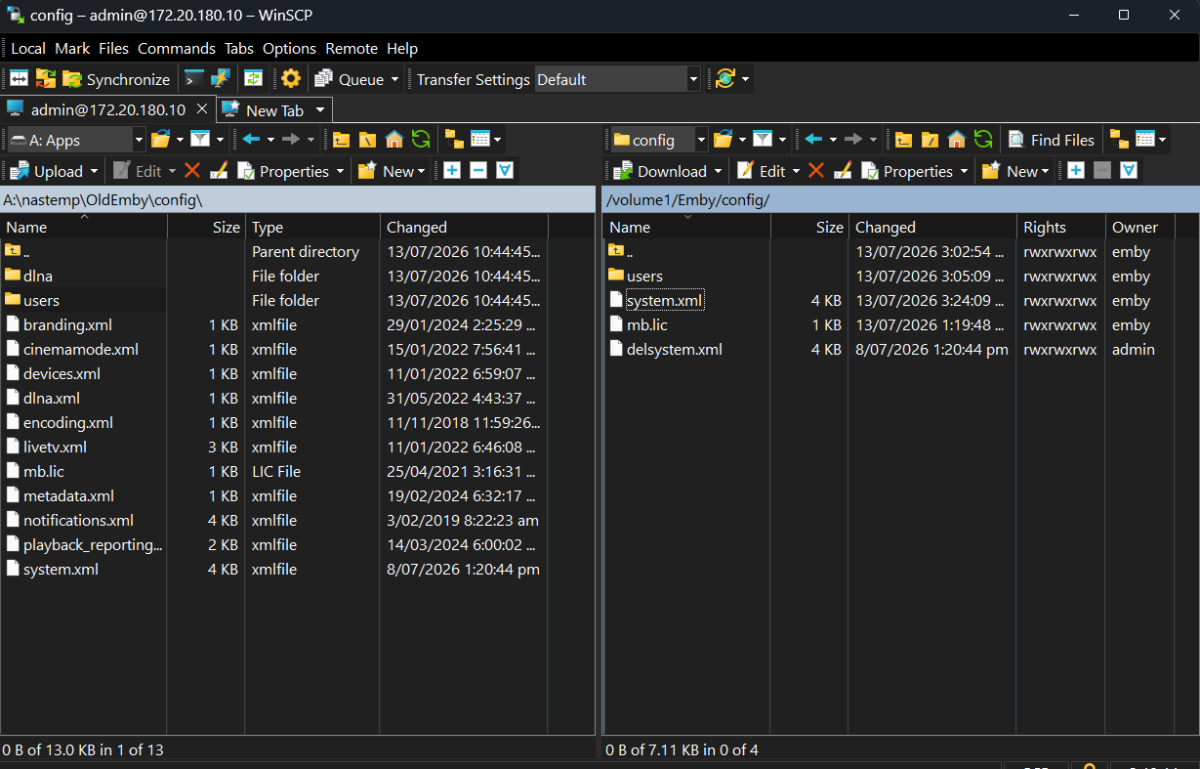
-

Meta Quest 3 connect to emby
FourCorners replied to FourCorners's topic in Non-Emby General Discussion
ok -
Hi, the email that you entered into the field needs to have it's own Emby Connect account, so have the owner of that email sign up first, and then try entering it again.
-
Hi, that would be great. Thanks !
-
Hi there, let's look at an example. Please attach the information requested in how to report a media playback issue. Thanks!
-

-
There seems to be multiple issues with the Emby Xbox app here lately. One issue is that every live channel from my hdhomerun is now being deinterlaced and transcoded. Previously I'm pretty sure everything was working through direct play. Nothing has been changed other than a recent Emby server update. Another issue is some channels just won't work and show a black screen like my local fox channel. It'll say it's converting the stream to a compatible container but ends up not showing. Again this channel worked previously. Also, all of this works on my other devices such as direct play and channel 8 but I have multiple Xbox consoles in the house that I've loved using Emby with.
-
Thank you for the assistance, I have created a new thread, to stop hijacking this useful thread.