All Activity
- Past hour
-
 Susanasolana joined the community
 -
 Fabene joined the community
 -
 Falkie45 joined the community
 -
 Xush_Pirata joined the community
 -
 Niv Adam joined the community
 -
 Aabolto joined the community
 -

I am not allowed to watch movies or series in 4k UHD
robertmontblack replied to robertmontblack's topic in LG Smart TV
Por el momento he encontrado en los dispositivos smart tv LG C5 (2025), de vez en cuando falla el Firestick 4k max de segunda generación. -
 Kikkesevilla joined the community
 -
 karen8 joined the community
 -
 OtTheQueen joined the community
 -
 miguelangeldelg joined the community
 -
I think I may have isolated this further, and despite the title of this thread, I don't believe AC-4 itself is necessarily the cause of the playback failure. I am seeing essentially the same problem described here with KTXL/FOX40 in Sacramento. This is an unencrypted ATSC 3.0 channel received through an HDHomeRun at v140.1. The channel previously worked in Emby. It currently works normally, with video and audio, using the HDHomeRun application. VLC also plays the HEVC video perfectly, but has no audio because my VLC installation does not decode AC-4. Emby, however, fails completely with: Playback Error No compatible streams are currently available. Playback failure: network I initially suspected AC-4, but the Emby FFmpeg log appears to point somewhere else. I am currently running Emby Server 4.10.0.40. The included FFmpeg identifies itself as: ffmpeg version 5.1-emby_2023_06_25_p6 Emby successfully probes the ATSC 3.0 transport stream and identifies: HEVC Main 10 video, 1920x1080, 59.94 fps, yuv420p10le English AC-4 5.1 audio Spanish AC-4 audio STPP/data/caption streams It then sets up a transcode of HEVC → H.264/libx264 and AC-4 → MP3/libmp3lame. In other words, the Emby FFmpeg build appears to recognize the AC-4 stream and has an AC-4 decoder available. However, before any frames are produced, the HEVC decoder repeatedly reports: [hevc] PPS id out of range: 0 Error parsing NAL unit #4. This repeats continuously, and ultimately zero video is produced. I then tested the HDHomeRun stream directly with a current FFmpeg installation, explicitly disabling audio so that AC-4 support was irrelevant: ffmpeg -hide_banner -loglevel info -i 'http://hd1.direct.webbnet.org:5004/auto/v140.1' -map 0:v:0 -an -t 15 -f null - The current FFmpeg/libavcodec successfully decoded the stream: Stream #0:0 -> #0:0 (hevc (native) -> wrapped_avframe (native)) and completed the 15-second test with: frame= 900 ... time=00:00:14.89 ... speed=6.59x There were no HEVC PPS/NAL parsing errors. The current FFmpeg could not determine the AC-4 audio parameters and reported the AC-4 streams as 0 channels/unspecified sample rate, which is expected since upstream FFmpeg does not provide the AC-4 support that Emby's customized build does. But that was deliberately excluded from this test with -an. So at this point I seem to have the following: HDHomeRun application: HEVC works, AC-4 works VLC: HEVC works, AC-4 does not Current upstream FFmpeg/libavcodec: HEVC works; AC-4 unavailable Emby's FFmpeg 5.1 build: AC-4 is recognized/supported, but HEVC decoding fails with repeated PPS id out of range: 0 This makes me wonder whether the actual regression is not AC-4 at all, but rather that Emby's custom AC-4-capable FFmpeg is still based on FFmpeg 5.1/2023 and its HEVC decoder is no longer handling something present in current ATSC 3.0 broadcasts. For comparison, before upgrading I was running Emby 4.9.5.0, whose included FFmpeg identified itself as: 5.1-emby_2023_06_25_p4 After upgrading to Emby 4.10.0.40, it is: 5.1-emby_2023_06_25_p6 The exact same HEVC PPS id out of range failure occurs with both versions. It therefore looks possible that Emby's AC-4 patches themselves are still doing what they are supposed to do, but the FFmpeg 5.1 codebase underneath them has become the compatibility problem. One additional test I can perform is to invoke /opt/emby-server/bin/ffmpeg directly against the HDHomeRun URL. That should distinguish between two possibilities: If Emby's bundled FFmpeg produces the same PPS errors when reading the HDHomeRun URL directly, this would strongly suggest the problem is the older HEVC/libavcodec implementation in the Emby FFmpeg build. If Emby's bundled FFmpeg successfully decodes the direct HDHomeRun stream, but fails when Emby feeds it the internal /LiveTv/LiveStreamFiles/.../stream.ts, then the problem would instead appear to be somewhere in Emby's Live TV ingest/repackaging/stream initialization path. Given that this ATSC 3.0 channel previously worked in Emby, VLC still decodes its video, and a current FFmpeg decodes all 900 frames of the 15-second test without error, I think the repeated HEVC PPS errors in the Emby FFmpeg log may be the most useful clue. I would be happy to provide the complete Emby FFmpeg log and perform additional A/B tests if that would help isolate it. --- Follow-up: I found that I needed to go into the Emby "Transcoding" settings and for "H.265 (HEVC)" settings, changing it from "Main Profile" to "Main 10 Profile" solved my issues. I also found that I needed to set my player to play highest quality with preferred DirectPlay. Using the stand-alone Windows app, I had to disable de-interlacing, as it was attempting to de-interlace a progressive picture.
-

Library is lost and must be rescanned if network shares aren't available at startup
Q-Droid replied to displayname0504's topic in Linux
In addition to the startup checks both of you might want to consider a monitoring component because if the mounts disappear while Emby is running a scheduled scan could also wipe the library. The devs could resolve this problem and I don't think it would take a lot of effort or be a major overhaul. Some solutions could introduce other useful library management features that Emby users already struggle with. The big question is what are the numbers? How many are affected by this and other problems that could be solved in one go? -
Checking in on if this has been addressed yet.
-

A request to Emby - please clarify the situation with the AndroidTv app
IAmHugh replied to ecrispy's topic in Android TV / Fire TV
Cause rather you're on the phone app, TV app, or the PC app they ALL look the same. No real difference based on the type of device. Looks like you guys took a page from Microsoft who got it wrong and ignored Apple who got it right. -
Thanks @ebr. I understand the reasoning, but just giving you my user feedback.. Other users who aren't actively managing the system my have better experience.
-
Can I get the Host and Port
-

Developer API: Add an item to Resume/Next Up without starting playback
Lasikie posted a topic in Developer API
Please add a supported, user-scoped API to place an item in Emby's native Resume/Next Up rail without starting a playback session or changing play history. Use case: Plembfin (https://plembfin.com/) is an open-source, cross-service watch-history and queue manager (source: https://github.com/Lasikiewicz/plembfin). It calculates an Up Next queue and wants the next movie or episode to appear in Emby's native Resume/Next Up rows before the user has played it. Emby exposes the read side (for example /Users/{UserId}/Items/Resume) and clients can remove items, but there is no clean write operation for explicit queue membership. The current workaround is to report a synthetic client session through /Sessions/Playing, /Sessions/Playing/Progress and /Sessions/Playing/Stopped. This makes the item appear, but it also creates a real-looking playback session and can increment PlayCount. The integration then has to restore UserData and suppress the synthetic session. A small resume position alone is stored but filtered out of the native rail. Please add an idempotent endpoint or explicit QueueOnly/ResumeMembership flag that can add, remove and list an item for a user while: - leaving PlaybackPositionTicks/Played/PlayCount/watch history unchanged unless explicitly requested; - creating no playback session, now-playing event or scrobble; - supporting both movies in Resume and episodes in Next Up; - allowing normal playback to replace the synthetic queue membership with a real checkpoint. This would let Plembfin and similar trusted integrations manage queues safely across clients, removing the need for a fake 6% resume marker while preserving normal playback behavior. - Today
-
For sue and thanks @skidmarks
-
I think I may have isolated this further, and despite the title of this thread, I don't believe AC-4 itself is necessarily the cause of the playback failure. I am seeing essentially the same problem described here with KTXL/FOX40 in Sacramento. This is an unencrypted ATSC 3.0 channel received through an HDHomeRun at v140.1. The channel previously worked in Emby. It currently works normally, with video and audio, using the HDHomeRun application. VLC also plays the HEVC video perfectly, but has no audio because my VLC installation does not decode AC-4. Emby, however, fails completely with: Playback Error No compatible streams are currently available. Playback failure: network I initially suspected AC-4, but the Emby FFmpeg log appears to point somewhere else. I am currently running Emby Server 4.10.0.40. The included FFmpeg identifies itself as: ffmpeg version 5.1-emby_2023_06_25_p6 Emby successfully probes the ATSC 3.0 transport stream and identifies: HEVC Main 10 video, 1920x1080, 59.94 fps, yuv420p10le English AC-4 5.1 audio Spanish AC-4 audio STPP/data/caption streams It then sets up a transcode of HEVC → H.264/libx264 and AC-4 → MP3/libmp3lame. In other words, the Emby FFmpeg build appears to recognize the AC-4 stream and has an AC-4 decoder available. However, before any frames are produced, the HEVC decoder repeatedly reports: [hevc] PPS id out of range: 0 Error parsing NAL unit #4. This repeats continuously, and ultimately zero video is produced. I then tested the HDHomeRun stream directly with a current FFmpeg installation, explicitly disabling audio so that AC-4 support was irrelevant: ffmpeg -hide_banner -loglevel info -i 'http://hd1.direct.webbnet.org:5004/auto/v140.1' -map 0:v:0 -an -t 15 -f null - The current FFmpeg/libavcodec successfully decoded the stream: Stream #0:0 -> #0:0 (hevc (native) -> wrapped_avframe (native)) and completed the 15-second test with: frame= 900 ... time=00:00:14.89 ... speed=6.59x There were no HEVC PPS/NAL parsing errors. The current FFmpeg could not determine the AC-4 audio parameters and reported the AC-4 streams as 0 channels/unspecified sample rate, which is expected since upstream FFmpeg does not provide the AC-4 support that Emby's customized build does. But that was deliberately excluded from this test with -an. So at this point I seem to have the following: HDHomeRun application: HEVC works, AC-4 works VLC: HEVC works, AC-4 does not Current upstream FFmpeg/libavcodec: HEVC works; AC-4 unavailable Emby's FFmpeg 5.1 build: AC-4 is recognized/supported, but HEVC decoding fails with repeated PPS id out of range: 0 This makes me wonder whether the actual regression is not AC-4 at all, but rather that Emby's custom AC-4-capable FFmpeg is still based on FFmpeg 5.1/2023 and its HEVC decoder is no longer handling something present in current ATSC 3.0 broadcasts. For comparison, before upgrading I was running Emby 4.9.5.0, whose included FFmpeg identified itself as: 5.1-emby_2023_06_25_p4 After upgrading to Emby 4.10.0.40, it is: 5.1-emby_2023_06_25_p6 The exact same HEVC PPS id out of range failure occurs with both versions. It therefore looks possible that Emby's AC-4 patches themselves are still doing what they are supposed to do, but the FFmpeg 5.1 codebase underneath them has become the compatibility problem. One additional test I can perform is to invoke /opt/emby-server/bin/ffmpeg directly against the HDHomeRun URL. That should distinguish between two possibilities: If Emby's bundled FFmpeg produces the same PPS errors when reading the HDHomeRun URL directly, this would strongly suggest the problem is the older HEVC/libavcodec implementation in the Emby FFmpeg build. If Emby's bundled FFmpeg successfully decodes the direct HDHomeRun stream, but fails when Emby feeds it the internal /LiveTv/LiveStreamFiles/.../stream.ts, then the problem would instead appear to be somewhere in Emby's Live TV ingest/repackaging/stream initialization path. Given that this ATSC 3.0 channel previously worked in Emby, VLC still decodes its video, and a current FFmpeg decodes all 900 frames of the 15-second test without error, I think the repeated HEVC PPS errors in the Emby FFmpeg log may be the most useful clue. I would be happy to provide the complete Emby FFmpeg log and perform additional A/B tests if that would help isolate it.
-
It easier than all that.... Use MP3TAG. Add album artist and artist tag to your music videos, nothing else (title should obviously already be there). Scan the library in emby and they will show up in the Music library. You would have to make some decisions on how to tag Movie sound tracks.
-
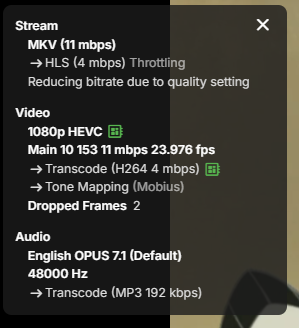
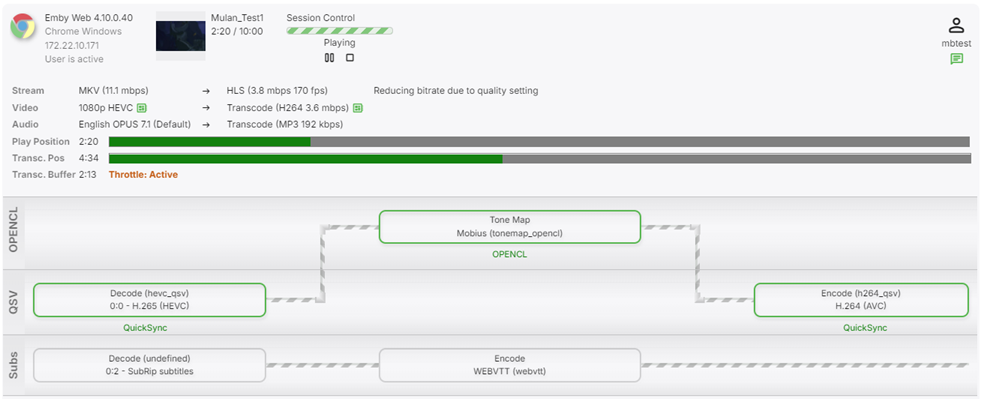
You might have to provide more details because in my case the new stable release did resolve the HW tone mapping.
-

Library is lost and must be rescanned if network shares aren't available at startup
displayname0504 replied to displayname0504's topic in Linux
Thank you for this. I went a slightly different route and put in a ping service which detects if my file server is up. I run emby through docker so I made that service a requirement of docker. to the original question/your reply. I get it doesn't know if it's intentionally purged, maybe a buffer before dumping the data, so if it's restored it doesn't require a rebuild. -
The upcoming beta release?
-
Thanks
-

FR - Server - Link Movies and Their Soundtracks if both Availible
STR8 replied to Cerothen's topic in Feature Requests
I was directed here by Ebr and I would like to see if we could have movie soundtracks pulled from movie folders into the music library? So Instead of moving or separating the original movie soundtrack from the actual movie folder (it can stay within the folder) Example: Movie Folder 300 (year) [1080p] Extras Folder Soundtrack Folder The music library can or will scan the movie folders and the soundtrack folder within the movie folder then place and display those soundtracks into the music library correctly named with art, info, artist and so on. Thanks -
I can reproduce this issue on a Philips TV with Titan OS (TPN246E). I tried the "Reinstall TV" solution mentioned above. After reinstalling the TV, Emby worked normally again. I could connect to my Emby server, select the user and use the app without any problems. However, as soon as I tried to exit Emby and the menu with options such as "Exit" and "Switch User" appeared, the app got stuck on this screen again. No matter which option is selected, nothing happens and it is no longer possible to leave this menu or use Emby. Power cycling the TV does not fix the issue. I also tried changing the Emby user's password, removing the TV from Devices on the Emby server and even disabling the user account. None of these had any effect. So "Reinstall TV" only fixes the issue temporarily. As soon as the exit menu is used again, the problem returns. TV firmware: TPN246E_V246.010.000.121 Build date: 2026-05-23 It seems that using the exit menu causes the Titan OS Emby app to get stuck in a persistent local state.
-
Ja kann ich bestätigen, ist mir auch schon aufgefallen, sowohl bei neu hinzugefügten Serien, wie auch bei den Filmen. Habe gerade nochmal geschau, der Letzte Film bei dem das Intro geladen wurde war am 19.07.26, der nächste am 24.07.26, und da wurde schon keines mehr geladen. Alle neuen Filme oder neuen Serien danach sind komplett ohne Themes/Intros. Ich nutze übrigens aktuell die Beta 4.10.0.31, falls das eine Rolle spielen sollte.
- 1466 replies
-
- 1
-

-
- movie themes
- radeon
- (and 2 more)
-

Movie Theme Videos Plugin Questions and Support Thread
Anskar26 replied to radeon's topic in Plugins
Guten Tag und schönen Sonntag wünsche ich allen. Habe seit einiger Zeit ein Problem wegen den Theme Plugins. Bei beiden Plugins, "Movie Theme Songs" und Movie Theme Videos" werden keine Treffer mehr erzielt. Hatte schon mit der EmbyServer Version 4.9.5.0 die letzte Zeit keine "theme.mp3" und keine "theme.mp4" / "theme.jpg" nun auch mit Version 4.10.0.40 keine Treffer. Kann das jemand bestätigen und das eventuell bitte gefixt werden ? Mit freundlichen Grüßen Anskar26 ---------------------------------------------------------------------------------------------------- Hello everyone, and I hope you're having a nice Sunday. I’ve been having an issue with the theme plugins for some time now. Neither of the plugins—"Movie Theme Songs" or "Movie Theme Videos"—is returning any results anymore. I wasn't getting any "theme.mp3", "theme.mp4", or "theme.jpg" files with Emby Server version 4.9.5.0 recently, and now I'm still getting no results with version 4.10.0.40. Can anyone confirm this, and could it please be fixed? Best regards, Anskar26 -
Ja kann ich bestätigen, ich antworte in dem anderen verlinkten Threa nocheinmal
-
Wait for what? Beta release has had all these features for the last 6 months.
-
When using the Windows desktop app I am not able to connect to a locally hosted server on the same subnet. The server is still accessible from the same machine in a web browser. I can't find a location for log files. The location of the application is apparently locked behind a Microsoft Store datastore. I really wish they would just release this as a normal windows application and not require the ridiculous MS store. How can I troubleshoot this connectivity issue?

-

Separate Live TV and Library Stream Limit
mwongjay replied to Warzonefury's topic in Feature Requests
This would be very useful although I might suggest an alternative approach using rate limit pools rather than global and live tv rate limits per user. This would allow finer-grained access controls based on the media source. Example: Pool ID: 1 Name: IPTV Fairness Limiter Included Libaries: Live TV, Movies Apply to Users: Joe Jimmy Stream Rate Limit: 2 Rate Limit Filter: [x] Device ID [ ] IP Address Pool ID: 2 Name: Shared Credential Limiter Included Libraries: All Apply to Users: Joe Stream Rate Limit: 1 Rate Limit Filter: [ ] Device ID [x] IP Address -

A request to Emby - please clarify the situation with the AndroidTv app
ebr replied to ecrispy's topic in Android TV / Fire TV
Okay, you are running directly on the TV, right? Android in that context doesn't expose the different video modes so the settings aren't there. -

Why did emby decide to create phantom ghost duplicates of my movies?
DCCXVIII replied to DCCXVIII's topic in General/Windows
As I said, I don't have dupes. Emby, for some unknown reason, thought I had dupes. But I never had dupes. I do have other libraries that were unaffected by this issue. So I can only assume that somehow the database for this particular library got corrupted somehow.