All Activity
- Past hour
-
Emby software (4.9.5.0) is installed on an iMac running Darwin 25.6.0, it loads every time the iMac is turned on. During the day, when Emby is not being used, the log file seems to record that the client disconnected from the host for a short period (http/1.1 Response completed after client disconnected to host1. Time: 1405ms.). This is not an issue at that time. However, when this happens when media is being streamed to a TV (LG OLED55C9PLA) this disconnection pauses playback for a period of one - two minutes before continuing to stream. The TV uses App version 1.0.50 and this App instigates the stream. In the attached log file the media stream was paused around 19:57:48 for a few minutes and again around 20:29:59. The media is stored on an external Seagate HDD connected directly to the iMac by USB. Both the iMac and the TV are on a DECO Mesh network at 5 GHz, setting ‘High' priority with fixed nodes and Mesh Technology ‘Off’. No other software is running on the iMac concurrently when buffering takes place. Emby is configured for Direct Play and the files are all mp4 ranging in size from 650 Mb to 3 Gb and hard disks are not allowed to 'sleep’. There is no consistency to the size of files that are affected. When the spinning buffering icon is displayed on the TV there are two options: 1. Wait a couple of minutes until the stream continues or, 2. Rewind the stream by 10 seconds. In the second case the stream immediately restarts though it does not guarantee that it will remain uninterrupted. Any thoughts on a solution to this issue would be appreciated. embyserver 03 Aug.txt
-
 Red_Elle joined the community
 -
Yes you can add multiple folders to the same library. Can you show your library configuration?
-
 Kingi84 joined the community
 -
 Yosef511 joined the community
 -
 Chotiman joined the community
 -
Hi, I cannot see in the docs here how Emby handles a single episode split across 2 files. Do I need to merge them? Thanks!
-
 Charlesmei joined the community
 -

Merge all movie folders into a single library
Abobader replied to sven901's topic in General/Windows
Hello sven901, ** This is an auto reply ** Please wait for someone from staff support or our members to reply to you. It's recommended to provide more info, as it explain in this thread: Thank you. Emby Team -
I am new to Emby, so apologies in advance. I am considering a PLEX to Emby move, but am having difficulties setting up libraries. In PLEX, I simply create a library type (e.g., Movies, TV, etc) and add any folders containing movies. PLEX then show them combined into the single library "Movies". When I try to do this in Emby, I end up with a dozen different "Movie" libraries - not what I want. I have at least 15 different Movie folders scattered across multiple hard drives. Is there no way to add folders into a single library, as in PLEX? If not, this is a non-starter for me. The same would be true for any other library types, such as TV Shows, Concerts, etc. Any help will be appreciated. And yes, I have spent hours reading through Emby documentation, forum posts, and general googling. To no avail.
-
 isco3231 joined the community
 -
PillVideo is an independent third-party Emby client designed specifically for Windows. Powered by the open-source mpv playback engine, it focuses on smooth, reliable playback and a modern viewing experience. PillVideo is currently available as a public trial. Feedback and testing reports are welcome! Key features: Powered by the mpv playback engine Hardware-accelerated decoding and broad media format support Connect and manage multiple Emby servers Featured carousel, Continue Watching, and categorized media library Movie and series detail pages with season and episode browsing Embedded subtitles, external SRT subtitles, and PGS subtitle support Automatic preference for Traditional Chinese subtitles Adjustable subtitle font, size, position, timing, outline, and background Primary and secondary subtitle support Audio track, subtitle, playback speed, and display mode controls Fit, crop-to-fill, and stretch display modes Automatic intro skipping and continuous playback Preloading before the next episode Video screenshots and real-time playback information Keyboard, multimedia key, and mouse controls Traditional Chinese, Simplified Chinese, and English interfaces Automatic update checking and installation Optimized windowed and fullscreen playback for Windows System requirements: 64-bit Windows 10 or Windows 11 Your own accessible Emby server and user account A GPU or integrated graphics processor with hardware decoding support is recommended Current version: PillVideo 1.2.4 Availability: Public trial PillVideo-1.2.4.zip
-
I've only built and tested this against 4.10.0.20 so far, haven't had a chance to try it on 4.10.22 specifically. I don't have a reason to expect it wouldn't work - nothing in the plugin depends on anything version-specific that I'm aware of - but "should work" isn't the same as "confirmed working." Would you be up for testing it and letting us know what happens? If it doesn't load, the first thing to check is embyserver.txt right after startup for any error mentioning IntrosBackupReplacement - that'll tell us whether it's a real incompatibility or something else. Appreciate you flagging this either way - if it does turn out to need a fix for 4.10.22, better to know now than have others hit it silently.
-
 hulki@gmail.com joined the community
 -
 sven901 joined the community
 -
 Leila13 joined the community
 -
Is nobody using any of the plugins for these?
-
@LukeWill this be added at some point? not seeing any traction on this change.
-

Feature request: native minimize client to tray
softworkz replied to vdb86's topic in Windows & Xbox
@vdb86 Thanks for your request. This is an interesting use case, but - to be honest - it's also pretty special. Likely too special to become a built-in feature. A GeneralCommandType which allow to remotely control the window state of an app - phhm - I'm not sure. Regarding "native shell": The web ui code that is shipped with apps is not meant to be touched or manipulated. You might have seen this in the Windows app already. And what's sttill working today, might no longer in the near future. So, what then? First of all, the way you have done it is the best you can get at the moment. I would do something similar if I had to. Future Now - there is a way how this can be achieved in a way that is crazily simple: Client Plugins (.net) The Windows app belongs to a new range of client apps which are based on .net and x-plat - named Emby.Client. There is a plugin model, and some other concepts (like JS- <> net interop, service model, x-plat feature among other things). A plugin with this code would already do what you want (roughtly): DISCLAIMER: Just for Illustratration - custom plugins are not supported atm public class AutoHidePlugin : HostPluginBase { private ICurrentPlayer currentPlayer; private IFeatureSetWindowState featureWindowSTate; public AutoHidePlugin(IServiceRoot serviceRoot) : base(serviceRoot) { } public override string Id => "autohideplugin"; public override string Name => "AutiHide Plugin"; public override PluginTypes Type => PluginTypes.Unknown; public override async Task OnAppReady() { this.currentPlayer = await this.Require<ICurrentPlayer>().ConfigureAwait(false); this.featureWindowSTate = this.GetService<IFeatureSetWindowState>(); //// TODO: Handle currentplayer/feauture unavailable this.currentPlayer.ModuleEvent += this.CurrentPlayer_OnModuleEvent; this.currentPlayer.RegisterModuleEvent(@"playbackstart"); this.currentPlayer.RegisterModuleEvent(@"playbackstop"); this.currentPlayer.RegisterModuleEvent(@"pause"); this.currentPlayer.RegisterModuleEvent(@"unpause"); this.currentPlayer.RegisterModuleEvent(@"statechange"); } private void CurrentPlayer_OnModuleEvent(object sender, JsModuleEventArgs e) { var playState = e.GetArgument<PlayStateInfo>(); if (playState != null) { if (playState.PlayState?.IsPaused != null && !playState.PlayState.IsPaused.Value) { this.featureWindowSTate.SetWindowState(WindowStates.Maximized); } else { this.featureWindowSTate.SetWindowState(WindowStates.Minimized); } } } } While that plugin model exists and is actually being used, it is not open for 3rtd party plugins at the moment. No decision has been made so far about whether we might open-up those apps to 3td party developers. There's a large amount of issues, consequences and caveats to consider and unfortunately we haven't come to the right point for this.. Clearly, it has a lot of appeal - the code above Eorks on all Emby.Client app (whch have the SetWindowState feature.. -
Hi @guilty57, I've got a question about plugin's compatibility. I don't have the plugin in Emby Server 4.10.22, it's not compatible with ?
-
Hi, there's already an open request for this or something functionally equivalent. Please join in and contribute to the existing discussion at:
-
Hi there, would it be possible to add the ability to search and sort by country of origin? Thanks
- Today
-
I'm sorry, I still don't know what your question is. There is a current release and a beta track in the store. Both have been updated recently. In exactly what context? Are you having a specific issue?
-
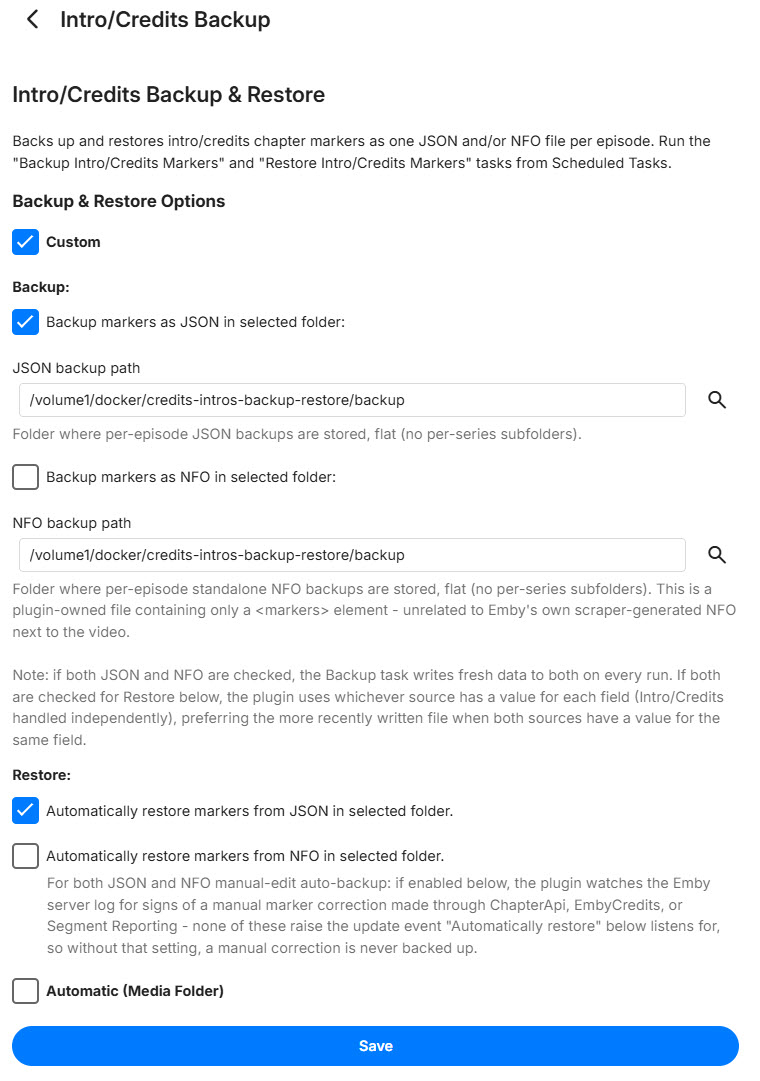
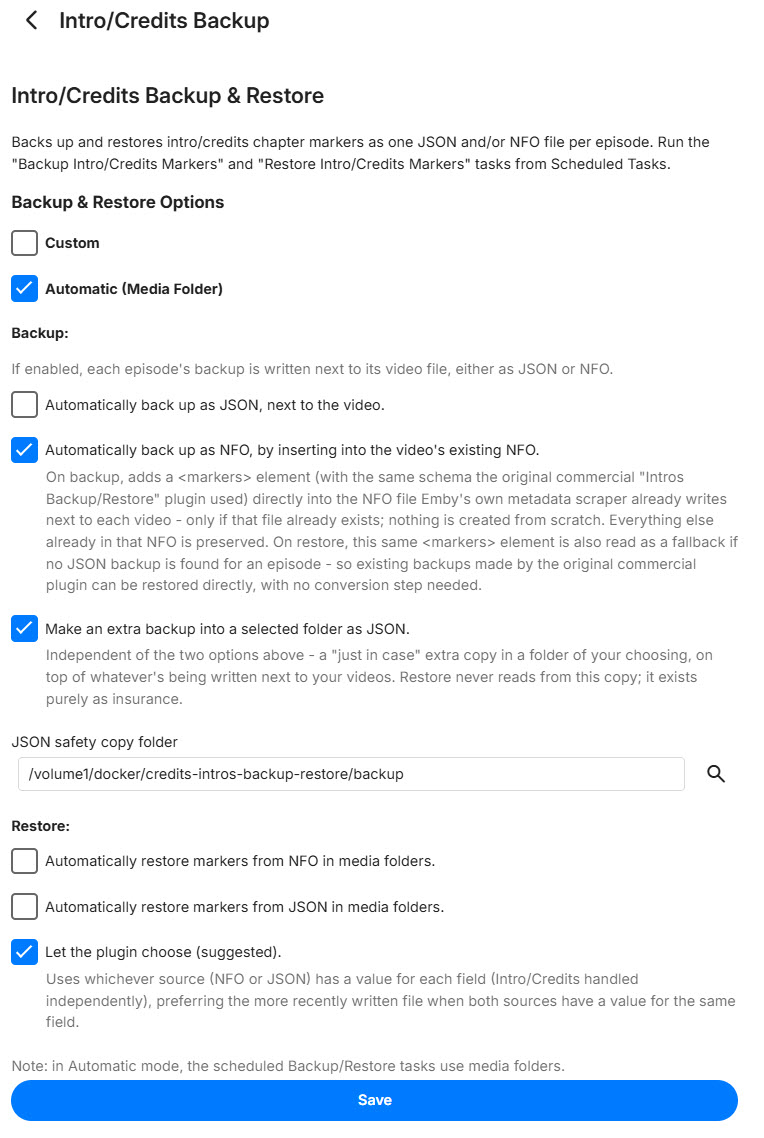
v1.9.0 is out - a full config page redesign plus a reliability fix. Config page redesign. Instead of one flat list of checkboxes, there are now two clearly separated modes: Custom: pick your own folder(s). Independent JSON and standalone-NFO toggles (the standalone NFO is the plugin's own file, just a <markers> tag - not Emby's scraper NFO), separately controllable for Backup and Restore. Automatic (Media Folder): backups live next to each video, like before. Backup now has independent JSON and NFO toggles (no more "Both" - just check one or both) plus a new "just-in-case" JSON safety copy option that writes to a folder of your choosing, completely separate from what's happening next to your videos. Restore stays NFO / JSON / "let the plugin choose" (recommended). Picking one mode now properly hides the other's section. The separate "Auto-restore" / "Auto-backup on manual edit" toggles are gone too - those background watchers are now on automatically based on whichever sources you've actually configured, instead of a switch you had to remember to flip. Reliability fix: Auto-restore occasionally missed restoring right after a Refresh Metadata, because Emby's own NFO scraper isn't always atomic about writing the file - a read could catch it mid-write. Added a short retry for that specific case; confirmed fixed across multiple shows in testing. If you're upgrading, take a look at the config page - the layout changed, worth double-checking your settings landed where you expect. Release with prebuilt DLL: https://github.com/guilty57/credits-intros-backup-restore/releases/tag/v1.9.0 Custom Selection Auto Selection
-
Hi, we'll take a look at this. Thanks.
-
Hi there, let's look at an example. Please attach the information requested in how to report a media playback issue. Thanks!
-
Hi, we'll be updating the server's ffmpeg build soon so that may help with this.
-

Feature Request: Grid Tile Format for Media Libraries in Android App
Luke replied to adreader51's topic in Feature Requests
Hi, the upcoming 4.10 server release has this now. -
The upcoming 4.10 server release has this now.
-
@LukeI'd like to offer my help with this. I'm ok signing NDAs etc.
-

Feature Request: Grid Tile Format for Media Libraries in Android App
vdb86 replied to adreader51's topic in Feature Requests
@LukeI'd like to offer my help with this. I'm ok signing NDAs etc. -
Hi Emby team, First, thanks for Emby. I run it as the media hub for my living-room HTPC and it has been rock solid. ## What I am trying to solve On a dedicated HTPC, I want the Emby client to get out of the way when I am not actively watching, and come back when I am: - Start with windows minimized to tray - so that I can use my phone to select the htpc as play on target. - Pause playback -> hide the client to the system tray. - Resume -> bring it back to the foreground. - Playback starts -> show it; playback stops/ends -> hide it. This is a really nice "appliance" experience on a TV-connected PC: the client is there when you need it and invisible when you do not, without ever landing on the desktop or taskbar. ## What I built as a stopgap Because I could not do this from within Emby, I wrote a small standalone Windows tray agent, "Emby Tray": https://github.com/vdb86/Emby-Tray It polls the server's `GET /Sessions` endpoint, filters to this machine's own session (by local network address / client name / device name), reads `PlayState.IsPaused` and the now-playing item, and then uses Win32 (`EnumWindows` + `ShowWindow`) to hide/restore the client window. It runs entirely outside the client install so client updates never touch it. It works well, but it is fundamentally a workaround, and I would much rather this behavior lived in Emby itself so nobody needs a side-car process. ## Why this cannot be done as a normal plugin today I looked hard at doing this "properly" first, and hit a wall that I think only you can remove: 1. A server-side catalog plugin can subscribe to `ISessionManager` playback events and read `PlayState.IsPaused`, so it can perfectly DETECT pause/resume. But it runs on the server and has no way to touch a client's OS window or tray. 2. A client-side (Theater web/JS) plugin knows the play/pause state directly via the web `playbackManager` events, but it runs in the web sandbox and cannot reach the OS tray or minimize the native window. 3. The server-to-client `GeneralCommand` path is the natural bridge, but `GeneralCommandType` has no command for this. It has `ToggleFullscreen`, `SetVolume`, `Mute`, `GoHome`, `DisplayMessage`, `SendKey`, `SendString`, and so on, but nothing like `MinimizeToTray` / `RestoreWindow` / `Minimize`. So detection is fully supported, but the "hide/restore the native window" half is not exposed to any plugin surface. That gap is why an external agent is currently the only option. ## What would be needed from your end Any one of these would let this be done natively (roughly in order of how self-contained they are): 1. Best: build it into the desktop client directly. Add a tray icon plus a "minimize to tray on pause / restore on resume" option (and a "start minimized to tray" option) in the client's settings. Nothing external needed, and it would be a great HTPC feature out of the box. 2. Or: add `GeneralCommandType` values such as `MinimizeToTray` / `RestoreWindow` (and ideally `Minimize` / `Restore`) that the desktop client honors. Then even a small server plugin could drive the behavior on pause/resume. 3. Or: expose a minimal NativeShell API to Theater client plugins (for example `nativeShell.window.hideToTray()` / `show()`), so a client plugin reacting to `playbackManager` pause/unpause events could do the window/tray control itself. Option 1 is what I would love most, since it removes the need for any plugin at all. Options 2 or 3 would let the community build it cleanly. ## Offer The full working implementation, including the session-matching logic and the Win32 hide/restore handling, is open source at the link above under GPLv3, so please feel free to reference it for the detection/behavior model. Happy to answer questions, test builds, or help however is useful. Thanks for considering it. P.s. I'm also open to trying to help with optimizing the windows app code (start faster, etc.)
-

Emby Server not installing on Android 7
CaptainPirate replied to CaptainPirate's topic in Android Server
By “Downloading from their repo” I meant downloading the apk from emby's GitHub repo (https://github.com/MediaBrowser/Emby.Releases/releases) Downloading isn't the issue, I can download just fine from the website also repo too but after downloading when I try to install the apk I get that “Failed To Parse” error message. -
Folder images missing in Emby Theater (3.0.20/21 Legacy)
softworkz replied to scottpro's topic in Windows & Xbox
Which Windows app version - I don't see it?