All Activity
- Past hour
-
 gagigabrhjh joined the community
 -
 Lily&Drew joined the community
 -
 arturo1234@gmail.com joined the community
 -
 widabajrhh joined the community
 -
 Lingyy joined the community
 -
 jivixoryhh joined the community
 -
 napobrnh joined the community
 -
 Habib75127512 joined the community
 -
 unet136725 joined the community
 -

new version doesn't play what it used to
ebr replied to groovejumper's topic in Android TV / Fire TV
Yeah, stable was just released this weekend so they are all the same right now. -

new version doesn't play what it used to
CBers replied to groovejumper's topic in Android TV / Fire TV
Beta and Stable? -
Welcome to the New Emby Website We’re excited to introduce the redesigned Emby website! The new site features a cleaner, more modern look, simpler navigation, and updated pages that make it easier to learn how Emby works, download Emby Server, find apps for your devices, and explore Emby Premiere. The new design puts Emby’s purpose front and center: your personal media server for enjoying your own videos, music, photos, and live TV on every screen you own. Take a look around and let us know what you think. Welcome to the new Emby website—Your Media. Everywhere. View the full article
-
- 1
-

-
Welcome to the New Emby Website We’re excited to introduce the redesigned Emby website! The new site features a cleaner, more modern look, simpler navigation, and updated pages that make it easier to learn how Emby works, download Emby Server, find apps for your devices, and explore Emby Premiere. The new design puts Emby’s purpose front and center: your personal media server for enjoying your own videos, music, photos, and live TV on every screen you own. Take a look around and let us know what you think. Welcome to the new Emby website—Your Media. Everywhere.
-
OK we'll take a look at it. Thanks.
-
is it the same on ONN? I just typed emby and used that one on the ONN box.
-
That is a system default and internal setting - so it should be harmless
-
Thanks @sa2000for your thorough analysis. I have no idea where these LiveTV entries are coming from, I've never used it.
-
@Oomek thanks for sending the new copy of the database The playlists for the music paths on windows have now been removed from the database after you updated the path for the music library The cast and actors image paths all got corrected earlier when you did a metadata scan If you do use tha backup plugin, go to the settings and make sure you have a valid path defined - documentation here The database has one item still with a windows path - relates to Live TV where a path is currently set to %MetadataPath%\views\livetv For Linux, it ought to be %MetadataPath%/views/livetv I will discuss with the development team to see if the Scan metadata task should have corrected that.
-
That's not our standard android app. Can you try searching for our standard android app (Just "Emby" on Amazon and "Emby for Android on Google) on the same device's app store and see how that compares? Thanks.
- Today
-
I tried a wide variety of things that I found on the website last night. My connection is now set to private with all of the boxes for media sharing enabled. I have also enabled Emby through both public and private connections to my firewall. I manually went into my firewall settings and opened up ports 8096, 8920, and 7359 even though there’s already 2 rule’s for all ports to be open for the embyserver.exe program(TCP,UDP). Additionally I removed my port forwarding in my router settings and turned on upnp and have auto port mapping enabled in Emby again and am now able to connect without a port forward. After having restarted my pc and server multiple times with all these changes I did not see any change with my mobile download issues.
-
Depends which app you use as to whether it works or not period. Roku - works perfectly, plays three 1/2 hour episodes and asks during the credits of the fourth. Android - plays about 10 episodes or about 240 min before it asks and shuts down in the middle of the episode. When it asks you must shut down as it will not continue and it does not respond to the remote except to continually ask to shut down. It's why I still have a Roku.....
-
I thought I updated the version from 1.3.4.0 to 1.3.5.0 but apparently the last version was 1.3.5.0 and the new should have been 1.3.6.0 (which is corrected now)
-
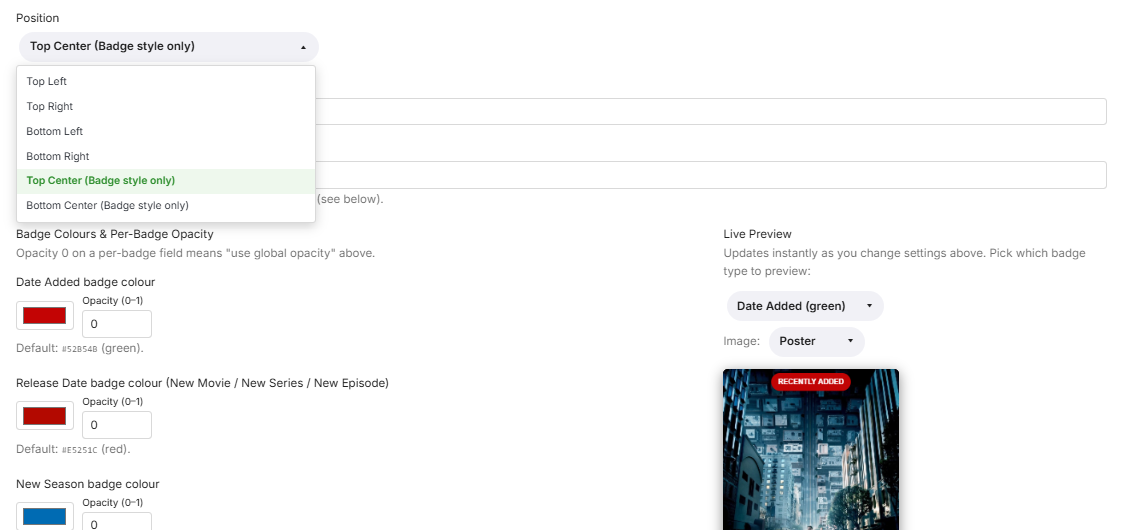
EmbyNewOverlay.dll CORRECTION, New Release V 1.3.6.0 Fixed high CPU usage during library synchronization with Seerr. Added Top Center and Bottom Center positions for badge overlays. Unified the “Most Watched” label across all content types, including movies, series, and episodes.
-
sorry my bad i thought the last one was 1.3.4.0 i will update the version. thanks for pointing that out.
-
Not that I'm happy either, but we HAVE heard something. Waiting for LG to approve it, apparently. They usually take 3 weeks, but this time it has taken 3 months so far. Have the Emby team heard anything?
-
The Roku player is very particular about everything in the video conforming exactly to spec so it could be something slightly off that it just doesn't adjust to like some other players will.
-
new version doesn't play what it used to
ebr replied to groovejumper's topic in Android TV / Fire TV
55 and 54 are identical. I just had to bump the version number to get Google to look at it again. -
I forgot to remove it. I have uploaded current database.
-

Live TV - Emby - On Roku TV Sound is not synced with program.
GaryG replied to GaryG's topic in Roku
Thanks. Ill reach out to them, But I doubt theyll help. Since its isolated to a ROKU TV, and only specific channels, theyll probably blame ROKU. Ill try it again today turning off those settings to make sure I did it right. Let me know if you have any other thoughts. The problematic channels only a problem on a ROKU TV, Android TV fine, PC, channels are fine. and this just started recently. -

TV Show Status — TMDB-powered Returning/Ended/Cancelled badges for series
Blueskies278 replied to Blueskies278's topic in Plugins
TV Show Status — 2.5.18.0 Release notes covering everything since 2.5.15.0. Fixed The status message is now easy to read. Plain text, laid out over separate lines. Permission failures now tell you how to fix them. If the plugin couldn't write its script file, the status box only said "see server log for details" — no cause, no fix. The full platform-specific instructions were already written but were only wired to one of the two failure paths. Both now use them. The fix command is readable. It used to be buried mid-sentence in a single paragraph. Now it's three parts — what's wrong, the command on its own line, what to do next. Changed The settings page no longer suggests copying tmdb-status-plugin.js into dashboard-ui by hand. That could never work on its own, because the plugin also has to add a <script> tag to index.html. It now explains the real cause — Emby doesn't own its own web folder — and points at the status box for the exact command. "Prepend status to show description" is offered as the alternative if you'd rather not change permissions at all. Worth knowing Every Emby app update resets the web folder to root, which breaks the badge until the chown is re-run. Confirmed live going from 4.10.0.24 to 4.10.0.25. The status box says so plainly now. The badge is delivered through dashboard-ui only. The Trakt Air Dates listener route was removed in that plugin's 7.0.0.0 and no longer exists. Emby does not render markup in a status message. No HTML, no markdown. Line breaks do work, and they're what made the message readable. Installing Copy EmbyTVShowStatus.dll into your Emby plugins folder Restart Emby Open the plugin's settings page and check the status box If it reports a permission problem, run the command it gives you — then restart Emby again Re-run step 4 after any Emby app update. TV Show Status — how's it going? Now you've all had it running for a while, I'd like to hear how you're getting on. Is the status showing up reliably for you, on the web and in the apps? Anything looking wrong, or a show where the status doesn't match? Anything you'd change about how it looks or where it appears? Feature ideas are very welcome, with one caveat: the plugin can only do what Emby allows a plugin to do, which is add a badge and some text to the show page. Anything that would need changes inside the native apps themselves is out of my reach. Thanks for testing 2.5.18.0 EmbyTVShowStatus.dll -

High RAM usage on Emby Server 4.9.3.0 even with Direct Play and rclone mounts
iloveparks replied to jordan888's topic in Linux
All good, I appreciate you trying to help either way! Forcing a library scan on just one library brings my memory usage from 5.70GB to 6.25GB. Can see here in the logs when the scan started and finished: 2026-08-17 09:04:26.208 Info ItemRefreshService-0HNNRAJBFAAGR:00000006: Refresh metadata requested on 84321 2026-08-17 09:04:26.208 Info ItemRefreshService-0HNNRAJBFAAGR:00000006: http/1.1 Response 204 to host1. Time: 5ms. POST http://emby_remote_ip/emby/Items/84321/Refresh?Recursive=true&ImageRefreshMode=Default&MetadataRefreshMode=Default&ReplaceAllImages=false&ReplaceAllMetadata=false&X-Emby-Client=Emby Web&X-Emby-Device-Name=Firefox Windows&X-Emby-Device-Id=x_device_id_x&X-Emby-Client-Version=4.9.5.0&X-Emby-Token=x_secret3_x&X-Emby-Language=en-us. 2026-08-17 09:04:26.258 Info ProviderManager: RefreshItem Start: 84321 CollectionFolder /config/root/default/Movies 2026-08-17 09:04:33.595 Info ProviderManager: RefreshItem Complete: 84321 CollectionFolder /config/root/default/Movies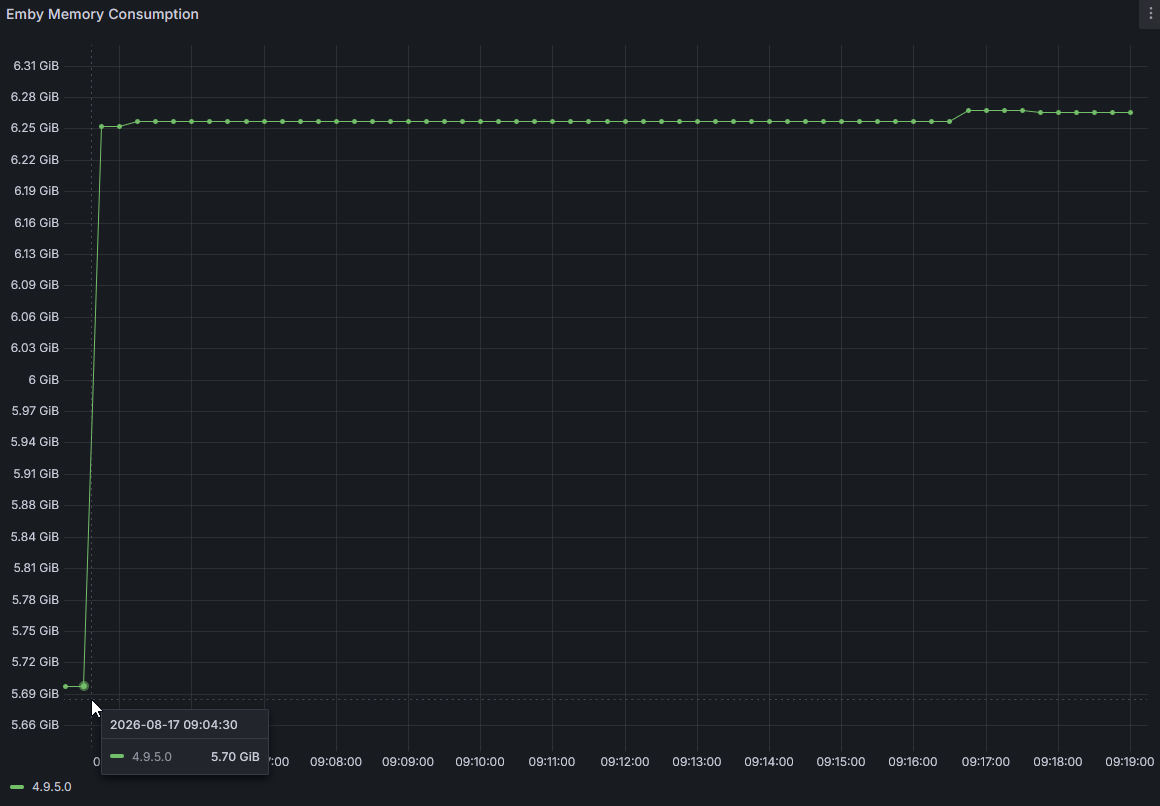
-
Hello, is there any news on the LG update? I'm still using Emby 4.8.11.0, and version 4.9.5.0 is still showing subtitles in the top left corner. It's been 8 months since this bug was reported, and we still haven't heard anything?
-

Can't move Emby when installed as an app in Edge
Luke replied to IdeasMan's topic in General/Windows
Hi, we’ll take a look at it. Thanks -
Hi. The feature is not broken. Did you interact with the remote at all? Are you sure you had the setting in the app set? It is app-specific, so if you turned it on in your web app settings that would not carry forward to any other app. If you are still having a problem, please open a new topic in the forum for the app you are using with specific details. Thanks.