All Activity
- Past hour
-
Stab in the dark, did you switch to a Fiber ISP? If so, you have the situation that js8194 was asking about. In the simplest summary possible, you are behind your ISP's giant router. Here is a basic visualization: STANDARD (Cable/DSL) SETUP ═══════════════════════════ ┌──────────┐ ┌──────────┐ ┌──────────┐ ┌──────────┐ │ Computer │───▶│ Router │───▶│ Modem │───▶│ Internet │ └──────────┘ └──────────┘ └──────────┘ └──────────┘ (Public IP assigned here) FIBER + CGNAT SETUP ════════════════════ ┌──────────┐ ┌──────────┐ ┌──────────┐ ┌──────────┐ ┌──────────┐ │ Computer │───▶│ Router │───▶│ ONT │───▶│ CGNAT │───▶│ Internet │ └──────────┘ └──────────┘ └──────────┘ └──────────┘ └──────────┘ (Optical-to- (ISP-side NAT — Ethernet you get a conversion, private/shared no NAT/routing IP, not a real happening here) public one) I ended up paying for a static IP address from my ISP. Then a domain from porkbun and a simple caddy config running on my main home server. It sounds hard at first, but you can use ChatGPT or Claude to build everything for you if it gets to be to much for you.
-
 MathioLuca joined the community
 -
To paraphrase, Emby needs to be more aggressive in their marketing to attract people before possibly losing them to Jellyfin. Things spoken aloud don't always translate well to text, especially if English is not your native language. Even then, region can make it difficult.
-
 Koob23 joined the community
 -

Upgraded 4.9.3 -> 4.9.5 (Artwork and data for movies disappearing on scheduled scans?)
Normanos replied to mike3821's topic in Linux
When I updated to 4.9.5, Emby for some reason "touched" all media files. At least, most of media files was re-added on Debian. My server just scanned all libraries and everything was fine when it finished. P.s. always have backups... . -
 daviddebelfort joined the community
 -
 marcuswzy joined the community
 -
 SaudQ8 joined the community
 -
 piedad_vargas joined the community
 -
Hi, thanks @SoliFlix! That's what I did do but nothing happened. I'll be at hers tomorrow and can try again and see what does happen.
-
 uhumb2624113 joined the community
 -
 nmmmmm joined the community
 -
 vertex2626 joined the community
 -
 maohernandez joined the community
 -
What is those folder named in you file system?
-

Emby for iOS fails to complete Google Cast connection to Google Home Mini
Robin5446 replied to Robin5446's topic in Apple iOS / macOS
Thanks. No, I have not changed Emby’s media port to 8009. Emby is still listening on its default HTTP port 8096. Port 8009 mentioned in my packet capture is the Google Cast control connection to the Google Home Mini, not the Emby media delivery port. What I find unusual is that the initial Cast connection on 8009 succeeds, but afterwards the Google Home Mini never appears to initiate a connection to the Emby server on 8096 to retrieve the actual media. The linked Google article appears to refer to WAN port forwarding / port opening on Google/Nest Wifi. My devices are on routed local VLANs, so I don’t believe WAN port forwarding is involved here. Casting from Qobuz on the same iPhone to the same Google Home Mini works correctly. -
noyb, Your transcoding buttons are all on in your latest image, which means each one tries to adjust the transcoding in a different way, depending on your source. You are also using an audio boost which is additional transcoding traffic, although small. So everything is on and you appear to be sending the transcoding file copy to drive E, while Emby is probably on drive C, so there is drive to drive traffic as well. Your Max transcoding res is set to 720P which would force any 1080P to transcode. And you have experiemental HEVC encoding. OK... With all that you sometimes get errors from various different media, which also might have file or metadata issues. So, no subs works even with all the options tuned on or did no subs work with the earlier mix of several options off. I have not reviewed the log file from Friday, but that is further up and apparently Luke reviewed it. Transcoding subs is a part of the total transcoding, so the problem might be adding all options together. I think a good way to test is to use 1080P quality test media without subs compared to the same media with embedded subs of different types. Turn off all the options and see what combination fails, when you add one thing at a time. It's difficult to fix an issue, if the error is something to do with your media and your setup and so the error is not reproducable on another server. Anyway, I know that's more work, but when tracing down a bug that process is helpful, especially if the devs can't see the error. I just wanted to explain the logic of how the dfferent features can add up. Each one on it's own might work, but everything together can maybe fail and it's a fixable bug. The devs need to find how it's happening, if it's not obvious in the log. Hope that makes sense.
- Today
-

Have an "Admin Notes" section under each user account
SoliFlix replied to bennymac's topic in Feature Requests
I think there is a slight misunderstanding: Nobody mentioned adding a full rich-text editor, embedded images, or active links. The core request is simply for plain-text notes on each user profile, accessible and editable exclusively by admins. -
Hi there! This is perhaps a question more suited for devs etc. but out of curiosity, what exactly does "step up" mean? Also, what does "be more specific" entail? Thanx!
-
Emby Theater (Windows Store app, v2.317.2.0) is preventing my PC from sleeping and my monitor from turning off, even after playback has fully ended. My Windows power settings are: screen off after 10 minutes, PC sleep after 45 minutes. These work correctly for every other app. When Emby Theater is left open after a movie finishes, the PC will stay fully awake with the display on for hours, I've had it stay on for 8+ hours overnight with nothing playing. Importantly, this did not happen on my previous monitor (ASUS VG34VQL1B). It started after switching to a new monitor (ASUS XG34WCDG, HDMI 2.1). Same PC, same Windows install, same Emby Theater app and settings only the monitor changed. This suggests the app may be detecting something about the new display (HDR capability, refresh rate, or similar) and not releasing its background media playback lock correctly once that detection changes. I'm aware Emby Theater uses the Windows backgroundMediaPlayback capability to prevent sleep during active playback, which is expected behaviour. The issue is that this lock does not appear to be released once playback stops it should only apply during active media playback, not indefinitely afterward. System: Windows 11, Intel i9-13900K, RTX 4090, ASUS XG34WCDG monitor (HDMI 2.1) Could someone look into whether the background playback lock is being released properly when playback ends, and whether display capability detection could be a factor?
-

Emby for iOS fails to complete Google Cast connection to Google Home Mini
visproduction replied to Robin5446's topic in Apple iOS / macOS
Emby port for media delivery is normally 8096. Did you change that to 8009? Related? https://support.google.com/googlehome/answer/6274503?hl=en#zippy=%2Cwhen-do-i-need-port-forwarding-or-port-opening https://emby.media/support/articles/Connectivity.html -
looks like the cause are seasons like that: "Staffel 2003" Staffel "2004" That's not uncommon in Germany. Because of that I see
-

New Emby for Apple TV 2.0.8 Version Released
Andromeda1 replied to Emby Releases's topic in Apple TV
Apologies my mistake. For that problem I had the view Last played ordered backwards so when I started a new movie it dropped out the view to the very bottom which is correct. The first problem is there though; starting a movie and backing out takes you to the very top of the listing again instead of where that movie is located. Last time I think I may have to reindex to fix it which is odd but I think @VADMIN is seeing the same problem as me reading between the lines. -
anybody else has problems with this plugin and Emby dockerized? I am in the process of moving emby to Docker. Plugin works fine locally. In Emby docker, the scan stops after some seconds. Log is very quiet unfortunately.
-
Have an "Admin Notes" section under each user account
visproduction replied to bennymac's topic in Feature Requests
Adding editable text with possbile links to the Emby dbase is a security risk, opens up the server to possible hacking, requires a more complex text editor and potentially can bog down and slow the overall database speed that could eventually cause issues to media processing. Users will probably want extra link options and have further support questions which uses up support time. It sounds easy to add, but to do it properly, is complex and takes more development time than you think, to do it safely and right. I think creating a user text note area with link and image options is not good practice. Even if it was offered, it would probably be limited to text only with no active links or images and not be searchable. I don't think it's worth this effort and is a bad design choice. I vote against it. Sorry... Why not just export the users name and create a document or spread sheet and run it separately? You can add all the links and images you want. In addition, searching for any text or name works immediately in both programs and even if you just used an advance text editor. You could have 2000 users and search for New York and find all users with New York in their info easily. Word editors and spreadsheets can do this all much better and faster and it would not slow down the media server, no matter how much information, photos you added. New emby users means you have to also add them into your word doc or spreadsheet. It's an extra step, yes, but you get far more features and search options. -
Do I need to submit a feature request for this? This is not a major request, in terms of development (I think) but it will provide a great quality of life for people with ultrawide screen sizes.
-

Emby Android TV subtitle position at the bottom of screen
kron0s replied to Youthanasia's topic in Feature Requests
@Lukebump, will this ever get added for emby on android? -

IOS emby server offline - not loading download content
Hernandez24 replied to HairyBizRat's topic in Apple iOS / macOS
Im having the same issue my internet went down and could not get to my downloads folder. IOS wont get pass the splash screen waited for over 10 minutes. iOS App version 2.2.56 -

Have an "Admin Notes" section under each user account
Betelgeuse replied to bennymac's topic in Feature Requests
A plug-in could be handy! -
Glad that did it — and thanks for running all those tests, they're what made it findable. What was happening: your file stores VC-1 using the legacy Video-for-Windows wrapper (Codec ID: V_MS/VFW/FOURCC, FourCC WVC1). With that layout the VC-1 sequence header lives in the container's codec private data rather than repeating in-band through the stream. Starting from position 0 works because the header is applied at initialization; after a mid-stream seek, NVDEC has nothing to re-initialize from and emits zero frames. The software decoder handles it because ffmpeg re-injects the extradata on seek. On getting the A2000 back into the decode path — there's no setting that fixes this while keeping NVDEC on VC-1. The mismatch is between the file's container layout and what the hardware decoder needs, so it's the file that has to change, not Emby. Two routes: Remux to a native VC-1 mapping. Cheap and lossless, worth trying first: ffmpeg -i "Gran Torino (2008) [tmdb=13223] 1080p.mkv" \ -c copy -bsf:v vc1_unpack \ "Gran Torino (2008) [tmdb=13223] 1080p.remux.mkv" Then test seeking on the new file with hardware decode re-enabled. It may or may not help depending on whether the sequence headers are recoverable — no harm in finding out, it's a few minutes of copying. Re-encode. This is the one I'd actually do. It solves several things at once: ffmpeg -i "Gran Torino (2008) [tmdb=13223] 1080p.mkv" \ -c:v hevc_nvenc -preset p5 -rc vbr -cq 24 -b:v 0 -maxrate 12M \ -c:a copy -c:s copy \ "Gran Torino (2008) [tmdb=13223] 1080p.hevc.mkv" About ten minutes on the A2000. You'd go from 26 GB to roughly 7 GB, the LG TV can direct-play HEVC so it may not transcode at all, and if it ever does, HEVC hardware decode has none of these problems. Practically speaking, keep VC1 hardware decoding off. VC-1 is a dead codec — you'll only have it on old Blu-ray remuxes, and those are exactly the files worth converting anyway. Everything modern in your library is H.264 or HEVC and still gets full GPU decode.
-
When I reduce the import size to 500000 I get this error and all the RAM on the server is used up. I'll have to wait until I can get a RAM upgrade before I can import the whole playlist. It might be a while with these outrageous RAM prices. embyserver.txt
-
I've applied the changes and now it works fine. Is there any option to use the A2000 for decoding without this issues? Thank you for your dedication and patience.
-

data export from kodi (delete low resolution images?)
GrimReaper replied to familiezufall's topic in General/Windows
You have several options: per-item, per-folder, per-library / Search for missing or Replace all, you pick the one that suits your needs the best. -
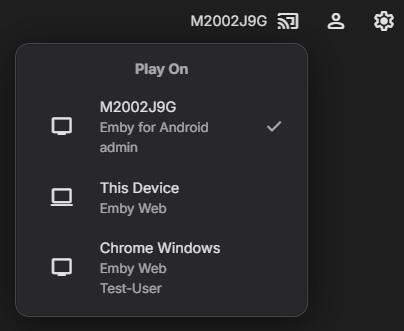
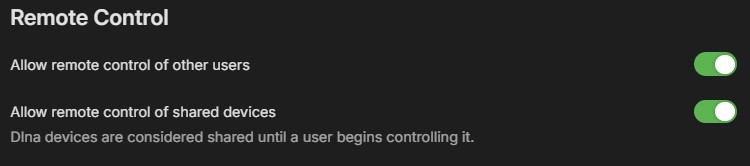
As soon as she opens the Emby app on her AppleTV and is signed in, her device should appear when you tap the cast icon on your device. Select her device, and now it should be displayed next to the cast icon. You can then start a movie or TV show from your library, and it should play on her device. Assuming you've enabled the option in your user profile
-
Good news — your tests ruled out both of my earlier theories. The index is fine (software seeks return in 0.15 s) and the disk is fine (281 MB/s). The problem is somewhere else entirely, and the new logs point at the NVDEC VC-1 decoder: after a seek it produces no frames at all, so ffmpeg dies before writing anything. Before I explain the details, could you try one quick change and tell me what happens? Dashboard → Transcoding → uncheck VC1 under hardware decoding. Leave everything else as it is — keep NVENC encoding on, and keep hardware decoding enabled for H.264 and HEVC. Then play Gran Torino and jump to somewhere around the 30-minute mark. With 4 cores the software VC-1 decode should keep up fine, and NVENC still handles the encoding. Let me know whether seeking works after that. If it does, we've found it and I'll explain what was going on. If it doesn't, send me the new logs and we keep digging.