
All Activity
- Past hour
-
 syin joined the community
 -
 Ferran756168 joined the community
 -
 daniel9234 joined the community
 -
 Kelvin9950 joined the community
 -
 DOCCCMC joined the community
 -
 camek4591 joined the community
 -
 Dongxian joined the community
 -
 http://www.playmovie.com.mx/ joined the community
 -
 huanghuang joined the community
 -
 zhubin joined the community
 -
Hahaha, i didn't notice the date. It was late when I wrote it Thanks for reminding me!
-

After upgrade to 4.8.5 shows will skip back 1 sec or so and replay
plexrefugee99 replied to zebo51's topic in General/Windows
This is still happening for me on all my Roku devices (at least) as of 4.10.0.40. I think it might happen elsewhere when transcoding is happening but I'm not sure. I'm a long time plex user trying to migrate the family off to emby but they are not loving this bug (and I don't blame them). I'm a premiere subscriber, if it matters. - Today
-
Hi, the Emby app is also in the app store.
-
Server version: 4.10.0.31 Apple TV app version: 2.0.9 (1) iOS app version: 2.2.58 Not sure how best to describe what's happening other than showing a video of it happening, but the video is glitching/ghosting/rubber banding. It happens regularly after watching anytime between 5-30m. I did not see the issue at all on the iOS app. Both were direct playing so no transcoding. image_D5BEB523-6AC2-4D21-83F1-9CA528DA8EE1_1789437607.mov embyserver (2).txt
-

4.10.0.40 Regression - Android and Samsung sessions no longer remotely controllable
Cr8iveLosr replied to Cr8iveLosr's topic in Linux
Adding to the above, I also tested Samsung and LG TVs using the latest app versions available from their respective app stores. Both show the same behavior. As soon as the second user starts playback, there are no remote-control buttons available in the Emby Dashboard for those sessions. That makes this broader than an Android app-version issue. I am seeing the same loss of remote control across Android, Samsung, and LG clients on 4.10, while iOS, Apple TV, and Web remain controllable. -
No need to be sorry! I was able to figure this out. It looks like adding this plugin, it disabled the default selections of My Media, Latest Movies, etc. I just had to go to each profile and add them back in. No problem though!
-
4.10.0.40 Regression - Android and Samsung sessions no longer remotely controllable
Cr8iveLosr replied to Cr8iveLosr's topic in Linux
embyserver-redacted-2026-09-15.txt See attached. It took a while to tail the relevant logs because "Anonymize log contents" does not do a very good job, so I had to manually scrub quite a bit of information from the log. However, here is what I found. The capture was taken while the issue was actively occurring, with remote Android clients streaming normally but showing no remote-control options in the Dashboard. The server explicitly identifies the affected Android playback as remote: IsPlayback: true, isInLocalNetwork: False Playback itself continues normally. The Android clients continue reporting playback progress and receiving successful responses from the server. What stands out is that, during the same window, the server repeatedly logs: SessionInfosWebSocketListener failed processing WebSocket message SessionsStart with: System.IndexOutOfRangeException inside: MediaBrowser.Controller.Net.BasePeriodicWebSocketListener.Start There are six occurrences of this during the short capture. At the same times, the server also repeatedly logs: ActivityLogWebSocketListener failed processing WebSocket message ActivityLogEntryStart with a System.FormatException, again inside BasePeriodicWebSocketListener.Start. There are also six occurrences of that error. I also found three 404 responses to: GET /embywebsocket?api_key=...&deviceId=... while the affected Android sessions are active and continuing to report playback normally. I am not claiming that any one of those entries, by itself, proves the root cause. What I am pointing out is that there are repeated server-side WebSocket processing failures occurring at the same time the remote-control problem is present. One other limitation of this log is that Info-level logging does not show the request body for /Sessions/Capabilities/Full, so it does not expose the actual SupportsMediaControl value being declared by the client. The only capability registration that happened during this particular capture window was Apple TV, which completed successfully with a 204. The Android sessions were already active when I started the capture, so I am not interpreting the absence of an Android capability registration in this window as proof that Android never registered one. The important part remains that this is reproducible by changing only the Emby Server version. On 4.10.0.40 these remote Android sessions are immediately treated as non-controllable. Reverting to the previous stable restores the Dashboard controls for the same clients, users, permissions, reverse proxy, and network configuration, until the longstanding WebSocket timeout occurs. -

4.10.0.40 Regression - Android and Samsung sessions no longer remotely controllable
JMSolo replied to Cr8iveLosr's topic in Linux
@yocker, "Allow remote control of shared devices" is not what governs this. That policy lets an account send content to shared devices, the DLNA-style ones with nobody signed in. The sessions in question are not shared devices, they are normal user sessions with a user signed in and actively streaming (Emby for Android on the TV boxes, and a Samsung TV). So that toggle does not even apply to them, and either way it is a permission on the controlling account, not something that decides whether a given client platform can be controlled. Here is the proof it is not that setting. The exact same admin account (and other users) keep full remote control on iOS and Apple TV with no problem. That same account logs in on a Samsung TV, which had working controls before this update, and there are none. Same account, controls work on one platform and vanish on another. A user or account permission cannot do that, because it would kill control everywhere, not only on Samsung and Android. To remove all doubt, I turned that setting on for my own admin account and I had it streaming a show, and there were still zero controls for it in the Emby dashboard. So the toggle is not the fix. I have already rolled back to the previous stable, since I rely on these controls to manage my kids' streams. Hopefully the logs cr8iveLosr is supplying help Luke narrow this down. -
Gentlemen...... I might have a solution. While, it's not Emby. Astra, is available in the APPstore and it does recognize the Jellyfin server, Emby is coming soon. Jellyfin works right now but they plan to have Emby working soon.
-

4.10.0.40 Regression - Android and Samsung sessions no longer remotely controllable
yocker replied to Cr8iveLosr's topic in Linux
Works both on local, through VPN and through just normal remote and with promote proxy. Works with my users as well. For the admin account that you want to be able to control others.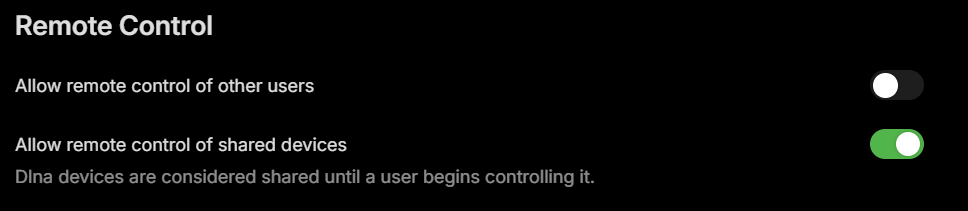
-

Hardware Transcoding Graphic Card
RanmaCanada replied to breezytm's topic in Non-Emby General Discussion
Why are you necroing a 9 year old thread.. - Yesterday
-
@scottpro You got it - all correct now. Another detail worth noting: For better transparency, we have started versioning the core UI code. These are the 26.0.-ish version numbers like the web app is showing. In the changelogs for apps (like here for example) and the server you can see sections like "Core UI Changes" which tells you the version of the core ui that is included.
-

4.10.0.40 Regression - Android and Samsung sessions no longer remotely controllable
Luke replied to Cr8iveLosr's topic in Linux
Hi there, please attach the Emby server log from when the problem occurred: How to Report a Problem Thanks! -
4.10.0.40 Regression - Android and Samsung sessions no longer remotely controllable
Cr8iveLosr replied to Cr8iveLosr's topic in Linux
Thanks for chiming in. This question was already answered, not once, but twice. -
4.10.0.40 Regression - Android and Samsung sessions no longer remotely controllable
JMSolo replied to Cr8iveLosr's topic in Linux
Interesting, @yocker. On my end this really is not a permissions thing, because nothing changed except updating the server to the latest Emby stable. And like I said above, I rolled back to the previous stable and remote control came right back with no other changes. That is about as clean a before and after as it gets. I would ask you the same thing I would ask about any test here, because the details really do matter. Is your setup a local install on the same network, or are your clients connecting in remotely through a reverse proxy and subdomain? On my side iOS and Apple TV are golden, the controls work and messages go through, while Android and Samsung are the ones that lost control. So if you are testing on the LAN, or you are not on an Android or Samsung client, that would explain why you are not seeing it. To add to this which setting are you referring to specifically? I have toggled every user setting on and it makes no difference. I also tested this with a full admin account, my own, and the issue is exactly the same there. An admin account already has every permission there is, so if remote control fails even for the admin, that rules permissions out entirely. And if you are saying the admin is somehow lacking a permission to remote control, then that is a separate bug on its own. That is really why I keep coming back to the setup. Same server, same account, same permissions: iOS and Apple TV work, Android and Samsung do not. There is no per user permission that disables remote control for only Android and Samsung while leaving iOS working for that same user. That points at the client platform and the 4.10 server, not a toggle. Not trying to be difficult, just trying to pin down the exact conditions so we are actually comparing the same thing. -
Well , i use a Geforce 1060 with 6GB VRAM. 6-7 simultaneous sessions is ok, i tried that. 3 simultaneous external users is no problem . And that is a 1060 card. Imagine what you can do with, say a 30xx card.
-
4.10.0.40 Regression - Android and Samsung sessions no longer remotely controllable
yocker replied to Cr8iveLosr's topic in Linux
Works fine for me. As Luke said, sure you have enabled the option in the user settings?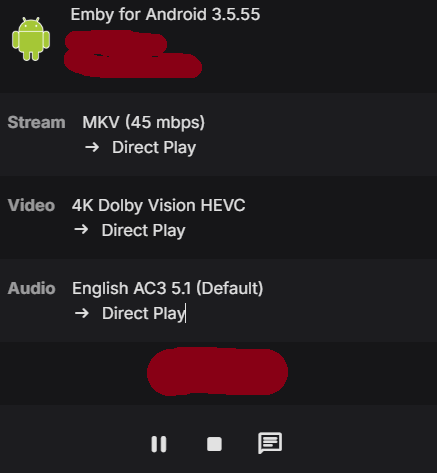
-
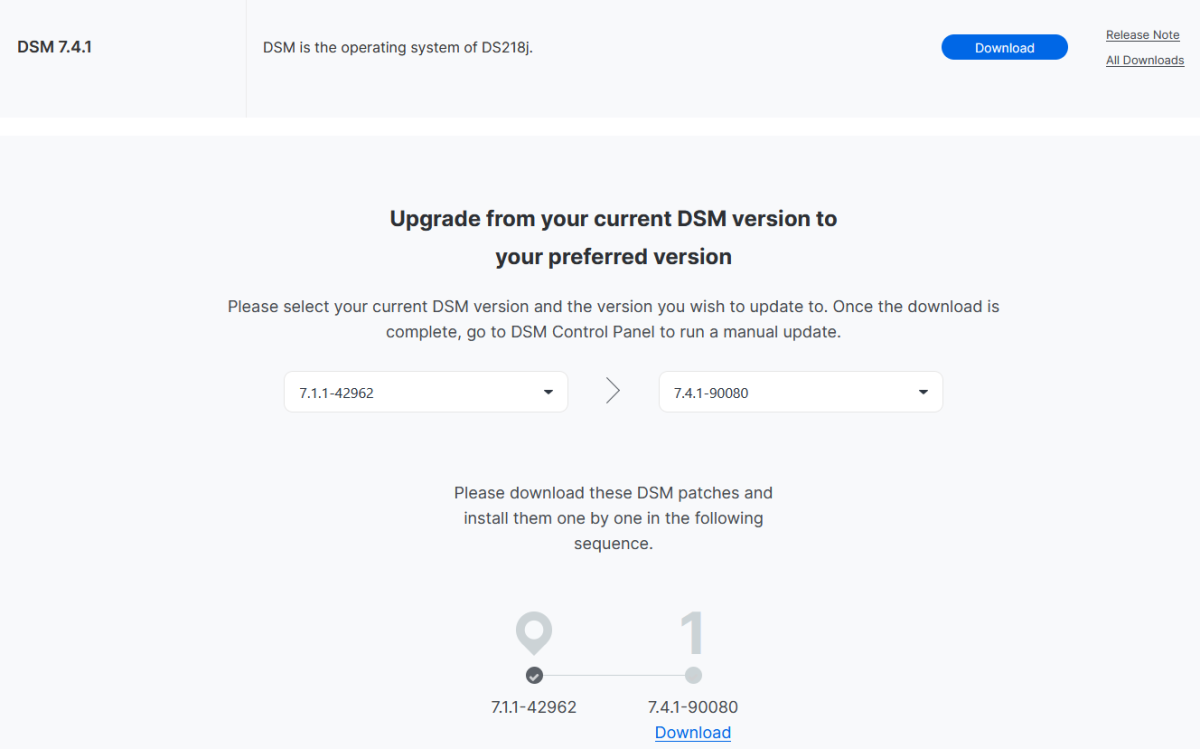
Not trying to be nosy... just curious: why are you keeping your DS218J on such an old DSM? I have both the DS918+ and the DS418J on 7.4.1 and they're both working fine (and more secure, since they have the latest security patches). Edit: You don't even need to perform any intermediate updates to reach it, you can even go directly to the 7.4.1:
-
4.10.0.40 Regression - Android and Samsung sessions no longer remotely controllable
JMSolo replied to Cr8iveLosr's topic in Linux
Just chiming in to confirm I am seeing the exact same thing, so this is not a one-off. The only thing that changed on my end was updating to 4.10.0.40. I did not touch a single permission, I did not change any settings, and nothing in my environment changed. It just broke after the update. @Luke respectfully, this is not a user permission issue, and it is pretty easy to rule that out. On the same server, with the same users and the exact same permissions, my iOS and Apple TV clients are perfectly controllable. I literally sat down and streamed a show from my iPhone, the playback controls were right there, they worked, and messages went through fine. Meanwhile the Android and Samsung sessions from those same users show no controls at all, and messages never reach them. A per-user permission cannot explain a break that only follows the client platform. Same user, iOS works, Android does not. That alone tells you it is server side. And to be clear, this is not some third party tool or API script doing something weird on my end. I see it right inside Emby's own dashboard. Every Android and Samsung stream in there only shows the Message option, no play, no pause, no stop, and even that message does not actually get delivered to the user. I also want to back up what @cr8iveLosr said about this being a remote thing. To be upfront, this is just me and my immediate family using this server. It is a normal family setup. We simply connect in from outside the house, over the internet, to a self hosted server sitting behind an nginx reverse proxy on its own subdomain over HTTPS. This is all remote, not LAN. That distinction seems to matter a lot here, and it makes me think your quick test that worked on Android may have been done locally. If you hit it the way my family actually does, remotely through a reverse proxy and subdomain, I think you will see exactly what we are seeing. @cr8iveLosr already laid out the API evidence and it lines up exactly with what I am seeing. SupportsRemoteControl comes back false for Android and Samsung and true for iOS, Apple TV, and Web, all in the same /Sessions response with one admin key. The SupportsMediaControl field is completely gone from the payload now, and it was there before 4.10. Those broken sessions also do not show up at all under /Sessions?ControllableByUserId. Your own capabilities docs say controllability is declared through ClientCapabilities.SupportsMediaControl, and these clients are still sending a full SupportedCommands list, so the server has simply stopped treating them as controllable. You mentioned you did a quick test and Android worked for you, so this is probably build or app version specific. Can you tell us the exact server build and the exact Android app version you tested against, and whether you tested a remote session through a reverse proxy or just on your LAN? Because rolling back to the previous stable brings control right back, which points pretty clearly at something that changed in 4.10 itself. -
Interesting, I think that might be a change worth considering then, it sounds decent. I know from experience the current method has been a not-so-uniform approach where as even if you tell the server settings for a user to default to genres when opening "Movies", that isn't respected on most tv apps such as Roku until you change it on a Roku device. So my next follow-up question would be, will this new method be respected cross-platform? For example, if I have tabs re-ordered or removed completely in the server settings for the user, will that be sync'ed & respected across all tv apps? Thanks
-
4.10.0.40 Regression - Android and Samsung sessions no longer remotely controllable
Cr8iveLosr replied to Cr8iveLosr's topic in Linux
Yes, the permissions have been checked. Nothing in the user permissions, server configuration, reverse proxy, clients, or network configuration changed between the previous stable release and 4.10.0.40. That is also why I specifically tested this by reverting the server version. On the previous stable release, the same Android users and same devices immediately show as remotely controllable in the Dashboard and /Sessions reports them accordingly. After upgrading the same server back to 4.10.0.40, those same Android sessions report: SupportsRemoteControl: false and they disappear from: GET /Sessions?ControllableByUserId=<adminUserId> The Dashboard reflects the same state by removing the playback controls. No permissions are being changed between these tests. Only the Emby Server version is changing. Also, was your quick Android test performed with a remote Android client connecting through a reverse proxy, or was the Android device on the local network? The issue I am reporting is specifically with remote users. They can connect, authenticate, browse, and play normally, but 4.10.0.40 immediately classifies the Android session as non-controllable. Web, iOS, and Apple TV sessions on the same server still report SupportsRemoteControl: true, so this is not a general administrator permission issue either -
UPNP setup of Emby Server has suddenly stopped working remotely
Luke replied to Beta8088_Proto's topic in General/Windows
I think we need to learn more about this because the rule of thumb is get the direct address working first because Emby Connect is just a shortcut for that. If they are truly acting differently then it is likely because they are using different addresses, so we should get to the bottom of that. There's no magic involved here. And if they are using the same address, then we need to look at what exactly is happening that's leading you to say "not working". For example, a user who can't login to their server might also describe it as "remote connection not working", when in fact they can connect, but just had trouble signing in after that. -
With 2.1.55 and CodecEAC3 Dispositionstereo Chaînes2 ch Débit192 kbps Taux d’échantillonnage48 000 Hz I can not accelerate With Emby for Android TV_2.1.26g, I can
-

Emby server/client - ReplayGain or R128 volume normalization support for music
TariqK replied to Espen JQ's topic in Feature Requests
What do you mean? did they add it? -
Indeed. And, as I also said, highlights the shortcomings of the movie collection on the server, rather than add value (at least IMO).





.thumb.png.1ddf135ad99a72646a26d671a28ffe35.png)


