All Activity
- Past hour
-
 Al_samhan joined the community
 -
To clear the logs, I restarted the server at 20:00 before the test. I started playing the movie at 20:01. The audio began to lag at approximately 21:00 (around the 58–59 minute mark). Device: Xiaomi Mi Box 3. I am attaching the server logs and information about the video file. embyserver.txt hardware_detection-63920865587.txt Супермен 2025 (TrueHD Atmos).mkv.MediaInfo.txt
-
 manking1997 joined the community
 -
 7WTIb0wAEn joined the community
 -
 Semperaudere joined the community
 -
.thumb.jpeg.5ef6271c0f4457d42d5f771a1f902b7c.jpeg) RafaElCejas08 changed their profile photo
RafaElCejas08 changed their profile photo -
 Krishna515 joined the community
 -

File order for TV shows....TheTVDB new options.
GrimReaper replied to RedStagPass's topic in Feature Requests
Hi, there's already an open request for this or something functionally equivalent. Please join in and contribute to the existing discussion at: -
 ByanP joined the community
 -
 xiaoyong97 joined the community
 -
 Deyaj joined the community
 -
 Pipat115 joined the community
 -
Sorry. I thought I had attached the full file. embyserver.txt
-
RafaElCejas08 joined the community
-
Since your files are already consistently named (no rename involved in what you're testing), the simplest safety net is backing up Emby's own database before you try Restore - if anything looks wrong afterward, you roll the whole thing back in one move. 1. Back up the database: sudo synopkg stop EmbyServer # or however you stop your Emby install cp /var/packages/EmbyServer/var/data/library.db /var/packages/EmbyServer/var/data/library.db.bak sudo synopkg start EmbyServer (Path varies by platform - Docker installs usually have it under your mapped /config/data/library.db; native Windows/Linux installs keep it under Emby's ProgramData/data folder.) 2. Run the plugin's Restore task and check the results. (I use Chapter API, and preferably copy the intro summary table into an Excel worksheet.) Don't forget: if you don't run any backup task, and don't edit any marker via any plugin (ChapterApi, Credits Detector, Segment Reporting), your NFO files stay untouched. If any compensable data lost; edit/add/delete them manually. And let the plugin auto-restore the adjustments. 3. If something's wrong, roll back: sudo synopkg stop EmbyServer rm /var/packages/EmbyServer/var/data/library.db mv /var/packages/EmbyServer/var/data/library.db.bak /var/packages/EmbyServer/var/data/library.db sudo synopkg start EmbyServer That puts the database back exactly as it was before the test - since no files were renamed in between, there's no mismatch between what the database expects and what's actually on disk, so this is a clean, complete rollback.
-

File order for TV shows....TheTVDB new options.
Luke replied to RedStagPass's topic in Feature Requests
Hi, yes more options are planned for future updates. Thanks. -
 Gembird79 changed their profile photo
 - Today
-
TrailerTheme – Trailer & Theme Song Downloader for Emby/Jellyfin/Plex (Windows)
Gembird79 replied to Gembird79's topic in Third Party Apps
Hi, thanks again for the detailed logs — that helped a lot. Cause TrailerTheme needs 64-bit VLC for the embedded trailer preview. Without it (or with a manually copied mismatched libvlc.dll), older builds could crash on startup (libvlc.dll / WinError 193). Workaround (still valid) Install the full 64-bit VLC from https://www.videolan.org/vlc/ Do not copy single DLLs into the TrailerTheme folder Restart once, then start TrailerTheme again Update available: 1.0.9 Please update to 1.0.9. When you open the app, you should get an in-app update prompt; or download here: https://github.com/Gembird79/TrailerTheme-Releases/releases/tag/v1.0.9 What’s fixed in 1.0.9: App starts even without VLC (trailer preview uses a Qt fallback) With 64-bit VLC installed, the normal VLC preview works as before Path dialog no longer freezes if the NAS/server is still asleep Please let me know if 1.0.9 starts cleanly on your Win11 25H2 system. Thanks! Gembird79 -
Running into issues where Peacock/Amazon/etc have season episodes broken up differently than the 3 options of Aired/Absolute/DVD. It looks like on TheTVDB there are more options available now. Looking at, for example, The Office (US). example in this case is Season 3. There are 2 episodes that are broken in to part 1 and part 2 that don't reflect in the 3 options for File Order for having the episodes show correctly without have to get creative. It would be cool if those options were updated to be able to be pulled and show correctly. In this case Amazon Order would fix the file naming and show correctly when meta data run. The Aired/Absolute/DVD orders do not. If this could be incorporated that would be awesome. (I searched and didn't see this in there, but my search skills are not the greatest)

-
That is not part of Emby server. That scheduled task must be coming from a plugin. I would remove the plugin and report the issue to the developer.
-
Hi there, please attach the Emby server log from when the problem occurred: How to Report a Problem Thanks!
-
Not sure if the last app on IOS version is broken
Luke replied to LoLoEmby's topic in Apple iOS / macOS
Hi there, please attach the Emby server log from when the problem occurred: How to Report a Problem Thanks! -
The server is being denied access to the location that you configured: System.UnauthorizedAccessException: Access to the path '/media/zEmbybackup/embyserver-backup-full/config/system.xml' is denied. if you can resolve that then I think that will resolve your issue.
-

unknown codec subtitle can not recognize and render
luowengang replied to luowengang's topic in Linux
I see. It seems that the problem is on the resourse. Is it possible to accommodate this kind of issue? -
Hi there, let's look at an example. Please attach the information requested in how to report a media playback issue. Thanks!
-
We've had a few home internet outages recently due to storms, etc. At this time, Emby because our sole means of entertainment. While it generally works, navigating between screens often becomes painfully slow. I guessed that it was trying to use the internet to get certain information, so I looked in the logs and found many timeouts trying to get artwork: https://ebyl.tmsimg.com/assets/p7893024_b_v8_aa.jpg?w=480&h=720 I'm not 100% sure if this is the problem, but the errors seem to coincide with sluggish behavior. During an internet outage, we can absolutely live without pretty artwork for recorded programs, etc. It would be nice if such requests were asynchronous behind the scenes so artwork could come in when it's available, but doesn't slow the UI. This problem exists on all devices we have: web UI, Firestick and Roku.
-
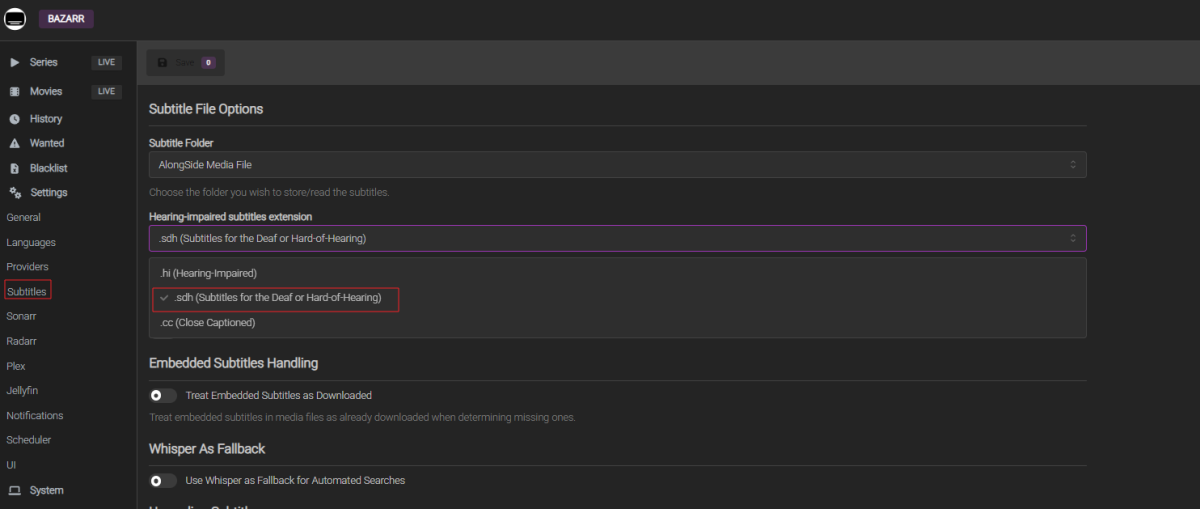
In Bazarr you can control this, with this setting. Then your subs will be named .sr.sdh.srt then you will get rid of hi=Hindi.
-
Hi,one回复
-
With 3050 works fine. Thanks!
-
Warn administrators before deleting media that is currently being watched
Luke replied to martian's topic in Feature Requests
HI, yes it's a good idea, although I think in most cases that delete would fail anyway. -
The problem is the people images are not designed for that, so you could end up cutting off heads.
-
Has this always been the case? Would have sworn they were different before I wiped them thinking they were corrupted somehow, esp. given that some of the thumbnails were blank anyway. Oh well, looks odd with the auto generated thumbs... guess I will have to replace them with something chosen by me. Thanks - solved the confusion. Guess - mixed by design.
-
@hackthis02 What do you think about adding a section within the Statistics plugin for Actor information? Number of Actors (count) List of Actors (list) Actors appearing in the most movies (count) Maybe some other Actor data elements Also, what about including a section for Genres? Number of Genres (count) List of Genres (list) Count of Movies in each Genre Also, what about including a section for Parental Rating? Number of Ratings (count) List of Ratings (list) Count of Movies in each Rating Thanks!
-

[BUG] Critical issues with Metadata Parsing and NFO Ignore for Audiobooks
Flest replied to Flest's topic in General/Windows
If I understand correctly, the issue is that some software writes a release date for 2010 as 01.01.2010. But if the time zone isn't UTC+0 (say, it's +6), the server shifts the time back by 6 hours. So instead of 00:00 on 01.01.2010, you end up with 18:00 on 31.12.2009. That’s why in my script I started writing 2010 as 01.07.2010 )))))) -
like this

-
Always is. I have everything set up where I can to store things with my media, for easier backup and portability. Images, NFOs, thumbnails...everything gets stored in my media folders. If I'm storing the NFO with the media file, and the NFO has the same filename as the media file, then it shouldn't matter if they've been renamed, should it? That is, again, a large part of the point of storing the information in the NFO to begin with, and I lost all my intros/credits when I renamed my files to include the aspect ratio in the filename. Most of what I'm worried about is my sporting events, which I store as TV shows but have no external IDs.
-
Nema na čemu. Javi kako je prošlo.