All Activity
- Past hour
-
 kbalkoski joined the community
 -

Request: Full Missing Episode Report Across Entire Library
kvillumsen replied to KLF&TLF's topic in Tools and Utilities
I made the below plugin for emby, my metadata manager keept crashing when browsing missing episodes. you access the missing episode functionality from the Manage server page, it shows up under advanced, when added to the plugin directory and configured with an api key.. it works really smooth and have consistent memory, so you dont need to run the full lookup every time. It has New vs. known missing episodes, Resolved history, Removed, Ignored (series or single episode), notifications and scheduling https://github.com/k-villumsen/Emby-missing-episodes -

Issue with playing music with app when connected through Tailscale
Gjonesesq posted a topic in Apple iOS / macOS
I've just recently started getting this problem where I'm unable to play music through the iOS app when I'm connected remotely through Tailscale. I've previously been able to play music (mainly MP3) through the app. I can still play music when I'm connected through WiFi. I can also still play all video without issue. Im on iOS 26.5.2. Any help would be greatly appreciated. -
 User3030 joined the community
 -
 Wd9099 joined the community
 -
 Lysa_cnz joined the community
 -
 FanhaLhama024 joined the community
 -
I've noticed a few times recently where even after I exit a live TV stream on the Roku app (normal exit, not a crash or anything), the stream keeps going -- I use HLS Proxy for buffering and I can see it still feeding things in an active connection to the Emby server for more than an hour after I've exited the Roku app. I haven't noticed this happening via the web interface or iOS apps. Server admin console does not show the stream playing. I can share logs but there is nothing obvious I see in there since this is really the absence of something happening (closing the stream). Sharing in case this is a bug worth looking at vs. anything idiosyncratic with my setup.
-

Please send in an up to date stable version to the Tizen store
SamES replied to JonKanon's topic in Samsung Smart TV
I believe a store update is in review with Samsung -
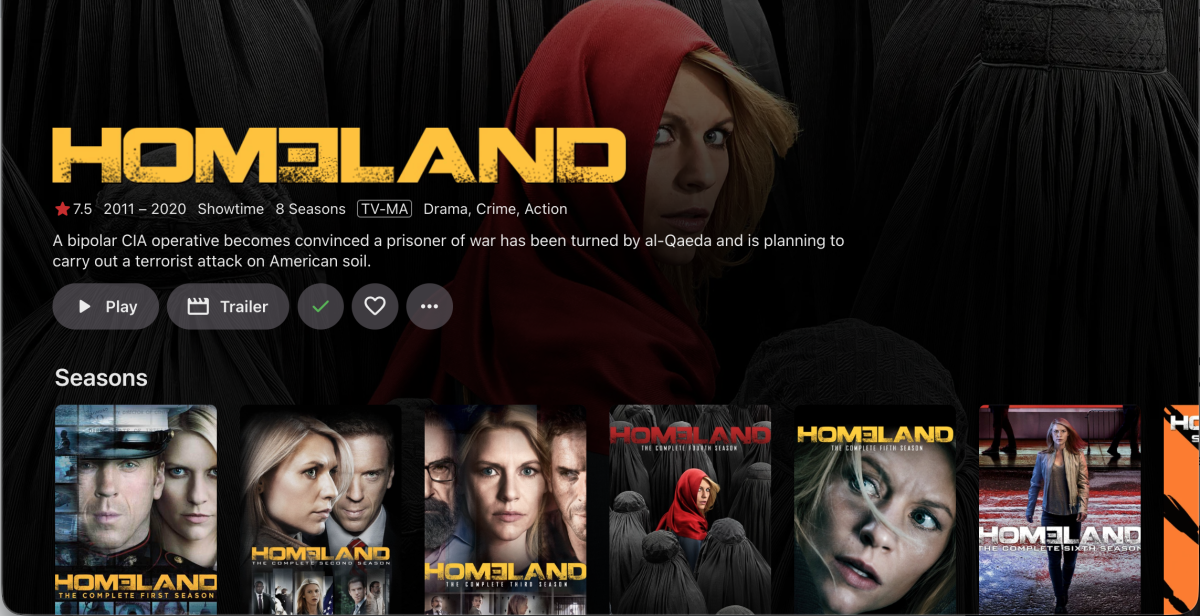
Maybe. This is what the web app looks like and it is generally the reference standard
-
 Goldenret2022 joined the community
 -
kvillumsen joined the community
-
 Parsa-12 joined the community
 -
 carolinarey joined the community
 -

Merging Live TV recordings and downloaded TV recordings for same show
flashls82 replied to flashls82's topic in General/Windows
Sorry, I am probably being dense, but say more about how this would work? If I want recordings to merge with downloaded content where relevant, don't I have to point the Live TV settings at the TV library? But then it's looking at the whole TV library as recordings. (This is purely a cosmetic thing and not a huge deal, to be clear, but if there's a solution I'm missing I would take it.) -
There is a bug in version 2.3.8 with .ass files
SamES replied to MediaEmby1968's topic in Samsung Smart TV
Before we get too far, and considering that you also have this issue with srt files, can you please confirm whether you are now able to turn subtitles on/off before playback from the details screen? I do think you have an internet connectivity problem from your server. Do you run PiHole or any other form of firewall or ad/content blocking on your network/router? -
With regards to the Procmon PML issues, I think it was misoperation where you got it the wrong way round with the capture button toggle. When you were intending to start the capture, clicking the capture button actually stopped the capture because it was already capturing When you were intending to stop the capture, clicking the capture button actually resumed the capture that you unintentionally stopped earlier ! When you launch procmon it automatically starts capturing
-
So is it now working ok on one of the computers after these changes? What you have done is a non standard installation - if it works, good. If it does not, I would suggest running Emby Windows on PCs that have local windows accounts - or alternatively get whoever is responsible for your domain - the domain admin - to resolve the problem for you
- Today
-

Significant performance regression in 4.9.x / 4.10.x compared to 4.8.11.0 + Season/Specials display bug
pwhodges replied to leshkraven's topic in Windows & Xbox
One season and specials specifically? I'd expect that to be treated as a one season show, which is what happens. But I guess you're asking for a specials folder to be treated as a season in this instance. Paul -

Please send in an up to date stable version to the Tizen store
JonKanon replied to JonKanon's topic in Samsung Smart TV
Seems that I need to do the 30day bets tjingy... Or will there be any update that supports this TV in the future? With the latest from the store 2.2.8 it takes forever the he subtitles to start.will try the latest beta tomorrow and report back if it solves the subtitles delays... I will report back. -

Significant performance regression in 4.9.x / 4.10.x compared to 4.8.11.0 + Season/Specials display bug
leshkraven replied to leshkraven's topic in Windows & Xbox
I am fully aware of that feature and did mention it with image. The issue is that it isnt working correctly when "Specials" folders S00 are introduced -
Significant performance regression in 4.9.x / 4.10.x compared to 4.8.11.0 + Season/Specials display bug
pwhodges replied to leshkraven's topic in Windows & Xbox
This is a user setting "Preferred TV Show Display" in your personal display settings: You can select to always show season folders, show season folders only when there is more than one season, or never show season folders. Paul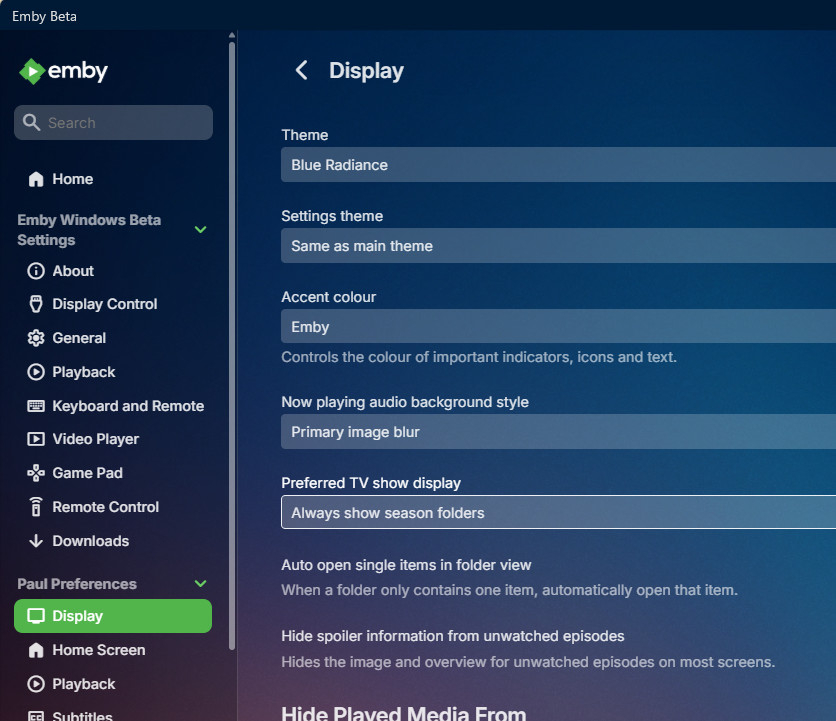
-

We really need better multi version handling for Continue Watching
js28194 replied to te5s3rakt's topic in General/Windows
I may not be understanding your complaint. Does multi-verstion naming not work for you? \Spider-Noir (2026)\Season 01\Spider-Noir 01x01 Step Into My Office - Authentic B&W.mkv \Spider-Noir (2026)\Season 01\Spider-Noir 01x01 Step Into My Office - Full Hue.mkv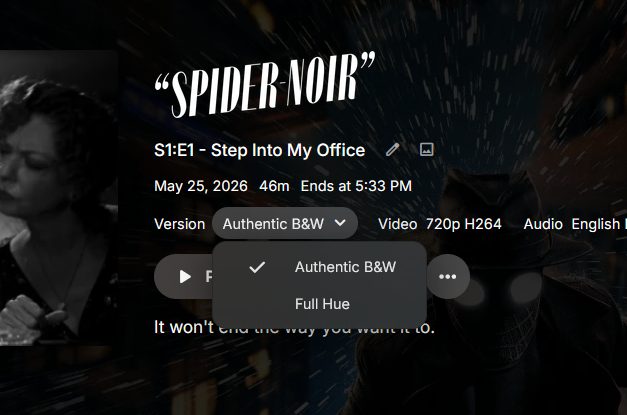
-
I am having this problem on my home videos menu. Everything looks fine on my server app (Synology), but on the Roku device, the Year tag does not show up even when that is the only tag I have chosen besides the title. I have tried it with the smallest available thumbnails. I would really like this information visible to family logging into my server! Is there anyway to fix this? My screen shots would look identical to those shown above.
-
Significant performance regression in 4.9.x / 4.10.x compared to 4.8.11.0 + Season/Specials display bug
leshkraven posted a topic in Windows & Xbox
After updating from 4.8.11.0 to 4.9.x and later 4.10.x, I noticed significant UI lag, artwork taking 30-40 seconds to load, sometimes even longer, shows slow to display, and general sluggishness throughout the interface. Rolling back to 4.8.11.0 immediately resolved the issue. I tested 4.9.5.0 today and the same lag is present. 4.8.11.0 runs perfectly on the same hardware with the same library. It appears something in the image processing or metadata pipeline changed significantly from 4.9 onwards that introduces overhead on larger libraries. Season/Specials display bug: On shows that contain only one season folder and a Specials folder, Emby is incorrectly treating them as single-season shows and flattening all episodes into one view instead of displaying separate season folders. This issue is also present on 4.8.11.0. The "display episodes within seasons for single season shows" setting appears to be ignoring the Specials folder when counting seasons. Even changing folder names to Season 0, with episodes correctly named S00E01 etc., does not fix the behaviour. The only shows that display season folders correctly are those with more than one regular season — for example a show with Specials, Season 1, and Season 2 displays all three folders as expected. A show with only Specials and Season 1 gets flattened. To put the performance regression into perspective the lag on 4.9.x is horrendous, a complete opposite experience to 4.8. Even while writing this post, I opened a show on 4.9.5.0 and after over 3 minutes the episodes still had not loaded on screen. This is on hardware that runs 4.8.11.0 without any issues whatsoever. Something has gone seriously wrong with performance between these versions. The uploaded image that shows partially loaded shows sat like that for over 8mins, I had to back out and open again which seemed to make it load fully but still took over 20secs. It is also worth noting that when accessing Emby directly via the linux server URL locally, it does appear to load faster. This suggests the lag is amplified over remote connections, likely due to the increased number of API calls and heavier responses in 4.9+ every additional request compounds the latency over the internet. However the root cause is clearly on the emby side, as 4.8.11.0 handles remote access without any such issues on the same hardware and connection..thumb.png.2c9e09e35b803f9bc65781a5db9e2478.png)
.thumb.png.60a8c41450aa8084cd548c2213ff1e97.png)
.thumb.png.e7cd7ff1a35f4c4da5277b46f577414f.png)
.thumb.png.ce9552514edefe05edbe8aecf5eafd4b.png)
-

'Shuffle' command for photos on Android app not shuffling
tgraph replied to beckfield's topic in Android
Experiencing the same thing on my Firestick client... random start and then sequential slide show... It seems no progress made in the last year. -

Next Episode Pop-up won't show up for the credits chapter
lozanoeg replied to Kyouma's topic in Apple TV
I have this same issue, The chapters work on iOS just not apple TV. Running 4.10.0.17-beta for the server and the latest on app store for apple tv -

There is a bug in version 2.3.8 with .ass files
visproduction replied to MediaEmby1968's topic in Samsung Smart TV
OK, sounds like there is a code issue with the update. The last idea I have would be this one: https://emby.media/community/topic/137265-media-subtitle-ass-format-playback/#comment-1433426 Some .ass files cause an error with a subtitle editor. Maybe the TV app is also sensitive to this typo issue regarding ,0 instead of 0,0 or 0,1 or 0,2. It's probably not the problem, but have a go. My editing software really did not like .ass files that had the ,0. Be sure to post the answer when you find it. Good luck. -

TV Show Status — TMDB-powered Returning/Ended/Cancelled badges for series
Blueskies278 replied to Blueskies278's topic in Plugins
New icon New rounded edges to look more cohesive, to match Emby's UI New icon can now be added to textcolour.thumb.png.c88987f356ca733cc53d3a8ed5775194.png)
colour.thumb.png.98e9d0d553c0ec92d8d0108ce1163e28.png)
.thumb.png.014fd12db7185184c9089be87ab0d58f.png)
.thumb.png.25576f3e3a0cd9a10a59d2ea82abb21b.png)
texte.g.22Airing15Jul202622(nobackground)e.g.22Airing15Jul202622(no.thumb.png.0c7875b6805c492146dc8eff008173e4.png)
texte.g.22Airing15Jul202622(nobackground).thumb.png.273189f4cf5b79c12e512d0e49adb7fc.png)
-
Hey Emby Team, @Luke @ebr I recently checked out Emby on Android TV and was really impressed – the interface feels much more modern and cleaner compared to Apple TV. Especially the layout of the elements is much better, plus the poster preview is bigger and the buttons/navigation feel more intuitive. In comparison, the Apple TV design feels a bit dated. Please give the Apple TV app a design upgrade for the detail pages that meets today's standards I'd love to see the Apple TV app get an upgrade in the future that's closer to the Android TV version. Thanks and best regards!

-
TV Show Status — TMDB-powered Returning/Ended/Cancelled badges for series
Blueskies278 replied to Blueskies278's topic in Plugins
deleted -
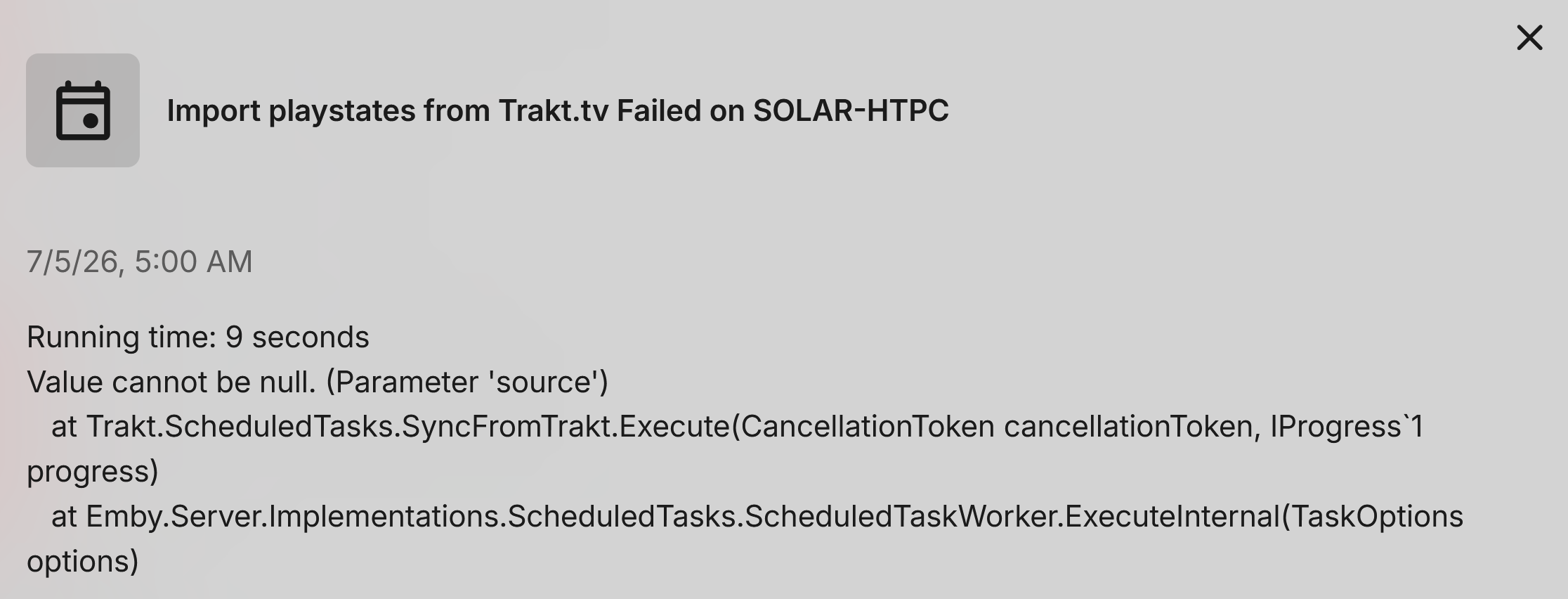
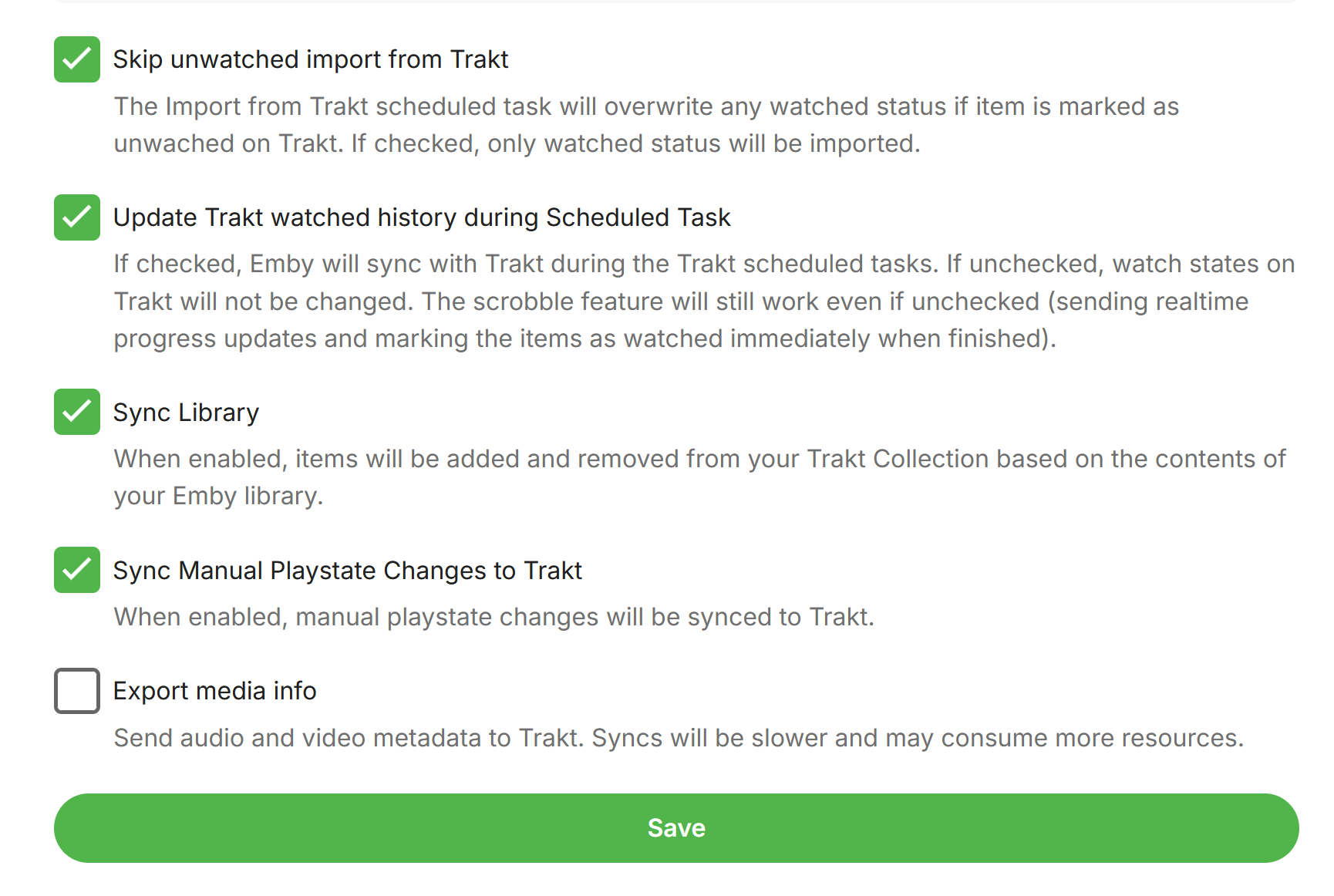
I'll start by saying I only started using Trakt a few months ago at most. But the good news in that regards is that it worked! Now the bad news.... it no longer works! (whats annoying is that even with TRACE logging turned on it does not give any detail.) however, I've been able to narrow it down... The issue is related to TV scan. If I only include Movies, it completes successfully. However, with TV enabled, it fails. It doesn't give any useful info like a specific show it is failing on. I have two different TV folders that are in my library and it crashes the exact same way for either one of them. > 2026-07-05 14:25:35.218 Error Trakt: Error syncing trakt data for user media *** Error Report *** Version: 4.9.5.0 Command line: C:\Users\media\AppData\Roaming\Emby-Server\system\EmbyServer.dll -noautorunwebapp Operating system: Microsoft Windows 10.0.26200 OS/Process: x64/x64 Framework: .NET 8.0.27 Runtime: C:/Users/media/AppData/Roaming/Emby-Server/system/System.Private.CoreLib.dll Processor count: 24 Data path: C:\Users\media\AppData\Roaming\Emby-Server\programdata Application path: C:\Users\media\AppData\Roaming\Emby-Server\system System.ArgumentNullException: System.ArgumentNullException: Value cannot be null. (Parameter 'source') at System.Linq.ThrowHelper.ThrowArgumentNullException(ExceptionArgument argument) at System.Linq.Enumerable.TryGetFirst[TSource](IEnumerable`1 source, Func`2 predicate, Boolean& found) at System.Linq.Enumerable.FirstOrDefault[TSource](IEnumerable`1 source, Func`2 predicate) at Trakt.ScheduledTasks.SyncFromTrakt.SyncTraktDataForUser(User user, TraktUser traktUser, Double currentProgress, CancellationToken cancellationToken, IProgress`1 progress, Double percentPerUser) Note: This ONLY happens with TV Enabled. I also tried keeping only the first "skip unwatched import from Trakt" checked and unchecked the rest. Again, it only succeeds on Movies sources.
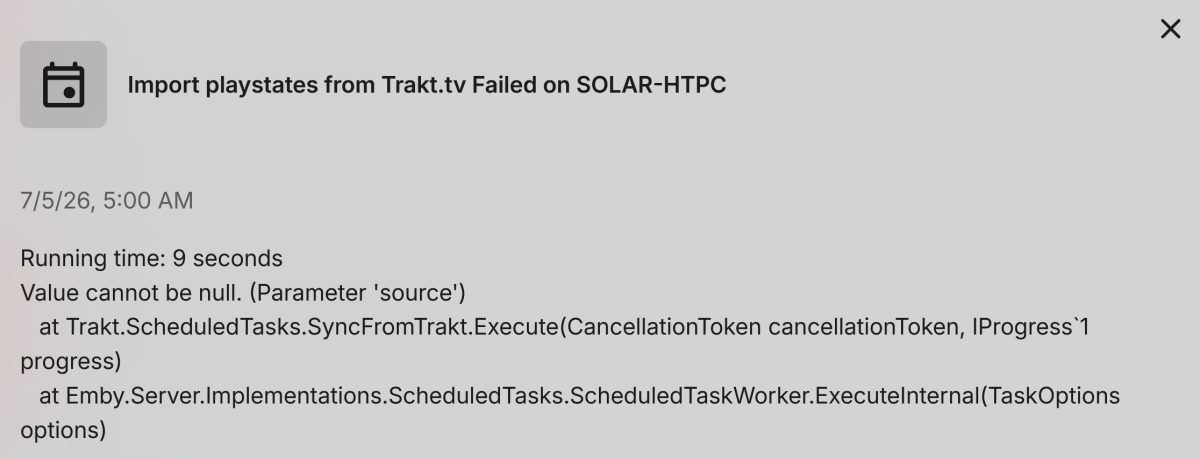
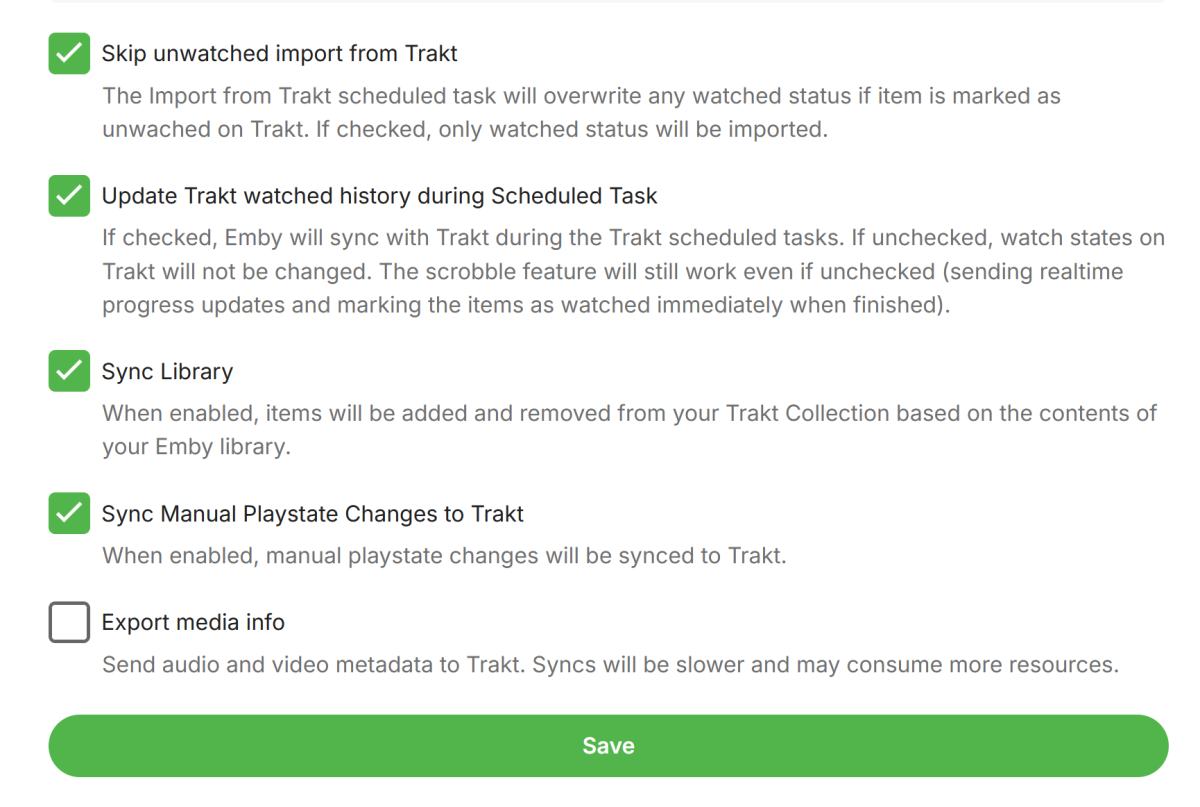
-

Workaround: customize UpNext / Next Episode prompt timing in Emby Web
lolotux replied to lolotux's topic in General/Windows
Have you read all my trick? "This is only a workaround and may be overwritten by Emby updates. An official UI option would still be much bett" .... -
Workaround: customize UpNext / Next Episode prompt timing in Emby Web
lolotux replied to lolotux's topic in General/Windows
Fortunately, the percentage is configurable......... Rome: 2 minutes out of 50 minutes = 96%



.png.3d4aa29c8f5ce00c54a20b4f29582fc3.png)
.png.7e8bc623f60b5150b70cac1beab9603c.png)
.png.fef07c3bc0d3f8868ac3e9edaefce0b6.png)
.png.13360fca128bfd8e1a425c48e9e66139.png)
colour.png.0bf435c81a2f618961e8bcf96a9f543c.png)
colour.png.ac5069bf60409f665041d224bdaec698.png)
.png.5c27620178cff45d6c0f5c6bd2bdd0bd.png)
.png.96b9a32ba7e1ecc7a0d1762aed2a6de9.png)
texte.g.22Airing15Jul202622(nobackground)e.g.22Airing15Jul202622(no.png.5edbfb1befb40a0920475a81d9cb326c.png)
texte.g.22Airing15Jul202622(nobackground).png.b1999f3ac5f9a61663f7f2b03cb30b29.png)