All Activity
- Past hour
-
 ujesu68693 joined the community
 -
Ok we’ll take a look at it. Thanks:
-
 Alloush313 joined the community
 -
 camilosoy joined the community
 -
Hi there, please attach the Emby server log from when the problem occurred: How to Report a Problem Thanks!
-
 albyglenn joined the community
 -
 Mickey Chen joined the community
 -

Additional UI Aspect Ratio Themes Support (16:9, 2.35:1, Anamorphic, etc)
dwyatt replied to TheWorkz's topic in Plugins
Make that 6 of us? Just building a dedicated home theater that will be primarily run with CIH through zooming my projector. Would be great to be able to have a theme that moves UI elements (important ones anyways) within some boundary.- 7 replies
-
- 1
-

-
- aspect ratio
- theme
- (and 1 more)
-

Playback failing on iPad without a transcode attempt
Luke replied to flashls82's topic in Apple iOS / macOS
Thanks for the feedback! -
 mico1014 joined the community
 -
This still happens to me consistently (every time, even?), and only from the Roku app. When I watch a live tv stream, the provider stream stays open even after I exit the stream and stay in the app. The only way to end the stream is to disconnect via my IPTV proxy app (Dispatcharr) or restart the emby server (restarting only the Roku app has no effect). On Windows and iOS, exiting the stream stops the stream from the provider as expected.
-
 Shawnycoconut joined the community
 -

Playback failing on iPad without a transcode attempt
flashls82 replied to flashls82's topic in Apple iOS / macOS
On the latest version of the app it DirectPlays, so I guess solved for now. -
 Luckyking2020 joined the community
 -
 JoshoNZ joined the community
 -
 JACOBITOU67 joined the community
 -
Hi, were you able to try it?
-
Hi, we mention that in our Connecting from Client Apps guide. please go through that and let us know if it helps. Thanks.
-
IOS emby server offline - not loading download content
Luke replied to HairyBizRat's topic in Apple iOS / macOS
Hi, please try with the latest update to the Emby app. Thanks. -
Help! Emby Server is stuck in "Ready to Transfer" to my Android phone
Luke replied to drsalzman's topic in Android
Hi, I would try cleaning your existing download queue and then try to download something new. Please see if that helps. Thanks. -
Hi, what makes you think the webstreams plugin does not work?
-
Hi, we’ll do some testing on this. Thanks.
- Today
-

The left bar on the dashboard page has been blank
kira yamato replied to kira yamato's topic in Apple iOS / macOS
Just use Emby as usual. This bug is quite common. In the most common case, the dashboard will stretch to fill the screen (normally, it must show a left bar for the 1/4 of the screen)but its won’t show and when click show left bar will blank the pic above . -
Hi, this is happening on YouTube’s end. We are configuring it to not show subtitles but it still is anyway. Right now this looks out of our control but we are looking into it. Thanks.
-
Is it your own server that you are trying to connect to?
-
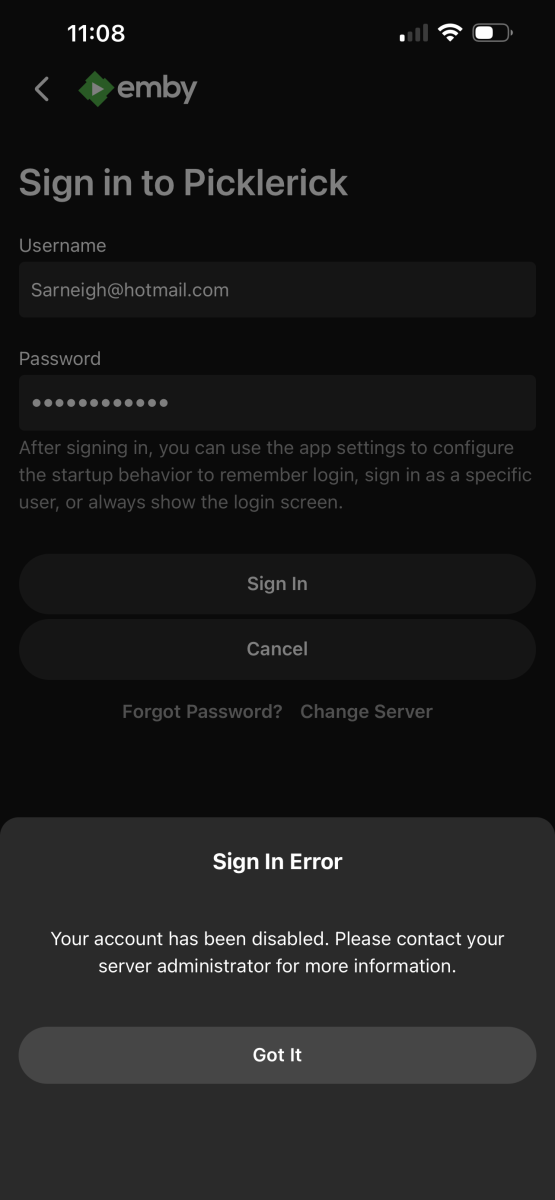
Hi all , I can’t get into Emby I hit login with connect, scan qr and enter the code which is correct, sign into server on phone and I get this what does this mean?
-
Is there any way to turn off subtitles/captions when watching trailers - without impacting subtitle settings for playback of normal content? They appear to be full descriptive captions, e.g. "(Ominous music)" as well as dialogue subtitles. They're present on both my LG app and windows desktop app. If they're being pulled in by default from, e.g. You Tube, could you add a setting enabling Emby users to disable the feed? Thanks!
-

Emby for iOS 2.2.52 no video via HDMI output
bradford replied to Symen_4ab's topic in Apple iOS / macOS
I’m having black screen issues returning after a few minutes of playback on 2.2.56 using the official Apple USB c to HDMI adapter -
Access ReplayGain metadata through the Emby API for audio playback
Luke replied to MarvinB's topic in Developer API
Hi, not currently but it’s something that could be added. - Yesterday
-

Playback freezing when skipping forward or resume playing.
plutonicdiagram replied to plutonicdiagram's topic in Linux
Here's another example with a different file. simplescreenrecorder-2026-08-29_18.52.27.mp4 -
Playback freezing when skipping forward or resume playing.
plutonicdiagram replied to plutonicdiagram's topic in Linux
Here's a recording of the issue. simplescreenrecorder-2026-08-29_18.47.53.mp4 -

I built the Plexamp "Sonic Analysis" experience for Emby — self-hosted. Anyone Interested? Want to test it?
kaj replied to kaj's topic in Third Party Apps
Small update for anyone still following this thread — liquidWave is now on Google Play in closed testing, and I'm looking for testers. Rather than repeat it all here, the details and the two-step join are in a new thread: Thanks to everyone who showed interest first time round -
liquidWave is now on Google Play (closed testing) — looking for testers
kaj posted a topic in Third Party Apps
Hi all Some of you may remember my earlier post about liquidWave, the self-hosted "sonic analysis" layer for Emby I've been building, plus its Android player: There's been a lot of work on it since — and it's now on Google Play in closed testing. I'm looking for testers. The idea: a small service you run yourself listens to your library once and learns what each track actually *sounds* like — not genre tags — which powers: - Sonic Mixes — auto-curated mixes grouped by how your music really sounds, refreshable, save as a real Emby playlist - Track Radio & Similar — an endless queue from any track, or tracks/artists/albums that genuinely sound alike - Sonic Adventure — pick a start and end track, it builds a journey that morphs between them - Artist Mix Creator — pick a few artists, it suggests sonically similar ones, builds a cross-artist mix It's also a complete Emby music and audiobook player: crossfade that trims silent intros/outros rather than blending dead air, a 10-band EQ, offline downloads with durable resume, Android Auto, a home-screen widget, Google Cast, and a browser web app for non-Android devices. Audiobooks are a first-class citizen here, not an afterthought — chapter-aware browsing and resume (it picks up at the right chapter and position, not just the start of a file), variable playback speed, and a sleep timer. They download for offline listening too, and still resume in the right place when you come back. Everything runs on your own hardware. No account, no cloud service, no ads, no analytics, no telemetry. You need Emby 4.8+. The app on its own is a fully capable Emby player in about five minutes with no backend at all; the sonic features need the small self-hosted service alongside your server. To join the test (Google requires both steps, sorry — the group is how Play controls access): 1. Join the group: https://groups.google.com/g/liquidwave-testers 2. Then open https://play.google.com/apps/testing/guru.liquid.embysonic and hit "Become a tester" After that it installs from Play like any other app and updates automatically. If you're able to, please join through Play rather than sideloading the APK — Google needs 12 testers installed via Play for 14 continuous days before an app can go public, so those are the installs that count. Sideloading works fine and is still supported, it just doesn't help get it over that line. Full details and the setup guide: https://playliquidwave.com Genuinely a beta, but been my daily driver for over a month now — actively developed, there will be rough edges, and I'd rather hear about them. Feedback of any kind very welcome, here or in the app's issue tracker. Thanks for reading