All Activity
- Past hour
-
 Puripalleiro joined the community
 -
 wyjzjpj joined the community
 -
 yuemengfan joined the community
 -
 Cilindraka1972 joined the community
 -

[Beta] ROMote – play your retro game collection in the browser (NES → PlayStation)
GrimEvil replied to digitalirony's topic in Plugins
So far works fine, just really needs support from other clients, android, android tv etc and not just the web. If possible you should have a proper button with in emby to play the game instead of just a link, maybe a way to use the emby button/control for this from the api? -
Having a quick play with it so far and I like the emulator support, not sure if my issues but live tv is not working for me, but will report back later once i have had a proper test using the different clients.
-
 lilbear joined the community
 -
 Bartasony1211 joined the community
 -

Emby Windows 2.317.2.0 playback controls hidden behind video
TDriver replied to TDriver's topic in Windows & Xbox
Thanks for the suggestions. I was able to resolve the issue and narrow down the cause. The playback controls were present and interactive the whole time: • The mouse cursor changed to a hand over the invisible buttons • Back, Forward, Play/Pause and other controls could still be clicked • The Emby client log showed that showVideoOsd was called successfully • The issue only occurred on this particular Windows PC • Other Windows PCs displayed the controls normally I then tested the following without success: • Windows display scaling at 100% • Dark theme and Windows theme • Windowed, maximized and fullscreen playback • NVIDIA GPU and AMD integrated graphics • Windows automatic GPU selection • High-performance GPU selection • Power-saving GPU selection • Auto HDR enabled and disabled • Optimizations for windowed games enabled and disabled • App repair • Complete app reset • Full uninstall and reinstall from the Microsoft Store The decisive test was disabling WebView2 GPU acceleration with: WEBVIEW2_ADDITIONAL_BROWSER_ARGUMENTS=--disable-gpu After restarting Windows, the complete playback controls / OSD became visible again immediately. This confirmed that the issue was related to hardware-accelerated WebView2 rendering or GPU composition on this system. I then removed the workaround again and performed a clean installation of the latest NVIDIA driver, including a complete driver reinstall. After restarting Windows, the playback controls were visible again with normal WebView2 GPU acceleration enabled. The environment variable is now removed and no workaround is required. So the issue appears to have been caused by the previous NVIDIA driver or its interaction with WebView2 GPU rendering/composition. Thank you for pointing me toward the GPU and Windows graphics settings. -
Was just playing a 4K (Toy Story 4) in the Windows app and it says - Failed to initialize a decoder for codec 'True HD'. The audio for the 4K version is apparently English True HD 7.1 and gives the above error and silence. The audio for the 1080 version is apparently English DTS HD MA 7.1 and seems fine.
-
 Moaeed66667 joined the community
 - Today
-
 kris03 joined the community
 -

[Beta] ROMote – play your retro game collection in the browser (NES → PlayStation)
digitalirony replied to digitalirony's topic in Plugins
It should work fine inside your network. It only needs network for downloading artwork and metadata etc. But it should work as long as emby works, you may need to set your remote IP/lan address inside of the network settings, just depends on your setup. Yes, it has saves and save states to the server. -
 Tahomina joined the community
 -
Indeed it can happen but in this case you try to repair the problems that have appeared
-

Emby Windows 2.317.2.0 playback controls hidden behind video
softworkz replied to TDriver's topic in Windows & Xbox
Great analysis! Now that you say it, I remember that a similar issue existed for a user with the new Linux app, but that was early in the beta phase and unrelated to the app. Did it work in an earlier version of the app? Generally, multi-gpu is working fine on Windows, I have 3 GPUs (Intel iGPU, Nvidia, AMD) working at the same time. Do you know the Windows settings where you can choose a "high performance GPU" and also per-app settings which GPU it should use. You can try "Optimizations for windowed games" on/off Do you have the latest drivers installed for all GPUs?
-

[Beta] ROMote – play your retro game collection in the browser (NES → PlayStation)
Fch11 replied to digitalirony's topic in Plugins
It doesn’t work on local network if ISP goes down? Also is there a continue for games you’re currently playing? -
 Lironnnn joined the community
 -
Hi Lessaj I already ordered GeForce 3050, but i will get it in two weeks. So for now i want to try something else. Could you show me where i can find "Energy Efficient" settings in App?
-
Emby Windows 2.317.2.0 playback controls hidden behind video
TDriver replied to TDriver's topic in Windows & Xbox
I found a reproducible workaround and this appears to confirm a WebView2 GPU rendering issue. After setting the following user environment variable and restarting Windows: WEBVIEW2_ADDITIONAL_BROWSER_ARGUMENTS=--disable-gpu the playback controls / OSD become visible again immediately. Without this flag, the controls are present and clickable, but completely invisible. With --disable-gpu, the full playback UI is rendered correctly. This strongly suggests a hardware-accelerated WebView2 rendering or composition problem on this PC. The system has both: • NVIDIA GeForce RTX 5060 Ti • AMD Radeon integrated graphics It may be related to the hybrid GPU configuration, GPU selection or the current WebView2/graphics driver combination. -
What was the solution?
-
Emby Windows 2.317.2.0 playback controls hidden behind video
TDriver replied to TDriver's topic in Windows & Xbox
I tested the keyboard and mouse input again. The controls are definitely present and functional, but they are completely invisible. When I move the mouse over the positions where the controls should normally be, I can still click Back, Forward, Play/Pause and other buttons. I also checked Task Manager while the video was playing. Emby starts the following processes normally: • Emby.Client.WinUI.exe • WebView2 GPU Process • WebView2 Manager • WebView2 Utility processes • A WebView2 process for the currently playing media The WebView2 GPU process is active, and the application continues responding normally. The video is rendered correctly, but the entire visual playback UI is missing. So this does not appear to be an input problem. The interactive hitboxes are present, but the icons, text and overlay background are not being visually rendered. Windows display scaling is set to 100%. PC specifications: • Windows 11 • AMD Ryzen 5 9600X • 32 GB RAM • NVIDIA GeForce RTX 5060 Ti • AMD Radeon integrated graphics I have attached additional screenshots showing the invisible controls and the active Emby/WebView2 processes in Task Manager. -

Emby 2.317.0 in English despite display language on Auto (French expected)
nicko84 replied to nicko84's topic in Windows & Xbox
Yes the device (Windows 11) is set to french -
The first post fixed it, thanks
-

How to prevent apps from discovering/preferring "local"/LAN IP of server.
Napsterbater replied to Napsterbater's topic in General/Windows
It didn't appear that it was using it, But there was never any validation to stop it, and previously the apps were using the FQDN as initially set up on each app, And we're never using any local IP that Emby server would have known about. And again, no configuration changes have been made on the server recently, and especially on this page for a number of years. The only things that have changed has been Android app updates and server app (Beta) updates. -
Das sollte nur verdeutlichen, dass es mir nicht um diesen Text geht, sondern um die Einblendung darunter aus dem Bild von Post 1. Da dieser Button nicht vorhanden ist, scheint also ein Problem im Zusammenhang mit der Nvidia Shield Beta Version von Emby zu sein.
-
Thanks very much. Scrim = lighting / illumination ? Would be nice to be able to move info down to the bottom to show the backdrop a (lot) more if possible... I'll look at themes.
-
Thank you I'll take a look at the emby rows and how to better transfer them over. For the classic details screen there's also a blur option to make the backdrop clearer (I prefer no blur but it's there so everyone can try things how they like) and for the modern I'm adding a slider for the scrim so people can choose. There is a Themes repo that people can submit themes to and it's available for ALL Moonfin users, look for the Theme Store setting (it's all free, just looks nicer and easier to translate)
-
Re themes - I thought, or was hoping, there was maybe a collection of Moonfin themes people have made and uploaded somewhere ?
-
Thanks very much for the quick response. The main lesson, so far...is maybe I should have tried checking out the settings in the app not the ones in the plugin. Duh. Anyhoo - - Size on monitor - extra large is much better. - User added rows - didn't sopot anything, maybe they're not being picked up or not sure what to do with them. i.e. List in Emby (Family is superbig spotlight, like yours and Animation and Winnie the Pooh and just normal rows, all added by me in Emby. Would be nice if they just transferred over.)- List in Moonfin - - Will look at themes a bit later. - Backdrops and Modern vs Classic. What I get - Modern - Classic - and in Emby with extra css - s- Stopping trailers - done. Thanks again.
.jpg.b2bc889a013a36f008bc96a8dcf7a776.jpg)
.jpg.940dfb86167814b03b510c8a00e790a8.jpg)
.thumb.jpg.be514b6166fbdcf254b25f3569872f45.jpg)
.thumb.jpg.bb9949b801ae0eb696e080d4ee8031ab.jpg)
.thumb.jpg.21bc98400a5bba2dba833825dc535b9c.jpg)
-
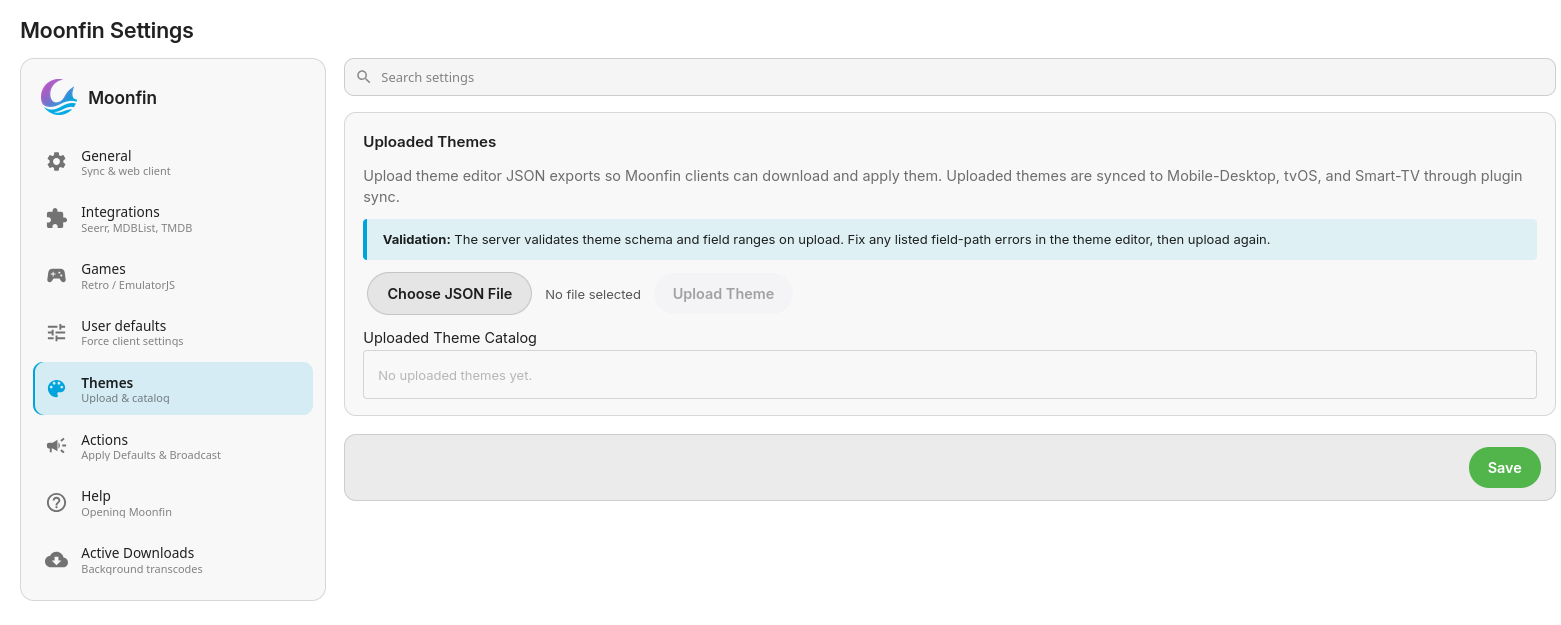
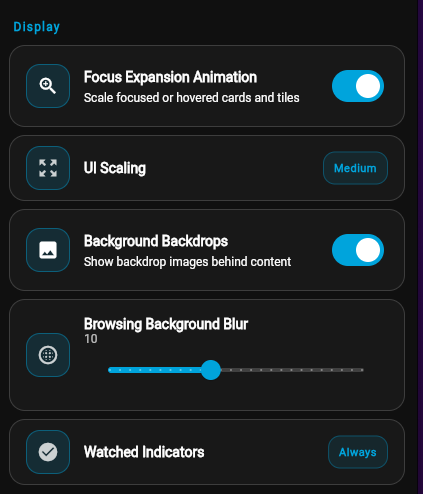
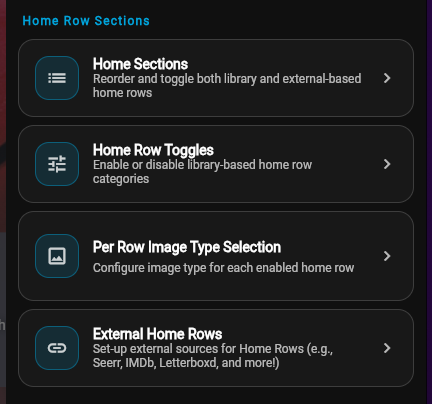
Hi @arrbee99! Please check take a look at the Settings > Personalization > General Style > UI Scaling option If it doesnt appear on first run then take a look at the Settings > Personalization > Home Screen > Home Sections for your home rows as well as more options You can use the ones already included or create your own! Once the server plugin is installed you can access the Theme Editor by: going to http://<server IP>/Moonfin/Web/theme/index.html if using the web version of the client Settings > Theme Editor or online here then upload the theme.json file into the server plugin under Themes There are 2 different media details screens you can choose from: Classic or Modern. I think Classic might be more your style, go to Settings > Personalization > Details Screen Settings > Personalization > Local Previews
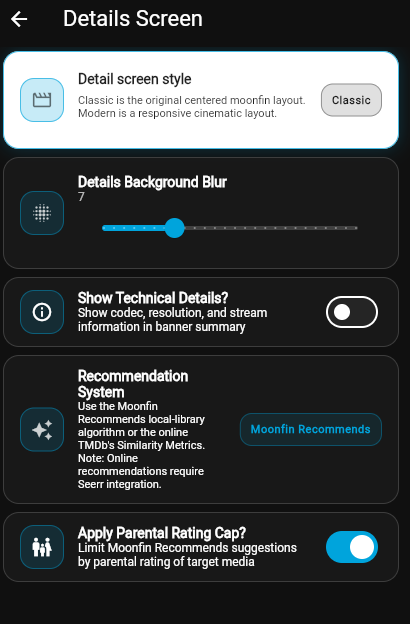
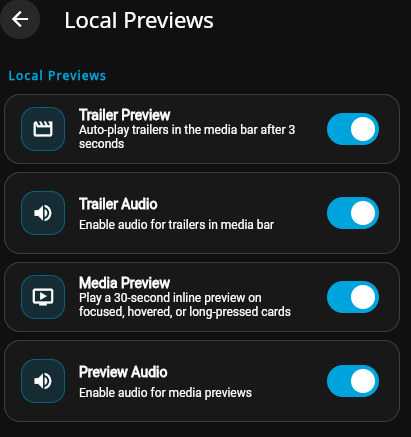
-
My bad. Its fixed. Thank you. To be honest I didnt do the "season" because its just a 10 part series and I didn't realize that was causing the issue since the files seemed to be scraping art etc. As always thank you for your help and crazy fast response.
-
No it doesn't. I would first start by comparing your reverse proxy settings to this: If that doesn't help, then I would read this topic because your issue is the same: And your solution can be found by reading my two posts starting here:
-
Hi there, have you taken a look at our TV naming guide? TV Naming
-
Yes I am, forgot to mention that. Does Roku have a problem with reverse proxies?







.jpg.af5f74c93b92c7bff980e5ae8f7cde39.jpg)
.jpg.6e7d6020102ed413ecbff4761ac1451d.jpg)
.jpg.01cc8f0df3d735e418b8822f1b56d9da.jpg)