All Activity
- Past hour
-
 Vipin kk joined the community
 -
 Jefferson Alvarado joined the community
 -
 Handshake87 joined the community
 -
 Issa Najib joined the community
 -
 Prlrkk joined the community
 -
 Reema_se joined the community
 -
 dafafadfa758838 joined the community
 -
 liudeshipinhao1 joined the community
 -
 Hely1988 joined the community
 -
-
 Emmy26 joined the community
 -
Yeah, Dev opted for longer way around: click three-dots>select Go to Item in the dropdown.
-
Sorry to bump an old request, but how and why something so useful still has not made its way to the UI for playlist?
- Today
-

Skip Intro markers not being generated despite scheduled task completing
atcronin replied to UsamaWaheed's topic in Linux
3 logs attached. A. 2 New Episodes - No Webhook - Working Fine.txt Working as I would expect with the new episodes intro timestamps added successfully. B. 1 New Episode - No Webhook - Not Working.txt Not working as expected, fingerprint created but intro timestamps not added. C. 1 New Episode - With Webhook - Worked Around.txt Using webhook to fire "Detect Episode Intros" task after media added, scan behaves same as B, but task adds timestamps successfully. These lines seem to tell the story of what's going on: 2026-06-14 01:01:43.868 Info App: \\NAS.MyLAN\Videos\TV\From\Season 4 has 2 episodes with audio fingerprints available 2026-06-14 01:01:43.910 Info App: Best title sequence for \\NAS.MyLAN\Videos\TV\From\Season 4\From S04E08.mkv is 00:04:23.1840796 - 00:06:22.5870646. Confidence: 0.9 2026-06-14 01:01:43.949 Info App: Best title sequence for \\NAS.MyLAN\Videos\TV\From\Season 4\From S04E09.mkv is 00:08:00.0995024 - 00:09:59.5024874. Confidence: 0.9 2026-06-14 01:01:43.957 Info App: \\NAS.MyLAN\Videos\TV\Criminal Record\Season 1 has 0 episodes with audio fingerprints available vs 2026-06-14 01:10:58.373 Info App: \\NAS.MyLAN\Videos\TV\From\Season 4 has 1 episodes with audio fingerprints available 2026-06-14 01:10:58.389 Info App: \\NAS.MyLAN\Videos\TV\Criminal Record\Season 1 has 0 episodes with audio fingerprints available 1 New Episode - No Webhook - Not Working.txt 1 New Episode - With Webhook - Worked Around.txt 2 New Episodes - No Webhook - Working Fine.txt -
Huh, it worked for me too. Thank you!
-

Windows app not recognising Emby Premiere
ProjectBlue replied to ProjectBlue's topic in Windows & Xbox
There's no way to know for sure I guess... but the fact that a second person had this issue (wookie_jmc above) and as previously noted; there was nothing being blocked, no changes to the machines or network before this issue started and the only change was that the Emby app updated to the latest version on both machines... Seems like pretty sound logic to me, VM's have nothing to do with this - I'm just lucky they were VM's so that I could quickly fix this. -
alle Android Apps ...Windows apps von emby zeigen es an.Einen neuen Test mache ich morgen früh da meine Familie gerade etwas schaut. Danke und Grüsse aus Germany
-
If one does that, sure. Like if one examines client logs. but as initially said the way this is handled now is too obvious.
-
Generate intro markers when media added is not working
atcronin replied to eastward7475's topic in Linux
I am having the same issue by the looks of it. my workaround is to setup a webhook to trigger the "Detect Episode Intros" task when new media is added to my TV libraries. Guide: 1. note down the "Detect Episode Intros" scheduled task id from the url of the page where you add triggers to the task 2. create an api key - call it something relevant like "detect intros webhook" 3. add a webhooks notification under "{USERNAME} Preferences > Notifications" - will need the webhooks plugin installed. 4. call it something relevant like "Fire Detect Intros Task after Media Added" 5. set the url to: https://{EMBY_URL}/emby/ScheduledTasks/Running/{TASK ID}?api_key={API_KEY} filling in the correct URL,TASK_ID and API_KEY looking something like this: http://locahost:8096/emby/ScheduledTasks/Running/41025d42ea034a89558382b16c965757?api_key=6fc562cf56074bb093ef814487c8039c 6. set request type to application/json 7. Select "New Media Added" under library 8. Optional, set "Limit library events to" to TV libraries with intro detection running during scan. 9. Save 10. Test it's working. -
I have been running the emby auto backup. It creates the following folder. emby server databases, emby server- backup-full, programdata I just reinstalled the emby server. How can I restore all my libraries etc ?
-

Playback issues with certain shows on Sony Bravia using Emby app
visproduction replied to Zaryt's topic in Android TV / Fire TV
Related? https://github.com/brave/brave-browser/issues/44301 https://www.reddit.com/r/brave_browser/comments/17sedjr/no_sound_on_any_website_using_brave_browser_solved/ From search: https://duckduckgo.com/?q=brave+browser+unable+to+play+surround+sound+center&ia=web -
Even though the plugin has that error I ended up trying: unchecked enable for scrobbling, then entered my password in place of the code showing already ... and rechecked enable for scrobbling, hit Save and it saved without error and is now working to scrobble music I play to my Last.fm profile.
-

EmbyPluginUiDemo in SDK shows an issue with back button with a tab controller
ginjaninja replied to ginjaninja's topic in Developer API
In case anyone stumbles on this and it helps Best work around i found was to set allowback=false on the page, but that only works if showback=true. public bool ShowSave { get; set; } = false; public bool ShowBack { get; set; } = true; public bool AllowSave { get; set; } = false; public bool AllowBack { get; set; } = false; -
This was very painless! I was dreading this update for so long. Thank you, Emby team for the write up! FYI in case anyone is upgrading from DSM 6.2, I followed the instructions EXACTLY (meaning updating to 7.0 first, running through the guide in it's entirety, THEN updating to 7.3), once you update to 7.3, you'll need to just grab the correct Emby file for the DSM 7.2+ and install it on top of what you have through Package Center manual install. No need to stop/uninstall/do anything else. Also another note because this got me googling for a bit, to ssh to your Syno nas, use command prompt/power shell/putty on Windows. Syntax is: ssh username@server_ip_address -pPORT_NUMBER (no space between -p and the port number)
-

Option to Hide Season 0 (Specials) When Using Airs Before/Airs After
andrew.smith posted a topic in Feature Requests
Currently Emby allows Specials (Season 0) episodes to be displayed within regular seasons using the Airs Before / Airs After metadata fields. This works very well for shows where specials need to be viewed in a specific order alongside normal episodes. However, even when all specials are successfully displayed within the appropriate seasons, the Season 0 (Specials) season card is still shown on the series page. This results in duplicate access to the same content and adds unnecessary clutter to the Seasons view. I would like to request an option such as: Hide Season 0 / Specials Hide Season 0 when all specials are displayed via Airs Before/Airs After Display specials in viewing order only This would be particularly useful for series with large numbers of specials, such as Doctor Who, Star Trek, anime series, and other franchises where viewing order is important. The requested feature would not change metadata or episode organisation. It would simply provide a display option for users who already use Airs Before/Airs After to integrate specials into the main viewing order. Example: Current behaviour: Specials (Season 0) Season 1 Season 2 Season 3 Desired optional behaviour: Season 1 (including relevant specials) Season 2 (including relevant specials) Season 3 (including relevant specials) Thank you for considering this request. -
Creating collections pulled from extarnal sources, such as tmdb, mdblists and trakt. I can create collections, name them, all the items added return Ids as does the collection. I understand the server would use .nfo and TMDB to pull info if it was a collection of all the same type, eg Avengers.. Searching the api docs I cannot find anything that would allow me to inject the description into the correct part of the nfo file, see the code below.. <?xml version="1.0" encoding="utf-8" standalone="yes"?> <collection> <plot />I would want the description added in here from an external source <outline /> <lockdata>false</lockdata> <dateadded>2026-06-13 14:05:02</dateadded> <title>MDBlists: Horror (3 items)</title> <sorttitle>MDBlists: Horror (3 items)</sorttitle> <mpaa>GB-15</mpaa> <genre>Horror</genre> <genre>Mystery</genre> <displayorder>PremiereDate</displayorder> </collection> That is the correct part of the nfo, yes? Any help would be good. thanks
-
Hi there, let's look at an example. Please attach the information requested in how to report a media playback issue. Thanks!
-
I really don't see any logic path to that being possible. When you reset the MAC, you basically completely reset the network. You also said this is a VM. All of those variables are much more likely at the root of why it is different now.
-
-
This already exists in the "My Plugins" tab They are already separated by category... We don't have this information for 3rd parties Otherwise, not bad suggestions but probably not worth the effort until it is saving you more than a minute or two given the number of plugins in the catalog at this point.
-
Thanx for sharing. Started tinkering with this, seems pretty nice so far
-
I'm having the same problem as well.
-
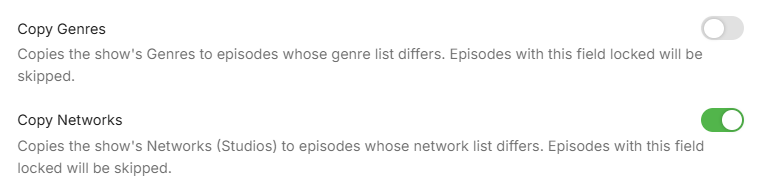
updated 1.0.0.2 in 1st post added Genres and Networks - vibe coded in 1 prompt (tread carefully)
-
Hola, alguna novedad? Algo que pueda hacer para identificar el problema? Saludos
-

El icono de Emby de la barra para pc no sale en español
MediaEmby1968 replied to coyotecabreado's topic in Spanish
@softworkzthese chains appear to be blocked.