All Activity
- Past hour
-
 Barkworth joined the community
 -
Why? Is your server that underpowered to remux audio?
-
 TheDorKnight138 joined the community
 -
 Aseel_Adnan joined the community
 -
@ebrCould you comment here please.
-
 Zeyder joined the community
 -
 Peterteruel joined the community
 -
 ElenaRubin joined the community
 -
 piece joined the community
 -

What part of this name is causing it to be identified as part of "Season 29"?
podonnell replied to podonnell's topic in General/Windows
For this particular use-case, it's a collection of YouTube videos that are required to be downloaded by an internal identifier. This is basically any string of alphanumeric characters at the end, ie -- [KPY3L9Daxc4] I can tell the developer of the app what particular strings to avoid, is it strictly S followed by a number? That said, is simply having a title of "May 1st 2023" going to cause this issue? A lot of the videos need to maintain their date in the title, but they don't need the alphanumeric section. -
 deborasoav joined the community
 -
 Axnsleepy joined the community
 -

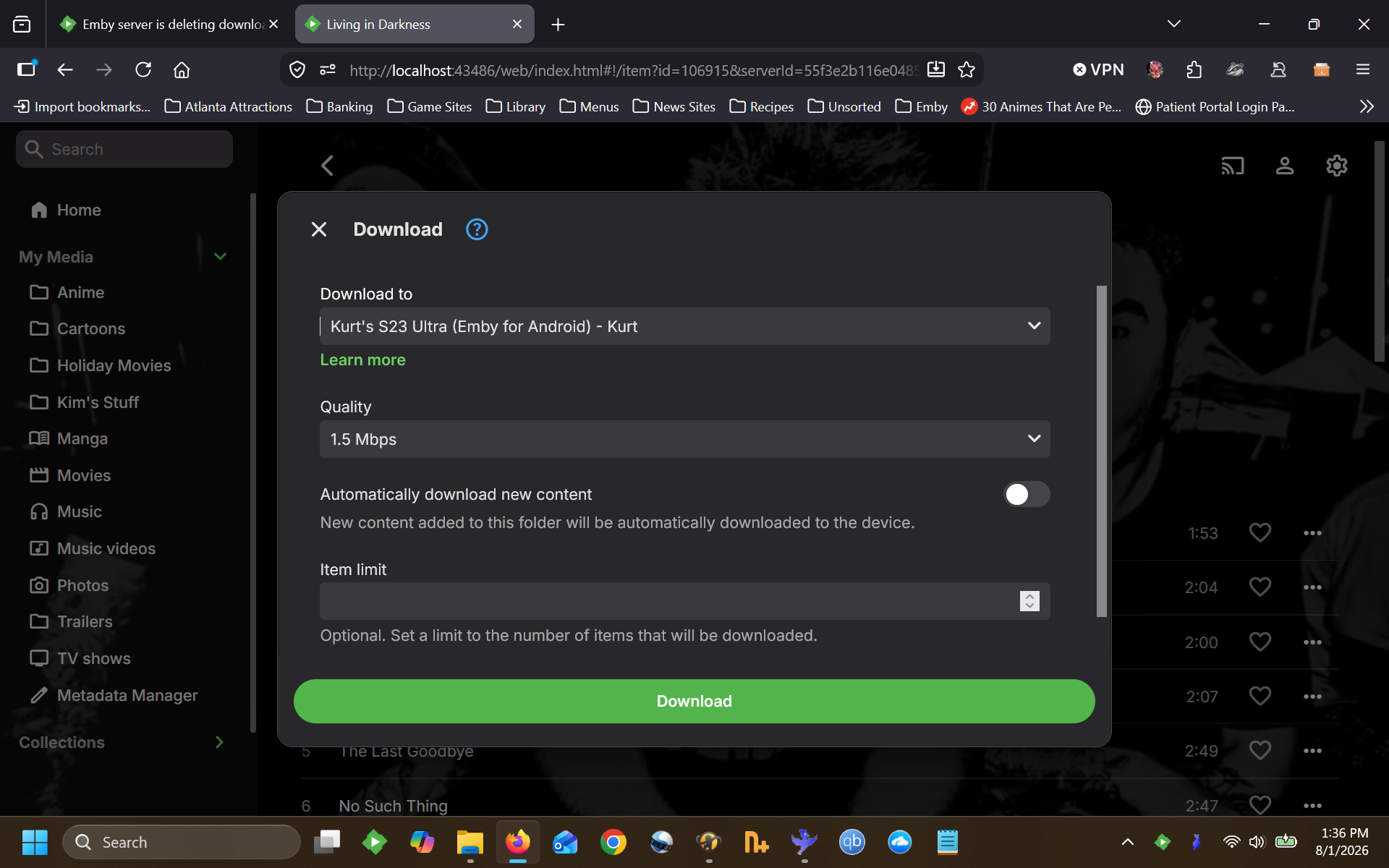
Emby server is deleting downloaded files immediately after transferring them.
mintman72 replied to mintman72's topic in General/Windows
The exact same thing that happens with every other option. The server would convert the media, then transfer it to the device, then after a few short seconds the file would disappear from the device. The emby for android log I provided earlier was from where I just used the download arrow option. -
 Mamemimomu joined the community
 -

Embeat — a native, music-only player for Emby (gapless, DLNA, offline)
vdatanet replied to vdatanet's topic in Third Party Apps
Update — version 1.1.0 is out: Embeat is now native on iPad Quick recap for anyone landing on this thread for the first time: Embeat is a native iOS music-only player for Emby — gapless FLAC/ALAC direct play, offline downloads, DLNA, playlist management. €9.99/year, one month free. It talks straight to your server, with nothing of mine in the middle. Apple approved 1.1.0 today and it's rolling out now. On iPad (the point of this release) - A sidebar instead of the tab bar: Home, Artists, Albums, Songs, Genres and Playlists, always in view. - Two panes when there's room — the list on the left, the detail on the right, without losing your place. - Two-column player, with the full editable queue beside it. - Search shows the results and the selected item at the same time. - Rotating the device keeps both your selection and your place in the list. And for everyone, iPhone included - Tapping a song in Songs, on Home or in search now plays it, with the queue taken from that same list. - Shuffle in the playlist detail and in Songs now runs across the whole library rather than just what's loaded. - New playlists appear under Playlists without pulling to refresh. - Gone: the double back arrow in Genres and Playlists. - Home sections no longer disappear after you reorder them. Requirements are unchanged: iPhone or iPad, iOS/iPadOS 18.4 or later. What's next I had the audio engine independently audited last week and it turned up a handful of genuine playback bugs: a brief dropout at the start of a track, failures on cellular data, opens that never completed, a pause that could get stuck on "loading", and FLAC seeking that made the progress bar lie. Those are fixed and going through TestFlight now, so the next update is mostly playback reliability. Also worth saying here, since it's the thing people have asked for most since launch: Apple has granted me the CarPlay entitlement, so it's no longer blocked on their side. Nothing is built yet and I'm not going to promise a date, but it's coming. Android is still in development and not out. App Store: https://apps.apple.com/app/embeat/id6788410988 Site: https://www.embeat.media Feedback and bug reports: here or joan@vdata.net — I read everything. Thanks again to everyone who tried it and wrote in; several of the iPhone fixes above came straight from this thread. -
I upgrade to the latest release and I see in the service startup: Aug 01 11:13:33 Emby sh[1632]: /bin/sh: /opt/emby-server/lib/libc.so.6: version `GLIBC_2.38' not found (required by /bin/sh) Aug 01 11:13:33 Emby sh[1632]: /bin/sh: /opt/emby-server/lib/libc.so.6: version `GLIBC_2.33' not found (required by /bin/sh) Aug 01 11:13:33 Emby sh[1632]: /bin/sh: /opt/emby-server/lib/libc.so.6: version `GLIBC_2.34' not found (required by /bin/sh) And of course the service fails to start. This is on Debian 6.12.94-1 (2026-06-20) x86_64 (not docker) I saw this trying to upgrade from 4.9.3.0 to 4.9.4.0 and to 4.9.5.0
-

What part of this name is causing it to be identified as part of "Season 29"?
Luke replied to podonnell's topic in General/Windows
How are your files named and organized? -
Emby 4.8 to 4.9 upgrade - needed to set "legacy" folder scanning mode
Luke replied to ganglepin's topic in General/Windows
Right now there are no plans to remove but the list of features that don’t work with it is likely to grow over time. -
Can’t see skip/back 10 sec. with carplay and on the start screen
Luke replied to Valako's topic in Apple iOS / macOS
Hi, we might be able to add this to CarPlay but the lock screen is an Apple UI that we can’t control. -
Android application cannot playback audiostream (DTS-HD MA Stereo in *.mkv)
Luke replied to voodoo5_6k's topic in Android
Hi there, let's look at an example. Please attach the information requested in how to report a media playback issue. Thanks! -

Why isn't the default audio track set by default as default?
justinrh replied to justinrh's topic in General/Windows
Something still isn't making sense. You imply if 'default' pref is off, then the device decides. But in my case the AC3 track is supported. Thanks for the info - I learned some things. I can't explain what happened and probably isn't worth chasing in this case. I'll have to monitor.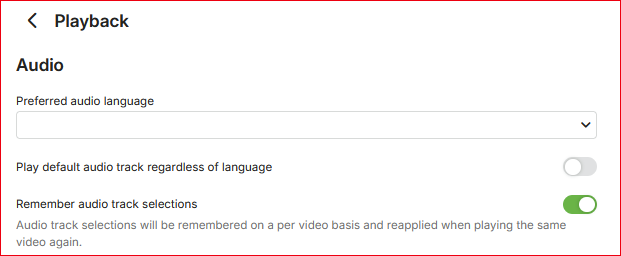
-

Why isn't the default audio track set by default as default?
ebr replied to justinrh's topic in General/Windows
This: If you always want the "default" to play you would select that option. However, that could cause remuxing/transcoding when it isn't strictly necessary. In the above screenshot, the device probably doesn't directly support the audio codec of the first track so it selected the second one to direct play.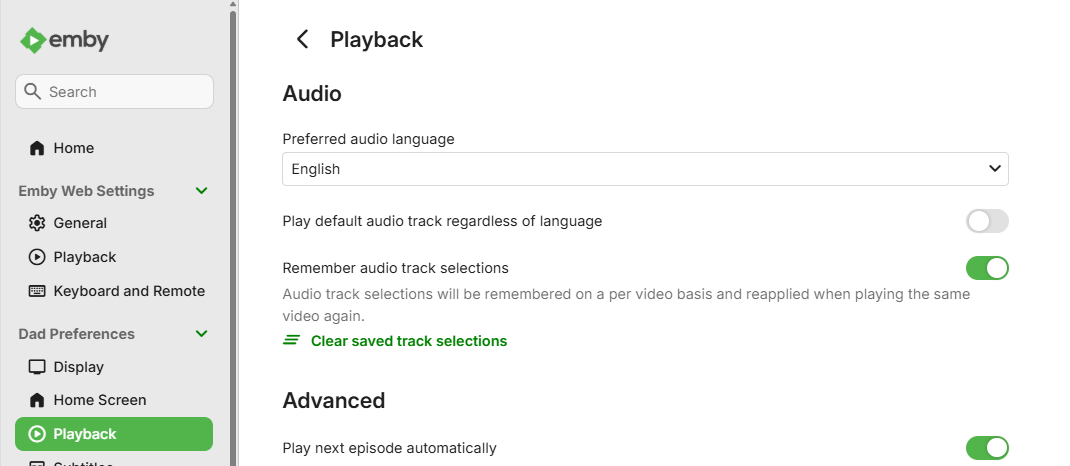
-
Emby server is deleting downloaded files immediately after transferring them.
ebr replied to mintman72's topic in General/Windows
Exactly what happened when you tried that? - Today
-

problem with transcoding or transmission
speechles replied to hearingaid1970's topic in General/Windows
The output steam 1:1 is the subtitles. 8.464MB buffer. There are 3 subtitles muxing into this space from your log. If each takes up the maximum it would equal 12 which exceeds the buffer. Not sure if that is what this means the buffer size is for all the subtitles combined or just the 1. But the issue comes down to the subtitles sidedata being too large. If you remove some of those subtitles that will never get used it might make it easier to play that item. ffmpeg allows the flag -max_muxing_queue_size to change the queue size larger. But that is at the cost of memory leaking. The main reason that error comes up is to prevent memory leaks so ffmpeg crashes rather than continue out of bounds. This is happening for a reason. Maybe @softworkzknows best? -
Why isn't the default audio track set by default as default?
justinrh replied to justinrh's topic in General/Windows
You mean this?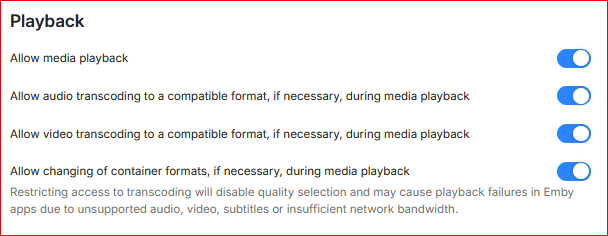
-
We already have the option to not record episodes that are already in the library.
-
Android TV doesn't like DVDSUB subtitles?
justinrh replied to justinrh's topic in Android TV / Fire TV
FFmpeg log says "TranscodeReasons=SubtitleCodecNotSupported". What about the issue? -
Hi, not yet sorry.
-
Hi, what is your question?
-
Playback failing on iPad without a transcode attempt
Luke replied to flashls82's topic in Apple iOS / macOS
Hi, please attach the complete Emby server log without cutting it from any specific moment. Thanks. -
Hi, what did the stats feature list as the transcoding reason?
-
Why isn't the default audio track set by default as default?
Luke replied to justinrh's topic in General/Windows
How have you configured your Emby user audio settings? -

Trying to set Caddy up as reverse proxy
slevin7 replied to RedNo7's topic in Non-Emby General Discussion
Your Caddyfile is fine — that two-liner is really all Emby needs, so the problem is almost certainly setup, not config. A few things to check, roughly in order of likelihood: 1. This line in your logs is the biggest clue: ▎ server is listening only on the HTTPS port but has no TLS connection policies With a plain yourdomain.tld { ... } site block you shouldn't see that warning at all — it means Caddy isn't actually serving TLS for your hostname. If you're using an env placeholder like {$DOMAIN} in your Caddyfile, check that it's actually set inside the container (docker exec caddy env), or just hardcode the domain and restart Caddy. Could also be a stray typo in the site address. Maybe post your Caddyfile with the real structure (redact the domain itself), that would help. 2. How are you testing? If you're opening the domain from inside your own LAN, many routers fail at this (no NAT loopback / hairpin NAT). Try from your phone on mobile data — if it works there, that's your answer. For local access you'd then add a DNS override on your router or Pi-hole pointing the domain at the Pi's LAN IP. 3. Is port 80 forwarded too? Cert issuance can succeed over 443 alone, but if you type the domain without https://, the browser hits port 80 first — no forward there means a timeout that looks like "nothing works". 4. Do you have a real public IP? Compare the WAN IP your router shows with what whatismyip tells you. If they differ you're behind CGNAT and no port forwarding will ever work — you'd need a tunnel (Cloudflare Tunnel, Tailscale etc.) or ask your ISP for a public IP. 5. Docker port mapping: make sure your compose publishes 80:80 and 443:443 (plus 443:443/udp if you want HTTP/3). If none of that helps: what exactly happens when you try — timeout, connection refused, a Caddy error page, or an Emby error? And what does curl -v https://yourdomain from outside show? That narrows it down quickly. -
Emby server is deleting downloaded files immediately after transferring them.
mintman72 replied to mintman72's topic in General/Windows
So, as we all know, there are multiple ways to initiate downloads. There's the "down arrow" download option that immediately initiates downloads. We've tried that one, to no success. There is also the option of "download to..." where you can decide what device you want to download to, what bitrate you want it to download as, if you want to automatically download new material that is added, and for videos you get the option to ignore episodes already watched. We've tried that way as well. I have initiated the download to my device, I have initiated the download to my daughter's device. I have adjusted the bitrate down and up, I have toggled the option to automatically download new content. No of these options has worked. The next way you can download is if you initiate it from the server itself onto the external device. We have tried that method as well, with no success. Attached is a screenshot from how we try to download from the server itself, using the "download to..." option.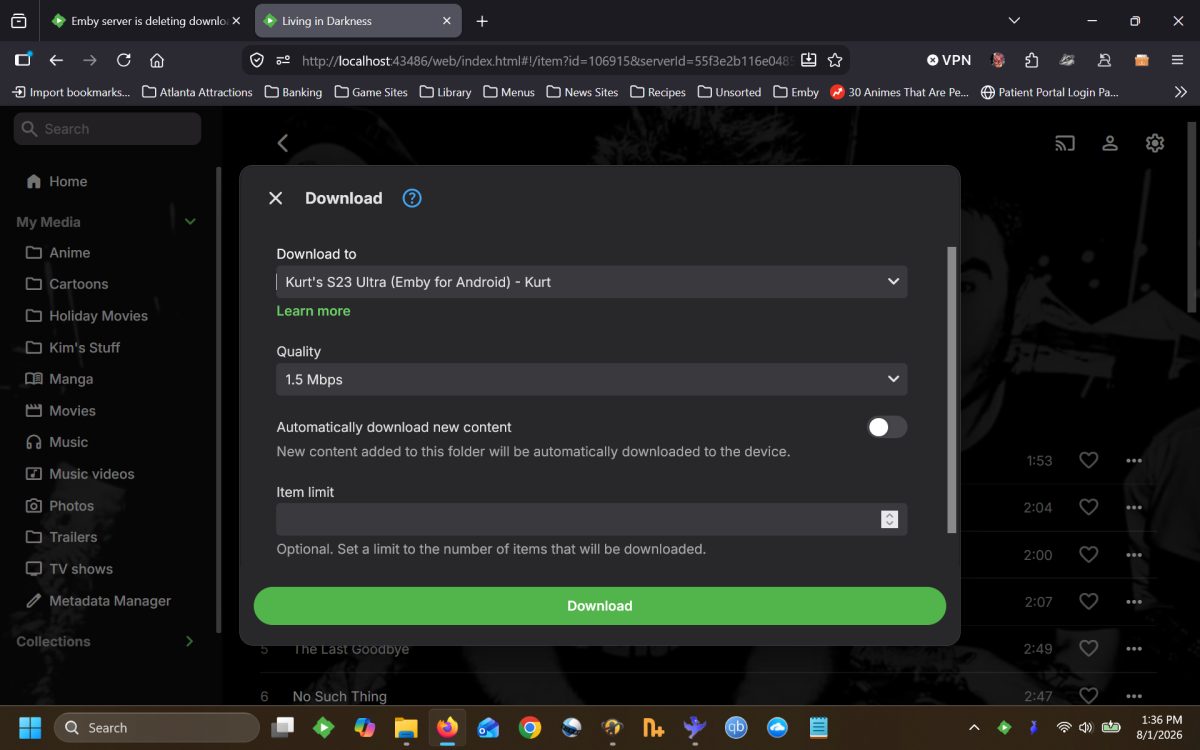
-
Hmm I found something peculiar in the Emby server log: /app/emby/bin/ffmpeg -loglevel +timing -y -print_graphs_file "/config/logs/ffmpeg-remux-06a47e9b-6f71-4de6-9ae5-e81904c920ab_1graph.txt" -copyts -start_at_zero -f matroska,webm -ss 01:13:00.000 -noaccurate_seek -c:v:0 h264 -noautorotate -i "/data/media/movies/X-Men Days of Future Past (2014)/X-Men Days of Future Past (2014) [imdb-tt1877832][Remux-1080p][DTS-HD MA 7.1].mkv" -map 0:0 -map 0:1 -sn -c:v:0 copy -bsf:v:0 h264_mp4toannexb -c:a:0 eac3 -ab:a:0 384000 -ac:a:0 6 -metadata:s:a:0 language=eng -disposition:a:0 default -max_delay 5000000 -avoid_negative_ts disabled -f segment -map_metadata -1 -map_chapters -1 -segment_format mpegts -segment_list "/transcode/transcoding-temp/61D6A6/61D6A6.m3u8" -segment_list_type m3u8 -segment_time 00:00:06.000 -segment_time_delta -01:13:00.000 -segment_start_number 730 -break_non_keyframes 1 -individual_header_trailer 0 -write_header_trailer 0 -segment_write_temp 1 "/transcode/transcoding-temp/61D6A6/61D6A6_%d.ts" This is the ATV app playing the movie. It seems that the Emby server is remuxing the audio, just like the universal android version. Could there be somehow a technical naming error in the UI in ATV? It shows direct-play for audio but in fact it is remuxing it. I am really confused now