All Activity
- Past hour
-
 Nemofel joined the community
 -
 hadeswithme99 joined the community
 -
 khalidth1992 joined the community
 -
 Aisu64 joined the community
 -
 BigBSpragg joined the community
 -
 452838 joined the community
 -
 cwemby joined the community
 -
 Xenzinia joined the community
 -

How to prevent apps from discovering/preferring "local"/LAN IP of server.
Clackdor replied to Napsterbater's topic in General/Windows
NAT hairpinning/reflection has it's own set of issues and may not be properly supported by some routers or work in certain situations. Local DNS is overall cleaner IMO if you're trying to connect to local services using a domain name in most situations. Plus there may be other services that you want to access internally via domain, but not expose publicly, so an internal DNS is far better there. Either option is valid depending on how you want to configure things and what you have to work with etc. Which one you choose doesn't necessarily matter in the context of the issue being discussed here though. Some Emby clients will just use the server's local IP and plaintext http port rather than the domain name over https if they are on the server's local network. -
Well.. When using the API swagger site with the following tv show parameters : Recursive : true Path : /media/tv/Magnum P.I/Season 1 I get the following response : { "Items": [ { "Name": "Season 1", "ServerId": "<redacted>", "Id": "14347", "IndexNumber": 1, "IsFolder": true, "Type": "Season", "ParentLogoItemId": "1762", "ParentBackdropItemId": "1762", "ParentBackdropImageTags": [ "bfea3603d15c7b22cec7b3169514a80d_638832047166162440", "ee666978cd2943638b0b34f318575c53_638881761922356646" ], "SeriesName": "Magnum P.I.", "SeriesId": "1762", "SeriesPrimaryImageTag": "ab120df05d5455567639a47a9482968c_638834038680845685", "ImageTags": { "Primary": "9157bbf92f067ac0e421d56c43292be5_638832047160334594" }, "BackdropImageTags": [], "ParentLogoImageTag": "6b4e5d2f1caedbb97cfdfbde43f28227_638832047166162409", "ParentThumbItemId": "1762", "ParentThumbImageTag": "7d2278ac1068555d02bb50ebe894f923_638832047166163687" } ], "TotalRecordCount": 1 } Which is correct and working. For movies this used to work with for example the following parameters : Recursive : true Path : /media/movies/Queen Rock Montreal & Live Aid (2007) But now I receive the following response : { "Items": [], "TotalRecordCount": 0 } Which is incorrect as the folder does exist and has files in it and matched in Emby Before it would return the movie(s) details mapped to this folder. This was working until some time ago. I'm using this in an automation script to refresh Emby based on the path and not on the full path+filename.) I could always do the mapping on tmdb or imdb identifier but this was an easier way to do this. Thanks
-

How to prevent apps from discovering/preferring "local"/LAN IP of server.
yocker replied to Napsterbater's topic in General/Windows
Isn't that precisely what NAT hairpinning is for? So you can do precisely that without the extra steps of having to run local DNS servers and such. I'm in no way a network expert or even close to it so if i'm wrong please correct me. -
Why hasn’t this been solved yet? Currently on holiday and watching something with this bug is just a no-go. It’s such a hassle to keep disabling and enabling subtitles.
- Today
-
First: The scann is now complet and I have many new sesaons with audio and scene intro! Works fine and now I understand the protocol better! With your help, I've been delving deeper into Emby again, actually learning something instead of just mindlessly pressing buttons. Thanks! Regarding the issue of deleting the theme because it was incorrect, I downloaded a dummy theme so the plugin simply skips it. Now I search and download with "Stacher7" ( best YT DL Toll for me) for additional missing files. I wish you many happy and thankfully user for your great tool, for me is this a favorit over the other tool.
-

Emby for Android on Shield TV no longer passing through dolby digital 5.1 or DTS
ChateauPlex replied to Kramerika's topic in Android TV / Fire TV
Server OS is Windows Server 2019 on Dell PowerEdge hardware. Dual Xeon ES-2623 processors and 128GB RAM My transcoding-temp folder has 30 empty folders dating back to 2022. Newest folder is 7/11/26. Current plugins: Addic7ed Auto Organize Backup & Restore Bluray Folder Support Bulky Cinema Intros DLNA Dvd Folder Support Emby Guide Data Fanart.tv M3U TV Tuner MusicBrainz Nfo Metadata OMDb Open Subtitles Port Mapper Studio Images TheAudioDb TheMovieDb TheTVDB Trakt Webhooks XmlTV -
How to prevent apps from discovering/preferring "local"/LAN IP of server.
Clackdor replied to Napsterbater's topic in General/Windows
With a LAN DNS server (or public dns records that point to internal IP's) there is no looping through the internet, nor is NAT reflection needed. The local DNS server will just resolve the domain name to an internal IP address (whether that's IPv4 or IPv6) I'm not the OP, so I can't speak for their particular setup. I can say with 100% certainty though that in my own setup that my domain name resolves to an internal ip address via local dns (my reverse proxy). Certain clients bypass that altogether and just communicate with the emby server on http port 8096 via it's advertised local IP rather than using https through the reverse proxy with the configured domain name. Having client apps always use a domain name or always using https connections even locally has been asked for a long time. The only current way to accomplish this is with firewall rules on the server that can break functionality or may not even be possible to configure in the first place depending on the environment. The emby server needs options to advertise a domain name internally via the server discovery service and advertise a domain name as the internal address to clients that use it in order to accomplish this. -

Emby for Android on Shield TV no longer passing through dolby digital 5.1 or DTS
ebr replied to Kramerika's topic in Android TV / Fire TV
What I'm trying to figure out is how on earth this is happening: 2026-07-18 10:12:40.198 Error DynamicHlsService-0HNN4O0646IO0:00000002: Error processing request *** Error Report *** Version: 4.9.5.0 Command line: C:\Users\graham\AppData\Roaming\Emby-Server\system\EmbyServer.dll -noautorunwebapp Operating system: Microsoft Windows 10.0.17763 OS/Process: x64/x64 Framework: .NET 8.0.27 Runtime: C:/Users/graham/AppData/Roaming/Emby-Server/system/System.Private.CoreLib.dll Processor count: 16 Data path: C:\Users\graham\AppData\Roaming\Emby-Server\programdata Application path: C:\Users\graham\AppData\Roaming\Emby-Server\system MediaBrowser.Common.Extensions.ResourceNotFoundException: MediaBrowser.Common.Extensions.ResourceNotFoundException: Exception of type 'MediaBrowser.Common.Extensions.ResourceNotFoundException' was thrown. at Emby.Server.MediaEncoding.Api.Hls.BaseHlsService.CreateRequestFromPlaySessionId(BaseSegmentRequest segmentRequest) at Emby.Server.MediaEncoding.Api.Hls.DynamicHlsService.Get(GetHlsSegment segmentRequest) at Emby.Server.Implementations.Services.ServiceController.Execute(HttpListenerHost appHost, Object requestDto, IRequest req, Type serviceType) at Emby.Server.Implementations.Services.ServiceHandler.ProcessRequestAsync(HttpListenerHost httpHost, IServerApplicationHost appHost, IRequest httpReq, IResponse httpRes, IStreamHelper streamHelper, RestPath restPath, String responseContentType, CancellationToken cancellationToken) at Emby.Server.Implementations.HttpServer.HttpListenerHost.RequestHandler(IRequest httpReq, RestPath restPath, String urlString, String localPath, String contentTypeInPath, CancellationToken cancellationToken) Source: Emby.Server.MediaEncoding TargetSite: System.Tuple`3[Emby.Server.MediaEncoding.Api.StreamRequest,System.String,MediaBrowser.Controller.Net.AuthorizationInfo] CreateRequestFromPlaySessionId(Emby.Server.MediaEncoding.Api.Hls.BaseSegmentRequest) 2026-07-18 10:12:40.198 Info DynamicHlsService-0HNN4O0646IO0:00000002: http/1.1 Response 404 to host3. Time: 1ms. GET http://172.17.172.2:8096/emby/videos/1827772/hls1/main/2.ts? How is the server unable to find a segment it has just produced? Do you have any sort of plugin or system that is doing something in the transcoding-temp folder? That isn't the whole problem but it is a contributing factor to why you have to use playback correction. -

Samsung Tizen app unable to play FLAC – infinite loading, no playback, forces AAC transcoding
FrostByte replied to Liskanet99's topic in Samsung Smart TV
That chart is actually for my 2018 TV. Samsung has dropped WMA playback for newer TVs now. -
Hi. You are using the banner text feature of the server and that particular app lets you dismiss it with that button. If you press it, the text above disappears too.
-
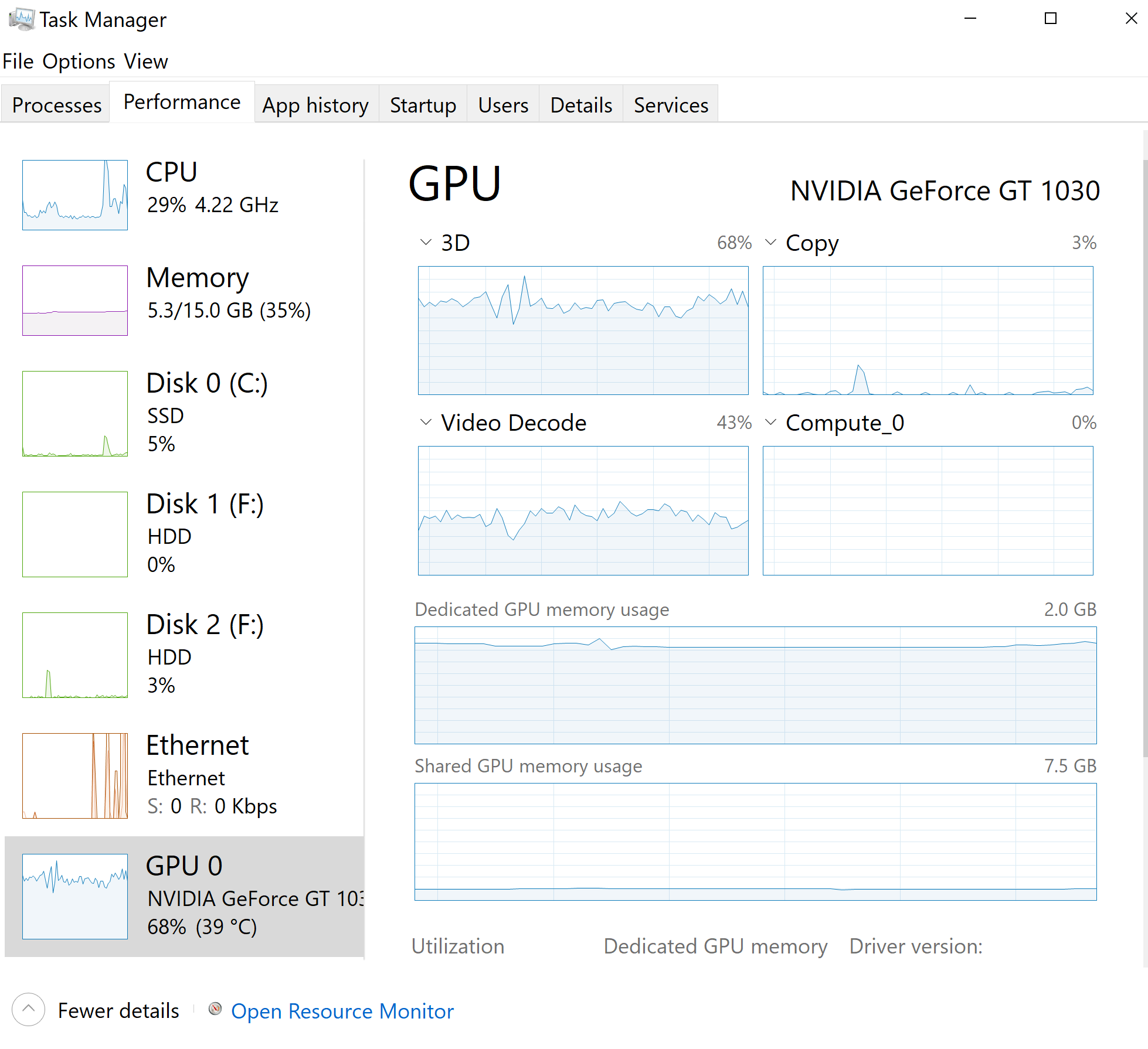
v4.9.5.0 My setup: Computer №1 with Emby Server (Premiere version) + Windows 10 + NVidia GeForce 1030 + TV + Brave browser + Emby Windows App. Computer №2 Windows 11 + NVidia GeForce 3080 + Brave browser. Mobile phone Android + Emby App. My computer №1 had no videocard, decoding videos on CPU. That made not possible to play 4k videos - very slow. I bought Premiere version of Emby and installed NVidia GeForce 1030. I configured Emby Server to use new videocard. So after that i tried to play 4k HDR10 video on computer №2 via browser and on mobile phone via app - no problem even on 4k 200MBs mode. But on computer №1 i cannot play this video in browser - i get an error "No compatible streams are currently available" on start (see attached logs). Its also problematic to play video in Emby Windows App on computer №1 - very slow, but videocard is about 70% loaded (see screenshot attached). So i want to understand, what is going on computer №1 and how to fix. I think 4k video should work on GeForce 1030 even with HDR. embyserver.txt ffmpeg-transcode-024aa517-0752-40a2-a182-fce6838cb881_1.txt
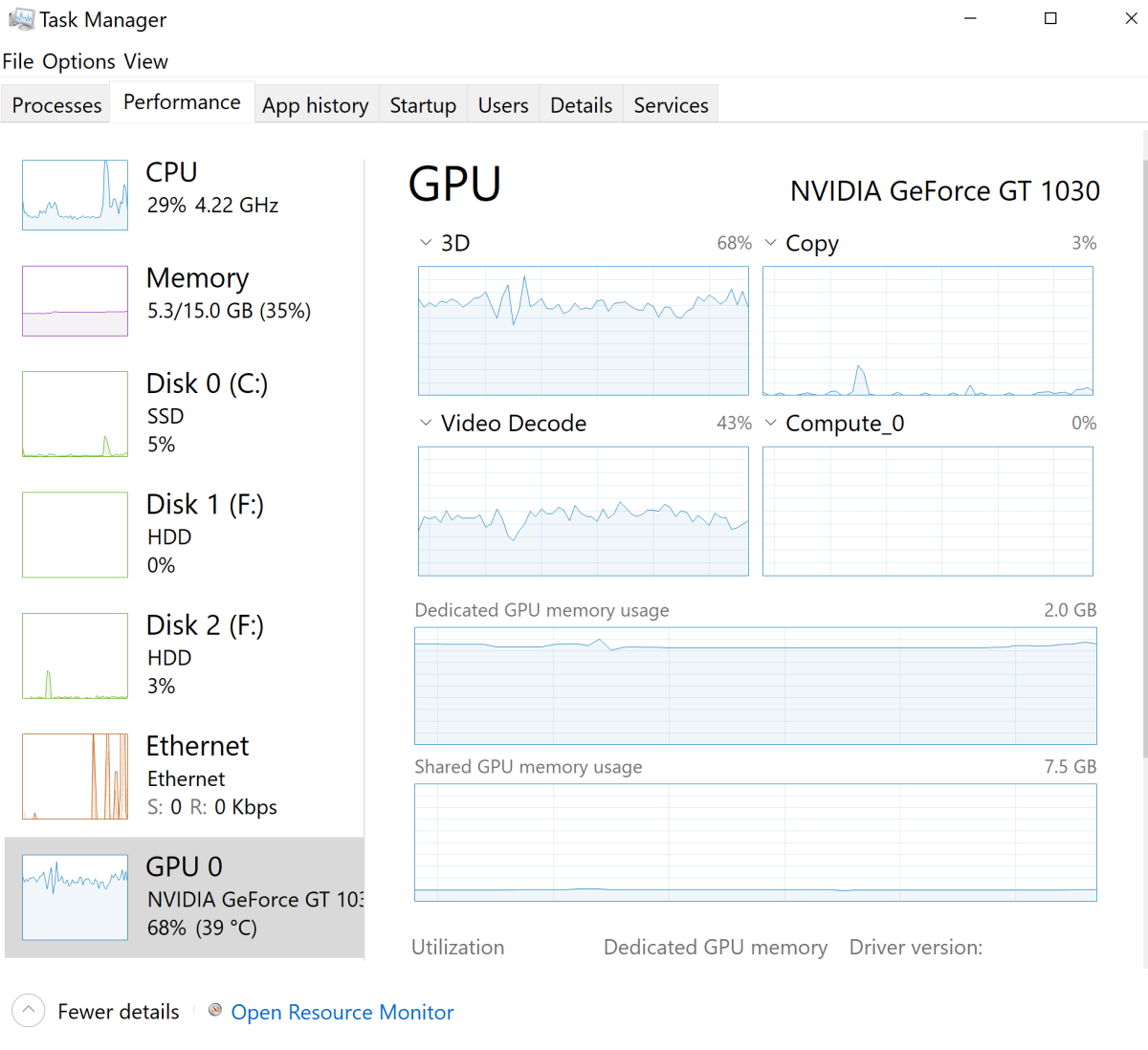
-
Samsung Tizen app unable to play FLAC – infinite loading, no playback, forces AAC transcoding
FrostByte replied to Liskanet99's topic in Samsung Smart TV
The only other lossless audio format you can convert it to, and Samsung supports, is wav and that would double or triple the size of the file. My suggestion (if the devs agree) would be for Emby to temporarily transcode FLAC to mp3 for users on Tizen 9. There would be some loss in quality, but you wouldn't have to change anything and the devs could put things right after Samsung fixes it. This way you can at least play your music which is better than nothing.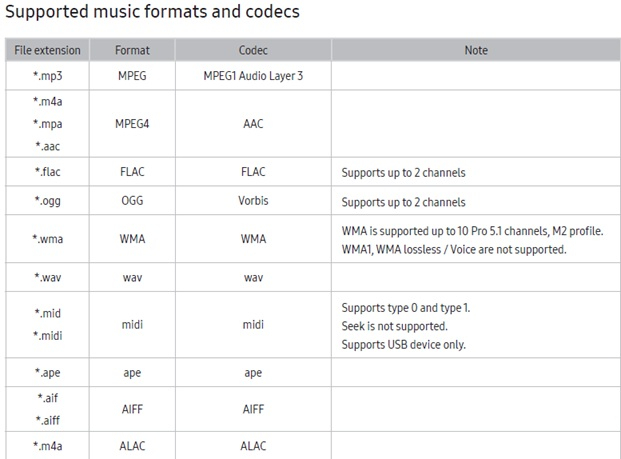
-
Android TV clients cannot authenticate through reverse proxy (browser and Android phone work)
ebr replied to Breezey's topic in QNAP
It won't - at least not in the TV app because the Volley system doesn't follow the 308. We recently had someone run into that. Make sure you've set the server to require it and, if entering the address manually in the app there is now a simple check box to click to use SSL. -
Samsung Tizen app unable to play FLAC – infinite loading, no playback, forces AAC transcoding
yocker replied to Liskanet99's topic in Samsung Smart TV
There will always be a loss of quality when transcoding, Flac is a lossless format and transcoding it will make it lossy so there will always be something missing in the conversion. It's not always noticeable, specially not when not using some VERY high end headphones. For example, MP3 is a lossy format but most people don't complain about hearing any degradation in quality. -
How to prevent apps from discovering/preferring "local"/LAN IP of server.
yocker replied to Napsterbater's topic in General/Windows
Out of curiosity may i ask why you want it to loop through the internet instead of just using local address? -
The new version fixed my problem. Thanks!
-
You have every individual movie folder defined in your library? If so, you don't want to do that. Just designate the parent folder of all of those folders in the library and the system will find them.
-

Samsung Tizen app unable to play FLAC – infinite loading, no playback, forces AAC transcoding
Redji59 replied to Liskanet99's topic in Samsung Smart TV
How do you do it, and is there any loss of quality? comment faire et perd t'on de la qualité ? -
It's okay. I understand BTW, has there been any progress on separating Cast & Crew in the Emby universal App and Emby Web?
-
@chuwzwe cannot verify what that APK does so cannot allow its distribution here. Thanks.
-
Allow plugin containers to return references to existing native items
ebr replied to pfunk1978's topic in Developer API
Moving to Developer API section as this is not a user-facing feature. -
That's simply what capitalism is, which is why not everyone is in love with it. Paul
-
if you delete theme.mp3 or theme.mp4 they will be regenerated, as long as you ran a libary scan beforehand. If you decide to manually upload one from youtube or any other source my plugin skips it, since it already exist. My Plugin only uses what is already present on the server. No external calls, so if emby has at least one intro-marker set for a show this will be used to cut the themes. PS: Plugin arrived in the Emby Plugin Cataloge
- 33 replies
-
- 1
-

-
- plugin
- theme song
- (and 6 more)
-

Samsung TV Emby app: 'Date Added' sort showing release date instead - works fine on web/Edge
rcsnoopdog replied to rcsnoopdog's topic in Samsung Smart TV
Thank you - you were right, I had someone staying with me last month & they speak Ukrainian & must have added that filter, so I have been missing a pile of movies this past month & never noticed -

Pausing/stopping movie using android media control not working
tuckjordan20 replied to DrNoD's topic in Android
Amazing, this has worked! Thank you for persisting with this!