All Activity
- Past hour
-
 Bert1982 joined the community
 -
 jizeiry joined the community
 -
 ualda8599367 joined the community
 -

Status of Dolby Vision Profile 5.0 transcoding?
RanmaCanada replied to HawkXP71's topic in General/Windows
The best way is to ask your family and friends what their hardware is, especially their TV. AFAIK Emby just asks the player if it itself can stream the content and is unable to poll what TV or other hardware the device is plugged into (not all home theatre receivers or sound bars can pass through DV). If you can't do that, make a test library, and have them go through that and check to see if the files direct play or not. There are plenty of Creative Commons DV test files on the internet for you to use. Here is a link to the official Dolby MP4 files And of course there are a large selection of samples on the Kodi page as well. Profile 5 is pretty much strictly for streaming (and is single layer with zero fallback), and more than likely if their TV supports DV and has the logo on the box, it will support profile 5. So if they have a Samsung TV (the creator of HDR10+), they absolutely can not play DV. Yes this is a PITA, but you must do your due diligence when it comes to proprietary codecs and users who are dumber than stumps and say "IT SHOULD JUST WORK!". It's for this very reason any family member who had an Apple TV was removed from my server until they got an Android device, because of how horrible the experience is with crApple. In the end, the work will pay off, and you as a server admin will be far happier, and your users, they will either understand, or they won't be on your server anymore. -
 Brantlapp joined the community
 -
 diegovalencia joined the community
 -
 aitorrgarrido joined the community
 -
 garridoooo joined the community
 -
 Jerryvaz joined the community
 -
 boyhero joined the community
 -
 hamzafarooqarif joined the community
 -

Plugin: Ginjaninja Tools - Consistent Season Images - Help to ensure all images are part of the same set
GrimReaper replied to ginjaninja's topic in Plugins
Glad you got the chance to visit those places, hope you survived the heat wave we've been having last few weeks. - Today
-
Mackie was in both movies Avengers and Avengers: AoU. I had to fix him twice. I added A:Aou after I fixed Avengers.
-
If you run the scan metadata folder scheduled task (which will take a long time), then that will help scrub the bad paths out of your database. That won't pull in new images but will remove one step from the process of cleaning them up.
-
Because you had a path saved in your database for that person already. The server isn't' going to go and check on every single library scan if those paths are still valid or not. Would you like your library scans to be slow or fast?
-
No I'm not. If you add a new movie and none of the people are already in your database, then they won't have paths pointing to your old windows install and there shouldn't be problem.
-
So you are saying I have to manually refresh the metadata for every movie I add and there is no permanent solution to fix that? I still don't understand why the person isn't fixed once I scan it once.
-
It will work but it has to be after you've already seen the broken image. Additionally it does some existing lookups that we can't do as part of the library scan because there's too many. It has to be one at a time, so it's not until clicking on the person. But in most cases the refresh metadata of the movie or show will do it.
-
After further investigation refreshing metadata does not always work. What does work 100% is to click on each person with missing photo and then press F5 on the movie screen.
-
Are you sure those subtitles have any data?
-
-
Yes.
-
So what should I do to fix it permanently?
-
Are you sure this is not some race condition between threads?
-
You added new movies, but the people are common across movies, and you already had those people in your database. Your server had images for them, but they were pointing to invalid locations.
-
I added Avengers with Anthony Mackie in it yesterday, then scanned for missing metadata. Today I added Avengers: Age of Ultron and I'm having the same issue. So I'm not really understanding what manual fixup you have in mind.
-
HI there, can you please provide a specific example? How to Report a Problem Thanks !
-
It's probably a good idea. If you're deleting a huge amount of content, then it would be more efficient to shutdown the server, do the deletes, then startup and run a library scan. The scan will handle them all at once rather than thousands of realtime monitor events.
-

Plugin Extensibility for Live TV "On Now" Recommendations (general Home Screen Section API)
ebr replied to FlameRed's topic in Feature Requests
Hi. Have you tried the beta? This should be possible with 4.10.x. -

[BUG] Fast-Forward Live TV Allowed Into the Future, Then Appears Stuck
JayG7800 replied to Tigga5's topic in Android
I have the same exact issue. -
But the person was already in your database. Moving an installation between windows and linux is not fully supported yet. Existing impacted people are going to require manual fixup as I've outlined in this topic. New people that are not in your database shouldn't have any problem as you continue to add new movies and shows.
-
Oh, the second one is actually from the movie I just added, so what I should do then?
-
So regarding Anthony Mackie, the server thinks you already have an image, but the path is invalid: System.IO.FileNotFoundException: System.IO.FileNotFoundException: Could not find file '/var/lib/emby/metadata\people\a\Anthony Mackie-tmdb-53650\folder.jpg'. File name: '/var/lib/emby/metadata\people\a\Anthony Mackie-tmdb-53650\folder.jpg' So it errors when trying to access that image. That's why you see the broken placeholder in your screenshot. After the first failed attempt, the server removes the invalid path from the database so that it doesn't keep erroring over and over. So then at that point you have no image for that person, and that brings us to where you are today.
-
I moved some time ago my Emby server from Windows to Ubuntu, but I was having the issue with photos long before that. But these errors are from mp3 library. What do you suggest I should try?
-

Plugin Extensibility for Live TV "On Now" Recommendations (general Home Screen Section API)
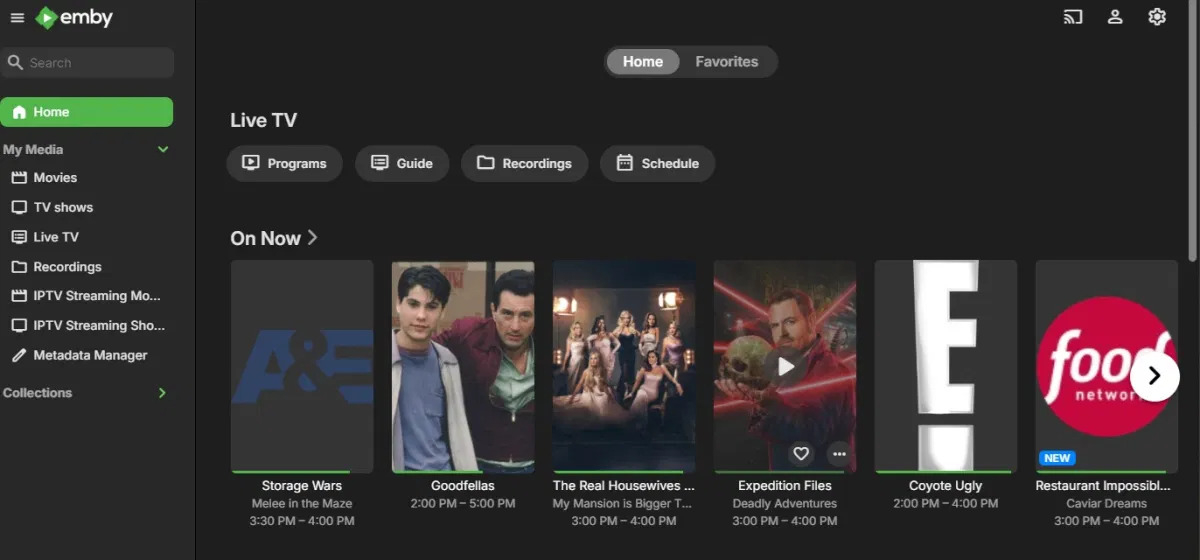
FlameRed posted a topic in Feature Requests
Feature Request: Plugin Extensibility for Live TV "On Now" Recommendations (or a general Home Screen Section API) Summary There's currently no supported way for a plugin to influence what appears in the "On Now" Live TV row on the home screen, or to add a custom row/section to the home screen at all, in a way that renders across all official clients (web, Roku, Android TV, Fire TV, iOS, Android). I'd like to request either of the two extensibility points described below. Motivation / use case I built a working plugin that pulls all currently-airing Live TV programs and ranks them by TMDB popularity (as a more useful alternative to the semi-random subset "On Now" currently shows). The ranking logic itself works well as a standalone JSON API endpoint. The problem is surfacing it: There's no hook into the logic behind the native "On Now" row, so a plugin can't re-order or replace what it shows. There's no documented Home Screen Section API a plugin can register a custom row against. The only "native, renders-everywhere" content types a plugin can populate (via ICollectionManager) are Collections and Playlists — which work great for persistent library items, but don't fit Live TV programs well, since EPG program entries are ephemeral and get purged/replaced as the guide data refreshes. Adding a currently-airing program's item ID to a Collection today risks that reference becoming stale within the hour. As a result, the only way I found to actually display this data is a browser-side script injected via a userscript manager or reverse proxy — which only reaches desktop/laptop browsers and never reaches Roku, Android TV, Fire TV, or the mobile apps. For a Live TV-focused feature, that's a significant gap. What I'm requesting (either would solve this) Option A — A pluggable recommendation source for Live TV. Something analogous to how metadata providers or channel providers are registered today: an interface such as ILiveTvRecommendationProvider that a plugin can implement to supply (or re-order) the list of programs shown in the "On Now"/recommended row, with the core server falling back to its existing default logic when no plugin provides one. Option B — A documented Home Screen Section API. A general extension point (e.g. IHomeScreenSectionProvider or similar) allowing a plugin to register a named section with a data source, which official clients would then render as a normal home screen row — the same way built-in rows like "Continue Watching" or "Latest" work. This would be more broadly useful than Option A alone, since it would also unblock other kinds of custom home screen content beyond Live TV. Why this matters A few actively-maintained community plugins (e.g. Aperture, Home Screen Companion) already work around this today by generating symlinked library folders or managing Collections/Playlists behind the scenes, specifically because there's no cleaner way to get custom content to render on every client. That workaround is solid for persistent library content, but it structurally can't extend to real-time/ephemeral data like Live TV EPG programs. A documented extension point would remove the need for these workarounds and make plugin-driven home screen customization officially supported rather than reverse-engineered. Happy to help test I'm an Emby beta tester and already have a working plugin (ranking logic, TMDB matching, caching) ready to plug into whatever interface gets added — happy to test any preview build of this against it. Thanks for considering this.