All Activity
- Past hour
-
 Dbl_Wide joined the community
 -

Anroid app Transcoding vs. AndroidTV app DirectPlay
ebr replied to NeverReadyEddie's topic in Android TV / Fire TV
Its not supposed to and I don't see why it would "kill" any other app on the device either. Double-click the home button and you'll probably see them all still running. -
 bajiuay joined the community
 -
 Noam Stuffelman joined the community
 -
 lauriers joined the community
 -
-
 DAKN joined the community
 -

Plugin: EmbyCredits, detect end credits and add auto skip.
yocker replied to yocker's topic in Plugins
@Ferwin29New 2.9.0.3 beta in the catalog. Should fix the problem. -
Live TV channels not showing up in Global results on Emby clients
ebr replied to Killahcriss's topic in Android
You are positive it is also a problem on the phone? Do you have a proxy for remote connections? -
 Elvis98 joined the community
 -
 Peterortiz84 joined the community
 -
 Noura.566 joined the community
 -
Unable to delete a user – RemoteServiceUnavailableException
ebr replied to Juanrendon's topic in General/Windows
Hi. Did you clone or restore this server from another one? -
 Vladislav_09_123 joined the community
 -
If you removed them while looking at them that is the same. Where the edit or change originated probably wouldn't matter because the apps receive notifications of a library change no matter where that may occur.
-
See. You guys KNOW this has been a problem for YEARS and bupkiss Same function takes seconds in Plex. I moved to emby from plex for two reasons, live tv support, and offline functionality. But what I’ve learned is that menus basic features are oftentimes shotty, you guys have been basically ignoring live tv for years, and known broken features get ignored for years. Now that I’m doing live tv in apps like tivimate and with the ability to hide everything but my content in Plex, what does emby offer?
-
Hi all, I’ve been building Okuzukey, a metadata plugin for Emby designed for books, comics, manga, and light novels. What it does: - Local metadata grabber: Supports NFO, Calibre metadata.opf (or an EPUB’s internal OPF if no sidecar exists), and ComicInfo.xml inside .cbz/.cbr. - Covers: Uses local sidecar images if present; otherwise, it extracts them directly from inside .cbz/.cbr/.epub. - Optional Komga integration: Connect to your own Komga server (opt-in, off by default) to fetch metadata and covers. - Performance tweaks: Configurable logging levels and Komga request concurrency. What it doesn’t do: - No embedded metadata/covers for formats like PDF, MOBI, or AZW3 (though sidecar NFO/OPF/covers still work perfectly for them). - No public online sources (Google Books, ComicVine, AniList, etc.) - dealing with rate limits and weak free-text matching wasn’t worth it for now. Emby limitations (not by the plugin): The Book item type in Emby currently has a limited field set. For example, it lacks a proper series name field or People/Authors display in the UI. While the plugin successfully parses writers and artists from your files, Emby simply doesn’t display them for books yet. Here's a video of a metadata refresh with a bit over 2500 random books (epub, cbr, cbz) - everything local on Windows (both the server and the files), which is why the refresh took less than 25 seconds to read it all, including covers. okuzukey.mp4 Tested on: Windows Emby Server 4.10.x Installation: 1. Download the .dll 2. Copy it into your Emby Server's plugin folder 3. Restart your Emby Server Emby.Okuzukey.dll If you give it a try and see anything missing or wrong - a short feedback would be nice. Thanks!
-
- 1
-

-
 ericvanzandt joined the community
 -
See. You guys KNOW this has been a problem for YEARS and bupkiss
-
Specifically it almost never works. Ever. But you guys know this. Transfer fails. Says ready to transfer and never does. Says it’s transferred but empty container when trying to play. It’s almost like you guys just out the onus on paying users to debug basic functionality.
-

Live TV channels not showing up in Global results on Emby clients
Killahcriss replied to Killahcriss's topic in Android
In the native/remote client path for Emby for Android it looks like emby uses a different global search than it does when your connected locally. When I'm at home and search for a live tv channel on my computer it comes up fine. But when I'm away and using the emby app on my phone or android tv, no results pull up for that same channel. I'm on the latest update for both android tv and my server is on 4.10.0.40 -

Live TV glitching/ghosting/rubber banding only on Apple TV
Luke replied to mwongjay's topic in Apple TV
Hi, no I don’t think that’s the issue. -
Specifically it almost never works. Ever.
-
Hi, yes we are still looking at it. Thanks.
-
Hi, yes there is a topic in the server testing about this. Thanks.
-
@CharlesF HI there, can you please provide a specific example? How to Report a Problem Thanks !
-
Hi, I think if you uninstall and reinstall the app that should resolve it. We are working on chasing down the cause of this. Thanks.
-
Live TV channels not showing up in Global results on Emby clients
Luke replied to Killahcriss's topic in Android
Hi, what do you mean by search hints? - Today
-
Live TV channels not showing up in Global results on Emby clients
Killahcriss posted a topic in Android
Search/Hints returns empty array for all queries including admin on version 4.10.0.40 -
It’s pretty incredible how sh-tty the download feature works - or I should say doesn’t work. Maybe it works 10% of the time. Normally it fails. Or just does nothing. The UI sometimes shows a downloaded section at the top but mostly it doesn’t. It’s just an incredibly poorly designed feature that is never gotten to work regularly. Pretty remarkable.
-
Problem still persists in Android Version 3.5.55 with Server 4.10.0.40
-

[Beta] ROMote – play your retro game collection in the browser (NES → PlayStation)
GrimEvil replied to digitalirony's topic in Plugins
@digitalironyAny update on this getting in the store as we are getting close to those 30 days.... -

Issue with playing music with app when connected through Tailscale
MarkSM replied to Gjonesesq's topic in Apple iOS / macOS
Yes, with Emby as an audio player. BUT … On the iPhone 17 pro max using the Narjo app accessing my Emby database works fine for listening to music walking my dogs using Tailscale. Mark -
Plugin: EmbyCredits, detect end credits and add auto skip.
yocker replied to yocker's topic in Plugins
Will fix it soon. It's some left over code that doesn't get used any more any way so will be a quick fix. -
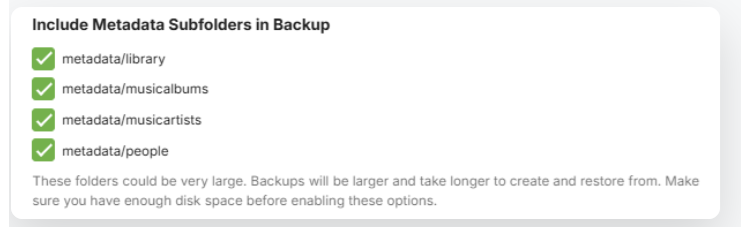
There are backup options to include all metadata But you are responsible to backup and restore the actual media folders and contents and any artwork within the media folders. These would need to be available and accessible on the new sytem and would not be backed up by the Backup and Restore Emby Server plugin. It should work - so long as both operating systems are linux. This article Using Restore to migrate to a New System covers this scenario - the example in the article is for windows but it would be similar for linux. The important elements being that the new system's Emby Server Backup and Restore is configured to point to the location of the backup path and that after the restore, the media folders are all accessible and you then adjust all the library paths to switch to the new paths You would need to adjust any folder level access settings that you had before - the article covers that as well It should be ok, so long as the folders for the media below the libraries root folders stay the same. Follow the same steps as being for a new system as outlined in the article So basically when editing the libraries folders paths, you should be able to replace these with the base top level folder /mnt/HD_500GB /mnt/HD_Seagate_8TB /mnt/HD_Seagate_16TB /mnt/TV_Serie I have not gone through a test of backup and restore for docker emby server but it ought to be similar