All Activity
- Past hour
-
 africauspapis joined the community
 -
 BSE200 joined the community
 -
 bernashi joined the community
 -
 wusiyuan123 joined the community
 -
So in overall you are saying that i need to deliver the keys of my pc to Microsoft and enable again 15 garbage services in order to keep up to date the EMBY app. In case of Store outage i will not be able to update or install the EMBY app. Hmmmm it make sense....
-
 Ksa11ruh joined the community
 -
 Khaled0707 joined the community
 -
 Akashdas0 joined the community
 -
 Nwujii joined the community
 -
Oh i missed which section this was in, i thought this was for the server.
-
 Mad speed joined the community
 -
 Parmeshwar joined the community
 -
Please don't suggest nonsense.
- Today
-
OP, you could use docker to install it without using the Microsoft store
-

Nvidia Shield not available for sale - alternatives?
yocker replied to Mister Steve's topic in Android TV / Fire TV
Passthrough of lossless formats and 7.1 is hard to find in streaming boxes. -

Emby for Android TV killed EAC3 and video freezes at 90%
jan_axhell replied to jan_axhell's topic in Android
What do you mean? That is the full message written by Claude Code after monitoring the event live. -
Summary When navigating from the Home screen to the Favorites screen and then returning to the Home screen using Home navigation, the Favorites tab remains selected. Steps to Reproduce 1. Start on the Home screen. 2. Navigate to the Favorites screen. 3. Return to the Home screen using one of the Home navigation methods, such as: Home icon Home key Remote Home button Actual Result The Home screen is displayed, but the Favorites tab remains selected. Expected Result Returning to the Home screen using Home navigation should restore the default Home tab selection rather than leaving the Favorites tab selected. Additional Information The issue appears to be related to the selected tab state not being reset when the Home screen is reopened through Home navigation. Web App version: 26.0.33 Server Version: 4.10.1.0 TV Display mode: both modes are affected
-

Home Sections with “Unplayed” Filter Do Not Refresh After Returning via Back Navigation
scottpro posted a topic in Web App
Summary Home screen sections configured with the Unplayed filter do not consistently refresh after an item is marked as played. When returning to the Home screen using Back navigation, the item remains visible in the section with a played indicator. When returning using Home navigation, the section refreshes correctly and the played item is removed. Affected Home Sections The issue occurs with the following Home sections when the Unplayed filter is enabled: Single Playlist Dynamic Media using video/movie media types Recently Released Movies Recently Released Episodes The issue does not occur with Latest Media. Steps to Reproduce 1. Configure one of the affected Home sections with the Unplayed filter enabled. 2. From the Home screen, select a movie or episode displayed in that section. 3. Either: Play the item until it is marked as played, or Manually set the item's played status. 4. Return to the Home screen using one of the following Back navigation methods: Back icon (<) Esc Alt+b Alt+left Remote Back button Actual Result The played item remains visible in the section and displays the played checkmark. Because the section is filtered to show only Unplayed items, the item should no longer be present. Expected Result The Home section should refresh when returning to the Home screen, and the newly played item should be removed from the section. Comparison If the same test is performed but the Home screen is accessed using one of the following Home navigation methods: Home icon Home key Remote Home button the section refreshes correctly and the played item is removed as expected. Additional Information The behavior appears to be specific to the navigation path used to return to the Home screen. Back navigation: section is not refreshed correctly. Home navigation: section refreshes correctly. The Latest Media section does not appear to exhibit this issue. Web App version: 26.0.33 Server Version: 4.10.1.0 TV Display mode: both modes are affected This issue occurs on multiple platforms, or at least the ones I've tested (PC, iOS) so it could be a server issue. -
New Emby server Beta release, v4.11.0.6.
-

Web Streams plugin and M3U file: Which path to store local meta files?
Achim71 replied to Achim71's topic in Synology
I just tried this one more time, but the problem remains. The error stays the same, the current log entry runs: System.IO.DirectoryNotFoundException: System.IO.DirectoryNotFoundException: Could not find a part of the path '/volume1/@appstore/EmbyServer/file:/volume1/music/M3U-TEST/D318_ANTENNE_600x600.png'. -

Keine Vorschaubilder beim manuellen identifizieren von Filmen!
joergurmel replied to joergurmel's topic in German
Sorry, konnte paar Tage nichts machen! debug Console.txt -

[Beta testers wanted] MediaCheck — read-only Windows media health and duplicate checker
guy_incognito19 posted a topic in Tools and Utilities
I am looking for a few Windows users to test MediaCheck 0.15 Beta. It checks the media files themselves rather than connecting to an Emby database, so it can be used with an existing Emby library without changing Emby or the media files. Current features include quick FFprobe checks, optional full video decoding, plain-language issue explanations, multiple library locations, cached refreshes, focused rechecks, scan history, and read-only duplicate comparison. It never renames, moves, repairs, or deletes media. The package contains the installer, a 25–40 minute testing checklist, feedback form, privacy/support explanation, SmartScreen instructions, and checksums. I am particularly looking for feedback from users with large collections, multiple drives, NAS folders, or known problem files. Download and details: https://github.com/stewlowe/MediaCheck/releases/tag/v0.15.0-beta Please reply in this thread with feedback. If a problem needs more detail, MediaCheck can export a privacy-conscious support bundle from its Diagnostics window. The beta is free. The installer is not yet code-signed, and the application may eventually have a paid edition; both points are disclosed before download. Development disclosure: the project was built with substantial AI coding assistance under my direction and has 73 automated tests plus hands-on Windows testing. -

Web Streams plugin and M3U file: Which path to store local meta files?
Luke replied to Achim71's topic in Synology
OK I would try a full path in the m3u, such as /volume1/music/121B_ROCK_ANT_600x600.png Relative will definitely not work. -
Emby for Android TV killed EAC3 and video freezes at 90%
Luke replied to jan_axhell's topic in Android
@jan_axhellcan you please provide the full message? Thanks. -
Web Streams plugin and M3U file: Which path to store local meta files?
Achim71 replied to Achim71's topic in Synology
This is exactly the problem: I do not know where the file: prefix comes from. It's nothing I entered anywhere. If there is a way to get rid of it, the problem might be solved... -
Playback skip forward/back on live tv or media while still recording jumps to "live" timeline
Luke replied to Loefamily's topic in Windows & Xbox
Hi, yes we will take a look at it. Thanks. -
Additional Options for metadata folder and storing images etc. next to media
Luke replied to Clackdor's topic in Feature Requests
More options are possible, but the reason for this is that the detail screen uses those thumbnails. If they're not included in the cache, then clicking into a video detail screen could cause a drive spin up. -
Still seeing this issue.
-
Because playlists store file path, not item ID, multi-version movies don't play well with playlist-based rules. I have a playlist I'm basically using as my Netflix-style watchlist, and anything in that playlist is supposed to not get the spotlight tag: there's no need to spotlight them if they're already on my list of things I want to watch soon. But some of the movies on that playlist are multi-version. Only one of the versions is on the playlist, so the other version gets tagged as spotlight and shows up there anyway. Not sure if there's a way you can work around that.
-

Additional Options for metadata folder and storing images etc. next to media
katbyte replied to Clackdor's topic in Feature Requests
+1 I would also like some more control over what files can be "cached" locally where emby is running. specifically this option didn't behave like i expected it to: as it also keeps a local copy of the preview thumbnails, the -320-10.bif files locally - this caused my emby folder to ballon to over 900gb and the vm disk is now 1tb. this matters to me because i DO want to cache artwork (100gb) as it is faster to browse, but i don't want to cache the bifs (~750gb) as it doesn't affect much being on the NAS. i turned that off for some libraries to see what would happen and after regenerating images those libraries obviously slower to interact with.
-

A new approach to making IPTV behave more like traditional tuners
PowerCC replied to PowerCC's topic in Third Party Apps
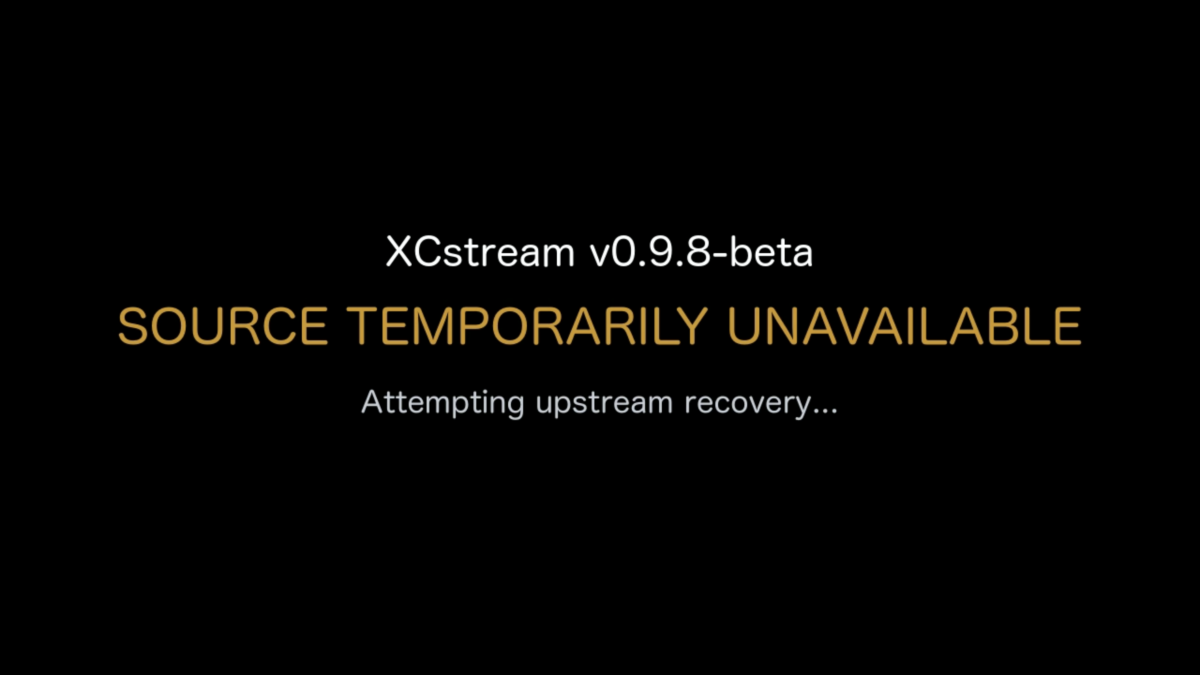
A lot has happened with XCstream since my last update. 0.9.9-beta is still in development and qualification, so there isn’t a public download for this build yet. Before I get into the changes, I should probably explain one of XCstream’s core concepts because I use the word Slate a lot. What is Slate? When an IPTV provider completely stops delivering usable media, XCstream eventually reaches a point where there is nothing left to preserve. Instead of simply allowing the downstream stream to die, XCstream can temporarily replace the failed upstream media with a synthetic MPEG-TS stream that I call Slate. Think of it as a controlled outage bridge. The provider may be dead behind XCstream, but the media server downstream can continue receiving valid MPEG-TS while XCstream works on getting the real source back. Conceptually: Healthy Provider ↓ Provider fails ↓ XCstream can no longer safely preserve the source ↓ Slate keeps protected MPEG-TS flowing downstream ↓ XCstream works on recovering the real provider Provider video itself is still pass-through. XCstream does not transcode the provider feed. Only the synthetic Slate is encoded. That distinction becomes pretty important in 0.9.9. One thing I’ve learned pretty clearly over the last few days is that the behavior I originally built for recording is not always the behavior you want when somebody is just sitting there watching Live TV. XCstream was built from day one around one basic idea: Protect the upstream source and salvage as much usable video as possible. That works really well for DVR. If a provider stops sending usable video for 10 or 15 seconds but there’s a decent chance it will recover, I would rather XCstream wait and save that material than instantly give up and throw Slate into the recording. That was always the priority. But for Live TV? Nobody wants to stare at a frozen football game for 15 seconds while XCstream patiently waits to see if the provider is going to wake back up. So v0.9.9-beta is getting a new Streaming Priority setting. Current XCstream Setup UI on macOS ARM64 (v0.9.8-beta). 0.9.9-beta expands this with Streaming Priority and additional recovery controls. DVR Priority — Default This keeps the current XCstream behavior. It is intentionally more patient with bad providers. XCstream gives the source more opportunity to recover naturally before deciding the stream is really gone and moving into recovery/Slate. The goal is simple: Save as much of the original program as possible. Live TV Priority Same exact recovery engine. No second Live TV engine. It just changes how aggressive XCstream is. It checks stream progression more frequently, declares a real stall much sooner, waits less for spontaneous recovery, retries the provider sooner, and uses a smaller initial buffer so playback can get moving faster. A quick hiccup can still recover naturally. A genuinely dead source should move toward recovery/Slate much faster instead of sitting there frozen forever. That gives me both behaviors without ruining the recording-first logic XCstream was originally built around. The other big thing coming in 0.9.9 is Session-Matched Slate. Right now XCstream has validated generic H.264 and HEVC Slate available when the real source is gone. That works, but it is still a different media stream. With 0.9.9, once XCstream has identified the source profile, it can prepare Slate that matches the stream much more closely: video codec resolution frame rate pixel format / bit depth audio codec sample rate channel layout So if I’m watching a 1080p H.264 / AC3 channel and the provider dies, XCstream can use Slate that is much closer to what the decoder was already seeing. The idea is to avoid unnecessary codec changes, resolution changes, audio changes, decoder resets, etc. just because the provider fell over. The Slate is generated in the background while the source is healthy. And I’m not generating one for every channel. If several channels use the same effective media profile, XCstream generates it once, validates it, caches it for the life of the running process and reuses it. Different channel. Different provider. Different tuner. Doesn’t matter. If the media contract matches, reuse it. And just to be clear: Provider video is still NOT being transcoded. Provider video stays pass-through MPEG-TS. Only the synthetic Slate gets encoded. I’m also adding an experimental option called Protected Slate Handoff. Getting into Slate cleanly is one problem. Getting back out of Slate cleanly is another. A provider can start sending again, look good for two seconds, and immediately die again. I don’t want this: Slate → Live → dead → Slate → Live → dead That’s ugly. So with Protected Handoff enabled, XCstream can keep Slate publicly playing while the real provider recovers privately in the background. The recovered source has to prove that it is actually healthy before XCstream puts it back on the public stream. Basically: Healthy Live ↓ Provider dies ↓ Matched Slate ↓ Provider recovers privately ↓ XCstream proves MPEG-TS delivery and the media clock are healthy ↓ Controlled return to Live If the recovered source still looks questionable, XCstream leaves Slate up and keeps working on the real source behind it. That feature is going to stay Disabled by default initially. The return-to-live path is one of the touchiest parts of the engine and I want to beat the hell out of it before I make it normal behavior. One thing I also want to make really clear because XCstream has changed quite a bit since I started this thread: XCstream is not an HLS/DASH segmenter. It does not create the HLS segments your media server uses. That belongs downstream. XCstream’s job is: Provider ↓ XCstream protects / buffers / validates / recovers ↓ continuous protected MPEG-TS ↓ Kernel Media Server / Emby / Jellyfin / Channels DVR Server / Plex whatever consumes it The media server still owns playback, HLS/DASH packaging, DVR scheduling, users, libraries, clients, etc. XCstream owns the ugly part upstream. If the provider freezes, starves, stops advancing video while the connection still looks alive, wakes back up, dies again, or needs the producer completely restarted, XCstream is supposed to fight through that before the media server ever has to care. That is still the whole point of the project. 0.9.9 just makes XCstream smarter about the fact that: protecting a recording and protecting somebody watching Live TV sometimes need different timing. Still testing. Still breaking things. Still abusing some absolutely horrific IPTV streams because they make great test subjects.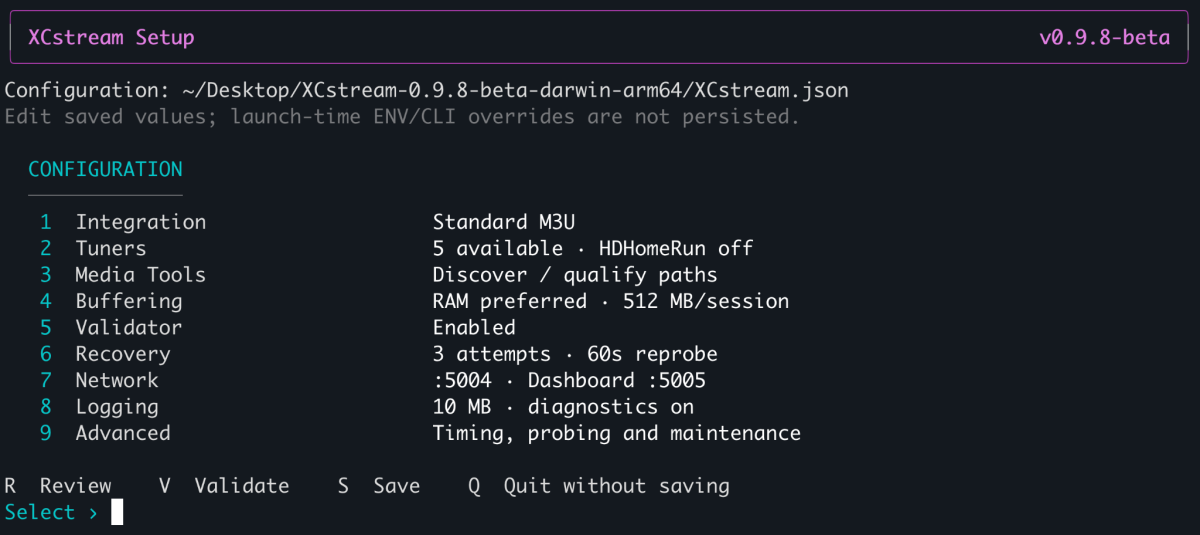
-
Quick Start
-
אני רוצה לראות סרטים וסדרות
-
Showing old/wrong Album Art, must be cached or downloading it from Internet
Luke replied to ColinPostsHere's topic in General/Windows
by the way this is off by default. but even if it's on, it's not really "from the internet", it's really from your enabled sources. so if you have none enabled, then it won't do much. so in your case, leaving it on would be harmless, although it would cause some occasional unnecessary scanning. -
BUG Live TV recording stopped early when a remote viewer stopped watching the same channel
Luke replied to nargg's topic in Live TV
HI, we are looking into this. Thanks.