All Activity
- Past hour
-

DELETE /Items/{Id} fails with "Could not find a part of the path" when the item's folder is gone
katbyte replied to katbyte's topic in General/Windows
yes, think /movie to /movies -
 IAmMistaMun joined the community
 -
And now I can't turn EHS off, because there's no way to navigate to that option? PXL_20260921_194657272.TS.mp4
-

DELETE /Items/{Id} fails with "Could not find a part of the path" when the item's folder is gone
Luke replied to katbyte's topic in General/Windows
ok so you renamed the top level folder? -
 Ice30 joined the community
 -
 Toleembyy joined the community
 -
LG TV is Internet blocked: Emby App asks for premiere / lags when pressing play
Luke replied to Utini's topic in LG Smart TV
can you force close the app and test again? -
Spotlight now displays the old way if EHS is on, and EHS works....but why can't this be applied to the full screen spotlight as well?
-
 calmstar3460 joined the community
 -
 qbbqbb joined the community
 -
 jeremyjj_95@hotmail.com joined the community
 -
Ah ok, then I agree that it's probably not worth to gobally alter emby functionality just to get the this feature. Do I understand it correctly, that the issue with altering the "added date" or "sort name" is regarding the series? Because for the movies it works with the top list already if I'm not mistaken. That would be great! Right now I'm not using it for the movies either, because I want the look for the movies and series trending list to be the same.
-
 Rod99 joined the community
 -
 Gillianr joined the community
 -
 CrowTC started following Plugin: Temporal - A per-library "Date Added" control
 -
Most of the spotlight bugs are resolved, but each slide still hangs around for way too long and it would be better to replace the redundant right arrow button with the button to show the context menu. The issue with long pressing the info button in the spotlight persists.
-
Well top-lists is sorted like this. But if you are missing Godfather from your library then Dark Knight will be number 2. I must say that i definitely see your point, but I believe this to be an admin feature more than a user friendly feature. If i try to think like the standard user, a list looking like this: 01. Shawshank Redemption 03. Dark Knight 07. Schindler's List It would make me wonder "what is wrong" "why am i not getting the number 2, 4,5 and 6?". I believe not showing that you are missing a movie from the original list gives a more user friendly and professional impression. What i could do that sort of solves this problem is to add a log input telling you what movies are missing. This selection is handled by Emby itself. I believe it takes into account what media player you are using, your bandwidth, etc., and will select the one best suited. For example if watching on your phone a 1080p version over cellular makes more sense than a heavy 4k blue-ray version. This is as far as my knowledge goes for the "pre selected version".
-
HI, do you still feel that you need this?
-
FIX FOUND - devs please look: Emby unnecessarily transcoding HEVC streams with the native AVKit player
Luke replied to Geordie's topic in Apple TV
Hi, can you give this another try with the latest update to Emby Server and Emby for Apple TV? Thanks. -

LG TV is Internet blocked: Emby App asks for premiere / lags when pressing play
Utini replied to Utini's topic in LG Smart TV
@Luke@ebr@Neminemnope still the same issue even when excluding the domain. Weirdly I can't see anything from Emby that seems to get blocked? See the screenshot. Could Emby be on any "common" blocklist from nextdns?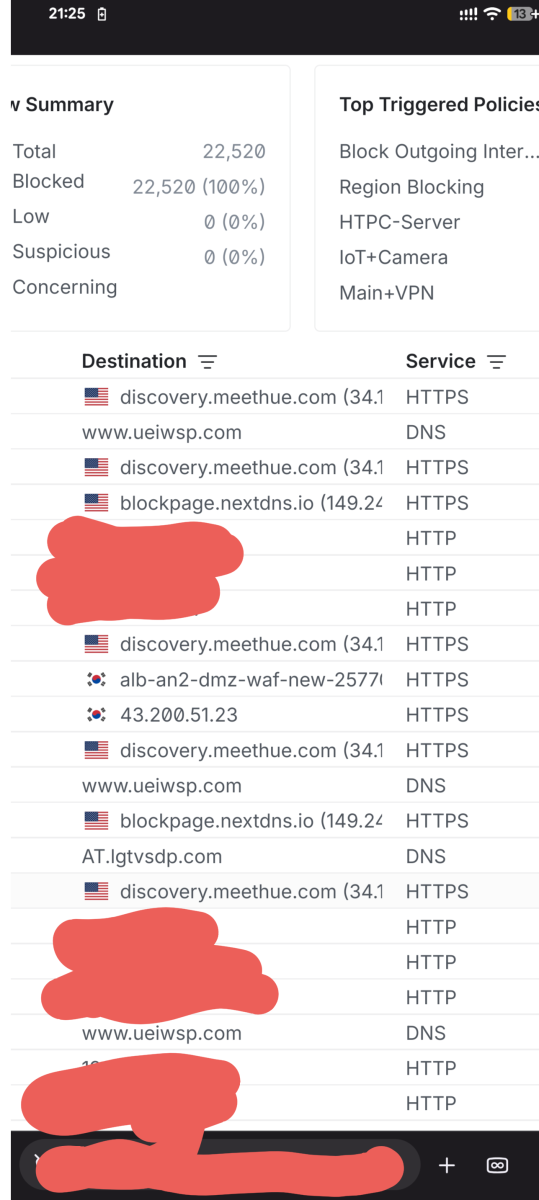
-
DELETE /Items/{Id} fails with "Could not find a part of the path" when the item's folder is gone
katbyte replied to katbyte's topic in General/Windows
the issue was i renamed a library (deleted recreated a new one? was a while back) that left me with ~10,000 orphaned entries no scan cleared, because i guess no scan to run to clean them as the folders were not associated with any library? and no easy way to trigger a scan to clear them without adding to a library and scanning i guess. while there was nothing in the UI to indicate this and i only found them via the API, i can't imagine 10,000 entries being good for performance so i figured out a way to clear them via the API which is fine, except for a couple that failed like described above. -
You can edit the home section to only show "unwatched". Everything that is marked as played will then be hidden. This is a bit tricky question. Its absolutely doable, but we will have to alter either the "added date" or the "sort name". This will then have a global impact in every view within Emby. And if the same movie/show is in to separate home sections one of them will be completely messed up.. I will think about this a bit more if there is any solid workaround, but right now my opinion is that it will mess up far to much. One thing i could do for the movies is to add an option to not show a number on the poster. It will work the same way but be a more discreet top-list. Not 100% sure i understand your request. Do you want to create a list based of everyone's watch history? If so, this is a really quick fix, but beware: If you have a kids profile only watching Blue and My little pony, and your own profile watching hardcore action movie, the output from that combined list will be very weird..
-
Android app requests images smaller than it renders them (Google TV)
Luke replied to redoXiD's topic in Android TV / Fire TV
Hi, that's interesting. I wonder if the pixel ratio reported by the webview is incorrect. -
OK please try 3.5.60. Thanks.
-
Extremely Faint Item Background Image on Home and Detail pages on v2.3.6
Luke replied to Monkey1971's topic in Samsung Smart TV
Hi, the rendering engine in the 2019 and 2020 tizen models doesn't support the fade technique that we're using. We'll have to look into an alternative way for older hardware. Thanks. -
3.5.60 Core UI Update Only Core UI Changes from 26.0.26 to 26.0.27 Various spotlight bug fixes and improvements
-
Emby for Android 3.5.60 Released Changes 3.5.60 Core UI Update Only Core UI Changes from 26.0.26 to 26.0.27 Various spotlight bug fixes and improvements
-
What is the content type of the library? What version of the server are you running?
-

TV Show Status — TMDB-powered Returning/Ended/Cancelled badges for series
Blueskies278 replied to Blueskies278's topic in Plugins
When I feel it's stable enough for release, and if it passes Emby's guidelines -
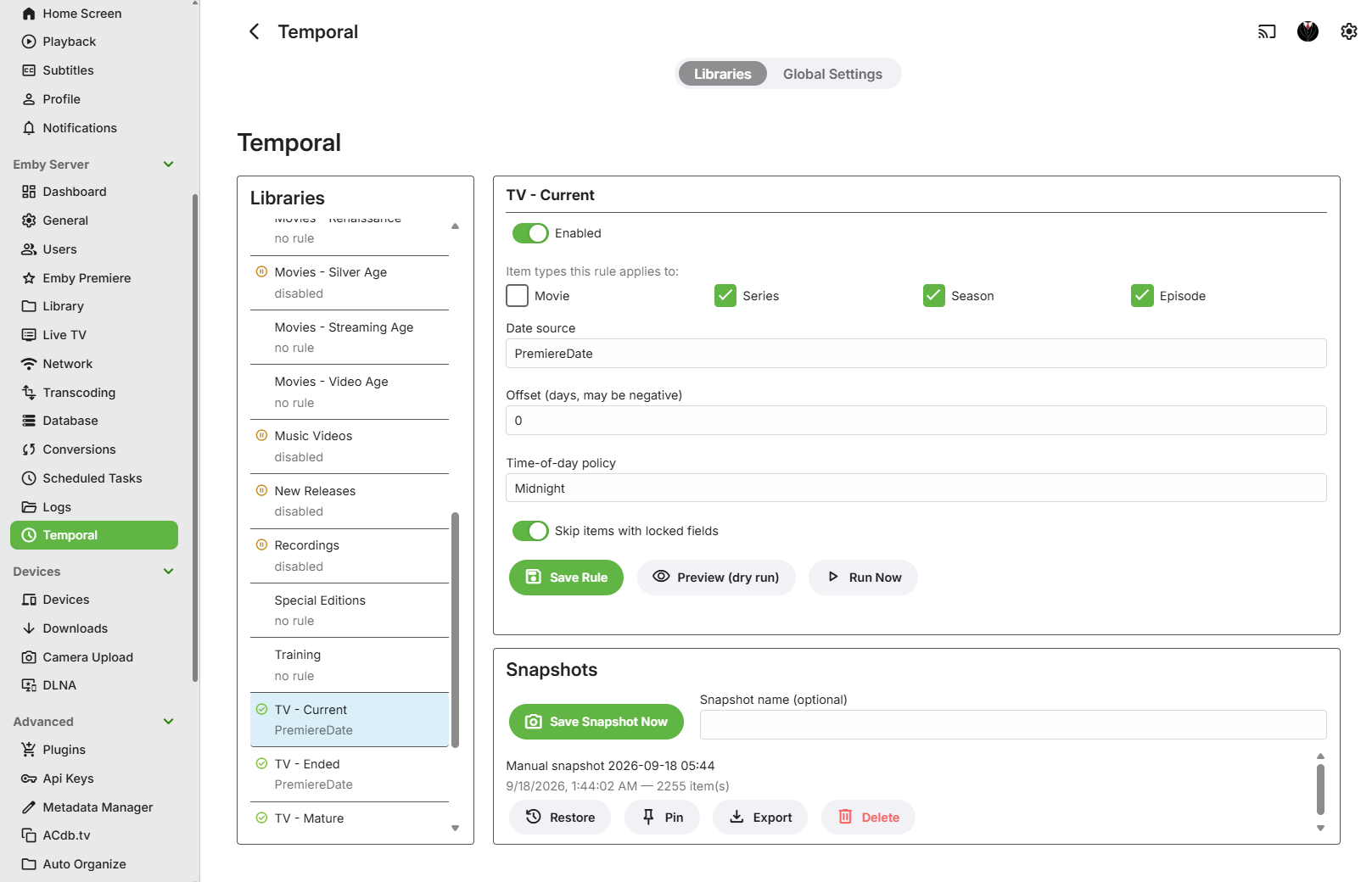
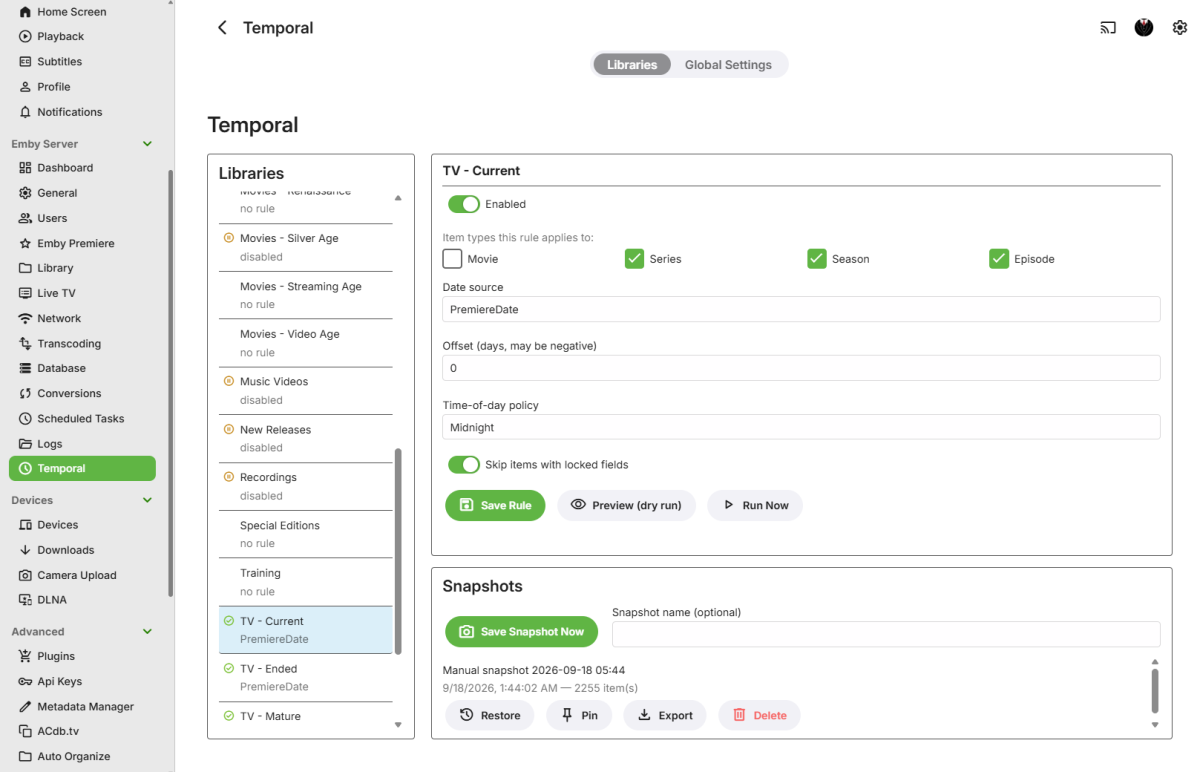
Temporal: Time Management I've wanted to build this for years, as my own library has grown larger and more complex. Temporal replaces Emby's "Date Added" value with one derived from an item's own metadata, chosen independently for each library. No more one-size-fits-all date handling across a varied collection that doesn't work that way. NOTE: It was compiled for Emby Server 4.10+. Source is closed, but it's free to use. The problem Emby's built-in "Date added behavior for new content" handling gives you a global choice: date scanned, or file creation date. That's fine until you have libraries where you want different logic. Other plugins I have used are basically an "all or nothing" that is more like a blunt instrument than a precision tool. Maybe you have a "New Releases" library where file date is genuinely useful, but you have a general TV Show/Movies library where you'd rather sort by Air Date/Premiere Date, and an old-film collection where all you really want is the production year. There was also no quick way to recover an item's original date once something has overwritten it. Temporal makes the date source a per-library choice, and gives you an actual undo path. What it actually changes Each library gets its own rule, and every rule is disabled by default. Temporal touches nothing until you explicitly turn a library on. Pick exactly one date source per library: Premiere Date, Production Year (Jan 1), File Created Date, or File Modified Date. No fallback chains. If the source you picked can't be resolved for an item, that item is left completely alone and shows up as "unresolved" in the run summary. It will never quietly substitute a different source. It only ever touches Emby's own DateCreated/DateModified fields on the items it manages. It never writes to any file on disk; file dates are read-only inputs, never outputs. Items with any locked metadata field are skipped by default (there's a per-library toggle if you want Temporal to override locks instead). Series/Season with a file-based source use the earliest file date among their child episodes, scoped to just that season, or the whole series. Undo is via named Library Snapshots. Save one manually from the config page at any time, and restore it later if a rule change didn't do what you wanted. Snapshots are exportable, pinnable, and covered by retention settings so they don't grow forever. (An automatic "snapshot before rule change" prompt is planned but not wired up yet. For now, snapshotting is a manual step you take yourself.) Scope for v1: Movies, Series, Seasons, and Episodes only. No Music/Books/Photos yet. I have a few other time-related functions I've been wanting to add, so we'll see how it pans out going forward. Real-world testing I've been running Temporal in it's current state for about a week on a Linux/Docker Emby host, against a networked media library over CIFS. I have had no issues so far, including on the file-date sources, but see the caveat below on FileCreatedDate, since CIFS/SMB is one of the setups where filesystem "birthtime" support can be inconsistent. Installing it Unzip and drop "Emby.Temporal.Plugin.dll" into your Emby Server plugins folder. Restart your Emby Server, it should pick up the plugin right away. It will show up under Emby Server in the left-hand Dashboard menu as Temporal. Click it to open the config page. Here's what the config page looks like, live on my server: Configuring a library On the Temporal config page, each of your libraries shows up with its own rule. I don't have any gating yet on which libraries show up, so you will just see all your libraries in the list. Simply choose a library and the rule configuration will pop up on the right: Enabled: off by default. Turning it off later pauses management without undoing anything already written. Item Types: which of Movie/Series/Season/Episode this rule covers. Date Source: the single field to resolve dates from. Offset (days): shift the resolved date forward or backward. Time of Day: Midnight, Preserve Original Time, or Run Time. Respect Item Exclusions: on by default; controls whether locked items get skipped. Be sure to click Save Rule if you edit the settings. Preview (dry-run diff, no writes) and Run Now (runs immediately, bypassing the Enabled flag) are both on the same page. Snapshots Before making any changes, or hitting run, it's a good idea to make a snapshot of the library, just in case the date change didn't turn out like you expected. You can optionally name snapshots for your own reference. Each snapshot can be Restored, Pinned, Exported or Deleted, everything should work as you would expect it to. Just click Save Snapshot Now, and you don't have to worry if it messes up your dates. NOTE: Export is mostly for reference right now, but I will support import in the future. Global settings A separate tab on the config page controls settings shared across every library: Dry Run Default (on): whether Preview opens with dry-run pre-selected. Batch Size (200): items written per batch during a run. Throttle (ms) (250): delay between write batches, to avoid hammering the Emby database on large libraries. Log Verbosity (Normal): Minimal / Normal / Verbose logging. Max Snapshots Per Library (10): snapshot retention limit (0 = unlimited); pinned snapshots are exempt. Max Snapshot Age (days) (90): snapshot retention age limit (0 = unlimited); pinned snapshots are exempt. Scheduling Everything runs through Emby's own Scheduled Tasks, no custom scheduler: Temporal: Incremental Date Update: safe to run hourly or more. Only touches items changed since the library's last successful run, and skips no-op writes. Temporal: Full Validation Pass: re-checks every item regardless of watermark. Heavier; good for a daily/weekly cadence or a manual "Run now" after a rule change or metadata refresh. Both respect each library's Enabled flag and skip orphaned rules (rules pointing at a library you've since removed get flagged, not deleted). Feedback is welcome, especially from anyone with unusual library setups (network shares, mixed filesystems), since the file-date sources are best-effort on some of those. Emby.Temporal.Plugin.1.0.0.40.zip
- Today
-

Movie Theme Videos Plugin Questions and Support Thread
Scott310 replied to radeon's topic in Plugins
I ran it a few times in the beginning just testing. My bad. If I can confirm it is working I will just leave it alone and let it do its thing over time. I can be patient when I know its working lol. Thanks again brother. -

NVIDIA Shield screensaver appears while paused, then playback resumes behind it
dbott replied to Dr. Technolust's topic in Android
Thank you for that. Also, interesting thought on having the Shield turn off with Energy Saver. But in my case, it would shut down the entire theater with automation. (Receiver off, projector off, open blinds, turn on lights.) Though I do have that happening after 30 mins just in case. -
This would be amazing. To get around this currently, I have found a top 30 trending shows (smaller quantity) then set it to random and added it as a spotlight. This works very well, netflix style. Some requests from me and forgive me I do not know the limitations you work with Soderlund. for AI can we somehow have a single playlist and for each user its passes in their own watch history. This avoids having to create so many sources for each unique user. To be honest this would be amazing for most of the features to have "Current User"
-

Atrium — a native tvOS app for your Emby server
vdatanet replied to vdatanet's topic in Third Party Apps
Atrium 1.93 is on the App Store. @jasonmcroythis is the one with your two Apple TVs. Nothing to set, just update. One correction to my last post: when I wrote "it's fixed", only the rows were. With the enhanced home, the header kept showing the old progress until you moved the focus, and it took one more build to catch that. This version has both. If you get a minute, try your exact case: leave Atrium open in the bedroom without force closing it, watch something in the living room, then go back. It should already be there. Dolby Vision through the server. When a film can't be played straight from the file and has to come through Emby instead, a Dolby Vision one used to arrive converted to SDR and re-encoded, because the app never told the server your TV could take Dolby Vision. It does now, and the server sends the film as it is: nothing re-encoded, and the TV switches to HDR. To be exact, that's HDR10 from the film's own base layer, not the TV's Dolby Vision mode; that last step needs the server to label the stream as Dolby Vision, and it's been raised with them. HDR10 films on that path still arrive in SDR, and that one is on the server side as well. The guide. When the first channels in the list had no listings, pressing down from the buttons at the top did nothing and the remote seemed dead. It now goes down into the grid. As always: what's missing or wrong, say it here.