All Activity
- Past hour
-
 Yonimor joined the community
 -
 zero0o21 joined the community
 -
 maxza6654 joined the community
 -
 ewalker69 joined the community
 -
 Jiraphan joined the community
 -
 Arslen joined the community
 -
 zhangdazhuang joined the community
 -
 zd418702 joined the community
 -
 emd83291 joined the community
 -
 gloriapersa joined the community
 -
no the metro doesn't look like a case at all. and the corners are not the real issue. it's height and width. do you know in which file the size is maintained? maybe I play around a bit with it?
-

Playback Error - no compatible streamsare currently available
Neminem replied to twofacetoo's topic in General/Windows
Tbh I have no more time for this, IRL issues. Anyways hope you get this solved. Best regard another friendly Emby user. -

embyforkodi (next-gen) 12.X.X support
Bigjohns97 replied to quickmic's topic in Emby For Kodi Next Gen
Nevermind I figured it out -

Emby for Android TV app fails login if the server is entered as a bare hostname
ebr replied to MikaelKW's topic in Android TV / Fire TV
Hi. If your connection is via SSL it is currently required to enter the "https://". We should make this easier with something like a simple checkbox. -
Playback Error - no compatible streamsare currently available
Neminem replied to twofacetoo's topic in General/Windows
Because E drive looks like a 8 gb thumb drive. -
Playback Error - no compatible streamsare currently available
Neminem replied to twofacetoo's topic in General/Windows
And what does explore show on drive E and F -
Is there a way to move media library folders while preserving metadata and watch history?
ebr replied to Arthur0's topic in General/Windows
Hi. You can if you save your metadata to NFO files and your images alongside your media. Both options in Emby. -
I have both "Allow subtitle extraction on the fly" and "Allow subtitle font extraction on the fly" turned on. Does that apply to SUP/PGB subtitles as well which aren't text-based?
-
embyforkodi (next-gen) 12.X.X support
Bigjohns97 replied to quickmic's topic in Emby For Kodi Next Gen
Good morning everyone, I just recently installed the new Coreelec-NO nightly and the progress they have made is very impressive, hoping to not have to use the CPM builds anymore. The one issue I seem to be having on this fresh install is not being able to install this add-on, it tells me something about an invalid structure, has anyone seen this before? It seems like a common error but the structure looks fine when I open the zip and check, I feel like there might be something else going on here. Any assistance would be appreciated, my library is quite large and I have grown quite dependant on this awesome add-on. -

Playback Error - no compatible streamsare currently available
twofacetoo replied to twofacetoo's topic in General/Windows
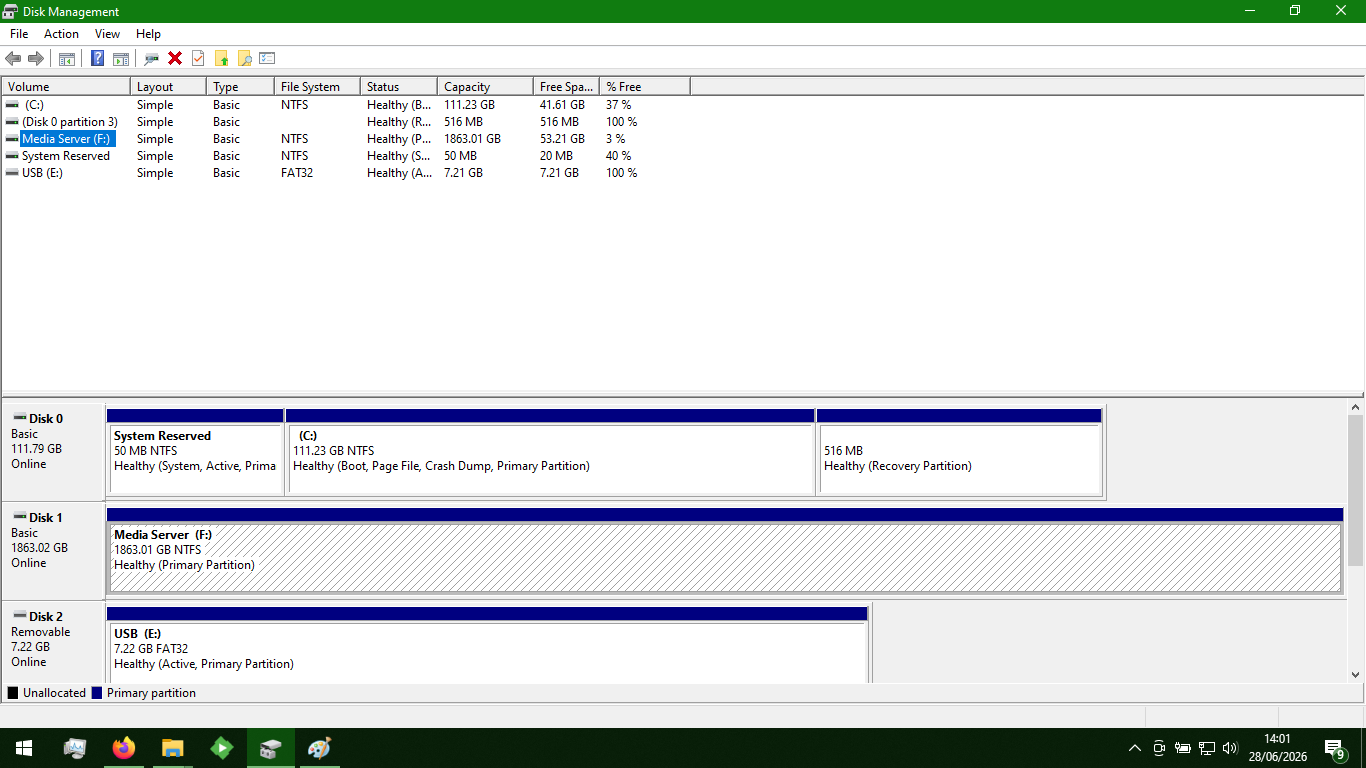
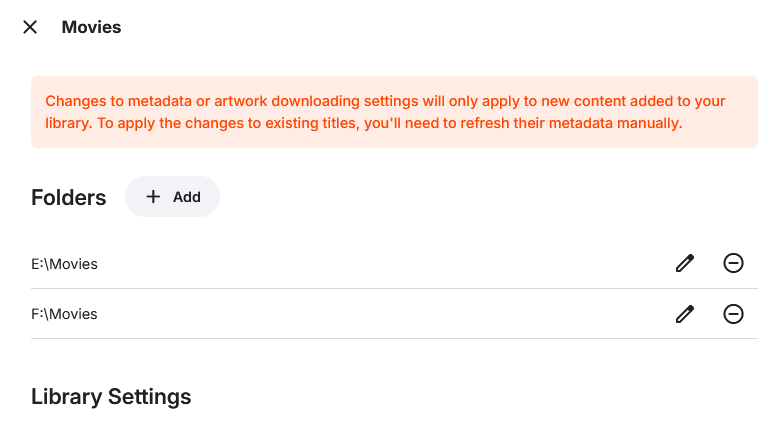
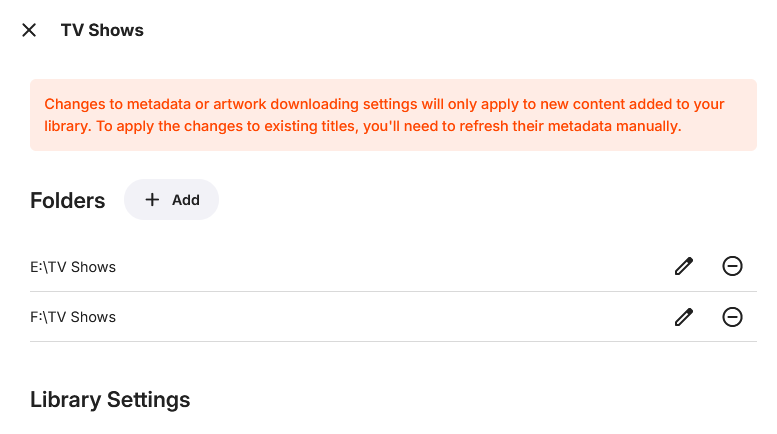
Attached are screenshots showing the Drive Management program open on the laptop, with the Media Server hard drive highlighted, plugged into F (where all the content is stored). The USB in E is, as mentioned before, there to ensure that the drive was registered as F when it was plugged in Attached also is pages from the laptop's Emby library settings, showing both Movies and TV have E and F listed as available. As said before, I did try it with ONLY F and ONLY E at different times, but the error persisted On the laptop, the only actual drive is the Media Server one. It came with the C drive setup with the two other sections (Disk 0 and System Reserved) already built in, this was pre-owned by a relative after all so I had no involvement with it before yesterday basically. The only additional portions were the USB in E and the Media Server drive in F.
-
It is more likely that your client is not reporting correctly to the server what playback capabilities it has. I suggest you make a full report of your problem, with appropriate logs so that the devs can see what is going on: Paul
- Today
-
Playback Error - no compatible streamsare currently available
Neminem replied to twofacetoo's topic in General/Windows
Exactly how are you drive mappings? ( Screenshots ) How many drives have you connected? How is your library mapped inside Emby? ( library specific ) -
Will there be any new Emby for Android updates? Coming from Roku. Been using this for a month. Solid, no issues. Just pure curiosity.
-
Playback Error - no compatible streamsare currently available
twofacetoo replied to twofacetoo's topic in General/Windows
What do you mean, 'not there'? The laptop has an E and F drive, I plugged the drive into both at different times, same with my desktop PC. I added the drive letters via the library menu and added both E and F drives, so no matter which one it was plugged into, it should have still been able to read the data. Right this second it's showing as plugged into F on the laptop, and it finished scanning the files from F when I added it, like I already showed in the previous image I originally had the drive set on my desktop PC to ONLY the F drive to avoid having to constantly re-scan for files if anything happened, however by default the laptop registered it as E. I managed to get it to F on the laptop by plugging in a USB stick first, which registered it as E, then added the drive as F, to avoid messing around with Disk Management again The hard drive is accessible via E or F, on both machines. This isn't a case of 'it's added to a drive that doesn't exist', I added it to a drive that DOES exist. Even when I first plugged it in, it was set to E, so I added E to the library. YOU then advised that I should set it back to F, which is what I did, and now you're telling me to NOT set it to F, because F doesn't exist according to you, after you told me to set it to that? I've tried it in the F drive with only F set on the library settings for both folders, didn't work I've tried it in the E drive with only E set on the library settings for both folders, didn't work I tried it on both E and F with both 'E and F' paths in the library settings, didn't work Both E and F are available drives on both machines, which the external hard drive can be plugged into, I added both to the library, it scanned all the files (which took some time but it DEFINITELY finished before I did anything else), yet still gives the same playback error no matter what I try to watch, but E and F ARE available drives on both of my machines. -
Playback Error - no compatible streamsare currently available
Neminem replied to twofacetoo's topic in General/Windows
Stop adding drive letters that not there. If it shows up as E only add that to you library. 2026-06-28 06:27:24.026 Info LibraryMonitor: Skipping realtime monitor for F:\TV Shows because the path is currently not available Right now its adding all you media via E and is not done yet. 2026-06-28 13:04:39.213 Info MediaProbeManager: ProcessRun 'ffprobe' Execute: C:\Users\colin\AppData\Roaming\Emby-Server\system\ffprobe.exe -i file:"E:\TV Shows\Friends\Season 3\S03E09 The One with the Football.mkv" -threads 0 -v info -print_format json -show_streams -show_chapters -show_format -show_data This will be an endless cycle for you if you keep doing these things. -
Playback Error - no compatible streamsare currently available
twofacetoo replied to twofacetoo's topic in General/Windows
Okay, I moved the drive back over to the desktop PC, added E and F as well, still getting the same playback error message while trying to play content on my TV with the drive hooked into my PC (via E), this is the log that generated when I tried to play 'The Untouchables' and an episode of 'Family Guy' (just what I had immediate access to). The movie seemed to load but just showed a black screen (video not playing, no progress bar, no pause, etc), then the episode gave the same error message as before. embyserver.txt -
Playback Error - no compatible streamsare currently available
Neminem replied to twofacetoo's topic in General/Windows
Is this a HD that you move between the to servers? If it is I would shutdown Emby Server before removing the HD. Emby might see files missing and start removing metadata. And then need to fetch metadata again, when it sees the drive again. Just so that you are aware of that. -
Playback Error - no compatible streamsare currently available
twofacetoo replied to twofacetoo's topic in General/Windows
Just finished the scan, this is what I see in the settings on the laptop, the '2 folders' are for the E and F drives. I'm just about to add the E drive to the desktop settings before going any further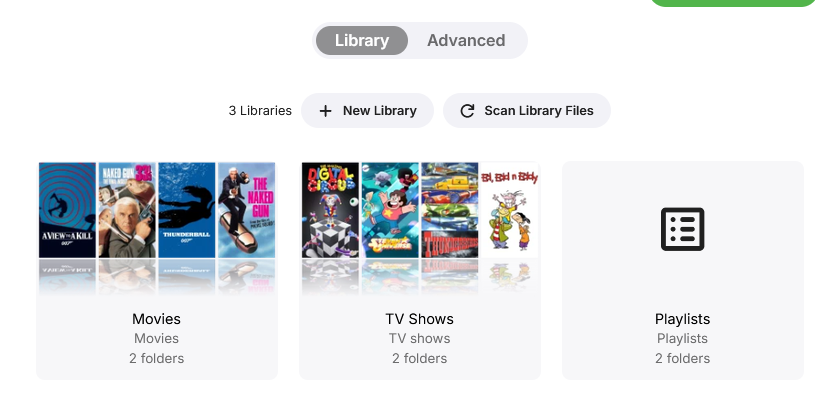
-
Playback Error - no compatible streamsare currently available
Neminem replied to twofacetoo's topic in General/Windows
Hmm is it possible you forgot click ok? And not just click outside the popup window. When adding E drive. -
Hello @softworkz the update meanwhile released, but I am seeing no change in behavior regarding resuming web streams.
-
Resuming still doesn’t work on current version
-
Playback Error - no compatible streamsare currently available
twofacetoo replied to twofacetoo's topic in General/Windows
Okay, the laptop is still scanning, but I just checked on my desktop PC where it was all setup before, and IT only shows the F drives in the library settings, after I changed it to E on my laptop. So for whatever reason, it looks like it's still going by what it says on my desktop PC to find the files. Once the laptop is done updating, I'll see if I can hook the drive back into my PC in 'E', set it up to use F and E just like the laptop, then move the drive back to the laptop and see if it works I have no idea HOW this is happening but it seems to be happening. I definitely set the library to E on my laptop, I KNOW that, and I'm in the process of adding F back in, the laptop shows '2 folders', but the desktop only shows 'F' -
Playback Error - no compatible streamsare currently available
Neminem replied to twofacetoo's topic in General/Windows
Sure there is you just need to add the extra drive / folder to Emby library. But right now Emby is seeing all your files at F driver when you try to play movies. Which tells me that Emby has not finished removing from F drive and adding them to E drive or that you have not added E: to your libraries. And I did not see any attempt to finde E: 2026-06-28 06:27:24.025 Info LibraryMonitor: Skipping realtime monitor for F:\Movies because the path is currently not available 2026-06-28 06:27:24.026 Info LibraryMonitor: Skipping realtime monitor for F:\TV Shows because the path is currently not available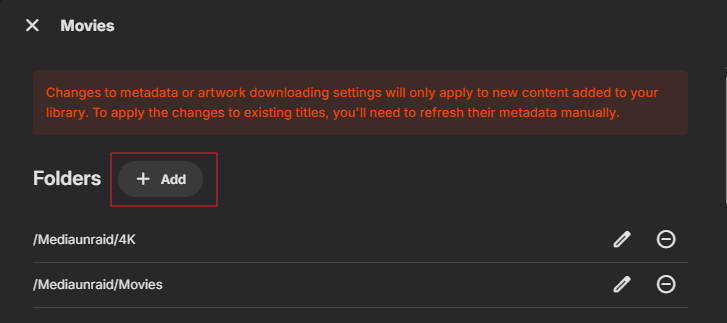
-
Playback Error - no compatible streamsare currently available
twofacetoo replied to twofacetoo's topic in General/Windows
I've set the drive itself to F, and I'm also setting the libraries back to F, but is there really no way of changing that internally? Because I was looking to get another drive anyway, so E and F would both have 2tb of storage available for more content. So if I end up having to move something over to E (say, 'movies'), is this going to be at all doable? It's taking a minute to scan all the content on the laptop, so I'll update when I have a result -
Playback Error - no compatible streamsare currently available
Neminem replied to twofacetoo's topic in General/Windows
11:32:33.150 F:\Movies\Untouchables\The Untouchables (1987).mp4: No such file or directory Emby can't find you F drive. I would change the drive letter back to F: