All Activity
- Past hour
-
As you were just shown: https://emby.media/support/articles/Quick-Start.html Scroll down to the paragraph "Prepare Your Media". The menu on the left also has an entry "Media Preparation" which gives details of how you should name the files to have them recognised without problems. For ripping the files from your DVDs and Blurays, MakeMKV is a popular choice of (free) program. If you have a TV tuner (or IPTV) on your network, Emby can also record from that source. Paul
-
 tawel02 joined the community
 -
What exactly isn't showing up? Where?
-
 stingeyal joined the community
 -
 @ualeribeiro11 joined the community
 -
 Jeany097 joined the community
 -
I decided to cancel all my newsgroup accounts it costs too much, I like to copy from dvd blueray the quality is that way always better and ebay always has good deals for dvd's in 100 packs. I just hope they don't stop making dvd's and turn everything into streaming only so we can no longer copy from disk
-
 Juergen_S joined the community
 -
 phv789 joined the community
 -
 Andres777 joined the community
 -
 Mathana2006 joined the community
 -
 C0LE joined the community
 -
 chriku joined the community
 -
Perhaps you had the Diagnostics plug-in installed...?
-
Mine does this sometimes also in the continue watching section and if I switch vpn's it works again as it should. UK and USA seem to work best on emby using vpn but that may not be your issue but just more of something to keep in mind.
-

Add a buffer to the pixel dimensions of the "match video resolution" feature
ebr replied to rekit's topic in Feature Requests
Hi. We already do that as far as our processing goes. However, some of the "match resolution" during playback is handled by the player or device instead so the best thing to do here is look at a specific example. Please attach the information requested in how to report a media playback issue. Thanks! -
Hello, what else can I try?
-
I understand, I'm just a silly nerd in a basement
-

Why is Jellyfin so much more popular than Emby?
FourCorners replied to Nabukodonosor's topic in Non-Emby General Discussion
I'm not a fan of jellyfin but I do like it more than plex. For me I will use emby and pay monthly indefinitely I like it more than other platforms it just keeps getting better with better support more people on the forums so yeah, better community here. I do tinker with jellyfin css and silly stuff like take a live link from a few movies and throw it on tivimate as an m3u just crap like that. But emby is what I support and will continue to support. -

We really need better multi version handling for Continue Watching
js28194 replied to te5s3rakt's topic in General/Windows
Well put diplomatically. So I was compelled to look up this THRASHY girl... ah now it makes sense... Square pegs and round holes... I tried that once. Didn't work sad to say. -

Add a buffer to the pixel dimensions of the "match video resolution" feature
rekit posted a topic in Feature Requests
Forgive me if I'm misunderstanding how the setting works. I assume it works by looking at pixel width and not total pixels, but I could be wrong. The problem, in short: When a 4k video is a few pixels narrower than standard 4k, the setting seems to identify it as the next smaller resolution (hd instead of 4k). The problem, longer explanation: When match video resolution is enabled and a video that has a horizontal resolution less than a particular threshold such as 3840 for 4k or 1920 for hd (maybe 3838, or 1918 for example, sometimes due to having a couple pixels trimmed off the edges horizontally to crop out minuscule black bars, or more noticeably when the aspect ratio is more square), match video resolution seems to identify this as something smaller than the intended resolution of 4k or hd, and matches the video resolution to the next smallest resolution. So a 4k movie is being displayed at 1080, and any scaling the tv is doing is doing it unnecessarily or inaccurately for the source resolution. Proposed solution: I assume the way the setting works is by telling emby "any horizontal pixel width less than x should be identified as y". And instead of setting that pixel width to the normal 3840 for 4k, change it to something slightly smaller like 3820. (Or if it uses total pixels, then the total pixels could be adjusted accordingly.) -
How do i do that? Im really not very techy
- Today
-
Why is Jellyfin so much more popular than Emby?
FourCorners replied to Nabukodonosor's topic in Non-Emby General Discussion
Agreed. -
@JordanThe green tint is caused by the server transcoding/converting the stream, disabling transcoding and container changing permissions for the user is a good temporary fix. Often times the transcode is due to TrueHD audio being selected for the stream. At the moment the Emby Server unnecessarily transcodes TrueHD audio even though the Apple TV is able to convert it client side. The server side conversion is causing the Dolby Vision colors to be incorrect. I've made @Lukeaware of this in a recent post.
-

We really need better multi version handling for Continue Watching
Neminem replied to te5s3rakt's topic in General/Windows
Stop sailing the high seas, and conform to the naming conversions Emby needs. -
Hi, no updates yet but we plan to make the top tabs configurable in future updates. Thanks.
-
Thanks for sharing.
-

False "maximum streaming limit" on a single Apple TV device (limit = 1)
Luke replied to steve_tv's topic in Linux
Hi, we'll take a look at this. Thanks for reporting. -
Hi, what version number are you on now?
-
Still nothing. Exact same problem years later.
-
@LukeThis has been going on for so insanely long now. You responded to posts in 2024 about the EXACT same issue that 'you were taking a look at it'. Can you please just be honest.
-
No Metadata at the Season Level (Episodes are Fine)
js28194 replied to js28194's topic in General/Windows
Am I making a simple folder structure mistake that I am just too blind to see? I honestly don't recall this ever being an issue until 2 days ago. Since I'm 99% Kodi user that has it's own addons, I guess I may have never seen this. Any guidance would be appreciated before I embark on who directory structure redo. I suppose I could wait till the weekend and peel off a few shows into a separate library for testing. /taking grandma nap. -

Emby Beta 4.10.0.15+: Crashing due to Out of Memory on DS918+ Package Center Install
DiabboVerdde replied to DarWun's topic in Synology
I'm experiencing what appears to be the same issue on a Synology NAS and wanted to share my findings in case they help. Environment Synology DS1819+ DSM 7.3.2-86009 32 GB RAM Emby Server 4.9.5.0 (Package Center installation) .NET 8 runtime bundled with Emby The problem only started recently. Prior to that, this server had been running reliably for a long time. Symptoms After a restart, Emby starts normally using approximately 350-400 MB RSS. Throughout the day it remains very stable, even under heavy load. I tested: Three simultaneous 4K streams A full manual library scan while streaming During those tests, Emby's RSS never exceeded approximately 850 MB. The interesting part is that the problem consistently starts around midnight. At approximately midnight, Emby's memory usage begins increasing in large steps. From that point on, the resident memory continues growing throughout the night until the server eventually runs out of memory and the Linux OOM killer terminates the Emby process. On the night I monitored it, I observed approximately: 0.4 GB 1.3 GB 4.3 GB 4.8 GB 7.2 GB eventually peaking at 28.6 GB RSS The growth appears to occur in roughly 30-minute intervals. Suggesting a process starting at midnight being triggered again and again every 30 minutes, eating up more and more memory every time until it crashes. During this entire period the process is mostly idle: CPU around 4% approximately 20-21 threads process state is generally "sleeping" So, it looks like something is simply eating up the memory, but not doing anything meaningful. Kernel logs The Linux kernel consistently reports Emby using approximately 25 GB of anonymous RSS immediately before it is killed. Example: Out of memory: Kill process 30784 (EmbyServer) Killed process 30784 (EmbyServer) anon-rss:25216920kB Monitoring To investigate, I wrote a script that records Emby's memory every minute and ingested the data into Splunk. The graph clearly shows: Emby's RSS increasing in large steps beginning around midnight. Total system memory usage following Emby's growth almost exactly. Memory continuing to increase throughout the night until the OOM event. Jumps occur every 30 minutes, increasing about 3GB every time, until it crashes. You see the moment it crashes, the sudden deallocation of all that memory. I only realized it was down about an hour later and then I brought it back manually. When it came back, memory usage returns to a constant of 350-450MB and it's not increasing at this moment. Debug logging With debug logging enabled, I noticed repeated library validation messages approximately every 30 minutes: ValidatePhysicalRoots ValidateTopLibraryFolders The timing appears to correlate with the memory increases, although I can't yet say whether those operations are the cause or simply occur at the same time. Plugin observation After reading Luke's recommendation in this thread, I checked my installed plugins. Of the plugins mentioned, the only one I had installed was Statistics 3.4.2.0. So i just removed it and I'll monitor what happens at midnight now. My logs also have many 404 errors from the TMDB plugin at the 30 minute intervals. This plugin was was not mentioned by @Lukebut it might play a part in this issue. I also realized that I installed the Statistics plugin relatively recently, which roughly coincides with when I first started noticing this problem. I can't say whether it's the cause, but as my next step I've removed the Statistics plugin and will monitor tonight's behavior to see whether the overnight memory growth still occurs. If anyone would like them, I have: minute-by-minute RSS history system memory history debug logs kernel OOM logs graphs showing the complete overnight memory progression Script i devised to grab the Emby statistics minute by minute to be ingested by Splunk Hopefully this helps determine whether we're seeing the same underlying issue.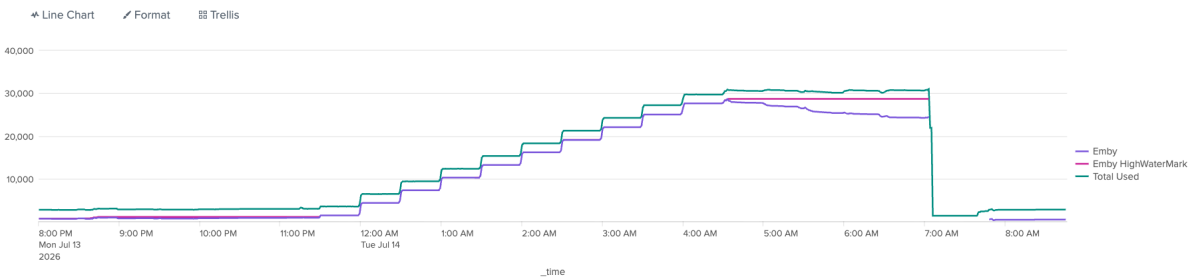
-
I've done this and will share with you via the link you DM'd me.
-

Is there any command for purging "Continue Watching" history on a user account?
GrimReaper replied to SanguineWren's topic in General/Windows
There ain't. You can only do it in a per-item basis as @pwhodgessaid. You can lend your support here And for future instances: