All Activity
- Past hour
-
 rolobory8ii joined the community
 -
 fhyoni joined the community
 -

Intel Arc A310: QSV works, but OpenCL HDR tone mapping fails with Small BAR in official Emby Docker image
Kwin replied to Kwin's topic in Linux
Thanks Q-Droid! Rolling-back to 4.9.1.90 fixed the issue. Your golden tip is greatly appreciated! -
 xenecisrttg55 joined the community
 -
 micix4r4tyh joined the community
 -
 Moody711 joined the community
 -
 rikejemr56gg joined the community
 -
 pimimrtyyff joined the community
 -
 nheyh505 joined the community
 -
 stefanscx joined the community
 -
 jaxeta22dd joined the community
 -

HLS segment list is computed from the container's declared duration and is never checked against the media.
vdatanet replied to vdatanet's topic in Developer API
Not quite — the same 220 both works and fails, in the same session and the same file, depending only on how it is reached: requested 216..221 in order 220 -> 200 (221 fails) fresh session, jumping straight to it 220 -> 500 (500 on every retry) real player, no seeking 220 -> 200 (36 ms) real player, after one seek 220 -> 200 (42 ms, 221 -> 500) If 220 were missing its SegmentComplete, it would fail every time. It doesn't: reached in order it is served in 36-42 ms. The ffmpeg log I posted is the one for the *last* segment, where SegmentComplete stops at Index=211 / filename ..._210.mp4 and 211.mp4 is never announced. I don't have an ffmpeg log for a *jumped* 220 — glad to capture one if that's useful, but the four rows above already say the difference is the request path, not the segment. -

Trakt Air Dates — outside the US? Fixes US shows landing on the wrong day
Blueskies278 replied to Blueskies278's topic in Plugins
Trakt Air Dates Release Notes Changes 8.10.0.0 Add a setting to hide episode names like "Episode 3", so a card shows just "S3:E3" instead of "S3:E3 - Episode 3". Once Trakt publishes a real title for that episode, it appears automatically Limitations Only a title that is the word Episode followed by that episode's own number is hidden. A real title such as "Episode 1: The Beginning" is left alone, and so is a title whose number does not match the episode Hiding names does not change your library. The real titles are kept, so turning the setting back off restores them without re-fetching anything Versions 8.8 and 8.9 do not exist. Both were withdrawn before release, which is why this release follows 8.7.1.0 Changing a setting takes effect on the next refresh. Saving the settings page clears the caches, so it applies straight away rather than in a few hours The plugin will never hand Emby a shorter episode list than you already have files for, so it cannot remove real seasons If neither Trakt nor TMDB gives a sensible answer for a show, it says nothing rather than guessing Excluding a show keeps its past episodes and drops only the future ones No platform-specific setup. Every path comes from Emby itself, so it behaves the same on NAS/Docker, Linux, Windows and macOS TraktAirDates-Settings-Reference.pdf TraktAirDates.dll -

Atrium — a native tvOS app for your Emby server
jasonmcroy replied to vdatanet's topic in Third Party Apps
Excellent. Makes sense in your explanation. I hadn’t yet noticed the other thing you mentioned but nice catch. -
Atrium — a native tvOS app for your Emby server
vdatanet replied to vdatanet's topic in Third Party Apps
Thanks — and good to hear about the playback, that's the part we can't test from here. You were right that it's padding, but it turned out to be a more interesting kind of wrong than a number typed too small. The space under the artwork was a constant, and what eats it isn't: on focus, artwork grows in proportion to its own height, so the taller the image the more of that gap disappears. A poster is the tallest thing in the app, which is why it's the one that reads badly — the wide Continue Watching thumbnails were escaping it by half a point, which is exactly why those looked fine. So rather than reserving more space, the text now moves down with the artwork: the distance between the two never changes. It's what most apps do and what this should have done from the start. The wide rows and the cast row move the same way now, so nothing behaves differently from the card next to it. While in there, one more thing came out that you'll see: the titles under artwork were smaller than the ones in Continue Watching, for no reason anyone could find. They're all the same size now, and they read a great deal better from a sofa. It's fixed and the update is with Apple. Thanks for looking closely — that one had been there since the very first version and nobody had put a finger on it. -
@kikinjoI see you edited your post so i guess any problem you might have had is fixed? @MAX92Nice to hear! Planning on release the beta as stable very soon.
-
Are you "replacing images" when you do that? The poster and the treatment are different. The poster is undefined as to which one if there are multiple posters. The treatment, however, is looking at the entire item and deciding based on the highest resolution.
-

4K HEVC shows as 1080p, think I can't find any setup to fix?
Luke replied to PeteGul's topic in Android
I am going to some posts out of here and into their own topic because this thread has gotten derailed. -
4K HEVC shows as 1080p, think I can't find any setup to fix?
Luke replied to PeteGul's topic in Android
Never said your hardware is too weak and there’s nothing wrong with having an option that makes users happy. I was just pointing out that what actually happens under the hood is not very different. -
Hi, there's already an open request for this or something functionally equivalent. Please join in and contribute to the existing discussion at:
-
Super, moi j'utilise une tnt externe HDHomeRun
-

A new approach to making IPTV behave more like traditional tuners
PowerCC replied to PowerCC's topic in Third Party Apps
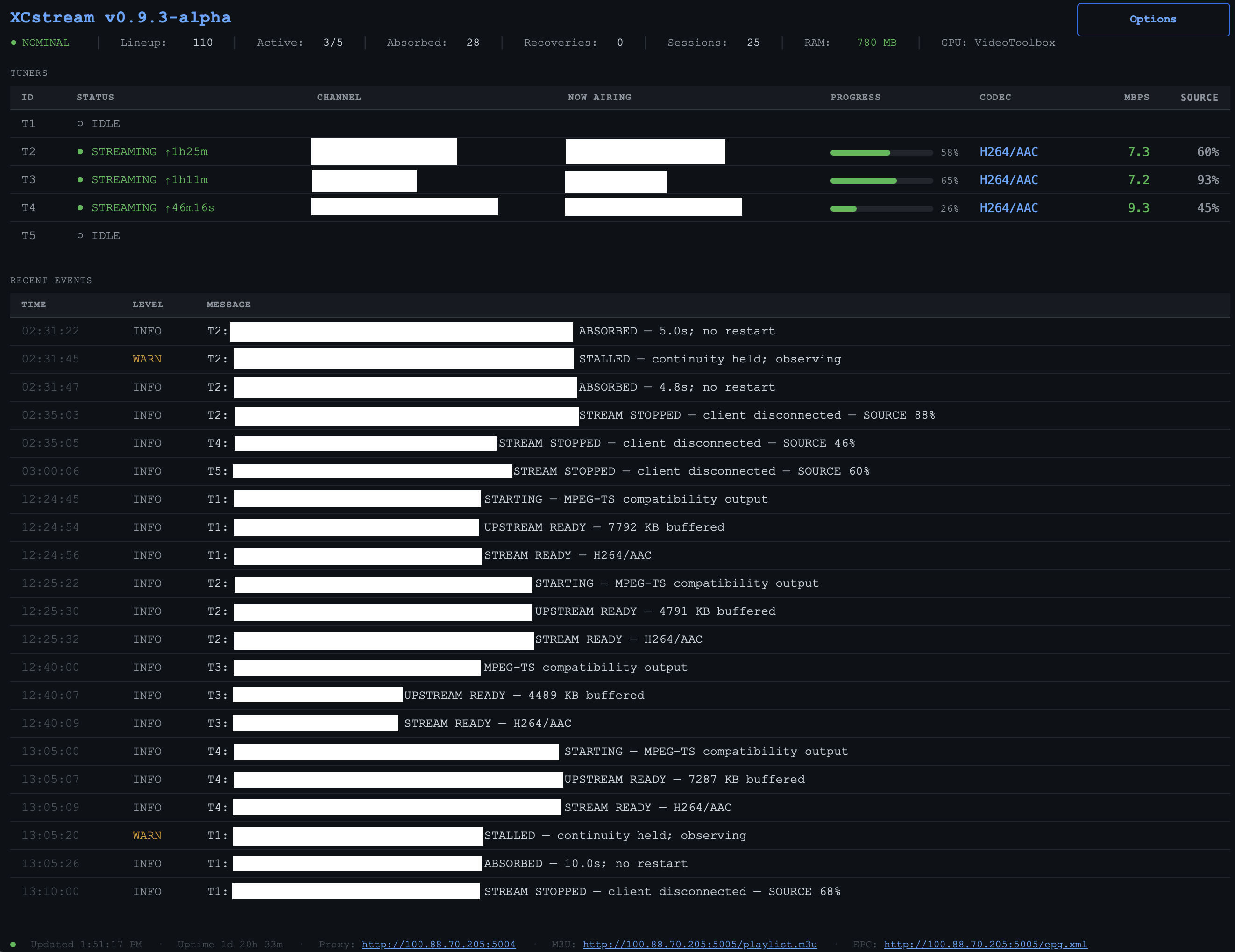
The latest soak testing has changed my thinking quite a bit as I work toward a public beta. Pass-through is proving extremely resilient. The latest run covered roughly 45 tuner-hours across 21 sessions, with 27 sustained stalls — and every one was absorbed without restarting the backend. You’ll also notice SOURCE % in the dashboard. It reflects how cleanly the upstream media timeline is arriving — not recording quality or footage loss. The biggest takeaway is that GPU transcoding no longer needs to be the default. That should make XCstream much easier to run on a much wider range of hardware, including NAS systems, mini PCs and older machines.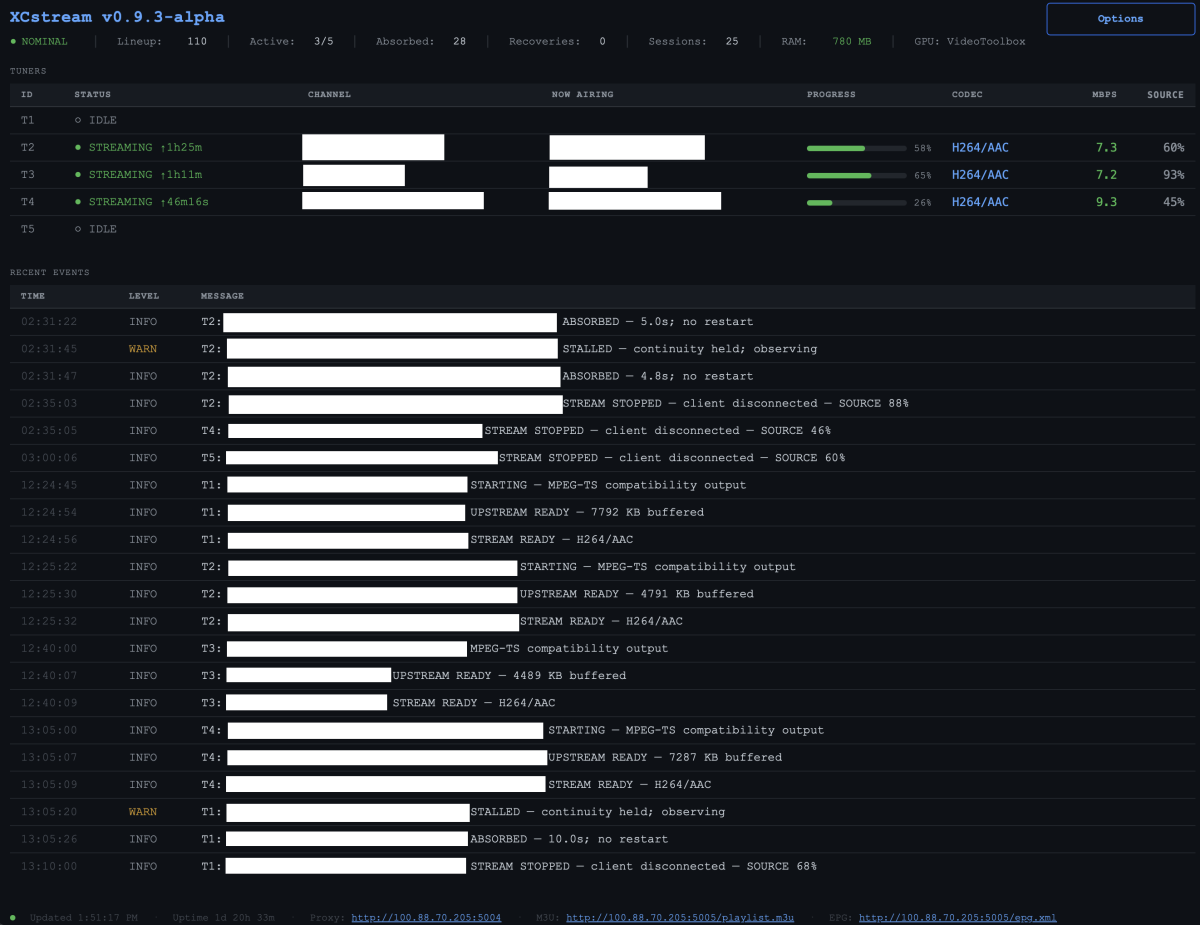
-

Option to display Extras directly below synopsis on the details page
ebr replied to thealienamongus's topic in Feature Requests
Hi, there's already an open request for this or something functionally equivalent. Please join in and contribute to the existing discussion at: -
TV Show Status — TMDB-powered Returning/Ended/Cancelled badges for series
Blueskies278 replied to Blueskies278's topic in Plugins
Last Minute tweaks TV Show Status Release Notes Changes 2.5.102.0 Add an option to show "Season Premiere" and "Season Finale" on posters as well as thumbnails Add an option to put the season number on the badge, as "Season 21 Premiere" 2.5.101.0 Add "Season Premiere" and "Season Finale" to the Upcoming list on every client, including Android TV, Fire TV and tvOS Fix Upcoming badges showing the show's next air date instead of each episode's own date Fix two badges appearing on posters when the overlay and web badges were both on Fix badges only appearing after visiting a show first, and disappearing again on the way back Fix badges never clearing from a card once drawn Add an optional calendar or coloured status dot in front of the status in show descriptions, which shows on every client. Off unless you choose one Add a colour setting for the Season Premiere badge Add a setting to show "Returning" instead of a date on the badge Add separate settings for library cards and the Upcoming list, so either can be badged on its own Add a setting to switch the web badges off inside the Emby app while keeping them in a browser Add a setting to turn off status badges on posters Change the "What to badge on thumbnails" description to say plainly that Season Premiere and Season Finale show on every client, not just a web browser Change the Upcoming badge to read the day heading Emby prints above each card, so it always matches Limitations Season Premiere and Season Finale on the Upcoming list appear on every card of that show while the episode is coming, not only the card it refers to. One picture serves every card and cannot tell them apart. Only the web browser gets it per-episode Turning on "Show the season number on premiere and finale badges" makes every badge slightly smaller, not only the premiere ones. Badges are sized so the longest possible label fits, and that label gets longer Season Finale can flag a week early or late. It compares the next episode against the number of episodes the season is announced to have, and that figure gets revised while a season is still airing. Season Premiere has no such risk There is no "Only Complete" option for the Upcoming list. Complete means nothing further is scheduled, and a show only appears in Upcoming because something is scheduled Air dates on Upcoming cards are web browser only. Season Premiere and Season Finale reach every client Turning "Prepend status to show description" on can produce two badges on a poster. Leave it off for now With Emby's "Hide spoiler information from unwatched episodes" on, unwatched episodes show the series artwork, so you see the show's badge rather than an episode one Episodes with no artwork of their own borrow the series picture, and the series badge comes with it Your library's thumbnail view and the Upcoming list request the same image, so a badge in one appears in the other. Poster view is the only layout that separates them The calendar and status dot in descriptions are emojis, so each device draws them in its own style and their colours cannot be changed Changing a setting may not update artwork you have already viewed. Refresh metadata on the show, or wait for Emby to re-read it "Draw badges on library cards" is web browser only, and is ignored while the poster overlay is on Ended defaults to amber on new installs only. Existing installs keep whatever they had EmbyTVShowStatus.dll TVShowStatus-Settings-Reference.pdf -

4K HEVC shows as 1080p, think I can't find any setup to fix?
Teddyknuddel replied to PeteGul's topic in Android
Wrong. Or are you suggesting my hardware is too weak? Then take a look at my signature. What the hell is the problem with offering true direct play over SMB? -
HLS segment list is computed from the container's declared duration and is never checked against the media.
Luke replied to vdatanet's topic in Developer API
And for the 220 this is where there’s no segmentcomplete in the ffmpeg log? - Today
-
Access ReplayGain metadata through the Emby API for audio playback
Luke replied to MarvinB's topic in Developer API
For example a client based on the mpv player doesn’t need to wait for any server features. You can just enable the options in libmpv -
4K HEVC shows as 1080p, think I can't find any setup to fix?
Luke replied to PeteGul's topic in Android
No the entire original file is transmitted. There’s no separation of audio and video. -
4K HEVC shows as 1080p, think I can't find any setup to fix?
Luke replied to PeteGul's topic in Android
Look at the source code for an smh file access client. The network requests to get a file are not that different from http requests. -
4K HEVC shows as 1080p, think I can't find any setup to fix?
Teddyknuddel replied to PeteGul's topic in Android
From the perspective of a video player, this line of reasoning is entirely correct from a functional point of view; however, it does not alter the technical definition of a bit-for-bit file copy. Relevance for the player: A video player requires neither file system permissions nor inode information nor creation dates to decode a video stream. For playback alone, this part of the metadata is in fact irrelevant. Representation in HTTP headers: Certain basic metadata, such as the file size (Content-Length) or the modification date (Last-Modified), are, of course, transmitted in HTTP headers. However, they are represented there as protocol parameters and are not part of the original file bytes on the storage medium. The difference compared to a file copy: A true bit-for-bit copy (such as that produced when copying via SMB or rsync, for example) creates a physically or logically identical duplicate of the file at the bit level, including all container structures and file sectors. An HTTP stream, on the other hand, delivers data dynamically and often in fragments (via range requests). If the original statement claims that this is a ‘bit-to-bit perfect copy’, this is technically inaccurate. It involves a bit-for-bit transfer of the payload (audio and video tracks) on demand, whilst the file as a whole remains on the server and is not transferred as a bit-for-bit copy. The term ‘DirectPlay’ is just a misnomer here. And practice proves it too. Large MKV files with HD audio, no smooth playback -
4K HEVC shows as 1080p, think I can't find any setup to fix?
Luke replied to PeteGul's topic in Android
Actually it works the same way. Players abstract this sort of thing the same way the server does. -

Access ReplayGain metadata through the Emby API for audio playback
MarvinB replied to MarvinB's topic in Developer API
@softworkz Thank you. I agree that Emby should not apply ReplayGain automatically and that clients normally should decide how to use it. My client has an additional constraint: it uses Alexa AudioPlayer, which accepts a stream URL but provides no DSP or ReplayGain controls. The client cannot modify audio samples, and the Echo cannot be assumed to honor preserved ReplayGain tags. Emby also has its own Alexa integration, so this limitation may apply beyond Ear Wax. Alexa AudioPlayer clients are not full media players with local DSP. They generally provide Alexa with a stream URL and cannot apply ReplayGain themselves. Therefore, exposing and preserving ReplayGain metadata solves discovery but not playback leveling for Alexa integrations. An explicit, opt-in server-side gain parameter would allow both Emby’s Alexa integration and third-party Alexa clients to request normalized output without changing Emby’s default behavior for ordinary clients. Would an explicit opt-in transcoding parameter be feasible—for example: ApplyReplayGain=Track or: AudioGain=-2.85 When requested, Emby would force transcoding and apply that constant gain. Without the parameter, current direct-play and transcoding behavior would remain unchanged. To prevent double application, the playback/media-source response could indicate: ReplayGainApplied=true AppliedGainDb=-2.85 Exposing the original ReplayGain fields or complete stream side-data JSON would allow my client to make one provider-neutral gain decision. The explicit stream parameter would allow Emby to perform that decision only when requested by a client that cannot process audio itself. Does the current transcoding API or plugin API have an extension point for this kind of explicit client-requested audio filter? -
4K HEVC shows as 1080p, think I can't find any setup to fix?
Luke replied to PeteGul's topic in Android
Actually some of that data goes in http headers. The rest doesn’t matter to a video player. -
Hi, yes, although there are features in the UI to delete subtitle files.
-
4K HEVC shows as 1080p, think I can't find any setup to fix?
Teddyknuddel replied to PeteGul's topic in Android
Wrong! Because the HTTP protocol and a conventional file transfer process (such as copying via a network share) work in fundamentally different ways: Missing file system metadata: HTTP transmits only the raw data stream (the payload of the media file). Operating system file attributes – such as timestamps (creation and modification dates), access permissions, inode information or extended attributes – are simply not included in an HTTP response header and are lost in transit. HTTP Range Requests (partial requests): When copying a file (e.g. via SMB), the file is transferred sequentially from start to finish. An HTTP media stream works differently: the player uses so-called range requests (206 Partial Content) to request only specific ranges of bytes – for example, when fast-forwarding or for the current buffer. At no point is a complete, contiguous copy of the file as a whole transferred. Server abstraction: The Emby server reads the source file and sends only the requested byte sequences to the client. Even though the audio and video streams remain bit-for-bit identical, the server processes the container structure at the application level, rather than serving the physical file on a block-by-block basis (as a file system would). Technically speaking, this is an on-demand live data stream rather than a synchronous, complete copy of a file.