All Activity
- Past hour
-
 Bridny joined the community
 -
 yhon9970 joined the community
 -
 jjj705428 joined the community
 -
 cking960218 joined the community
 -
 Tayaba joined the community
 -
 Jihad@7 joined the community
 -
 lpetolic25 joined the community
 -
 Silkyfy joined the community
 -
 ryanpotosme joined the community
 -
 lpetolic joined the community
 -
Thank you!!
-

There is a bug in version 2.3.8 with .ass files
MediaEmby1968 replied to MediaEmby1968's topic in Samsung Smart TV
Any solution? -
@GravitywaI have removed your last post. This is not the place to share that. Thanks.
-
Yes, this was addressed last year.
-
Is this resolved? I know its been a minute. thxs!
-
Thank you! That explains some things I was seeing.
-
Yes.
-
Don't forget that it should work the same for an .NFO file if there are customizations there. Have a good day.
-
So are all of those playlist folders obsolete?
-
I appreciate that, but then why even have the options available in Emby? And the same thing could be said about albums. I have the information stored in the file itself, but if I modify it in Emby, it uses my modifications going forward. And writes the modifications to the file system for easy backup/interoperability. The idea here is to rely on Emby for media management. Otherwise, I could just make sure to tag my files correctly, and let something else play them. Since I started this thread, I have gone back through all of my 5300+ music tracks, and retagged with the most recent metadata using Musicbrainz Picard. I enabled options for high-resolution images and complete genre and track data. It took every bit of free time I had for the last month. I wanted to start out with the most current and complete metadata I could to make sure that my observations were accurate. And for @Luke, let me say... As usual, Emby did a fantastic job of picking up the changes, re-indexing everything, etc... Admittedly, I've been ripping my CD's since (probably) the Windows 98 days, so it was a worthwhile project to get updated data into the files themselves... LOL My opinion is that music should behave just like we've come to expect from movies or television libraries. If you customize metadata/artwork there, it is preserved in the file system if a user elects to save metadata to disk. But if a trusting/non-technical user assumes their music track customization's are occurring the same way, they may only find out otherwise after a server failure. The fact that the options are available in the GUI at the track level tells me that ultimately, this is how it was intended to be at some point anyhow. Artists... Custom metadata info and art saved to disk... Albums... Custom metadata info and art saved to disk... Tracks... Well.............. Obviously, the expectation is the same. And THIS is the final step to complete everything necessary for music to behave like everything else. Maybe development focused on other things initially because not many people were customizing down to this level, but I think it's time to finish what was started. That's what I'm trying to help happen, using myself as a willing guinea pig. I have 5300+ tracks all tagged with the most current information, and hundreds of those tracks have custom art/metadata added through the Emby GUI. I'm here to help if needed, to find the correct path forward that doesn't break anything for others. Have a great holiday weekend.
- Today
-
Playlists are db-only now.
-
No not on the server, I mean on the Ubuntu client.
-
Thank you. I actually DO have the embyserver-backup-full folder. I had neglected to mention it because I was confused as to where that came from, figuring I had done it somehow. It's date is is 2024-02-27, though if I change into it, it seems like items in subfolders have been updated including this year. One thing that is confusing is in my Playlists, I have a playlist.xml file that does not seem to be updated - most are showing a date of 2023, while the .m3u file seems to be updated. Is this as expected? Finally, so it seems like things like playlists do not have multiple versions stored. Previously, every backup had a set of the playlists and so I would have 10 or so versions and if I needed to restore, I would have options. It seems now it only has the most recent copy. Is that correct? If so, it's a little disappointing. Thank you @Lessajand @GrimReaper for the fast responses!
-
@yockerwhat happened to you summer vacation / break And here I am, tagging you Enjoy your summer
-

Trouble Getting .strm files to play on Linux
MartinCheetham replied to MartinCheetham's topic in Linux
Yes. That is the path I use for the English version of the library metadata. So the mount is fine and the server can see and play the videos. -

What % of Emby users started with Plex?
ab123ga replied to Gilgamesh_48's topic in Non-Emby General Discussion
I cannot remember the exact order of things but I had WMC b/c of the liveTV and I did not feel like paying xfinity for their boxes. Worked good. I've had media portal (did not like it), Kodi for a while, and Plex before I ended on Emby. I will be honest and say that most of my family accesses my media center via plex. It probably was because it was the first I introduced to them and navigating them away now is a non-starter. I pretty much exclusively use Emby for my access. The gui and features are much more pleasing than plex. So emby in the end. -
You should also have "embyserver-backup-full" folder, the initial one - the others are incremental db updates. Backup & Restore plugin undervent significant overhaul for server version 4.8+, making previous backups incompatible. https://emby.media/support/articles/Backup-Using-Plugin.html
-
You should have a "embyserver-backup-full" folder along with newly dated folders you mentioned "Emby Server Databases - YYYY-MM-DD HH.MM.s" The 2024 folder you see is the older style of backup. Do you see the embyserver-backup-full folder? It may have an old time stamp on it but if you look inside backupinfo.json should have the latest date on it.
-
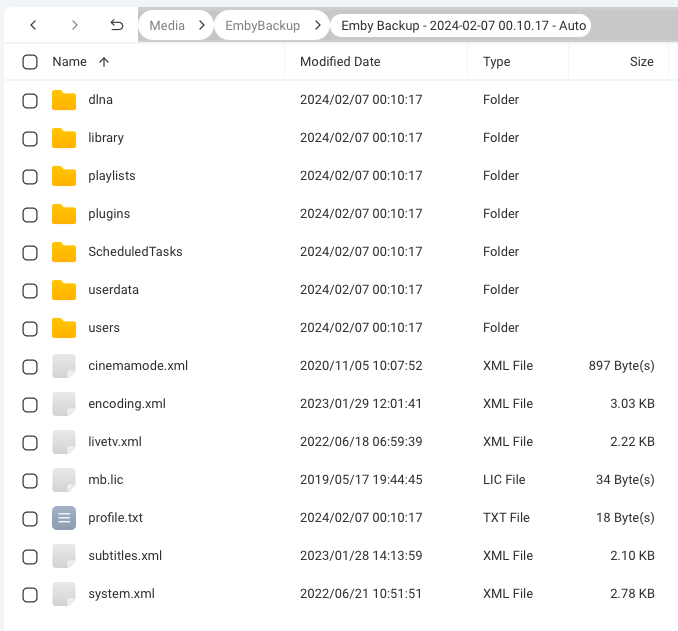
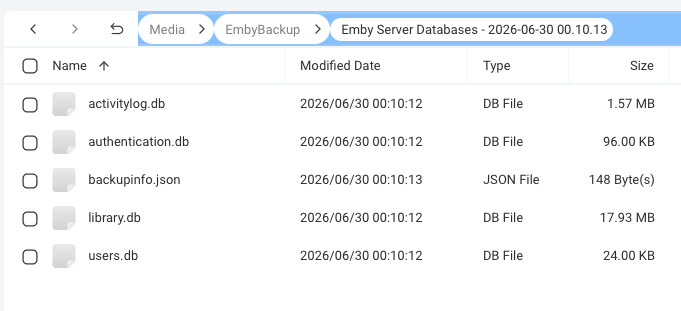
I have been running my Emby Server on a QNAP NAS for a number of years. Though I have the Backup and Restore plugin configured with all options checked and to keep 10 copies, I just noticed that what is being backed up has changed. And it seems like it changed a while ago. In my backup folder, I have 2 sets of folders. The first is 10 folders titled "Emby Backup -" with dates from 2024-01-19 to 2024-02-07. Each of these has a number of sub folders and some other files. See attached screenshot. The second is 11 folders titled "Emby Server Databases" with dates from 2026-06-21 to 2026-07-01. These only contain .db files and a backup info.json file. Why can I not access my playlists or other data that used to be backed up? Server Version 4.9.5.0 Backup Plug-in Version 1.8.3.0
-
“Please provide the macOS x64 build of Emby Server 4.8.0.32 (manual-launch .app). File name: EmbyServer-macos-x64-4.8.0.32.app”
-
Thanks, figured as much.
-
Out of curiosity, if you mount that share so that locally you can also see "/mnt/Qmultimedia/Movies/FirstdonoHarm.mkv" at the exact same path, does that play?
-
Could someone help here please? My setup is multiple Emby servers and clients on Windows and Linux with a QNAP NAS as the place where all my media is stored. As I host a non-English audience. I decided to try to create libraries with non-English metadata which has .strm files pointing to the actual .mkv files which are held on the NAS. Generally this has worked well. On a Windows client (with Windows server) the libraries are displayed in foreign language, where it is available, and Movies and TV shows play correctly. The .strm file just has a pointer to the locally mounted drive on the QNAP. On the Ubuntu clients (with Linux server), again the libraries are populated with foreign language descriptions of films and TV shows but I simply can't get the content to play (the screen just hangs, no error message). From the log files I can see "Directory or File does not Exist". I have tried many variations of the URL in the .strm files such as; /mnt/Qmultimedia/Movies/<folder>/<film name>.mkv With this variant I see "file:" prefixed to the URL in the log so I tried adding it; file:///mnt/Qmultimedia/Movies/<folder>/<film name>.mkv file://localhost/mnt/Qmultimedia/Movies/<folder>/<film name>.mkv I have even tried stripping off the <Cr> which one google search told me could be a problem as the files are created on a PC running windows. I have checked the path using something like; sudo -u emby ls -la "/mnt/Qmultimedia/Movies/FirstdonoHarm.mkv". This returns details of the file (so it is found) and is executable; -rwxr-xr-x 1 root root 3856642267 Feb 24 2022 /mnt/Qmultimedia/Movies/FirstdonoHarm.mkv (I stripped out the spaces and brackets in the file name in case this was an issue). Does anyone know the correct way to format the URL in a .strm file to play a locally mounted .mkv file? Thanks.
-
The functionality you are looking for all currently exists if you edit your actual music files using MP3Tag or similar software.
-

Collections Fails and Images Don't fully download
GrimReaper replied to ab123ga's topic in General/Windows
Is that a community plugin?- 1 reply
-
- 1
-