All Activity
- Past hour
-
 Michel1958Gagne joined the community
 -
 rooboos joined the community
 -
 botem435 joined the community
 -
 besor434 joined the community
 -
 berum433 joined the community
 -
 benax432 joined the community
 -
 bemor430 joined the community
 -
 beker429 joined the community
 -
 bajum428 joined the community
 -
bager427 joined the community
-

Latest version of Emby - Random lockups - Connection Timeout to https://api4.thetvdb.com
vaise replied to vaise's topic in General/Windows
So - the auto restart did not last long. /var/log/syslog:Sep 27 19:37:49 Tower kernel: .NET TP Worker invoked oom-killer: gfp_mask=0xcc0(GFP_KERNEL), order=0, oom_score_adj=0 Just 2 hours and 37min. I have NO remote applications connected to emby (have gone right back to basic) and only four non shipped plugins left - email, discord, reports and playback reporting. None of those are doing anything anytime around this out of memory issue. To re-iterate, I have not had to manually restart emby in years. The logs don't help as they are just cut off and stop dead. I am after any ideas going forward? Is it worth removing those last few plugins ? - Today
-
on Android it's trivial. I have my own made Emby Music Player app with built in updater and signed key for release. I like running the beta app but I'm always have to look for a new update and do it manually.
-
This is an interesting discussion. I was also looking into how Android APK updates work for apps installed outside the Play Store, especially when managing multiple devices. I found some related information here: https://inshotproapk.net/ . Would a store-based update system be able to recognize and update an existing sideloaded installation, or would users still need to reinstall it?
-
New Emby server Beta release, v4.11.0.4.
-
@softworkz It works but i have alread 2 important things which i don't find. I have added: https://streamfeeds.github.io/web/rss/wikidata-radios.rss but I can not automate that this feed will be imported every day at 02:00 AM. Is this possible? There is a second big problem. I can not add to my favorite list which is on the home screen on top. You can click add to favorite but it doesn't appear. Probably we have there a further problem. Because if we refresh the list every day we need a option to update only the URL's which are changed because if you create the entrys new the favorite list will be lost i think.
-

[Beta] ROMote – play your retro game collection in the browser (NES → PlayStation)
Maldark replied to digitalirony's topic in Plugins
This is so sweet. Thank you very much. I've only begun playing around with it but it seems to tick all the boxes for my user base of less tech-savy people that would struggle to setup something themselves. -

My Emby Customization – CSS + JavaScript Redesign
MediaEmby1968 replied to adelinxq's topic in Web App CSS
Hi. Since you mention CSS + JavaScript in the title, I think it would be good if you shared the file and mentioned whether you performed any special configuration or installation, or if it's just a matter of copying and pasting the CSS. Regards. -
 smolfirebug changed their profile photo
 -

Any way to quantify what causes a long library scan?
Luke replied to podonnell's topic in General/Windows
Hi, the log is the best way to see what it's doing. Library scan times will depend on what has changed since the last scan, what features you've enabled, what plugins you've installed, and what else might be consuming resources on the server at that time. -
https://github.com/MediaBrowser/Emby.Releases/tree/master/android I always go here
-
Oh, and if you can please share the screenshots of what you see on the three detail pages for the three Burzum entities now, that would be useful... I'm genuinely trying to solve this for you...
-
I've recently been catching my library scans running, which I never have in the past. When I do. I watch to see how long it takes to complete. Currently I've had one running for at least 2 minutes prior to me starting this thread, and it is still be running when I finished typing this message. I did check to confirm there is only a single stream happening, the CPU of the host machine is about as low as it normally is, and there are no current transcodes. Curious if there is any way to quantify what might be causing the longer library scans as of late. Is there any way that this can easily be done? Thanks!
-

TV Air Dates — corrects US and Canadian broadcast times to your timezone
Blueskies278 replied to Blueskies278's topic in Plugins
TV Air Dates 8.34.0.0 A big thanks to sh0rty for his invaluable help solving a few simkl bugs. Nothing you have saved changes — every setting keeps its name and default, and your API keys and Simkl sign-in carry over untouched. Everything new below is off until you switch it on. This release covers everything since 8.33.0.0. The big addition: TV Air Dates can now build your home screen as well as correct your dates. New A home screen of your own (Emby 4.10 or newer). A Home screen section now comes first in the settings, with a spotlight and up to six rows. Each one can show any of seven choices, independently: Airing Today — tonight's episodes, with their corrected dates Random TV shows or Random movies from your library, a fresh set each time the home screen loads In theatres — films playing in cinemas in your country, from TMDB New series — shows that started in the last 30 days, from TMDB Returning this week — shows with a new episode in the next seven days, from TMDB Spotlight at the top of the home screen is Emby's large carousel with full-screen backdrops and title logos. First row to Sixth row are ordinary rows you can move anywhere from your home screen settings, and they stay where you put them. Use one row or six, with or without the spotlight. The carousel shows in the web browser, the Emby for Android TV app and Emby for Android 3.5.62 or newer; other apps show large cards instead. Country for the TMDB lists — a two-letter code (GB, US, IE, DE, AU…) so In theatres, New series and Returning this week are your country's lists. Leave it empty to use the country in Emby's metadata settings. Hide the spotlight's Play button — leaves just the info and › buttons, for a spotlight you browse rather than play from. Web browser only. It works whether or not you have TV Show Status installed. Sharp backdrops, and your own choice of picture. In theatres, New series and Returning this week cards get the sharpest backdrop TMDB has, up to 4K, text-free first because the title logo sits on top. To pick a different one, open the card, choose Edit Images, click the backdrop and Search for a New Image: everything TMDB holds for that film or show is listed under TV Air Dates (TMDB). A picture you choose yourself is never replaced. Per-episode badges on the home screen. Airing Today cards are each their own episode, so a Season Premiere or Season Finale badge from TV Show Status sits on that one episode, in every Emby app. Nothing is added to My Media or the side menu. A Simkl request count in the log. Once an hour, when Simkl is your source, the log reports how many requests the plugin has made in Simkl's day and when the day starts again. Search for SIMKL:. Fixed On Simkl, dates went back to TMDB's once the daily allowance ran out. When Simkl refuses for the day, the plugin now keeps your last good Simkl dates instead of falling back to TMDB, and does not ask Simkl again until the allowance resets at midnight US Eastern. It also asks far less often: Simkl's id for each show is remembered for good, ended shows are checked weekly, and shows with something coming up about once a day. Saving no longer throws away work for nothing. Pressing Save with nothing changed is still the manual refresh and fetches fresh data for every show, and so does changing the source, a key or the two main switches. Changing anything else, such as the home screen or the window, now fetches nothing and takes effect straight away. Episode names could have been marked twice. Both this plugin and TV Show Status have a "Mark season premieres and finales in the episode name" setting. Each now recognises the other's marker, so whichever gets there first marks the name and the other leaves it alone. Airing Today could miss episodes dated later in the day. If a later fetch moved an episode onto today, Airing Today did not pick it up until the next day. It is now checked after every save and every refresh, and topped up when it is behind. Known limitations The home screen features need Emby 4.10 or newer. On an older server nothing is added and the log says why. Search for HOME ROW:. A person who has never changed their own home screen settings is left alone, on purpose. Emby builds an untouched home screen on the fly, and adding a row there would replace all of its default rows. Once that person changes anything in their home screen settings, the rows appear the next time you save, or at the nightly refresh. The spotlight shows at most ten items. That limit is in Emby's own apps. Random TV shows and Random movies pick a fresh ten from your whole library each time the home screen loads. After switching the Play button off or on, refresh the browser page. The switch does not affect the Android apps. On Simkl, the first refresh after updating looks each show up once, which costs two requests per show, one time. After that it is one. A free Simkl account allows about 500 requests a day, shared across all your Simkl apps. A show your source has never heard of cannot have a broadcast slot measured, so those episodes keep TMDB's date. The log names them: search for SLOT:. Disclaimer This is an unofficial, hobby-built plugin. It is not made by, endorsed by, or affiliated with Emby, Trakt, Simkl or TMDB. It uses the Trakt API, the Simkl API and TMDB, none of whom endorse or certify it. It is beta software and it writes to your library: it changes the air dates of episodes you already have, optionally adds "Season Premiere" or "Season Finale" to episode names, and with the home screen settings on it adds rows to people's home screens. Take a backup of your Emby server before installing, and keep one. It is supplied as-is, with no warranty of any kind — you run it at your own risk, and I cannot be held responsible for anything it does to your library, your server or your data. You supply your own API keys and remain bound by the terms of whichever services you use. Exported settings files contain those keys — and your Simkl sign-in — in plain text; treat them as passwords. Please report bugs along with your Emby log. Thanks New TVAirDates.dll TV-Air-Dates-guide-8_34_0_0.pdf TV-Air-Dates-settings-8_34_0_0.pdf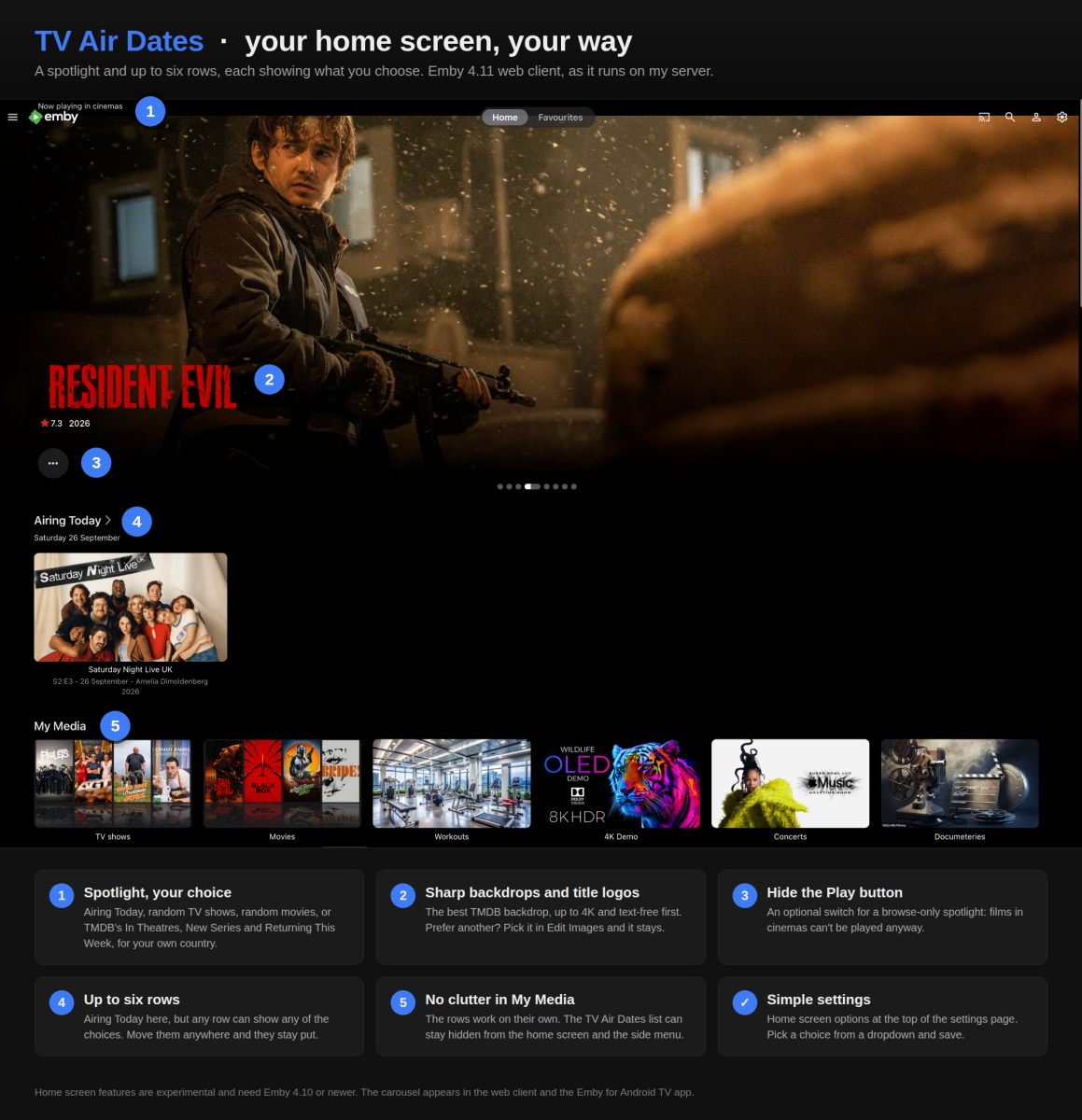
-

How to delete downloaded content without being connected to the server?
ebr replied to LittleKinder's topic in Android
Again, to clarify - you don't actually want to delete the content - you want to remove the download, correct? -
TV Show Status — TMDB-powered Returning/Ended/Cancelled badges for series
Blueskies278 replied to Blueskies278's topic in Plugins
TV Show Status 2.5.137.0 Nothing you have saved changes — every setting keeps its name and default. This is an updated build under the same version number, so replace the DLL you have. It covers everything since 2.5.137.0 was first posted on 19 September: mostly the browser, and working alongside TV Air Dates. New Per-episode badges on TV Air Dates' Airing Today cards, in every app. If you run TV Air Dates with an Airing Today row or spotlight on your home screen, each card there is its own episode. A Season Premiere or Season Finale badge therefore lands on that one card, in the Emby apps as well as the browser, not on every card of the show. Fixed Home screen rows lost their badges in the browser. The script that tidies the Upcoming list was also running under every other heading on the home screen, so rows such as TV Air Dates' Airing Today had their badges stripped and nothing painted back. It now only touches real Upcoming day headings, and a card showing its own picture keeps its badge. Web browser only. Blank Airing Today cards with the spoiler setting on. With Emby's Hide spoiler information from unwatched episodes on, the browser showed a blank placeholder for TV Air Dates' Airing Today cards. It now shows their wide picture instead. Your own library episodes are left exactly as the spoiler setting says. Web browser only. Episode names could have been marked twice. Both this plugin and TV Air Dates have a Mark season premieres and finales in the episode name setting. Each now recognises the other's marker, so whichever gets there first marks the name and the other leaves it alone. Why a badge showed on one premiere but not another in the apps. It was the Flag a premiere or finale this many days ahead window, working as intended, but the description never said so. It now explains that the number applies to the Emby apps, while the web browser badges every premiere and finale in Upcoming however far off, because there the badge is per episode. Known limitations In the apps, a premiere badge still appears on every Upcoming card of a show that has no episode artwork. Unchanged and not fixable server-side: all of those cards ask for the same image. The browser, and TV Air Dates' Airing Today cards, are per-episode. TV Air Dates' Airing Today cards show no badges in an app with "hide episode spoilers" on. That app hides an unwatched episode's own picture, and the badge goes with it. A new badge can take a while to reach an app. The app keeps showing the list it has cached. Force-close the app and the badge appears. After updating, hard-refresh the browser (Ctrl+Shift+R, or Cmd+Shift+R on a Mac). The badge script is cached, and without a hard refresh you are looking at the previous version. Disclaimer This is an unofficial, hobby-built plugin. It is not made by, endorsed by, or affiliated with Emby or TMDB. It uses the TMDB API but is not endorsed or certified by TMDB. It is beta software and it can write to your library: with the relevant settings turned on it changes show descriptions and episode titles. Those are real edits to your metadata, reversible by switching the setting off. It also modifies cached artwork — your original image files are never touched, and turning the overlay off restores the artwork as Emby regenerates its cache. Take a backup of your Emby server before installing, and keep one. It is supplied as-is, with no warranty of any kind — you run it at your own risk, and I cannot be held responsible for anything it does to your library, your server or your data. You supply your own TMDB API key and remain bound by TMDB's terms. Exported settings files contain that key in plain text; treat them as passwords. Please report bugs along with your Emby log. Thanks My "TV Show Dates" plugin EmbyTVShowStatus.dll TV-Show-Status-guide-2_5_137_0.pdf TV-Show-Status-settings-2_5_137_0.pdf -
@mwongjay Hi, I don't use most of the things you are describing - Live TV, m3u, Dispatcharr, iptv groups, parental controls, mdblists... Also, Movies and Music Libraries in Emby have quite a few differences. For Music, generally I use: embedded metadata in source files to create Album Tags because I can bulk edit them in Mp3tag and import into Emby Tags Emby UI functions to create Artist Collections because it's mostly easier and more convenient than Emby Tags Of course there is cross-over with managing this within Emby, but I think that's the main fundamental difference. I'm happy to share more ideas, but not really sure I have many that will help for your media/movie setup..?
-
Hey everyone, I wanted to share a small set of custom library cards inspired by Seer for Emby dashboards. I put these together to give the dashboard a cleaner, more unified look. Please feel free to use these in your own dashboard. I'm happy to provide more or tweak them if there are specific libraries or styles you'd like to see added, but I wanted to share these for the community to use! Movies, TV, International, Anime, Pro Wrestling, Music, Podcasts





-
@kbeck I would agree that Media Monkey is useful. I vaguely remember using it perhaps 15 years ago (?) in the Windows 8 days. They had a separate Windows App that was great on large touchscreen PCs. But then Windows 10 came out and this App was discontinued. I also likely changed PCs around then, and with the updated operating system, stopped using it. Perhaps time to see what the latest version has... At some point, think I have tried most of the well-known options. MusicBee has some nice features but it reminds me too much of being at work and managing Excel spreadsheets. There's a lot of other options that give me the same unpleasant experience. At the moment, customized Emby Web App (CSS/Javascript/Plugins) plus Mp3tag, does most of what I want as a dedicated music management setup. For Movies/TV the Emby Android App is fine for my basic requirements. Thanks for the info - most appreciated!
-
what about when you mouse over the timeline during video playback? does it happen with those thumbnails?
-
Frankly I am floored by the magnificent help here at Emby. I will apply your suggested correction. Thanks!
-
You've in effect actually caused transcoding. Auto is 80MBit and allows bitrates that high to play. When you use the quality selector inside the video player it will shorten the choices on the quality menu to allow you to lower the quality. Since the media you are playing is 480P it only suggests heights/bitrates that are lower in quality. You chose 480P and 4Mbit. The quality is below the original quality of the media and causes transcoding. This fixed your issue. But there is a better way. If you keep the setting at 480P with 4Mbit all your media will be reduced to this. Even your 4K, 1080P, and 720P material will be reduced to 480P at 4Mbit. When you use the quality selector inside the settings menu you can adjust to the exact quality and bitrate you desire. There is no context of a media item playing. All quality choices are shown. You can set the quality to exactly where you want which should match the available bandwidth you have on your LAN/WAN. The better way of fixing this issue quickly is to use the "Attempt Playback Correction" button instead of the Quality button. It is right below it on the playback settings menu. Then it will attempt to fix the issue by restarting the video player with a different method. If the issue isn't fixed by using the playback correction the first time use the playback correction button again. Using playback correction will keep your original quality and simply change playback methods.
- Yesterday
-

Opus files incorrectly transcode part way through tracks after update to Emby for LG 1.0.51
magickii replied to magickii's topic in General/Windows
Thanks for the quick reply. I have two questions in the meantime, 1. Is there a way that I can force opus to Direct Play a specific track to help debug if my particular model has issues playing opus? 2. Why might the transcoded tracks be starting part way through rather than at the beginning, and is there any additional information I can provide to help with debugging that? -

Catastrophic Emby search bug on the new stable version.
devsky88 replied to Dan_86's topic in General/Windows
They keep releasing more betas but they won't release even a small stable with the 1 item needed to fix a completely broken piece of Emby. One of your own clients (Emby app on Android TV) can't even search and is completely broken. Can we get a small push for just the search fix? Kind of ridiculous when we can't even use the Emby client as it stands. -
Latest version of Emby - Random lockups - Connection Timeout to https://api4.thetvdb.com
vaise replied to vaise's topic in General/Windows
Im shelving this recovery plan, as I did a restore to the new backup server (assuming it would offer me a selection of what I could restore), I wiped out all my rebuild work for the new system. Any corruption on the live system is now in the new backup system also. Im just going to have an autmatic restart of the emby server daily in case of this issue - maybe that's all it will need for stability - a restart at 5pm. -
Latest version of Emby - Random lockups - Connection Timeout to https://api4.thetvdb.com
vaise replied to vaise's topic in General/Windows
hhhmmmmm - so it seems I have to pre-create all the users on this newly built backup system - I can't restore just the users, then the play states....... This is a bit of a pain as I don't know all the passwords...... -
Hey, so just to confirm what you want to achieve, something like: "Burzum" and "Burzum (NEW)" and "Burzum NEW" still showing as separate Album Artists on the main Emby page that shows all of the entities together. So you see the aliases. These three next to each other in the standard primary grid view: AND when you select any of these: They all link to the one Album Artist detail page that shows the one overview, but all of the Albums for the three entities all show together on that one detail page as a combined discography. But with the individual Album tracks still only containing the one relevant Artist alias? If that's the scenario (and please correct me if I'm wrong) then I may have a tentative idea that might achieve this for you. I've just run a mini-test and I think it's possible, but just need to confirm with you and do a bit more playing around with it...