All Activity
- Past hour
-
 y36697851 joined the community
 -
 deviantcryptids joined the community
 -
Hi. Can I please see the ffmpeg logs from that exact playback?
-
 Aliencatmeow joined the community
 -
 JazzPrime joined the community
 -
 ER43NI joined the community
 -
No none of the onedrive links work anymore. Anyone else have a link willing to share please?
-
 roncero joined the community
 -
 Rzchn joined the community
 -

Emby for Android on Shield TV no longer passing through dolby digital 5.1 or DTS
ebr replied to Kramerika's topic in Android TV / Fire TV
Can you please reproduce that and then follow the instructions to send a log from the app? -
https://emby.media/community/forum/96-third-party-apps/
-
Hi. The only account you can have with us is not disabled because you just used it to post here.
-
 IPPLAY joined the community
 -
 clover的花语 joined the community
 -
G'day, I have a feeling this is related to the other forum topics relating to Nvidia Shield Audio Codec Issues (E-AC3) - Android TV / Fire TV - Emby Community and Emby for Android on Shield TV no longer passing through dolby digital 5.1 or DTS - Android TV / Fire TV - Emby Community, except my issue is with MP2 audio. I'm not entirely sure when this happened but I feel it was over the past two days. Neither of my two NVIDIA Shields using the Emby for Android TV app will play the audio from DVB-T live TV streams when the audio is MP2. If I playback Dolby Digital, it works fine, but not when it's MP2. It is definitely the app doing it, because the Emby server records the stream just fine with audio and you can play it back on PC just fine as well. I have submitted two logs. It's playing Frankie Drake Mysteries on ABC TV at ~7.20 am GMT-5. Emby for Android TV was auto updated to v2.1.49g on both devices. The issue does not occur on the Emby for Android app; it can play the live TV channel just fine, however, that app is not the solution here. Like the other threads, this has been working flawlessly for years until now. One device is plugged into an A/V receiver via HDMI; the other a soundbar via HDMI.
- Today
-
Not recording a single channel or other content provider. I use a website like pogdesign and mark the TV shows I want to watch and then go about either watching them or getting them. All the content available for free has ZERO advertisements. Live sports that I watch like Soccer, F1, Rugby have no commercials. In addition they have VOD so again no need to record. I have a total of 46TB of video content on 2 Unraid servers that I rarely touch these days. The routine for watching has changed for me and many others yet Emby still plays an important roll. For the WAF the BBC "Great British Sewing Bee" just started with season 12 and that is for Emby. Usenet is too expensive, really? You must have missed when Newshosting / Easynews ran a massive 2025 Black Friday promotion offering 15 months of unlimited Usenet for around $25 which you could add to existing subscriptions. Add to that a decent NZB indexing site and you are set. Waiting for the 2026 BF deals.
-

Emby clients can enter uncontrolled request loops without retry backoff
peter2020 posted a topic in General/Windows
Hi, I have observed multiple cases where Emby clients entered long-running request loops against different Emby API endpoints. Although the affected endpoints and clients differ, the behavior appears similar: the client repeatedly sends the same request without an effective delay, backoff or termination condition. Environment: - Emby Server version: 4.9.5.0 - Confirmed clients in some of the cases: - Emby for Samsung - Emby for Android - The client responsible for some Live TV cases could not be identified from the available logs. Case 1: Item-detail requests Affected endpoint: GET /emby/Users/{UserId}/Items/{ItemId} Four analyzed log extracts contained approximately 198,000 requests to four individual item-detail URLs. Observed behavior: - Bursts continued for up to approximately four hours. - The same item was requested about once or twice per second. - Most responses were successful HTTP 200 responses. - Successful responses did not stop the repeated requests. - Individual clients generated tens of thousands of requests for the same item. Case 2: Live TV playlist requests Affected endpoint: GET /emby/videos/{ItemId}/live.m3u8 One incident produced: - Approximately 490,000 requests to the same playlist - A duration of approximately three and a half hours - Only HTTP 401 responses - Peaks of more than 12,000 requests within five minutes - Up to 43 requests during the same second Another incident produced: - Approximately 12,700 requests over four hours - A mixture of HTTP 200 and HTTP 401 responses - Peaks of approximately 5,000 requests within five minutes - Up to 39 requests during the same second Common behavior In all cases: - The same endpoint was requested repeatedly for an extended period. - There was no effective retry delay or exponential backoff. - Successful HTTP 200 responses did not always stop the loop. - HTTP 401 responses could trigger a particularly aggressive retry storm. - Multiple identical requests sometimes arrived during the same second. - The behavior continued until the client or session was interrupted. Expected behavior - A successful item-detail response should not be requested again every second unless something has changed. - Live playlist polling should use an appropriate refresh interval. - After HTTP 401, the client should stop playback, refresh authentication or apply exponential backoff. - Duplicate or concurrent retries should be limited. - Repeated failures should eventually terminate the operation and display an error to the user. Impact A single affected client can generate tens or hundreds of thousands of unnecessary requests, place significant load on the Emby server, and consume unnecessary resources on the client itself. Could this behavior originate from a shared retry, polling, request-scheduling, or client-side state/cache handling component used by multiple Emby clients? Please let me know which server or client debug logs would be helpful for identifying the trigger. I can provide sanitized access-log samples if required. -
Hi all, First of all apologies if I already posted about this (I couldn't find anything on the forums but can't fully remember) Having some issue with volume on certain things. 1. Volume is low when listing to voice so myself and my wife just turn thr volume up and then as something progresses into loud affects (cars speeding or guns) it's super loud. 2. Second issue is where from episode to episode the volume changes in it's entirety. I am posting it here as I think it's samsung related. Whilst I don't have another TV brand to test my phone seems okay. I have tired to find a pattern with the audio but some things that have issues are AAC stereo and others are 5.1. Whilst trying to troubleshoot this issue myself I have stumbled upon posts where there are screenshots of audio settings I can't find myself like pass through or codecs etc. It's actually got the point where it's super hot at the mo and have fans running the talking is so bad I am having to turn up TV super loud and manage it when it gets to non talking bits. Has anyone got any suggestions. Thanks
-
Hi, perhaps check out the official Emby Music Naming requirements if you haven't already: https://emby.media/support/articles/Music-Naming.html Problems with Albums joining together incorrectly are usually due to incorrect or missing embedded metadata in your audio files themselves. Check your tags for the relevant fields (e.g.) Album and Album Artist, ideally with a tagging application (e.g.) Mp3tag. If you have missing embedded metadata and the audio track files are grouped in the same parent folder that may also cause issues? Do you use MusicBrainz IDs? This could cause incorrect grouping if the tags are inconsistent or incorrect? My guess is you don't have Album Artist field filled in and it is blank???? But it could be something else? Cheers!
- 1 reply
-
- 1
-

-

Fixed - choppy/ stuttering playback on some HEVC RARBG files
Machete89 replied to Machete89's topic in Android
Try remuxing one of the affected videos and if it works then you will have to do your whole library. I know it sucks but I haven't had a single issue ever since I remuxed my library. -
Which account and disabled where?
-
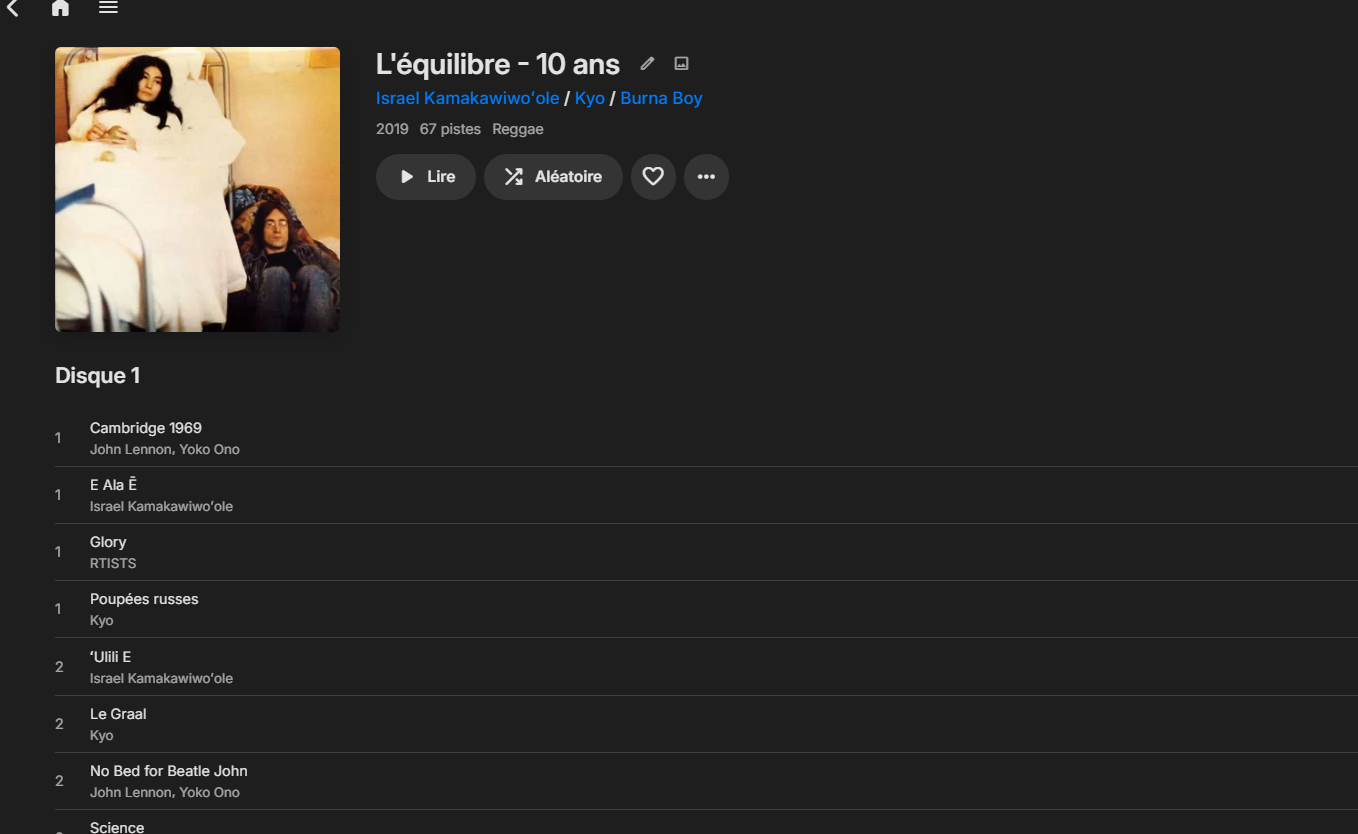
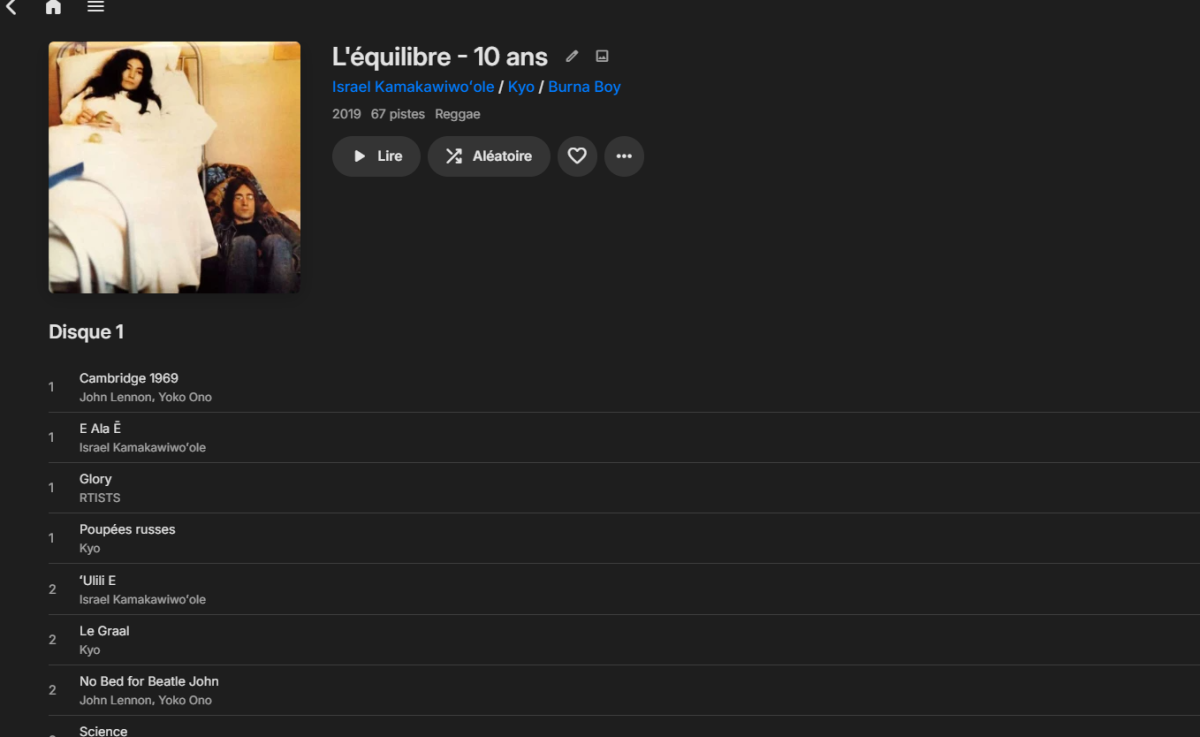
Hi, I got multiple album that fuse together without reason it start with "Kyo-L'équilibre" who fuse with "Israel Kamakawiwo'ole-E Ala E" and i recently added somes new artist and same issue with "John Lennon-unfinished album life with a lion" and 'burna boy album don't remember which one" Someone know how to correct this issue ?
-
It would be an awesome addition for admins to be able to force the setting, how ever niche this problem might be. It would make helping elderly and other not tech savvy people much easier.
-

Samsung Tizen app unable to play FLAC – infinite loading, no playback, forces AAC transcoding
Redji59 replied to Liskanet99's topic in Samsung Smart TV
Bonjour, je confirme depuis la MAJ de TIZEN OS les .FLAC lu par Emby tourne en boucle et la lecture ne demarre jamais je suis sur TrueNAS, Emby Server derniere version et TIZEN OS egalement Hello, I can confirm that since the Tizen OS update, .FLAC files played via Emby get stuck in a loop and playback never starts; I am running TrueNAS with the latest versions of both Emby Server and Tizen OS. -
My is my account disabled?
-
When this control was first requested, it was hoped that it would perform as a complete 'override' regardless of what was set at the client end. Unfortunately it ended up working specifically for those still set at "Auto" @Lukeany chance we can still expand the feature to override more than just Auto?
-
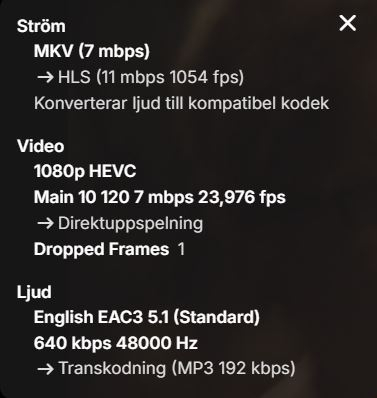
Hi! I've recently migrated from truenas Core 13, to truenas Scale 25. Hardware is all the same. Emby now works worse. I've given it access to all 8 cores in config. I access it the same way, through the brave browser. Video sometimes plays a few seconds of the same video again, while sound continues to play, then video snaps forward to where the sound is. Never happened before. Also playback is flawless in the emby app. But I can't choose zoom level and alltogether don't want to use the app. Also playing the video over Samba in vlc is no problems. So the hardware on both my server and the local PC is not a problem. Please help /V
-
Problem is as said that some now have manually set it at the lowest possible quality. They are using Samsung but even with the feature they are no longer set to auto as they fumbled into having turned the quality setting way down. I do love the new feature though!!
-
Hey Luke, sorry for the delay. Question: that page talks about collecting server logs but I think this is only an issue for one client, the AppleTV. Would you still like me to provide server logs, or would you prefer I just send a small sample video that reproduces the issue reliably? I have one ready to provide if you want, let me know. Thanks!
-

Fixed - choppy/ stuttering playback on some HEVC RARBG files
ullmat replied to Machete89's topic in Android
I might have the same problem. The solution can't possibly be to remux my entire library? -
With pleasure..
-

iOS App Error playing MKV files (only on the app)
felix89 replied to AlyEssa's topic in Apple iOS / macOS
Scarlet iOS is a helpful resource for people who want to learn about installing and managing apps on iOS devices. It provides clear installation guides, easy-to-follow tutorials, and the latest updates in simple language, making it suitable for both beginners and experienced users. The information is organized in a way that helps visitors quickly understand each step without feeling overwhelmed by technical details. It also includes useful tips and troubleshooting advice to help users solve common issues and stay up to date with new features and improvements. -
Whar are some 3rd party apps that work with emby that I can test out and play around with?
-

My experience with Intel ARC A310 Sparkle and Windows Server 2025 (Proxmox VM)
kadargof replied to kadargof's topic in General/Windows
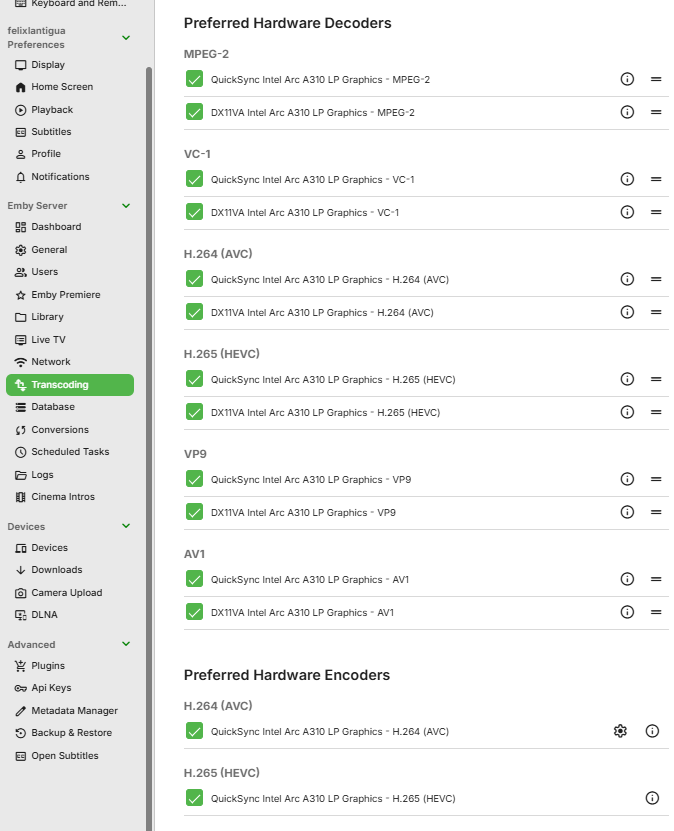
For better understanding... [GUIDE] Intel Arc A310 Hardware Encoding & Decoding in Proxmox (Windows Server 2025 VM) on a Legacy BIOS System (No UEFI / No ReBAR) Overview After several days of troubleshooting, I successfully deployed an Intel Arc A310 LP GPU for full hardware decoding and encoding inside an Emby Server running in a Windows Server 2025 virtual machine hosted on Proxmox VE. Many online guides suggest that Intel Arc GPUs require: UEFI firmware Resizable BAR (ReBAR) Modern PCIe platforms to function correctly. For my particular workload (Emby hardware transcoding), that was not the case. This guide documents the complete process that ultimately resulted in stable hardware transcoding on the following legacy platform. Tested Hardware Host Lenovo ThinkStation D20 Dual Intel Xeon X5680 Legacy BIOS (no UEFI) PCIe 2.0 Intel Arc A310 Low Profile Proxmox VE Guest VM Windows Server 2025 Q35 machine type GPU PCI passthrough Initial Symptoms Initially I observed the following behavior: https://cdn.jsdelivr.net/joypixels/assets/8.0/png/unicode/64/2705.png Intel Arc driver installed correctly https://cdn.jsdelivr.net/joypixels/assets/8.0/png/unicode/64/2705.png GPU detected by Windows https://cdn.jsdelivr.net/joypixels/assets/8.0/png/unicode/64/2705.png GPU passed through successfully https://cdn.jsdelivr.net/joypixels/assets/8.0/png/unicode/64/2705.png Hardware decoding worked https://cdn.jsdelivr.net/joypixels/assets/8.0/png/unicode/64/274c.png Preferred Hardware Encoders always reverted to Software Encoders https://cdn.jsdelivr.net/joypixels/assets/8.0/png/unicode/64/274c.png hardware_detection.txt contained Quick Sync initialization failures (Result: null) https://cdn.jsdelivr.net/joypixels/assets/8.0/png/unicode/64/274c.png Connecting through Microsoft Remote Desktop caused hardware encoding to stop working Because the GPU itself was functioning correctly, the problem turned out not to be related to: Proxmox PCI passthrough Intel Arc drivers Legacy BIOS Missing ReBAR Instead, the issue was caused by a combination of Windows Server multimedia components, driver installation behavior, and Remote Desktop graphics policies. Phase 1 — Base Platform Preparation 1. HDMI Dummy Plug In my environment, Windows Server would not consistently initialize the Intel Arc media engine while running completely headless. Installing a simple HDMI dummy plug allowed the GPU to initialize correctly after every reboot. Although this may not be required on every system, it was required in my configuration. 2. GPU Passthrough Configure GPU passthrough normally. Recommended configuration: IOMMU enabled iommu=pt Q35 virtual machine Intel Arc A310 passed directly to the guest Phase 2 — Restore Windows Server Multimedia Components Unlike Windows 11, Windows Server intentionally removes many multimedia features that consumer applications expect. Without these components, Emby's Quick Sync detection failed and produced: Result: null inside: hardware_detection.txt Install Media Foundation Open an elevated PowerShell window: Install-WindowsFeature Server-Media-Foundation Also install the required .NET Framework Features from Server Manager. Restart Windows. Install DirectX End-User Runtime Download Microsoft's official: DirectX End-User Runtimes (June 2010) Extract the package and run: DXSETUP.exe as Administrator. Phase 3 — Install the Intel Driver Correctly The standard Intel installer detects Windows Server and may omit or block portions of the consumer multimedia stack. Instead: Extract the Intel driver package with 7-Zip. Open Device Manager. Update the Intel Arc device manually. Browse to the extracted driver folder. Enable Include subfolders. Complete the installation. This installs the raw driver without relying on Intel's installer logic. Phase 4 — Media SDK Registry Configuration Create: intel_fix.reg Paste: Windows Registry Editor Version 5.00 [HKEY_LOCAL_MACHINE\SOFTWARE\Intel\MediaSDK] "DispatchLevel"=dword:00000001 [HKEY_LOCAL_MACHINE\SOFTWARE\Wow6432Node\Intel\MediaSDK] "DispatchLevel"=dword:00000001 [HKEY_LOCAL_MACHINE\SOFTWARE\Khronos\OpenCL\Vendors] "intelocl64.dll"=dword:00000000 Merge the registry file. Phase 5 — Prevent RDP from Taking Over the GPU This ended up being one of the largest obstacles. By default, Microsoft Remote Desktop may replace the active graphics adapter with the Microsoft Remote Display Adapter during remote sessions. In my testing, this caused Emby to lose access to Intel hardware encoders even though the GPU driver remained installed. To prevent this: Open: gpedit.msc Navigate to: Computer Configuration Administrative Templates Windows Components Remote Desktop Services Remote Desktop Session Host Remote Session Environment Configure: Policy Setting Use the hardware default graphics adapter for all Remote Desktop Services sessions Disabled Prioritize H.264/AVC graphics mode for Remote Desktop Connections Disabled Use WDDM graphics display driver for Remote Desktop Connections Enabled Then run: gpupdate /force Restart the VM. Phase 6 — Configure Emby Inside Windows: Settings System Display Graphics Assign High Performance to: EmbyServer.exe and ffmpeg.exe located in the Emby installation directory. Switch Windows to the High-Performance power plan. Finally: Exit Emby completely. Delete: %appdata%\Emby-Server\programdata\cache\ffmpeg Restart Emby Server. Results After Emby rebuilt its hardware detection cache, both hardware decoding and hardware encoding became available. The Preferred Hardware Encoders list correctly displayed: Quick Sync Intel Arc A310 LP Graphics — H.264 (AVC) Quick Sync Intel Arc A310 LP Graphics — H.265 (HEVC) Hardware transcoding continued to function correctly after: Multiple server reboots Multiple RDP sessions Normal day-to-day server administration Final Notes This guide documents one verified working configuration and should not be interpreted as proof that every Intel Arc deployment behaves identically. However, it demonstrates that full Intel Arc A310 hardware transcoding is possible on a legacy BIOS platform without UEFI or Resizable BAR, provided that Windows Server's multimedia framework, graphics policies, and driver installation are configured appropriately. I hope this saves someone else the many hours of troubleshooting that went into discovering these interactions.