All Activity
- Past hour
-
 daneder89oi joined the community
 -
 tavesigrjmm joined the community
 -
 felipe_5 joined the community
 -
 tofesaprhjj joined the community
 -
 IsmailBS joined the community
 -
 Teamo12 joined the community
 -
 umaur9837785 joined the community
 -

Emby server/client - ReplayGain or R128 volume normalization support for music
ManiacDC replied to Espen JQ's topic in Feature Requests
It doesn't use replaygain, but yes it scans your music library and normalizes the volume. -
 Lorena_oc joined the community
 -
 Littlefugt joined the community
 -

Atrium — a native tvOS app for your Emby server
jasonmcroy replied to vdatanet's topic in Third Party Apps
I have been watching movies today on a lazy Saturday. So far playback has been flawless! Enjoying that. I have noticed a minor UI thing - When selected any poster or thumb image, as the poster/thumb expands slightly in size as it becomes the focus point, the text under it overlaps the image just a little bit. It sort of makes it hard to read while the image is focused. Maybe just a padding issue? Nothing else of note so far. -

4K HEVC shows as 1080p, think I can't find any setup to fix?
yocker replied to PeteGul's topic in Android
Nothing is lost by transferring over http. It's still bit to bit perfect copy. -

Access ReplayGain metadata through the Emby API for audio playback
MarvinB replied to MarvinB's topic in Developer API
@softworkz Thank you for clarifying. Is there a supported public plugin API—such as IFfmpegRunner, IMediaEncoder, or another service—that allows a plugin to create an audio transcoding job with a custom constant-volume filter and stream the result? I am trying to avoid launching and managing FFmpeg directly from the plugin. If no supported extension point exists for adding an audio filter to Emby’s transcoding pipeline, that answers the question. -
Bonjour à tous, Comme beaucoup ici, j'ai mon serveur Emby au centre de mes soirées. Il ne lui manquait qu'une chose : la TV en direct de mon abonnement Zattoo, que je devais toujours aller chercher ailleurs. Alors je me suis lancé, et le résultat fonctionne assez bien pour que j'aie envie de le partager. Emby.Zattoo est un plugin Live TV qui fait apparaître les chaînes non-DRM d'un compte Zattoo directement dans Emby, comme n'importe quelle autre source TV. On ouvre le guide, on clique sur une chaîne, ça démarre. Rien de plus. Sous le capot, tout se passe côté serveur : le plugin ouvre le flux Zattoo, choisit une piste vidéo et une piste audio, puis les remuxe en MPEG-TS pour Emby avec FFmpeg en copie de flux. Pas de réencodage, donc très peu de CPU. Et vos identifiants, cookies et URL de lecture ne quittent jamais votre serveur. Ce que ça donne au quotidien : - vos chaînes arrivent avec leurs vrais numéros, vos favoris, les logos et les bouquets, en ne gardant par défaut que celles réellement lisibles - un guide jusqu'à 14 jours, dont les descriptions se complètent tranquillement en arrière-plan - les rubriques Films, Séries, Sport, Jeunesse et Actualités de la grille se remplissent enfin, et l'enregistrement de séries fonctionne - le DVR d'Emby fait son travail normalement. Le plugin s'adapte même à la capacité de votre compte : si l'abonnement le permet, vous pouvez regarder une chaîne pendant qu'une autre s'enregistre - côté configuration, deux champs à remplir : identifiant et mot de passe. Tout le reste a des valeurs par défaut qui vont très bien. Soyons clairs sur les limites, parce qu'elles comptent : le plugin ne touche absolument pas aux chaînes protégées par DRM et ne contourne rien du tout. Il lit uniquement ce que votre compte expose sans protection. Le Replay et les enregistrements hébergés chez Zattoo ne sont pas intégrés non plus. Pour l'essayer, il vous faut Emby 4.9.x sous Linux avec Emby Premiere actif (c'est Emby qui l'exige pour le Live TV et le DVR), et un compte Zattoo valide. Rien d'autre à installer : le plugin utilise le FFmpeg déjà embarqué par Emby. Tout est ici, avec le guide d'installation : https://github.com/fearless210/emby.zattoo La DLL se télécharge dans les releases, avec ses sommes SHA256 pour vérifier l'intégrité. Et maintenant, j'ai besoin de vous. Je l'utilise tous les jours et il tourne très bien chez moi — Emby Web, iOS, Samsung Tizen, enregistrements longs compris. Mais je n'ai qu'un seul compte et une seule région pour tester. Si vous l'essayez depuis un autre pays, avec un autre abonnement ou d'autres clients Emby, votre retour m'intéresse énormément, que ça marche ou non. Bugs, idées, remarques : ouvrez une issue sur GitHub ou répondez ici, je suis preneur. Et si l'envie vous prend de mettre les mains dedans, le dépôt contient une documentation technique qui explique l'architecture et le protocole observé, de quoi contribuer sans avoir à décortiquer tout le code. Petite précision pour finir : projet non officiel, sans aucun lien avec Zattoo ni avec Emby, et son utilisation reste soumise aux conditions de votre abonnement. Bons tests, et merci d'avance à ceux qui prendront le temps d'un retour !
-

Access ReplayGain metadata through the Emby API for audio playback
softworkz replied to MarvinB's topic in Developer API
Emby SDK Reference: IFfmpegConfiguration only tells you the location of the FFmpeg binaries. -
Access ReplayGain metadata through the Emby API for audio playback
MarvinB replied to MarvinB's topic in Developer API
@Luke Would a plugin using the documented IFfmpegConfiguration and media-encoding interfaces to expose ReplayGain metadata and a gain-adjusted audio stream be acceptable for the Emby plugin catalog? Are those interfaces considered stable for third-party plugins? -
Emby server/client - ReplayGain or R128 volume normalization support for music
MarvinB replied to Espen JQ's topic in Feature Requests
JF has this feature/functionality? -
Emby server/client - ReplayGain or R128 volume normalization support for music
MarvinB replied to Espen JQ's topic in Feature Requests
I am also interested in this feature -
Have you taken a look at this?
-
That is not all you have to do. You have to make sure to choose a location that the server process has permission to write to.
-
Hi, maybe the windows app is just taking over there?
-

Access ReplayGain metadata through the Emby API for audio playback
Luke replied to MarvinB's topic in Developer API
Yes there’s a topic in the feature requests section for replay gain . -
Tizen app hangs indefinitely on external Greek (el) subtitle extracted from MKV — same file works fine renamed
Luke replied to GiannisValatsos's topic in Samsung Smart TV
Hi, is the file utf8 encoded? What happens in the web app? -
Access ReplayGain metadata through the Emby API for audio playback
MarvinB replied to MarvinB's topic in Developer API
@Luke@softworkz, Understood. Is there an existing feature-request or issue number I can follow, and would this likely be considered for the 4.9 release series or a later major release? -

ADM - Adult Metadata for Adult Movies - *OFFLINE due to Law Changes*
mickle026 replied to mickle026's topic in Plugins
Sorry about the very delayed reply, as i am pretty much not using emby anymore so haven't even visited here in over a month. The UK has written the law in such a way that I am liable wherever its hosted, and because of age gates and cloudflare protection getting more and more common on the source sites, its now even harder to automate the backend to update the catalog, which is now at least 6 months behind current releases. I still have the database somewhere archived (not even sure where now), but its huge. it was over half a terabyte. So uploading it is also a good no-no, im not using my bandwidth to do that. Even posting it on a hdd to someone else would require a 1 tb hdd and hours of copying it there (maybe days because of millions of files). I might ressurect it in time as a dht (torrent) kind of network, that's an option but i dont think that adheres to embys own policies. -
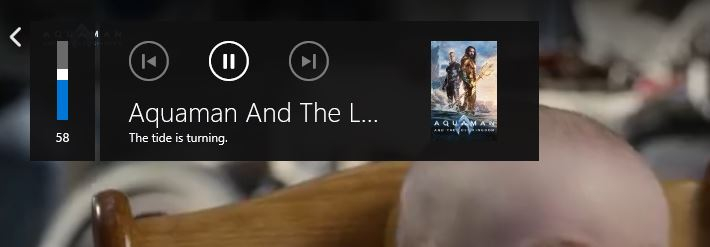
Have one of those things that drives you up the wall. I use Firefox to play Emby 99% of the time. It's just handy for me. Until today whenever I pressed the volume key on my keyboard a "mini-player" would show the volume with additional controls and what's playing (attached). Now, it's gone, and the only place I can see it is within Windows Emby Theater. Same control panel. Did I do something to make it disappear? Software update? Unknown? I'm stumped.
- Today
-
The left bar on the dashboard page has been blank
Luke replied to kira yamato's topic in Apple iOS / macOS
Hi, what are the steps to reproduce? -
Option to display Extras directly below synopsis on the details page
Luke replied to thealienamongus's topic in Feature Requests
Hi, yes this has come up before and is possible for the future. Thanks -
Access ReplayGain metadata through the Emby API for audio playback
Luke replied to MarvinB's topic in Developer API
Hi, yes it’s likely to be added in the future. Thanks. -
Ok we’ll take a look at it. Thanks
-
I click on the home button on my remote controller
-

Music playback should be better designed (what's playing, song title)
markand posted a topic in Android TV / Fire TV
The display when listening to music is disappointing. I'm using a playlist, and am not sure if it's different for other ways of playing. Nevertheless, the playback screen shows almost nothing and it's hard to tell what's playing. Below is a screenshot. The only way to tell the current song is the small, animating playback graphic, which is really hard to see. The position of the currently playing song doesn't make it obvious. Further, as you can see in this example, if the song title is long, you can't tell what it is. It would be nice if the current song artwork was centered and highlighted in some way, and if the title and maybe artist were in a readable font in the area between the playback time ruler and the artwork .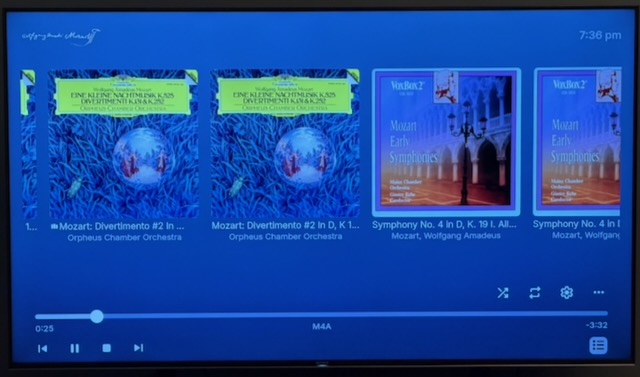
-
Latest ffmpeg log line 81 & 88 Why are there 2 forced subtitles, one is .srt and the other is pgs? Doesn't 'forced' make both subs work at once? I thought there should only be one forced per media. Obviously DTS and TRUE HD audio take up a lot of transcoding processing. Add on two subs at once? Could that be the problem?
-

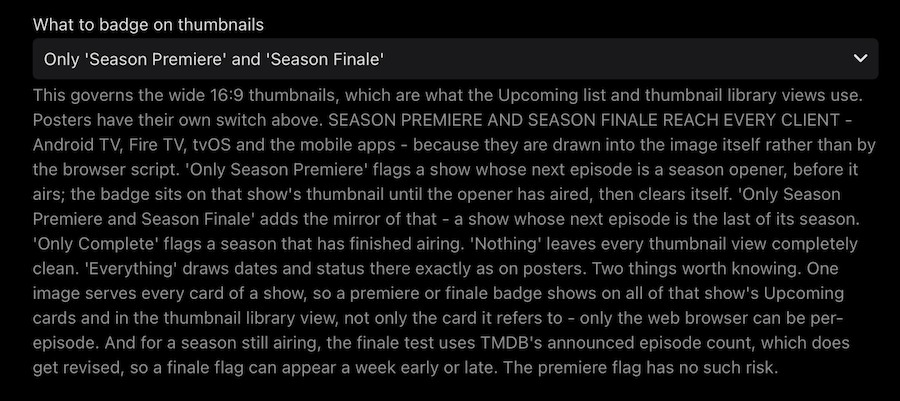
TV Show Status — TMDB-powered Returning/Ended/Cancelled badges for series
Blueskies278 replied to Blueskies278's topic in Plugins
TV Show Status Release Notes Changes 2.5.100.0 Add "Season Premiere" and "Season Finale" to the Upcoming list on every client, including Android TV, Fire TV and tvOS Fix Upcoming badges showing the show's next air date instead of each episode's own date Fix two badges appearing on posters when the overlay and web badges were both on Fix badges only appearing after visiting a show first, and disappearing again on the way back Fix badges never clearing from a card once drawn Add an optional calendar or coloured status dot in front of the status in show descriptions, which shows on every client. Off unless you choose one Add a colour setting for the Season Premiere badge Add a setting to show "Returning" instead of a date on the badge Add separate settings for library cards and the Upcoming list, so either can be badged on its own Add a setting to switch the web badges off inside the Emby app while keeping them in a browser Add a setting to turn off status badges on posters Change the Upcoming badge to read the day heading Emby prints above each card, so it always matches Limitations Season Premiere and Season Finale on the Upcoming list appear on every card of that show while the episode is coming, not only the card it refers to. One picture serves every card and cannot tell them apart. Only the web browser gets it per-episode Season Finale can flag a week early or late. It compares the next episode against the number of episodes the season is announced to have, and that figure gets revised while a season is still airing. Season Premiere has no such risk There is no "Only Complete" option for the Upcoming list. Complete means nothing further is scheduled, and a show only appears in Upcoming because something is scheduled Air dates on Upcoming cards are web browser only. Season Premiere and Season Finale reach every client Turning "Prepend status to show description" on can produce two badges on a poster. Leave it off for now With Emby's "Hide spoiler information from unwatched episodes" on, unwatched episodes show the series artwork, so you see the show's badge rather than an episode one Episodes with no artwork of their own borrow the series picture, and the series badge comes with it Your library's thumbnail view and the Upcoming list request the same image, so a badge in one appears in the other. Poster view is the only layout that separates them The calendar and status dot in descriptions are emojis, so each device draws them in its own style and their colours cannot be changed Changing a setting may not update artwork you have already viewed. Refresh metadata on the show, or wait for Emby to re-read it "Draw badges on library cards" is web browser only, and is ignored while the poster overlay is on Ended defaults to amber on new installs only. Existing installs keep whatever they had EmbyTVShowStatus.dll