All Activity
- Past hour
-

Auto Select Audio When Transcoding
visproduction replied to njmckenzie96's topic in Feature Requests
NJ, Not sure if this helps. You can try switching the audio file so the EC3 or AAC is the first choice and DTS is the second audio. This can be done with MKVToolNix or ffmpeg, which probably could do multiple files at once using a command script. Since this is not a transcoding task, it should take around 1 minute pre media on an average speed server with a 2 hour 1080P file. After doing that, most users will get the audio that works best for them first. The alternate audio is available on the media page in the pull down, for those users with everything working for higher end audio. The best designed automatic solution can fail when there is a change in connection speed from Internet traffic so the first handshake test by the Emby server, sees any audio or video issue and starts transcoding anyway to AAC. This can happen on a weekend because of heavy Internet traffic issues and not be a problem mid-week. So any automatic feature would still flip back and forth. Making AAC the first audio choice is a good idea, but that may mean transcoding and adding a new AAC audio track, which is more work. I believe AAC is better for streaming delivery because EC3 always requires more overhead processing by the user to playback. Depending on the user's setup, this can maybe get in the way of processing TCP packets and cause stuttering. The Emby server, I believe will often transcode EC3 anyway to AAC which, I think, forces a video transcode. So, even the best automatic solution will continue to cause issues. Having AAC audio, first choice, is more dependable. Any automaticfeature would also run into comment auio tracks which are typicaly AAC or AC3 stereo. You really don't want commen tracks automatically chosen. If you left the media with all the audio tracks attached an automatic solution can run into this issue, where my idea to prep your media with your preferred track in audio 1, won't have this probem. If the user wants higher end, they can pick EC3, DTS or True Audio. I think Emby remembers the audio choice per media, maybe even there is a way to pick an audio type by each user. That leave the issue you metnion above. Can Emby find audio track 2 DTS and choose it for a particular user? I think admin of a lbrary collection needs to prep the media to work best for the users. Every profesional site streaming media does this type of prep with scripts that set audio preferences and transcode everything for all users. Typical online site has the HD level user, pick from a different library that they are allowed access. Automatic features trying to match users exactly to media preferences from media with every audio mixed in, is never going to work 100% of the time. Professional online sites would, I think, refuse to code an all automated feature and choose insted to prep the media with best choice in audio track 1.. Anyway, hope that makes sense. -
Anyone with a Synology Nas willing to help test? As this is for testing it would be best with some knowledge of the terminal in case anything breaks.
-
 lvcii1 joined the community
 -
 Mr.MJ joined the community
 -
 mariadelcarmenrubio joined the community
 -
 dataaa joined the community
 -
 Omar@1173 joined the community
 -
 Omar-sul joined the community
 -
 Merysanchez joined the community
 -
 MvouniB joined the community
 -
 Ajnadin joined the community
 -
 monkeyJ joined the community
 - Today
-

Roku app - Channel logos/programme not loading in Guide and On Now row (show channel name text instead)
gillmacca01 replied to gillmacca01's topic in Roku
Im guessing other users are using a different guide data, because I have seen images with programmes displayed. Any how, guessing I will have to live with channel logos Thanks for the info -

Roku app - Channel logos/programme not loading in Guide and On Now row (show channel name text instead)
speechles replied to gillmacca01's topic in Roku
What he means is the Roku is actually requesting images in WebP format from your Emby server. But is being given SVG images instead. This is because Emby server doesn't support SVG and cannot convert it into WebP to feed into the Roku. So the Roku is given the SVG in normal format, not WebP. The Roku goes, I do not understand this and throws an error and refuses to display it. Other clients, such as the web app, also request WebP. But they also contain a web rendering engine. So the SVG is also sent uncoverted to them. But unlike the Roku, the web rendering engine inside can render the SVG in normal format. This is the difference. The Roku does not have a web browser possible to create. The Roku does not have a web rendering engine. -

Client video max bitrate auto detection deny transcode option
njmckenzie96 replied to Zhadum101's topic in Feature Requests
Would there be a way to make the auto remote option be for certain devices? Here's my issue. A Family member has had auto selected on their Roku. They have Gig speed, wired internet to their Roku, but if they are on auto quality, Emby keeps transcoding down to 720p for their movies. When I had them select the manual 4k-120mbps the file plays direct perfectly. I get I can force the auto remote, but if it's for all devices that means that overrides their phones and iPads which don't need direct play (especially if they are on data). Could there be a way to select what devices somehow, or even IP address based auto setting? -
Roku app - Channel logos/programme not loading in Guide and On Now row (show channel name text instead)
gillmacca01 replied to gillmacca01's topic in Roku
Sorry must be me being stupid. You say emby doesn't support svg, so can't show programme images in 'on now' but in the tv guide it is able to. I would have thought (but known to be wrong), that if it can display in the guide, it should be able to in 'on now' -
Roku app - Channel logos/programme not loading in Guide and On Now row (show channel name text instead)
speechles replied to gillmacca01's topic in Roku
@gillmacca01Yes. If you want the images displayable for all your devices, Roku included, PNG or WebP are the way to go. We will also fix the display logic for the channel grid item so it is smarter. Thanks for letting us know about this issue. If you spot anymore keep them coming... -
So I've been testing this a lot the past few months and so far here are my findings. On iOS and android apps, if both audio tracks are set to default in the mkv container, the apps select the secondary track IF the 1st track is TRUHD. If the 1st track is DTS OR DTS MA, Emby selects those and transcodes the audio even though there is a secondary track that is compatible. Today, I had a family member test playing a movie remote on their Roku. The movie played direct, and both audio files were set to default (trueHD, and Eac3),. Since Roku can't decode trued, Emby transcoded the audio without trying to switch to the second track that was compatible. I had the family member manually select the 2nd track and it played perfectly. Is there a way you could work on this behavior or anything I should try? I've scoured through all their settings and everything is set, at least from my understanding, for the movie and audio to try to play direct, and it does play direct if they select the 2nd compatible track. I've tested all this on my home setup but my chromecasts are plugged into receivers that are able to pass/unpack truehd/dts without needing anything transcoded. The goal in all this is ease for the users who don't know about these settings. I realize I could flip which default track is at the top in the container, but then that means I have to change the audio settings on my home network when my family watches movies. So, if it's possible to work that would be awesome! Thanks for all the continued support and features on Emby!
-

Roku app - Channel logos/programme not loading in Guide and On Now row (show channel name text instead)
ebr replied to gillmacca01's topic in Roku
All your other devices are using a web engine for rendering and understand SVG. Emby server does not officially support SVG so it doesn't try to convert it either. -
Roku app - Channel logos/programme not loading in Guide and On Now row (show channel name text instead)
gillmacca01 replied to gillmacca01's topic in Roku
So best option is to manually download the images in png/jpg and then import? If that works it will give me channel images, but in other devices it shows the programme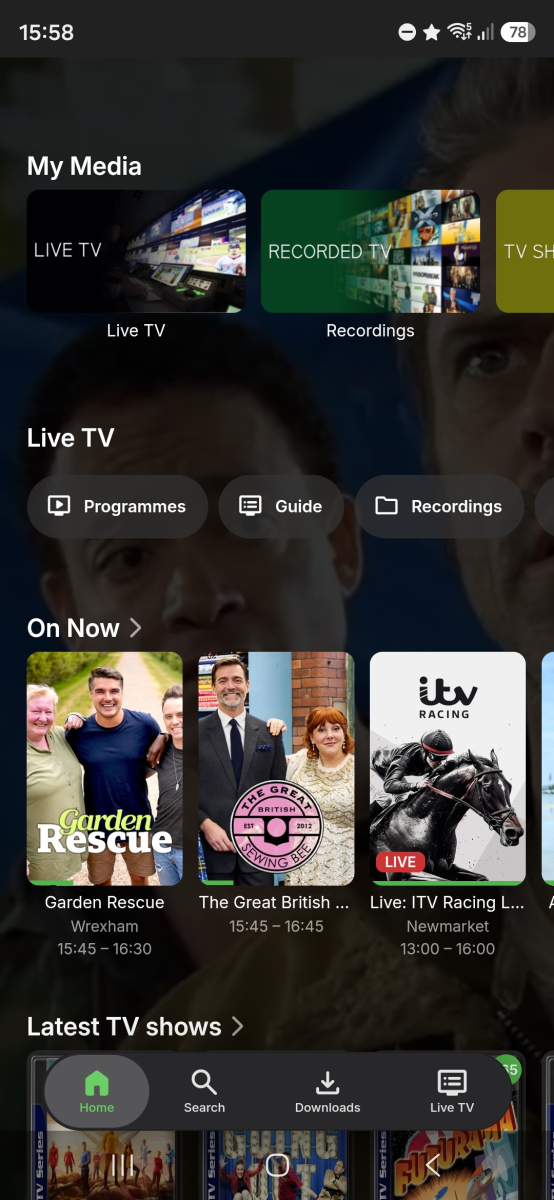
-
Roku app - Channel logos/programme not loading in Guide and On Now row (show channel name text instead)
speechles replied to gillmacca01's topic in Roku
If they are WebP the Roku will show them. But if they are SVG the Roku doesn't understand how to render those. Roku never added support for that image type. Right now it merely checks for the URL on the image to exist. If it does it gets display template A. If it doesn't it gets template B. But what happens if there is an error? Yeah. I do see what you mean in the guide display. The logic inside the guide needs to be smartened up. So it can understand when the image loading fails on the channel image. Then it can properly do as you say and display differently. When error it would display template B. Thats all that needs to be added. I can look into doing that. The cards which are shown on the "On Now" row have that smart logic for image loading already. That is why the cards show placeholder text. Its just the guide display that lacks them. Which is why it shows emptiness. -
I'm not aware that Tone Mapping is an option from the sidebar. Can you show a screenshot of where you're going to Tone Mapping from that it's not bringing you to the right place?
-
Ja das weiß, ich hatte mir das auch schon so gedacht. Ich wollte nur mitteilen, das bei mir generell wieder Themes gefunden wurden. Somit bin ich mit dem jetzigen Zustand zufrieden Yeah, I knew it was like that. I just wanted to say that I was generally found with themes again. I am satisfied with the current state
-
Roku app - Channel logos/programme not loading in Guide and On Now row (show channel name text instead)
gillmacca01 replied to gillmacca01's topic in Roku
Most of my channel logos I got from Logopedia using the "copy image URL" option. The URLs don't end in a file extension (they end in /revision/latest?cb=…), and I think some of the originals may be SVG or served as WebP. Here's an example URL for a channel whose logo doesn't show on Roku: https://static.wikia.nocookie.net/logopedia/images/9/9a/Channel_4_2022.svg/revision/latest?cb=20260614024831 Could that be the problem? -
new version doesn't play what it used to
ebr replied to groovejumper's topic in Android TV / Fire TV
Can you please confirm the version number and send a new app log? Thanks. -
Roku app - Channel logos/programme not loading in Guide and On Now row (show channel name text instead)
ebr replied to gillmacca01's topic in Roku
Are they in an odd format? -

embyforkodi (next-gen) 12.X.X support
quickmic replied to quickmic's topic in Emby For Kodi Next Gen
Yes, could be, I'll check it. -

The left bar on the dashboard page has been blank
kira yamato replied to kira yamato's topic in Apple iOS / macOS
@Lukeany update? -
No, it's one of twelve.. But it's not adding intro skip to any new episodes. It is adding the new episodes to Emby but doesn't appear to be scanning them to add the skip intro.
-

Casting to google hub max video times out after 10mins
yocker replied to chathway's topic in General/Windows
Afaik it's a problem with the Hub it self. I've tried making custom control screens for the hub with Home Assistant but it always goes to blank after some minutes. There are ways around it but requires a small script to be run in Home Assistant. -
Is there only that one episode? Audio fingerprints usually needs more episodes to compare to, otherwise it doesn't know what to look after.
-

Casting to google hub max video times out after 10mins
KroZpOz replied to chathway's topic in General/Windows
This issue is still occurring for me as well. I had hope with the release of Emby Server v4.10.x.x this would have been corrected but I've tested and I'm still experiencing the same issue. -
Try the latest 5.60.2.0 beta in the catalog. I changed it to not show when the rating has no value.
-

FIX FOUND - devs please look: Emby unnecessarily transcoding HEVC streams with the native AVKit player
abat119 replied to Geordie's topic in Apple TV
Just wanted to clarifiy: I still prefer the Emby app over Moonfin due to UI and a bit more pleasing image (using Apple's native player)... I just wish that Emby would implement the decoding pipeline to get TrueHD and HEVC working on Apple TV Natively. Still super pleased with Emby Keep up the great work! -
Hey, I am using embyicons to overlay the community rating for movies. What I noticed is, that it always shows a community rating of "10" if it the community rating field is either empty or if it is set to 0. Could the default behaviour be changed to either showing 0, or even better not showing the icon at all if the community rating is not set?