All Activity
- Past hour
-
 zulibeth joined the community
 -
 linaparedes4152 joined the community
 -
 hudsonsantiiago@gmail.com joined the community
 -
 Humphreys85 joined the community
 -
 Hmmmm!!! joined the community
 -
Thanks for the reply, I’ll look into that plugin. I’m surprised there’s no automated way to remove the tag with new stuff. I do wish this wasn’t an issue in the first place.
-

False "maximum streaming limit" on a single Apple TV device (limit = 1)
steve_tv replied to steve_tv's topic in Linux
Well, the real is the annoyng message "Your account exceeded the maximum streaming limit set by your Emby Server Administrator". And it occurs when someone plays content. I pasted the logs and my thougths just to be more clear, but the problem is the thread title, and first paragraph: "user keeps getting "Your account exceeded the maximum streaming limit set by your Emby Server Administrator", but he only ever uses a single Apple TV" -
 Filz.1 joined the community
 -
 Sheonnastan joined the community
 -
 Anjasteegh joined the community
 -
 ahmed2244 joined the community
 -

Emby for Android on Shield TV no longer passing through dolby digital 5.1 or DTS
ebr replied to Kramerika's topic in Android TV / Fire TV
I've found some logs but none of them have any playback in them. Please be sure to play the item with the problem for a few seconds and then immediately send the log. Don't restart etc. Then also, please provide the information requested in that topic. Thanks. -
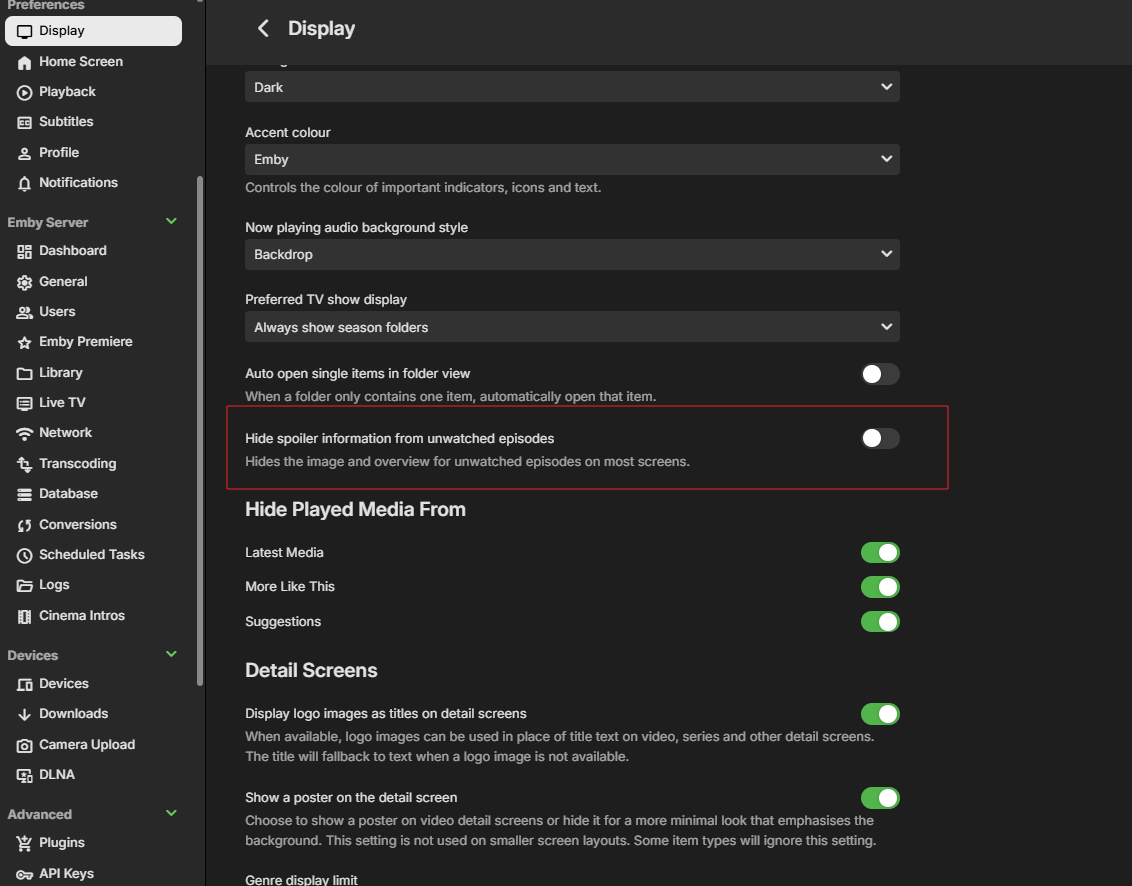
Check do you have "Hide spoiler information..." enabled under your user's Display preferences.
-
@Luke The error in this log is the most frequent one, and it’s what caught my attention. The one I sent earlier was actually an issue with my network... I added a new movie, but it isn't showing up. Since it wasn't appearing, I checked the logs and found several errors similar to this one. It seems like an error occurs at some point during the movie scan. ChatGPT suggested it might be the file format or the fact that I grouped movies from the same franchise into folders, but this always worked before, and I'm using the same format as always. Even so, I went to the trouble of changing the format as suggested—putting each movie in its own folder—but that didn't fix it. The error persists, and the movie I added still isn't found. In fact, the error occurs even without that movie...
-
I am sorry for my late reply, had a few hectic weeks. I sadly can confirm that the last Emby client update for MacOS did not fix the issue, or at least not for me.
- Today
-
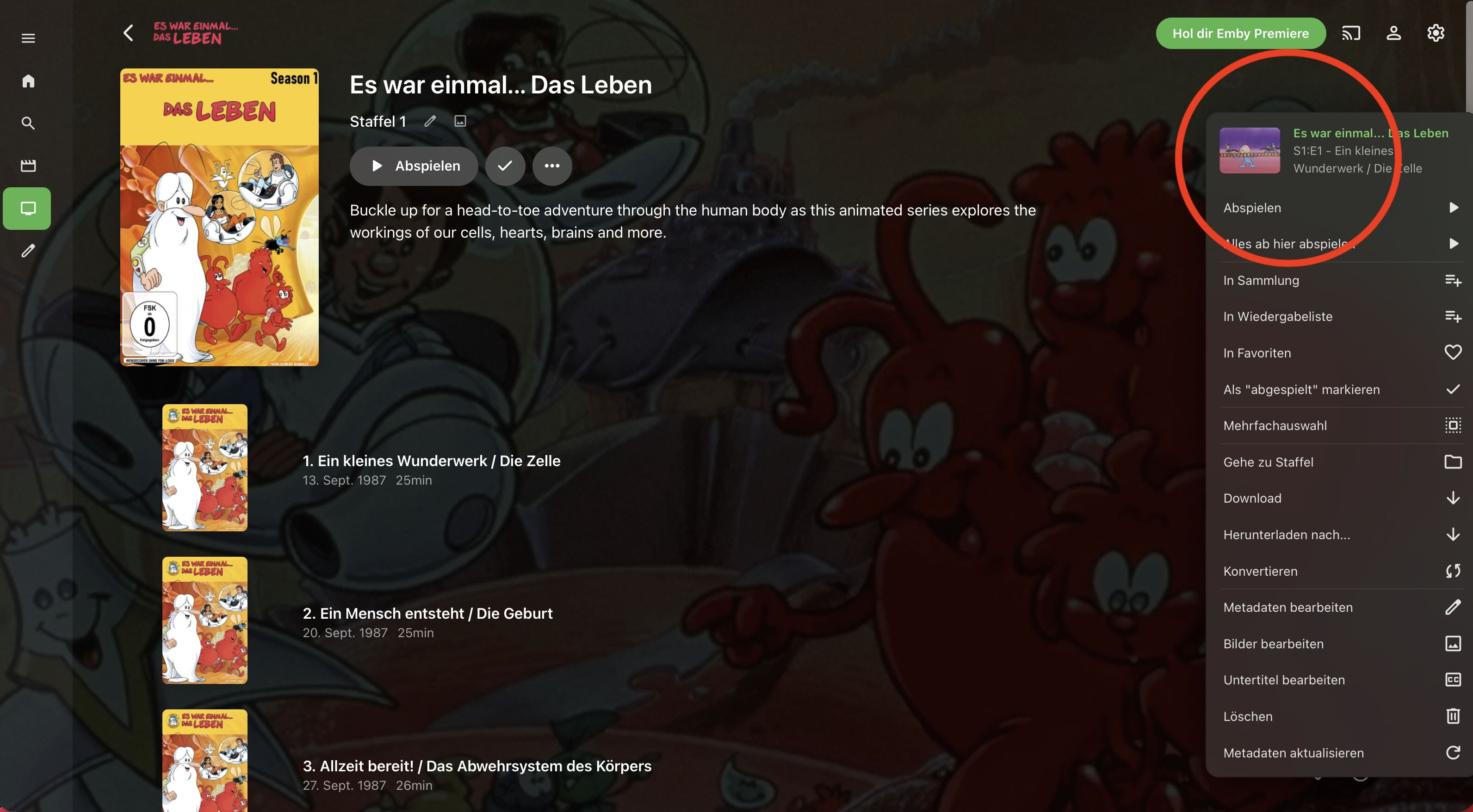
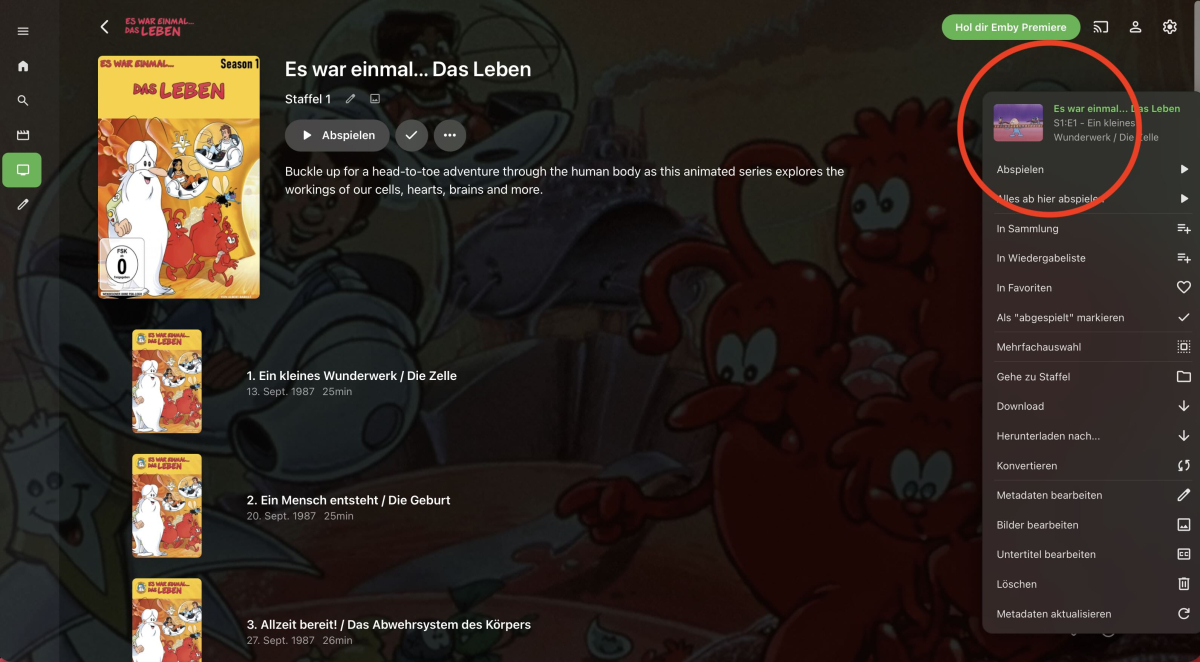
Lustiger Weise scheint Emby Vorschaubilder gefunden zu haben, nur werden sie nicht angezeigt - siehe roten Kreis im folgenden Bild.
-

Missing guide channels 20.8 thru 20.13 98685
gdbrow replied to gdbrow's topic in Emby Provided Guide Data
Thanks for your help. -
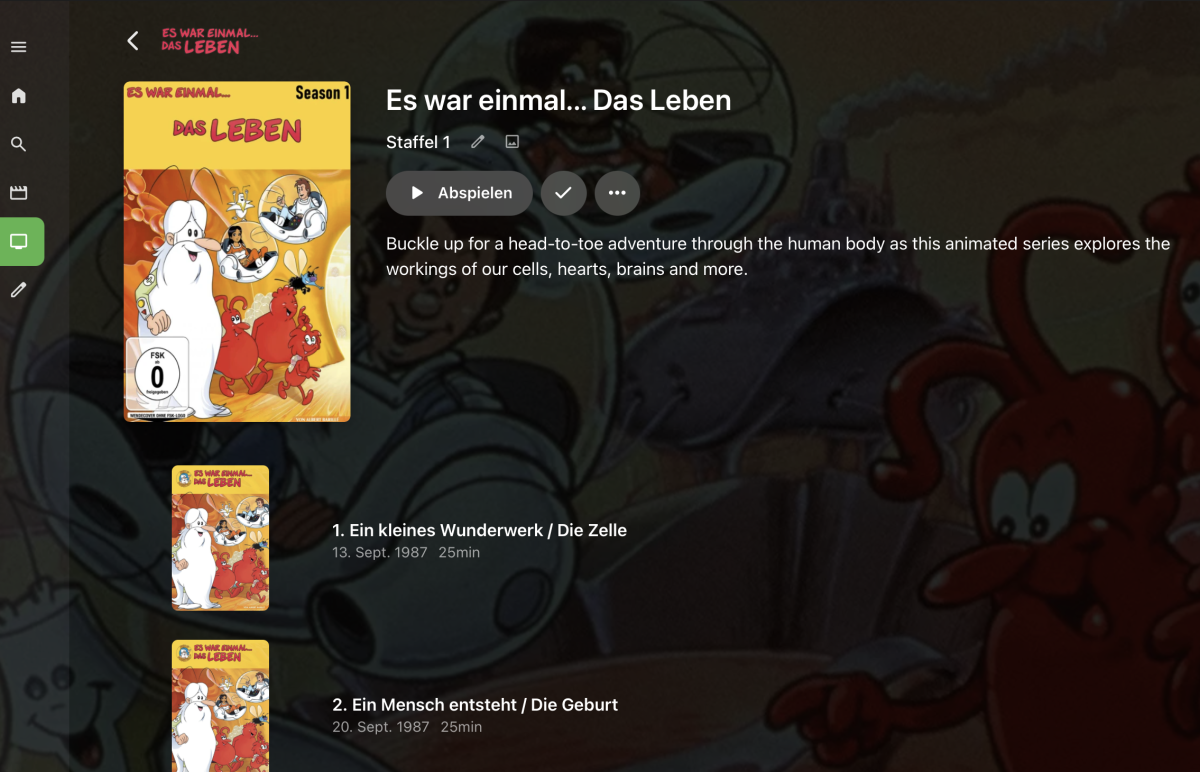
So schaut es bei mir auch aus, habe da mal alle "Bildquellen" angeklickt in der Hoffnung er findet was/ stellt was dar. Aber auch händisch eingefügte Thumbnails werden gar nicht erst angezeigt..., es werden gar keine Episodenbilder/ Thumbnails angezeigt - irgendwie seltsam. Kann man die Darstellung von Thumbnails irgendwie abschalten? evtl. habe ich ja irgendwo falsch geklickt und den Bums damit ausgestellt?
-

We really need better multi version handling for Continue Watching
te5s3rakt replied to te5s3rakt's topic in General/Windows
It's never been a viable option. Anyone following the TRASH Guides naming standard, which is extremely common in this space, will find zero comfort in Emby's implementation of multi-versioning. Emby requires all version to have the same name. Whereas different files are never named the same following any popular standards. no way. i've found they are usually completely reasonable and logical but yes, ultimately I've done what we always have to do. seperate folders. remove any external tags from the nfo files. and then just wait till next season to come in and end up lost some place -

False "maximum streaming limit" on a single Apple TV device (limit = 1)
yocker replied to steve_tv's topic in Linux
Most likely because people just turn off their device instead of actually stopping the video when done. -
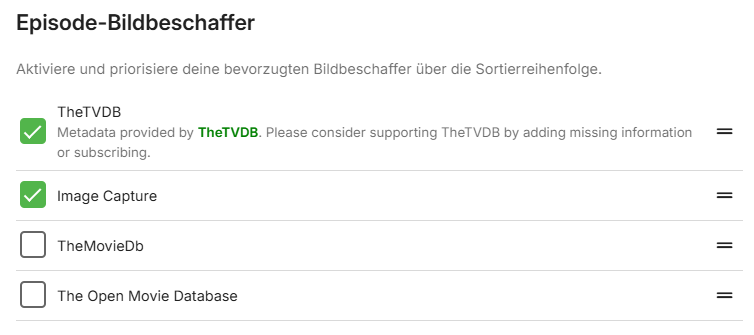
Was hast du denn in der Bibliothek als "Episoden-Bildbeschaffer" eingestellt? Bei mir sieht das so aus: D.h. wenn er von TheTVDB kein Bild findet, würde er einfach selbst ein extrahieren. Allerdings scrape ich meine Daten normalerweise auch manuell, bevor ich sie in Emby hochlade. Ciao, Alfred
-

Missing guide channels 20.8 thru 20.13 98685
sa2000 replied to gdbrow's topic in Emby Provided Guide Data
@gdbrow We had a response from Gracenote indicating that these channels cannot be added to the lineups because the stations are not in their database. It would be up to broadcasters to lisise with gracenote and request inclusion - the broadcaster in this case is KOXI-CD (HC2 Holding) If you find a way to let them know please do - that they should reach out to Gracenote and negotiate inclusion of all their channels in the gracenote dataset -
We could see if SysInternals Process Monitor gives some clues. You can download from the microsoft page here Unzip and accept the EULA and you can set up a filter of Process Name containing the word Emby and at the end when the app exits, save all filtered events as a PML and zip and upload using a link I will send you You could also if you do not mind, launch event viewer and open each of the Application and System Windows Logs and save each as an evtx and zip and add to the upload When you do the test, check task manager and make sure there is no emby client app process running - if you find any, end the process Then launch process monitor, start capture Then launch the new Emby Windows app When it fails to launch, stop the capture and save as PML file, zip and athen save the two evtx files Thanks
-
Emby Beta 4.10.0.15+: Crashing due to Out of Memory on DS918+ Package Center Install
sa2000 replied to DarWun's topic in Synology
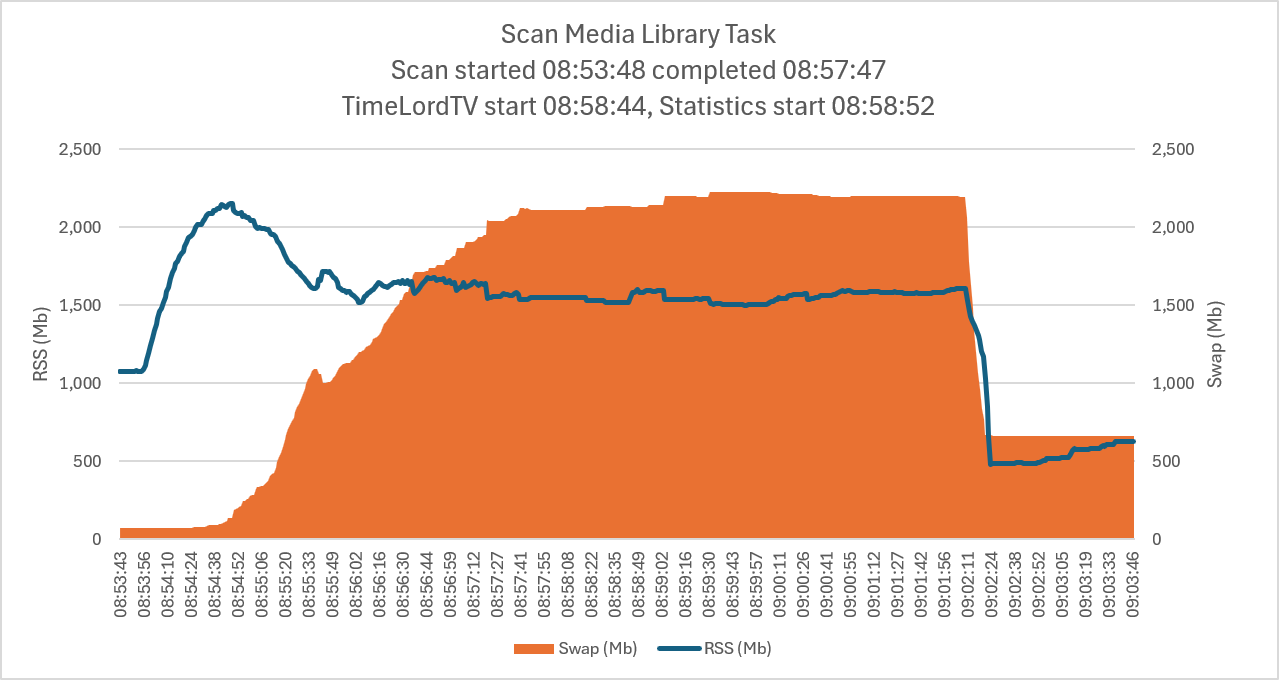
Thanks for the info That is good Thanks The logs do show after the 12 hourly periodic scheduled task "scan media library" with last completing at 08:06 am, you did run one at 08:53 am. Memory usage peaked during this scan with an RSS peak of 2.1 Gb. Swap memory usage peaked at just above 2.1Gb. RSS came down to a low of 478 mb The impact of the TimeLordTV and Statistics plugins appears to be minimal - picking out the scan period: And this covers the whole period captured in the memory usage log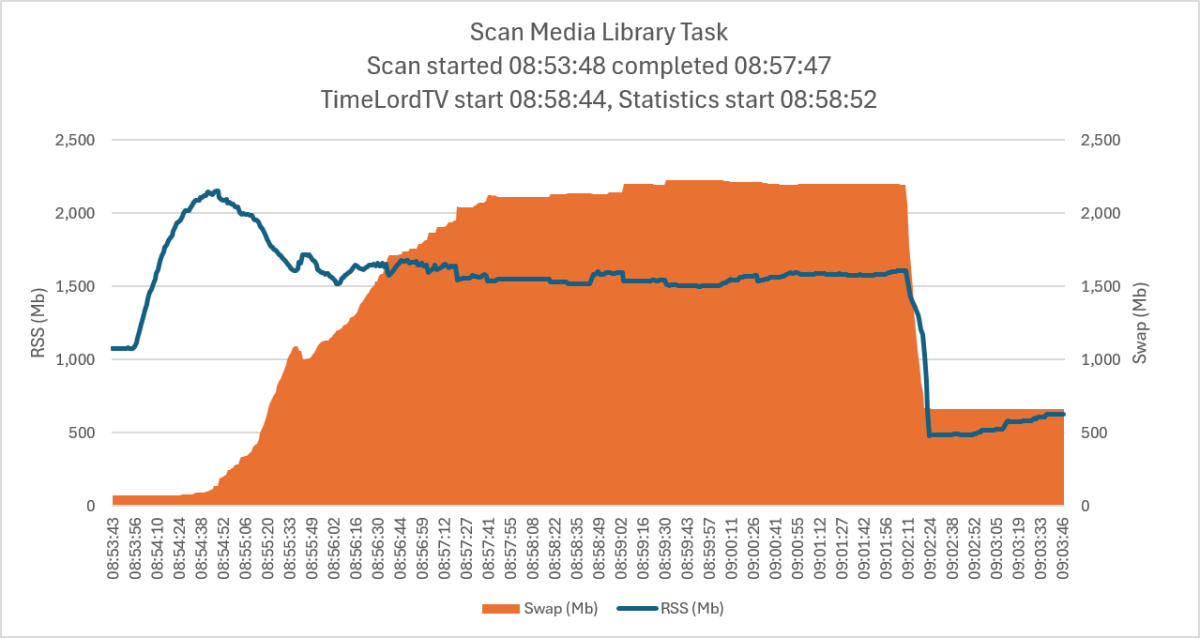
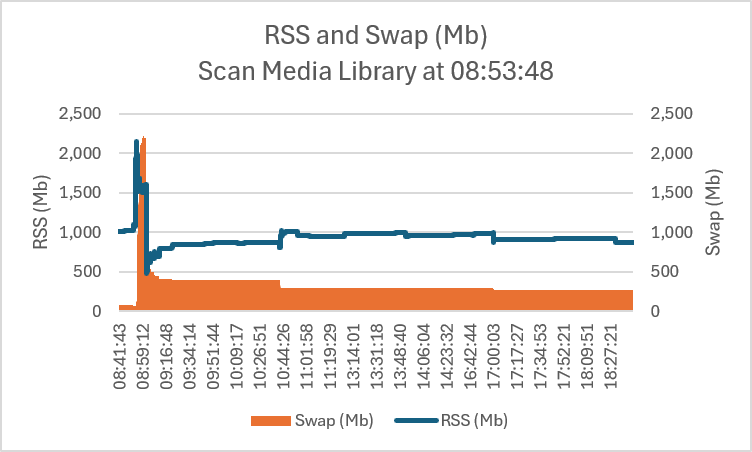
-
False "maximum streaming limit" on a single Apple TV device (limit = 1)
steve_tv replied to steve_tv's topic in Linux
Can't edit previous message; I'm focusing on the Apple TV because its log is the cleanest to follow, but I see the same false limit errors on Chromecast and on some smart TVs too. In fact the log shows several play sessions that were opened and never closed on those clients — added 53 play sessions vs only 49 removed over the day. A few examples below: a Chromecast that played and then went silent for ~20 min with no "stop" and was never removed, plus LG and Samsung sessions that reported a start and then nothing, and one orphaned session that was added without any playback at all. If these lingering sessions still count toward the stream limit, that would explain why the "limit exceeded" error isn't specific to the Apple TV. --- Chromecast: played, then went silent, never closed --- 2026-07-13 16:28:28.449 SessionManager: Adding playSession PS... to session SESS... 2026-07-13 16:28:30.635 SessionManager: Playback start reported by Emby for Chromecast 2.1.0 on Chromecast playing <title>. PlaySessionId: e19a58ec... 2026-07-13 17:17:58.737 SessionManager: Playback progress reported by Emby for Chromecast 2.1.0 on Chromecast playing <title>. PlaySessionId: e19a58ec... --> log ends 17:37:14, no "Playback stopped" and no "Removed playSession" for this id (~19 min silent) --- LG Smart TV: start reported, then no progress, never closed --- 2026-07-13 17:10:34.937 SessionManager: Adding playSession PS... to session SESS... 2026-07-13 17:10:37.230 SessionManager: Playback start reported by Emby for LG 1.0.50 on LG Smart TV playing <title>. PlaySessionId: 30709c98... --> no further progress, no stop, no "Removed" by end of log --- Samsung Smart TV: start reported, then no progress, never closed --- 2026-07-13 17:02:30.150 SessionManager: Adding playSession PS... to session SESS... 2026-07-13 17:02:35.602 SessionManager: Playback start reported by Emby for Samsung 2.2.8 on Samsung Smart TV playing <title>. PlaySessionId: 67a53a0b... --> no further progress, no stop, no "Removed" by end of log --- Orphaned session: added, but no playback ever started, never removed --- 2026-07-13 16:14:33.362 SessionManager: Adding playSession PS... to session SESS... --> no "Playback start", no "Playback stopped", no "Removed" anywhere in the log I also attach full log, the AppleTV user is @User09 embyServer (2).txt -

Tips to set up emby on a QNAP NAS using Docker with HW Transcoding
quized replied to Ikario's topic in QNAP
Update after downgrade, qts is not a problem, i don't have a problem with emby 4.9.3 -
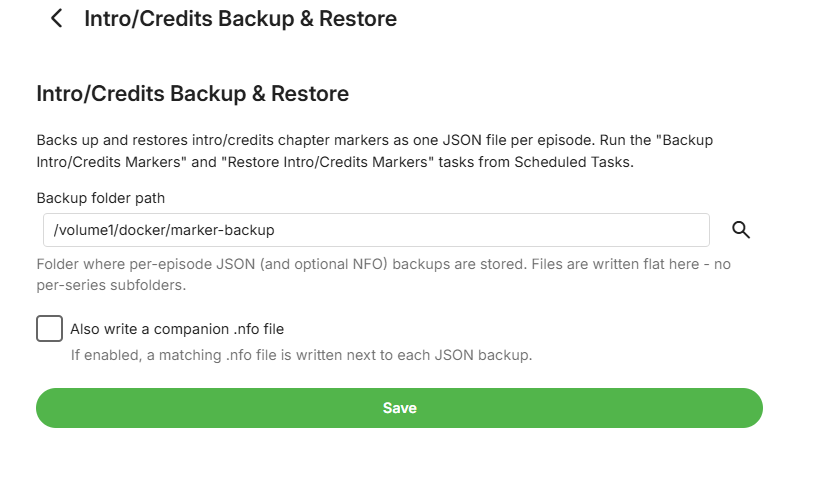
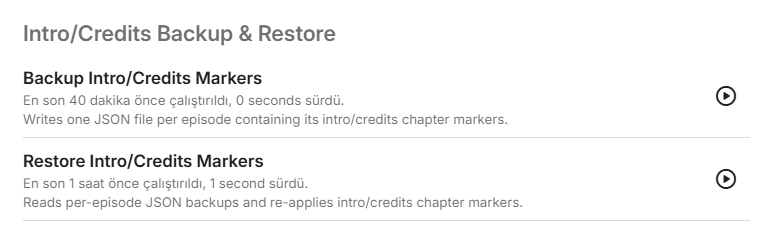
Intro/Credits Backup & Restore - open-source replacement for the intro/credits backup plugin Hi all, The "Intros Backup/Restore" plugin that many of us have relied on to back up and restore intro/credits chapter markers hasn't seen an update in a while, and I know several people here have been running into issues or just waiting on fixes that haven't come. I ended up writing an independent, open-source replacement from scratch, built purely against Emby's public plugin SDK - no code from the original plugin, just the same general idea (export markers to JSON per episode, restore them back later). What it does: Backs up every TV episode's intro/credits chapter markers to one JSON file per episode Restores markers from those JSON backups, matching episodes by TVDB ID + season + episode number Before each backup run, zips up whatever was already in the backup folder into a timestamped archive first, so nothing gets silently overwritten Optional companion .nfo output alongside the JSON Both backup and restore run as normal Emby scheduled tasks - no custom in-app dialogs, just Dashboard > Scheduled Tasks like anything else Scope: TV episodes only for now - movie intro/credits markers aren't handled. Settings: Scheduled Task: Requirements: Built and tested against Emby Server 4.10.0.18. You'll need the .NET 8 SDK (or Docker) to build it, and you'll need to copy three DLLs from your own Emby install to build against (not redistributed in the repo for licensing reasons - the README walks through exactly where to find them on Synology/Docker/Windows/Linux installs). It's MIT licensed, so do whatever you want with it. Source, build instructions, and a v1.0.0 release are all here: https://github.com/guilty57/credits-intros-backup-restore Happy to hear feedback, and PRs are welcome if anyone wants to extend it (movie support would be the obvious next step).
-
False "maximum streaming limit" on a single Apple TV device (limit = 1)
steve_tv posted a topic in Linux
Hi all, I'm running Emby Server 4.9.3.0 on Linux. I share my library with several users and I have Max simultaneous streams set to 1 per user. One user keeps getting "Your account exceeded the maximum streaming limit set by your Emby Server Administrator", but he only ever uses a single Apple TV (Emby for Apple TV 2.0.6). I checked and his device ID only ever connects from one single IP — he is definitely not streaming anywhere else at the same time. Looking at the server log, I think the app is tripping its own limit. During a single movie, the Apple TV app repeatedly reports "Playback stopped" and then keeps sending progress events and re-adds the same play session to the same session container, and eventually starts a new PlaySessionId for the same title. The content is being transcoded (ContainerNotSupported / ContainerBitrateExceedsLimit), so a server-side transcode is still finishing when the next session registers. Server-wide I also see more play sessions added than removed (53 vs 49), so some sessions aren't being released cleanly. My guess is that with the limit at 1 there's zero headroom, so the brief overlap between the not-yet-released old stream and the new one is counted as 2 and rejected. My questions: Is this the expected cause of a false "limit exceeded" for a user on a single device? Is there any server-side setting to add a small tolerance/grace to the simultaneous-stream check, or to make a stopped session/transcode release immediately, so I can keep the limit at 1 without these false positives? Relevant log excerpt (session IDs shortened, server IP removed) below. Full log attached.Thanks! 2026-07-13 15:45:18.467 SessionManager: Adding playSession 86430611... to session 337b0590... 2026-07-13 15:45:18.929 SessionManager: Playback start reported by app Emby for Apple TV 2.0.6 (3) on Apple TV playing <title>. PlaySessionId: 86430611... IsPaused: False ... normal playback for ~25 min ... 2026-07-13 16:10:39.973 SessionManager: Playback stopped reported by app Emby for Apple TV 2.0.6 (3) ... PlaySessionId: 86430611... 2026-07-13 16:10:39.974 SessionManager: Removed playSession 86430611... from session 337b0590... 2026-07-13 16:12:17.094 SessionManager: Adding playSession 86430611... to session 337b0590... <-- same play session re-added 2026-07-13 16:13:36.796 SessionManager: Playback stopped reported by app Emby for Apple TV 2.0.6 (3) ... PlaySessionId: 86430611... 2026-07-13 16:13:36.797 SessionManager: Removed playSession 86430611... from session 337b0590... 2026-07-13 16:13:38.484 SessionManager: Adding playSession 86430611... to session 337b0590... <-- re-added again 2026-07-13 16:14:00.465 SessionManager: Playback stopped reported by app Emby for Apple TV 2.0.6 (3) ... PlaySessionId: 86430611... 2026-07-13 16:14:00.850 SessionManager: Removed playSession 86430611... from session 337b0590... 2026-07-13 16:14:03.005 SessionManager: Playback start reported by app Emby for Apple TV 2.0.6 (3) ... PlaySessionId: 0e78ef8c... <-- NEW PlaySessionId, same title/position 2026-07-13 16:39:53.203 SessionManager: Playback stopped reported by app Emby for Apple TV 2.0.6 (3) ... PlaySessionId: 0e78ef8c... Same device across the whole log: 977 requests, all from ONE source IP. Transcode reasons for this device: ContainerBitrateExceedsLimit, ContainerNotSupported, DirectPlayError. Server-wide: playSession "Adding" = 53 vs "Removed" = 49. -
Of course no one responded.
-
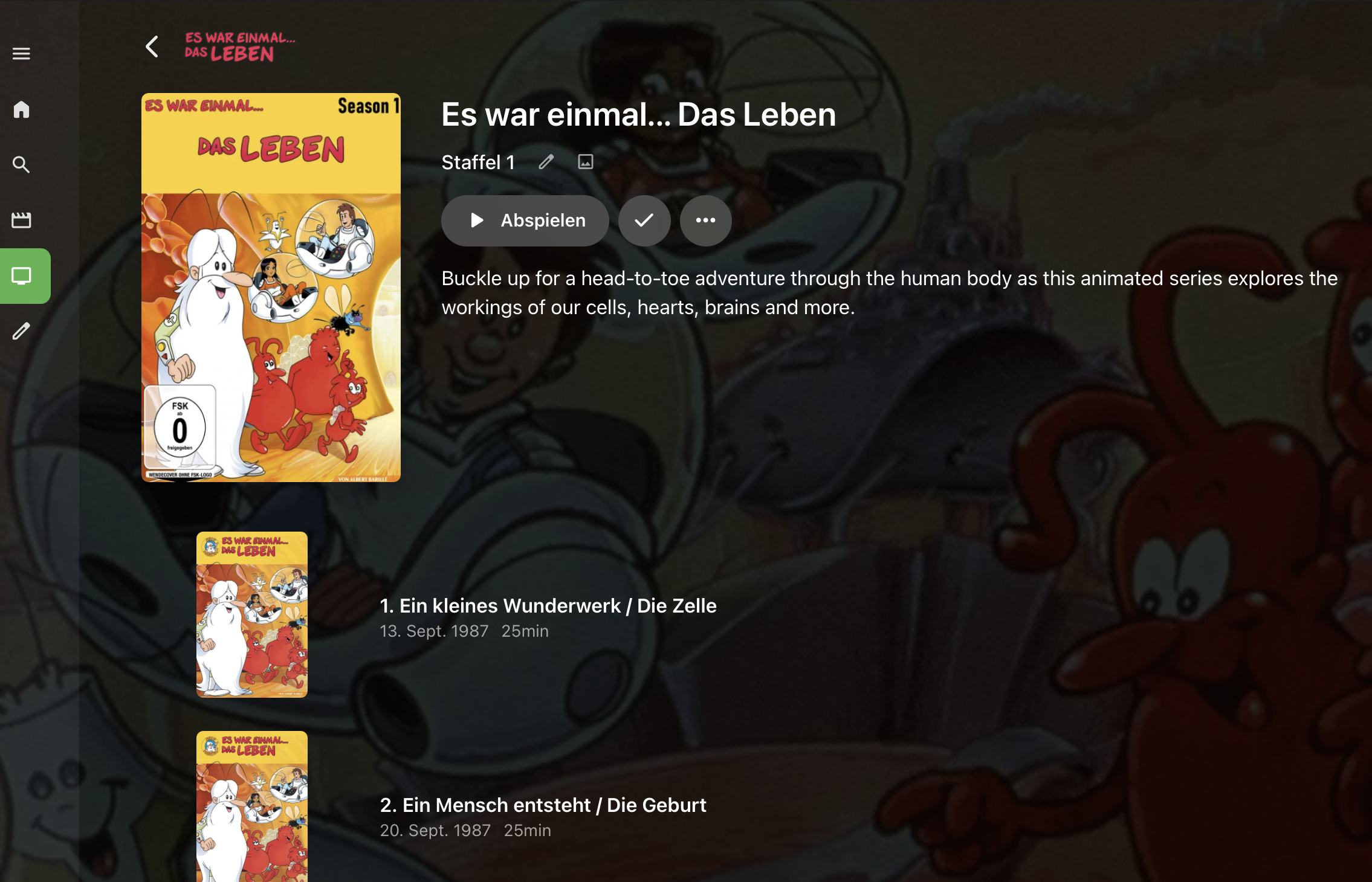
Hallo ihr Alle, ich bin seit dieser Woche neu bei Emmy und wurschtle mich grad noch so ein... Meine Mediatheken (Filme, Serien) wurden erkannt und auch die Cover, Beschreibungen werden dank IMDB/ TVDB/ OMDB gefunden. Einige Cover bzw. Filme musste ich händisch korrigieren - hatte ich erwartet. Nun zu meinem Problem... - bei Serien wird vom Hauptcover, über Staffeln, bis zur einzelnen Episode immer nur das Cover der Serie eingeblendet. Bei Plex hatte ich zu jeder einzelnen Folge auch ein eigenes Folgencover. Habe ich was nicht aktiviert? Wo muss ich denn klicken um das noch zu bewerkstelligen? Mein bisheriges Setup: Serie (Coverbild) Staffel (Coverbild) Episoden (jeweils eigene Bildchen) Z.b. die Reihe "Es war einmal... das Leben" hat ein Coverbild. Dieses nutze ich auf für die einzelnen Staffeln/ DVDs, für jede einzelne Folge gibts Bildchen inkl. Beschriftung mit Folgentitel. Funzt bei mir derzeit alles nicht... Grüße Jan
-

Link Watched Database Between Linux and Windows?
Xplorer4x4 replied to Xplorer4x4's topic in General/Windows
Just thought I would give this a little bump and see if anyone has any ideas. I have CachyOS exclusively on my NVME drive. I have an SSD with Win 11. The dual boot works fine as is. Now I am trying to install Debian to a partition on the SSD as a L1 hypervisor (based on what I understand), and then Debian should be able to run from CachyOs or Windows and stay synced. I am a bit concerned about how many resources it would need to reliably stream 1080p @ 10 Mb/s using x265, although most videos would be x264/265 @ around 2-3 Mb/s while trying to game. If I want to watch something with a higher bitrate and HDR I can always offload the video to a flash drive and watch it directly from the TV. I am wondering if, in the end, a NAS might be my best option since Emby can run directly from most NAS. It's just I wouldn't have the funds until closer to September or generally the end of the year. -

Emby for Android on Shield TV no longer passing through dolby digital 5.1 or DTS
seanbuff replied to Kramerika's topic in Android TV / Fire TV
Always remember to provide the important detail as requested in that link: -
Tips to set up emby on a QNAP NAS using Docker with HW Transcoding
quized replied to Ikario's topic in QNAP
Hello, I need your help, i have a same problem with emby and hardware transcoding. HW is down after the last update of QTS 5.2.9. before the update it's run successfully I try your docker compose with jellyfin and it's OK i try with emby and it's down (i have a premium key) Emby Server 4.9.5.0 Command line: /app/emby/system/EmbyServer.dll -programdata /config -ffdetect /app/emby/bin/ffdetect -ffmpeg /app/emby/bin/ffmpeg -ffprobe /app/emby/bin/ffprobe -restartexitcode 3 Operating system: Linux version 5.10.60-qnap (root@mini-builder-01) (x86_64-QNAP-linux-gnu-gcc (toolchain config: [gcc-4.9.2 binutils-2.25 glibc-2.21]) 4.9.2, GNU ld (G OS/Process: x64/x64 Framework: .NET 8.0.25 Runtime: app/emby/system/System.Private.CoreLib.dll Processor count: 8 Data path: /config Application path: /app/emby/system Docker compose file : services: emby-qnap: build: dockerfile: /share/Container/repository/emby-qnap/Dockerfile context: /share/CACHEDEV1_DATA/.qpkg/NVIDIA_GPU_DRV/usr container_name: emby-built environment: PUID: 1000 PGID: 100 GIDLIST: 0 TZ: Europe/Paris volumes: - /share/Container/repository/emby-qnap/config:/config - /share/mediatheque:/mediatheque - /share/Container/repository/emby-qnap/scratch:/scratch ports: - 8096:8096 # HTTP port - 8920:8920 # HTTPS port - 7359:7359 - 1900:1900 devices: - /dev/nvidia0 - /dev/nvidiactl - /dev/nvidia-uvm restart: unless-stopped image: embyhwtrc2 network_mode: bridge embyserver.txt hardware_detection-63919621670.txt -
Incidentally, the old Windows Theater app worked fine. I've just pulled that from Github to test and it works. I guess if nothing else works I can still use the old version.