All Activity
- Past hour
-
 Dams1140 joined the community
 -
 chrisB26 joined the community
 -
 whreckxsz joined the community
 -
 Emilycortijero joined the community
 -
 Portiblo5 joined the community
 -
 johnstagg joined the community
 -
 Laura121105 joined the community
 -
I don't really use Infuse because it doesn't have support Live TV , but it is universally praised. The times I've used it with Emby it worked flawlessly. I think it can handle just about any format you throw at it.
-
Since Emby server was updated to 4.9.5.0, I have performance issues on the overview page. The sections "Continue watching" and "Continue listening" took very long to load. In Emby app on Android Auto, mostly the section is emby. I need multiple tries to get a list. Any idea what might be causing this? Before the update, this problem doesn't exist. Regards, Alexander
-
Double click it, copy paste, brings you right to the logs folder. I'm not aware that they're sanitized but you can look for your domain address or mentions of API keys before posting. Or even just looking at the log yourself might make an error obvious.
-
 GooFyy01 joined the community
 -
 Harald99 joined the community
 -
 LiaraAlis changed their profile photo
 -
 aidan3b joined the community
 -
The path is too long to fit on the screen...I'm in the EmbyMedia.EmbyTheater_[long string] folder but it has a lot of subfolders and none of them say anything about logs. Also since I'd be digging it out of the folder directly, I assume it won't be sanitised?
-
About -> Log Path.
-
If you are afraid your device doesn't support what ever you have then I can recommend just getting a Nvidia Shield. It supports pretty much everything plus audio pass through.
-
I have no idea how to provide that. @Lukehas already stated that, but seemed to be waiting on @softworkzto sort out actually getting the logs, and he hasn't been around.
-
yep I think the difference might have been AC5.1 and some were EAC5.1. Not sure of the difference
-
Yeah. AI is not always the solution Yeah. If some are working. Some not. Check Bitrate. Check Level. Check Audio of the file. Anywhere there is the Difference why some work fine and some not. As an example. Some of my friends dont have a Dolby vision TV. So its using the fallback hdr. But when the Audio is eac3 7.1 the file doesnt work. Its always a few parameters that can be the issue
- Today
-
yeah don't have a GPU, Synology DS224+ I need to check again at some point as I noticed that some HEVC files played instantly while another I got the progress bar and AI was telling me to make changes in the server web side and app side so that's why I thought I would check here what the optimum settings are. AI lies
-
Hi I have some users that have a lot of problems to use the Emby player on AppleTV and it looks like the player is not really "finished". Discovered Infuse but free version is very limited so difficult to check if it works well ! Do some people use it as a daily player for Emby on AppleTV ? Does it read everything properly ? Don't crash ? I'd like to have a little of review of it with Emby before pushing users to buy a licence of Infuse. Thanks
-
I dont know the specs of the roku. But i guess h264 and hevc are not a Problem. You just need to take a Look at the Bitrate and Level. Higher Level means more Compression and the roku needs to handle the Compression. Around Level 150 and under that is fine. High Bitrate Begins at around 30mbit/s. So dont watch remux files. Use webdl or "normal" bluray files On your Server. If you own a gpu in the nas buy the emby Premiere subscription to enable Hardware transcoding
-
I confirm the issue with Brave is still there with 4.9.5 (but I found a ticket on Brave github that confirms the bug in Brave https://github.com/brave/brave-browser/issues/44301 ) but it would be nice to add in Web player settings to be able to force transcode also for AAC (format is not listed so far) so no way to force Emby to transcode in a readable audio format by Brave
-
Client app log might be helpful.
-
Fortunately bounced my NAS at lunch and it seemed to sort itself and limited to the browser unfortunately while I'm work. On my new TCL TV the app seems to work well, just trying to tune the performance the best I can for the Roku Premiere in the bedroom and finding the happy medium between devices for formats and any if needed changes to the server to help improve performance
-
Hey It doesnt depends on the emby Software at All. Its the Player and your Server hardware. Some players work fine with hevc, Some not. If your Player cant play the file direct your Server Hardware needs to transcode Video or Audio or both. If you dont have a gpu for transcoding your CPU needs to Do the Job. And CPUs are not Designed to decode and encode Video files. Transcoding hevc needs more Power. Transcoding only Audio is very simple. So you See. The choice of the Player is the most important Part of choosing which files are working great and which not Browsers are always a Bad idea. They often dont have the needed Codecs. Use the native app on Windows or Mac or whatever. Watching on a TV. Buy a shield and you are fine
-
Thanks for the report! No worries about being new to Emby. To be honest, this is an issue I wasn't aware of yet - I hadn't come across it before, so this is the first time it's been brought to my attention. Once you're able to send over those logs, I'll dig into it and see what's going on between the Podcast and YouTube plugins.
-
Windows host, i’ll Send u logs later, seems that podcast plugin didn’t work now i put the YouTube plugin is it a know issue ? sorry i’m new to emby
-
To help narrow this down, could you let me know how you're hosting Emby? For example: Docker, Windows, macOS, Linux, etc. Also, would you be able to send over your logs?
-
Still empty since 1pm
-
[BETA] Ear Wax - NOW AVAILABLE - Testers Wanted
ginjaninja replied to MarvinB's topic in Amazon Alexa
Hi @MarvinB, I am able to reproduce the dto exception on /Artist/{Name} endpoint. It seems that endpoint is only safe if given a valid artistname in terms of substring match. I found a useful field on /items/userid/ which isnt visible on my screen in chrome in swagger &AlbumArtistIds=257013 I believe it would allows the skill to find audio content where the specified albumartistid is present. It would allow the skill to find audio from "studio albums" (or a close approximation of it) -

Old artwork of previously deleted programs still appears on the media library covers
phoesky replied to phoesky's topic in Synology
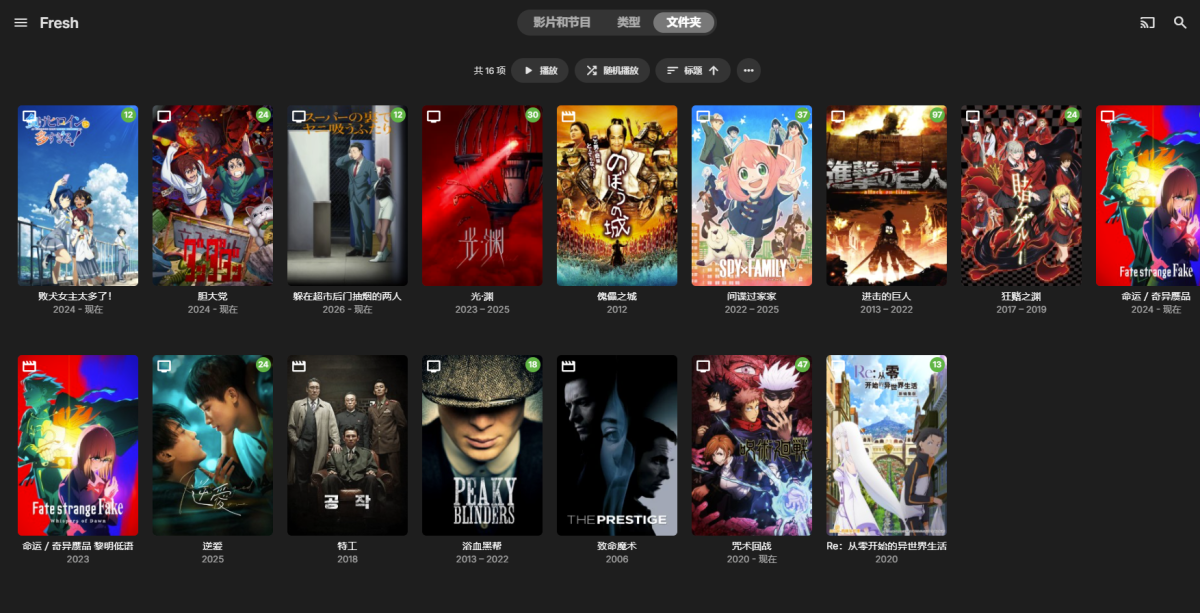
I have two screenshots for reference. This library is only provided as an example, and this bug affects all of my media libraries, not just this one. Screenshot 1 shows the combined 4-in-1 cover thumbnail displayed on this regular library page. Screenshot 2 shows the actual current content inside this media library. Issue details: The 2nd and 4th poster thumbnails on this combined cover belong to items that I permanently removed from the library over a year ago, yet they still remain in the composite cover preview. The 1st and 3rd poster thumbnails are old custom artwork I manually replaced a long time ago. My newly updated custom covers never take effect on this merged four-panel cover preview, while outdated cached thumbnails persist permanently. This abnormal cache refresh failure for library collage covers started to happen after I upgraded my Emby Server to version 4.9.5.0. Could you help check the global cache mechanism for these combined library artwork previews and provide a solution to fully clear stale cached images? Thanks a lot.
-
Please don't necro two year old threads.
-

Android App silently "crashes" when switching networks
brothom replied to brothom's topic in General/Windows
This issue can also be reproduced somewhat easily by having Emby open via the Browser and then just disconnecting from WiFi. Emby doesn't "understand" the local IP no longer being available and doesn't attempt to connect via the public domain/hostname. Shouldn't we always connect from the hostname, rather than the local IP? The reason I'm bumping this is because some of my users have been trying out the audio feature but are running into these issues when moving into/out of the house.