All Activity
- Past hour
-

Please send in an up to date stable version to the Tizen store
JonKanon replied to JonKanon's topic in Samsung Smart TV
Seems that I need to do the 30day bets tjingy... Or will there be any update that supports this TV in the future? -
 WaratahBay joined the community
 -
 rogelioca joined the community
 -
 CyndiK joined the community
 -
 2338773535 joined the community
 -

Significant performance regression in 4.9.x / 4.10.x compared to 4.8.11.0 + Season/Specials display bug
leshkraven replied to leshkraven's topic in Windows & Xbox
I am fully aware of that feature and did mention it with image. The issue is that it isnt working correctly when "Specials" folders S00 are introduced -
 jdominguez9 joined the community
 -
 JorgeA27 joined the community
 -
 Azooz17001 joined the community
 -

Significant performance regression in 4.9.x / 4.10.x compared to 4.8.11.0 + Season/Specials display bug
pwhodges replied to leshkraven's topic in Windows & Xbox
This is a user setting "Preferred TV Show Display" in your personal display settings: You can select to always show season folders, show season folders only when there is more than one season, or never show season folders. Paul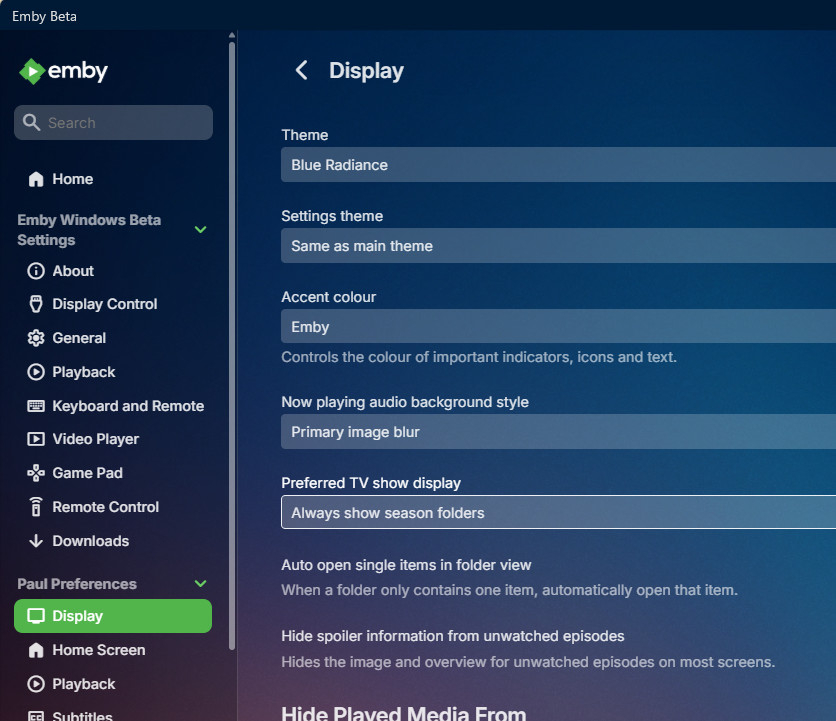
-
 menchu18 joined the community
 -
 MurelKidAcc joined the community
 -
 Mostafasalm joined the community
 -

We really need better multi version handling for Continue Watching
js28194 replied to te5s3rakt's topic in General/Windows
I may not be understanding your complaint. Does multi-verstion naming not work for you? \Spider-Noir (2026)\Season 01\Spider-Noir 01x01 Step Into My Office - Authentic B&W.mkv \Spider-Noir (2026)\Season 01\Spider-Noir 01x01 Step Into My Office - Full Hue.mkv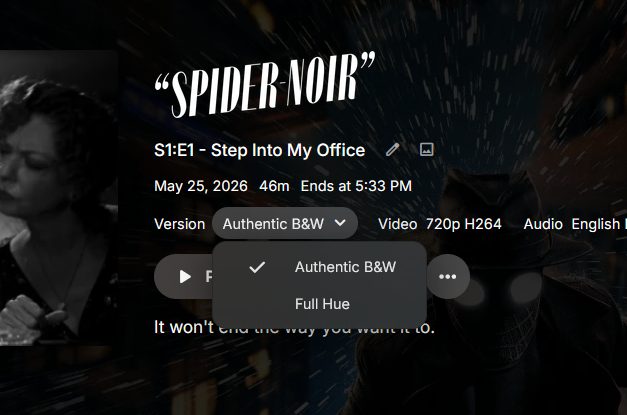
- Today
-
I am having this problem on my home videos menu. Everything looks fine on my server app (Synology), but on the Roku device, the Year tag does not show up even when that is the only tag I have chosen besides the title. I have tried it with the smallest available thumbnails. I would really like this information visible to family logging into my server! Is there anyway to fix this? My screen shots would look identical to those shown above.
-
Significant performance regression in 4.9.x / 4.10.x compared to 4.8.11.0 + Season/Specials display bug
leshkraven posted a topic in Windows & Xbox
After updating from 4.8.11.0 to 4.9.x and later 4.10.x, I noticed significant UI lag, artwork taking 30-40 seconds to load, sometimes even longer, shows slow to display, and general sluggishness throughout the interface. Rolling back to 4.8.11.0 immediately resolved the issue. I tested 4.9.5.0 today and the same lag is present. 4.8.11.0 runs perfectly on the same hardware with the same library. It appears something in the image processing or metadata pipeline changed significantly from 4.9 onwards that introduces overhead on larger libraries. Season/Specials display bug: On shows that contain only one season folder and a Specials folder, Emby is incorrectly treating them as single-season shows and flattening all episodes into one view instead of displaying separate season folders. This issue is also present on 4.8.11.0. The "display episodes within seasons for single season shows" setting appears to be ignoring the Specials folder when counting seasons. Even changing folder names to Season 0, with episodes correctly named S00E01 etc., does not fix the behaviour. The only shows that display season folders correctly are those with more than one regular season — for example a show with Specials, Season 1, and Season 2 displays all three folders as expected. A show with only Specials and Season 1 gets flattened. To put the performance regression into perspective the lag on 4.9.x is horrendous, a complete opposite experience to 4.8. Even while writing this post, I opened a show on 4.9.5.0 and after over 3 minutes the episodes still had not loaded on screen. This is on hardware that runs 4.8.11.0 without any issues whatsoever. Something has gone seriously wrong with performance between these versions. The uploaded image that shows partially loaded shows sat like that for over 8mins, I had to back out and open again which seemed to make it load fully but still took over 20secs. It is also worth noting that when accessing Emby directly via the linux server URL locally, it does appear to load faster. This suggests the lag is amplified over remote connections, likely due to the increased number of API calls and heavier responses in 4.9+ every additional request compounds the latency over the internet. However the root cause is clearly on the emby side, as 4.8.11.0 handles remote access without any such issues on the same hardware and connection..thumb.png.2c9e09e35b803f9bc65781a5db9e2478.png)
.thumb.png.60a8c41450aa8084cd548c2213ff1e97.png)
.thumb.png.e7cd7ff1a35f4c4da5277b46f577414f.png)
.thumb.png.ce9552514edefe05edbe8aecf5eafd4b.png)
-

'Shuffle' command for photos on Android app not shuffling
tgraph replied to beckfield's topic in Android
Experiencing the same thing on my Firestick client... random start and then sequential slide show... It seems no progress made in the last year. -

Next Episode Pop-up won't show up for the credits chapter
lozanoeg replied to Kyouma's topic in Apple TV
I have this same issue, The chapters work on iOS just not apple TV. Running 4.10.0.17-beta for the server and the latest on app store for apple tv -

There is a bug in version 2.3.8 with .ass files
visproduction replied to MediaEmby1968's topic in Samsung Smart TV
OK, sounds like there is a code issue with the update. The last idea I have would be this one: https://emby.media/community/topic/137265-media-subtitle-ass-format-playback/#comment-1433426 Some .ass files cause an error with a subtitle editor. Maybe the TV app is also sensitive to this typo issue regarding ,0 instead of 0,0 or 0,1 or 0,2. It's probably not the problem, but have a go. My editing software really did not like .ass files that had the ,0. Be sure to post the answer when you find it. Good luck. -

TV Show Status — TMDB-powered Returning/Ended/Cancelled badges for series
Blueskies278 replied to Blueskies278's topic in Plugins
New icon New rounded edges to look more cohesive, to match Emby's UI New icon can now be added to textcolour.thumb.png.c88987f356ca733cc53d3a8ed5775194.png)
colour.thumb.png.98e9d0d553c0ec92d8d0108ce1163e28.png)
.thumb.png.014fd12db7185184c9089be87ab0d58f.png)
.thumb.png.25576f3e3a0cd9a10a59d2ea82abb21b.png)
texte.g.22Airing15Jul202622(nobackground)e.g.22Airing15Jul202622(no.thumb.png.0c7875b6805c492146dc8eff008173e4.png)
texte.g.22Airing15Jul202622(nobackground).thumb.png.273189f4cf5b79c12e512d0e49adb7fc.png)
-
Hey Emby Team, @Luke @ebr I recently checked out Emby on Android TV and was really impressed – the interface feels much more modern and cleaner compared to Apple TV. Especially the layout of the elements is much better, plus the poster preview is bigger and the buttons/navigation feel more intuitive. In comparison, the Apple TV design feels a bit dated. Please give the Apple TV app a design upgrade for the detail pages that meets today's standards I'd love to see the Apple TV app get an upgrade in the future that's closer to the Android TV version. Thanks and best regards!

-
TV Show Status — TMDB-powered Returning/Ended/Cancelled badges for series
Blueskies278 replied to Blueskies278's topic in Plugins
deleted -
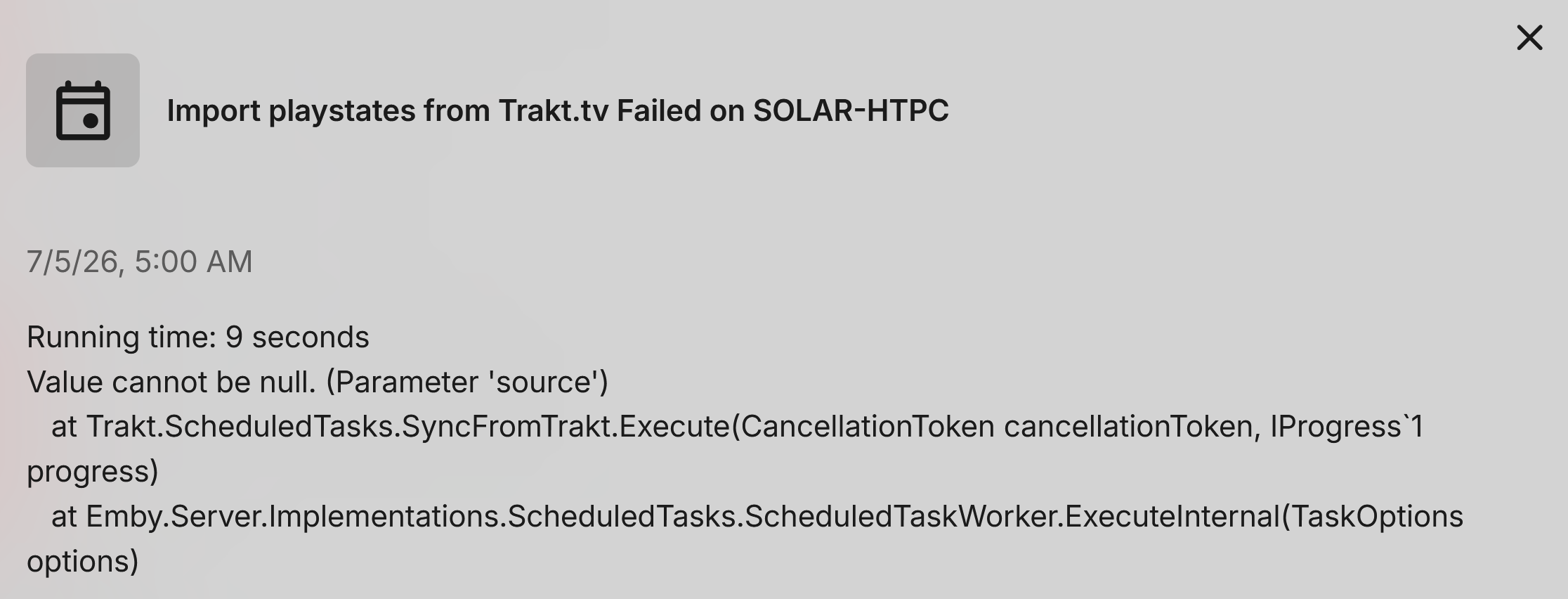
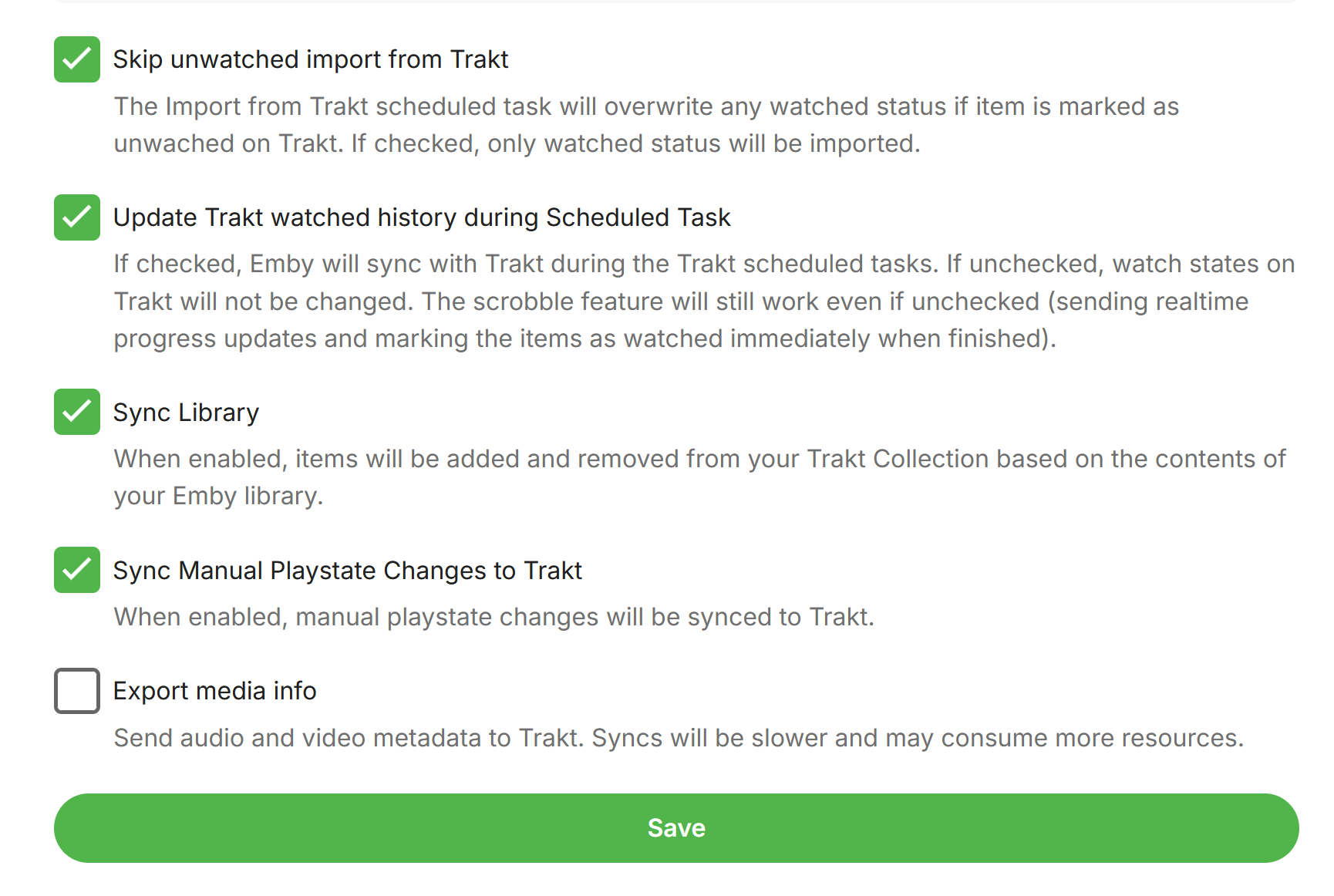
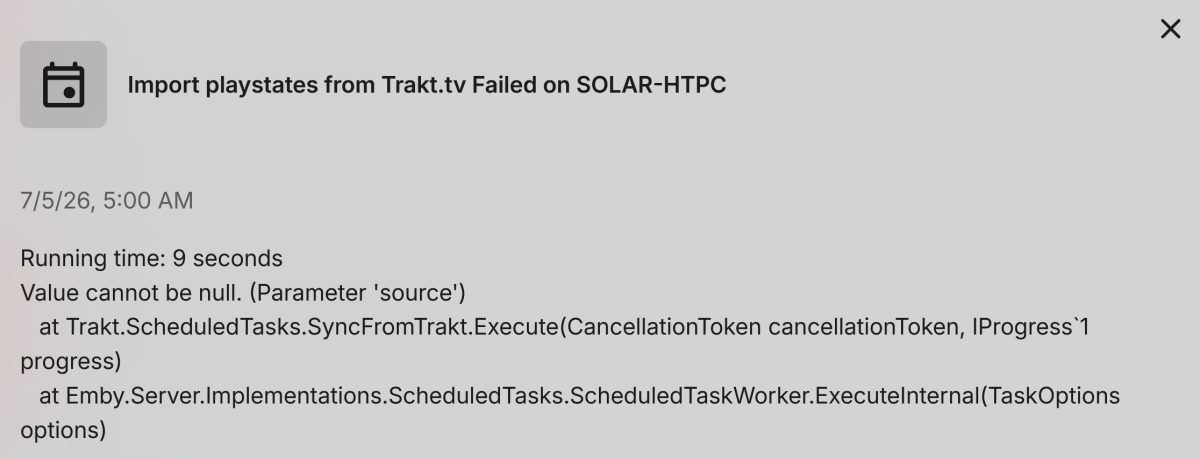
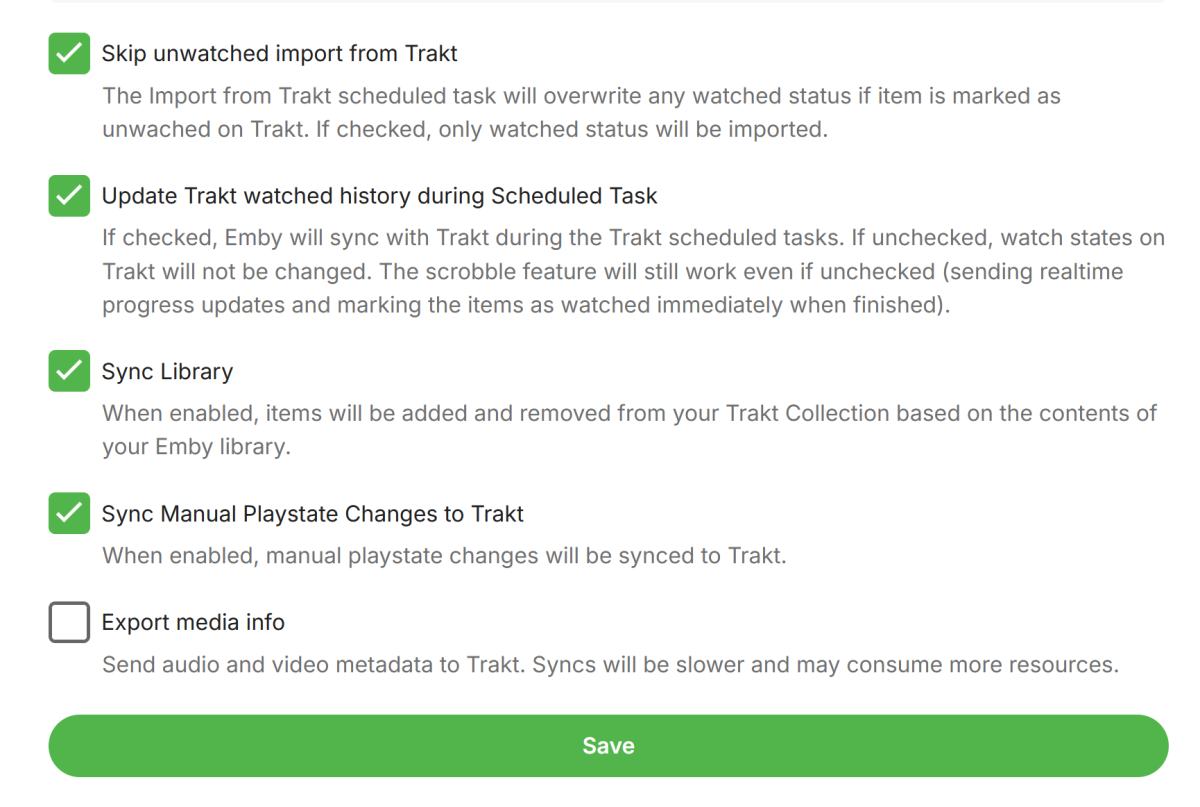
I'll start by saying I only started using Trakt a few months ago at most. But the good news in that regards is that it worked! Now the bad news.... it no longer works! (whats annoying is that even with TRACE logging turned on it does not give any detail.) however, I've been able to narrow it down... The issue is related to TV scan. If I only include Movies, it completes successfully. However, with TV enabled, it fails. It doesn't give any useful info like a specific show it is failing on. I have two different TV folders that are in my library and it crashes the exact same way for either one of them. > 2026-07-05 14:25:35.218 Error Trakt: Error syncing trakt data for user media *** Error Report *** Version: 4.9.5.0 Command line: C:\Users\media\AppData\Roaming\Emby-Server\system\EmbyServer.dll -noautorunwebapp Operating system: Microsoft Windows 10.0.26200 OS/Process: x64/x64 Framework: .NET 8.0.27 Runtime: C:/Users/media/AppData/Roaming/Emby-Server/system/System.Private.CoreLib.dll Processor count: 24 Data path: C:\Users\media\AppData\Roaming\Emby-Server\programdata Application path: C:\Users\media\AppData\Roaming\Emby-Server\system System.ArgumentNullException: System.ArgumentNullException: Value cannot be null. (Parameter 'source') at System.Linq.ThrowHelper.ThrowArgumentNullException(ExceptionArgument argument) at System.Linq.Enumerable.TryGetFirst[TSource](IEnumerable`1 source, Func`2 predicate, Boolean& found) at System.Linq.Enumerable.FirstOrDefault[TSource](IEnumerable`1 source, Func`2 predicate) at Trakt.ScheduledTasks.SyncFromTrakt.SyncTraktDataForUser(User user, TraktUser traktUser, Double currentProgress, CancellationToken cancellationToken, IProgress`1 progress, Double percentPerUser) Note: This ONLY happens with TV Enabled. I also tried keeping only the first "skip unwatched import from Trakt" checked and unchecked the rest. Again, it only succeeds on Movies sources.
-

Workaround: customize UpNext / Next Episode prompt timing in Emby Web
lolotux replied to lolotux's topic in General/Windows
Have you read all my trick? "This is only a workaround and may be overwritten by Emby updates. An official UI option would still be much bett" .... -
Workaround: customize UpNext / Next Episode prompt timing in Emby Web
lolotux replied to lolotux's topic in General/Windows
Fortunately, the percentage is configurable......... Rome: 2 minutes out of 50 minutes = 96% -

Emby Beta 4.10.0.15+: Crashing due to Out of Memory on DS918+ Package Center Install
DarWun replied to DarWun's topic in Synology
Coincidentally, the NAS was updated to DSM Version 7.4-90075 two days prior to the update to Emby Beta 4.10.0.15. I thought that was worth pointing out. -
2.315.0.0 [Win] Fix rare crashes on startup [Win] Fix playback start error
-
Emby Windows: A new Stable version 2.315.0.0 is available Changes 2.315.0 [Win] Fix rare crashes on startup [Win] Fix playback start error 2.310.0 Update to latest UI features Update translations Fix backspace behavior on search view in TV mode Enable YouTube playback Fix Trailers Fix non-working gear button in video OSD [Win] Update HDMI audio detection [Win, Xbox] Enable screen savers [Win] Fix hidden volume control in TV mode Update WebView2 [Win] Rework threaded xaml island animation [Win] MPV: Disable mpegts as container [Win] MPV: Fix live TV playback [Win, Xbox] UI Update [Win] Fix app hanging on start [Xbox] Fix Crash [Win] Slightly improved startup time [Win] MPV: Change HLS segment constraints [Win] Fix duplicate downloads (sync feature) [Win] Fix hidden errors on startup and shutdown [Win] Update to WinAppSDK 1.8 [Win, Xbox] Fix errors about missing sleeptimer [Win, Xbox] Fix streams error on audio playback [Win] Improve full-screen buttons [Win] When navigating back from the home view, show menu instead of exiting [Win] Fix full-screen exit button [Win] Show keyboard shortcuts under settings [Win, Xbox] Update subtitle font [Xbox] Fix unresponsive app on startup [Win] Fix failing downloads with long file names [Win] Fix refresh rate switching [Win] Fix keyboard navigation on start [Win] Fix keyboard navigation on start 2.234.0 [Xbox] Fix rate switching when current rate is > 60Hz [Win] Fix rate switching when current rate is > 120Hz [Win] Provide opt-out for hard refresh-rate limiting [Win] Fix horizontal scrolling issues [Win] Sync: Fix display order of downloaded items [Win] Display settings: Always show sound scheme selection [Win, Xbox] AudioPlayer: Fix audio playback resume at position [Win, Xbox] Sound Effects: Avoid doubled sound on Enter key [Win] Fix hang on start [Win] Adjust "Don't revert display mode" feature when initial switch is hard limited
-
And that would work just fine for me... Pulling track information into the GUI from what's in the files, and writing changes the user makes back into the files is perfectly fine. I didn't mention that option because I was under the impression that modifying the users files was frowned upon. But I'm good with it. Anything that saves my efforts back into the file system serves the purpose.
-

Different versions identified as a different movie
billyjr82 replied to billyjr82's topic in General/Windows
The duplicates filter just tells me that there are multiple versions of that movie. It doesn't show me what it thinks the other duplicate is. I think I found another way to explain the issue. 1. Add Shrek 1-4 to the server and refresh. 2. Notice that Shrek The Third (3) is sorted after Shrek Forever After (4). This is as intended. I don't expect Emby to be able to figure out what is in a series and what the order is. I'm happy to fix that part by hand. No problem. 3. Fix the Sort Title on Shrek The Third and Shrek Forever After to say Shrek 3 and Shrek 4 respectively. 4. Hooray! They are where they should be. 5. Add 3D versions of all 4 movies and refresh the library. Named properly so that Emby knows they are the same movies. 6. Hooray! It shows Shrek 1-4, still in the correct order, and it shows the 3D version as a selectable dropdown. 7. Now let's see all of the 3D movies we have on the server. Turn on the 3D filter. 8. Notice that the Shrek movies are now sorted back in the original order (1, 2, 4, 3). Because it is not keeping the Sort title with the MOVIE, only with the FILE. This does not make sense to me. When I want to edit the metadata of a movie, I am editing it for that movie. If I want two files to have separate metadata, I'll make them a separate movie on Emby. Maybe Emby wants to keep separate metadata for each file regardless of if it is combined with something else or not. That's fine. But when I run a search that hits the Shrek movies, there should only be one metadata that is used for that movie regardless of which file it hits. This example with Shrek obviously is a very minor problem with a very easy fix. But the OP issue is something I wouldn't know is an issue unless I search across every single duplicate in a way that would hit one of the files, but not the other, and see if Emby mis-identified it or didn't carry over the metadata. -
TV Show Status — TMDB-powered Returning/Ended/Cancelled badges for series
Blueskies278 replied to Blueskies278's topic in Plugins
Update: new features added today Badge style options — five ways to display the status badge on the web client: Icon (calendar) + colour Original pill (no icon) Coloured icon + text, no background Plain text only, no icon or background No badge at all New calendar icon My first plugin.This is a leaning curve, be gentle None" web display option — a dedicated setting to show nothing at all on the web client (looks exactly like stock Emby), separate from the native app toggle. Web and native app display are now fully independent — "Prepend status to show description" now only controls whether Android/tvOS see it (since those apps read the real description field directly). The web browser client shows the badge/description entirely on its own, so you can have one without affecting the other. Turning "Prepend status" off now also automatically cleans up any previously-added prefix from your real library data. Inline coloured icon in the description text — when using "Description text only" or "Both" mode with an icon-based badge style, the same coloured calendar icon now appears right in the description text on the web client, not just in the badge. Faster settings propagation for Android/tvOS — changes to settings (like turning "Prepend status to show description" on or off) now take effect within 15 minutes automatically on the native apps (previously up to 24 hours), so you don't need to restart your server to see updates there. The web client already updates independently and instantly. Self-installing web script — the plugin now attempts to automatically deploy its web browser badge script on startup, so it works out of the box for most users without any manual file copying. On some hardened server setups (e.g. certain Docker configurations) where the server process doesn't have write access to its own folders, this may fail gracefully — in that case a manual copy of tmdb-status-plugin.js into your dashboard-ui folder is still needed, and the plugin's settings page description explains this. Installing TV Show Status (beta) This plugin isn't in the official Emby catalog yet, so it needs to be installed manually. Pick your platform below. Windows Locate your Emby Server plugins folder. By default this is: C:\ProgramData\Emby-Server\programdata\plugins(ProgramData is a hidden folder — in File Explorer, go to View → tick "Hidden items" to see it.) Download EmbyTmdbStatus.dll from this thread. Copy the file into the plugins folder above. Restart Emby Server — right-click the Emby tray icon and choose Restart, or restart the "Emby Server" Windows service from Services. Go to your Emby Dashboard → Plugins. "TV Show Status" should now appear in the list — click it and enter your TMDB API key to finish setup. Synology (Package Center install) Open File Station. Enable hidden folders: Settings (gear icon) → tick "Show hidden folders." Navigate to your Emby Server package's data folder and find the plugins subfolder inside it. The exact location can vary by DSM version — if you can't find it, check Emby's Dashboard → General page for path hints, or ask in this thread with your DSM version. Download EmbyTmdbStatus.dll from this thread and copy it into that plugins folder. Restart Emby Server from Package Center (select Emby Server → Action → Stop, then Start again). Go to your Emby Dashboard → Plugins to find "TV Show Status" and enter your TMDB API key. UGREEN NAS (Docker-based Emby) If your Emby Server runs in Docker (as it does by default on UGREEN NAS OS): Download EmbyTmdbStatus.dll from this thread onto your NAS (via File Manager, or upload it to your home folder over SSH/SCP). Open a terminal / SSH session to your NAS. Copy the file into the running container (replace Emby_Server with your actual container name if different sudo docker cp EmbyTmdbStatus.dll Emby_Server:/config/plugins/EmbyTmdbStatus.dll Restart the container: sudo docker restart Emby_Server Go to your Emby Dashboard → Plugins to find "TV Show Status" and enter your TMDB API key. After installing (all platforms) Once the plugin appears in Dashboard → Plugins, click it to open settings: Enter your free TMDB API key (get one at themoviedb.org) Choose your "Web display style" and "Badge style" preferences Leave "Prepend status to show description" off unless you want the status visible on Android/tvOS too ( this edits your real library metadata) If the web browser badge doesn't appear after installing, check your server log for a "Failed to deploy web script" message — some hardened server setups block the plugin from installing its own web files automatically, in which case a manual file copy is needed (ask in this thread and we'll help). EmbyTmdbStatus.dll -
Just to clarify, the plugin does not download or retrieve content from torrent sites or any other source. It only monitors downloads already in qBittorrent, creates .strm files and metadata (poster, overview, and an Upcoming badge), and copies completed files to a folder chosen by the user. It's simply a media organization tool, similar to how Emby manages a user's existing media library without being responsible for where the files came from. some third party app like for e.g emby watch use same (integration with torrent apps like utorrrent qbit...) That said, if you feel this plugin violates your terms or could affect your product's reputation, I completely understand and will not make it public.
-

There is a bug in version 2.3.8 with .ass files
MediaEmby1968 replied to MediaEmby1968's topic in Samsung Smart TV
@visproductionThanks for your help. I've never noticed anything about OpenSubtitles simply because I don't use it and never have. I'll try uninstalling it since I don't use it. Regarding the renaming you mentioned, I've always used 1x05, for example, and it's always worked fine with all the versions I've used, and I always rename the subtitle like this: Tracker 3x21.spa.default.ass The strange thing is that it worked fine up to version 2.3.4; it was only after switching to 2.3.8 that problems started. In an hour, I'll uninstall 2.3.9 and install the one that came with the TV, 2.2.8, which works fine. I uninstalled the OpenSubtitles plugin and changed the file name to TrackerS03E21.es.default.ass, and it still doesn't work. -
Hola, asi funciona correctamente. Curiosamente, no detectaba que la aplicacion ya estaba instalada y al reinstalarla la instaló en "C:\Users\test\AppData\Local\Microsoft\WindowsApps\EmbyMedia.EmbyTheater_svmepx4c03f7m" Luego entre de nuevo con la cuenta del dominio (administrador), cambie los permisos y el propietario de la carpeta "C:\Program Files\WindowsApps\EmbyMedia.EmbyTheater_2.310.2.0_x64__svmepx4c03f7m" agregando mi cuenta de dominio con control total y todo correcto. Voy a verificar que estos cambios funcionen en el resto de los equipos. Saludos y gracias.
-
sorry for multiple posts - there may be some group policy settings relating to when running on a domain that may be relevant to what the emby client app is trying to do

.png.3d4aa29c8f5ce00c54a20b4f29582fc3.png)
.png.7e8bc623f60b5150b70cac1beab9603c.png)
.png.fef07c3bc0d3f8868ac3e9edaefce0b6.png)
.png.13360fca128bfd8e1a425c48e9e66139.png)
colour.png.0bf435c81a2f618961e8bcf96a9f543c.png)
colour.png.ac5069bf60409f665041d224bdaec698.png)
.png.5c27620178cff45d6c0f5c6bd2bdd0bd.png)
.png.96b9a32ba7e1ecc7a0d1762aed2a6de9.png)
texte.g.22Airing15Jul202622(nobackground)e.g.22Airing15Jul202622(no.png.5edbfb1befb40a0920475a81d9cb326c.png)
texte.g.22Airing15Jul202622(nobackground).png.b1999f3ac5f9a61663f7f2b03cb30b29.png)