All Activity
- Past hour
-
Luke will probably have another new one in about a week also as the latest will soon expire.
-
 maariialvareez joined the community
 -
 athenaXowlraid joined the community
 -
HI there, can you please provide a specific example? How to Report a Problem Thanks !
-
Yes, this is sufficient, however the timer is just internal behavior and currently cannot be avoided.
-
I do believe the AndroidTV app does have such a message, but it only comes up once or on new installs so as not to nag people.
-

Emby Beta Linux - not retaining server information
Luke replied to TenderBabyMeat's topic in Linux & Raspberry Pi
OK. Haven't seen that before but we'll take a look at it. Thanks. -
 FlexingEmby2026 joined the community
 -
-
 palomagsilva joined the community
 -
 airbrushdel joined the community
 -
So @Luke there is a new version available I can download and sideload? Remembering I live in New Zealand and there seems to always be a huge delay with the Samsung store. Please confirm?
-
 Thamerrrrr joined the community
 -
Existing transcoded video should be discarded when remote playback bitrate is changed
Luke replied to gu5gus's topic in General/Windows
OK we'll take a look at that. You can also change quality directly in the video player. -
 Kiliinn joined the community
 -
I understand, but thank you very much for considering it anyway.
-
 Booneyjam joined the community
 -
@RealLinuxGamer@LukeI have not retested yet on the new server version with Emby for AppleTV 2.0.6 (3), but there has still been no issues on the Nvidia ShieldTV Shield Experience Upgrade 9.2.4 (33.2.0.400) Emby Server: 4.9.5.0 Emby for AndroidTV 2.1.43g and 2.1.46g (subtitles work on both versions, directplay and transcode)
- 21 replies
-
- 1
-

-
- subtitles
- transcoding
- (and 1 more)
-
 lissette40 joined the community
 -
-
I think it is an issue in that version of the app. we have already submitted an update to Samsung. You can sideload if you need immediate relief.
-
Anyway I don't see this issue on the iOS 26.6 beta so maybe the best solution is just to wait and let Apple resolve it.
-
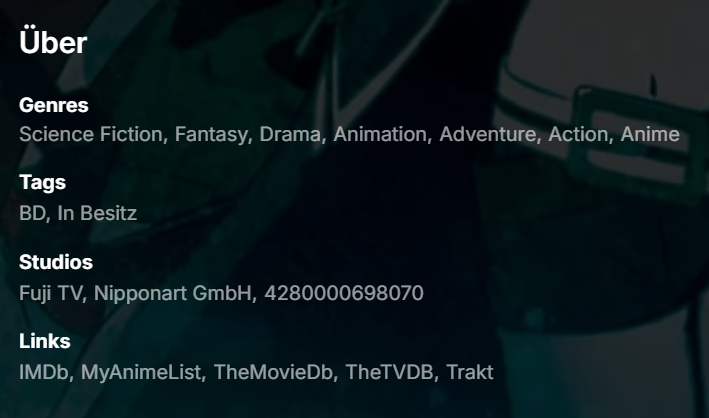
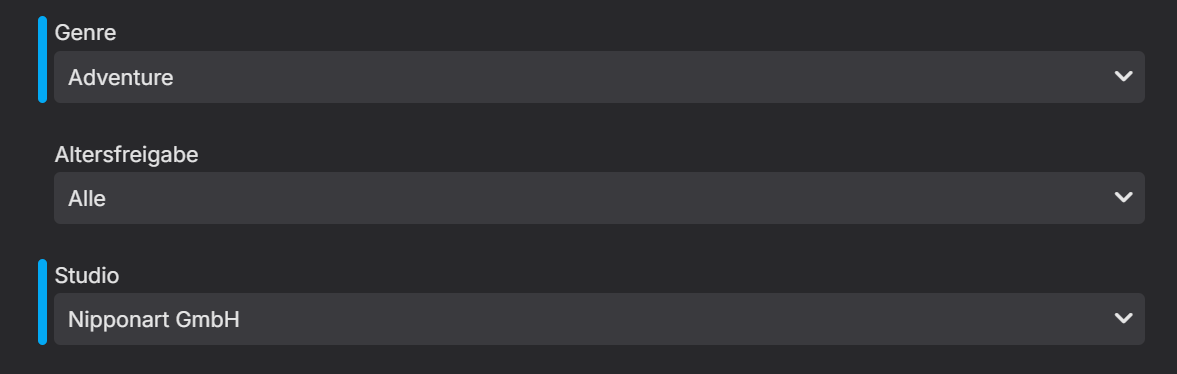
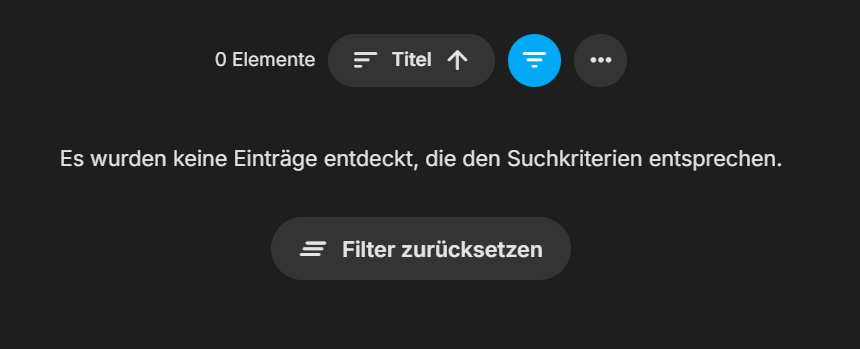
Hey @Luke, Here is a Bug report and a "little" Feature Request at the end. The most pressing issue is the bug, the FR is just damn inconvenient. I've just updated to the latest beta version 4.10.0.14 because this did not work. For example lets use this entry: When I filter for either "Nipponart GmbH" or "Animation" it does work, but when applying both at the same time It results in this: I tested it with "Series" and "Home Videos & Photos" Type of Library and could reproduce it 100% of the time! Also it is damn god annoying that I cannot hit any letter when having a dropdown open to get to the desired entry (genre, studio, tag, ...) those lists can contain several hundred if not thousand entries in my library, so it gets quite annoying having to scroll all the time... Best Regards DragonSkills99
-
Best i can do for now is promise i will look into it after the summer. As said i have looked into the problem before but never found a good solution for it, so no promises!
-
What exactly did you adjust?
-
HI, yes it is certainly doable. Thanks.
-
We have? I don't recall that.
-
ok @Lukebut I don't quite follow. Are you saying I need to sideload a new version that is out now, or is there an update coming? Also what is causing this issue? I've never need it in the 20+ years I've been using EMBY
- Today
-

Emby Beta Linux - not retaining server information
TenderBabyMeat replied to TenderBabyMeat's topic in Linux & Raspberry Pi
Each time I launch the Emby beta, it goes to the first-time run, "Welcome to Emby" with the promo text and the Next button. Next leads to "Let's Get Set Up". Next again leads to the usual sign-in options, including the option to skip and enter the server info manually. Interestingly enough, I had to reboot the server machine a bit ago, and now the Emby beta (running on a different workstation than the server) seems to be retaining the server/login information between launches. -
Merging Live TV recordings and downloaded TV recordings for same show
Luke replied to flashls82's topic in General/Windows
When you add it to one library, make sure to remove it from the other one as well, and then it should work. -
Merging Live TV recordings and downloaded TV recordings for same show
Luke replied to flashls82's topic in General/Windows
Hi, to merge them you would have to make them part of the same library. -
OK this should be improved with the next Emby LG app update. Thanks.
-
Hi, all of your requests to MovieDb are timing out: MediaBrowser.Model.Net.HttpException: MediaBrowser.Model.Net.HttpException: The requested name is valid, but no data of the requested type was found. (api.themoviedb.org:443) Typical causes of this are firewall, security software, or vpn. Can you look into those and let us know what you find? Thanks !
-
Yes, I understand what you mean. Moving the icons up or down globally can avoid the text in some posters, but in my case the current global position is already the best position for most of my library. For example, bottom-left works very well for around 80% of my posters, especially movies and main series posters. The problem is that the remaining 20%, mostly anime season posters or some specific covers, have important title/text exactly in that area. That is why I think the tag-based override idea could be really useful. It would not need to replace the global profile. The global profile would still handle most posters, and only specific problematic items would need a manual exception. Something like: embyicons-position-top-left or embyicons-position-bottom-right would allow users to fix individual posters without changing the entire library layout. I understand that this would require a new rules/customization section, and I know that means extra work. But honestly, if you ever decide to add something like this, I think it would make EmbyIcons one of the most complete and flexible icon customization plugins for Emby. The plugin is already very useful, but this kind of per-item override would make it much easier to get a clean result across movies, series, seasons, collections, and anime posters without having to compromise the global layout. Just sharing the idea. Thanks again for considering it.