All Activity
- Past hour
-
 Tubacca joined the community
 -
 枫林晚 joined the community
 -
 budgiebyte joined the community
 -
 bangbangup joined the community
 -
 Rosfaty20 joined the community
 -
 sorax758 joined the community
 -
 monex245 joined the community
 -
 zamep875 joined the community
 -
 Sgmaquimakisac@gmail.com joined the community
 -
 raxen594 joined the community
 -

Is there a way to move media library folders while preserving metadata and watch history?
Arthur0 posted a topic in General/Windows
Hello, I would like to move all files in my media library to another subfolder, for example, from /video/movie/film1 to /video/movie/UHD/film1 How should I proceed to ensure the metadata and watch history for the media in this library are retained? I want to avoid having to re-scrape the metadata after the move. Can I simply move the files directly and then rescan the library? - Today
-
I increased the watcher per your suggestion and rebooted my NAS. Will keep an eye on this and see if this helps
-
Every file and folder in your library uses a watch. A movie can be 50+ watches depending on how many pictures and stuff you like to keep. An instance is the number of changes since the last scan. Every actual watched file (not what you set it at) uses about 1K of memory.
-
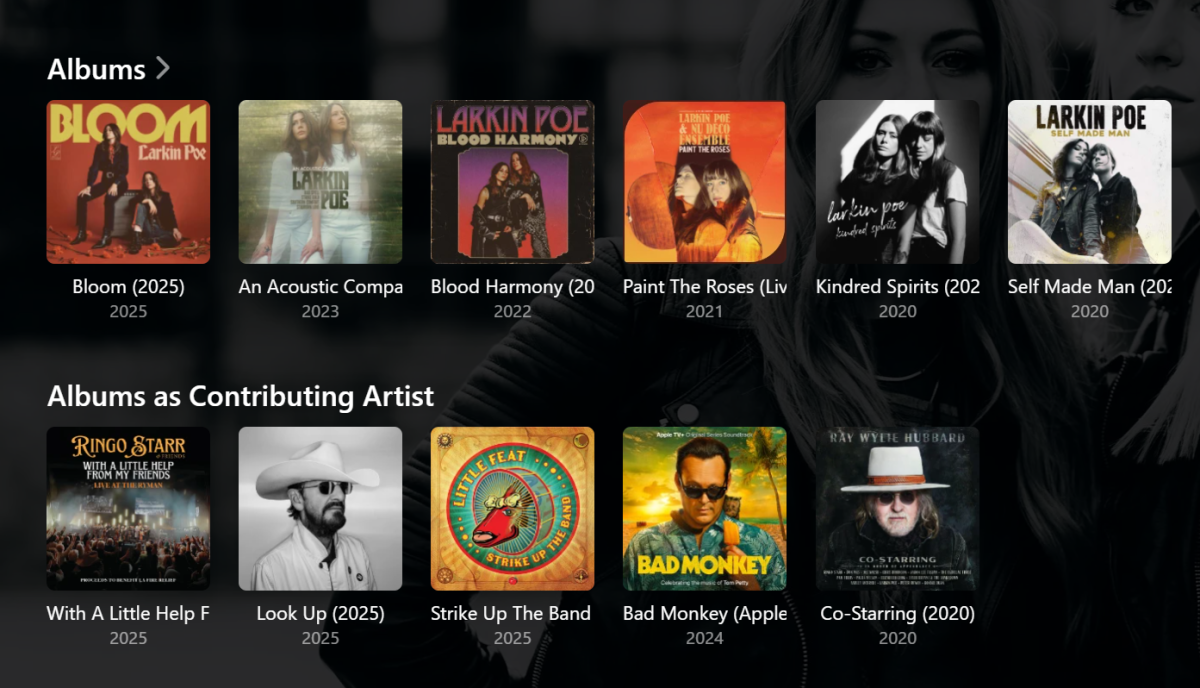
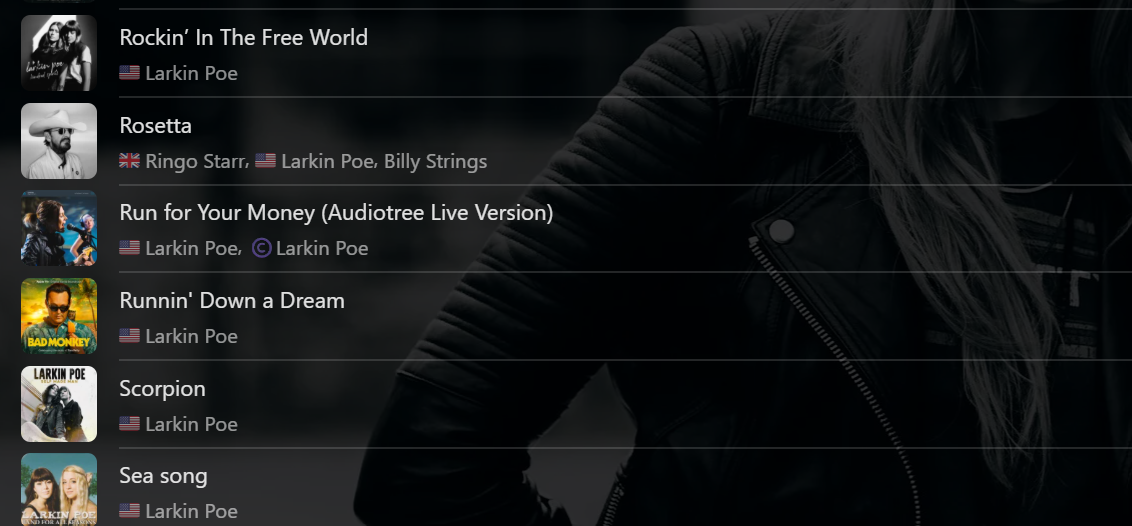
Hi again, Have you tried changing the Album Artist field to "Soundtrack". Not the Artist field, just the Album Artist field. This will not affect the individual Artists on the individual Songs. Your "Soundtrack" Albums willl then appear under the one "Soundtrack" Album Artist and the Albums should then also be present in the "Albums as Contributing Artist" row on the respective individual Artist pages. As per my previous example, here is this view (e.g.) the main Album Artist page is "Larkin Poe" and the Bad Monkey "Soundtrack" Album on which they contribute only one Song also is shown on the row below their main Albums: The relevvant Song will also be in the Larkin Poe Songs list/page/etc. Of course, that's just my method of doing it. Whatever you wish to have as Album Artist should also work. If you still can't get it sorted out nicely, perhaps post your own specific example to help get to a resolution. Cheers!
-
Thank you for the quick reply and the help. I'm pretty sure I did setup spotlight collection with or within your plugin I'm not sure if I did it correctly so I will double check that. I will now work on the MDBLis instead of the ACdb and I'll report back
-
so what does "1148576" actually do? I remember few years ago where I posted about this, created the task, etc and fixed the issue. Never was certain about the number Thank You for your help!
-
Hi Luke, thanks for the suggestion but I'm using 4.9.3.0. again because I couldn't resolve the issues in 4.9.5.0. Version 4.9.3.0. works perfect for me. I just wait until the next update maybe then the bugs are fixed.
-
If you're going to add a bunch more files still, I would just change it to 1148576. Or, if you want to go up in smaller amounts just keep adding 10,000 until the error goes away.
-
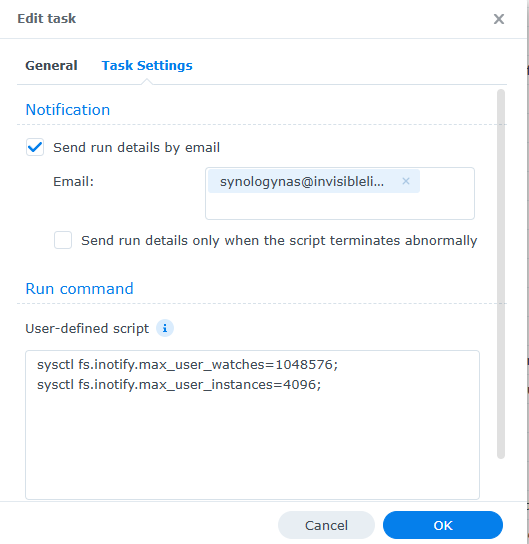
so far in the document, what is your suggestion? this is what I have right now sysctl fs.inotify.max_user_watches=1048576; sysctl fs.inotify.max_user_instances=4096; Please advise and Thank You tvos
-
Ya, looks like you're going to have to bump that up some more again to make RTM work. A million + is a lot of files
-
Hi Luke, I wanted to share some great news. I’ve been testing Emby Theater’s external player feature with a small C# shim that launches VLC using the full LiveStream URL. The results have been outstanding. Weak OTA channels that normally freeze or lock tuners in Theater (like PBS 2.2 here) play smoothly in VLC with no stutter or audio drift. IPTV streams also behave better. VLC pause and mute work perfectly, and the shim automatically stops the LiveStream when VLC exits, so tuners are always released cleanly. My plan is to publish this as an open‑source community tool on GitHub. The full C# source will be included, along with build instructions using the standard .NET Framework compiler. A precompiled exe would be optional for convenience. Before I post anything publicly, I wanted to check with you to make sure this aligns with Emby’s expectations and that you’re comfortable with me sharing it. If you prefer a specific format, location, or disclaimer, I’m happy to follow your guidance. Thanks, Jan
- Yesterday
-
I have tried MusicBrainz, it re-wrote the metadata, still individual albums, I would really like to maintain Artist names if possible, The rest of my library is mostly all showing correctly, only a few issues where I had to change Artist/Album Artist. Soundtracks is the last hurdle
-
thats goona be alot of popcorn!
-

Emby for Android TV app fails login if the server is entered as a bare hostname
MikaelKW posted a topic in Android TV / Fire TV
It works if entered explicitly as: https://emby.example.com Setup: -Emby Server version: 4.9.1.90 -Reverse proxy: NPMplus -Cloudflare proxy in front -Emby Network setting: Secure connection mode = Handled by reverse proxy -Public HTTPS port: 443 -External domain: emby.example.com Browser login works correctly through the reverse proxy. The NPMplus access log shows: POST /emby/Users/authenticatebyname ... 200 But Emby for Android TV / Android app fails login when the server is entered as a bare hostname. Initially, with Cloudflare Always Use HTTPS enabled, the login attempt appeared in the proxy log as: GET /emby/Users/AuthenticateByName?format=json ... 401 Cloudflare was returning a 301 HTTP-to-HTTPS redirect before the request reached NPMplus. I then disabled Cloudflare Always Use HTTPS and NPMplus Force SSL, and tested custom NPMplus redirects using 308 and 307. That changed the Android app request to: POST /emby/Users/AuthenticateByName?format=json ... 308 and then: POST /emby/Users/AuthenticateByName?format=json ... 307 but the app still failed to complete the login after the redirect. So the conclusion is that the Emby for Android TV app appears not to handle HTTP to HTTPS redirects correctly during the AuthenticateByName login flow when the server is entered as a bare hostname. It either converts the login request to GET after a 301 redirect, or fails to complete login after a 307/308 redirect. Expected behavior: -If a user enters a bare domain like emby.example.com, the app should either default to HTTPS, follow 307/308 redirects correctly, or warn the user to enter https:// explicitly. -The app should not fail with invalid username/password when the issue is actually HTTP-to-HTTPS redirect handling. The workaround is the basically typing https:// first. But it's a bit painful to try and guide my dad (nearly 65) to type https://. If i could just have him type emby.example.com that would be much easier, and maybe he could even remember it, lol. -
TVDB does also lock wrong data sometimes... But usually because some people disagree. And their rules can be odd. I've just been watching a series that they insist is being broadcast a week later than I've been watching it! Paul
-

Same movie, different year release
Energon_Universe replied to Energon_Universe's topic in General/Windows
Thank you again , yes its ok now . This is the second time I haven't paid attention to manual. -
This is the old classic RTM limit problem: There is a post on this forum that gives instructions on how to fix this, but all searches currently give me 0 results. A forced library scan should also make these avaliable (but not future additions). Found it:
-
Hi. If you are still running into this with the current app, please provide new logs. Thanks!
-
Wasn't there a thing called MusicBrainz Picard or something that could help cleaning up album names etc?
-
Hi, Any chance we can see this added? Thanks.
-
@UCM_1please check your PMs.
-

Emby for iOS 2.2.52 no video via HDMI output
Symen_4ab replied to Symen_4ab's topic in Apple iOS / macOS
Message sent to my friend, tests should be done tomorrow, thanks! -
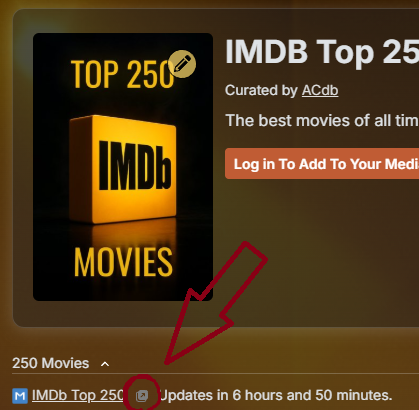
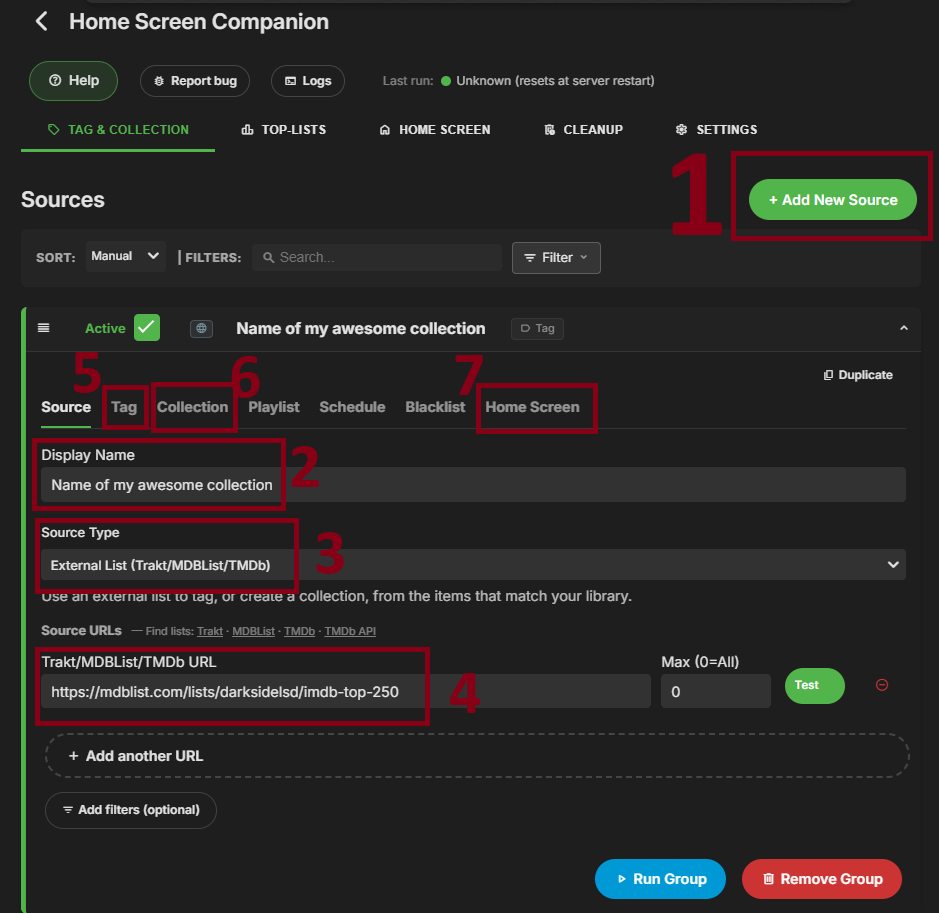
I'll look into it! Have you made those collections using the plugin? If not - the plugin cannot update them on a scheduled basis. You have to use the Home Screen Companion plugin to create your collections for you, then it will auto update them. Regarding imports from ACdb i would recommend going to the equivalent MDBList and use that URL to create a collection. Not sayin you shouldn't use ACdb, just that it will work better for this plugin to use the MDBList url instead. (I beleve all list on ACdb are just another way to present lists that are already on MDBList) You will find the link to the corresponding MDBList here: EDIT: Add quick setup guide When you have the URL to the list on MDBList, do as below: 1 - Add new source 2 - Give it a name 3 - Select external list 4 - paste the MDBList URL 5 - Go to "Tag" tab, if you only are interested in the collection, you can deselect "apply tag" 6 - Collection tab, enable and give your collection a name. (you can also upload a poster image if you want to) 7 - Set up the home screen section to your liking (and selecting what users)
-
I just looked and no filters I can see. Verified this with three devices. TV (Roku), Laptop, and S26ULTRA..
-
@davidawarnerCan be something as simple as a filter you have enabled in the client? It sometimes fools me when i forget to remove it.