All Activity
- Past hour
-

Plugin: EmbyCredits, detect end credits and add auto skip.
yocker replied to yocker's topic in Plugins
That settings is only for if extra training files have been given to the OCR engines. It doesn't really matter for what is being done here as long as you add the right keywords. -
 Anderson Santiago joined the community
 -

Plugin: EmbyCredits, detect end credits and add auto skip.
fbourg replied to yocker's topic in Plugins
Should I also set it to eng+fra in the OCR settings? -
Plugin: EmbyCredits, detect end credits and add auto skip.
yocker replied to yocker's topic in Plugins
@fbourgPlease quickly edit your message with the file as it's not allowed here. I should have clarified that it should have been in PM.. Sorry about that. -
Plugin: EmbyCredits, detect end credits and add auto skip.
yocker replied to yocker's topic in Plugins
@fbourgAre the videos french? I don't mean just the audio but french speaking with french end credits and so on? I noticed this in your settings file: <OcrDetectionKeywords>associate producer,based on,cast,casting,cinematography,co-producer,composer,costume design,created by,credits,developed by,directed by,director of photography,editing,editor,end credits,ende,executive producer,fim,fin,fine,guest starring,music by,produced by,producer,production company,production design,screenplay,series producer,sound,special thanks,starring,story by,the end,visual effects,written by</OcrDetectionKeywords> OCR needs keywords to look for and if it doesn't find them it will fail. So you might need to add keywords like for example "histoire" and "acteurs" for it to look for. The more you add the more precise it will be. The Chroma/hash detection seems to work as it should. If audio is too different between episodes it will fail because it can't find a common sound to compare with. -
Plugin: EmbyCredits, detect end credits and add auto skip.
fbourg replied to yocker's topic in Plugins
I just watched the end of the episode, I think it's supposed to be like that. -
Plugin: EmbyCredits, detect end credits and add auto skip.
fbourg replied to yocker's topic in Plugins
-
 Aloyo27 joined the community
 -
 Y111 joined the community
 -
Plugin: EmbyCredits, detect end credits and add auto skip.
yocker replied to yocker's topic in Plugins
Do you have any way of sharing one of the files that fail ? -
thanks for reminding me that Luke has been "looking into this" for over 2 years now.
-
 Garpugui joined the community
 -
Plugin: EmbyCredits, detect end credits and add auto skip.
fbourg replied to yocker's topic in Plugins
here new file of season 2 credits-detection-debug-2026-09-22T11-48-14.log -
Plugin: EmbyCredits, detect end credits and add auto skip.
yocker replied to yocker's topic in Plugins
No debug log available.. That's new... Please try again. -
Plugin: EmbyCredits, detect end credits and add auto skip.
fbourg replied to yocker's topic in Plugins
Here is the debug log file. Only Season 1 is working, even though I'm definitely running the latest v6 release. credits-detection-debug-2026-09-22T11-38-45.log -
 İsabjkbjk joined the community
 -

EmbyVision OCR - CPU Based AI Credits Detector for Emby (Docker)
EncryptedCity replied to EncryptedCity's topic in Tools and Utilities
This is what the logs should look like embyvision-ocr | INFO: Uvicorn running on http://0.0.0.0:8000 It also shows the ram usage. Approx 350-500 MiB during startup. Here is a video of pulling the container and what to expect. ScreenRecorderProject25.mp4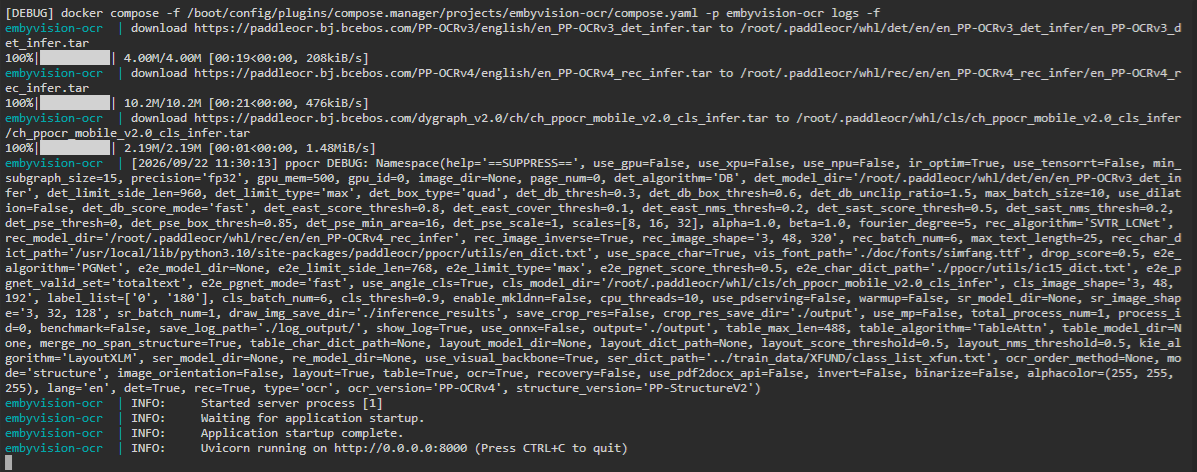
-
 Jajameon joined the community
 -
Plugin: EmbyCredits, detect end credits and add auto skip.
yocker replied to yocker's topic in Plugins
Seems to work fine on my end. Chroma/hash, Blackframe and OCR all workikng as they should. I suggest you try with the lastest beta in the catalog and report back with a dry run with debug. I will see if the changes made helped. -
 AnliMedia joined the community
 -
 Karin3 joined the community
 - Today
-
EmbyVision OCR - CPU Based AI Credits Detector for Emby (Docker)
EncryptedCity replied to EncryptedCity's topic in Tools and Utilities
The container needs time to download and initialize. Check the logs, I would not suspect the 12GB ram is your problem. docker logs -f embyvision-ocr -

Playlist and Collection Improvements for Music Libraries
goblin2k3 posted a topic in Feature Requests
I have started using playlists and collections extensively to make my large classical music library easier to navigate. More specifically, I create playlists for individual works and add them to collections containing works of a particular type by a composer, for example “Beethoven: Symphonies”, “Mozart: Operas”, or “Bach: Sacred Cantatas”. I also add the albums containing those works to the respective collections. This is a really useful feature for organizing a music library. However, there are a few things that I think could be improved: Playlists and collections should be displayed separately on album and artist pages. Collections are not really a type of playlist. They are more like enhanced tags or categories. Displaying them together with playlists is therefore somewhat confusing. Playlist pages should display the collections that contain the playlist. A “More Like This” section for playlists would also be useful, although that may be asking a bit much. Song pages should not display collections merely because the song's album belongs to them. The album was added to the collection, not the individual song. There may be no relationship between a particular song and the collection at all. The different album views on artist pages should also be available for playlists. For example, clicking “Albums” on an artist page displays all albums for which that artist is credited as the album artist. Similar views are already available for albums under “As Contributing Artist” and “As Composer”. It would be very useful to have equivalent views for playlists. Artist pages should distinguish between playlists or songs where the artist is a contributing artist and those where the artist is only the album artist. At the moment, these are mixed together, which can be quite confusing. The same applies to songs. If I want to see all songs from an album where the artist is credited as the album artist, I can simply open that album. I would therefore prefer the artist's song and playlist sections to show items where the artist is actually credited as a contributing artist. Collections should support MusicBrainz and Discogs IDs. Currently, collections can only be linked to TheMovieDB. For music libraries, it would be very useful to support external identifiers from music-specific databases as well. MusicBrainz has a dedicated “Series” entity which can be used to group releases or release groups, making MusicBrainz Series IDs a natural match for Emby collections. Discogs also supports series of releases. Although Discogs handles series within the same database structure as labels, allowing a Discogs series/label ID to be assigned to a collection would be useful as well. -
Plugin: EmbyCredits, detect end credits and add auto skip.
fbourg replied to yocker's topic in Plugins
Here is the XML file. If you have any edits or feedback, feel free to send an updated version over. Thanks a lot! EmbyCredits.xml -

A request to Emby - please clarify the situation with the AndroidTv app
NeverReadyEddie replied to ecrispy's topic in Android TV / Fire TV
Yes in both. Why would that trigger transcoding though? Please note it plays smoothly with no dropped frames on the Nvidia Shield in both the AndroidTV app and the Android app. It just transcodes in the Android one for some reason. -
@soderlundBesides: Thank you for the official release, I'm excited! And basically a big thank for the Cleaning-Modul. (I found Tag-Entries in my library, I didn't know about ::)
-

A request to Emby - please clarify the situation with the AndroidTv app
CBers replied to ecrispy's topic in Android TV / Fire TV
@NeverReadyEddieDo you have the "Auto Refresh Rate" option set in either of the apps? -
To chip in: with some help from AI, I'm testing a script that automates this, as @Lukesuggested above (fetching the Upcoming API URL on a schedule). It runs every hour from Synology Task Scheduler. So far it works well, and the Upcoming tab loads quickly in my two TV libraries (TV Shows, about 740 series, and Cartoons). Setup: Emby 4.10.0.40 in Docker on Synology. Both libraries have TheTVDB and TheMovieDb enabled for Series, Season and Episode. Log from last night and this morning: 2026-09-22 05:00:10 TVShows http=200 took=6s 2026-09-22 06:00:09 TVShows http=200 took=7s 2026-09-22 07:00:06 TVShows http=200 took=5s 2026-09-22 08:00:07 TVShows http=200 took=6s 2026-09-22 09:04:13 TVShows http=200 took=252s 2026-09-22 10:00:40 TVShows http=200 took=39s 2026-09-22 11:01:29 TVShows http=200 took=88s 2026-09-22 11:01:59 Cartoons http=200 took=30s 2026-09-22 11:10:02 TVShows http=200 took=5s The slow runs were all TheTVDB episode-list requests (/v4/series/{id}/episodes/official plus /eng), about 870 fetched from the network and 630 served from cache. Most of the cached responses had been fetched the previous evening between about 20:20 and 22:20, and they seem to have expired roughly 12 hours later, in the same order. The fast hourly runs in between didn't seem to renew them, since they were pure cache hits. My questions: How long are provider responses (TheTVDB/TMDB) kept in the HTTP cache before they're refetched, and does a cache hit extend that? Is there a setting for that lifetime, or a way to refresh the whole Upcoming data at a chosen time (for example at night), so the refetch wave doesn't hit users during the day? Which provider does Upcoming use when both are enabled? My TV Shows library lists TheMovieDb first, but all the lookups went to TheTVDB. A built-in scheduled task for this would make the script unnecessary. Many people in this thread seem to have asked for one. Here is the script (it needs jq, which DSM includes and you need to replace LIBRARIES, USERNAME, the port, DIR and api file with your own data): Here is the script: #!/bin/bash # Requests Emby's Upcoming list for each library in LIBRARIES (the same query the # web client sends) and logs how long it took. Run from Synology Task Scheduler as root. # Fast times = Emby answered from its cached provider data; slow times = it had to # fetch episode lists from TheTVDB/TMDB again because the cached data had expired. DIR="/path/to/script" LOG="$DIR/emby-upcoming.log" EMBY="http://127.0.0.1:8096/emby" # library id = the parentId in the library's web URL; name is only for the log LIBRARIES="15884189:TVShows 748:Cartoons" USERNAME=username # api key string stored in the same directory as script in file named .emby-api-key KEY=$(cat "$DIR/.emby-api-key" 2>/dev/null) [ -n "$KEY" ] || { echo "$(date '+%F %T') no api key" >> "$LOG"; exit 0; } U=$(curl -s --max-time 10 -H "X-Emby-Token: $KEY" "$EMBY/Users" | jq -r --arg n "$USERNAME" '.[] | select(.Name == $n) | .Id') [ -n "$U" ] || { echo "$(date '+%F %T') user lookup failed" >> "$LOG"; exit 0; } for lib in $LIBRARIES; do id=${lib%%:*}; name=${lib#*:} start=$(date +%s) code=$(curl -s -o /dev/null -w '%{http_code}' --max-time 600 -H "X-Emby-Token: $KEY" \ "$EMBY/Shows/Upcoming?Limit=100&UserId=$U&ImageTypeLimit=1&EnableImageTypes=Primary,Backdrop,Thumb&EnableTotalRecordCount=false&parentId=$id&Fields=Overview") echo "$(date '+%F %T') $name http=$code took=$(( $(date +%s) - start ))s" >> "$LOG" done # keep the last 7 days (at most 1400 lines) tail -n 1400 "$LOG" > "$LOG.tmp" && mv "$LOG.tmp" "$LOG" exit 0
-
Plugin: EmbyCredits, detect end credits and add auto skip.
yocker replied to yocker's topic in Plugins
There's a new version in the catalog. Version 2.8.9.6 beta. Also please send me your embycredits.xml settings file. You will find it in plugins/configurations. -
Emby for Android or Emby for Android TV ?
NeverReadyEddie replied to chrisrobbins1970's topic in Android TV / Fire TV
I just discovered a rather major difference, at least for me in one specific scenario. Its worth noting though, and in this instance the AndroidTV app is working better. If you want to comment on it please do it below my post rather than here: -
Again thx. Maybe some of the admins/dev team can share some light, how the selection is done? Would be lovely, if I could somewhere select: select based on format or based on best resolution.
-
Thank you @soderlundfor your comments. Maybe there is any way to implement this as an option? (I don't think it's "only" an admin feature.... That's what "rankings" for movie enthusiast are all about! To see what's number 25 or what's the last ten til 100. And of course to see: Oh my collection still misses the top movies from 11 to 16 and 22-23. In addition of the ranking thought I also believe that this kind of "order" would be necessary for the collection or homescreen add on. (Because who cares of an alphabetic movie-list, if the collection is called: "Top 100 Movies of all Time".) Thanks for further thinking about it and hopefully - if necessary - the admin-team could think of adding "numbers" to playlists (optional of course).
-
The request An entry returned by /Shows/Upcoming has no image of its own. I'd like to ask for one: a per-entry image reference on that endpoint's response. The reason I maintain two plugins, TV Show Status & Tv show Air Dates. Among other things it marks season premieres and finales by drawing a small badge on artwork, through IImageEnhancer. On posters and on series thumbnails it does exactly what it should. In Upcoming it cannot, and the reason is visible in the API response. Calling /Shows/Upcoming with an API key returns entries that carry: no Id no ImageTags ParentThumbItemId and ParentThumbImageTag that are identical for every entry of the same show SeriesPrimaryImageTag, likewise identical across that show's entries Everything else is per-episode — Name, Overview, PremiereDate, IndexNumber, ParentIndexNumber, ProviderIds — but every image field points at the series. So each card in the Upcoming view is given the same picture. The clients then behave sensibly: they use an entry's own image when there is one and fall back to the series thumbnail when there isn't, and the fallback is always taken, because the first option never exists. What that means for the plugin The enhancer is handed the series, once, and asked whether to draw. It has no way to answer differently for one episode than another, because there is only one image in play. In practice: A show with a premiere inside the plugin's window gets the badge drawn on its series thumbnail — and therefore on every one of that show's Upcoming cards, which can be ten or more, not the one the badge refers to. A show whose premiere has already aired has a plain thumbnail, so none of its cards are badged. Side by side on one screen that reads as a fault: one show badged ten times, another not at all. It isn't a fault. It is the only behaviour the data permits, and no plugin setting can change it. The same limitation blocks anything else an enhancer might reasonably want to do per upcoming episode — a new-season marker, a countdown, a logo on the episodes that actually change network, a first-episode-after-the-hiatus flag. Why the existing routes don't cover it The episode name. The plugin's companion, TV Air Dates, can put "Season Premiere" in front of the episode title, and that does land on the correct card everywhere. But a name is one field and it travels: the prefix then appears on the season page, in search results and on the now-playing screen, not only in Upcoming. A marker on artwork is the right shape for this, and it is the shape Emby uses elsewhere. Injected JavaScript in the web client. This solves it per episode, and it is what the plugin does for browsers. It reaches only browsers. The apps carry their own copy of the web client, so a server has no way to reach them, and iOS cannot be modified at all. That is the gap I am asking about: the route that works is available only on the client that needs it least, and the plugin therefore cannot work seamlessly on the Emby apps — which is where most people actually look at Upcoming. IImageEnhancer. The enhancer is the right mechanism and it works well everywhere else. The difficulty is only that for Upcoming it is asked one question per show and expected to answer it per episode. Possible shapes Any of these would do it, in rough order of how small they look from outside: Set ImageTags on the entry when the episode resolves to a real (including virtual or unaired) item, so clients take the path they already prefer. Set Id on the entry, so a plugin has something to attach an image to and clients can request /Items/{id}/Images/Primary as they do everywhere else. Allow a metadata provider to supply a per-entry image reference alongside the episode, for the endpoint to carry through. The first appears to change nothing for existing clients, since they already check the entry's own image first and fall through when it is absent. What it would enable Plugins that already badge posters and thumbnails correctly would badge upcoming episodes correctly too, on every client, including the TV and mobile apps where nothing else is possible — and TV Show Status would behave the same way in the apps as it does in a browser, which is all I am really after. Everything above is observable from /Shows/Upcoming with an API key, if it is useful to reproduce. Thanks for reading, and for the plugin surface generally: the enhancer and channel APIs are good, and this is a request to extend one of them. Thanks