All Activity
- Past hour
-
 JohnnyGee joined the community
 -
 net127 joined the community
 -
 yazzay joined the community
 -
 NGallup joined the community
 -
 Rodrigo1995 joined the community
 -
 net126 joined the community
 -

Advice please - getting the maximum from my EMBY Setup / Samsung HW-Q990C (Atmos and TrueHD)
Robnaeyaert replied to Robnaeyaert's topic in Hardware
Thanks @FrostByte- interestingly my ChatGPT said regarding Kodi "Once Kodi is fully configured you'll likely find yourself using it for virtually all movie playback while continuing to use Emby Server as the backend that managed your media library. This combination is widely regarded as one of the best Windows-based home theatre setups". I take your point on introducing another app here as opposed to native Emby Theatre - I'm just trying to reconcile why Kodi would be considered "better" by ChatGPT over a pure Emby front and back end? Thoughts? -
 527873645 joined the community
 -
 ClickHere joined the community
 -
 leonel93 joined the community
 -

Expand saved home-screen ItemsQuery to support Live TV program and relative-date filters
pfunk1978 replied to pfunk1978's topic in Feature Requests
Hey, sorry. I didn't realize that there is a dev request section. Can we get this moved to there? I don't seem to have the ability to do it. -
 无敌大奥特 joined the community
 -

Emby Windows 2.317.2.0 playback controls hidden behind video
softworkz replied to TDriver's topic in Windows & Xbox
Hm, this is very unusual. It cannot be behind the video, because the video is an entirely different layer behind everything else . Has it been working for you with a previous version? If yes, which one? Do you have display scaling set to anything else than 100% Have you tried key presses via keyboard? Is it a tablet with touch input? - Today
-

How to prevent apps from discovering/preferring "local"/LAN IP of server.
Napsterbater replied to Napsterbater's topic in General/Windows
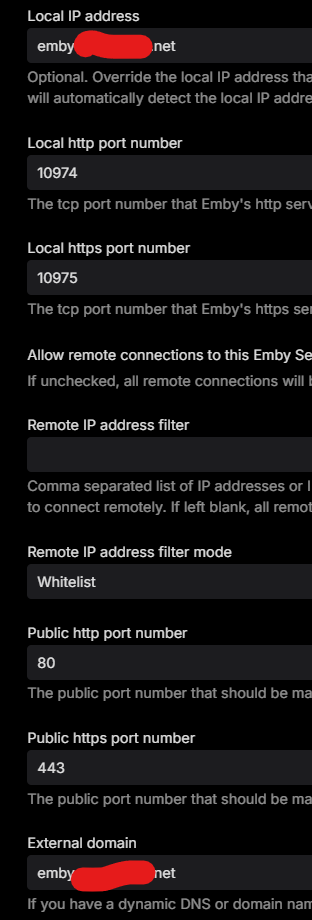
That is strange, because that has never been my experience. Never had to block the clients on the local firewall to prevent this. So for the devs: If nothing changed, then why would clients previously setup with just the FQDN + Port 443, who could always connect direct in this manner but didn't, and always used the FQDN for everything, just now decided to stop doing that? Settings screen and dashboard have been set and looked like this for years. Also, again, the IP address reported for these clients has been their IPv6 addresses, and seemingly, Emby ONLY give the clients the IPv4 for the "Local Access" IP, plus seeing them on HTTP vs HTTPS as they have always been.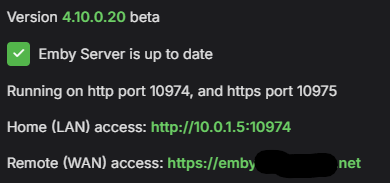
-

Advice please - getting the maximum from my EMBY Setup / Samsung HW-Q990C (Atmos and TrueHD)
FrostByte replied to Robnaeyaert's topic in Hardware
I don't really have any experience using EmbyCon, just read through the threads some. There is a post that compares the two, I just can't find it right now. You may have found it already though. I think E4K is more actively supported, but I'm sure they both work and both devs seem to be good guys. E4K doesn't really create its own database, it syncs Emby's db with Kodi's. Though I suppose that's kind of the same thing if all your information is coming from Emby. EmbyCon is probably simpler I'm guessing. If all you want is smooth playback though I'm not sure introducing another variable like Kodi would be the right thing. The Emby client would probably be the most stable/smooth and introducing Kodi could introduce other issues. Also, if you have Kodi issues then you may need to jump over there for any support for that. The guys here are mostly just going to assist with the plugin. The main advantage of using either plugin is probably going to be the ability to change the look of the client more. If you like to tinker try them both and try several skins out. -

How to prevent apps from discovering/preferring "local"/LAN IP of server.
Lessaj replied to Napsterbater's topic in General/Windows
Always been like that. I don't use emby connect, I have a domain. -
How to prevent apps from discovering/preferring "local"/LAN IP of server.
Napsterbater replied to Napsterbater's topic in General/Windows
@LessajWhen did this start for you? Again for me it started roughly within the last month. Up until then the Apps always used the FQDN as* inputted on the setup screen of the app, for these I don't use Emby connect. -
Hi. Can you try searching for our standard android app (Just "Emby" on Amazon and "Emby for Android on Google) on the same device's app store and see how that compares? Thanks.
-
Advice please - getting the maximum from my EMBY Setup / Samsung HW-Q990C (Atmos and TrueHD)
Robnaeyaert replied to Robnaeyaert's topic in Hardware
@FrostByteso given all I have outlined and what I want to achieve (which is just smooth playback with maximum audio and video) would you recommend Kodi EmbyCon or Emby for Kodi (I think there are two paths - one just connects to my Emby server (EmbyCon) and the other (Emby Next Gen) creates its own database etc. I'm just after smooth playing of media -
Advice please - getting the maximum from my EMBY Setup / Samsung HW-Q990C (Atmos and TrueHD)
FrostByte replied to Robnaeyaert's topic in Hardware
Here is the thread you will want to follow: https://emby.media/community/topic/139523-embyforkodi-next-gen-12xx-support/ Load the Kodi Companion plugin from the Emby plugin library on your server Download the 4 plugins of quickmic's from the first post in the link above Install the Service plugin first in Kodi, then load the other 3 plugins in Kodi If you have any question about the plugin post in the thread above and I'm sure someone will respond -
Advice please - getting the maximum from my EMBY Setup / Samsung HW-Q990C (Atmos and TrueHD)
Robnaeyaert replied to Robnaeyaert's topic in Hardware
Thanks @FrostByteit's definitely 'baby steps' for me as I hadn't really dug into all this before and your advice was amazing. I dont mind forking out money for a good device but I had a nagging feeling I had all the ingredients I needed to get the most. I must admit it wasnt very easy to get all the drivers and settings sorted on the Windows NUC but once I did I'm guessing it's a one-time thing (versus a Shield plug-and-play I'm assuming). I dont watch streaming platforms I have all my media local on my NUC. So one last request please - can you point me to the Kodi/quickmic's plugin info and where to source that so I can give that a try as a client? -
Advice please - getting the maximum from my EMBY Setup / Samsung HW-Q990C (Atmos and TrueHD)
FrostByte replied to Robnaeyaert's topic in Hardware
Also, if your NUC and the Emby client can pass HDR10+ (since you have a Samsung TV and no DV) then that's another plus for the NUC. The Shield does NOT pass HDR10+ as of yet. -
Advice please - getting the maximum from my EMBY Setup / Samsung HW-Q990C (Atmos and TrueHD)
FrostByte replied to Robnaeyaert's topic in Hardware
If you got Atmos and HDR to trigger and are happy that is good. I believe running the Emby client on the NUC was one thing I did mention in that journal of long-winded information I gave you. I just didn't have any experience with the Windows client and MPV, etc. to say how well it worked. Though I would imagine it's probably better than using your Xbox as a client. Yes, I've used quickmic's plugin and find it to be very good. Basically, it sync's Emby's db with Kodi's and brings some capabilities along with it that Kodi doesn't provide. If you like to play with skins and want more leeway in tweaking your client, the way you want it to look then the plugin may be for you. -
Advice please - getting the maximum from my EMBY Setup / Samsung HW-Q990C (Atmos and TrueHD)
Robnaeyaert replied to Robnaeyaert's topic in Hardware
@Neminemit was considerably longer than that as you probably missed, I have a NUC11TNHi3 running as an EMBY server directly into my HW-Q990c sound bar. I spent just on 3 hours yesterday on the NUC side alone updating drivers and configuring to hear what I was missing out of the Samsung Tizen App. I was asking these questions given the higher experience from the community to help me - which you didn't appear to offer anything of use (noted). I'm glad to say @FrostBytethat your advice and help was beneficial as I managed to get the NUC to output TrueHD to the Soundbar through the Emby theatre App running on the same NUC. My config was NUC>HW-Q990C>Samsung The Frame LS03B [eARC] My original question was "DO I need a nVidia Shield Pro to get the best out of my sound bar hardware" given I listed all my kit upfront. ChatGPT replied "NO your NUC is actually more powerful than a Shield" and you have it already negating the need to spend more on the config Interestingly ChatGPT also recommended I run Kodi on the NUC with EMBY integration (same NUC running Emby Server) as a recommended experience which I found a little odd but I'm going to give it a go. I'd be keen on @FrostByteor @Lukecomments on that. On another massive "plus" side, by running Emby Theater on the NUC PC that runs the EMBY Server, I'm gaining many versions newer than my old way of running the Tiezen Emy App which is still stuck on 2.2.8 due to the long waits caused by Samsung. So all in all it feels like I have all the hardware I need to get the most out of my Soundbar, I just didn't realize all the issues/transcoding etc that was blocking me by running the Tiezen App on my LS03B The Frame TV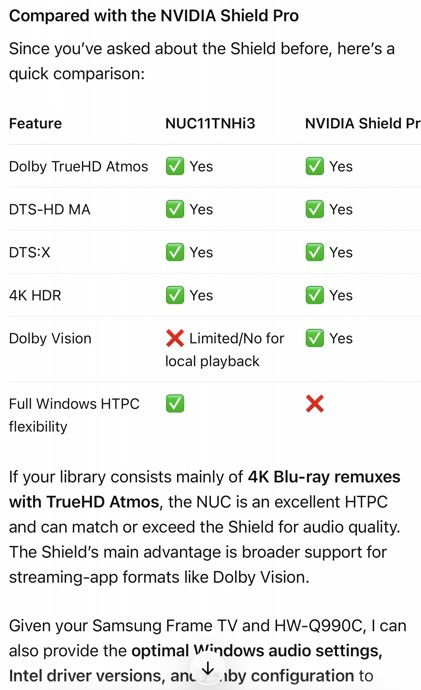
-

Emby clients can enter uncontrolled request loops without retry backoff
Luke replied to peter2020's topic in General/Windows
HI, when you enable debug logging then all requests will appear in the server log. -
What exactly in that screenshot are you referring to?
-
They made a breaking api change. Things are going to happen when you do that.
-
How to prevent apps from discovering/preferring "local"/LAN IP of server.
Napsterbater replied to Napsterbater's topic in General/Windows
Something has absolutely has had to change, because up until the past month or so my apps never connected to the local IP. Because the IP reported by the Emby server itself in current streaming sessions shows this has to be the case. And no it's not due to X-Forwaded headers or anything, because that wouldn't match it either. They always utilized the IP associated with the DNS FQDN that I initially input to connect them with. And now they don't. They ignore it. They use the local IP and they're using HTTP vs HTTPs. I've had to resort to blocking via local Firewall So clients cannot access the server directly, and only the reverse proxy and or cloudflare tunnel apps can. That's never had to happen before. And Emby Network settings haven't changed for a couple years at this point. And this also happened on multiple Android apps, across a fire stick, Onn Google TV stock, And Android phone. Two different networks. One network is actually in a completely different subnet across the VPN tunnel, so it couldn't even have seen the local broadcast Discovery mechanism that's in place either Edit: Also as I noted, The local IP address I've always had configured on the network settings page in Emby, it was this FQDN, not an IP. And again that FQDN does not resolve to the local IP/s of the Emby Server. -

Emby clients can enter uncontrolled request loops without retry backoff
peter2020 replied to peter2020's topic in General/Windows
One additional concern is that these repeated item-detail requests do not appear to be recorded in the normal Emby server log, at least at the default logging level. This may make the problem difficult to detect. An administrator might only notice increased server load, network traffic or an unusually high number of requests without being able to identify the endpoint responsible. It is therefore possible that the issue is more widespread but has remained unnoticed on servers that do not retain reverse-proxy access logs. I would be interested to know whether other Emby server administrators can find similar patterns in their reverse-proxy access logs. If you are running Emby behind nginx, Traefik, Apache, Caddy or another reverse proxy, please check for repeated requests matching this pattern: GET /emby/Users/{UserId}/Items/{ItemId} The pattern I am seeing has the following characteristics: The item is a Live TV channel (Type: TvChannel). The response contains the current EPG programme in CurrentProgram. The same user and client request the same channel item repeatedly. Requests occur at a stable frequency of approximately one, two or sometimes almost five requests per second. The behavior can continue for minutes or hours. Successful HTTP 200 responses do not stop the repeated requests. The same behavior can occur with different channel item IDs. Affected clients in my data include Samsung Tizen, LG webOS, Amazon Fire TV WebView and an embedded Apple WebKit client. When checking your logs, useful information would include: Emby client and version Device/platform Anonymized endpoint pattern Number of requests Duration of the repeated activity Approximate requests per second HTTP response status codes Whether the same user or client exhibits the behavior with multiple Live TV channels Please make sure to remove user IDs, access tokens, API keys, IP addresses and channel names before posting any log extracts. A simplified example of the suspicious pattern would look like this: 12:00:00 GET /emby/Users/USER_ID/Items/ITEM_ID 200 12:00:00 GET /emby/Users/USER_ID/Items/ITEM_ID 200 12:00:01 GET /emby/Users/USER_ID/Items/ITEM_ID 200 12:00:01 GET /emby/Users/USER_ID/Items/ITEM_ID 200 12:00:02 GET /emby/Users/USER_ID/Items/ITEM_ID 200 If other administrators can confirm the same pattern, it would help determine whether this is a broader cross-client Live TV/EPG issue rather than an isolated installation-specific problem. Could the Emby team also confirm whether requests to this endpoint can be included in debug logging or whether there is another recommended way to trace which client component is scheduling them? -

Emby Beta 4.10.0.15+: Crashing due to Out of Memory on DS918+ Package Center Install
DarWun replied to DarWun's topic in Synology
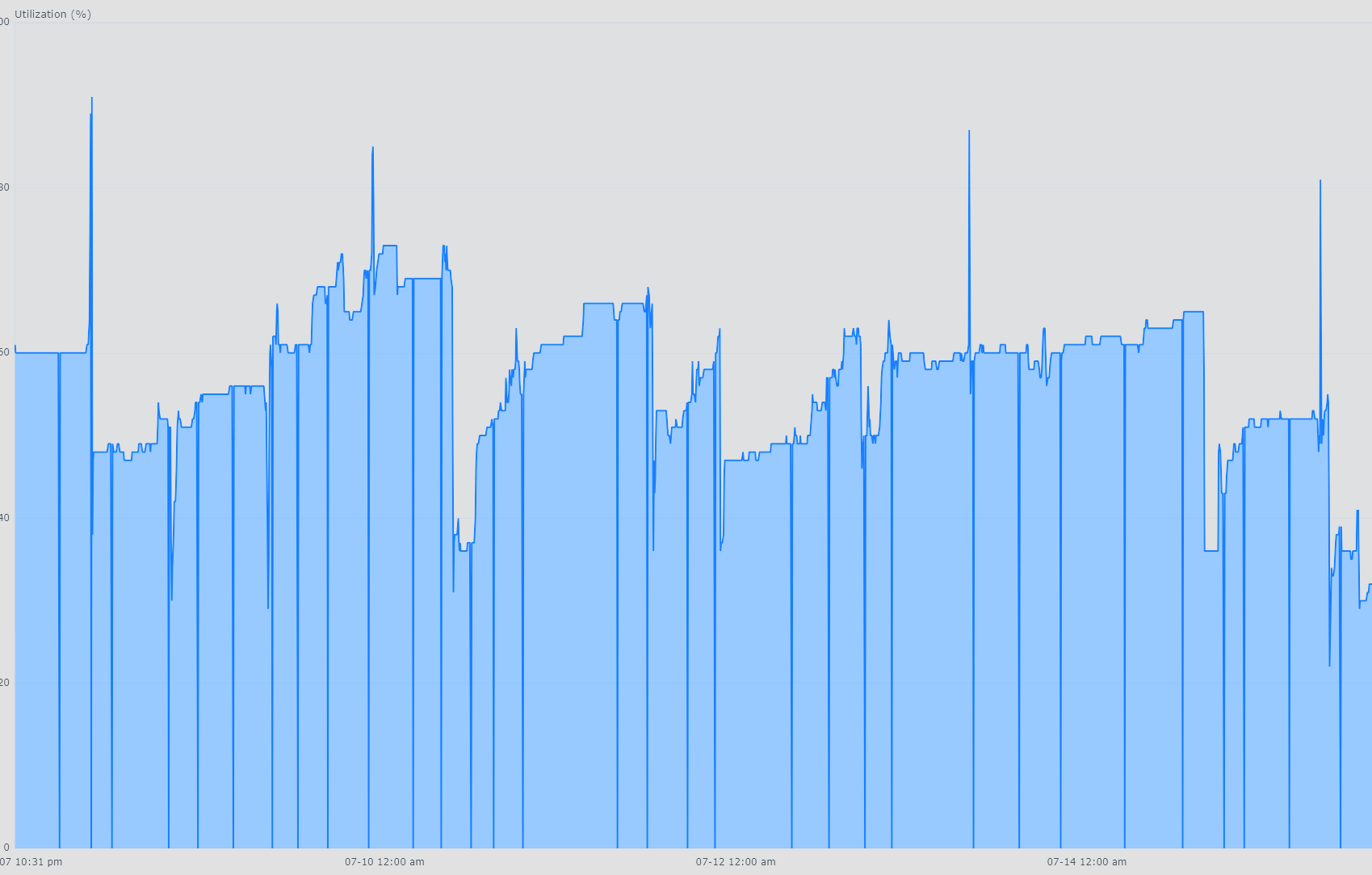
As I stated in this post, I rolled back to 4.10.0.11 to see if the memory usage spike when manually initiating a library scan first thing in the morning occurs as frequently as it does after updating to Beta 4.10.0.15 and beyond. Four days later, and there have been no memory spikes in that scenario. I'm going to hang back on 4.10.0.11 for another few days. Post 4.10.0.15 I was seeing this issue within 24 to 48hours of restarting Emby since mid-June. The image below shows 4 spikes in memory usage over four days post 4.10.0.15 . Each one of those occurred when a manual library scan was run first thing in the morning after the server had been idle overnight. Only one of them (the first one) lead to an OOM event that shutdown Emby. But all of them resulted in Emby becoming unresponsive for the duration of the scan. I'll post back after installing Beta 4.10.0.20 later later this week and running it for a few days. Hopefully there will be no memory usage spikes...fingers crossed!!!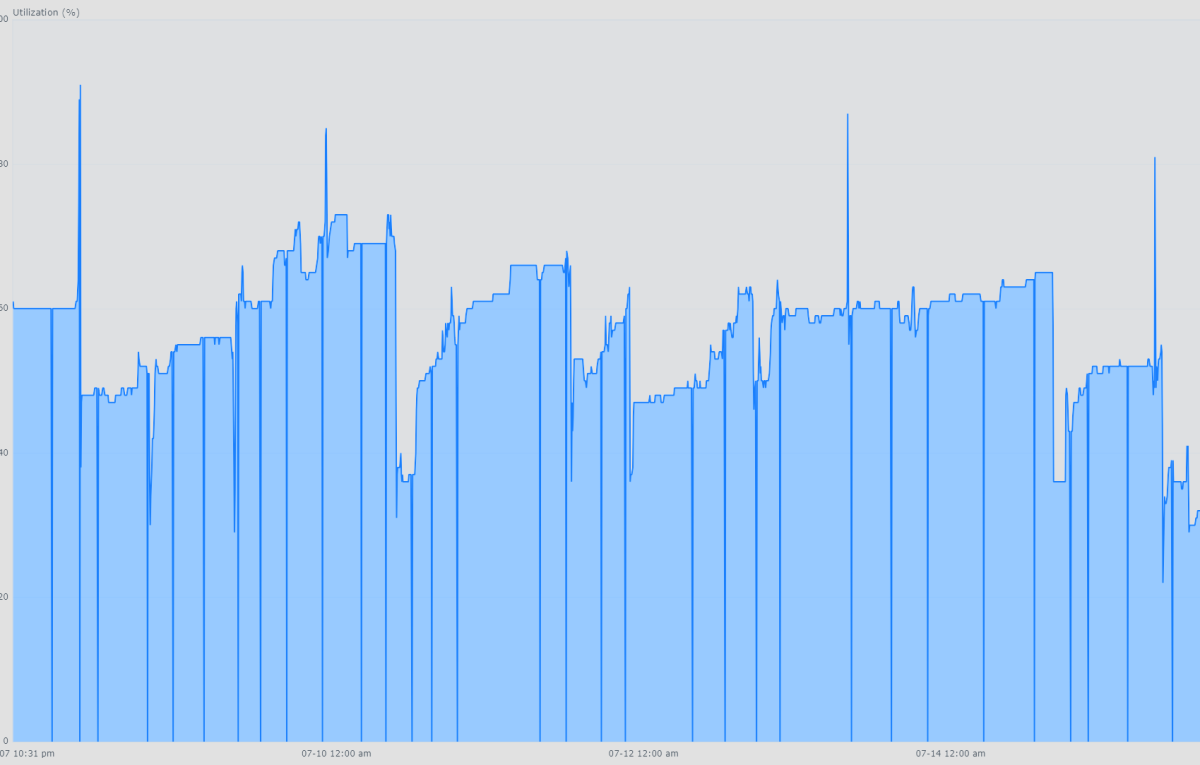
-

Emby Windows 2.317.2.0 playback controls hidden behind video
TDriver replied to TDriver's topic in Windows & Xbox
No, TV Mode is not enabled. I am using the Dark theme, but I have also tested the Windows theme and the issue remains exactly the same. I have additionally: • Reset the app completely • Uninstalled Emby Windows • Restarted Windows • Reinstalled the app from the Microsoft Store Unfortunately, the playback controls / OSD are still not visible after the clean reinstall. The issue occurs in normal desktop mode as well as in windowed, maximized and fullscreen playback.

-
The GT 1030 is a complete pile of e-waste, it's garbage. In Emby for Windows you can try setting Video Player to Energy Efficient and see if that helps.
-
Emby Windows 2.317.2.0 playback controls hidden behind video
softworkz replied to TDriver's topic in Windows & Xbox
Not that I'd know of. Which theme? TV Mode enabled? -
Emby Windows 2.317.2.0 playback controls hidden behind video
TDriver posted a topic in Windows & Xbox
Hello, I am using Emby Windows version 2.317.2.0. Video playback itself works normally, but the complete playback controls overlay / OSD is no longer visible. When I start any video and move the mouse or click inside the player, no controls appear. The play/pause button, progress bar, volume control, audio and subtitle selection, fullscreen button and all other playback controls are missing. The video continues playing normally, and player commands such as play/pause are still being processed. The issue occurs in windowed, maximized and fullscreen modes. I have already tested the following: • HDR enabled and disabled • 10-bit and 8-bit display output • NVIDIA GeForce RTX 5060 Ti • AMD Radeon integrated graphics • D3D11VA hardware decoding • Software decoding • Different MPV quality and scaling settings • Multiple video files • Windowed, maximized and fullscreen playback The behavior is always the same. The Emby client log shows that IAppRouter.showVideoOsd is called and returns successfully, but the OSD is still not visible. This makes me suspect a z-order or composition issue where the native MPV video surface is being rendered above the WebView2 playback controls. The client log also repeatedly contains the following warning when the OSD is requested: Warn WebView: error locking orientation: [object DOMException] I have attached the Emby client log and several MPV logs from tests using different graphics adapters, decoding methods and display configurations. Expected behavior: The playback controls should appear when moving the mouse, clicking inside the player, pausing playback or entering fullscreen mode. Actual behavior: The video is visible and plays normally, but the complete playback controls overlay remains hidden. The controls worked previously, but I currently cannot find any way to restore them.EmbyClient.txt Is this a known regression in Emby Windows 2.317.2.0? Is there a way to completely reset the WebView2 UI, player configuration or application data without losing the connection to the Emby server? Thank you. mpv-20260719T213156584.txt -
Auf deutsch steht folgendes: "Spoiler-Informationen von ungesehenen Episoden ausblenden" "Blendet das Bild und die Übersicht für ungesehene Episoden auf den meisten Bildschirmen aus." Mich persönlich hat das "Spoiler-Information" etwas irritiert. Ein "Vorschaubilder/ Episodenbilder ausblenden" hatte ich wahrscheinlich leichter verstanden.