All Activity
- Past hour
-

Verizon Fios killing my CableCard: Options? Ideas?
jcbeaver76 replied to jcbeaver76's topic in Live TV
Sounds like a good idea, except right now I'm trying to setup CDVR and it won't take my FIOS credentials, which I know work. -
@jcbeaver76 ChannelsDVR makes an excellent backend for Emby. Once you have the sources set up in CDVR, you create an M3U tuner in Emby, then copy the M3U and EPG links from CDVR to configure the tuner in Emby.
-
 Bernie546 joined the community
 -
 Cb1983 joined the community
 -
 vivian07366 joined the community
 -
 ld_p3 joined the community
 -
 Anglow joined the community
 -
 Kvbuckaroo joined the community
 -
 unet87641 joined the community
 -
 AZR2026 joined the community
 -
 linarubio joined the community
 -
 sneakypl joined the community
 -
Thanks for following up.
-
So thank god for AI I guess Got deepseek taking a look at my setup and it got to this in the end... UPDATE: found the root cause of the "random pauses" + System.IO.IOException: Input/output error Long story short: it was the NFS mount version, not disk/space/network. After weeks of chasing it, I can now reproduce it on demand and have a fix that is verified. ROOT CAUSE - Emby runs in a Proxmox LXC; the movie files come from a Synology NAS over NFS (mount points defined in /etc/fstab on the Proxmox host and bind-mounted into the LXC). - The mounts used NFSv4.1 with default locking (local_lock=none). .NET/Emby takes a flock (share-lock) on the media file when it opens it for streaming. On NFSv4.1 that flock is forwarded to the server as an NFSv4 byte-range lock. - The Synology server periodically drops that lock state (lease/stateid expiration). The kernel client then logs: "NFS: <nas ip>: lost 1 locks", and every subsequent read through the locked file fails with EIO -- which Emby surfaces as System.IO.IOException: Input/output error and a playback pause until the file is re-opened. PROOF (reproduced while the NAS was fully online, cold cache, so no NAS power schedule involved) - Every Emby "Input/output error" event matched 1:1 with a kernel "lost 1 locks" event (same second, 97/97 on the worst evening). - Deterministic repro on the host: open the movie file, take flock(), read continuously. * NFSv4.1 + flock -> EIO partway through the file + "lost 1 locks" * NFSv4.1 without flock -> full file reads fine * NFSv4.1 + nolock -> still fails (kernel silently maps nolock to local_lock=none) * NFSv4.1 + local_lock=all -> still fails (NFSv4 client ignores this option -> /proc/mounts still shows local_lock=none) * NFSv4.0 + flock -> full 5.8 GB file reads fine, no "lost 1 locks" So neither nolock nor local_lock help on NFSv4.1 -- the only reliable fix I found was dropping the NFS protocol version from 4.1 to 4.0 for these mounts. FIX APPLIED In /etc/fstab change "/path nfs defaults 0 0" to "/path nfs defaults,vers=4.0 0 0", unmount and remount, then verify: /proc/mounts should show vers=4.0.
-
Verizon Fios killing my CableCard: Options? Ideas?
jcbeaver76 replied to jcbeaver76's topic in Live TV
i know its been some time, but just got the update from Verizon FIOS... I have until November 5th... Hi, We recently reached out to you about a required technology upgrade for your Fios TV service, but we haven't heard back yet. Our network is transitioning to Internet Protocol (IP) delivery to provide you with an improved viewing experience and increased flexibility. Because of this upgrade, your current Fios TV Digital Adapter(s) and/or CableCARD(s) will no longer work on or around November 5, 2026. To prevent an interruption to your service, you must replace this legacy equipment. Action needed: Please call us today at 1-800-Verizon (1-800-837-4966) to schedule your equipment transition. Based on your current Fios TV equipment pricing and your specific household needs, you may be eligible for a complimentary upgrade to our new IP-capable Fios TV boxes (up to 10 per household). Our representatives will help you configure the right setup for your home. Please note that depending on the final equipment configuration you choose, charges may apply. I think its time to start looking into Channels DVR a little harder. Even if i get a "free" IP box, the DVR service would be more per month. - Today
-

Markers - "as a schedule task and when media is added" - not working.
adolfotregosa replied to adolfotregosa's topic in Linux
File attached. Thank you embyserver.txt -

Markers - "as a schedule task and when media is added" - not working.
Luke replied to adolfotregosa's topic in Linux
Hi there, please attach the Emby server log from when the problem occurred: How to Report a Problem Thanks! -
Markers - "as a schedule task and when media is added" - not working.
adolfotregosa replied to adolfotregosa's topic in Linux
I thought I did. I have an 'anime' library. When I manually add a valid episode to one of the shows and wait for it to show up in the 'Latest' section, I start playing it in the browser. However, when the intro comes on, the 'skip intro' button doesn't show up. If I go to 'Scheduled Tasks' and run 'Detect Episode Intros,' the button finally appears when I play the episode again. I did a quick screen recording showing the issue. Screencast_20260810_215511.webm -

Emby App Crash on Launch After iOS 12.5.7/Emby 2.2.19 Update
AndreaPrati replied to Just4Jo's topic in Apple iOS / macOS
Ok. I'll wait for it and let you know. Thank you so much!! -
Emby App Crash on Launch After iOS 12.5.7/Emby 2.2.19 Update
Luke replied to Just4Jo's topic in Apple iOS / macOS
Ah ok. That folder view should be resolved for the next app update. -

TOS 7 Stable and Latest Emby Issue Upgrading
svgetm replied to Racerprose's topic in TerraMaster NAS
Well, I decided to keep experimenting I changed the directory back to the default one, removed the permissions from the system emby user, and then uninstalled Emby with the option to remove the configuration as well. The beta version was removed successfully. Then I installed the 4.9.5.0.02 version from the TOS Store again, immediately stopped the server, changed the directory to the correct one: -programdata $APP_DATA_DIR/Volume1/Emby \ and started the server again. And, surprisingly, everything came back — and now everything works! Videos play normally and there are no more streaming errors. So now the question is: what should I do from here? Who actually needs to fix this — TerraMaster or Emby? And is it correct/safe to leave the programdata path like this permanently? -
Emby App Crash on Launch After iOS 12.5.7/Emby 2.2.19 Update
AndreaPrati replied to Just4Jo's topic in Apple iOS / macOS
App store is not so responsive on old iPads... I’ve just updated to .56 and I can log in. Thank you so much for your efforts and help. But I’ve run into another problem: I’ve organised everything into folders, and they look just like in the image I’ve attached. And I can’t access them. If I go to the ‘Movies’ section or use the search function, it finds everything and everything works, but browsing by folders just isn’t working at all.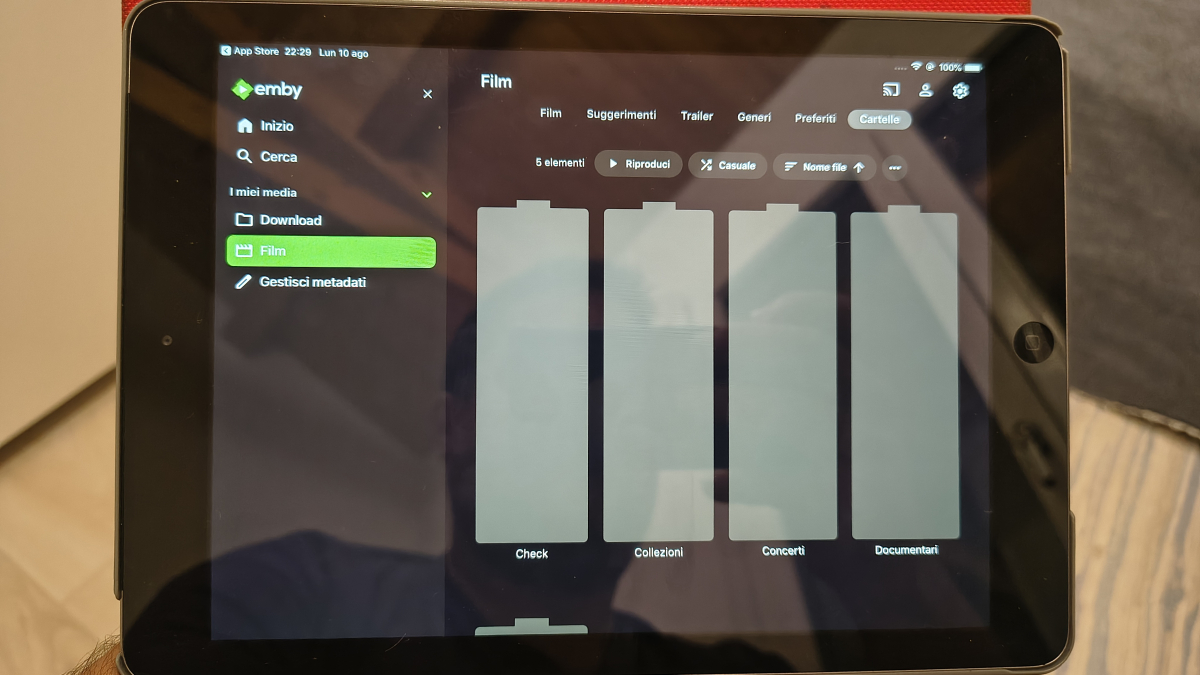
-
it might be ok for google play, but apple doesn't like apps pulling down and executing code dynamically, which is exactly what that would do. even if it is OK though, we would have to setup our own review process and add more structure around plugin updates. Currently once you get access to the plugin catalog you can publish updates freely, but we'd have to gate that process and go over everything that gets added, and have source code access.
-
Markers - "as a schedule task and when media is added" - not working.
Luke replied to adolfotregosa's topic in Linux
HI there, can you please provide a specific example? How to Report a Problem Thanks ! -
Emby Server for Windows: MSI installer missing?
Luke replied to GeorgeCalli's topic in General/Windows
Hi, once you've installed Emby Server, you can learn how to set it up as a service here: Running Emby Server as a Windows Service -

Emby Server for Windows: MSI installer missing?
RobWayBro replied to GeorgeCalli's topic in General/Windows
https://emby.media/windows-server.html is the download location. There is a big Download button which download the setup.exe installation file and FYI, Emby does NOT have a built-in option to 'run-as-a-service'. I use NSSM (Non-Sucky Service Manager) to create the service. On that page are the optional, portable downloads. HTH -

Emby Server for Windows: MSI installer missing?
Lessaj replied to GeorgeCalli's topic in General/Windows
Where are you looking for it? What are you downloading exactly? -
Markers - "as a schedule task and when media is added" - not working.
adolfotregosa posted a topic in Linux
Hi everyone. I'm running emby 4.9.5.0, and this option is not working for me. I'm testing this out. I manually add an episode and let it show up in the "Latest" section for that library. However, unless I go to "Scheduled Tasks" and run "Detect Episode Intros", the skip intro button does not show up. When I manually run the "Detect Episode Intros" task, it's instant. Am I missing something? Thank you -
The name of plugin would be better (as registered by a plugin) but that would be "volatile" which im assuming is what the stores dont like? Custom1 would be terrible on all systems unless the admin could enable it when they wanted to install a plugin that was configured to use it.For store approval "Custom1" is static and doesnt convery sharing and what not. (im just trying to think of ways to maximise what plugin developers can do without falling foul of the store challenges you outlined)
-
I’ve got a new Windows 11 PC and want to move my Emby Server setup from the old Windows 10 machine. But when I download Emby Server for Windows, I only get the portable ZIP version. Where is the proper Windows installer (MSI) that installs Emby Server as a Windows service?”
-
embyforkodi (next-gen) 12.X.X support
adolfotregosa replied to quickmic's topic in Emby For Kodi Next Gen
Hi everyone, new user here. I use Kodi with the Vero V player. The 'skip intro' option is very unreliable for me on version 12.4.23, but it works perfectly on the latest available version 11. Am I the only one? Should I use version 11 instead ? Thank you! -

Embeat — a native, music-only player for Emby (gapless, DLNA, offline)
vdatanet replied to vdatanet's topic in Third Party Apps
Right now tapping a playlist in CarPlay plays it in its own order — but it does respect the shuffle mode: if you turn shuffle on (either the car's own shuffle button or the one on the Now Playing screen), the next playlist you tap will start shuffled. What we don't do yet is remember that setting between app launches, or offer a direct "Shuffle" entry next to a playlist in the CarPlay list the way the phone does. Both are on the list for a future release. -
I don't know but I'd never want to put that in our UI... What are users supposed to do with a menu option called "Custom1"? The store is running the same app you are.
-
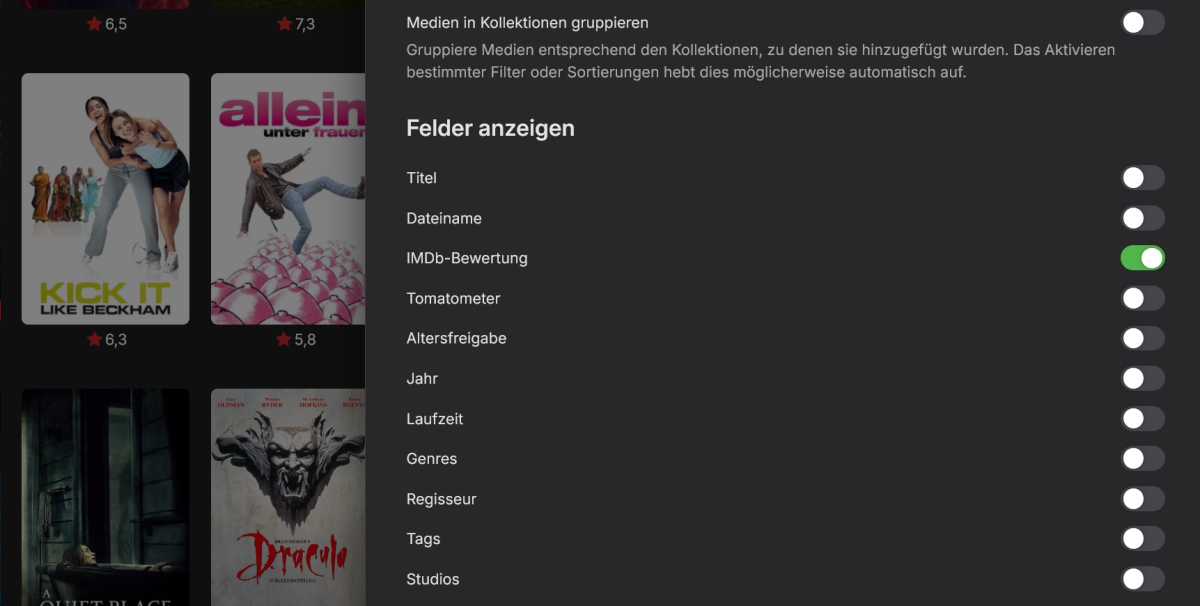
Evtl. habe ich Dich falsch verstanden. Aber in den Einstellungen kann ich doch die Bewertungen anzeigen lassen?
-

Embeat — a native, music-only player for Emby (gapless, DLNA, offline)
ebr replied to vdatanet's topic in Third Party Apps
default shuffled...?