All Activity
- Past hour
-
 michael161 joined the community
 -

embyforkodi (next-gen) 12.X.X support
Eisi2005 replied to quickmic's topic in Emby For Kodi Next Gen
yes the cinema intros addon is installed -
 Pepecb joined the community
 -
 DaveCooke joined the community
 -
 Ricardo Pedrote joined the community
 -
 Anett joined the community
 -
 策舟入梦来 joined the community
 -
 Jasonnnnn24 joined the community
 -
 Solal07 joined the community
 -
 lgw041226 joined the community
 -
 Salman1311K joined the community
 - Today
-

LG G5 dropped DTS again, and Emby didn't work...?
sa2000 replied to TurkeyMan's topic in LG Smart TV
There is currently a new version of the app that is under review by LG -
I split your post into a new topic as the specific issue you added your post to has already been resolved and related to subtitles I see the above crash report is for Emby for MacOS 2.2.39. Could you please try with the latest version of Emby for MacOS available on the MacOS app store which should be 2.256 If the problem persists with the latest version, please enable debug logging within the App by going to App Settings / Logs / Settings / Enable App logging. Then shutdown the app and re-launch and reproduce the problem and capture the full crash report and attach together with the Emby for Mac OS app logs which would be in ~/Library/Containers/com.emby.mobile/Data/Library/Caches/emby_logs ;
-
Hola
-
It clearly states what the issue is, and I provided the log files.
-

BDMV folder playback broken in Emby Server 4.9.5.0 – BDMV directory is incorrectly opened as a regular file
Jar4tt replied to Jar4tt's topic in General/Windows
Thanks for the update. I understand. I hope this can be fixed near future, as rolling back to an older Emby Server version is quite troublesome, especially due to the database and configuration compatibility issues between versions. I’ll stay on the current version for now and wait for a fix. Thanks for looking into it. -
Yes, it fails to autostart and when I try manually
-

Moonfin, a new cross platform client
fabien_m2002 replied to bingbong69_'s topic in Third Party Apps
Does not work -

BDMV folder playback broken in Emby Server 4.9.5.0 – BDMV directory is incorrectly opened as a regular file
Luke replied to Jar4tt's topic in General/Windows
Hi, yes this has been reported and we are looking into it. I think this is only affecting titles with certain characteristics, but not all. -

BDMV folder playback broken in Emby Server 4.9.5.0 – BDMV directory is incorrectly opened as a regular file
Abobader replied to Jar4tt's topic in General/Windows
Hello Jar4tt, ** This is an auto reply ** Please wait for someone from staff support or our members to reply to you. It's recommended to provide more info, as it explain in this thread: Thank you. Emby Team -
Environment Emby Server: 4.9.5.0 OS: Linux x64 / Docker Host: UGREEN NAS / Debian-based Linux .NET: 8.0.25 Blu-ray Folder Support / BlurayMounter: 1.0.5.0 Client: Infuse 8.4.8 on iPad Also reproducible with Emby Web Problem BDMV/Blu-ray folder playback used to work normally, but now all BDMV folder movies fail to play. In Infuse, playback fails with a "no compatible streams" type error. This does not appear to be a media file, codec, Docker permission, or Infuse decoding issue. Emby correctly detects and analyzes the Blu-ray folder, including the video/audio/subtitle streams, but during actual playback the BDMV folder path appears to be passed to the normal static-file/progressive-streaming path as if the directory itself were a regular media file. Important: Emby successfully detects the Blu-ray structure The affected title is correctly detected as a Blu-ray source. Emby is able to obtain the runtime and identify the HEVC 2160p HDR10 video, TrueHD/DTS-HD MA audio and PGS subtitle streams. Therefore, the BDMV structure itself is being recognized and parsed. BlurayMounter 1.0.5.0 is also successfully loaded by Emby Server at startup: File /config/plugins/BlurayMounter.dll has version 1.0.5.0 File /app/emby/system/plugins/BlurayMounter.dll has version 1.0.5.0 Loading BlurayMounter, Version=1.0.5.0 from /config/plugins/BlurayMounter.dll Infuse Direct Play reproduction When Infuse requests the movie, Emby first processes the PlaybackInfo request: GetPostedPlaybackInfo request. IsPlayback: true Infuse then requests Direct Play/static streaming: GET /Videos/25368/stream? MediaSourceId=mediasource_25368 &Static=true User-Agent=Infuse-Direct/8.4.8 Client="Infuse-Direct" Device="iPad" Version="8.4.8" Emby then attempts to open the movie directory itself as a regular file: System.UnauthorizedAccessException: Access to the path '/data/movies/Transformers Rise of the Beasts 2023 V2 ULTRAHD BluRay 2160p HEVC Atmos TrueHD7.1-sGnb@CHDBits' is denied. ---> System.IO.IOException: Permission denied The stack trace shows the request going through the normal file/static progressive streaming path: System.IO.FileStream..ctor(...) Emby.Server.Implementations.IO.ManagedFileSystem.GetFileStream(...) Emby.Server.Implementations.IO.IOManager.GetResponse(...) Emby.Server.Implementations.HttpServer.HttpResultFactory.GetContent(...) Emby.Server.Implementations.HttpServer.HttpResultFactory.GetStaticResult(...) Emby.Server.MediaEncoding.Api.Progressive.BaseProgressiveStreamingService.ProcessRequest(...) This does not appear to be an actual filesystem permission problem. The path being passed to FileStream is a directory containing the BDMV structure, not a regular media file. Emby already has sufficient access to this directory to scan the Blu-ray structure and obtain its media information. Emby Web reproduction The same underlying problem is also reproducible using Emby Web. When Direct Play fails and Emby falls back to transcoding, the generated FFmpeg command uses the Blu-ray movie directory itself as the input: -i "/data/movies/Transformers Rise of the Beasts 2023 V2 ULTRAHD BluRay 2160p HEVC Atmos TrueHD7.1-sGnb@CHDBits" FFmpeg then immediately exits with: /data/movies/Transformers Rise of the Beasts 2023 V2 ULTRAHD BluRay 2160p HEVC Atmos TrueHD7.1-sGnb@CHDBits: Is a directory EXIT This appears to be the same underlying problem as the Infuse failure: the BDMV directory path is being treated as a normal media file path during playback. Observed behavior BDMV folder ↓ Blu-ray structure is detected successfully ↓ Media streams/metadata are detected successfully ↓ PlaybackInfo / MediaSource ↓ BDMV directory path is treated as a regular file ↓ Infuse Direct Play: FileStream(directory) ↓ UnauthorizedAccessException / Permission denied OR Emby Web transcoding: ffmpeg -i "directory" ↓ "Is a directory" Expected behavior Emby should use the Blu-ray-specific media source / playlist handling provided by BlurayMounter and expose a valid playable Blu-ray media source to the client, rather than passing the BDMV parent directory to the regular static-file or FFmpeg input path. Actual behavior Emby appears to retain the Blu-ray directory as the MediaSource path and later treats that path as a normal file during Direct Play/transcoding. As a result, both Direct Play and the transcoding fallback fail. Why this appears to be a regression The same BDMV library previously played correctly. All BDMV folder titles are now affected rather than only one particular movie. Regular media files are not affected. There have also been previous reports of BDMV/Blu-ray Folder Support behavior changing between Emby 4.8.x and 4.9.x. Steps to reproduce Run Emby Server 4.9.5.0 with Bluray Folder Support 1.0.5.0. Add a normal BDMV/UHD Blu-ray folder to a movie library. Allow Emby to scan the title. Verify that Emby correctly detects runtime, HEVC video, audio tracks and PGS subtitles. Connect Infuse 8.4.8 to Emby. Attempt to Direct Play the BDMV title. Infuse playback fails. Check embyserver.txt. Emby attempts to open the BDMV movie directory through ManagedFileSystem.GetFileStream(). Alternatively, attempt playback using Emby Web. FFmpeg receives the movie directory as -i and exits with Is a directory. Additional troubleshooting already performed BlurayMounter / Blu-ray Folder Support 1.0.5.0 is loaded successfully. The Blu-ray media structure and streams can be analyzed successfully. The problem affects multiple/all BDMV folders. The problem is reproducible independently through Infuse and Emby Web. Reinstalling Blu-ray Folder Support 1.0.5.0 does not resolve the problem. Could you please check whether there is a regression in BDMV MediaSource / PlaybackInfo / DirectPlay handling in Emby Server 4.9.x, particularly the interaction between the server playback pipeline and BlurayMounter? It looks like the Blu-ray-specific media source is correctly detected during library/media analysis, but that information is lost or not handled when the source enters the Direct Play / progressive streaming / transcoding pipeline. ffmpeg-transcode-9f965bc7-27fa-41f3-bba8-0c0105e5012e_1.txt embyserver.txt
-
Can I update .m3u files in emby\programdata\data\userplaylists directly to fix broken links?
Luke replied to podonnell's topic in General/Windows
You could also do it on the entire playlists library. -

Alexa stop playing after the first song ends on multi echo devices (3rd generation).
Goober77 replied to Goober77's topic in Amazon Alexa
Hello hatharry, On certain songs it will stop when you tell Alexa next song. The only way to get it working again is to tell it to play from Amazon music and then switch it back to Emby. Thank you for the support -

4.9 and above versions cannot identify and play BDMV
LonelyCat replied to chorion83's topic in Synology
I already posted for help last year, tried various methods and troubleshooting, but couldn't solve the problem. The problem is already very clear, it is between the Bluray Folder Support plugin and version 4.9. I don't understand why it hasn't been resolved yet. -

TV Show Status — TMDB-powered Returning/Ended/Cancelled badges for series
ginjaninja replied to Blueskies278's topic in Plugins
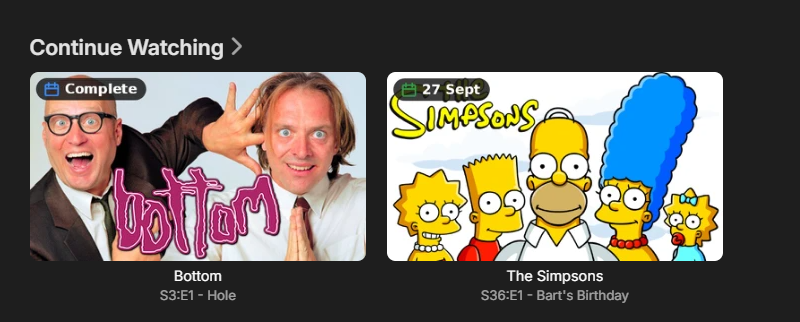
Good stuff, I must be getting old, i need "extra large". The plugin seems perky and rapid and the fundamentals are working. I have overlays working for show posters, showing ended or next air date. And on continue watching i can see the air date and that a show has ended I have to set a username and bingeable to see that bottom s3 is ready to binge (but is that logically necessary, the season being ready to binge (Complete?) is not related to me/my watch history? its a function of the season? if it can be made to work without the introduction of a username that would be much "tidier" i think. for some reason the simpsons season s36 is not not marked complete (when it is), could be an anomally from rapid clicking and testing rather than an issue, or it could be becuase Bottom the Show has ended and the Simpsons has not (and some sort of bug around that?). i dont see episode premiere and finale tags on episodes, If i set my continue watching on "bottom" to be either S03E01 (the first episode in season) or S03E06 (the last episode in season) i dont see "Season Premiere" or "Season Finale". Wether people want the show status or the season (+episode?) status might need to be a choice, for me if the overlay can treat images differently, i would choose series staus (started|ended) for posters (becuase i dont use posters for continue watching) and i would choose season status (?|Complete) and episode status (Premiere,,Finale) for Thumbs on continue watching. The plugin could require people to have season images and season thumbs in order to yield season level granularity, (if that is what would make the difference) but hopefully not. I havent fully digested the upcoming , day mismatch info above, but i dont think it matters to me if things are a day out particualrly.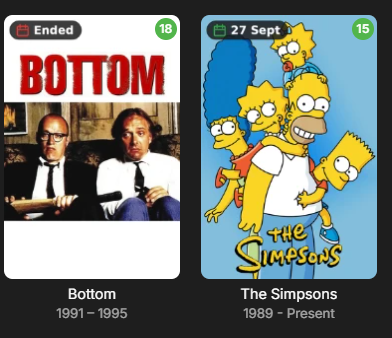
-

LG G5 dropped DTS again, and Emby didn't work...?
TurkeyMan replied to TurkeyMan's topic in LG Smart TV
Come on, it's been a solid year. This has caused my household to stop using Emby -

Can I update .m3u files in emby\programdata\data\userplaylists directly to fix broken links?
podonnell replied to podonnell's topic in General/Windows
Update: I had them invite me as a view collaborator, which allowed me to do a refresh metadata. That did indeed do the trick. Going forward, is there any way to have this refreshed without me having to be invited to see a user playlist? They are unable to refresh metadata themselves. -
Can I update .m3u files in emby\programdata\data\userplaylists directly to fix broken links?
podonnell replied to podonnell's topic in General/Windows
Is that like a library rescan or some other way? Since it's on another user account I don't know if they have an option to do that. Something I can do perhaps? -
Can I update .m3u files in emby\programdata\data\userplaylists directly to fix broken links?
Luke replied to podonnell's topic in General/Windows
You might have to refresh the metadata on those playlists. -
Can I update .m3u files in emby\programdata\data\userplaylists directly to fix broken links?
podonnell replied to podonnell's topic in General/Windows
Thank you. The user is still seeing a blank playlist however when they launch Emby. I restarted the server just in case the database read from the file on launch or such. Would there be anything else I might need to do, or this should be instant? Also, if I wanted to see for myself, how do these loose .m3u files link to each user? I'm guessing that is in the database? -
Can I update .m3u files in emby\programdata\data\userplaylists directly to fix broken links?
Luke replied to podonnell's topic in General/Windows
Hi, yes you can. -
Can I update .m3u files in emby\programdata\data\userplaylists directly to fix broken links?
podonnell posted a topic in General/Windows
I updated some paths in my library, which caused playlists to break. I have since gone in to ...emby\programdata\data\userplaylists and updated the playlists there, fixing the path issue. However, users are still seeing blank playlists. Is there something in the database instead that drives how these items are located? Or, what might I need to do to make sure the on-disk .m3u playlist files are read for the newly updated location? Thanks! -
1.Current sessions 2. Music controls 3. Admin alerts ( updates etc) These would be good start in my opinion.
-
Hi there, can you please describe your issue in more detail?
-
This is a playback log though. Are we talking playback or episode intro detection?